
هذا المقال متوفر باللغة العربية — اقرأ بالعربية
Building a high-converting furniture home decor website WooCommerce store in Saudi Arabia, Egypt, or the UAE requires solving engineering problems that standard fashion and electronics stores never encounter. Many furniture showrooms, custom upholstery workshops, and home-decor brands in Riyadh, New Cairo, and Dubai start by closing sales through Instagram DMs, WhatsApp voice notes, and 45 MB PDF lookbooks. That manual workflow stalls once daily inquiries cross 30 conversations: sales reps spend hours quoting fabric grades, measuring doorway clearances over chat, and chasing bank transfer screenshots before the carpentry workshop can cut a single piece of timber.
Transitioning from chat-based quoting to an automated digital flagship is not a matter of installing a generic catalogue template. A commercial furniture storefront must handle made-to-order dimension and fabric configurators, split 50% deposit and balance-on-dispatch checkouts, volumetric freight routing with in-home carpentry assembly, and high-resolution room galleries that still load quickly on mobile networks. When you plan custom WordPress development for MENA commerce, every layer of the store must reflect how physical showrooms and carpentry factories actually operate.
Why Generic Retail Themes Break a Furniture Home Decor Website WooCommerce Store
Off-the-shelf retail themes assume a shopper picks a single size and color from a dropdown, pays 100% of the order value immediately, and receives a 2 kg cardboard box via a standard parcel courier two days later. Applying that rigid retail logic to a furniture home decor website WooCommerce project causes immediate checkout abandonment. A homeowner furnishing a villa in North Riyadh or a duplex in Sheikh Zayed rarely buys an L-shaped sectional sofa without verifying the exact fabric weave, comparing kiln-dried beechwood against American oak legs, confirming whether the chaise lounge sits on the left or right facing the sofa, and knowing the exact production lead time.
The second point of failure in generic templates is the mixed-cart problem. Home-decor shoppers frequently combine ready-to-ship accessories such as brass table lamps, ceramic vases, or woven rugs with custom-upholstered dining chairs that require 14 to 21 working days in the workshop. If your checkout lumps both categories into a single shipping timeline and forces a single upfront payment rule, buyers either abandon the high-ticket sofa or call your showroom to negotiate offline. Stores that sell complementary home categories face similar structural demands, whether you are running a lighting store website on WooCommerce with fragile chandelier crating or a home appliances website on WooCommerce requiring kitchen installation slots.
| Architecture Dimension | Generic Retail WooCommerce Theme | Engineered Furniture & Home Decor Storefront |
|---|---|---|
| Product Variation Structure | Cartesian variation matrix (12 fabrics x 5 wood stains x 4 sizes = 240 database rows per product) | Hybrid architecture: 4 structural size variations + dynamic custom field groups for 60+ fabric and wood swatches |
| Lead-Time Transparency | Static In Stock or Out of Stock label across all items | Dynamic lead-time badges: Ready to Ship (48 to 72 hours) vs Made to Order (14 to 21 working days) printed per line item |
| Payment Collection Logic | 100% full card payment or unverified Cash on Delivery (COD) | 50% upfront deposit via Mada, Paymob, or card on custom SKUs + automated 50% balance invoice link 48 hours before dispatch |
| Shipping & Assembly Calculation | Flat rate per order or simple parcel weight in kilograms | Volumetric shipping classes per city zone + 4-hour white-glove carpentry assembly window and floor access capture |
| Mobile Gallery Performance (LCP) | Uncompressed 2.5 MB PNG sliders loading 25 swatch images at once (LCP over 5.2 seconds) | 120 KB AVIF/WebP hero scenes with fetchpriority=”high” + asynchronous on-tap 2000 px macro texture zoom (LCP under 2.2 seconds) |
Made-to-Order Configurator and SKU Architecture for Custom Upholstery
Designing a scalable custom furniture WooCommerce configurator MENA shoppers can use effortlessly starts in the WordPress database. In native WooCommerce product architecture, every product variation creates a dedicated child post in the wp_posts table along with roughly 15 to 25 rows in wp_postmeta for pricing, dimensions, stock status, and SKU references. If a workshop offers a modular sofa in 5 lengths, 2 chaise orientations, 18 upholstery fabrics across 3 price grades, and 4 wood leg finishes, generating native variations for every combination creates 720 child posts for a single sofa frame. Multiply that across 120 catalog items and your database swells by 86,400 variation posts, causing slow admin saves and sluggish mobile filtering.
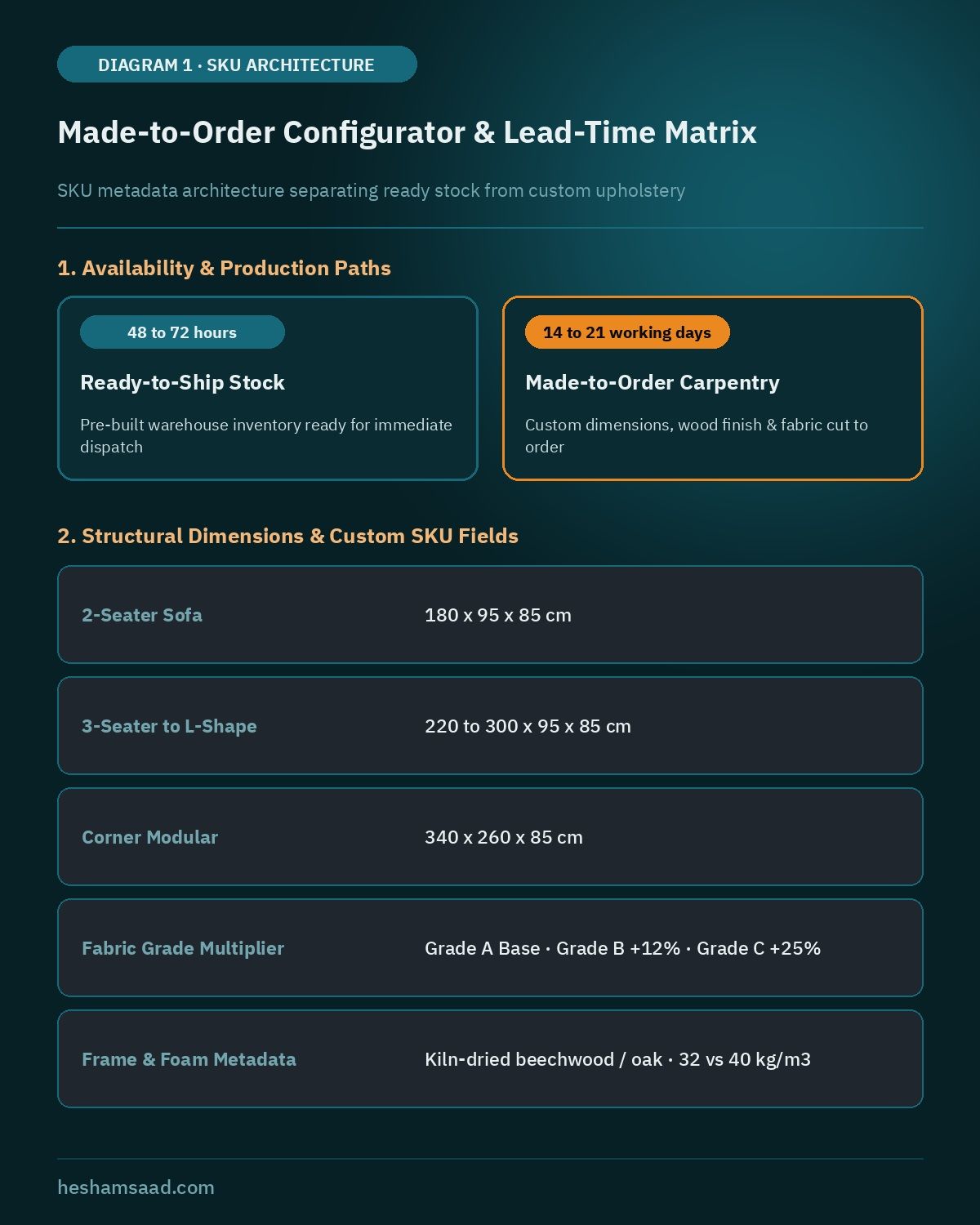
The production-grade solution separates structural dimensions from surface finishes. We use native WooCommerce variable product variations strictly for the physical frame configurations that alter the core carpentry bill of materials, base price, and volumetric shipping class. For example, a living room sofa product contains only four native variations: the 2-Seater (Width 180 cm, Depth 95 cm, Height 85 cm), the 3-Seater (Width 240 cm, Depth 95 cm, Height 85 cm), the L-Shape Left Chaise (Width 300 cm, Chaise Depth 165 cm, Height 85 cm), and the Corner Modular Set (Width 340 cm by 260 cm, Height 85 cm). Each structural variation holds its own base SKU, carton count, and shipping class.
Surface customizations and ergonomic add-ons are then layered onto those four structural variations using custom product field groups that save directly to cart and order line-item metadata rather than creating new database posts:
- Upholstery Fabric Grade and Swatch Code: Visual swatch selectors grouped into Grade A (woven polyester and cotton blends, included in base price), Grade B (stain-resistant performance bouclé and velvet, +12% price modifier), and Grade C (imported Belgian linen and full-grain leather, +25% price modifier).
- Timber Frame and Leg Finish: Swatch buttons for Natural American Oak, Smoked Walnut, Espresso Beechwood, or Matte Black Powder-Coated Steel, mapping directly to the workshop stain code.
- Cushion Core Density: Radio selection between standard medium-soft comfort (32 kg/m3 high-resilience polyurethane foam) and firm architectural support (40 kg/m3 foam wrapped in micro-fiber down).
- Custom Centimeter Micro-Adjustments: Optional numeric input bounded by workshop rules (for instance, allowing dining table length adjustments between 200 cm and 280 cm in 10 cm increments with an automatic per-centimeter price formula).
Real-Time Lead-Time Badges and Clean Schema.org Product Markup
Transparency around manufacturing lead times prevents post-purchase disputes. Every product variation and swatch rule should evaluate an explicit availability state and display a dynamic badge right above the Add to Cart button. Finished showroom pieces and warehouse decor display a green Ready to Ship: Dispatched in 48 to 72 Hours badge, whereas custom upholstery combinations dynamically switch to Made to Order: Crafted in 14 to 21 Working Days. When a customer selects a temporarily backordered imported linen swatch, the configurator adds the fabric restock buffer automatically and prints the calculated delivery window in the cart summary and confirmation email.
While custom field groups keep the visual configurator rich, your technical SEO depends on outputting clean structured data that adheres strictly to the official Schema.org Product specification. Search engines parse physical dimensions and materials far more reliably when you map them to dedicated native properties rather than dumping every specification into generic text. Your JSON-LD generator should output width, height, and depth as structured QuantitativeValue objects using the standard unitCode: "CMT" for centimeters, populate the native material and color properties with the primary timber and upholstery names, and nest pricing and stock states inside the offers object. Reserve the additionalProperty array of PropertyValue pairs strictly for furniture attributes that lack a dedicated Schema.org field, such as seat height in centimeters, foam density rating, assembly requirement status, and structural frame warranty years.
Split Deposit and High-Ticket Checkout Flows for Custom Carpentry
Once a shopper configures a 14,000 SAR bedroom set in Riyadh, a 95,000 EGP dining room suite in New Cairo, or an 18,000 AED modular sectional in Dubai, payment friction becomes the primary conversion barrier. Expecting a buyer to pay 100% upfront via card for made-to-order furniture that will not arrive for three weeks depresses checkout completion rates. Conversely, allowing zero-down Cash on Delivery (COD) on custom carpentry exposes the workshop to severe financial risk: if a customer cancels after a 280 cm sofa has been upholstered in a custom terracotta bouclé fabric, the workshop is left holding non-standard inventory that is difficult to resell.
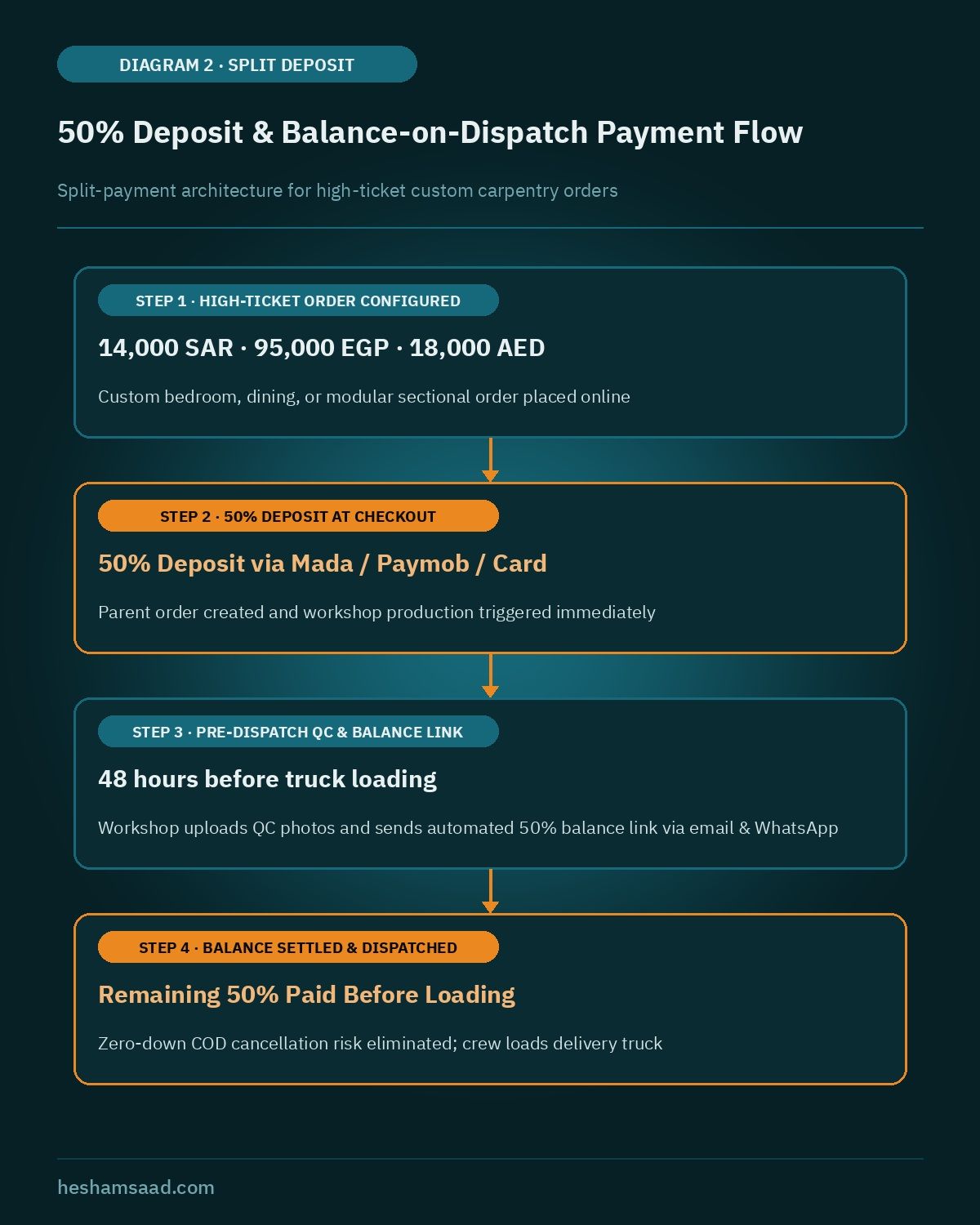
Implementing a structured split deposit balance payment WooCommerce workflow aligns online checkout with the established commercial practice of physical MENA furniture showrooms. Using the official WooCommerce Deposits extension, we configure per-category and per-product deposit enforcement rules that protect both the buyer and the manufacturer:
- Mandatory 50% Production Deposit on Custom SKUs: All made-to-order upholstery, custom-sized dining tables, and carpentry items require a 50% upfront payment at checkout via Mada, Visa, Mastercard, Apple Pay, or Paymob card integration. This commitment covers raw timber, foam, and fabric procurement before the job card enters the factory queue.
- 100% Upfront Payment on Ready-to-Ship Home Decor: In-stock cushions, mirrors, rugs, table lamps, and small accent tables require full upfront payment and are routed immediately to the warehouse packing desk for 48-hour courier dispatch.
- Automated Balance Invoicing Before Truck Dispatch: Because payment gateways do not store raw card credentials to silently charge an unscheduled balance weeks later, WooCommerce Deposits creates a parent order and a linked child balance order. When the sofa passes final workshop quality inspection, changing the parent order status to Ready for Dispatch triggers an automated email and WhatsApp notification containing the inspection photos and a direct WooCommerce payment link for the remaining 50% balance.
- Showroom Pickup vs White-Glove Delivery Selection: For smaller furniture pieces and decor collections, buyers can select free warehouse or showroom pickup in designated industrial zones (such as Al Sulay in Riyadh, 6th of October City near Cairo, or Al Quoz in Dubai) with an assigned collection date, waiving home freight fees entirely.
To prevent accounting discrepancies, the checkout summary and generated PDF tax invoice must explicitly itemize the total contract price, the 50% deposit paid today (including applicable VAT), the exact remaining 50% balance due prior to delivery truck loading, and the cancellation window policy (for example, full deposit refund within 24 hours of order placement before fabric cutting begins).
Heavy-Freight Shipping Zones, Volumetric Classes, and White-Glove Assembly
Shipping a 125 kg solid oak dining table and eight upholstered chairs has nothing in common with shipping standard e-commerce parcels. Third-party courier APIs calculate rates by dead weight in kilograms and assume one driver can drop a parcel at the front door. Heavy furniture requires volumetric truck allocation, a two-person or three-person handling and carpentry crew, protective blankets, and 45 to 90 minutes of on-site assembly and packaging removal inside the customer’s room of choice.
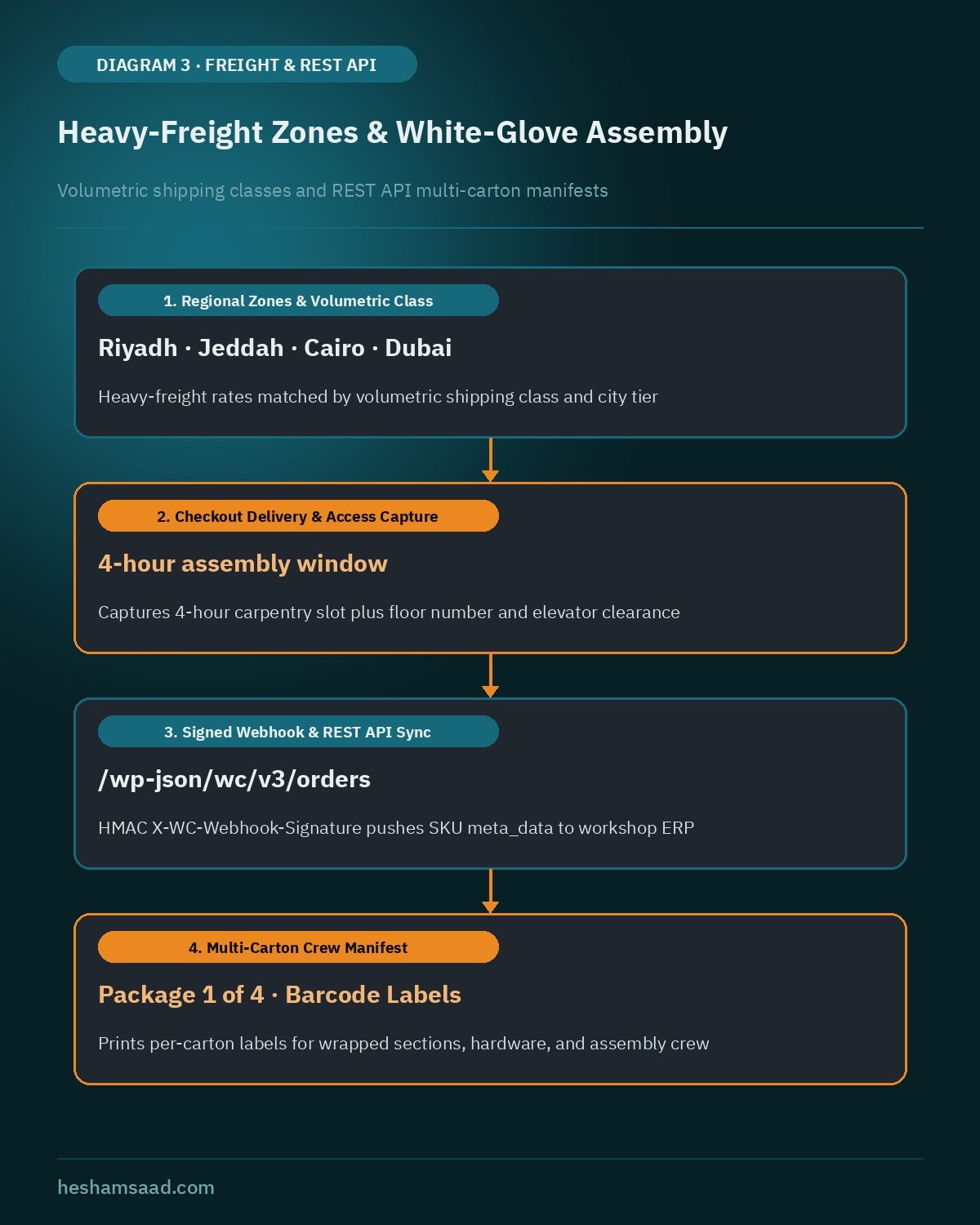
To automate accurate freight pricing without quoting every order manually over the phone, we structure WooCommerce Shipping Zones and Shipping Classes around geographic hub tiers and volumetric handling categories. If you want to see how geographic region matching works across MENA postal and district boundaries, review our dedicated technical breakdown on configuring WooCommerce shipping zones for Egypt and the Gulf. In a furniture and home-decor store, we pair three regional zone tiers (Primary Metro Hub where the showroom and warehouse operate, Secondary Inter-City Highway Corridor, and Remote Regional Freight) with four distinct shipping classes:
- Class 1: Parcel Home Decor (
decor-parcel): Vases, throws, cushions, wall art, and table lamps under 15 kg shipped via standard parcel courier at a flat rate (for example, 35 SAR in Riyadh, 95 EGP in Cairo, or 30 AED in Dubai). - Class 2: Light Curbside Furniture (
light-furniture-no-assembly): Fully assembled coffee tables, Poufs, nightstands, and dining chairs delivered to the room without carpentry installation (for example, 120 SAR, 450 EGP, or 100 AED). - Class 3: Two-Man White-Glove Assembly (
white-glove-assembly): King-size bed frames with hydraulic storage, L-shaped modular sofas, extendable dining tables, and multi-door wardrobes requiring a two-carpenter fleet truck and in-room assembly (for example, 350 SAR, 1,400 EGP, or 300 AED, or waived automatically when cart subtotal exceeds a free-delivery threshold such as 10,000 SAR, 65,000 EGP, or 9,000 AED). - Class 4: Oversized & Upper-Floor Hoist Evaluation (
oversized-freight-check): Single-piece 320 cm sofa frames or heavy marble slabs that cannot turn inside standard residential elevators and require staircase carrying fees or external hoist scheduling.
Handling bulky loads and site-access rules closely mirrors the logistics architecture we implement on a building materials website on WooCommerce, where truck access and unloading conditions dictate whether a delivery succeeds. To make heavy furniture delivery scheduling WordPress checkouts reliable, the checkout form dynamically reveals a Building Access and Assembly Slot panel whenever the cart contains a Class 3 or Class 4 item. The buyer selects their floor number, confirms whether a service elevator with at least 210 cm vertical clearance is available, notes residential compound entry permit requirements (essential for gated communities in New Cairo, Sheikh Zayed, Riyadh, and Dubai Hills), and picks a preferred four-hour assembly window (such as 10:00 AM to 2:00 PM or 4:00 PM to 8:00 PM).
Multi-Piece Order Tracking and Workshop Sync via the WooCommerce REST API
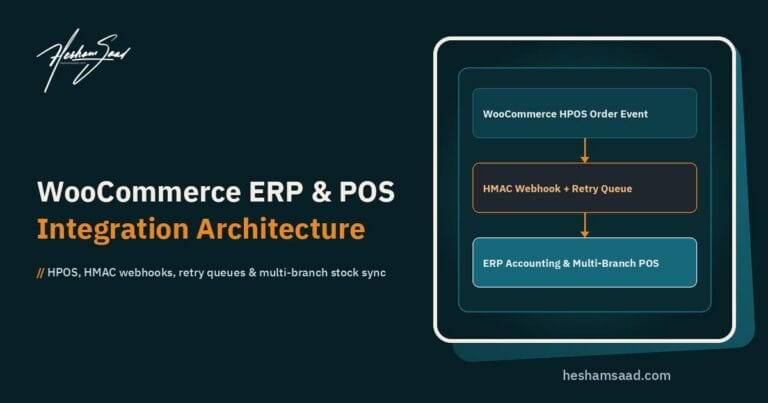
A single furniture order rarely travels as one box. A modular corner sofa with a matching ottoman ships as four wrapped structural sections plus one hardware and leg carton. When your store connects to a factory ERP, warehouse management system, or dispatch dashboard via the official WooCommerce REST API (specifically the /wp-json/wc/v3/orders endpoint), every custom attribute and delivery constraint travels inside the JSON payload’s line_items and root meta_data arrays.
When the initial 50% deposit clears, an order.updated webhook signed with the X-WC-Webhook-Signature HMAC-SHA256 header transmits the order payload to the workshop floor. The production system reads the line-item meta_data keys (such as _fabric_swatch_code, _wood_finish_sku, _custom_width_cm, and _foam_density) to print barcode labels for each piece in the multi-carton set (Carton 1 of 4 through Carton 4 of 4). Once all cartons scan into the dispatch bay and the customer settles the remaining 50% balance invoice, a `PUT /wp-json/wc/v3/orders/<id>` request appends the assigned truck plate number, crew lead mobile number, and confirmed four-hour assembly slot directly to the customer’s My Account order tracker.
High-Resolution Fabric Galleries Without Hurting Mobile LCP
Furniture is a tactile, visually driven purchase. Shoppers browsing on iPhones and Android devices want to inspect the tight weave of a bouclé armchair, see the natural grain variation in a walnut veneer sideboard, and view the piece styled inside a well-lit living room. However, uploading raw studio photographs or loading 30 high-resolution fabric swatch previews simultaneously on initial page render will ruin your mobile load times. According to Google’s official web.dev Largest Contentful Paint (LCP) performance standard, your store must render its largest above-the-fold visual element within 2.5 seconds or less for at least 75% of page visits.
We keep furniture product pages below a 2.0-second mobile LCP while preserving crisp macro zoom fidelity by enforcing four strict front-end media rules:
- AVIF and WebP Responsive Compression Budgets: Primary room-scene hero images are converted to AVIF and WebP with explicit responsive
srcsetbreakpoints, keeping the mobile viewport hero image between 85 KB and 140 KB and full desktop 1600-pixel scenes under 220 KB. - High Fetchpriority and Zero Above-the-Fold Lazy Loading: The main product gallery container outputs the primary variation image with
fetchpriority="high"and explicitwidthandheightattributes to eliminate Cumulative Layout Shift (CLS), while strictly excludingloading="lazy"from the first visible slide. - On-Demand Asynchronous Macro Swatch Textures: Instead of loading twenty-four 1.2 MB macro fabric textures when the product page opens, the swatch selector renders lightweight 80×80 pixel WebP thumbnails (under 4 KB each). When a buyer taps a specific swatch to inspect the weave or update the preview frame, a lightweight script fetches the 2000×2000 pixel macro texture tile asynchronously on demand.
- Poster-Guarded 360-Degree Spins and Video Walkthroughs: Showroom walkthrough videos and 3D/AR model viewers (
.glband.usdzfiles for mobile room placement) are deferred behind a static WebP poster card and initialized only after the user taps the View in Your Room or Play Video button.
When your store serves Arabic and English shoppers simultaneously, heavy Arabic web fonts and unoptimized RTL stylesheets can also delay first paint. You can pair these gallery optimizations with the server and asset techniques covered in our guide on how to speed up WordPress Arabic sites so both language versions stay well inside Core Web Vitals targets on 4G mobile connections.
Bilingual RTL/LTR Dimension Schematics and Realistic Build Budgets
Operating a bilingual Arabic furniture store WooCommerce platform across the Gulf and Egypt requires careful data synchronization so your merchandisers never have to maintain two disconnected catalogs. When configuring WPML and WooCommerce Multilingual for a furniture catalog, global product attributes that contain human-readable labels (such as pa_room_type, pa_fabric_family, pa_wood_finish, and pa_assembly_level) are translated once at the taxonomy level so faceted shop filters work cleanly in both Arabic and English.
Numeric engineering specifications, by contrast, must never drift between languages. Inside WPML’s Custom Fields Translation settings, we lock all numeric dimension and technical meta keys (including _overall_width_cm, _overall_depth_cm, _overall_height_cm, _seat_height_cm, _armrest_height_cm, _min_doorway_clearance_cm, and _carton_count) to Copy mode. When a catalog manager updates a dining table’s width from 220 cm to 240 cm on the English master product, the Arabic product page inherits the exact 240 cm figure automatically. On the front end, the bilingual dimension schematic table applies dir="ltr" CSS rules to measurement cells (such as 240 x 100 x 76 cm) so numbers and unit symbols never flip awkwardly inside the Arabic RTL layout.
Budgeting for a furniture and home-decor e-commerce build depends on whether you sell curated warehouse stock, made-to-order workshop upholstery, or multi-branch inventory tied to an enterprise ERP. The table below outlines realistic engineering scopes and timelines for MENA furniture brands.
| Store Tier & Target Business | Core WooCommerce Architecture & Integrations | Typical SKU Count & Build Timeline | Primary Build Cost & Budget Drivers |
|---|---|---|---|
| Tier 1: Ready-to-Ship Home Decor & Accent Furniture Store | Bilingual AR/EN storefront, volumetric Shipping Zones & Classes, Schema.org Product dimension output, AVIF/WebP high-LCP galleries, Mada, Paymob, and Apple Pay checkout | 100 to 500 simple and standard variable SKUs (4 to 6 weeks) | Template styling, Arabic/English WPML catalog setup, volumetric shipping zone configuration, and mobile image compression |
| Tier 2: Custom Upholstery & Carpentry Workshop Flagship | All Tier 1 features + hybrid structural variations with fabric/wood/foam configurator groups, dynamic 48h vs 14-21 day lead-time badges, 50% WooCommerce Deposits split flow, and checkout floor/assembly slot picker | 150 to 800 base frames with 40+ fabric/wood swatches (6 to 9 weeks) | Custom swatch/dimension configurator rules, dynamic mixed-cart lead-time logic, 50% deposit balance automation, and checkout delivery-window picker |
| Tier 3: Multi-Showroom Brand + Factory ERP & Logistics Sync | All Tier 2 features + bi-directional WooCommerce REST API v3 sync with ERP/WMS, multi-warehouse stock routing (Riyadh/Jeddah/Cairo/Dubai), barcode multi-carton manifests, and interactive 3D/AR room-view loaders | 1,000 to 5,000+ SKUs across multiple warehouses (10 to 14 weeks) | Bidirectional ERP/WMS REST API sync, multi-warehouse stock routing, barcode carton manifests, and interactive 3D/AR gallery architecture |
When you are ready to scope your catalog architecture and compare custom plugin engineering against off-the-shelf extensions, see what to look for when you hire a WooCommerce developer who understands complex physical fulfillment.
This-Week Furniture Store Launch Decision & Readiness Checklist
Before you write a brief or migrate your showroom catalog onto WooCommerce, work through this five-step operational readiness audit with your sales, workshop, and logistics leads this week:
- Split Your Catalog Into Ready-to-Ship vs Made-to-Order Tiers: Audit your spreadsheet and tag every SKU as either warehouse-ready (48 to 72 hours dispatch) or workshop-built (14 to 21 working days) so mixed carts can display accurate delivery dates and apply the right payment rule automatically.
- Separate Structural Variations From Surface Swatches: Limit native WooCommerce variations to physical frame sizes (2-seater, 3-seater, L-shape, dining table length) and organize your fabrics, wood stains, and cushion densities into standardized swatch grade tables with clear percentage or fixed price modifiers.
- Define Your 50% Deposit and Pre-Dispatch Balance Policy: Establish the exact deposit percentage required to start carpentry production, the cancellation grace period before fabric cutting begins, and the workflow for sending workshop inspection photos alongside the automated 50% balance payment link.
- Map Volumetric Shipping Classes and Assembly Windows by City: Group every item into one of four handling classes (parcel decor, curbside light furniture, two-man white-glove assembly, or oversized hoist evaluation) and set fixed zone fees and free-delivery thresholds for your primary and secondary cities.
- Benchmark Mobile Gallery Speed on Cellular Connections: Test your highest-resolution product gallery on a mid-range smartphone over a 4G connection to verify that AVIF/WebP hero scenes render an LCP at or under 2.5 seconds and that bilingual centimeter dimension tables remain legible in both Arabic and English.
If you want an experienced architectural review of your furniture catalog, deposit checkout flow, and delivery zone matrix before starting development, book a free consultation and we will map out the exact WooCommerce specification for your showroom and workshop.
Frequently asked questions
How should we structure custom sofa dimensions and fabric swatches in WooCommerce without slowing down the store?
Use native WooCommerce product variations only for base structural frames such as a two-seater, three-seater, or corner sectional that change the base price and volumetric shipping class. Handle fabric swatches, wood stains, and cushion density choices through lightweight custom field groups stored as line-item metadata. This approach keeps your product database under 10 variations per item instead of generating hundreds of slow database rows for every single fabric and wood combination.
How does a 50% upfront deposit work on WooCommerce for made-to-order carpentry orders?
With the official WooCommerce Deposits extension, you assign a mandatory 50% deposit rule to custom-made furniture while keeping in-stock decor items at 100% payment. At checkout, the buyer pays half of the custom item price via Mada, Paymob, or card, creating a parent order and a pending child balance invoice. When workshop carpentry finishes, WooCommerce sends an automated email with a direct payment link to collect the remaining 50% before delivery dispatch.
Can WooCommerce calculate different shipping fees for small decor parcels versus heavy furniture requiring home assembly?
Yes, you pair WooCommerce Shipping Zones for regions like Riyadh, Jeddah, Greater Cairo, and Dubai with distinct volumetric shipping classes. Small items such as table lamps or cushions use a standard courier parcel class, while wardrobes and sectional sofas use a two-man white-glove freight and assembly class. When a customer mixes both types in one cart, WooCommerce calculates the combined zone rate and prompts the buyer to select a four-hour delivery and assembly window.
How do we show high-resolution fabric textures and room photos without failing mobile Core Web Vitals?
Convert all primary room scenes to AVIF or WebP files compressed under 140 KB, apply the high fetchpriority attribute to the first gallery image, and never lazy-load above-the-fold product visuals. For close-up fabric weaves and wood grain swatches, render lightweight 15 KB thumbnail previews on initial page load and fetch the full 2000-pixel macro texture asynchronously only when the shopper clicks a swatch. This keeps mobile Largest Contentful Paint under the 2.5-second threshold.
How do custom furniture configurations and delivery floor details reach our carpentry workshop and dispatch crew?
Every custom selection made on the product page or at checkout is saved inside the WooCommerce order line-item and order metadata arrays. When the customer pays the initial 50% deposit, an order webhook sends a signed JSON payload via the WooCommerce REST API v3 orders endpoint to your workshop ERP or production dashboard. That payload includes the exact centimeter dimensions, fabric batch code, wood finish, floor number, elevator size, and chosen assembly time slot.
References
- WooCommerce Official Plugin and Store Architecture Documentation
- WooCommerce Deposits: Partial Payments and Automated Balance Invoicing
- Setting Up WooCommerce Shipping Zones and Volumetric Shipping Classes
- WooCommerce REST API v3 Technical Reference for Orders and Webhooks
- Schema.org Product Structured Data Specification for Dimensions and Materials
- Google web.dev Largest Contentful Paint (LCP) Performance Standards
- WPML and WooCommerce Multilingual Documentation for Custom Fields and Taxonomies



Add your first comment to this post