
هذا المقال متوفر باللغة العربية — اقرأ بالعربية
Planning a reliable WooCommerce ERP POS integration MENA retailers can trust becomes an urgent priority the moment your online orders start competing with walk-in cashier sales for the exact same stock. Whether you manage a pharmacy chain in Riyadh, a multi-branch apparel brand in Cairo, or a wholesale distributor in Dubai running Odoo, Zoho Books, SAP Business One, or a retail point-of-sale system, an uncoordinated connection between your storefront and back office leads to oversold items, checkout slowdowns, and broken VAT reports.
Many merchants assume that connecting an accounting platform or cashier terminal to WordPress is a matter of installing a single connector plugin. In reality, off-the-shelf plugins, scheduled polling scripts, and custom webhook middleware behave very differently under flash-sale traffic, ERP maintenance downtime, and multi-branch stock transfers. Choosing the wrong integration tier often means paying twice: first for a fragile setup that locks your database, and six months later for an emergency rebuild.
This architecture and buyer decision guide compares manual CSV routines, pre-built connector plugins, and custom middleware across latency, database performance, tax compliance, and two-year total cost of ownership. You will learn how to define clear data ownership rules, protect your store with WooCommerce High-Performance Order Storage (HPOS) and queued webhooks, and evaluate vendor proposals before signing a development contract.
Why manual CSV stock sync fails after 30 to 50 daily orders
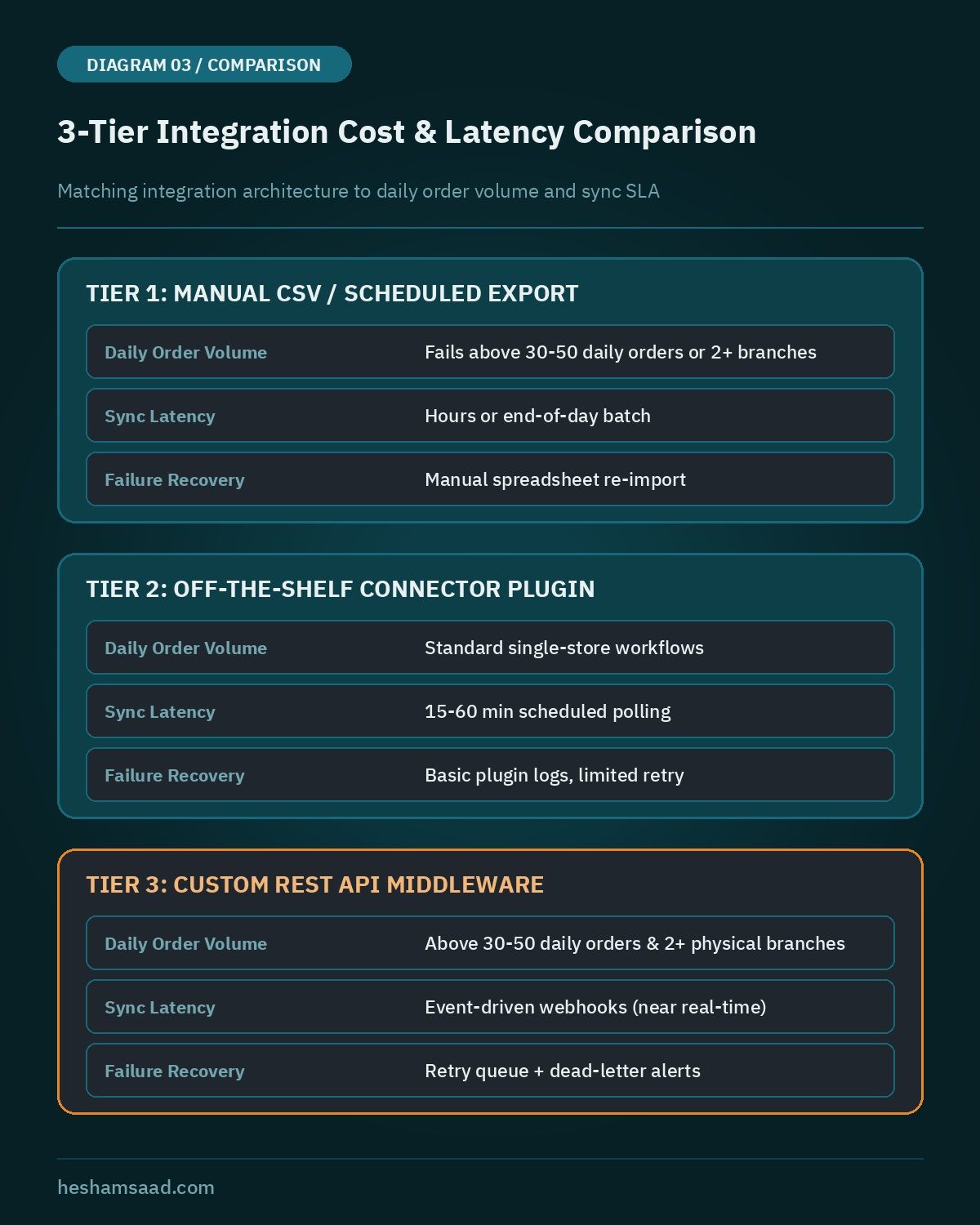
In the early stages of an online store, exporting a spreadsheet from your POS or accounting software at the end of the shift and importing it into WooCommerce feels economical. There are no software licensing fees, and a warehouse coordinator can handle updates when order volume stays around ten shipments a day. That manual comfort disappears once your website crosses 30 to 50 daily orders or your business expands to two or more physical branches.
The first breakdown is stock latency across sales channels. If a branch cashier sells the last three units of a popular item at 1:00 PM, but the CSV export only runs at 9:00 PM, your website continues displaying those three units as available all afternoon. Online buyers complete their checkout, pay through your gateway, and trigger customer service apologies, manual refunds, and payment processing fees that cannot be recovered.
The second failure point is stale pricing and promotional collisions. Retail chains and wholesale distributors in Saudi Arabia, Egypt, and the UAE frequently adjust unit prices due to supplier currency fluctuations, seasonal discounts, or tiered B2B agreements. When staff manually format CSV spreadsheets, a single mismatched column or decimal error can overwrite promotional prices on the website or publish raw cost figures as public retail prices.
The third hidden cost is manual accounting reconciliation. Without automated order and invoice synchronization, finance teams spend hours copying WooCommerce orders into Zoho Books, Odoo, or SAP Business One, matching shipping fees, gift cards, and cash-on-delivery collections by hand. When regional tax authorities require timely electronic tax invoices with exact line-item VAT rounding, manual batch entry turns every month-end closing into an audit risk.
How to choose a WooCommerce ERP POS integration MENA architecture
When business owners evaluate a WooCommerce ERP POS integration MENA vendors propose, the options fall into three architectural tiers: manual or scheduled file transfers, off-the-shelf connector plugins, and custom REST API middleware backed by an event queue. Each tier trades initial setup cost against sync latency, failure recovery, and storefront performance.
Understanding how data moves between WordPress and your back-office software is the only way to compare agency quotes fairly. A proposal that looks inexpensive on paper often relies on frequent database polling inside WordPress, which degrades page load times for paying shoppers as your catalog grows.
WooCommerce webhook vs polling sync and queue middleware
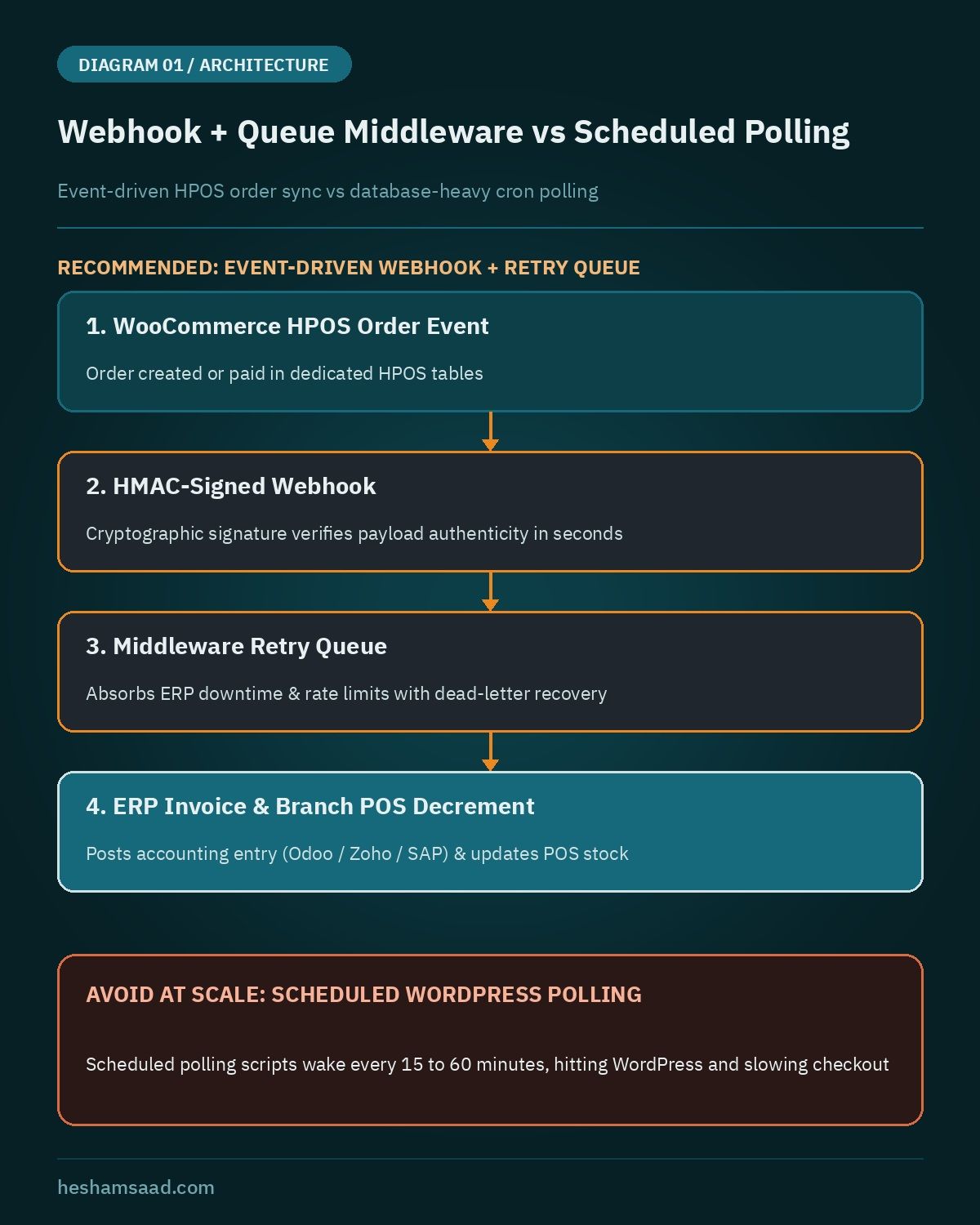
In a WooCommerce webhook vs polling sync comparison, the core difference is whether data moves when an event occurs or on a fixed timer. Scheduled polling scripts wake up every 15 to 60 minutes, ask the ERP or WooCommerce for every record modified since the last timestamp, and process them in bulk. During that 15-to-60-minute gap, your online stock counts and branch cashier terminals are out of sync, and every polling cycle consumes server CPU and database connections even when zero orders occurred.
Event-driven webhooks solve the latency gap by pushing an HTTP POST payload within seconds of an order status change or stock update. However, relying on direct point-to-point webhooks between WooCommerce and your ERP carries a major architectural trap. According to the official WooCommerce webhooks documentation, core WooCommerce attempts delivery once and automatically switches a webhook status from active to disabled after five consecutive failed requests or non-2xx responses.
If your Odoo, Zoho, or on-premise SAP server goes offline for a 20-minute maintenance window while five customers place orders on your website, WooCommerce disables the webhook permanently. Every subsequent order stays trapped inside WordPress until an engineer notices the missing invoices and manually re-enables the integration. Placing a lightweight queue middleware layer between WooCommerce and your ERP eliminates this failure mode: the middleware validates the request, responds with an immediate HTTP 200 status to keep WooCommerce active, and retries delivery with exponential backoff plus a dead-letter queue for inspection.
Off-the-shelf connectors vs custom middleware for Odoo, Zoho, and SAP
Marketplace plugins for WooCommerce Odoo Zoho inventory sync are attractive because they promise quick configuration through a settings screen. These plugins work well for single-warehouse stores with fewer than 1,000 SKUs, standard product types, and default tax configurations. When your business operates within the exact assumptions of the plugin author, an off-the-shelf connector reduces upfront engineering time.
Off-the-shelf connectors begin to struggle when your operations require multi-branch inventory routing, custom meta fields for regional e-invoicing, bundled product bill-of-materials deductions, or B2B wholesale price lists. Because most marketplace connectors run inside the WordPress PHP execution thread, heavy synchronization loops compete directly with customer checkout requests and can conflict with caching or security rules when you speed up WordPress Arabic sites.
Custom REST API middleware decouples integration processing from the WordPress web server. By running your synchronization logic on an external worker service that communicates with WordPress and your ERP via authenticated API calls, you can map custom ERP fields, aggregate stock across specific retail branches, and upgrade your WordPress plugins without breaking your accounting connection.
WooCommerce HPOS REST API integration and database performance
For years, high-volume ERP integrations suffered from database table locking because WooCommerce stored every order as a custom post type inside wp_posts and scattered order attributes across dozens of rows in wp_postmeta. Whenever an ERP queried or updated hundreds of orders at once, MySQL had to scan the same tables responsible for rendering pages, blog posts, and navigation menus.
A modern WooCommerce HPOS REST API integration resolves this bottleneck by relying on High-Performance Order Storage. As documented by WooCommerce, HPOS moves order data into four dedicated custom database tables: wp_wc_orders for core order headers, wp_wc_order_addresses for billing and shipping details, wp_wc_order_operational_data for fulfillment state, and wp_wc_orders_meta for custom order metadata.
When HPOS is enabled and paired with the WooCommerce REST API v3 (/wp-json/wc/v3/), external middleware can use the batch endpoints (POST /wp-json/wc/v3/products/batch and POST /wp-json/wc/v3/orders/batch) to create, update, or delete up to 100 records in a single HTTP request. Instead of firing 100 separate API calls that wake up WordPress 100 times, a single batch update writes directly to indexed tables, keeping your storefront responsive during peak shopping hours. You can verify HPOS readiness and plugin compatibility during your regular maintenance cycles by following our WordPress and WooCommerce stack upgrade guide.
Source-of-truth rules for inventory, pricing, and tax
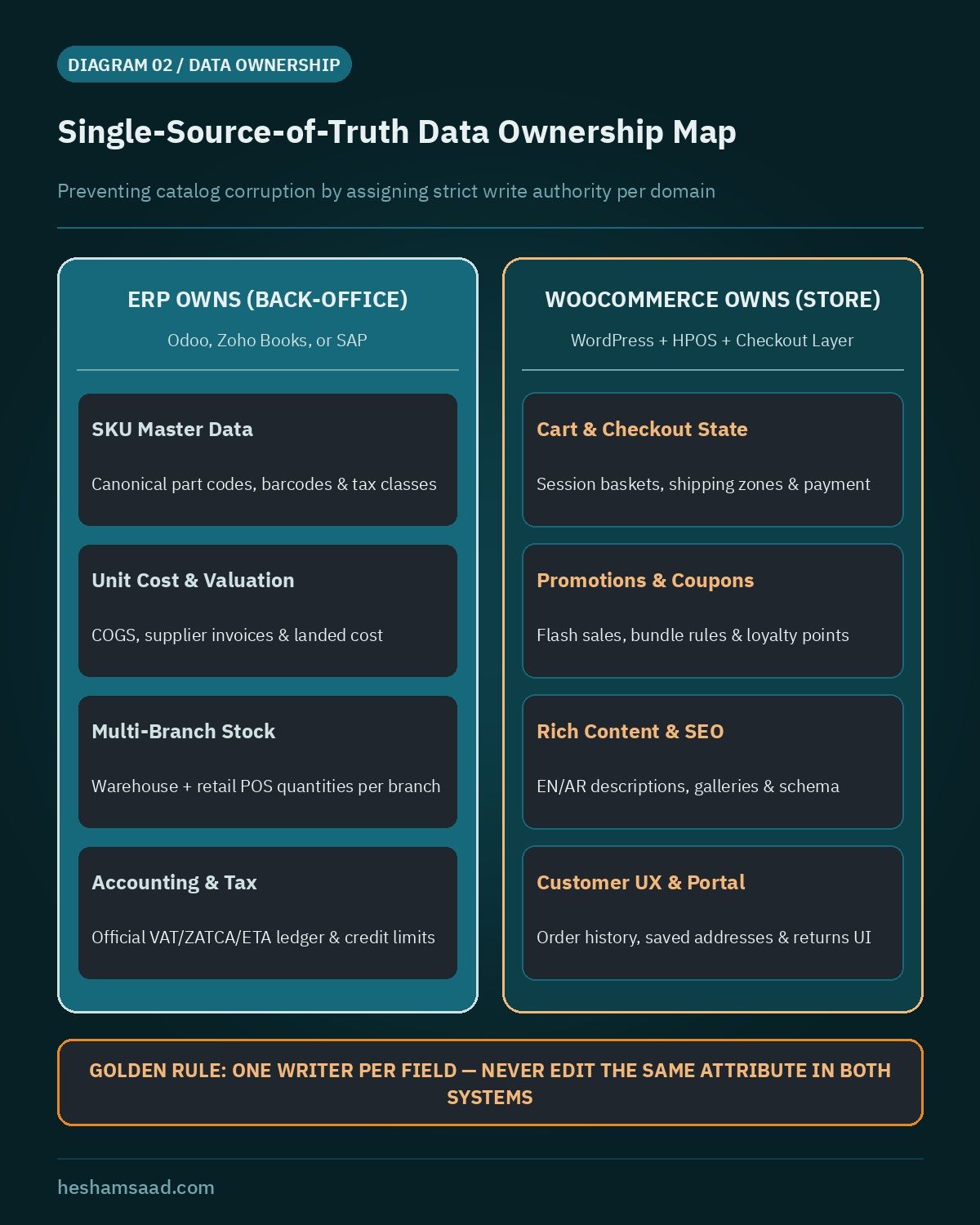
The most common cause of corrupted product catalogs in omnichannel retail is allowing two systems to edit the same data field independently. Before a developer writes a single line of integration code, your operations and finance teams must establish a strict single-source-of-truth matrix that defines which platform owns every piece of data.
SKU master data and omnichannel POS stock sync WordPress rules
In a resilient retail or distribution architecture, the ERP owns the SKU master record. Every new product, barcode, variation attribute, cost price, and base retail price is created in Odoo, Zoho, SAP, or your master POS database first, using a strict alphanumeric SKU naming convention. The integration then pushes or updates that SKU inside WooCommerce, while marketing teams enrich the product inside WordPress with long descriptions, Arabic and English SEO copy, gallery images, and cross-sell links.
Managing an omnichannel POS stock sync WordPress workflow across multiple physical branches requires clear allocation and safety-buffer rules. Rather than exposing raw shelf quantities from every retail shop without restriction, mature retailers configure their middleware to publish an aggregated sellable pool, for example, 100 percent of central ecommerce warehouse stock plus branch stock above a two-unit safety buffer per store. That two-unit buffer protects against the scenario where a walk-in shopper in Jeddah or Alexandria is holding an item in their physical shopping basket while an online buyer checks out the same SKU.
If your business serves both retail buyers and trade accounts, stock reservation rules become even more critical. Wholesale buyers frequently place high-quantity orders by carton or pallet, which requires separating wholesale warehouse allocations from retail branch shelves. We cover how to structure catalog visibility and tiered stock rules in our guide to building a wholesale B2B distributor website on WooCommerce.
Multi-currency, VAT rounding, and e-invoicing readiness
Accounting discrepancies between WooCommerce and ERP systems almost always trace back to tax and discount rounding differences. WooCommerce calculates taxes either per line item or on the subtotal depending on your settings, whereas ERP accounting engines enforce strict ledger rounding rules for national VAT compliance, such as ZATCA e-invoicing requirements in Saudi Arabia, the Egyptian Tax Authority (ETA) e-receipt and e-invoice system, or UAE Federal Tax Authority reporting.
If WooCommerce calculates a 15 percent VAT on a discounted line item and rounds to two decimal places before sending the net price to the ERP, and the ERP recalculates 15 percent VAT on its own, the final invoice total can differ by one halala, piastre, or fils. A one-cent mismatch causes the ERP to reject the payment reconciliation entry or leave the invoice marked as partially unpaid.
To prevent rounding conflicts, configure your integration so that the order payload sent from WooCommerce passes the exact captured gross amount, net unit price, tax rate identifier, and calculated tax amount per line item, mapping structurally to standard commerce properties such as those defined in the Schema.org Order specification. When the ERP generates the official tax invoice and cryptographic stamp or QR code, the integration writes the official ERP invoice number and PDF reference back into WooCommerce order meta (`wp_wc_orders_meta` under HPOS) so customers download compliant tax documents from their account page.
Order status mapping from checkout to fulfillment
Clear order lifecycle mapping ensures that warehouse teams, branch cashiers, and finance staff never guess whether an online order is ready to pack. Every status transition must have a single owner and a defined trigger event:
- Pending Payment (Owned by WooCommerce): The customer has initiated checkout, or selected an online payment gateway, but funds are not yet confirmed. Do not generate an ERP financial invoice at this stage to avoid cluttering the accounting ledger with abandoned checkouts.
- Processing (Triggered by WooCommerce, Pushed to ERP): Online payment succeeded, or a verified Cash on Delivery (COD) order passed confirmation. WooCommerce fires the webhook to middleware, which creates a confirmed Sales Order and reserves inventory in the ERP.
- Invoiced and Picked (Owned by ERP): Warehouse staff pick the items, scan barcodes, and finalize the ERP invoice. The ERP notifies middleware, which appends tracking details and tax invoice metadata to the WooCommerce order.
- Completed or Fulfilled (Pushed from ERP to WooCommerce): Once the courier scans the shipment or the customer collects the click-and-collect parcel at a retail branch POS, the ERP transitions the WooCommerce order to
completed. - Cancelled or Refunded (Bi-directional with Guardrails): Before an invoice is finalized, cancellations in WooCommerce release the ERP stock reservation. Once an order is invoiced in the ERP, refunds must originate as an ERP Credit Note that syncs back to WooCommerce to keep tax filings accurate.
Webhook reliability, rate limits, and staging verification
Moving from architectural diagrams to production code requires hardening your endpoints against network drops, duplicate transmissions, and unauthorized payload injection. Because financial ledgers and physical stock counts are at stake, your engineering team should enforce three technical safeguards before turning on live traffic.
First, verify every incoming webhook using HMAC-SHA256 signatures. When WooCommerce dispatches a webhook, it signs the raw HTTP request body with your secret key and sends the Base64-encoded hash in the X-WC-Webhook-Signature header. Your middleware must compute the HMAC-SHA256 digest of the raw request bytes and compare it against the header using a timing-safe comparison function before parsing the JSON payload, rejecting any unsigned or tampered requests with an HTTP 401 status.
Second, enforce idempotency keys to stop duplicate ERP invoices. Network timeouts sometimes cause a webhook sender or queue worker to retry a delivery that the ERP actually received and processed on the first attempt. By generating a deterministic idempotency key from the WooCommerce order ID, event topic (X-WC-Webhook-Topic), and modification timestamp, or tracking X-WC-Webhook-Delivery-ID alongside the order number, your middleware checks whether an ERP Sales Order already exists for that WooCommerce order ID and updates it rather than creating a second invoice.
Third, test concurrency and stock-decrement edge cases on an isolated staging environment connected to an ERP sandbox. Before go-live, run automated tests covering these operational scenarios:
- Simultaneous Last-Unit Purchase: Simulate a branch POS sale and a WooCommerce checkout occurring within ten seconds for an item with a stock count of one, verifying that the middleware alerts fulfillment teams immediately if safety buffers are breached.
- ERP Downtime Simulation: Block access to the ERP sandbox while placing ten orders in WooCommerce. Confirm that the WooCommerce webhook stays
activebecause the middleware queue returns HTTP 200, and verify that all ten orders replay cleanly into the ERP once connectivity resumes. - Bulk Catalog Price Update: Push a 2,000-SKU price update from the ERP sandbox using the WooCommerce REST API v3 batch endpoint (100 items per batch request) while running load tests on the staging checkout page to confirm zero HPOS table lockups.
- Partial Refund and Return at Branch POS: Process an online order of three items, then return one item at a physical branch POS terminal, ensuring the credit note and restocked unit reconcile accurately across both systems.
Build vs middleware budget and vendor evaluation
When budgeting for an ERP and POS integration, evaluating only the initial plugin license or agency setup invoice is a common mistake. Smart retail executives evaluate the two-year total cost of ownership, which includes initial engineering, middleware hosting, staff hours spent fixing failed syncs, and maintenance during WordPress or ERP version upgrades.
Several concrete architectural variables drive the scope and budget of your integration project:
- Number of Synchronized Entities and Endpoints: A basic integration syncing only simple products and completed orders costs far less to build and maintain than a multi-entity setup synchronizing variable products, customer credit limits, B2B price lists, gift cards, and partial shipments.
- One-Way vs Bi-Directional Data Flows: Pushing completed orders one way from WooCommerce to an accounting system is straightforward. Bi-directional synchronization, where orders, status updates, returns, and customer profiles can be modified in either system, requires conflict-resolution logic and idempotency tracking.
- Multi-Branch and Multi-Warehouse Logic: Mapping a single warehouse quantity to WooCommerce is native to core product fields. Aggregating stock across ten physical pharmacy or retail branches, applying per-branch safety buffers, and routing orders to the nearest fulfillment branch adds custom middleware logic.
- Custom Tax, E-Invoicing, and ERP Localization Fields: Passing commercial registration numbers, buyer VAT IDs, and national e-invoicing QR codes between WooCommerce checkout fields, HPOS meta tables, and localized ERP modules requires dedicated data validation and testing.
Before you sign a contract with an ERP implementer or web agency, review our framework on how to choose a web development agency in MENA and ask every shortlisted vendor these five technical questions:
- Does your integration natively support WooCommerce HPOS custom tables without compatibility mode fallback? If a vendor’s code still writes directly to
wp_postsorwp_postmetausing raw SQL queries instead of WooCommerce CRUD methods and REST API v3 endpoints, reject the proposal. - How do you prevent WooCommerce from disabling webhooks after five consecutive ERP errors? Look for an explicit answer involving an intermediate message queue, webhook proxy, or dead-letter retry worker rather than a promise that the ERP server never goes down.
- How does your system prevent duplicate ERP invoices when a webhook is delivered twice? The developer must explain their idempotency check using unique WooCommerce order identifiers in the ERP before inserting a new sales order.
- How are bulk catalog and inventory updates throttled? Confirm that they use the REST API v3 batch endpoint (up to 100 items per request) with controlled concurrency rather than firing thousands of single-product HTTP requests that exhaust PHP workers.
- Who receives alerts when a payload fails validation, and how do our staff replay failed orders? Every production integration needs an operational dashboard or automated Slack and email alert with a one-click replay queue so finance staff are never left searching server logs.
If your internal IT team needs dedicated architectural support to review vendor API documentation or build a resilient middleware layer, you can hire a WooCommerce developer experienced in high-volume HPOS migrations and ERP API integrations.
One-week ERP and POS integration readiness checklist
You can prevent the majority of integration delays and scope-creep disputes before writing a project brief by completing a one-week internal data and infrastructure audit. Assign these five preparation steps across your operations, finance, and technical leads:
- Day 1 to 2, Map your single source of truth: Document in a shared matrix which system (ERP, POS, or WooCommerce) owns SKU creation, product titles, stock quantities, base prices, promotional discounts, customer records, and tax invoices.
- Day 3, Audit SKU code consistency across every channel: Export your active product lists from WooCommerce, your ERP, and your branch POS terminals. Identify and fix duplicate SKUs, missing variation SKUs, trailing spaces, or products where branch cashiers scan a barcode that differs from the online SKU.
- Day 4, Confirm WooCommerce HPOS and REST API v3 readiness: Check that your WordPress environment runs High-Performance Order Storage without legacy plugin conflicts, verify that pretty permalinks and HTTPS are active for
/wp-json/wc/v3/routes, and confirm that your hosting plan has sufficient PHP workers for background batch processing. - Day 5, Document VAT, currency, and order status workflows: Write down the exact order status transitions from initial checkout to courier delivery or branch pickup, including how Cash on Delivery collections, shipping fees, coupon discounts, and partial refunds are recorded in your accounting ledger.
- Day 6 to 7, Define webhook failure retry and alerting rules: Decide how many times your queue middleware should retry a failed ERP sync, which team member receives an immediate alert when an order moves to a dead-letter queue, and what branch safety stock buffer will protect walk-in inventory during peak sales.
Once your readiness checklist is complete, you are in a strong position to scope an integration that scales with your retail branches and wholesale volume. Explore our WordPress development services to see how we engineer high-volume WooCommerce architectures, or book a free consultation to review your ERP and POS integration requirements before you commit to a vendor contract.
Frequently asked questions
When should a store replace manual CSV stock uploads with an automated ERP or POS integration?
You should replace manual CSV uploads once your online store processes 30 to 50 orders per day or operates two or more physical retail branches. At that volume, spreadsheet imports cannot keep pace with walk-in cashier sales and online checkouts happening at the same time. Automating the connection prevents oversold inventory, eliminates manual data entry mistakes, and keeps your accounting ledger accurate without daily spreadsheet reconciliation.
How does WooCommerce High-Performance Order Storage improve ERP and POS synchronization?
High-Performance Order Storage moves order records out of the general WordPress post tables and into four dedicated database tables built specifically for commerce transactions. When your ERP or POS syncs bulk orders or updates fulfillment statuses through the REST API, those database queries no longer lock or slow down your storefront pages. This separation protects checkout speed during flash sales and high-traffic retail campaigns.
Should WooCommerce or the ERP act as the primary source of truth for inventory and pricing?
For multi-branch retailers and wholesale distributors, the ERP should own product master data, SKU identifiers, base prices, tax rates, and total warehouse or branch inventory counts. WooCommerce should remain the source of truth for active shopping carts, storefront promotions, checkout sessions, and initial online order capture. Splitting responsibilities this way ensures that cashier sales and warehouse adjustments flow into your website without overwriting active online carts.
What happens if our ERP server goes offline while WooCommerce is sending order webhooks?
By default, WooCommerce tries to deliver a webhook once and automatically disables the webhook after five consecutive delivery failures or timeouts. Once disabled, new online orders stop reaching your ERP until an administrator manually turns the webhook back on. Routing webhooks through a lightweight queue middleware prevents this breakdown by returning an immediate confirmation to WooCommerce and holding the order data until your ERP recovers.
When do we need custom REST API middleware instead of an off-the-shelf connector plugin?
An off-the-shelf connector plugin works well when you run a single warehouse, use standard Odoo or Zoho Books fields, and have simple tax rules. You need custom REST API middleware when you manage stock across multiple physical branches, enforce complex wholesale pricing tiers, require custom national e-invoicing fields, or need automated retry queues to guarantee zero lost orders during ERP maintenance windows.


Add your first comment to this post