هذا المقال متوفر باللغة العربية — اقرأ بالعربية
Planning a building materials website WooCommerce build in Saudi Arabia, the UAE, or Egypt requires far more than uploading product photos and turning on a standard shopping cart. Across the work I lead as Safya, senior WordPress and WooCommerce architect at heshamsaad.com, tile showrooms, sanitary ware dealers, paint suppliers, and industrial hardware distributors come to us with the same bottleneck: off-the-shelf themes break the moment a buyer tries to calculate box coverage, upload a Bill of Quantities, or book a crane truck alongside a box of drill bits.
What a building materials website WooCommerce build must handle in MENA
A hardware or finishes catalog serves two distinct buyers on the same storefront. Homeowners remodeling a villa bathroom want clear room-area pricing, sample tiles delivered to their door, and simple mobile checkout. Site engineers and procurement managers want bulk pallet pricing, formal quote requests, credit-limit terms, and scheduled site dispatch.
Standard SaaS templates struggle when both buyer types share one inventory pool. Merchants who weigh comparing WooCommerce against Shopify usually pick WooCommerce because core checkout rules, pricing formulas, and shipping logic remain open to custom engineering under tailored WordPress development. Reviewing the official WooCommerce Documentation shows how modular hooks let developers extend cart calculations, B2B roles, and ERP endpoints without rebuilding the store from scratch.
Unlike pure brochure sites, such as a construction company website built on WordPress, a transactional supply storefront must keep live stock, carton math, and regional freight rules synchronized across every warehouse branch. Before writing a single line of code, your team should map four foundational requirements:
- Unit-of-measure conversion that turns surface area or wall dimensions into whole sellable boxes, cartons, pallets, or paint cans.
- Technical attribute filtering built around real job-site specs such as slip ratings, color codes, pipe diameters, and power tool voltages.
- Separate B2C sample ordering and B2B contractor quote workflows backed by role-based pricing and ERP inventory sync.
- Dual-tier logistics routing that distinguishes heavy flatbed or boom-truck site deliveries from parcel couriers and warehouse pickup.
Unit-of-measure and tile and paint area calculator WooCommerce logic
In ceramic showrooms and paint depots across Riyadh, Dubai, and Cairo, customers rarely walk in knowing how many cartons they need. They know their living room measures five meters by six meters, or that a boundary wall spans a certain height and length. Asking an online buyer to divide square meters by box coverage manually causes cart abandonment and expensive misorders.
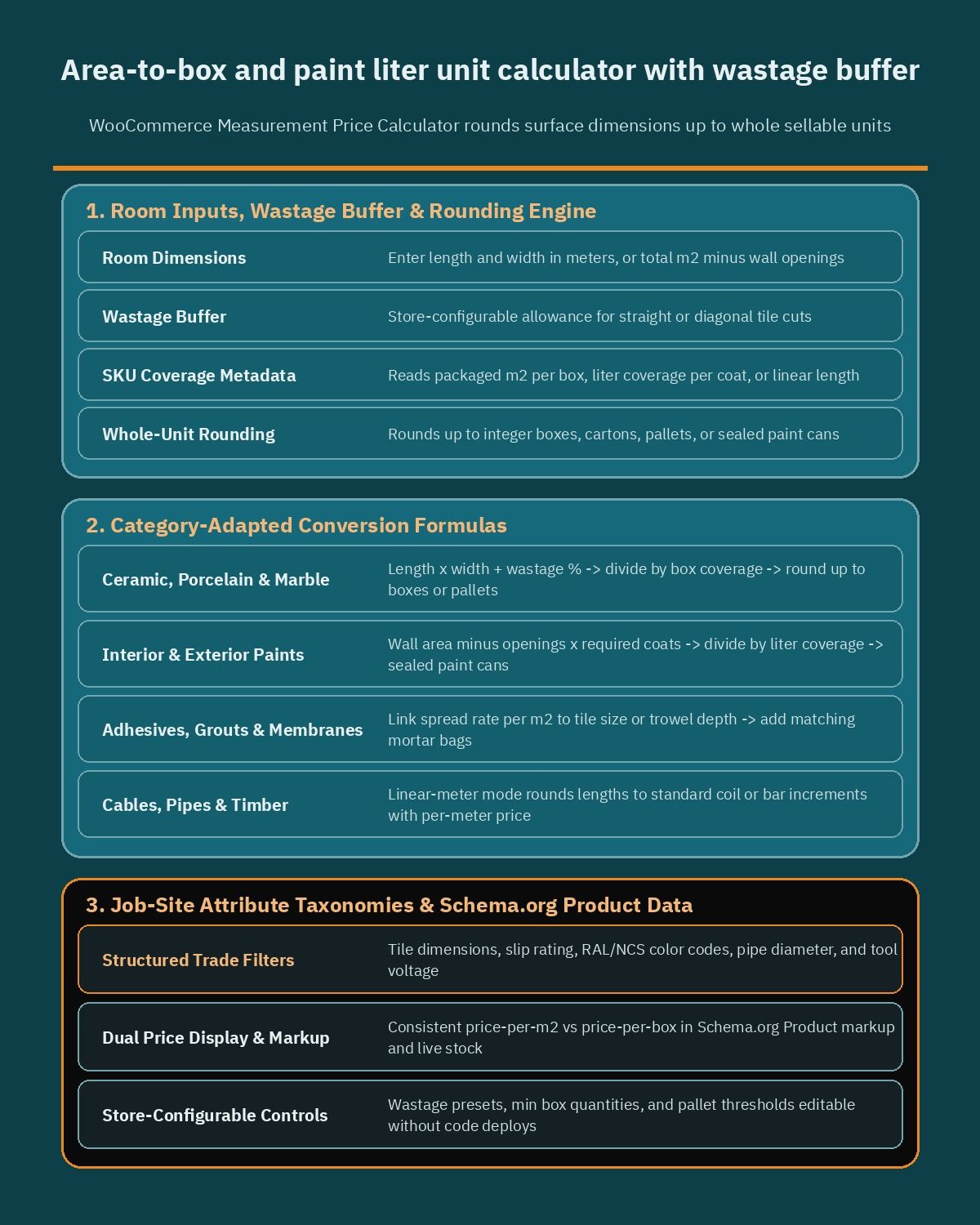
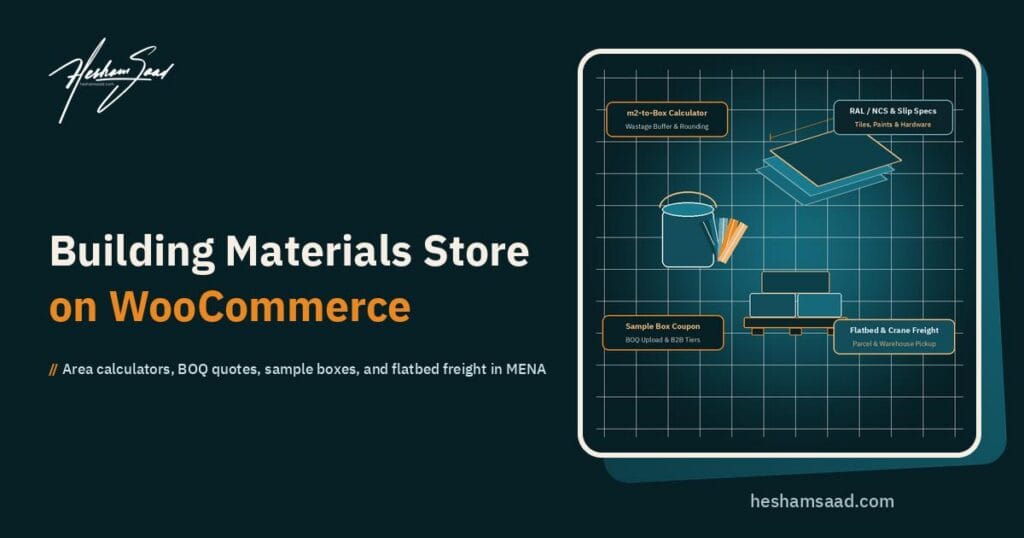
Implementing a WooCommerce Measurement Price Calculator workflow solves this directly on the product page. A tile and paint area calculator WooCommerce setup lets shoppers enter length and width in meters, or total square meters, while the system reads each SKU’s packaged coverage behind the scenes and converts the input into exact whole boxes or cartons.
Rounding up to whole sellable units is mandatory because warehouses do not split sealed porcelain boxes or tint half-cans of exterior coating. Equally important is a store-configurable wastage buffer checkbox or selector right inside the calculator widget. Cutting tiles around columns, stairs, and diagonal layouts always creates offcuts, and running short by two boxes later risks a dye-lot mismatch between factory batches.
How carton, pallet, and paint liter conversions behave
Different building categories demand slightly different formula parameters inside the same catalog. You should structure product metadata so the calculator adapts automatically by category instead of hardcoding one rule across every SKU:
- Ceramic, porcelain, and marble tiles: calculate total area from length and width, add the store-configurable wastage percentage chosen for straight or diagonal laying, divide by square meters per box, and round up to the nearest integer box or full pallet tier.
- Interior and exterior paints: capture wall surface area minus openings, multiply by the required number of coats from the product spec, divide by liter coverage per coat, and map the total to available can sizes such as one-liter, four-liter, or drum containers.
- Adhesives, grouts, and waterproofing membranes: link spread rate per square meter directly to tile size or trowel depth so shoppers can add matching bags of mortar alongside their primary tile order.
- Cables, pipes, and timber profiles: switch the calculator mode from area to linear meters, rounding lengths up to standard coil or bar increments while displaying the per-meter reference price clearly.
Because wastage tolerance varies by material quality and room geometry, keep every wastage option, minimum box quantity, and pallet-rounding threshold store-configurable inside product settings rather than locking fixed figures into theme templates. That flexibility lets category managers adjust rules per brand without waiting on developer deployments.
Technical catalog filtering and Schema.org Product data for a WooCommerce hardware store
A retail homeowner looks at color and price, whereas a procurement engineer filters by mechanical performance before ever checking aesthetics. Dumping technical specifications into long paragraphs makes both search and faceted filtering fail. A well-structured WooCommerce hardware store relies on disciplined taxonomies and clean product variations from day one.
Following the patterns in Managing Product Taxonomies and Variable Product documentation keeps your catalog queryable even as SKU counts scale into the tens of thousands. Global attributes and custom taxonomies let sidebar filters narrow down thousands of items in milliseconds without slowing database queries.
Essential technical attributes across construction categories
When our architecture team audits building supply catalogs across Egypt and the Gulf, we group filterable attributes by trade discipline so shoppers never wade through irrelevant specs:
- Flooring and wall cladding: nominal tile dimensions, thickness, surface finish, water absorption grade, rectified edge status, and slip resistance rating for wet zones or pool decks.
- Architectural coatings: sheen level, base chemistry, indoor or outdoor suitability, VOC classification, and standardized RAL or NCS color codes for exact tint matching.
- Plumbing and sanitary ware: pipe nominal diameter, pressure class, thread standard, mounting type, flush mechanism, and water-saving flow rating.
- Power tools and industrial hardware: operating voltage, corded versus cordless platform, battery chemistry, chuck size, torque class, ingress protection rating, and manufacturer brand.
Architects and interior specifiers often source multiple finishes from related trades at once, moving smoothly in their project workflow between surface suppliers, an interior design portfolio and specification site, a dedicated WooCommerce lighting store, or a custom furniture store on WooCommerce. Keeping downloadable technical datasheets, CAD or BIM files, and warranty PDFs attached to each variable SKU helps those specifiers approve your products faster.
Clean attribute architecture also strengthens organic search visibility. Mapping SKU identifiers, brand names, dimensions, packaging units, and live stock availability into valid Schema.org Product markup ensures Google understands exact model numbers and variant pricing. Avoid stuffing arbitrary text strings into brand or GTIN fields, and verify that price-per-box versus price-per-square-meter metadata stays consistent between the visible page and structured data.
Sample boxes and a B2B contractor wholesale portal WordPress workflow
Nobody commits to furnishing a three-story villa or commercial lobby with imported porcelain after viewing a backlit phone screen. Color temperature, surface glaze, and tactile grip look completely different under natural site daylight. At the same time, contractors ordering container-level quantities expect structured wholesale tooling rather than consumer checkout forms.
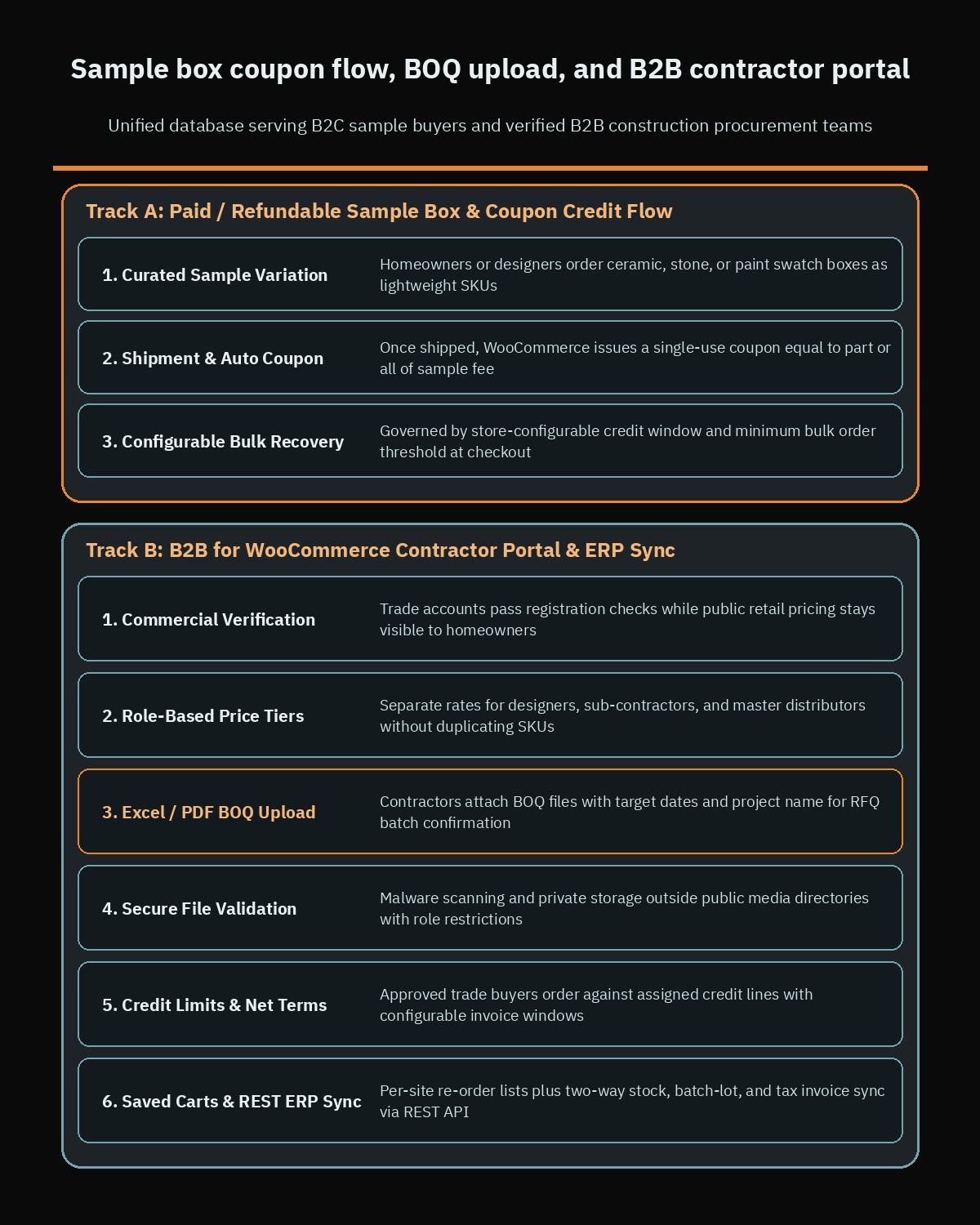
A modern B2B contractor wholesale portal WordPress architecture handles both physical sampling and bulk procurement inside one unified database. Using B2B for WooCommerce alongside custom portal endpoints, you can keep public retail pricing visible to homeowners while enabling trade workflows once an account passes commercial registration checks.
Sample box ordering with store-configurable coupon credit
Offering physical sample boxes for ceramic tiles, natural stone slabs, and painted swatches builds immediate buyer confidence while filtering out non-serious inquiries when priced thoughtfully. Rather than absorbing shipping and packaging costs on every request, stores can sell individual sample swatches or curated sample boxes as lightweight WooCommerce variations.
Once the sample ships, the system can automatically generate a single-use coupon equal to part or all of the sample fee, governed by a store-configurable credit window and minimum bulk order threshold. When the homeowner or designer returns to purchase full project quantities, applying that code recovers their sample spend and turns sampling into a direct conversion lever.
BOQ uploads, tiered wholesale pricing, and ERP sync
Commercial contractors rarely click through forty product pages one by one. They work from Bills of Quantities exported by quantity surveyors. Your portal should give verified trade accounts a dedicated Request for Quote intake where buyers attach Excel or PDF BOQ files, specify target delivery dates, and assign a project reference name.
Once sales engineers review stock batches and confirm pallet availability, they convert the RFQ into an executable WooCommerce quote or order link inside the contractor dashboard. Key capabilities that separate real B2B portals from basic discount plugins include:
- Role-based pricing tiers: separate rates for retail walk-ins, registered interior designers, sub-contractors, and master distributors without duplicating products.
- Store-configurable credit limits and net-terms invoicing: let approved trade accounts place orders against an assigned credit line with configurable invoice settlement windows instead of paying upfront by card.
- Project-based saved carts and quick re-order lists: allow site managers overseeing multiple developments to keep separate saved material lists per site and re-order consumables in one click.
- Two-way ERP integration: connect warehouse stock, batch numbers, customer credit balances, and tax invoices through the WordPress REST API so branch sales and online orders never oversell the same tile batch.
Always enforce strict file validation and malware scanning on uploaded BOQ spreadsheets and PDFs, storing trade attachments outside public media directories with role-restricted download permissions.
Dual-tier site freight and click-and-collect for construction supply e-commerce MENA
Shipping logistics breaks more hardware and tile e-commerce launches than any visual design flaw. A power drill and a box of wall plugs travel comfortably in a courier van, whereas two pallets of Spanish porcelain or six-meter PVC conduits require flatbed trucks, tail lifts, or crane boom offloading at an active construction site.
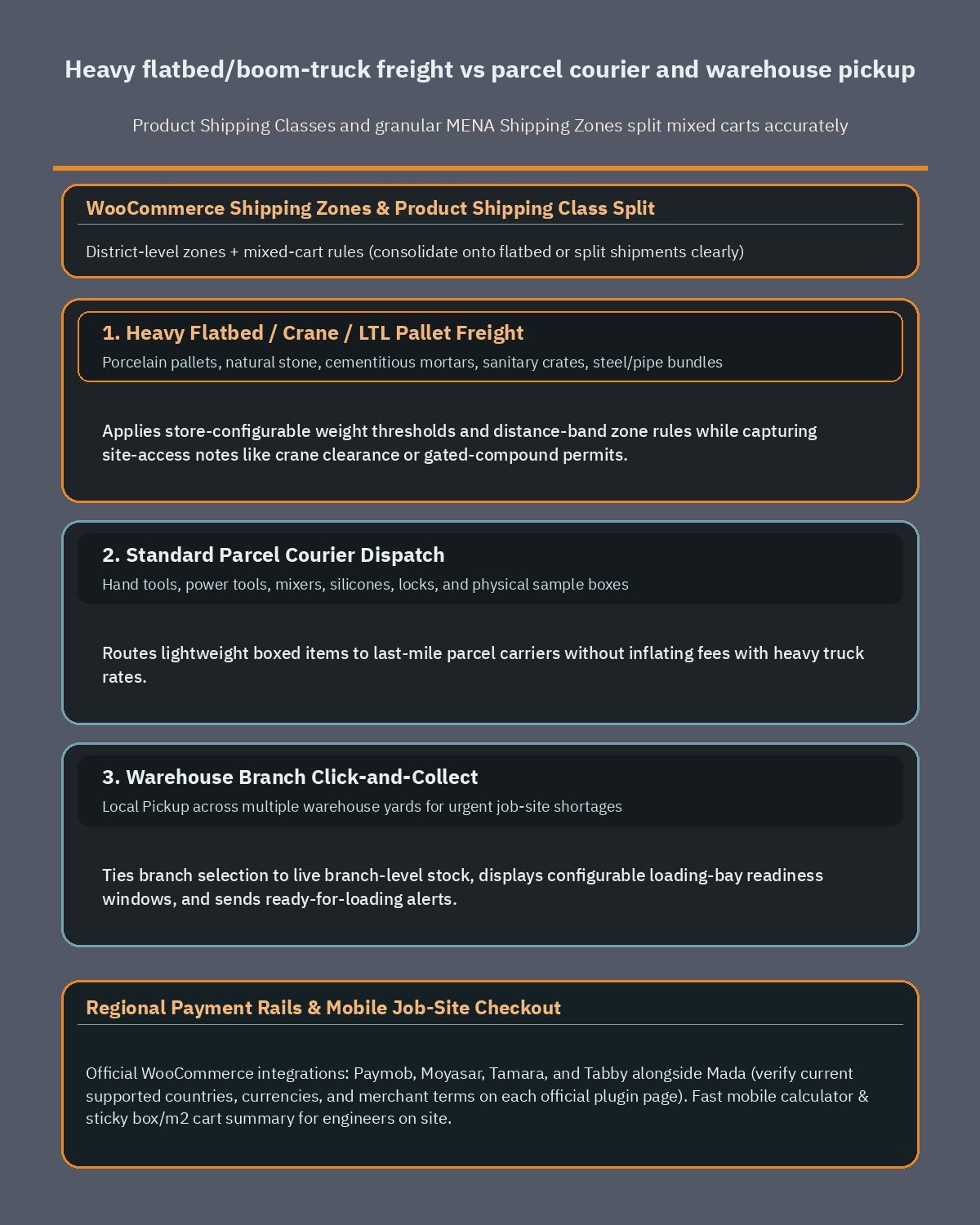
Solving this for construction supply e-commerce MENA operations requires separating freight classes cleanly inside Setting Up Shipping Zones and pairing them with Product Shipping Classes. If a storefront relies on a single flat rate or generic courier API, merchants either lose margin on heavy pallets or scare off tool buyers with inflated truck fees.
Routing heavy pallet freight versus parcel couriers
In WooCommerce > Settings > Shipping, define granular geographical zones down to city districts, industrial parks, and new urban developments. If you want a deeper breakdown of regional address formats and Gulf carrier constraints, our guide on WooCommerce shipping zones across Egypt and the Gulf covers how postal code gaps affect checkout matching.
Next, assign every SKU to a shipping class that reflects physical handling reality rather than price alone:
- Heavy pallet and crane freight class: covers tiles, natural stone, cementitious mortars, sanitary ware crates, and bulk steel or pipe bundles. Trigger store-configurable weight thresholds and distance-band rules that calculate flatbed, boom-truck, or less-than-truckload pallet rates by site zone, and capture site-access notes such as crane clearance or gated-compound permits.
- Standard parcel courier class: covers hand tools, power tools, mixers, silicones, locks, and sample boxes that fit standard last-mile parcel carriers.
- Mixed-cart handling rules: decide in advance whether a cart containing both a pallet of tiles and a tile cutter ships together on the flatbed truck at no extra parcel fee or splits into two shipments with transparent checkout messaging.
Warehouse branch click-and-collect for urgent job sites
Contractors frequently send a pickup truck mid-morning when a crew runs short on grout, blades, or valve fittings. Enabling Local Pickup across multiple warehouse yards lets buyers select their nearest branch, pay or charge to their trade account online, and receive a ready-for-loading notification before their driver arrives at the gate.
Connecting pickup branch selection to branch-level stock availability prevents awkward gate delays when an item sits in a central distribution hub rather than the showroom counter. Even better, display estimated loading-bay readiness windows using store-configurable preparation rules so foremen schedule drivers accurately.
Regional payment gateways and mobile site UX
Checkout completion in Saudi Arabia, the UAE, and Egypt depends heavily on familiar local payment rails alongside flexible consumer financing. Home renovation budgets stretch fast, and allowing buyers to split approved retail purchases or pay with domestic debit networks lifts conversion without forcing merchants to offer direct consumer credit.
WordPress and WooCommerce offer official integrations for the region’s leading processors and buy-now-pay-later providers, including Paymob for WooCommerce, Moyasar, Tamara Checkout, and Tabby Checkout. Alongside card acquiring, stores commonly configure domestic networks and wallets such as Mada, Apple Pay, and KNET depending on the markets they serve.
Because fintech coverage, licensing rules, and settlement currencies evolve frequently across MENA, verify current supported countries, currencies, and merchant terms directly on each provider’s official WordPress plugin page before finalizing your checkout architecture. Check Tabby’s official plugin page for its current supported countries, currencies, and merchant terms, and apply the exact same verification step to Paymob, Moyasar, and Tamara so your accounting and legal teams approve every integration prior to launch.
Designing mobile UX for contractors on active job sites
A large share of building supply orders originates on mobile phones rather than office desktops. Site engineers stand in dusty unfinished villas checking dimensions, while homeowners browse swatches in showrooms and compare options later at night. Heavy image sliders and bloated JavaScript bundles stall on weak job-site cellular connections.
Prioritize thumb-friendly area calculator inputs, sticky add-to-cart summaries showing both box count and total square meters, and instant Arabic and English RTL/LTR parity. Make sure technical spec sheets open cleanly in mobile browsers and that map-pin or district selectors work smoothly without forcing tedious street-name typing where neighborhood landmarks matter more.
What drives development scope and how to brief your WooCommerce team
Merchants often ask why one building supply store launches in weeks while another requires months of custom engineering. Rather than guessing fixed budgets blindly, evaluate the specific operational layers your catalog and fulfillment model demand.
Four scope drivers govern engineering effort and total cost of ownership on any construction storefront:
- Calculator and pricing complexity: straightforward box-rounding formulas require minimal customization, whereas multi-coat paint systems, diagonal wastage presets, dynamic pallet discounts, and linked accessory bundles require custom JavaScript and server-side cart validation.
- ERP, batch-lot, and BOQ integration depth: standalone stores managed in WooCommerce admin move fast, while live two-way inventory sync, multi-branch warehouse allocation, tile batch-lot reservation, and automated tax invoicing via REST API webhooks demand dedicated middleware and staging tests.
- B2B portal and RFQ automation: enabling basic wholesale price tiers takes far less effort than building BOQ Excel parsing, multi-approver contractor accounts, credit-limit ledgers, and sample-box coupon automation.
- Zone-based freight and multi-warehouse pickup logic: flat regional tiers are quick to configure, whereas mixed-cart splitting between parcel couriers, crane-truck dispatch schedules, and branch-level stock pickup needs custom shipping method rules.
Before you hire a WooCommerce developer, prepare a concise technical brief covering your SKU count, sample-policy rules, ERP software name, warehouse locations, target MENA delivery zones, and whether retail buyers and trade contractors share one storefront. Clear inputs turn vague estimates into an accurate phased roadmap.
If you are planning to launch or replatform a ceramic tile, paint, sanitary ware, or industrial hardware store in Saudi Arabia, the UAE, or Egypt, book a free consultation with our team at heshamsaad.com. We will review your catalog structure, area-calculator rules, ERP integration requirements, and regional freight logic so you leave with a practical build plan tailored to your operations.
Frequently asked questions
How does a tile and paint area calculator work in WooCommerce?
A measurement calculator converts room length and width in square meters into full boxes, cartons, pallets, or paint liters before a shopper adds items to the cart. You can configure a store-adjustable wastage buffer for cuts and corners before rounding quantities up to whole sellable units. This prevents under-ordering mid-project and keeps batch dye lots consistent.
How should a hardware or tile store structure technical attributes in WooCommerce?
Store technical specifications as structured product taxonomies and variable attributes rather than plain text inside descriptions. Ceramic tiles need dimensions, thickness, and slip ratings, while paints require finish type and RAL or NCS color codes, and industrial tools need voltage ratings. Structured attributes power sidebar filters for site engineers and output clean Schema.org Product markup for search visibility.
How do you separate flatbed truck freight from parcel shipping in WooCommerce?
Assign distinct product shipping classes to heavy palletized SKUs and lightweight tools, then map those classes inside regional shipping zones. Heavy tiles, cement bags, and sanitary fixtures route to zone-based flatbed, crane, or boom-truck rates, while hand tools and sealants use standard courier delivery. Adding local pickup also lets nearby contractors collect urgent materials directly from your warehouse.
Can WooCommerce handle B2B contractor BOQ uploads and net-terms invoicing?
Yes, a B2B WooCommerce portal can support role-based wholesale pricing, configurable credit limits, and net-terms invoicing for verified trade accounts. Contractors and procurement teams can upload Excel or PDF Bill of Quantities sheets to request bulk quotes, save project carts by site, and sync approved orders with your ERP over the WordPress REST API.
How do sample boxes and MENA payment gateways fit into one checkout?
Merchants can sell paid or refundable tile, stone, and paint sample boxes and issue a store-configurable coupon credit when the buyer places a full project order. At checkout, plugins for Paymob, Moyasar, Tamara, and Tabby can sit alongside Mada, Apple Pay, and KNET, provided you verify current supported countries, currencies, and terms on each official plugin page.
References
- WooCommerce Documentation
- WooCommerce Measurement Price Calculator
- B2B for WooCommerce
- WooCommerce Managing Product Taxonomies
- WooCommerce Variable Product Documentation
- WooCommerce Setting Up Shipping Zones
- WooCommerce Product Shipping Classes
- WooCommerce Local Pickup
- WordPress REST API Handbook
- Schema.org Product Specification
- Paymob for WooCommerce Plugin
- Moyasar Payment Gateway Plugin
- Tamara Checkout Plugin
- Tabby Checkout Plugin