هذا المقال متوفر باللغة العربية — اقرأ بالعربية
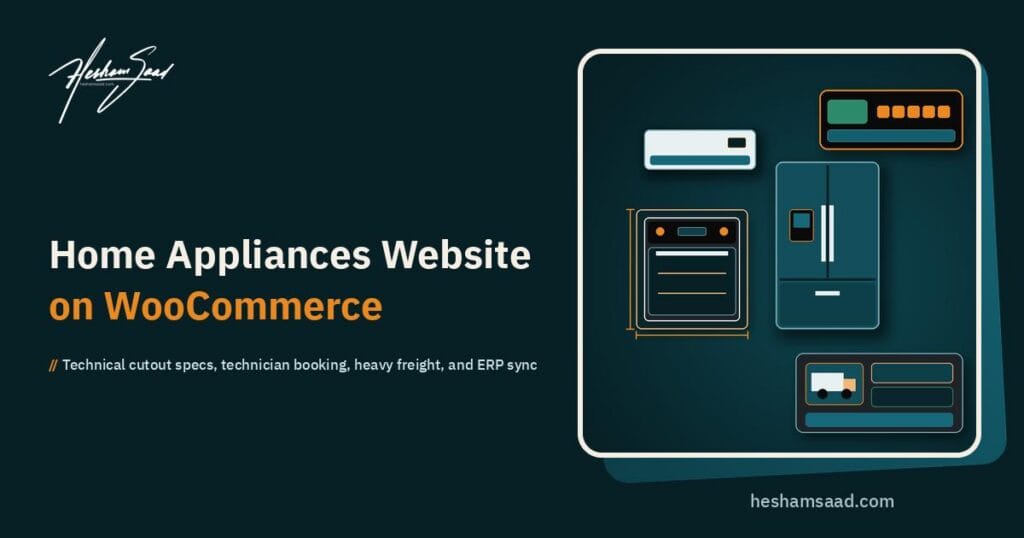
Building a profitable home appliances website WooCommerce platform in Saudi Arabia, the United Arab Emirates, or Egypt requires much more than uploading product photos and setting a single flat delivery rate. Home appliance distributors, built-in kitchen showrooms, and multi-brand consumer electronics retailers manage two completely different operational models inside the same catalog. Small domestic appliances like blenders, espresso machines, and microwave ovens move through standard parcel couriers, whereas refrigerators, washing machines, built-in ovens, dishwashers, and split air conditioners demand exact cabinetry cutout verification, two-person heavy freight handling, and post-delivery technician commissioning.
When a household in Riyadh, Dubai, or Cairo furnishes a new villa or renovates an apartment kitchen, the buyer rarely checks out on impulse. Homeowners, interior designers, and MEP contractors compare exact model codes, compressor or motor coverage terms, power requirements, water inlet specs, and energy efficiency labels before committing to a high-value cart. If your storefront hides technical drawings inside unstructured text paragraphs or fails to clarify how a heavy appliance will reach an upper floor and get installed, shoppers abandon the cart and walk into a competing showroom.
What a home appliances website WooCommerce build must handle
A specialized appliance store differs significantly from a general electronics store website on WooCommerce that focuses primarily on smartphones, laptops, and boxed accessories. While personal electronics share some catalog traits like brand taxonomies and serial numbers, major domestic appliances introduce physical installation constraints and specialized fulfillment workflows that touch every stage of the buyer journey.
Regional appliance retailers and authorized brand distributors across the Gulf and Egypt typically organize their online operations around four distinct buyer scenarios, each requiring tailored storefront logic and backend operational rules:
- Single replacement purchases for freestanding white goods: A family replacing a broken washing machine, upright freezer, or top-mount refrigerator needs fast delivery slot confirmation, clarity on doorway and staircase clearance, optional haul-away of the old unit, and immediate plumber or technician hookup.
- Built-in kitchen renovations and new home fit-outs: A homeowner working with a kitchen cabinet maker needs coordinated built-in ovens, gas or induction hobs, integrated dishwashers, and range hoods with downloadable engineering cutout drawings and bundle pricing.
- Seasonal climate control and cooling orders: Buyers purchasing multiple split, window, or floor-standing air conditioners require cooling capacity guidance in BTU or tonnage, wall-mounting and copper-piping installation scheduling, and split-payment financing at checkout.
- Corporate, hospitality, and real estate project procurement: Contractors, furnished-apartment operators, and office managers ordering appliances in multiple units require real-time warehouse availability, formal B2B tax invoices with VAT and commercial registration fields, and coordinated site delivery.
Because these workflows connect product data directly to field logistics and warehouse accounting, regional distributors evaluating WooCommerce vs Shopify frequently select WooCommerce for its open database architecture. Owning the full application stack lets your engineering team customize checkout fields, shipping class combinations, and ERP stock webhooks without hitting rigid SaaS checkout restrictions or per-transaction platform penalties.
Structuring technical specifications, energy ratings, and built-in cutout dimensions
Appliance buyers shop by measurement and capacity first, then narrow their choices by brand, finish, and price. If a shopper searching for a 9-kilogram front-load washer or a 60-centimeter built-in gas oven has to open thirty separate product tabs to read unordered bullet lists, your store will lose conversions. Structuring technical specifications cleanly requires using WooCommerce Managing Product Taxonomies and Variable Products with disciplined attribute governance under Products > Attributes.
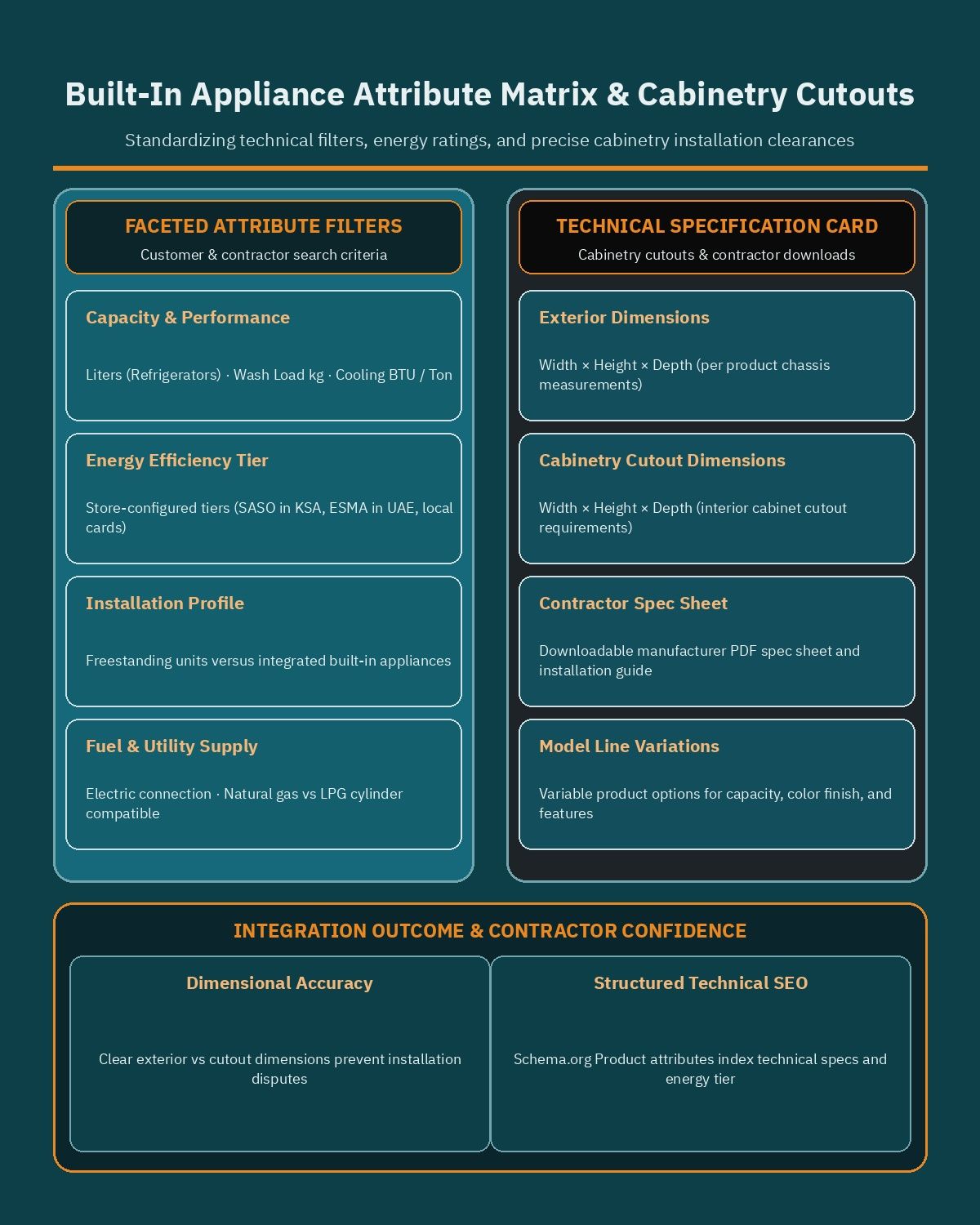
Much like building a fitment-driven auto parts website on WooCommerce where shoppers filter by mechanical dimensions and compatibility codes, an appliance catalog must separate filterable global attributes from model-specific reference measurements.
Capacity tiers, energy ratings, and utility requirements
Every major appliance category relies on a primary capacity metric and an energy consumption classification. Rather than creating one vague Capacity attribute that mixes incompatible units together, your catalog team should configure category-specific global attributes that power clean faceted sidebar filters:
- Cooling capacity and compressor type for air conditioners: Configure distinct store attributes for cooling capacity (such as nominal BTU tiers or tonnage ranges defined by your catalog), compressor technology (inverter versus rotary), and airflow direction (cold-only versus hot-and-cold heat pump models).
- Volume and compartment layout for refrigeration: Define net storage capacity in liters (alongside cubic feet where local buyers expect both units), door style (French door, side-by-side, bottom freezer, top mount, or single-door upright freezer), and defrost system (full no-frost versus defrost).
- Load weight and spin speed for laundry equipment: Separate washing capacity in kilograms, drying capacity in kilograms for washer-dryer combos, maximum spin speed in RPM, and loading orientation (front-load versus top-load).
- Place settings and cavity volume for dishwashers and ovens: Track dishwasher capacity by standard place settings and program count, and classify built-in or freestanding ovens by internal cavity volume in liters and fuel source (electric, natural gas, LPG cylinder compatible, or dual-fuel).
- Store-configured energy efficiency rating attributes: Create a structured attribute to display the energy efficiency tier applicable in your target market (such as SASO energy efficiency label tiers in Saudi Arabia, ESMA efficiency cards in the UAE, or local regulatory efficiency ratings in Egypt), allowing eco-conscious buyers to view the energy card level and upload the official label image per SKU.
When a single appliance family is sold in multiple capacities or finishes under one model line, Variable Products allow you to group variations cleanly (for example, letting a customer switch between Brushed Stainless Steel, Matte Black, and White, or between two BTU capacities of the same split AC series) while dynamically updating the SKU, price, stock status, and specification sheet for the chosen variation.
Separating exterior dimensions from built-in cabinetry cutout dimensions
The single most expensive reason for built-in appliance returns is dimensional mismatch at the customer’s kitchen site. A built-in oven or integrated dishwasher has two completely different sets of measurements: the exterior chassis dimensions of the appliance itself, and the internal niche or countertop cutout dimensions (width x height x depth) that the carpenter must leave open inside the kitchen cabinetry.
Your WooCommerce product template for built-in categories should explicitly separate and label three dimensional groups so neither homeowners nor kitchen joinery contractors confuse them:
- Nominal width class for rapid catalog filtering: A global taxonomy attribute (such as 60 cm, 75 cm, or 90 cm nominal width class) so shoppers can filter all hobs, ovens, and hoods that match their kitchen layout module.
- Exact exterior product dimensions: The full physical width, height, and depth of the unboxed unit in millimeters, plus the packaged carton dimensions and gross weight required for doorway and elevator clearance.
- Required cabinetry cutout and ventilation clearance dimensions: The exact niche width, niche height, and minimum cabinet depth in millimeters, alongside required rear or upper air ventilation gap guidelines specified by the manufacturer.
In addition to structured on-page attribute lists, every built-in and major appliance product page should include dedicated custom fields for downloadable PDF documentation: the manufacturer specification sheet, the dimensional cutout line drawing, the energy efficiency card, and the bilingual user manual. Presenting these files right below the variation selector, together with a side-by-side comparison drawer that lines up matching attributes across three or four candidate models, gives engineers and families the exact data they need to finalize their order online.
Scheduling post-purchase technician installation and old appliance removal
Dropping a boxed split air conditioner, built-in gas hob, or dishwasher inside a customer’s hallway does not complete a home appliance transaction. Most major appliances require certified technical commissioning to operate safely and to activate the distributor or manufacturer warranty. If a customer has to call a separate phone number after delivery just to book an installer, the buying experience feels fragmented.
By implementing WooCommerce Product Add-Ons alongside structured checkout slot selection, you can turn post-delivery technical services into transparent, selectable options directly on the product page before the shopper adds the appliance to the cart.
Capturing installation requirements by appliance category
Because a refrigerator requires very different site preparation than a wall-mounted split air conditioner or a built-in gas oven, WooCommerce Product Add-Ons lets you attach category-specific service selectors and conditional questionnaires to individual products or product categories. You can configure these options as complimentary distributor-included services or as store-priced installation packages depending on your commercial policy:
- Split and window air conditioner installation add-ons: Allow buyers to select standard wall-mounting installation, specify whether pre-installed copper piping already exists inside the wall, indicate whether outdoor condenser wall brackets are needed, and note if additional copper pipe meterage may be required on site.
- Washing machine and dishwasher plumbing hookup: Provide an add-on checkbox for unpacking, transit-bolt removal (critical for front-load washing machines), leveling on the floor, and connecting the unit to existing cold-water inlet valves and drain standpipes.
- Built-in oven, hob, and hood commissioning: Offer certified technician scheduling for electrical hardwiring, natural gas versus LPG nozzle conversion where supported by the brand, countertop sealing, and ducted versus recirculating carbon-filter hood setup.
- Preferred technician visit window: Let the buyer indicate whether they want the installation team scheduled for the next available slot after freight delivery, or held until a specific renovation readiness date when their kitchen cabinetry is finished.
Old appliance haul-away, dismantling, and trade-in workflows
When a household buys a replacement refrigerator, washing machine, or air conditioner, they almost always face the immediate logistical problem of removing the heavy old unit sitting in the exact spot where the new appliance needs to go. Offering a structured haul-away or store-configured trade-in option directly on the product page removes a major barrier to purchase.
Using WooCommerce Product Add-Ons, you can present clear option fields where the customer selects whether they need old unit dismantling (for example, unmounting an old split AC indoor and outdoor unit or disconnecting an old freestanding cooker) and haul-away disposal during delivery. If your store runs a brand-specific or seasonal trade-in program, custom add-on fields can capture the old appliance category, brand, approximate condition, and photo upload so your operations team can apply your store-configured trade-in credit rules or schedule pickup logistics accurately.
Configuring extended distributor warranty packages and kitchen bundle offers
In the MENA home appliances market, warranty authenticity and multi-unit package pricing play a decisive role in where customers choose to buy. Shoppers want explicit confirmation that their unit carries official distributor coverage rather than unauthorized parallel-import status, and homeowners fitting out an entire kitchen look for coordinated multi-appliance savings.
Offering store-configurable extended warranty and service plans
Every major appliance listing should clearly state two baseline coverage facts inside the structured specification block: the standard distributor full-unit warranty period and any brand-specific motor or inverter compressor coverage terms, both configured as store attributes per brand and product line. Beyond baseline coverage, many retailers and authorized service centers offer optional extended protection plans or annual preventive maintenance contracts (such as seasonal AC coil cleaning and gas-pressure checks).
With WooCommerce Product Add-Ons, you can attach store-configurable extended service tiers as radio buttons or dropdown selections directly above the Add to Cart button. Because each add-on selection is recorded as line-item metadata attached to that specific appliance inside the WooCommerce order, your fulfillment and ERP teams can link the purchased protection plan directly to the appliance serial number upon dispatch.
Building coordinated built-in kitchen suites with WooCommerce Product Bundles
When kitchen showrooms sell built-in appliances, customers frequently buy three to five matching units at once: a 60 cm or 90 cm built-in oven, a matching gas or ceramic hob, a chimney or telescopic range hood, a built-in microwave, and an integrated dishwasher. Creating a single static product SKU for a bundle causes severe inventory problems, because selling one unit of the oven individually would not deduct stock from the static bundle SKU.
Instead, appliance retailers should use WooCommerce Product Bundles to assemble dynamic, inventory-linked appliance packages:
- Fixed coordinated kitchen packages: Group a specific oven, hob, and hood SKU into a single promotional package page where all three items deduct inventory directly from their underlying individual product records in real time.
- Configurable build-your-own kitchen suites: Allow the shopper to choose their preferred oven model from a curated list in step one, select between a 4-burner or 5-burner hob in step two, and pick a compatible range hood width in step three, applying a store-configured bundle discount automatically when the complete set is selected.
- Laundry pair bundles and installation accessories: Pair a front-load washing machine with its matching heat-pump dryer and an optional stacking kit, ensuring every component is picked, scanned, and invoiced accurately in the warehouse.
Managing heavy white-goods freight, tail-lift dispatch, and showroom pickup
Shipping a 110-kilogram side-by-side refrigerator that must remain upright in transit cannot be priced or routed the same way as shipping a 2-kilogram electric kettle. In WooCommerce, building an accurate logistics engine starts under WooCommerce > Settings > Shipping by combining WooCommerce Shipping Zones, Product Shipping Classes, and Local Pickup.
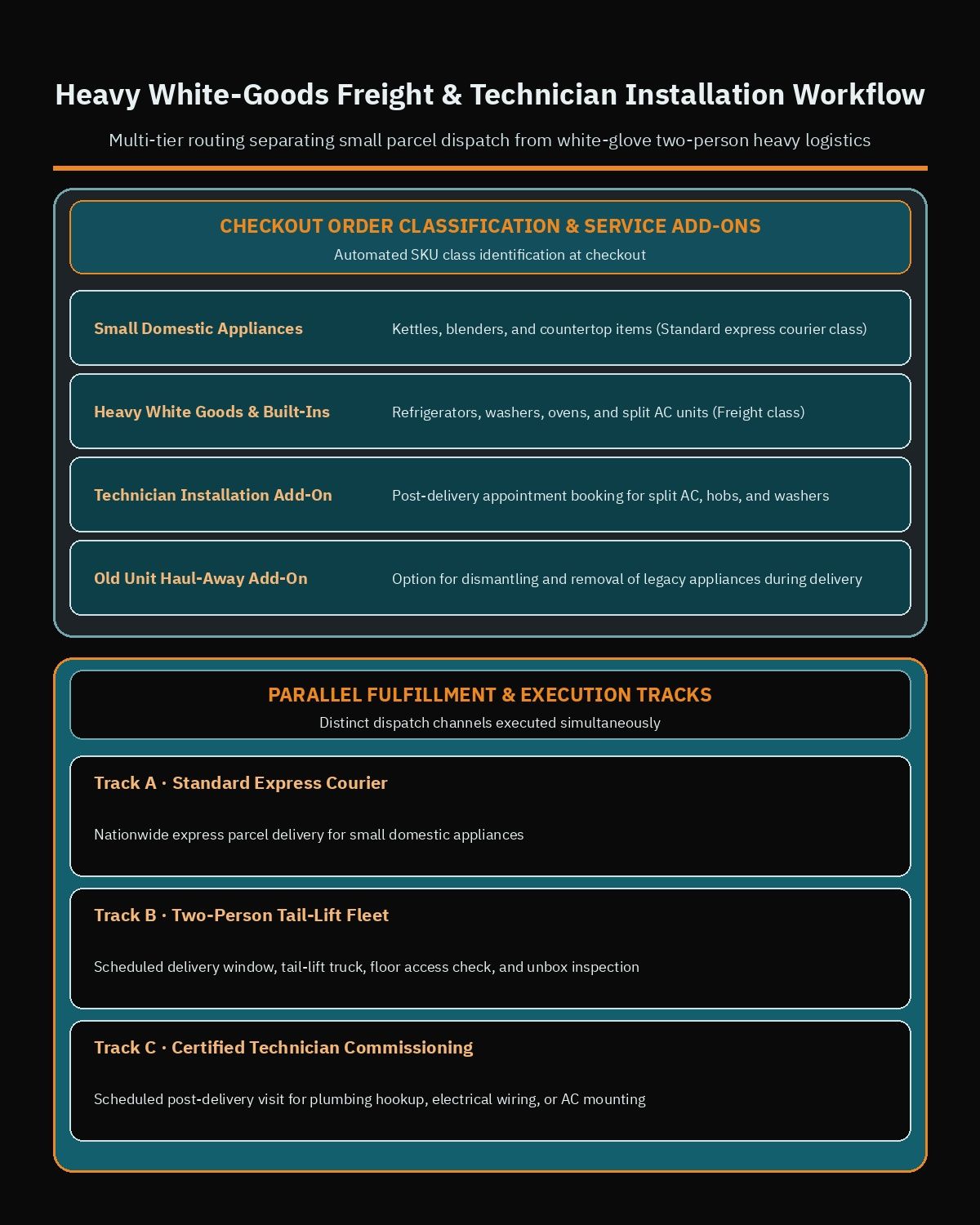
The operational physical challenges here closely mirror those of a furniture store website on WooCommerce, where bulky items require two-person handling teams, staircase and elevator verification, and scheduled delivery windows rather than unattended doorstep drops.
Segmenting the catalog with Product Shipping Classes and Shipping Zones
To prevent undercharging on heavy inter-city freight or overcharging customers who only buy a coffee grinder, your team should define distinct Product Shipping Classes across the catalog and map them to geographic WooCommerce Shipping Zones:
- Small Domestic Appliances (Standard Parcel Courier): Assigned to kettles, blenders, irons, toasters, personal care gadgets, and vacuum cleaners that can be fulfilled nationwide through standard domestic express couriers.
- Medium Fragile Appliances (Handled Boxed Freight): Assigned to countertop microwaves, freestanding water dispensers, and range hoods that require upright handling and fragile-cargo routing.
- Heavy White Goods and Built-In Units (Two-Person Tail-Lift Fleet): Assigned to refrigerators, deep freezers, washing machines, dryers, dishwashers, built-in ovens, freestanding cookers, and split air conditioners that require a two-person crew and tail-lift truck dispatch.
When configuring regional coverage across major metropolitan hubs (such as Riyadh, Jeddah, and Dammam, Dubai and Abu Dhabi, or Greater Cairo and Alexandria) versus secondary governorates, reviewing a dedicated guide on WooCommerce shipping zones for Egypt and the Gulf helps your team align postal codes, city dropdowns, and shipping class calculation rules (`Per class: Charge shipping for each shipping class individually` versus `Per order: Charge shipping for the most expensive shipping class`) so mixed carts calculate freight transparently.
Access checks, delivery inspection protocols, and showroom Local Pickup
For orders containing items in the Heavy White Goods shipping class, the checkout template should dynamically display delivery access fields: building type (villa, ground-floor apartment, or upper-floor apartment), floor number, freight elevator availability, and preferred delivery date window. Capturing whether a narrow staircase requires extra manpower before the truck leaves the warehouse avoids failed delivery attempts and damaged cabinetry.
Your order confirmation emails and delivery notes should also state your store’s on-delivery inspection protocol clearly. For example, many appliance distributors instruct customers to inspect the uncrated exterior chassis for dents or glass damage with the delivery crew before signing the proof-of-delivery slip, and to wait until the authorized technician arrives before opening sealed built-in or air-conditioning cartons if required by the brand’s warranty terms.
Finally, configuring Local Pickup under WooCommerce > Settings > Shipping > Local Pickup allows shoppers to buy online and collect from a specific showroom branch or distribution counter. While small and medium appliances are ideal for rapid showroom click-and-collect, your checkout logic should either restrict self-pickup on heavy refrigerators and washers or display a mandatory vehicle notice reminding the customer that compressor-based appliances must be transported upright in an appropriate vehicle.
Handling high-ticket 3D Secure payments, split financing, and B2B tax invoices
A single home appliance order easily reaches a high cart value when a customer purchases a large refrigerator, a built-in kitchen suite, or multiple inverter air conditioners for a villa. High average order values mean your checkout must balance two priorities: giving households flexible ways to pay without friction, and protecting your store from card fraud or chargeback disputes prior to dispatching expensive freight.
Regional card gateways, local debit networks, and split-payment checkout
Rather than relying on cash on delivery for heavy white goods (which exposes the retailer to high two-way truck freight losses if a buyer refuses delivery at the door), MENA appliance stores prioritize verified prepaid digital methods and installment plans:
- Regional card gateways with 3D Secure verification: Integrating official plugins such as Paymob for WooCommerce and Moyasar enables Visa, Mastercard, regional debit cards including Mada, and digital wallets like Apple Pay with mandatory 3D Secure authentication on high-value appliance transactions.
- Buy-now-pay-later and split financing plugins: Adding Tamara Checkout and Tabby Checkout lets shoppers split major appliance purchases into scheduled payments and displays monthly split messaging directly on eligible product pages and the cart screen.
- Conditional deposit or prepayment rules for heavy freight: If your commercial policy still permits cash or card-on-delivery via mobile POS terminals for certain zones, you can restrict it to verified orders below a store-defined cart threshold or require digital payment whenever custom installation or special-order built-in units are included.
Because payment gateway coverage, merchant category eligibility, supported currencies, and minimum or maximum transaction caps change over time, you should always check the official plugin and documentation pages for Paymob for WooCommerce, Moyasar, Tamara Checkout, and Tabby Checkout before finalizing your checkout architecture. Verifying each provider’s current supported countries, currencies, and order value limits directly with the provider ensures that high-ticket appliance bundles fall within approved financing thresholds.
Capturing B2B corporate procurement and tax invoice fields
Appliance showrooms generate substantial revenue from B2B buyers: real estate developers equipping residential compounds, contractors fitting out commercial pantry spaces, restaurants buying upright chillers, and corporate administrators ordering breakroom appliances. When these buyers checkout online or request a formal proforma quote, a standard consumer receipt is not enough for their accounting department.
Your WooCommerce checkout should include an optional B2B corporate toggle (`Purchasing on behalf of a company or project`). When selected, conditional checkout fields capture the company legal name, tax registration or VAT number, commercial registration number, and project delivery contact details. Storing these fields as structured order metadata allows your connected accounting or ERP system to issue compliant tax invoices automatically.
Synchronizing ERP stock across regional warehouses and physical showrooms
Overselling an out-of-stock t-shirt is a minor customer service inconvenience; overselling a high-value built-in oven or a specific French-door refrigerator when the customer’s kitchen carpenter is already on site damages your brand reputation immediately. Most established appliance retailers operate multiple physical showrooms alongside one or more central distribution warehouses, meaning stock levels change continuously as walk-in showroom salespeople and B2B account managers close orders offline.
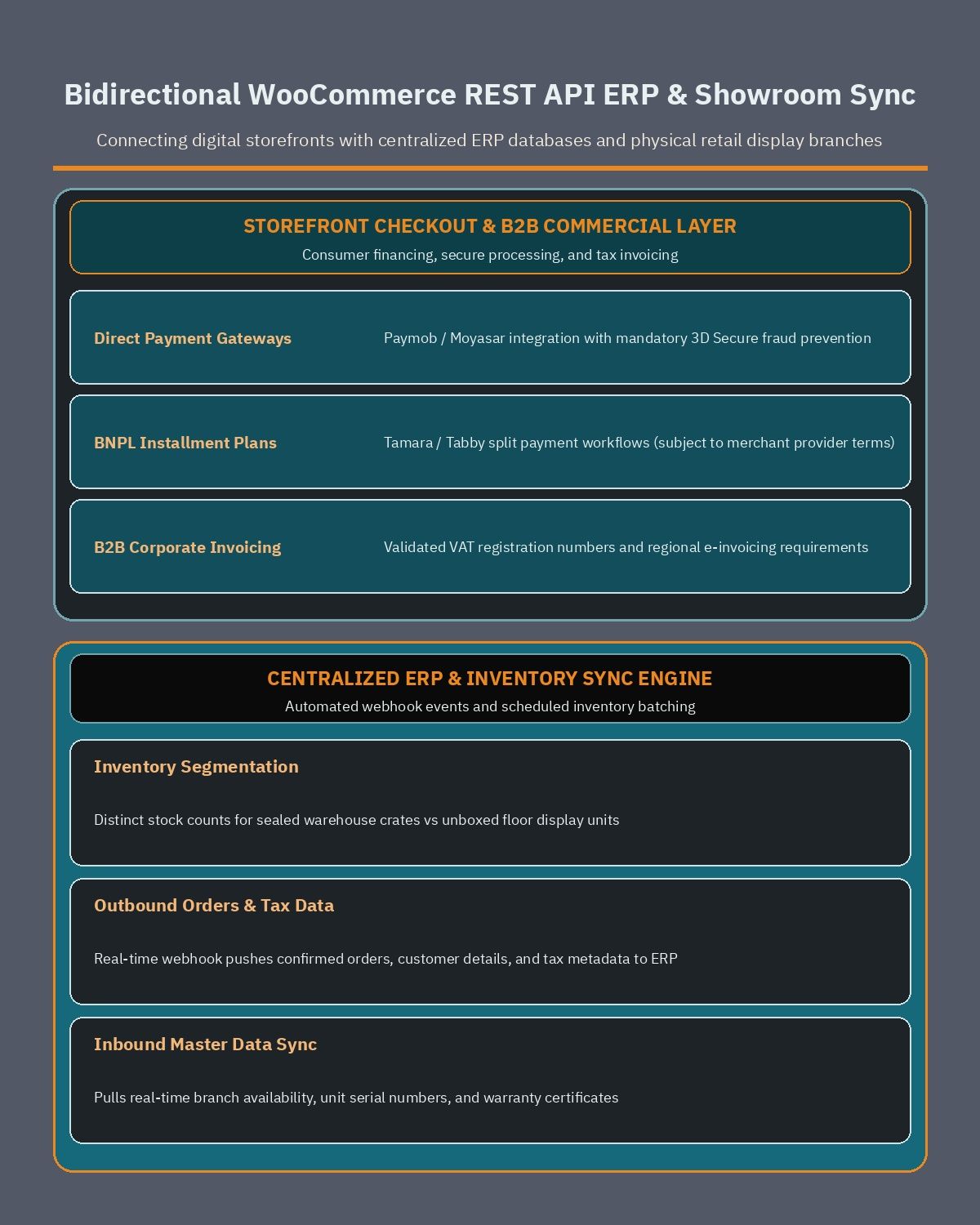
To keep online availability accurate without manual spreadsheet uploads, your store should connect directly to your ERP or inventory management system using the WooCommerce REST API and event-driven webhooks.
Separating boxed warehouse stock from showroom floor display units
In an appliance business, having “3 units in stock” inside the company ERP often means two factory-sealed cartons sit in the central warehouse while the third unit sits unboxed on a showroom floor as a display sample. A customer paying full price online expects a factory-sealed carton, not an unboxed display unit.
When designing your WooCommerce REST API middleware, your developer should implement stock-location filtering rules that protect fulfillment accuracy:
- Boxed sellable warehouse synchronization: Configure the ERP-to-WooCommerce stock sync endpoint to publish only factory-sealed warehouse quantities to the main product listing, excluding showroom floor display locations from standard online checkout.
- Showroom availability visibility and branch pickup mapping: If you offer Local Pickup for small and medium appliances, map branch-level boxed stock meta fields so shoppers see which physical showroom has sealed stock ready for collection.
- Safety stock buffers on fast-moving seasonal items: During peak summer air-conditioner demand or major retail campaigns, apply a configurable safety threshold in the sync layer so the last unit in a warehouse is held against simultaneous showroom POS checkout.
- Serial number and warranty record pushback: When warehouse staff scan the outbound appliance serial number in the ERP upon dispatch, push that serial number and the official tax invoice PDF back into the WooCommerce order record so the customer can download their warranty certificate from their My Account dashboard at any time.
Because appliance catalogs with hundreds of variable products, global filter attributes, PDF spec sheets, and ERP background sync tasks can put heavy query load on the database, you should pair your integration architecture with proper object caching and database indexing. Following proven engineering steps to speed up WordPress Arabic sites ensures that bilingual English and RTL Arabic category filters respond immediately even during high-traffic promotional campaigns.
What drives development budgeting and how to brief your WooCommerce team
When appliance distributors and retail chains plan an e-commerce build or migration, project scope and development investment are rarely driven by visual page count alone. Instead, the engineering effort depends on how deeply the storefront integrates with your technical catalog data, field service scheduling, freight logistics, and ERP stock workflows.
To scope your project accurately with a specialized WordPress development partner, evaluate these core architectural drivers and prepare your internal operational specifications before kickoff:
- Catalog taxonomy and cutout specification structure: How many appliance categories you carry, whether product data already exists in clean bilingual spreadsheets with separated exterior versus cabinetry cutout dimensions, and whether PDF spec sheets and energy cards are ready per SKU.
- Post-purchase service and bundling rules: Which categories require WooCommerce Product Add-Ons for technician installation, old unit haul-away, or store-configured extended service plans, and how many built-in kitchen suites will be merchandised through WooCommerce Product Bundles.
- Multi-class freight and delivery calendar logic: How your WooCommerce Shipping Zones and Product Shipping Classes separate two-person heavy truck delivery from parcel couriers, whether you require staircase/elevator checkout fields, and which branches support Local Pickup.
- Payment gateway, installment, and B2B invoice workflows: Which regional payment and split-financing plugins you have merchant accounts with, what cart value rules apply to each method, and what tax registration fields your B2B corporate buyers require on invoices.
- ERP, POS, and warehouse synchronization depth: Whether your ERP provides documented API endpoints to sync boxed warehouse inventory, exclude showroom display floor units, and return scanned serial numbers through the WooCommerce REST API.
Getting these catalog, delivery, and ERP decisions mapped out before writing code prevents costly mid-project rework and ensures your online showroom matches the reliability of your physical branches. If you are planning a new appliance storefront or upgrading an existing catalog for the Saudi, UAE, or Egyptian market, book a free consultation to review your SKU structure, shipping classes, and ERP integration requirements with a senior WooCommerce architect.
Frequently asked questions
How should a WooCommerce store display built-in appliance cutout dimensions and technical specs?
You should separate external product measurements from internal cabinetry cutout dimensions using global WooCommerce product attributes for width, height, and depth. This lets shoppers filter built-in ovens, hobs, and dishwashers by exact kitchen cabinet openings alongside capacity in liters, kilograms, or BTU and store-configured energy ratings. Attaching downloadable PDF specification sheets and installation diagrams on each product page gives kitchen contractors and homeowners the exact measurements required before checkout.
Can customers book technician installation and old appliance removal directly on the product page?
Yes, using WooCommerce Product Add-Ons, you can display store-configurable checkboxes and dropdowns for certified technician installation and old unit haul-away before the customer adds the appliance to the cart. This workflow separates freight delivery from specialized technical tasks such as split air conditioner mounting, washing machine plumbing connection, or built-in gas hob commissioning. You can also capture floor level and dismantling details so dispatch teams arrive with the proper tools.
How does WooCommerce handle shipping for both heavy white goods and small kitchen appliances?
You can combine WooCommerce Shipping Zones with Product Shipping Classes to assign different fulfillment rules based on weight, size, and fragility. Refrigerators, washing machines, and built-in ovens are placed in a heavy freight class routed to two-person delivery trucks with scheduled appointment windows. Small appliances like blenders and coffee makers use a standard courier class, while eligible showroom items can offer Local Pickup for customers who prefer direct branch collection.
What payment and installment options work best for high-ticket appliance orders in MENA?
Appliance retailers typically combine regional card gateways like Paymob for WooCommerce and Moyasar with local debit networks such as Mada, digital wallets like Apple Pay, and split-payment plugins including Tamara Checkout and Tabby Checkout. Enabling 3D Secure verification helps protect high-value kitchen package transactions against unauthorized chargebacks. Merchants should always verify current supported countries, currencies, and order value limits directly on each payment provider official plugin page before configuring checkout.
Why is ERP synchronization important for multi-branch appliance showrooms and warehouses?
High-ticket appliances are often stored in limited quantities across regional warehouses and physical showroom floors, making manual stock spreadsheets prone to costly overselling. Connecting your store to your ERP system through the WooCommerce REST API automates stock updates, separates boxed warehouse inventory from unboxed showroom display units, and records appliance serial numbers for distributor warranty registration. It also transfers corporate tax invoice fields directly into your accounting system for B2B orders.
References
- WooCommerce Variable Product Documentation
- WooCommerce Managing Product Categories, Tags and Attributes
- WooCommerce Product Add-Ons Documentation
- WooCommerce Product Bundles Documentation
- WooCommerce Setting Up Shipping Zones
- WooCommerce Product Shipping Classes Documentation
- WooCommerce Local Pickup Shipping Method
- WooCommerce REST API Documentation
- Paymob for WooCommerce on WordPress.org
- Moyasar Payment Gateway Plugin on WordPress.org
- Tamara Checkout for WooCommerce on WordPress.org
- Tabby Checkout for WooCommerce on WordPress.org