هذا المقال متوفر باللغة العربية — اقرأ بالعربية
Planning an interior design website WordPress studios can rely on starts with how property owners actually hire a designer in Egypt, Saudi Arabia, and the Gulf. Referrals and Instagram posts often spark initial curiosity, yet someone preparing to renovate a villa, finish an apartment, or fit out a commercial space wants to inspect full rooms before committing. They look for clear proof of spaces your studio has completed, honest notes on what your team handled, and a direct way to send project details.
Unlike a general contracting brochure built around tender prequalification, a design or decor studio site depends on visual presentation. If room galleries load slowly on mobile data or mix unlabelled inspirations with real work, serious leads leave quietly before reaching your contact page. Structuring your pages around genuine photography, fast galleries, and a focused inquiry path builds confidence in both English and Arabic.
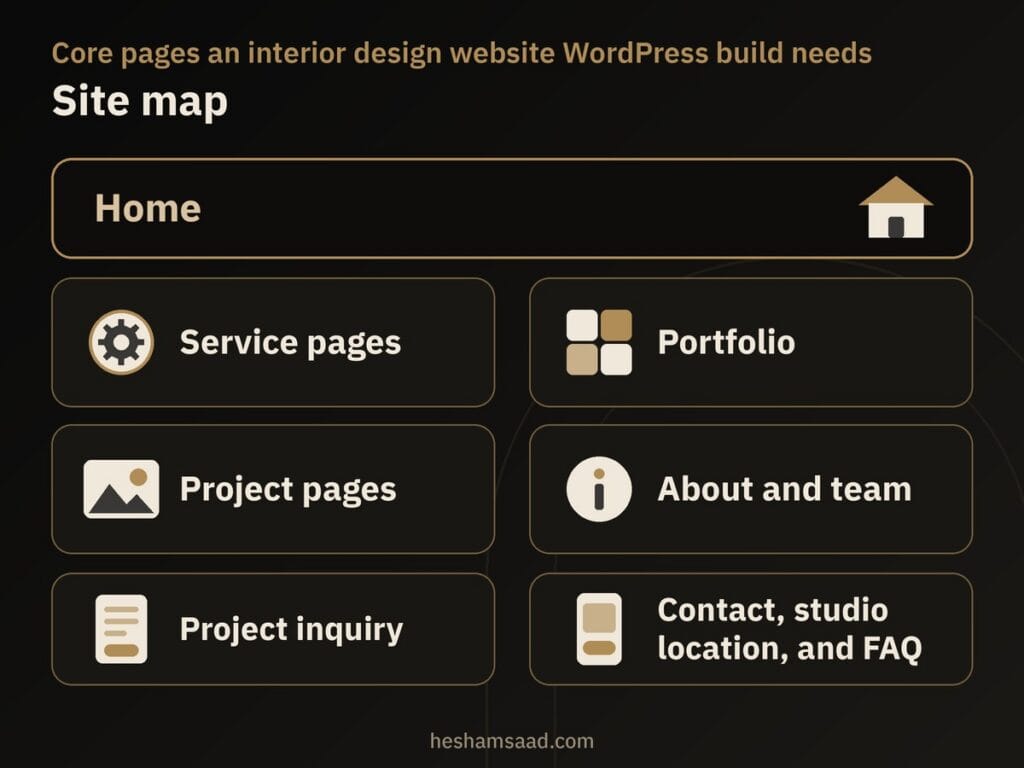
Core pages an interior design website WordPress build needs
Most small and mid-size studios do not need a bloated menu with dozens of half-empty pages. Every page should earn its spot by answering a practical question a homeowner, retail founder, or office manager asks before requesting a meeting. Publish service pages only for work your studio genuinely offers so incoming inquiries match your real capabilities.
- Home: states what types of interiors you design, which cities you cover, a curated preview of real projects, and a direct inquiry button.
- Service pages: dedicate one page to each service your studio really provides, such as residential design, commercial design, fit-out supervision, or 3D visualization.
- Portfolio and project pages: a scannable overview page leading to one dedicated page per real completed project.
- About and team: genuine details on the principal designer, team roles, and how projects run, with no invented credentials.
- Project inquiry: a focused form asking for project type, city, rough timeline, and preferred contact method.
- Contact, studio location, and FAQ: phone, email, public studio or showroom address where applicable, and clear answers to common pre-project questions.
Giving each service its own page helps visitors who need only 3D visualization or only fit-out supervision confirm right away that your workflow fits their stage. Linking those service pages directly to relevant completed projects lets prospective clients move straight from scope explanations to visual proof.
Keep the About and team page grounded in verifiable facts rather than invented project counts, unverified awards, or rounded years of experience. Property owners planning a serious renovation value plain transparency about who will actually design and supervise their space.
Your portfolio is the product: one page per real project
Uploading loose room shots into one endless photo grid leaves visitors guessing whether they are viewing a handed-over apartment, a retail fit-out, or an unbuilt render. As practical advice, give one dedicated page to each real project your studio completed and has permission to show. Always ask the client for explicit permission before publishing photographs of an occupied home or naming a commercial client publicly.
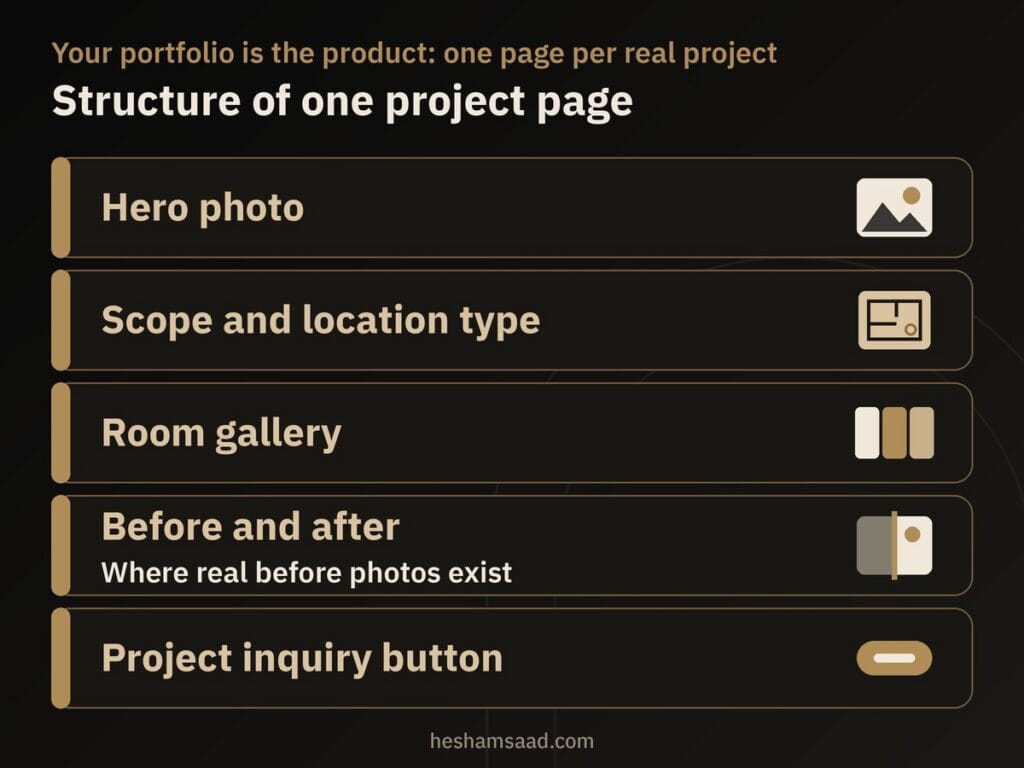
When a homeowner prefers privacy, describe the work honestly by property type and area, such as a residential apartment in a named district or a retail unit in a named city. Each project page works best when it pairs strong photography with five clear elements:
- Project name or descriptive space label alongside the location type (residential or commercial) and the city or district.
- Scope of work explaining what the studio actually handled, from layout planning and material boards to technical drawings or site supervision.
- Real photographs of finished rooms, or clearly labeled 3D visualizations when presenting an unbuilt design package.
- Before and after comparisons only on projects where genuine photographs of the original space exist.
- A clear project inquiry button at the bottom of the page for visitors planning a similar property.
Never invent a client name, a design award, a testimonial, or a commercial result to fill out a layout. A smaller set of well-presented real projects earns far more trust than dozens of thin pages holding two dark phone snapshots and no scope notes.
This visual layout sets a design studio apart from our sibling guide on building a construction company website on WordPress, where contractors organize pages around services, project proof, and quote requests. For an interior designer, room-by-room photography paired with clear scope boundaries does the persuasion.
Keeping photo-heavy galleries fast on mobile and desktop
Architectural photography sells interior design, yet uploading raw photographer exports straight into WordPress slows project pages down on mobile connections. Google Search Central notes that images are often the largest contributor to overall page size, recommending image optimization, responsive image techniques, and regular checks in PageSpeed Insights.
Preparing room photographs before upload
Never upload full camera originals; export room photos at the dimensions they will actually display on screen and compress them before adding them to the Media Library. Follow Google image best practices by placing photos in standard HTML img elements rather than CSS background images, since Google Search does not index CSS images and supports standard formats including JPEG, PNG, WebP, AVIF, SVG, GIF, and BMP. Our practical guide to optimizing images for WordPress walks through preparing photo-rich pages step by step.
Rename files with short, descriptive words before uploading instead of leaving generic camera codes such as IMG00023.JPG, and write useful, information-rich alt text for accessibility and search context without stuffing keywords. Keep room photos near relevant project copy and assign a sharp, high-resolution project photo as your social preview image rather than falling back to a studio logo.
How lazy loading affects your hero photo and galleries
Since WordPress 5.5, WordPress lazy-loads images by default using the native HTML loading=”lazy” attribute on img tags that have width and height attributes present, while back-filling width and height on attachment images where it can to reduce layout shifting alongside responsive srcset and sizes attributes. Both web.dev and Google Search Central warn against lazy-loading images likely to be immediately visible in the viewport when a page opens, especially Largest Contentful Paint (LCP) images, which measure render time for the largest visible image or text block. As practical advice, keep the top hero photo of each project page eager, let lower gallery rows lazy-load on scroll, and check rendered pages with the URL Inspection Tool in Search Console.
Gutenberg Gallery block or a visual page builder
Studio owners often assume they need a complex layout add-on just to arrange room photographs cleanly. According to the official WordPress documentation, the built-in Gallery block lets you add multiple photos by upload, from the Media Library, or via drag and drop, automatically arranging them while letting you control column counts and image sizes. Each photo inside a Gallery block works as an individual Image block, and you can write captions both for individual shots and for the gallery as a whole.
For click behavior across its images, the Gallery block supports linking to attachment pages, linking to the media file, keeping no link, or enabling an “Enlarge on click” lightbox where visitors move forward and backward through rooms. You can also build a dynamic gallery from photos attached to a post via “Use attached images”, or transform the block into Image, Columns, Group, Details, or Grid blocks when a layout changes. A visual page builder offers finer control over asymmetric grids, though it adds extra design and maintenance decisions, as we cover when comparing a visual page builder with Gutenberg.
An inquiry form that asks for the right project details
A bare contact box invites vague one-line messages, whereas a lengthy questionnaire feels intrusive before a property owner even knows whether your studio is available. As practical advice, ask only for what your team needs to send a helpful first reply: client name, preferred contact method (phone call, WhatsApp, or email), project type listing only the services you actually offer, city or district, rough timeline, and a short description of the space.
Do not make a budget field required on your initial form, and never invent arbitrary budget brackets in a dropdown menu. A required budget field can put off a visitor who is not ready to name a figure, or push them into guessing. Leave budget strictly optional if you include it at all, and avoid file upload fields for floor plans or photos on the first form; asking for a shared link or requesting plans after your first reply keeps submissions reliable.
Consultation request form or WhatsApp click to chat
In Cairo, Riyadh, Dubai, and across the Gulf, many prospective clients reach for WhatsApp out of habit, yet managing every first contact solely in chat threads leaves your team chasing missing location and scope details. As practical studio advice, use your structured consultation or project inquiry form as the primary call to action when screening full residential, commercial, or supervision commissions. Offer WhatsApp click to chat as a secondary option for quick preliminary questions, such as checking whether you serve a specific neighborhood or how initial meetings work.
When adding a chat button, use WhatsApp’s official click-to-chat format (https://wa.me/ followed by your full phone number with country code in digits only) and an optional ?text= parameter for a short pre-filled message. Keep that pre-filled prompt brief so it simply asks for an introductory call or studio visit. As a practical precaution, never ask prospective clients to send national ID numbers, contracts, title deeds, or private documents in pre-filled chat text.
Getting found on Google, Maps, and from Instagram
Social discovery and local search work together when property owners look up your studio name on Google or Google Maps after spotting a room on Instagram. Under Google Business Profile guidelines, represent your studio accurately as it is recognized on real-world signage and stationery, keep only one profile per business, and enter a precise address if clients visit your studio or showroom, or define an accurate service area if you travel to client sites. Google explains that local results rely mainly on relevance, distance, and prominence (which also reflects reviews and links) while keeping exact algorithm details confidential, so nobody can promise specific rankings.
Follow Google Maps User Generated Content policy by requesting honest reviews only from genuine past clients and never posting fake ratings. If your studio operates from a real public office or showroom address, a developer can also add LocalBusiness structured data with required name and address fields plus recommended telephone, opening hours, coordinates, and URL details, validating it in Google’s Rich Results Test without expecting guaranteed rich results, alongside the steps in our guide to local SEO for WordPress websites.
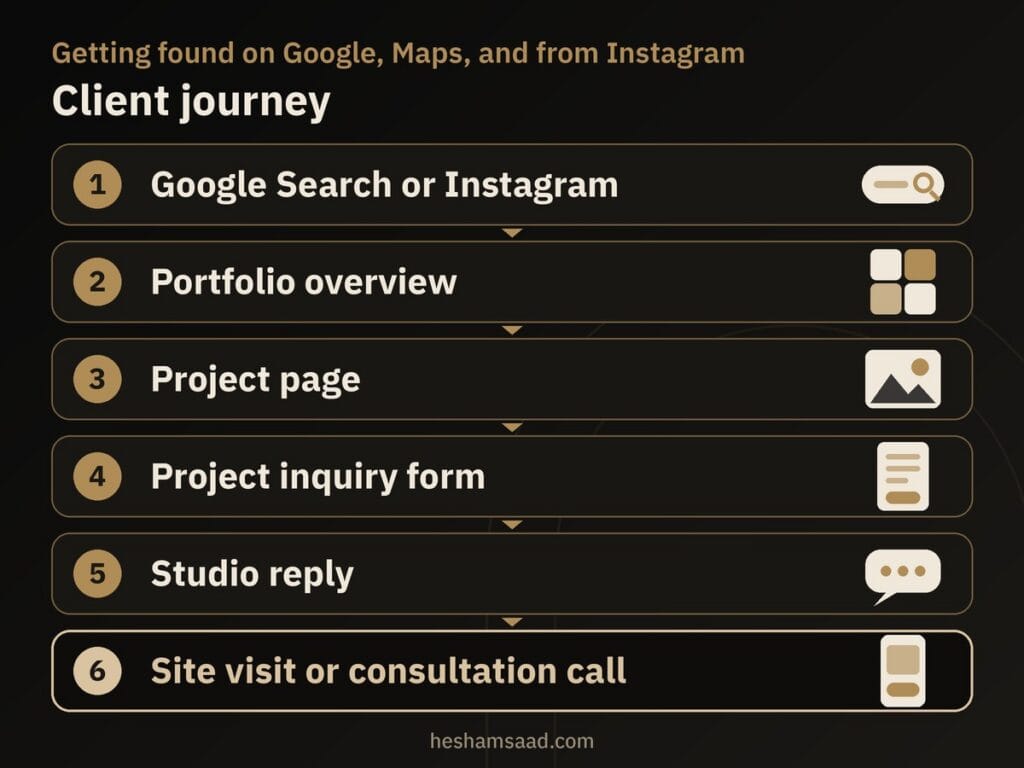
Placing your portfolio link in both your Instagram bio and your Google Business Profile funnels social followers and search visitors into the same clear path. Instead of piecing together project basics across scattered direct messages, your studio replies to leads who have already seen full project pages and shared their timeline.
Arabic and English pages with proper RTL layout
Serving private homeowners, local commercial founders, and international tenants across MENA usually requires publishing your portfolio and service pages in both Arabic and English. On WordPress, the free Polylang plugin translates pages, posts, media, categories, tags, and custom post types, supports right-to-left (RTL) scripts, sets the language via URL code, subdomain, or separate domain, and provides language switcher blocks, widgets, or menu items, with additional features available in Polylang Pro.
Write your Arabic service descriptions and project scopes naturally for an Arabic reader rather than translating English sentences word for word. Before going live, check every Arabic project page on a phone to test gallery captions, lightbox controls, menu alignment, and inquiry form fields, and review our guide on fixing common WordPress RTL layout issues to catch mirrored spacing early.
What drives the build cost and launch timeline
Two interior design studio sites can involve very different workloads depending on how much photography is ready and how custom the presentation needs to be. The main cost drivers are the number of distinct service pages, the number of project pages and how much real photography and project copy is prepared, gallery and layout requirements, publishing in both Arabic and English, inquiry form logic and integrations, image preparation, and ongoing maintenance after launch. For a closer look at planning a sensible web budget, see our breakdown of what shapes WordPress website costs.
How soon your site launches depends less on setup mechanics and more on content readiness, client permissions for project photos, approved service texts, Arabic copy, team details, internal approvals, and testing the inquiry flow. Cover core WordPress security basics before launch as well by serving every page over HTTPS and keeping WordPress updated using official releases from wordpress.org.
When bringing in a WordPress developer helps
A principal designer comfortable with the block editor can assemble a simple starter site, yet photo-heavy bilingual portfolios expose technical rough edges quickly. Working with a specialist in custom WordPress development helps when you want a repeatable project page structure your staff can update cleanly, fast room galleries with eager hero images, polished Arabic RTL layouts, dependable inquiry routing, and properly validated LocalBusiness structured data for a public studio address.
As your concrete next step, shortlist the completed projects you already have client permission and real photography to show, write down the exact services your studio offers, and check what Arabic and English copy is ready. Once you have that list together, book a free consultation so we can review your portfolio layout, gallery speed, and project inquiry flow before you build or redesign.
Frequently asked questions
Do I need a website if my clients come from Instagram?
Yes, a website still helps when referrals and social discovery bring most of your leads. Prospective clients planning a renovation usually want one organized place to review full rooms, read what your studio actually handled on each project, confirm the services you offer, and submit project details through a structured inquiry form.
How many projects should the portfolio show?
As practical advice, there is no fixed project target you need to hit before launching. A smaller collection of real, well-presented projects with genuine room photography and clear scope notes builds far more confidence than a large archive of thin pages. Give each completed project its own page once you have client permission to show the space.
Will a photo-heavy gallery slow my site?
Photo galleries stay fast when you resize and compress room images before uploading instead of placing full camera originals into the Media Library. Since version 5.5, WordPress adds native browser lazy loading by default to images that include width and height attributes. Keep your top hero photo eager so the opening screen renders right away while lower gallery rows load on scroll.
Should the inquiry form ask for a budget?
No, a budget field should never be required on your first inquiry form, and you should not list invented budget brackets. A required field can put off a visitor who is not ready to name a figure. Ask instead for project type, city or district, rough timeline, preferred contact method, and a short summary of the space.
How do I run an Arabic and English site?
You can run both languages on one WordPress installation using the free Polylang plugin, which translates pages, posts, media, categories, tags, and custom post types while supporting right-to-left scripts. Write natural Arabic descriptions for your services and project scopes rather than literal translations, and test gallery captions, lightboxes, and inquiry forms in Arabic view on mobile.
References
- WordPress Documentation: Gallery block
- WordPress Documentation: Image block
- Make WordPress Core: Lazy-loading images in 5.5
- web.dev: Browser-level image lazy loading for the web
- web.dev: Optimize Largest Contentful Paint
- Google Search Central: Fix lazy-loaded content
- Google Search Central: Google image SEO best practices
- Google Search Central: Local business structured data
- Google Business Profile Help: Guidelines for representing your business on Google
- Google Business Profile Help: Tips to improve your local ranking on Google
- Google Maps User Generated Content Policy
- WhatsApp Help Center: How to use click to chat
- WordPress.org Plugin Directory: Polylang
- WordPress Advanced Administration Handbook: Hardening WordPress
- WordPress Documentation: HTTPS for WordPress