هذا المقال متوفر باللغة العربية — اقرأ بالعربية
A sofa is hard to sell from one photo. Before buying, people want to know if it fits the living room, which fabrics you actually make, what delivery to their area costs and whether anyone will put it together. A well planned furniture store website WooCommerce build answers those questions on the page, so nobody has to pick up the phone first. Below I cover the parts to plan: pages, product details, variations, galleries, delivery, assembly, the showroom and the Arabic version.
I wrote this for furniture store owners in Egypt, Saudi Arabia and the Gulf who are about to hire someone to build an online furniture store. You do not need to learn the settings yourself. If you know what to ask for, though, the quotes you get will be much easier to compare.
Core pages for a furniture store website WooCommerce build
Agree on the site map before you talk about features. Each page has one job, and every page you leave out turns into a question your staff answer by hand.
- Home: your main categories, one short line about who you are and a clear path to the showroom.
- Categories by room or type: living room, bedroom, dining and office, or sofas, beds, tables and storage. Follow the way you already arrange your stock.
- Product pages: one per piece, with dimensions, materials, options and a delivery note.
- Showroom page: address, opening hours, map and a WhatsApp button.
- Delivery and assembly page: the areas you cover, how fees work and your assembly policy.
- Returns policy: in your own words, matching what your team really does.
- About and contact: who runs the store and how to reach you.
- FAQ: the questions your sales team answers most.
Keep the main menu short. Room or type categories go in the top navigation. Delivery, returns and the FAQ go in the footer, and each product page links to them again.
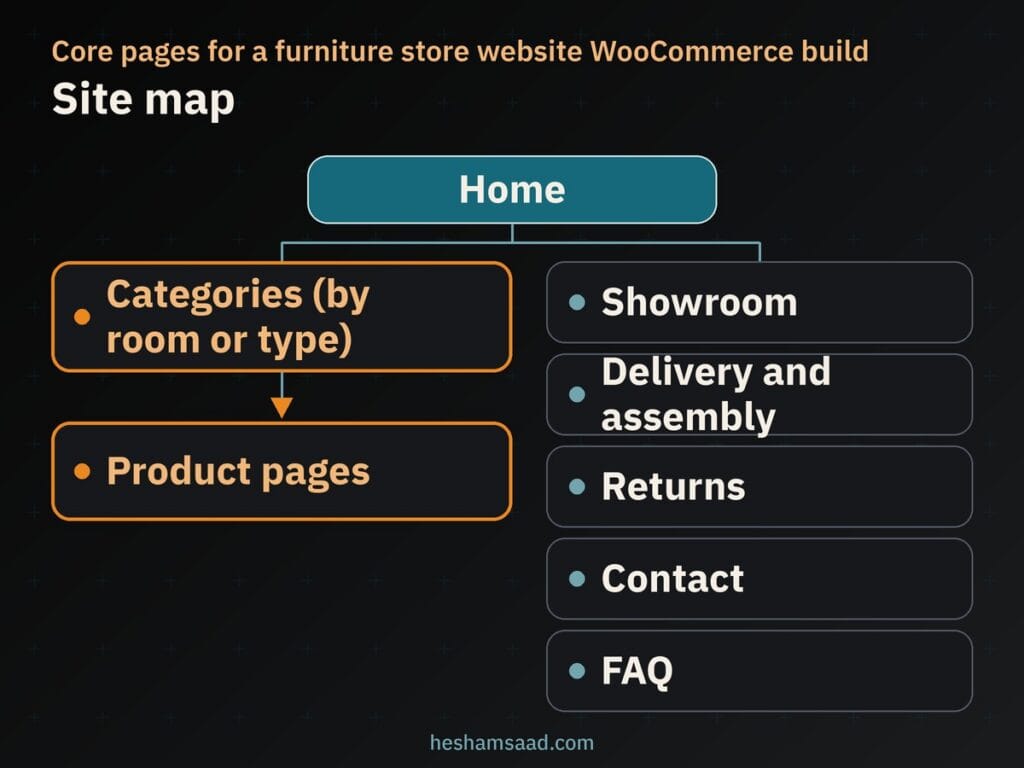
Once this map is agreed, your developer can plan and quote the build around real pages, not guesses.
Product pages that show real dimensions
With furniture, size matters as much as looks. A dining table that looks great in a photo but will not fit through the door is a return waiting to happen. Put the measurements on every product page, not just in a PDF. Here is what I show for each piece:
| What to show | Why it matters | Where it goes |
|---|---|---|
| Width, depth and height | The buyer can check the fit at home | Next to the price and options |
| Materials and fabric | Sets expectations on feel and care | Short description |
| Sizes and colors you make | Shows only what you can deliver | Option selectors above Add to cart |
| Real photos from several angles | Shows details and scale | Main gallery |
| Delivery and assembly note | Answers cost and setup questions early | Under Add to cart |
Use the same units on every page, and measure the actual piece instead of copying a supplier catalogue. If a product arrives in parts, say so. Also mention when the packaged size matters for stairs or lifts.
WooCommerce lets each product variation carry its own weight and dimensions, which helps with delivery logic. Write the visible measurements in the description as well, because that is the part buyers actually read.
Sizes and colors as variable products
When one sofa comes in several widths and fabrics, you do not want a separate product for every combination. WooCommerce handles this with variable products. In the product data box you choose Variable Product, add attributes such as Size and Color, and type the values separated by a vertical bar.
An attribute can be global, shared across the whole catalogue, or belong to one product only. Global attributes keep fabric and finish names consistent from page to page, and the admin stays easier to manage.
With the attributes in place, WooCommerce can generate a variation for every combination, or you can add variations one by one. Each variation can have its own image, SKU, price, stock status, weight, dimensions, shipping class and description. Bulk Actions let you set data for all variations in one go.
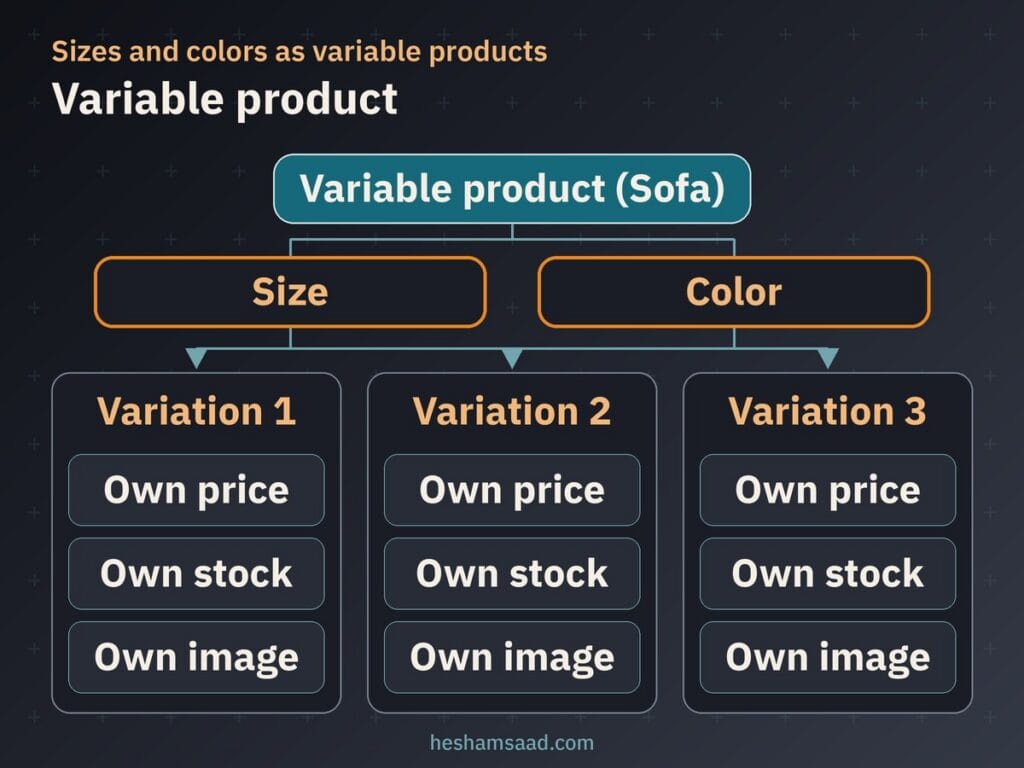
Two rules save a lot of trouble with furniture. First, only create the combinations your workshop or supplier can really make. If the large size does not come in velvet, add variations by hand instead of generating everything and hiding the wrong ones later. Second, give each color or fabric its own photo. The picture then changes when the buyer picks a color, and what arrives matches what they chose.
Plan your attributes before you load any products. The WooCommerce docs note that if you change attributes after creating variations, you may need to define the variations again, which is slow work on a big catalogue.
Large photo galleries that stay fast on mobile
Furniture needs a lot of photos: front, side, back, a close-up of the fabric or joinery, and one shot in a real room so the buyer can judge scale. Use photos of your own pieces. Supplier stock images make you look like any other reseller of the same catalogue, and they may show a finish you do not sell.
Google’s image guidance points out that images are often the largest contributor to page size, so preparation matters. Export each photo near the size it will be shown at and compress it. Give it a short, descriptive filename like oak-dining-table-side.jpg, not the camera’s default name. Write alt text that describes the piece and its color, without stuffing keywords.
Since version 5.5, WordPress lazy-loads images by default using the native loading="lazy" attribute. It adds the attribute to images that have width and height set, and fills in those dimensions where it can to reduce layout shifting. WordPress responsive images use srcset and sizes, so phones download smaller files.
There is one catch. web.dev warns against lazy-loading images that are likely to be visible when the page opens, especially the LCP image, and Google Search Central gives the same advice. On a product page that is usually the main product photo. Load that one eagerly and let the rest of the gallery load lazily.
For the full routine on sizes, formats and compression, read my guide to optimizing images in WordPress. Then test your product pages with PageSpeed Insights, and on a real phone, not only on office Wi-Fi.
Delivery fees for bulky pieces
Delivery is where a furniture shop differs most from a shop that sells small boxes. WooCommerce gives you three building blocks for it:
- Shipping zones: regions defined by country, state or province, continent or postcode. Customers only see the methods for their own zone, and each address matches the first zone that fits, so sort zones from the smallest area to the largest.
- Flat rate: a fixed cost per cart, with optional per item costs, added inside a zone.
- Shipping classes: groups such as bulky or small items. They cannot create rates by themselves; they let Flat Rate charge a different cost for each class.
In practice, create a zone for each city or area you really deliver to. Put sofas, wardrobes and beds in a bulky class, and cushions or lamps in a small one. Then pick the calculation type. Per Class charges for each class in the cart, and Per Order charges only the most expensive class. Which one is fair depends on how your trucks run. That is your call, not the software’s.
Watch the default zone, Rest of the world. If an address lands in a zone with no methods, WooCommerce tells the customer no shipping is available. That beats taking an order you cannot deliver, but your delivery page should still list the areas you cover.
Whatever your amounts are, show the fee or the rule before checkout: on the product page, on the delivery page and in the cart. I never set delivery prices or times for a client. Those come from the store.
Assembly, returns and delivery policies
Assembly is a business decision, not a technical one. You can include it in the price, offer it as a paid option or not offer it at all. Any of these works, as long as the buyer knows before paying.
State the policy on every relevant product page and again at checkout. If assembly is optional, a developer can add it as a clear choice the buyer selects. It then shows on the order, and your team knows which deliveries need assembly.
Write the returns and delivery pages in your own words. Cover what happens when a piece arrives damaged, whether assembled items can come back, who pays for collection and how buyers can reach you. A template copied from another site will promise things your team does not do.
Link these pages from the footer, from each product page and from checkout, so nobody has to go looking for them.
The showroom page, local pickup and Google
If you have a physical showroom, the website should send people there as well as to the cart. Some buyers want to sit on the sofa before they pay, and the site can make that visit easy to plan.
What the showroom page needs
List the real address, opening hours, an embedded map, a phone number and a WhatsApp button. WhatsApp click to chat uses a wa.me link with your full number in international format, digits only, plus an optional pre-filled message. That message could, for example, mention the product the visitor was looking at.
Keep the pre-filled text simple. I advise clients never to ask buyers to send ID numbers, contracts or private documents through it.
Local pickup from the showroom
If buyers can collect from the showroom or warehouse, add the WooCommerce Local Pickup method to the zone that covers your city. It shows a name you choose in the cart and at checkout, can carry an optional cost, and uses the store address for tax by default. Customers only see it when their address is in a zone that includes it.
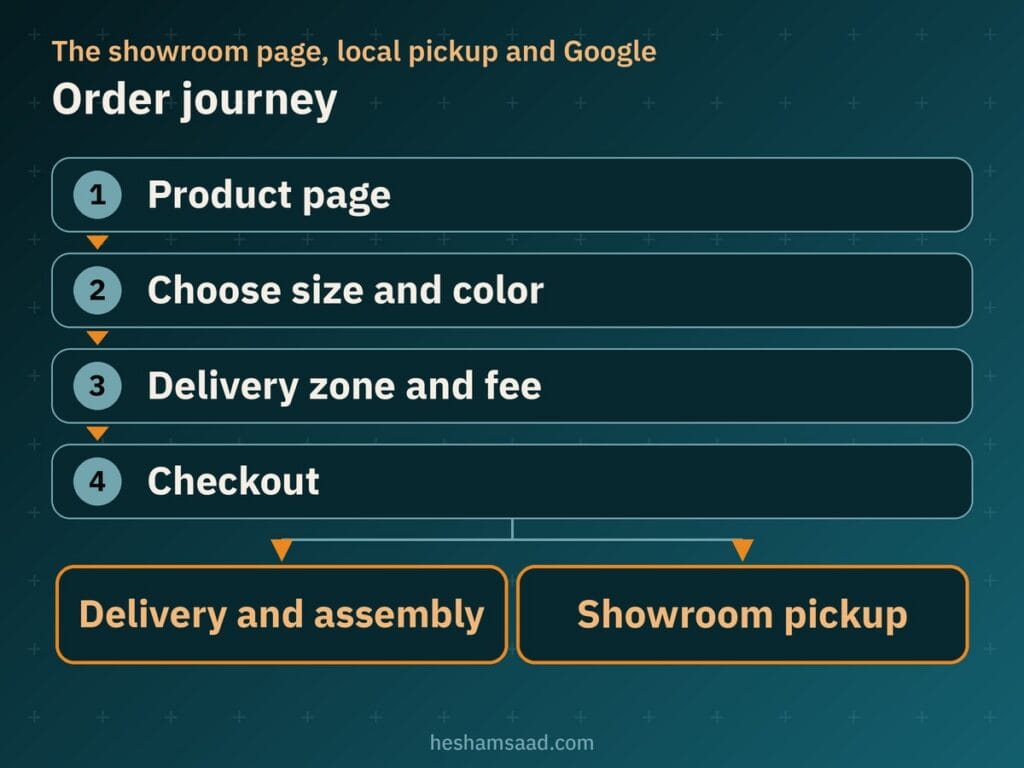
Seen this way, pickup is just one more branch at the end of the order, not a separate system to build.
Google Business Profile and structured data
Create a Google Business Profile for the real showroom, using the name on your signage and an accurate address. The guidelines allow only one profile per business. The exception is a service business with several locations, each with its own service area and staff. Read the guideline page before you create a second profile.
Google says local results are based mainly on relevance, distance and prominence, and that reviews and links feed into prominence. Complete, accurate details help, but nobody can promise you a position. Reviews must come from real customers, because the Google Maps content policy requires them to reflect a genuine experience.
On the site, a developer can add LocalBusiness structured data using the schema.org FurnitureStore type, since Google asks for the most specific sub-type. It needs a name and address, and Google recommends adding telephone, opening hours, geo coordinates and URL. Only add it for a real public address, and validate it with the Rich Results Test. Google does not guarantee rich results.
Product page SEO for furniture
Every product and category page can show up in search on its own, so treat each one as a page worth finding, not a catalogue entry. The basics:
- A unique title and description for each piece, written for your stock instead of copied from the supplier.
- Category pages with a short intro that names the room or type in plain words.
- Photos in standard img elements placed near the related text, because Google does not index CSS background images.
- A sharp, high resolution main image for sharing, not your logo.
- Internal links between related pieces, such as a bed and its matching side tables.
Variations help here as well. One solid sofa page with all its colors keeps your content in one place instead of spreading it across near-duplicate pages. For titles, categories and structured data, see my WooCommerce SEO guide.
Arabic, English and right-to-left layout
A bilingual furniture store needs more than translated text. Arabic reads from right to left, so menus, galleries, price blocks and checkout all have to mirror correctly, and the fonts have to show Arabic cleanly.
Polylang is a free multilingual plugin that translates posts, pages, media, categories, tags and custom post types. It supports RTL scripts and sets the language through a code in the URL, a subdomain or a separate domain for each language. Visitors switch languages through blocks, a widget or a menu item. Polylang Pro adds more features.
Agree with your developer on how products, variations and stock stay linked between the two languages. Before launch, test the cart, checkout and emails in both.
The theme has to handle RTL properly too. I compare the options in my guide to WooCommerce themes for Arabic stores. Read it before you buy anything.
What drives the cost of the build
I cannot give a fair number without seeing your catalogue, but I can tell you what moves it. When you compare quotes for furniture website design, check that each one covers these points:
- How many products and variations there are, and who enters them.
- Photo preparation: editing, resizing, renaming and alt text.
- Delivery logic: zones, shipping classes and the rules between them.
- Assembly as an option at checkout.
- Payment setup for the methods you want to accept.
- Arabic and English versions, including translated product content.
- The theme you choose and how much RTL work it needs.
- Maintenance after launch: updates, backups and security checks.
A quote that skips photos or delivery rules is not really cheaper. It just pushes that work to later, when it gets done in a hurry. For a furniture ecommerce website, ask for those parts in writing.
When a developer helps, and your next step
You can set up a simple shop yourself. A developer is worth it when the catalogue has many variations, delivery depends on zones and bulky classes, assembly needs to be a checkout option, or the store has to work in Arabic and English from launch day.
If you also offer interior design or want a portfolio side to the business, my guide to building an interior design website on WordPress is a good companion read.
Your next step: write down your categories, the sizes and colors each piece really comes in, the cities you deliver to, and your assembly and returns policy. Then book a free consultation and we will turn that list into a site plan. To see how I work first, read about my WordPress development service.
Frequently asked questions
Can one product have different sizes and colors?
Yes. In WooCommerce you set the piece up as a variable product, add attributes such as Size and Color, and each combination becomes a variation with its own price, stock status and image. Only create the combinations your workshop or supplier can really deliver, and give each color its own photo so the buyer sees exactly what they chose.
How do I charge delivery for bulky furniture?
Set up WooCommerce shipping zones for the cities you actually deliver to, then add a flat rate method in each zone. Put large pieces such as sofas, wardrobes and beds in a bulky shipping class so they carry their own cost. Show the fee or the rule on the delivery page and before checkout so nobody is surprised at the last step.
Should I offer assembly on the site?
That is your decision as the store owner: assembly can be included, offered as a paid option or not offered at all. Whatever you choose, state it clearly on the product page and again at checkout. A developer can add assembly as a clear option the buyer selects, so your team knows which deliveries need assembly.
How do I get my showroom found on Google?
Start with an accurate Google Business Profile for the real showroom, using the name on your signage and the exact address. Add a showroom page on the site with the address, opening hours, a map and a WhatsApp button, and ask real customers for honest reviews. Google ranks local results mainly on relevance, distance and prominence, so nobody can promise you a position.
How do I run an Arabic and English store?
Use WooCommerce for the shop and a multilingual plugin such as Polylang, which translates pages, media, categories and custom post types and puts each language on its own URL code, subdomain or domain. Polylang supports RTL scripts, but the theme must also show Arabic correctly from right to left. Test the cart, checkout and emails in both languages before launch.
References
- WooCommerce: Variable products
- WooCommerce: Setting up shipping zones
- WooCommerce: Flat rate shipping
- WooCommerce: Product shipping classes
- WooCommerce: Local pickup
- Schema.org: FurnitureStore
- Google Search Central: Local business structured data
- Google Business Profile: Guidelines for representing your business
- Google Business Profile Help: Tips to improve your local ranking
- Google Maps: User generated content policy
- WhatsApp Help Center: How to use click to chat
- Polylang on WordPress.org
- Make WordPress Core: Lazy-loading images in 5.5
- web.dev: Browser-level image lazy loading for the web
- Google Search Central: Google image SEO best practices