هذا المقال متوفر باللغة العربية — اقرأ بالعربية
If you are about to open an online store in Egypt, Saudi Arabia or the Gulf, the first real decision is usually WooCommerce vs Shopify. Both can sell products, take payments and ship orders. They get there in very different ways, and the differences matter more in the MENA region than most comparison articles admit: which payment providers work in your country, how well the store handles Arabic, who owns the code, and what you pay each month once the store is busy. This guide walks through those questions with facts from each platform’s own documentation, so you can choose with your eyes open or brief a developer properly.
I build WordPress and WooCommerce stores for businesses across the region, so I have an obvious preference. I will still tell you when Shopify is the better fit, because a store on the wrong platform costs more to fix than to plan. If you already know you want a bilingual store built on WordPress, our WooCommerce development service covers setup, Arabic content and care after launch. If you are still comparing, read on.
WooCommerce vs Shopify: the short answer for MENA store owners
Shopify is a hosted platform. You pay a monthly subscription, Shopify runs the servers, and you build the store inside its admin with themes and apps from its own stores. WooCommerce is an open-source plugin that turns a WordPress site into a store. The core plugin is free, but you choose and pay for hosting, and you or your developer are responsible for updates, backups and security.
In practice the choice usually comes down to three things:
- Payments in your country. Shopify’s own payment service is not available everywhere in the region, and using another gateway on Shopify adds a fee. WooCommerce connects to local gateways through plugins.
- How much control you need. If the store needs custom checkout fields, unusual product rules or deep links with your ERP or courier, WooCommerce gives you access to the code. Shopify gives you a cleaner, more limited box.
- Who will run it. A small team with no technical help often prefers Shopify’s managed setup. A business that already has a WordPress site, or works with a developer or agency, often gets more value from WooCommerce.
How each platform actually works
Shopify: rented, managed, opinionated
Shopify’s pricing page lists four main plans at the time of writing: Basic, Grow, Advanced and Plus. Each step adds staff accounts, reporting and lower card rates, and Plus is aimed at complex businesses and adds a fully customizable checkout. Prices are shown in your local currency and change with your billing cycle, so check the Shopify pricing page from your own country rather than trusting a number in a blog post.
Design comes from the Shopify Theme Store, which has free and paid themes. Extra features come from the Shopify App Store, and many apps charge their own monthly fee. You never touch a server, which is the main reason people choose Shopify.
WooCommerce: owned, flexible, your responsibility
The WooCommerce page on WordPress.org describes it as “the open-source ecommerce platform for WordPress” and says the core platform is free. The same page lists more than 7 million active installations. You install it on a WordPress site, pick a theme, and add extensions from the WooCommerce Marketplace or from WordPress.org.
Because it runs on your hosting, the server matters. WooCommerce’s server requirements currently recommend WordPress 6.9 or newer, PHP 8.3 or newer, MySQL 8.0 or MariaDB 10.6 or newer, HTTPS, and a WordPress memory limit of at least 256 MB. A cheap shared plan that cannot meet that list is where many slow, unstable stores begin.
Payments in Egypt, Saudi Arabia and the Gulf
This is the section where the regional answer differs most from the global one.
Shopify Payments and third-party fees
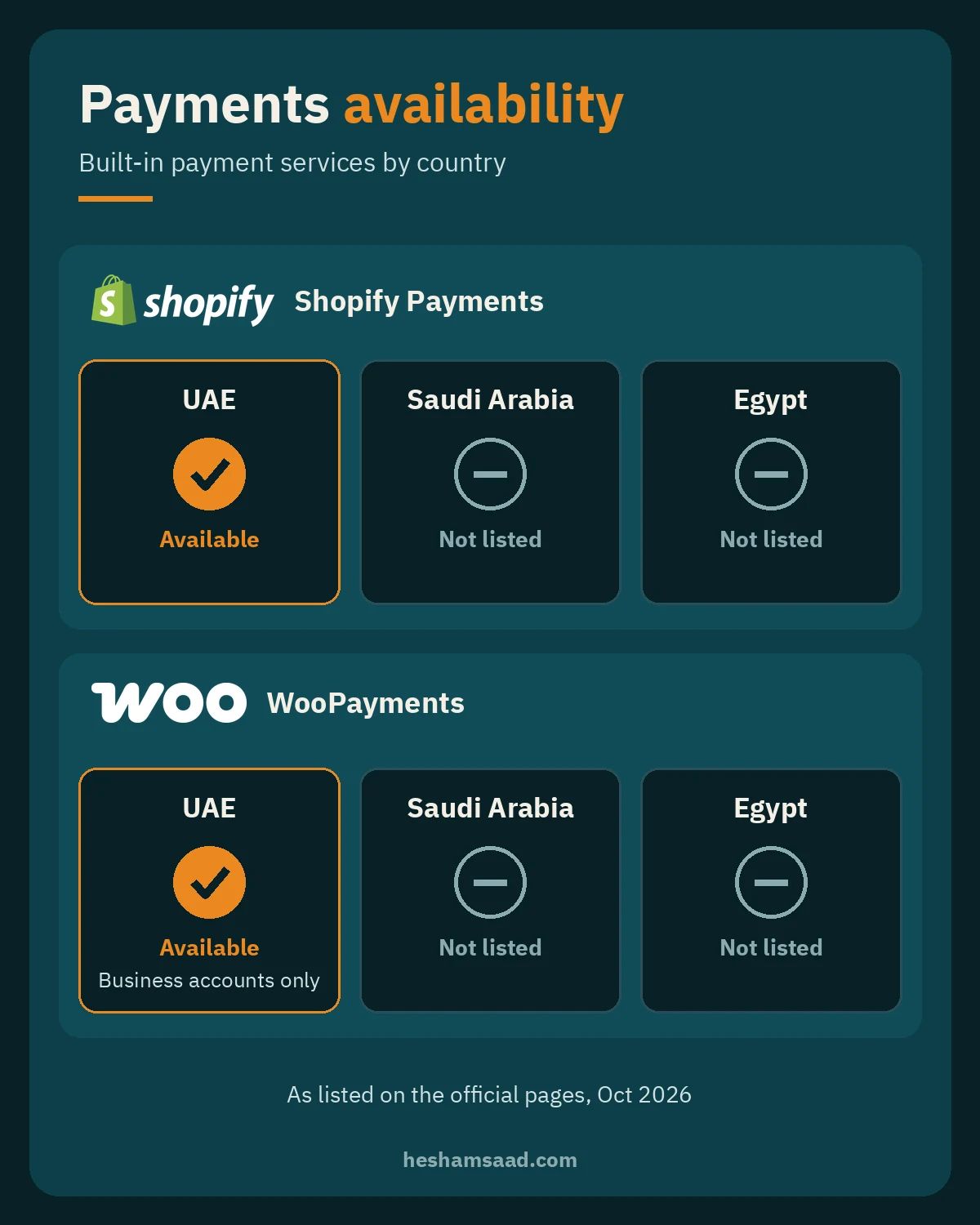
Shopify Payments is Shopify’s built-in payment service. Its supported countries page lists the United Arab Emirates, but at the time of writing it does not list Egypt or Saudi Arabia. If your business is registered in a country without Shopify Payments, you use a third-party provider instead.
That has a cost. Shopify’s help center states that third-party transaction fees apply to all transactions processed through third-party and alternate payment gateways, even when Shopify Payments is activated. The rate depends on your plan and location and is shown on the pricing page. This fee comes on top of whatever the payment gateway itself charges you.
WooCommerce and local gateways
WooCommerce does not charge a platform fee on your sales. Its own payment product, WooPayments, lists the United Arab Emirates among supported countries, with the note that UAE businesses can only open a Business account, not an Individual one. Egypt and Saudi Arabia are not on that list at the time of writing.
For stores in Egypt and Saudi Arabia, the usual route is a local gateway’s WooCommerce plugin. We compared the main options, including Paymob, Fawry, mada, Tabby and Tamara, in our guide to WooCommerce payment gateways in Egypt and Saudi Arabia. Whatever platform you pick, ask the gateway directly which platforms it supports, what it charges, and how long merchant approval takes.
Arabic, right-to-left and bilingual stores
Most MENA stores need Arabic, and many also need English for expat or export customers. Both platforms can do it, but in different ways.
- Shopify: you add and publish languages in the admin. Each published language gets its own URLs, and you translate content manually or with AI translations through Shopify’s Translate & Adapt app, with CSV files, or with a third-party app. Once a language is published, checkout and email notifications appear in that language. Shopify asks you to review theme compatibility before adding languages, so test the theme in Arabic before you buy it.
- WooCommerce: WordPress handles right-to-left layout, and a multilingual plugin such as WPML or Polylang manages the Arabic and English versions of products, pages and categories. The quality of the Arabic layout depends heavily on the theme you choose, which is why we wrote a separate guide to WooCommerce themes for Arabic stores.
Either way, check three things on a demo store before you commit: the product page in Arabic on a phone, the cart and checkout in Arabic, and the order confirmation email. Mixed directions in prices, phone numbers and addresses are the most common problem. For search, a bilingual store also needs the right language tags and URLs, which we cover in bilingual WordPress SEO.
Shipping, couriers and cash on delivery
Cash on delivery is still common in Egypt and parts of the Gulf, and local couriers matter more than global carriers for many stores. Before choosing a platform, list the couriers you plan to use and check whether each one offers an official integration for that platform.
On WooCommerce, shipping zones and methods are part of the core plugin, and courier companies or developers publish plugins that create shipments and print labels. Our guides to WooCommerce shipping zones for Egypt and the Gulf and courier plugins for Egypt and Saudi Arabia go through the setup. On Shopify, courier integrations usually come as apps. Shopify’s pricing page lists live third-party shipping rates as a feature of the Advanced plan, so if you need real-time quotes at checkout, compare plans with that in mind.
Tax and invoices
Both platforms let you set tax rates by country. The harder part in the region is invoices. If you sell in Saudi Arabia, ask how your invoices will meet ZATCA e-invoicing rules before you launch, on either platform. In Egypt, ask your accountant what the store must produce for your tax filings. Our WooCommerce VAT setup guide covers the WooCommerce side in detail.
What you really pay for on each platform
Comparing a Shopify plan with “free” WooCommerce is misleading. Both have running costs; they just sit in different places. Use this list to build a fair budget instead of comparing headline prices.
| Cost item | Shopify | WooCommerce |
|---|---|---|
| Platform | Monthly plan (Basic, Grow, Advanced or Plus) | Core plugin is free |
| Hosting | Included in the plan | Paid separately; quality matters a lot |
| Payment fees | Gateway fees, plus a Shopify fee when you use a third-party gateway | Gateway fees only |
| Theme | Free or paid from the Theme Store | Free or paid theme, or custom design |
| Extra features | Apps, many with monthly fees | Plugins and extensions, some with yearly licenses |
| Maintenance | Handled by Shopify for the platform | Updates, backups and security are on you or a care plan |
| Development | Theme and app customization | Full access to code and database |
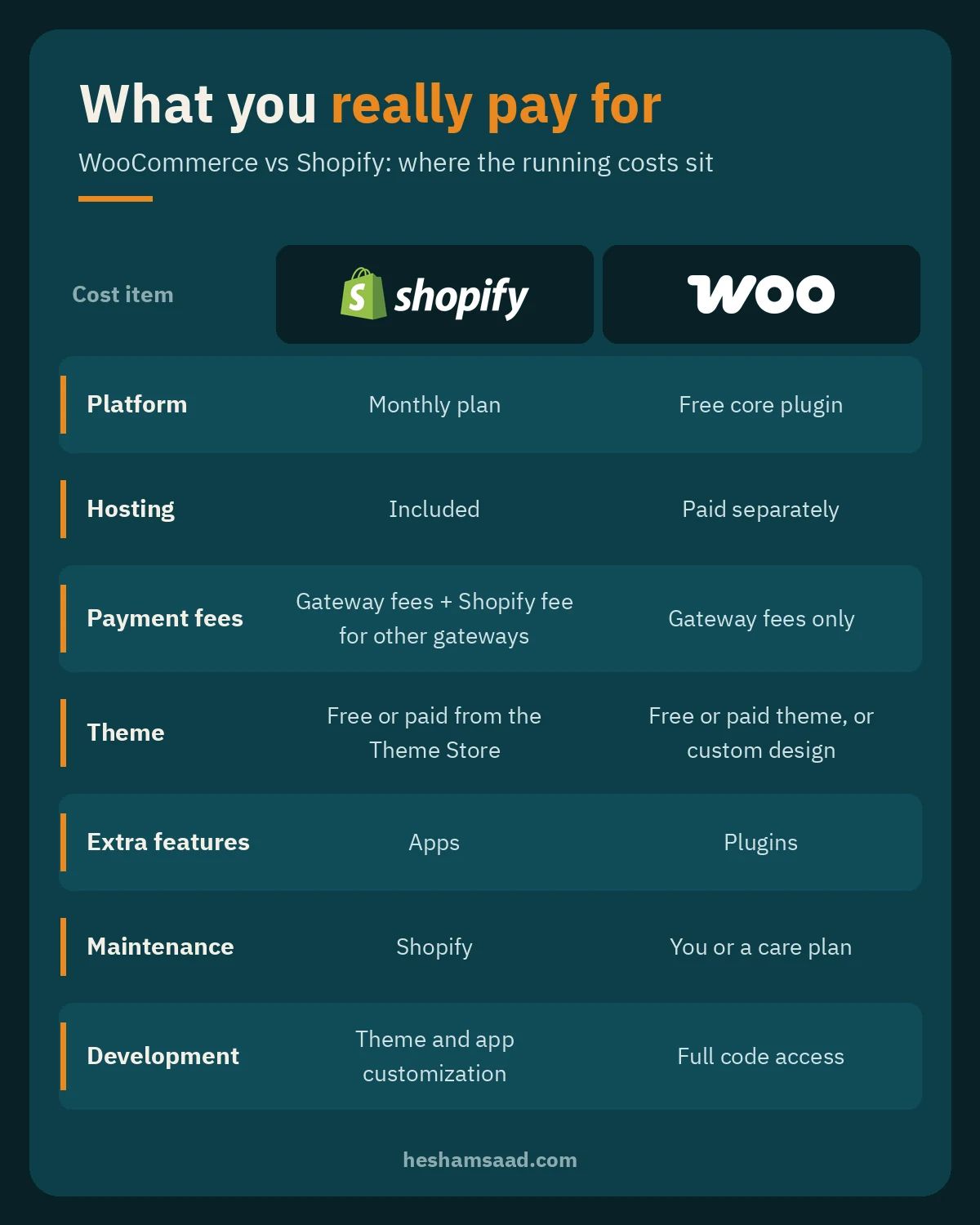
The maintenance row is the one people underestimate with WooCommerce. A store needs updates, tested backups and security monitoring every month. If you do not have someone in-house, budget for a WordPress care plan from day one. For a wider view of project budgets, see our article on what a WordPress website costs.
Ownership, flexibility and moving later
Ownership is where the platforms differ most in principle. A WooCommerce store is your WordPress site: your files, your database, your hosting account. You can move hosts, hire a different developer, or change anything in the code. A Shopify store runs on Shopify’s platform under its terms, and customization stays within what themes, apps and Shopify’s APIs allow. That flexibility is also what makes a WooCommerce multivendor marketplace possible, with many sellers on one store.
Moving later is possible in both directions. Shopify lets you export products to a CSV file for backup or migration, and WooCommerce includes a built-in CSV tool for importing, exporting and bulk-updating products. Products are the easy part, though. Customers, orders, reviews, redirects and SEO settings take more planning, so it is cheaper to pick the right platform now than to migrate in two years.
When Shopify is the better choice
- Your business is registered in a country where Shopify Payments works, such as the UAE, and you plan to use it.
- You want to launch quickly with a standard catalog and no custom checkout logic.
- Nobody on your team wants to think about hosting, updates or backups, and you have no developer on call.
- You are comfortable paying monthly for apps to add the features you need.
When WooCommerce is the better choice
- You sell in Egypt or Saudi Arabia and want to use local gateways without an extra platform fee on each sale.
- You already have a WordPress site with content and search traffic and want the store on the same domain and admin.
- You need custom product types, checkout fields, B2B pricing, or integrations with local couriers, ERPs or accounting tools.
- You want full ownership of the code and data, and you have a developer or agency to maintain it.
Questions to ask before you choose
Take this checklist into your first call with any developer or agency, whichever platform they recommend:
- Which payment gateways will we use, and are they officially supported on this platform in our country?
- What will the total monthly running cost be, including apps, plugins, hosting and payment fees?
- Can you show a live Arabic store you built, including checkout and order emails?
- Which couriers will we integrate, and how are shipments created?
- Who handles updates, backups and security after launch, and what does that cost?
- If we leave you or the platform later, what can we export and who owns the design files?
If you are hiring for a WooCommerce build, our guide on how to hire a WooCommerce developer adds portfolio checks and contract questions.
Frequently asked questions
Is WooCommerce really free?
The core plugin is free and open source. You still pay for hosting, a domain, any paid theme or extensions, payment gateway fees, and maintenance. Think of it as no platform subscription, not as no cost.
Can I use Shopify in Saudi Arabia or Egypt?
You can open a Shopify store, but at the time of writing Shopify Payments is not listed for either country, so you would use a third-party payment provider and pay Shopify’s third-party transaction fee on those sales. Check Shopify’s supported countries page before you decide, because the list can change.
Which one is better for SEO?
Both can rank well. WooCommerce runs on WordPress, which gives you more control over content, URL structure and SEO plugins, and it suits stores that rely on a blog or guides to attract buyers. Shopify covers the basics well and is easier to keep tidy without technical help.
Can I move from Shopify to WooCommerce later?
Yes. Products export to CSV on both platforms, and customers and orders can be moved with migration tools or custom work. Plan redirects from the old URLs so you keep your search rankings.
Next step if you want help choosing
If you are still unsure after this WooCommerce vs Shopify comparison, send us your product list, the countries you sell to and the payment methods you need, and we will tell you honestly which platform fits. You can start from our WooCommerce store development page or book a free consultation. If Shopify turns out to be the better match for your business, we will say so.
References
- WooCommerce plugin on WordPress.org
- WooCommerce server requirements
- WooPayments supported countries
- WooCommerce product CSV importer and exporter
- WooCommerce Marketplace
- Shopify pricing and plans
- Shopify Payments supported countries
- Shopify third-party payment providers and transaction fees
- Shopify localization and translation
- Exporting products from Shopify
- Shopify themes