هذا المقال متوفر باللغة العربية — اقرأ بالعربية
Every morning at a wholesale distributor in Riyadh, Dubai, or Cairo starts the same way: sales coordinators copy product codes out of WhatsApp messages, retype Excel order sheets into an ERP screen, and explain to a supermarket buyer why yesterday’s price list no longer applies. Building a wholesale B2B distributor website WooCommerce portal replaces that manual back and forth with a controlled self-serve ordering system. Buyers log in, see their contracted price tier, follow carton minimums automatically, and submit either an instant payment or a purchase order tied to their credit account.
This guide covers the commercial rules and technical architecture that FMCG suppliers, foodservice distributors, hardware wholesalers, and regional importers need before commissioning a build. Retail e-commerce templates break down quickly when faced with negotiated customer tiers, multi-warehouse stock, and net-term invoicing. Planning the data model and approval workflows upfront keeps your ERP ledger clean and makes vendor quotes easier to compare.
Why a wholesale B2B distributor website WooCommerce build replaces WhatsApp sheets
WhatsApp broadcasts and emailed spreadsheets work when you supply a small list of local accounts from a single warehouse. Once your catalog grows or spans regional branches, manual ordering turns inside sales staff into data-entry clerks. Buyers order from outdated PDFs, request out-of-stock cartons, and wait hours for a representative to confirm unit prices and delivery dates.
Moving repeat transactions onto a dedicated WordPress and WooCommerce B2B portal shifts routine order entry to the buyer while preserving commercial controls. Sales reps stop chasing standard reorders and focus on opening new retail chains, negotiating annual rebates, and resolving supply exceptions. When weighing platforms for complex wholesale rules, our comparison of WooCommerce vs Shopify explains why open WordPress ownership matters when custom ERP hooks, regional gateways, and bilingual RTL templates are required.
A wholesale portal also creates a clear audit trail for finance and warehouse managers. Every submitted cart records the buyer account, timestamp, SKU quantities, applied tier discount, and purchase order reference without relying on chat screenshots.
Gated B2B catalog and WooCommerce wholesale tiered pricing
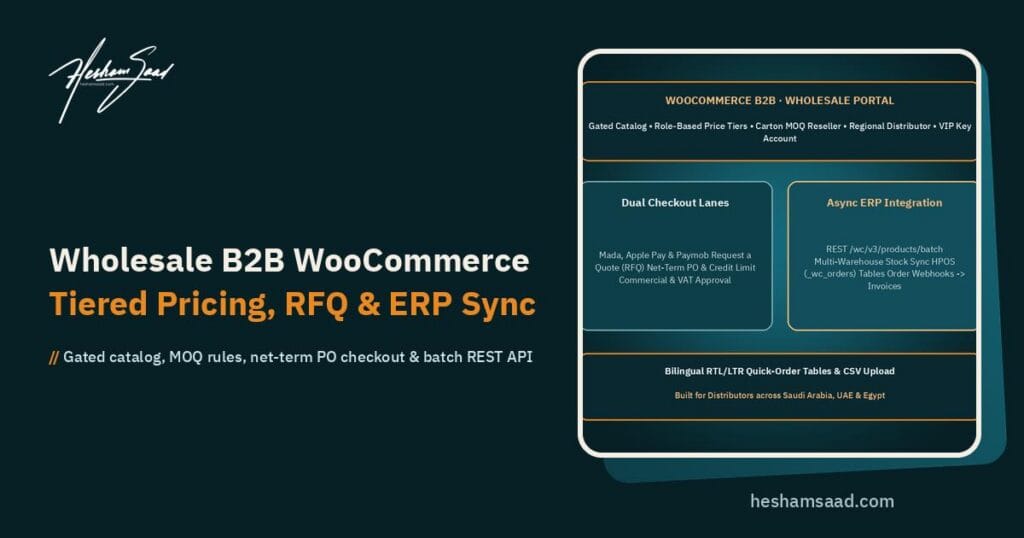
Most MENA distributors sell through overlapping channels and cannot expose contracted wholesale rates to retail shoppers or competing importers. On a wholesale B2B distributor website WooCommerce build, catalog gating and WooCommerce wholesale tiered pricing keep commercial margins private while letting prospective trade buyers inspect your product range.
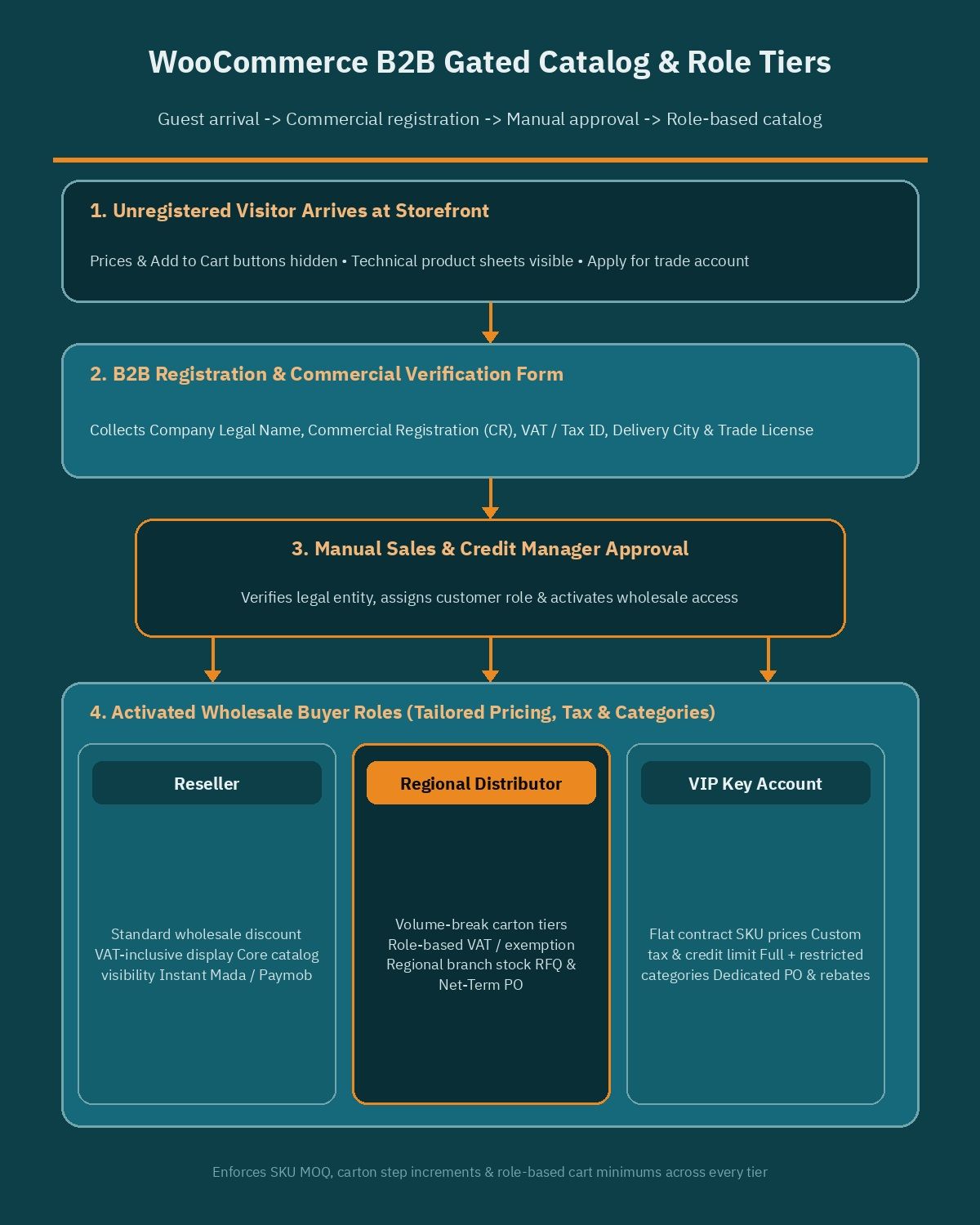
Catalog visibility and buyer approval workflows
Using an official marketplace extension such as B2B for WooCommerce, you can hide prices and Add to Cart buttons from unregistered visitors, restrict sensitive categories to logged-in trade accounts, or require login across the storefront. Unauthenticated visitors can browse technical product sheets and apply for a trade account, while approved buyers sign in to transact.
B2B registration forms should collect commercial verification fields before anyone views wholesale pricing. Ask applicants for their company legal name, commercial registration number, VAT or tax identification number, primary warehouse or delivery city, and supporting license files. Route new sign-ups into manual approval so your credit or sales manager verifies the entity and assigns the right customer role before activating access.
Role-based tiers, volume breaks, and tax display
Once approved, each buyer belongs to a custom user role such as Reseller, Regional Distributor, HoReCa Account, or VIP Key Account. Role-based pricing rules let you assign flat contract prices per SKU, percentage discounts by category, or quantity-based volume breaks shown in a tier table on the product page. A supplier can charge one unit rate at the base carton threshold, a lower unit price at bulk carton volume, and a pallet rate for full-pallet orders.
Tax presentation also varies by buyer type across Saudi Arabia, the UAE, and Egypt. B2B extensions let you configure tax exemptions for qualified accounts and control whether prices display exclusive or inclusive of VAT per user role, keeping online quotes aligned with your finance team’s tax invoices.
Enforcing B2B minimum order quantity WooCommerce and case-pack rules
Wholesale unit economics collapse if a buyer orders individual retail units at distributor pricing because warehouse teams spend the same picking time on tiny boxes as on full cartons. Your store must enforce B2B minimum order quantity WooCommerce rules directly in the product selector and cart so buyers cannot submit unprofitable orders.
Configure quantity and value limits across three layers matching how your warehouse packs stock:
- SKU-level minimum order quantity: Set a mandatory floor per product or variation so fast-moving consumables or bulk hardware items cannot enter the cart below your pack minimum.
- Carton and pallet step increments: Lock the quantity selector to fixed multiples matching your master carton or pallet layer so buyers order full cases instead of partial-case counts.
- Role-based cart and order minimums: Require a minimum subtotal or case total per checkout by customer tier so regional distributors meet delivery thresholds before checkout proceeds.
Heavy industrial and technical catalogs require extra care when modeling units of measure. As detailed in our guides for a building materials website on WooCommerce and an electronics store website on WooCommerce, showing pack counts, gross weight, and dimensions beside each SKU stops buyers from confusing single-piece rates with master-carton rates. Keep one consistent selling unit between WooCommerce and your ERP so invoice quantities always match picking slips.
| Commercial rule | Retail B2C store setup | Wholesale B2B WooCommerce setup |
|---|---|---|
| Price visibility | Public prices and Add to Cart for all visitors | Hidden prices for guests; role-based tiers after account approval |
| Pricing structure | Single regular or sale price per SKU | Customer role pricing plus quantity-break tier tables |
| Order quantities | Minimum 1 unit, any increment allowed | SKU minimum quantity, carton step multiples, and cart value floors |
| Payment methods | Instant card, wallet, or cash on delivery | Net-term credit, PO checkout, bank transfer, plus Mada, Apple Pay, or Paymob |
| Tax display | Standard consumer VAT-inclusive display | Role-specific VAT exclusive or inclusive display and tax exemptions |
Distributor RFQ net terms WordPress workflows and regional payments
Not every wholesale transaction ends with an online card payment. Larger distributors rely on negotiated bids, corporate purchase orders, and approved credit lines, while cash-and-carry trade buyers prefer paying online immediately to speed up dispatch. A distributor RFQ net terms WordPress setup supports both workflows side by side using role-based gateway rules.
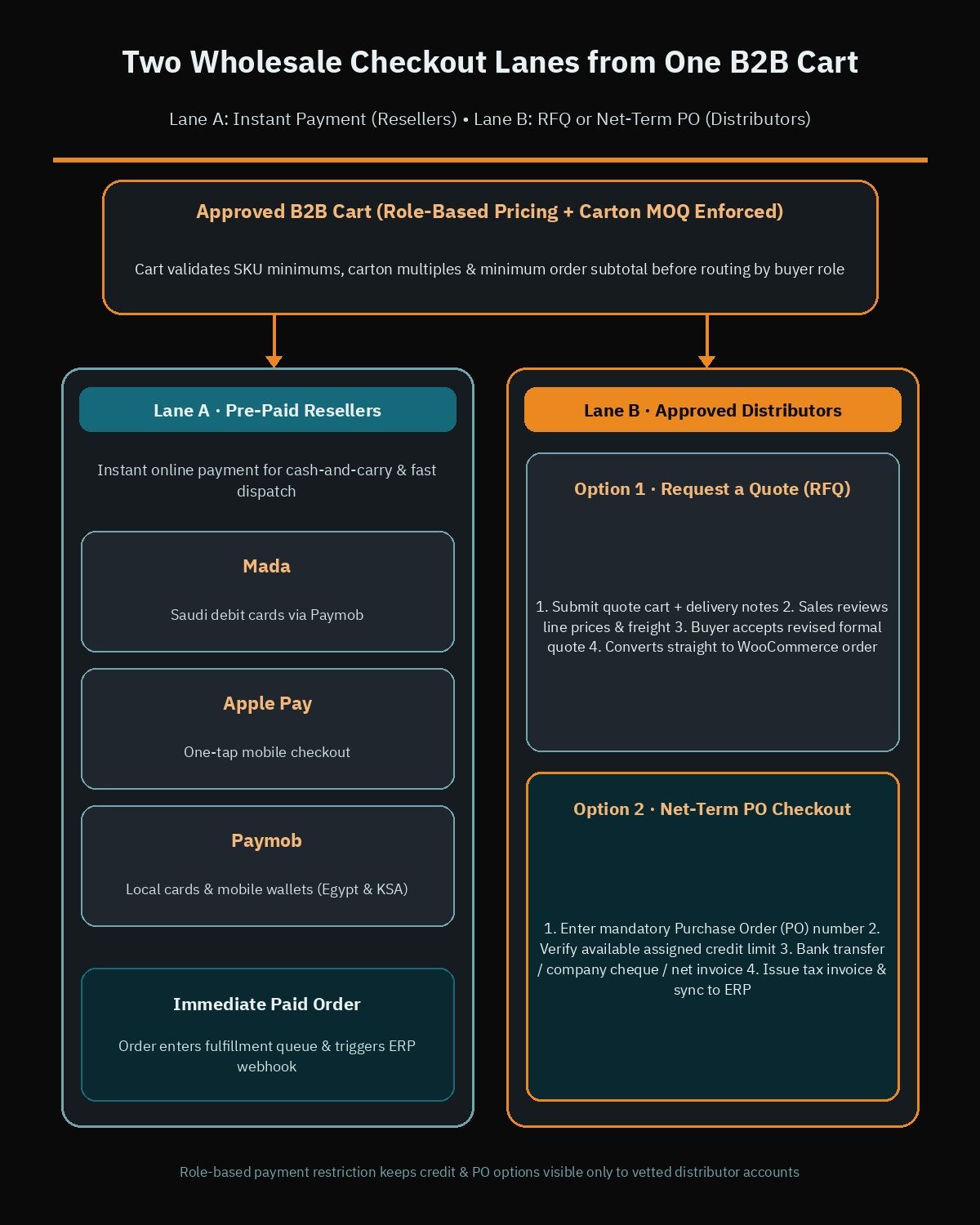
Request a Quote to order conversion
With a Request a Quote module, logged-in buyers assemble a quote cart just like a standard basket, attach delivery instructions or project notes, and submit an RFQ without paying at checkout. Your sales team reviews the request in the WordPress dashboard, adjusts line prices or freight charges, and sends the formal quote back to the buyer.
Once the buyer accepts the offer, the system converts that approved quote straight into a standard WooCommerce order. Keeping quotes inside WooCommerce eliminates rekeying errors and preserves the exact SKU breakdown for fulfillment.
Purchase orders, credit limits, and MENA gateways
Role-based payment restriction displays offline and credit methods only to vetted accounts while keeping cash buyers on instant payment rails. Approved corporate buyers can check out using a mandatory Purchase Order number field, bank transfer instructions, company cheque clearance, or net-term invoice billing capped at an assigned credit limit.
For pre-paid wholesale orders and smaller resellers in Saudi Arabia and Egypt, pair those credit methods with trusted regional gateways. Integrating Paymob for WooCommerce allows Saudi merchants to accept Mada debit cards, Apple Pay, and international cards, while Egyptian wholesalers can accept local cards and mobile wallets without building custom bank connectors. Map regional delivery rates early using our WooCommerce shipping zones for Egypt and the Gulf guide so freight fees reflect pallet weight or city zones accurately.
WooCommerce ERP inventory sync MENA architecture
Wholesale buyers lose trust the moment they pay for cartons that a warehouse already allocated to another branch. Reliable WooCommerce ERP inventory sync MENA workflows connect your ERP, such as SAP, Odoo, Microsoft Dynamics, or a regional accounting suite, to WooCommerce through asynchronous APIs rather than fragile CSV uploads or blocking checkout calls.
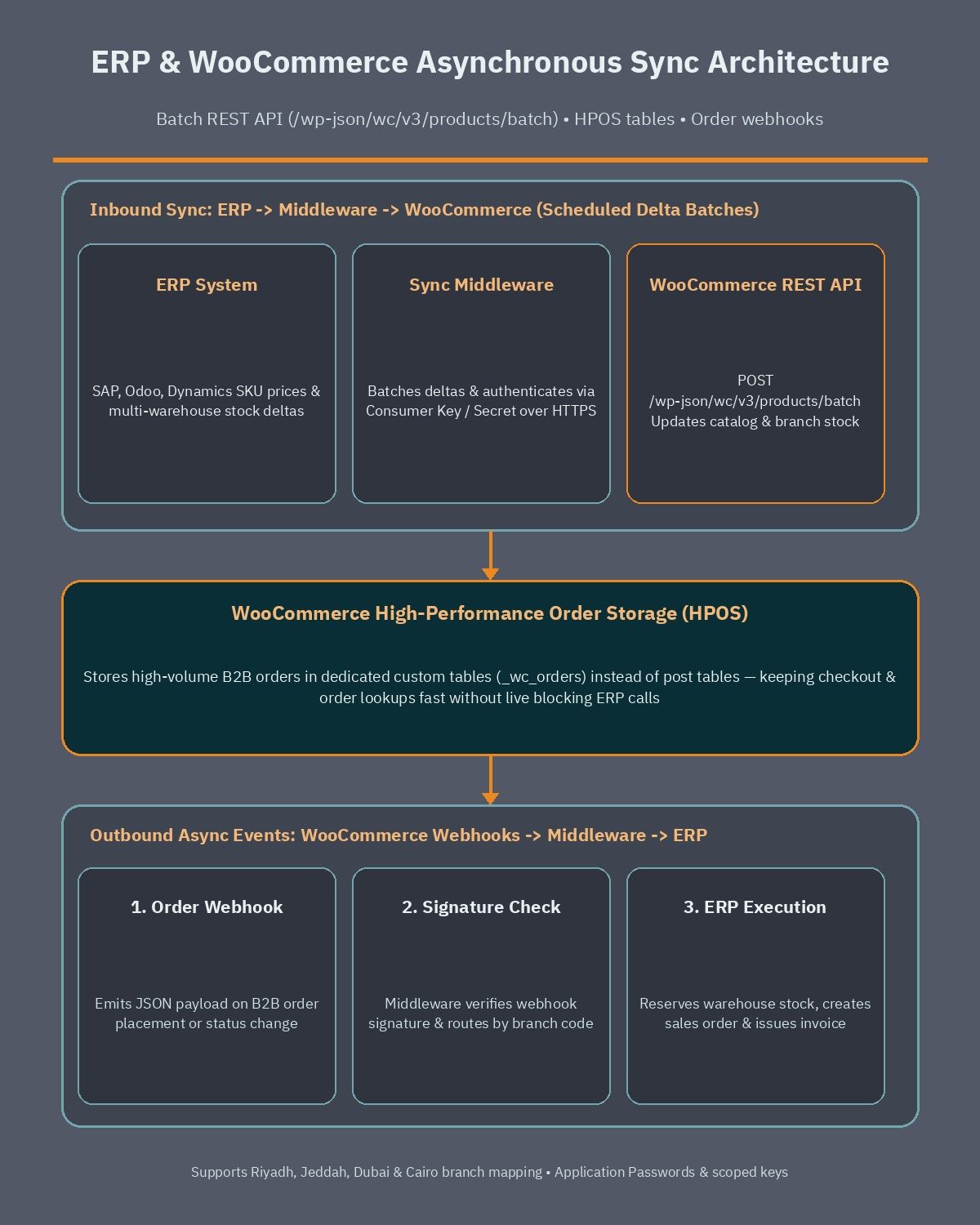
Batch REST API updates and webhook events
The WooCommerce REST API offers batch endpoints such as POST /wp-json/wc/v3/products/batch so middleware can create, update, or delete multiple products, stock levels, and prices in a single HTTP request. Pushing scheduled delta batches from your ERP avoids flooding PHP workers with hundreds of individual product updates during peak ordering hours.
In the reverse direction, WooCommerce webhooks emit JSON-encoded event notifications when a trade order is placed or updated. Your ERP middleware listens to those webhook payloads, validates the signature, reserves inventory in the assigned warehouse, and generates the sales order without making the buyer wait on an external ERP call during checkout.
Authentication, multi-warehouse mapping, and HPOS
For custom WordPress REST API endpoints, WordPress core supports Application Passwords over HTTPS so middleware authenticates with revocable per-application credentials instead of an administrator password, while WooCommerce REST API calls use Consumer Keys and Consumer Secrets. Scope API credentials tightly and monitor failed webhook logs so operations catches sync gaps early.
If you operate warehouses in Riyadh, Jeddah, Dubai, and Cairo, map each ERP branch code to a region or customer group so buyers see stock from their assigned fulfillment hub. On the database side, enable WooCommerce High-Performance Order Storage (HPOS), which moves order records into dedicated custom tables such as _wc_orders instead of generic post tables. HPOS keeps order lookups, ERP polling, and wholesale account order histories fast as repeat orders grow.
Bilingual Arabic RTL UX, quick-order tools, and structured data
Across MENA wholesale teams, purchasing officers often browse in Arabic while warehouse and finance staff cross-check English SKU codes. A bilingual Arabic RTL and English portal must translate category trees, attribute labels, checkout notices, and invoice emails properly instead of relying on overlays that break table alignment. Test quantity steppers and tier pricing columns in both RTL and LTR layouts, and follow our guide to speed up WordPress Arabic sites so large catalogs load fast on mobile and warehouse tablets.
Repeat B2B buyers rarely browse photo grids like retail shoppers. Speed up weekly restocking with two practical ordering interfaces:
- Table-style quick-order lists: Show SKU code, pack size, warehouse stock status, tier price, and a quantity box in dense category rows so buyers add multiple items from one screen.
- CSV quick-order and one-click reorder: Allow purchasing managers to upload a two-column SKU and quantity spreadsheet or copy a past invoice straight into a new cart.
When part of your catalog stays public for search discovery, mark up product details carefully with Schema.org Product properties. Schema.org defines Offer, UnitPriceSpecification, and eligibleQuantity to describe pack denominators and volume thresholds cleanly, while gated portals keep confidential contract rates behind login.
What drives the budget of a B2B WooCommerce portal
Wholesale builds vary widely in scope because distributors operate different ERP rules and pricing matrices. Before requesting proposals or looking to hire a WooCommerce developer, separate launch essentials from phase-two automation so you budget accurately:
- Catalog complexity and attributes: Number of SKUs, variable pack sizes, master-carton conversions, and searchable technical filters.
- Pricing and MOQ depth: Count of customer tiers, SKU-level exceptions, volume-break tables, and cart minimum rules by role.
- RFQ and credit workflow customization: Standard quote-to-order plugins versus custom credit-limit checks, PO approvals, and multi-buyer corporate accounts.
- ERP and multi-warehouse integration: One-way stock sync versus bidirectional batch price updates, multi-branch routing, and invoice webhooks.
- Bilingual RTL templates and hosting: Custom quick-order tables in Arabic and English plus managed WooCommerce hosting sized for logged-in uncached sessions.
Logged-in B2B buyers bypass standard full-page HTML caching because each user role sees personalized prices and cart rules. Factor object caching, HPOS database indexing, and clean plugin selection into your budget early so the portal stays responsive when many buyers order at once.
Your 1-week B2B catalog and pricing-tier readiness checklist
Before writing custom code or buying plugin licenses, spend five working days organizing your commercial data in one clean spreadsheet. Preparing these inputs first cuts discovery time and prevents pricing mismatches at launch:
- Audit your top 20% wholesale SKUs: Pull the high-velocity items driving most repeat orders, and standardize their SKU codes, pack sizes, carton counts, weights, and Arabic and English names.
- Map 3 customer price tiers and MOQ rules: Define your primary buyer roles (for example Reseller, Regional Distributor, and VIP), list the exact tier percentages or volume breaks, and confirm minimum order quantities and carton step multiples per product group.
- Verify ERP SKU and stock sync fields: Confirm with your ERP administrator the exact field names for SKU, warehouse branch code, available stock, tier price, and customer credit status, plus which events trigger webhooks or scheduled batch updates.
- Test one net-terms RFQ checkout flow: Walk through one sample order end to end on paper, from guest registration and commercial approval to adding a carton-locked SKU, submitting an RFQ or PO number, and matching the resulting WooCommerce order to an ERP invoice.
Once those four items are documented, your team has everything needed to scope a clean build without mid-project surprises. If you want an engineering review of your tier matrix, ERP sync plan, and bilingual checkout architecture, book a free consultation to map out your wholesale WooCommerce portal.
Frequently asked questions
How do I hide wholesale prices from retail visitors on WooCommerce?
Use an extension such as B2B for WooCommerce to hide prices and Add to Cart buttons for unregistered guests or selected categories. Prospective trade buyers complete a registration form with their company details, commercial registration, and tax number, and prices appear only after your sales team approves the account and assigns a wholesale role.
Can WooCommerce enforce minimum order quantities and full carton increments?
Yes, B2B pricing and order restriction tools let you set minimum order quantities per SKU, lock quantity steppers to carton or pallet multiples, and require a minimum cart subtotal by customer role. Keeping one consistent selling unit between WooCommerce and your ERP prevents picking errors and protects margins on small orders.
How do net-term purchase orders work alongside Mada, Apple Pay, and Paymob?
Role-based payment rules show offline or credit gateways such as purchase order numbers, bank transfers, and net-term invoicing only to vetted distributor accounts. At the same time, pre-paid resellers and cash-and-carry trade buyers see instant gateways like Mada, Apple Pay, and Paymob, while Request a Quote lets buyers submit negotiated orders without paying upfront.
Will syncing ERP inventory slow down WooCommerce checkout?
Checkout stays fast when your ERP sync runs asynchronously instead of making live blocking calls during payment. Push stock and price updates in scheduled batches through the WooCommerce REST API products batch endpoint, fire order webhooks back to your ERP after checkout, and enable High-Performance Order Storage so order tables remain responsive.
What determines the budget for a wholesale WooCommerce B2B website?
Development cost depends on your SKU count, the complexity of role-based price tiers and MOQ rules, and whether you need custom RFQ or credit-limit workflows. Two-way ERP and multi-warehouse sync, bilingual Arabic RTL quick-order templates, and managed hosting sized for logged-in uncached wholesale traffic also shape the final project scope.
References
- WooCommerce Documentation: Webhooks, High-Performance Order Storage, and Store Configuration
- WooCommerce Marketplace: B2B for WooCommerce Extension
- WooCommerce REST API Documentation: Products Batch Endpoints and Authentication
- WordPress Developer Resources: REST API Handbook and Application Passwords
- Schema.org: Product, Offer, and UnitPriceSpecification Vocabulary