هذا المقال متوفر باللغة العربية — اقرأ بالعربية
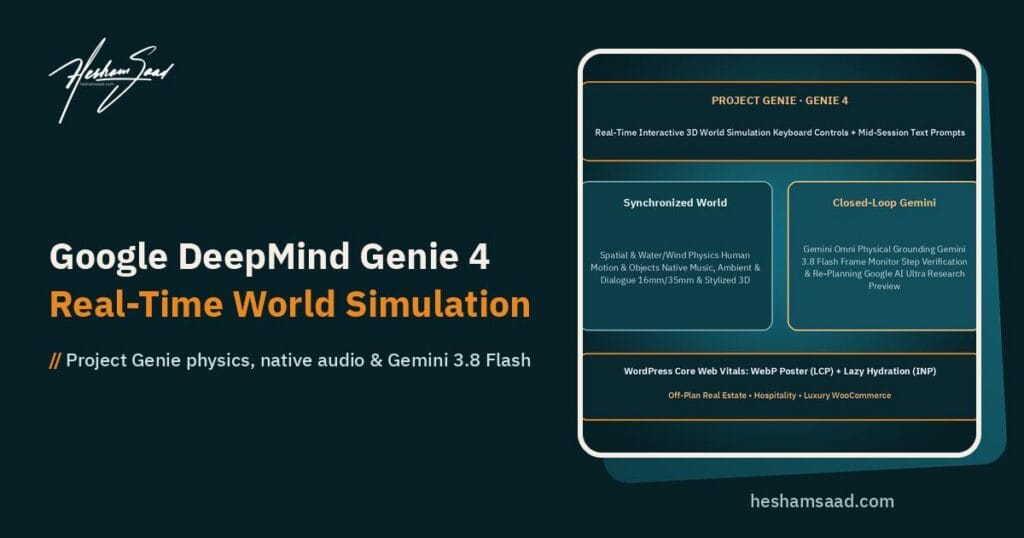
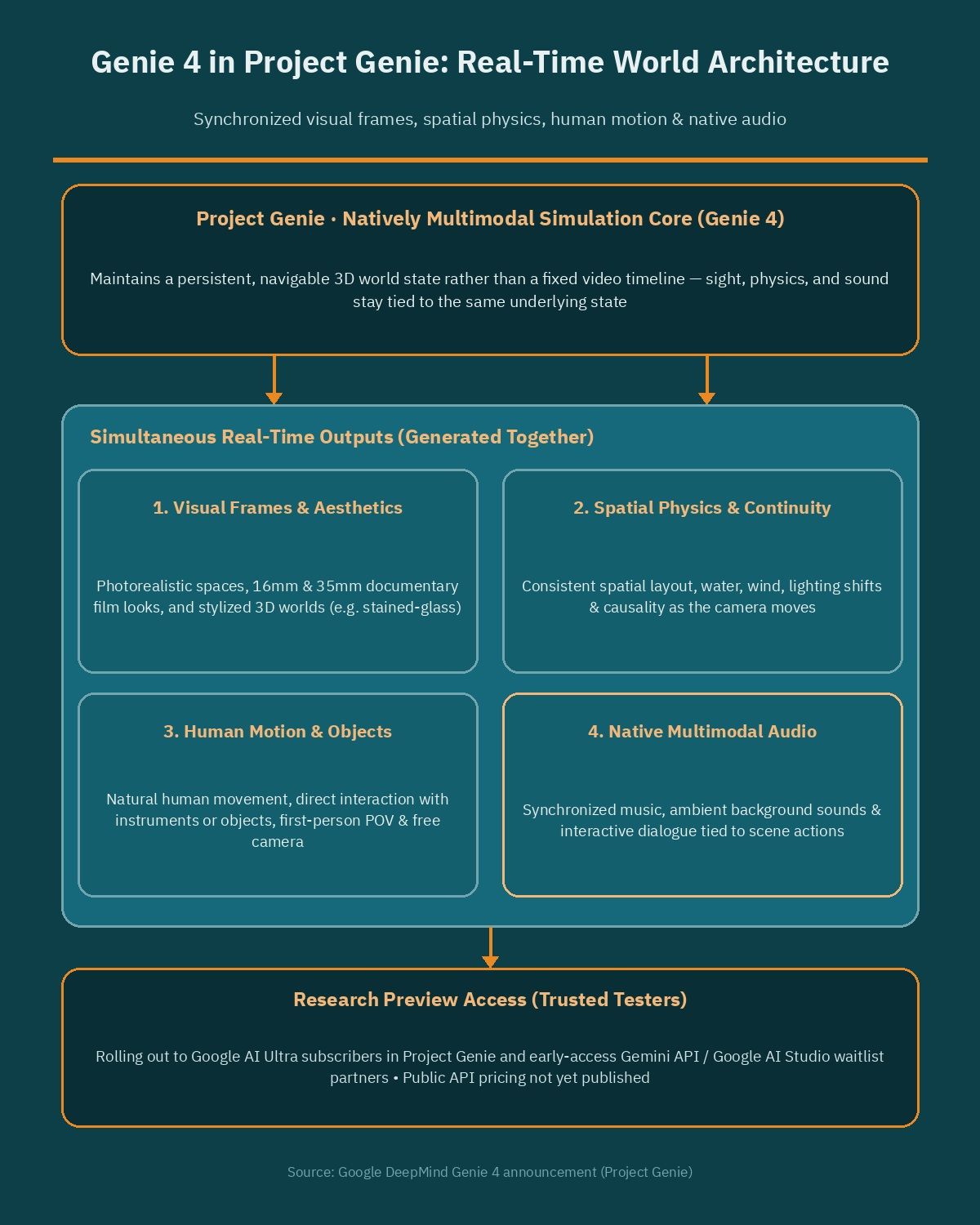
Google DeepMind has introduced Genie 4 inside Project Genie, led by researchers Raia Hadsell, Diego Rivas, and Hang Qi, marking a shift from passive AI video clips to real-time interactive world simulation. Unlike standard video generators that render a fixed timeline from a single prompt, Genie 4 responds continuously to user input while keeping physical rules, spatial layout, and synchronized sound intact.
For agencies, property developers, hospitality brands, and e-commerce teams across the Middle East and North Africa, that shift raises practical questions right away. Interactive environments could soon change how buyers explore an off-plan villa, a heritage resort, or a flagship retail space online, yet deploying rich visual media on the web still depends on disciplined WordPress engineering so pages stay fast on mobile connections.
What changed with Genie 4 in Project Genie
Most generative media tools treat visuals, sound, and interaction as separate stages. You prompt a clip, export silent frames, add music or foley afterward, and repeat the render if a client asks to move the camera two steps to the left. Project Genie approaches the problem differently by running Genie 4 as a natively multimodal, real-time simulation model.
Because the model is natively multimodal, audio is generated at the exact same moment as the simulated environment rather than layered on top later. Music, ambient background noises, and interactive dialogue emerge alongside photorealistic visuals, physical motion, and fluid human or character movement. Walk near moving water, open a door, or interact with an instrument, and the sight, physics, and sound stay tied to the same underlying state.
This also separates world simulation from general flagship reasoning models. Tools covered in our analyses of Gemini 4 Hydrogen and GPT-6.2 Astra Sol focus on reasoning, coding, and multimodal comprehension across documents or interfaces. Genie 4 focuses on maintaining a persistent, navigable 3D world that reacts frame by frame as a person or software agent acts inside it.
How Gemini Omni and Gemini 3.8 Flash work in the loop
One of the clearest architectural details in the Project Genie announcement is how Google DeepMind pairs the world simulator with two distinct Gemini models rather than asking one model to handle everything blindly. Each model carries a specific responsibility inside the simulation loop.
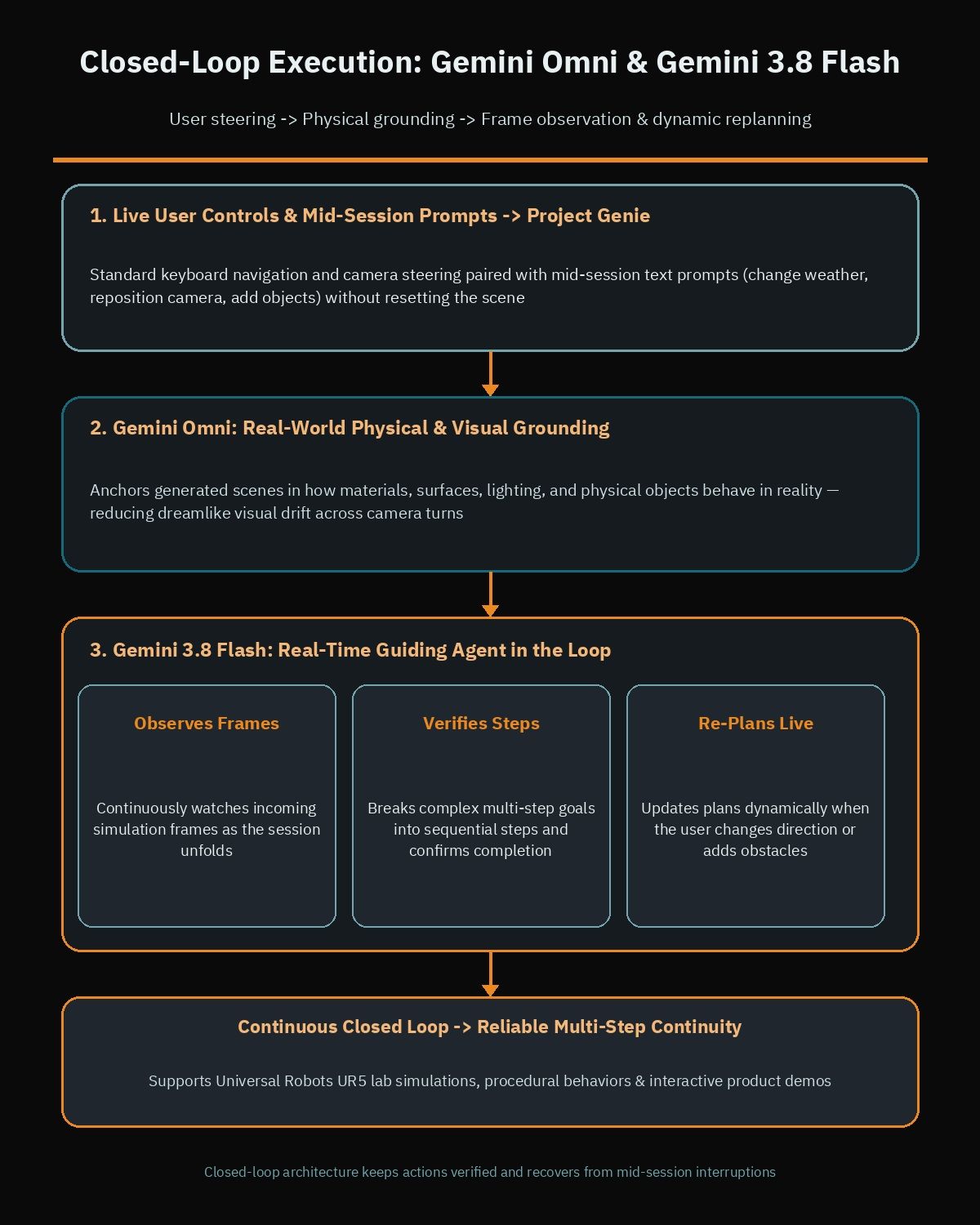
- Gemini Omni anchors real-world appearance and physics: It grounds generated scenes in how materials, surfaces, lighting, and physical objects behave in reality, reducing the dreamlike drift that breaks immersion in older video models.
- Gemini 3.8 Flash serves as a real-time guiding agent: Sitting directly in the loop, it continuously observes incoming frames as the simulation unfolds.
- Goal decomposition and verification: When a session involves a complex multi-step objective, Gemini 3.8 Flash breaks that goal into sequential steps and checks whether each step actually completed before advancing.
- Dynamic replanning on interruption: If the user changes direction, edits the scene mid-session, or introduces a new obstacle, Gemini 3.8 Flash adapts the plan on the fly instead of failing a rigid script.
For technical buyers and product teams, that closed-loop structure matters more than surface polish alone. A simulated environment only becomes reliable for training, prototyping, or guided product demos when an overseeing agent can confirm that an action succeeded, recover from unexpected user input, and preserve continuity across dozens of sequential decisions.
Four core capabilities and current preview limits
Google DeepMind groups the capabilities of Project Genie around four practical pillars. Together, they show how the system bridges casual interactive steering, visual fidelity, artistic control, and structured agent simulation.
Shaping world simulation in real time
Participants do not have to stop and regenerate a scene from scratch when they want a change. You can move through the world and control camera angles with standard keyboard inputs while sending natural-language text prompts mid-session. Asking the model to shift the weather, reposition the camera, or introduce a person or object triggers Gemini to adapt the prompt contextually and steer scene continuity without resetting the environment.
Frontier realism for physics and human action
Keeping an interactive world believable requires more than sharp textures on a single frame. Genie 4 targets realistic spatial continuity alongside water, wind, and lighting physics that respond consistently as the camera moves. It also supports natural human movement and direct interaction with instruments or everyday objects, paired with both first-person POV and independent free-camera modes so viewers can inspect a space from any angle.
Diverse aesthetic and stylized 3D worlds
Photorealistic scenery is only one mode inside Project Genie. The model also renders documentary 16mm and 35mm film aesthetics for teams that want tactile cinema grain and lighting, as well as stylized 3D environments such as navigable 3D stained-glass worlds. That range gives creative directors room to match a brand identity rather than forcing every output into one generic CGI look.
Simulating complex multi-step events
Beyond creative previews, Google DeepMind highlights robotics and agent training environments, including Universal Robots UR5 lab simulations. These sessions rely on consistent causality, procedural behaviors, and multi-step reasoning, letting researchers test whether an agent can complete ordered physical tasks inside a responsive virtual workspace.
Availability remains tightly staged during this phase. Genie 4 is rolling out as a research preview for trusted testers, starting with Google AI Ultra subscribers inside Project Genie alongside early-access partners of the Gemini API and Google AI Studio, where a waitlist is open. Google DeepMind has not published general-availability API pricing, commercial rate limits, or production deployment SLAs yet, so agencies should treat current access as an evaluation and R&D track rather than a live website dependency.
Strengths, trade-offs, and rival approaches
Before committing budget or redesigning a client roadmap around a new AI announcement, business owners benefit from weighing what actually improves today against what still carries friction. Comparing Project Genie with traditional 3D web engines and standard AI video tools clarifies where each option fits.
| Approach | Interactivity | Audio and physics | Production setup | Current web readiness |
|---|---|---|---|---|
| Genie 4 in Project Genie | Real-time keyboard navigation plus mid-session text prompts | Native multimodal audio with Gemini-grounded physics and causality | Prompt and agent steering without manual 3D modeling pipelines | Research preview for trusted testers and waitlist partners |
| Standard AI video tools | None during playback; prompts require full clip regeneration | Often silent or paired with separate post-production audio | Fast text-to-clip iteration for linear marketing edits | Ready today via compressed MP4 or WebM embeds |
| Traditional 3D and WebGL | Deterministic camera paths, hotspots, and configurators | Scripted audio and physics built explicitly by developers | Requires CAD cleanup, textures, shaders, and manual rigging | Production ready today when assets are carefully optimized |
The primary advantage of Genie 4 is speed of exploration: creative teams can test lighting, weather, camera angles, and spatial concepts live without waiting weeks for a 3D studio to rebuild assets. The main trade-offs are early-access availability, unpublished API pricing, and the fact that live neural world streaming is far heavier than serving a deterministic, compressed product page. For deterministic e-commerce configurators where every millimeter and SKU option must match inventory rules, traditional structured data and optimized WebGL or photography still win today.
What world simulation means for MENA businesses
Even while Project Genie stays in research preview, the capabilities Google DeepMind just demonstrated map directly onto high-value industries across the Gulf, Egypt, and the wider MENA region. Businesses that sell high-consideration spaces, experiences, or luxury goods often struggle to convey atmosphere through static photo galleries alone.
- Off-plan real estate developments: Buyers evaluating compounds in Riyadh, Dubai, New Cairo, or the North Coast want to feel natural daylight, courtyard wind and water features, and human-scale proportions. Free-camera modes and weather changes let sales teams showcase morning, sunset, or shaded views during concept pitches before full architectural renders finish.
- Tourism and hospitality showcases: Resorts, desert retreats, and cultural destinations can present first-person POV walkthroughs paired with ambient soundscapes, helping international visitors experience a property before booking.
- Architectural visualization studios: Design practices can explore 16mm or 35mm documentary moods or stylized 3D material studies during early client workshops, reserving costly manual rendering hours for approved directions.
- Luxury WooCommerce storytelling: High-ticket retail brands selling bespoke furniture, watches, hospitality installations, or custom interiors can frame flagship collections inside believable environmental scenes rather than plain white backgrounds. If your store relies on custom templates or complex catalog workflows, it helps to hire a WooCommerce developer who understands how visual storytelling connects to checkout speed.
Notice the common thread across those four examples: interactive simulation adds the most commercial value at the discovery and storytelling stage, while trust, pricing clarity, Arabic and English specifications, and lead capture still happen on your website.
Embedding interactive previews on WordPress without hurting Core Web Vitals
Whenever a new visual AI format arrives, marketing teams rush to drop heavy iframes, auto-playing streams, or oversized video loops right at the top of the homepage. On mobile networks across MENA, that single mistake routinely wrecks Core Web Vitals, pushing Largest Contentful Paint (LCP) into several seconds and stalling Interaction to Next Paint (INP) when a visitor taps a navigation menu or Arabic-English language switcher.
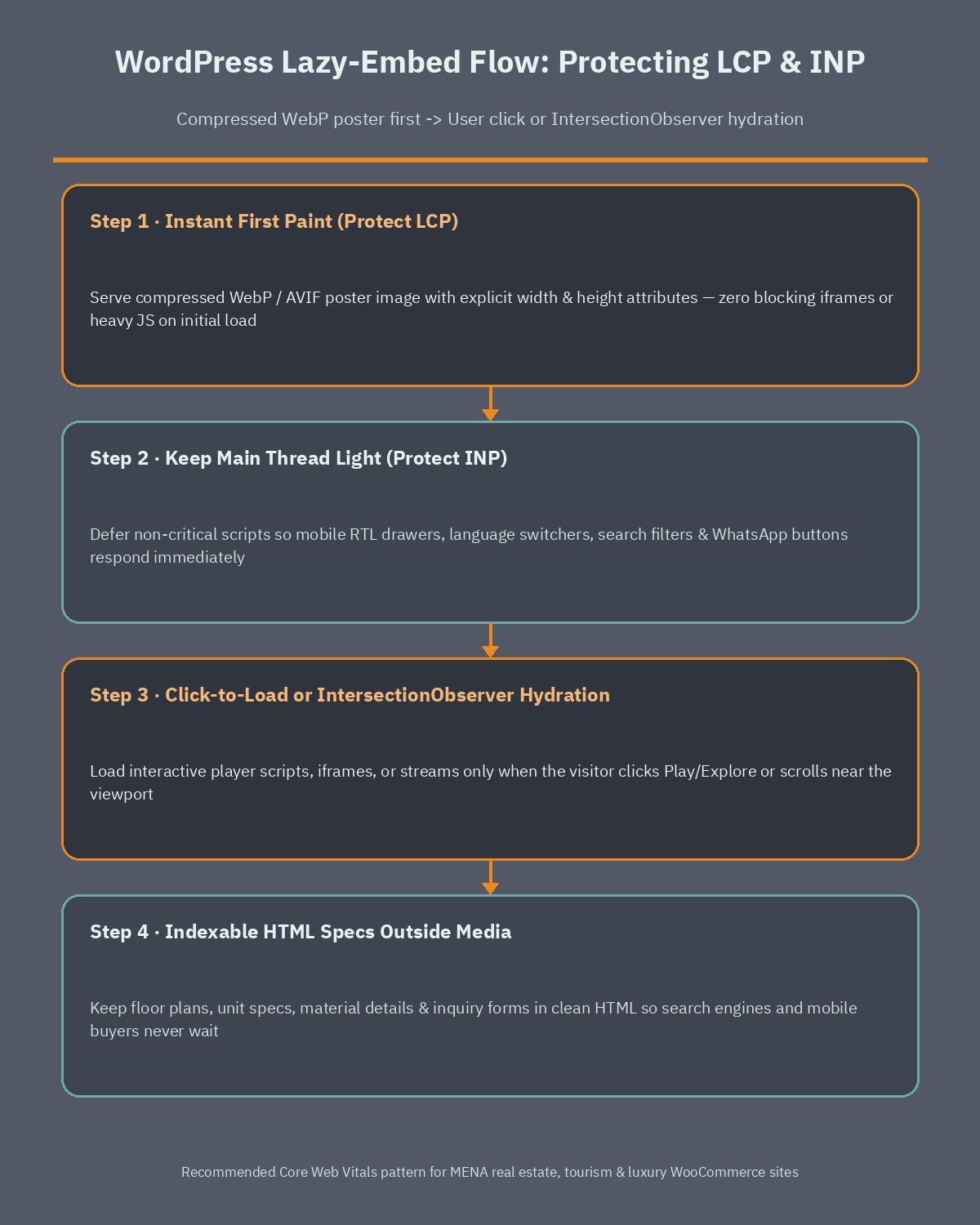
Smart WordPress development treats interactive simulation exports and future live embeds as progressive enhancements rather than blocking page assets. Whether you embed recorded Project Genie walkthroughs today or connect to interactive streams once API partners ship web players, follow a strict lazy-loading checklist.
- Protect LCP with a lightweight poster image: Render a compressed WebP or AVIF hero frame with explicit width and height attributes first, so the browser paints the visible layout immediately without waiting for media players or JavaScript bundles.
- Use click-to-load facades for interactive players: Load heavy player scripts, iframes, or WebSocket streams only after the visitor clicks a clear play or explore button, or when an element scrolls near the viewport via IntersectionObserver.
- Keep main-thread work off user taps to safeguard INP: Defer non-critical scripts and avoid attaching heavy frame listeners during initial page load, especially on bilingual sites where RTL drawers, search filters, and WhatsApp buttons must respond instantly. Our guide on how to speed up WordPress Arabic sites covers font, script, and caching steps that pair well with media-heavy landing pages.
- Never trap critical copy inside media: Keep floor plans, unit specs, material details, and inquiry forms in clean, indexable HTML so search engines and impatient mobile buyers get answers even if they skip the interactive preview.
Preparing your WordPress site before public API access opens
You do not need immediate Project Genie access to make practical moves this quarter. If your team builds custom digital experiences or R&D prototypes, register interest on the Google AI Studio and Gemini API waitlist so you can evaluate capabilities, latency, and published pricing as soon as partner access expands. At the same time, audit your highest-traffic WordPress landing pages and WooCommerce product templates for heavy media bottlenecks, oversized scripts, and mobile LCP or INP delays so your foundation is ready before interactive embeds become standard client requests.
If you are planning a new real estate portal, luxury WooCommerce flagship, or bilingual corporate site in MENA and want an architecture built for both speed and modern visual media, book a free consultation to review your technical roadmap and performance targets.
Frequently asked questions
How is Genie 4 different from standard AI video generators?
Standard AI video tools render fixed clips from a prompt and usually require regenerating the video to change camera angles or events. Genie 4 runs as a real-time interactive world simulation inside Project Genie, letting users steer navigation with keyboard controls and mid-session text prompts while generating synchronized music, ambient audio, dialogue, and physics simultaneously.
What do Gemini Omni and Gemini 3.8 Flash do inside Project Genie?
Each Gemini model handles a distinct part of the simulation loop. Gemini Omni grounds generated worlds in real-world appearance and physical behavior, while Gemini 3.8 Flash operates as a real-time guiding agent that observes incoming frames, breaks complex goals into sequential steps, verifies step completion, and adapts plans when the user intervenes.
When can businesses access Genie 4 and how much does it cost?
Google DeepMind is rolling out Genie 4 as a research preview for trusted testers rather than a general-availability product. Initial access starts with Google AI Ultra subscribers in Project Genie and early-access partners of the Gemini API and Google AI Studio through an open waitlist, and public API pricing has not been published yet.
Which MENA businesses benefit most from real-time world simulation?
Industries that rely on atmosphere and spatial understanding stand to benefit most once broader access arrives. Off-plan real estate developments, tourism and resort showcases, architectural visualization studios, and luxury WooCommerce brands can use free-camera previews, lighting shifts, and stylized 3D or film looks to enrich discovery alongside clear specs and inquiry forms.
How should WordPress sites embed interactive previews without slowing down?
Keep hero layouts fast by loading a compressed WebP or AVIF poster image with fixed dimensions first so Largest Contentful Paint stays quick. Load interactive players or heavy streams only after a user click or near-viewport scroll, defer non-critical scripts to protect Interaction to Next Paint, and keep key specifications in plain HTML.