هذا المقال متوفر باللغة العربية — اقرأ بالعربية
On November 19, 2026, Google DeepMind expanded its interactive world model from a consumer preview into a programmable developer platform by launching the Genie 4 Gemini API integration and a live playground inside Google AI Studio. Just one day after the initial Google DeepMind Genie 4 research preview, engineering teams and digital agencies gained direct programmatic access to models/genie-4 through the Interactions API (v1beta). Instead of waiting on an early-access waitlist or relying on a consumer subscription, developers with a paid-tier key can now generate and steer real-time 720p environments with synchronized stereo audio directly from Python, Node.js, or browser applications.
For technical founders, product architects, and web agencies across the Middle East and North Africa (MENA), this release transforms interactive world models from a research curiosity into an API line item with clear engineering trade-offs. Building with a real-time generative stream requires a completely different mindset compared to standard request-response text models like Gemini 4 Neon or offline video clip generators. Every active second consumes 5,760 video output tokens, browser connections rely on WebRTC media tracks and ephemeral session credentials, and forgetting to close a session properly keeps the billing meter running even after a visitor closes their browser tab.
What Changed With the Genie 4 Gemini API Release on November 19, 2026
When Google first unveiled Project Genie, interactive world generation was restricted to Google AI Ultra subscribers and a closed research waitlist. That initial rollout proved that a single foundation model could synthesize playable 2D and 3D environments on the fly, yet software teams had no SDKs, no network transport specifications, and no commercial pricing model to build custom frontends or internal prototyping tools. On November 19, 2026, Google DeepMind removed that barrier by publishing the official Genie 4 in the Gemini API release post alongside comprehensive developer documentation.
With this update, any developer holding a paid-tier Gemini API key can test prompts visually in the Google AI Studio Genie 4 live workspace and move directly to production code using the official Python (google-genai) and JavaScript/TypeScript (@google/genai) SDKs. The model is exposed under the identifier models/genie-4 through the Gemini Interactions API (v1beta), which handles bidirectional stateful streaming rather than stateless HTTP POST calls. Because the service runs strictly on the paid tier, data sent through the API is not used to train or improve Google products under the standard paid Gemini API terms of service.
- Model identifier and endpoint: Exposed as
models/genie-4via the stateful Interactions API underapi_version: "v1beta". - Interactive testing sandbox: Available immediately in Google AI Studio for rapid prompt iteration and visual seed verification before writing code.
- Official language SDKs: First-party support in Python (
google-genai, defaulting to WebSocket transport) and JavaScript/TypeScript (@google/genai, supporting both WebRTC in browsers and WebSocket in Node.js). - Commercial tier rules: Requires an active paid-tier Gemini API billing account; the Free tier, Context caching, Batch API, Flex inference, and Priority inference are not available for
models/genie-4.
Core Stream Capabilities, Real-Time Controls, and Rolling Horizon Limits
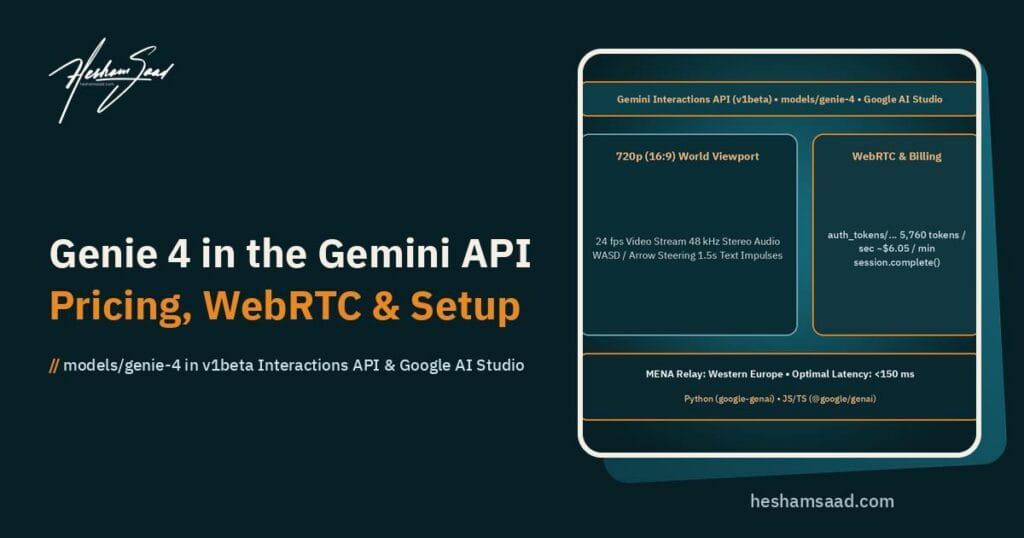
Understanding what models/genie-4 outputs at the protocol level helps teams decide whether an application truly needs a live generative world or a pre-rendered asset. Once an interaction session initializes, Genie 4 generates a continuous 720p video stream in a 16:9 aspect ratio at 24 fps. Synchronized 48 kHz stereo audio arrives alongside the video frames, producing ambient soundscapes, context-aware sound effects, and character dialogue that match the visual action on screen.
You can initialize a world using a descriptive text string (world_prompt), a 16:9 starting image (reference_image), or both combined. Combining a carefully composed 16:9 architectural render or product stage with a detailed world_prompt gives agency teams tight control over the opening frame’s lighting, camera angle, and visual palette before handing movement control over to the user. Every generated video frame and audio segment is embedded with imperceptible Google DeepMind SynthID watermarking so downstream platforms can verify that the stream was synthetically produced.
Keyboard Steering and Mid-Session Prompt Injection
Unlike traditional text-to-video APIs that accept one prompt and return a fixed MP4 file thirty seconds later, Genie 4 accepts continuous input events while the stream is running. Users navigate the environment using eight standard movement and camera keys sent as key_down and key_up events: key_w, key_a, key_s, key_d, arrow_up, arrow_down, arrow_left, and arrow_right. Forwarding both key press and key release events allows the model to distinguish between a short step forward and continuous walking or camera panning.
Developers can also mutate the environment mid-stream by sending text input events while the session is active, such as instructing the world to change weather conditions, open a doorway, or introduce a passing vehicle. Because Genie 4 evaluates incoming text interventions across generation steps, the official Genie 4 Gemini API technical documentation notes that mid-session text prompts should be repeated briefly across roughly 1.5 seconds (10 impulses spaced at 150 ms intervals) to ensure reliable uptake by the generation loop.
Boot Timing and the Rolling Visual Horizon
Production user interfaces must account for two physical timing characteristics built into the model architecture. First, initial world setup takes roughly 5 to 9 seconds after sending the world_setup event before frame 1 arrives at the client, and mid-session text modifications take approximately 1 to 2 seconds to appear on screen because Genie 4 plans environmental updates between generation steps. Designing a purposeful loading state with clear progress feedback prevents users from clicking repeatedly during that initial five-to-nine-second boot window.
Second, Genie 4 does not construct or store a persistent 3D polygon mesh in server memory. Instead, it maintains a rolling visual horizon as it predicts frames at 24 frames per second. If a user steers the camera 180 degrees away from a building or interior room and turns back several seconds later, background structures and layout details may rearrange rather than remain frozen in a deterministic coordinate system. That distinction makes Genie 4 suitable for concept exploration, mood walk-throughs, and interactive layout previews, but unsuitable for engineering CAD inspection or exact architectural measurements.
The Four-Step v1beta Session Lifecycle and Transport Architecture
Integrating models/genie-4 into a web application requires a clean separation between your trusted backend server and the visitor’s browser. Because a standard GEMINI_API_KEY grants full billing authority across your Google Cloud project, it must never be shipped inside frontend JavaScript bundles or WordPress theme scripts. The Interactions API (v1beta) solves this through a four-step lifecycle built around single-session ephemeral authentication tokens.
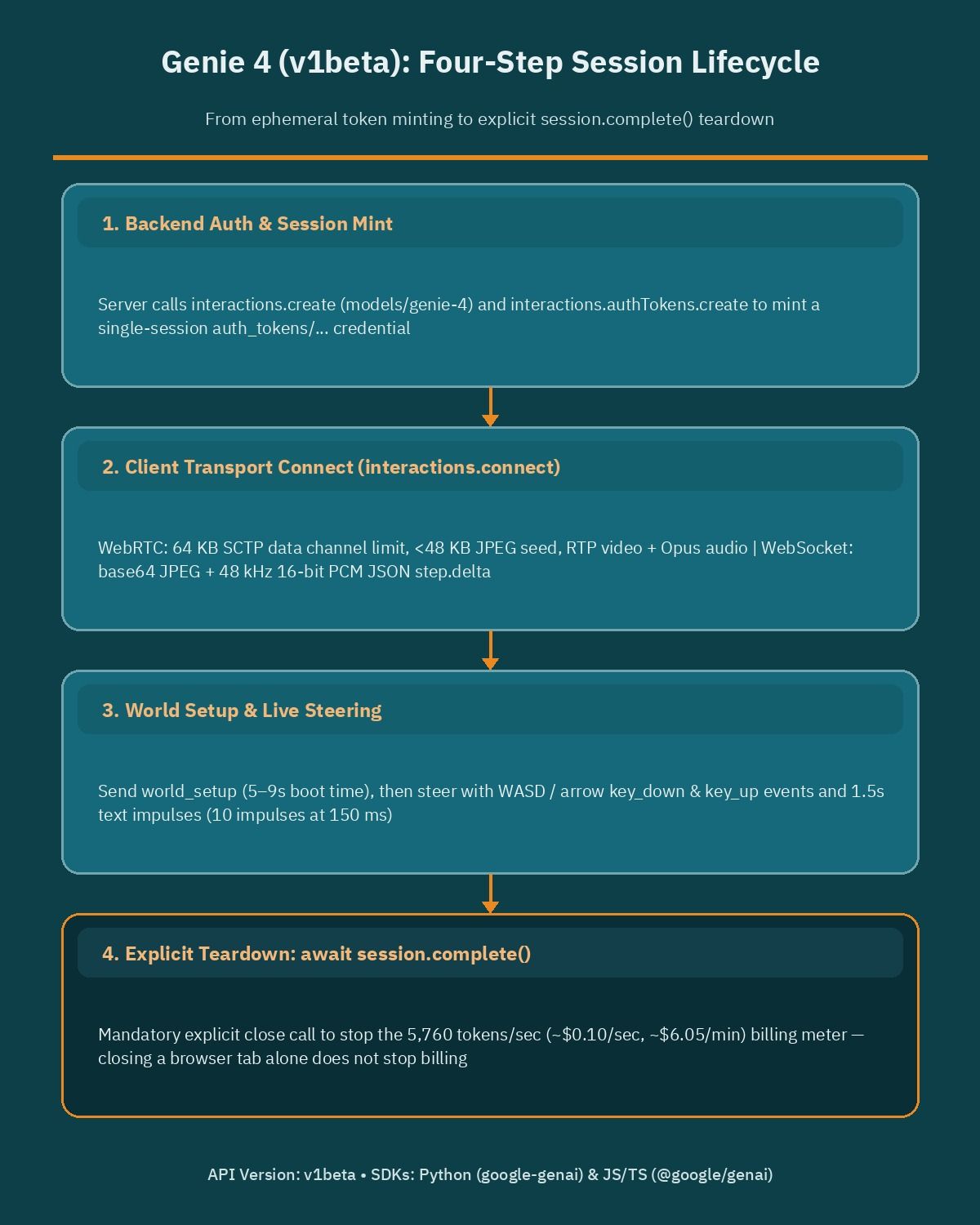
- Create the interaction and mint an ephemeral token on the server: Your backend calls
interactions.createspecifyingmodel: "models/genie-4"andapi_version: "v1beta". Immediately after receiving the interaction object, the backend callsinteractions.authTokens.create(interaction.id)to generate a short-lived credential formatted asauth_tokens/...scoped strictly to that single session, and returns only the interaction ID and ephemeral token to the client. - Connect over WebRTC or WebSocket: Using the ephemeral token, the client connects to the active interaction via
interactions.connect, choosing eithertransport: "webrtc"for low-latency browser playback ortransport: "websocket"for server-side frame processing. - Send world_setup and stream steering events: Once the transport handshake completes, the client transmits exactly one
world_setuppayload containing theworld_promptand optionalreference_image(placed as a top-level sibling ofworld_prompt). After the initial 5 to 9 second generation boot completes and frames begin arriving, the application streamsuser_actionkeyboard events (key_downandkey_up) or mid-session text impulse sequences. - Explicitly call session.complete() to terminate billing: When the user exits the preview or reaches your time limit, the application must invoke
await session.complete(). Simply closing a browser tab, navigating away, or exiting a local code block detaches the network transport without immediately stopping server-side generation.
Choosing Between WebRTC and WebSocket Transports
The Interactions API supports two distinct transport protocols for models/genie-4, and picking the wrong one can either break your image seeding pipeline or degrade frame delivery under real-world mobile network conditions. For interactive browser applications where a human visitor steers the world in real time, Google recommends transport: "webrtc". WebRTC delivers native RTP video tracks and Opus-encoded stereo audio directly into a standard HTML <video autoplay playsinline> element, leveraging the browser’s built-in adaptive jitter buffer to maintain smooth playback even when occasional UDP packets drop.
However, WebRTC sends control messages and the initial world_setup event over an SCTP data channel that enforces a strict 64 KB message size ceiling. Once base64 encoding (~33% size overhead) and JSON structure are factored in, any reference_image passed over WebRTC must be compressed to a 16:9 JPEG file under 48 KB. If your workflow requires sending larger uncompressed seed payloads, running automated backend evaluations in Python, or capturing deterministic frame sequences on a Node.js worker, use transport: "websocket" instead.
| Technical Attribute | WebRTC Transport (transport: "webrtc") | WebSocket Transport (transport: "websocket") |
|---|---|---|
| Primary Use Case | Interactive browser applications with live human steering | Python automation, Node.js backend workers, and server-side frame capture |
| Default SDK Binding | Recommended in browser JavaScript/TypeScript (@google/genai) | Default in Python (google-genai) and available in Node.js (@google/genai) |
| Video Delivery Format | Native RTP video track attached to HTML <video autoplay playsinline> | JSON step.delta events containing base64-encoded JPEG frames |
| Audio Delivery Format | Native Opus stereo audio track synchronized with RTP video | Base64 48 kHz 16-bit signed little-endian stereo PCM audio chunks |
| Bandwidth and Packet Behavior | Adaptive jitter buffering over UDP; resilient to minor packet loss | Approximately 33% base64 payload overhead; subject to TCP head-of-line blocking |
| Setup Payload and Seed Image Limit | SCTP data channel capped at 64 KB; requires 16:9 JPEG seeds under 48 KB | Supports larger JSON world_setup payloads without SCTP fragmentation limits |
Notice the structural requirement when seeding an environment with an image: inside the world_setup payload, reference_image must be passed as a top-level sibling of world_prompt, never nested inside the prompt object itself. When using WebRTC, resize your starting image to 1280x720 (or 960x540 at 16:9) and encode it as a progressive JPEG under 48 KB on your server before transmitting the setup message over the SCTP channel.
Official Paid-Tier Pricing and Per-Second Token Math
Before deploying any live world stream, engineering managers and agency owners need to look closely at the official Genie 4 Gemini API pricing table. Unlike text chat completions that bill a fraction of a cent per prompt, continuous 720p video and 48 kHz stereo audio generation at 24 frames per second consumes tokens at a steady, predictable clock rate for every second the session remains open.
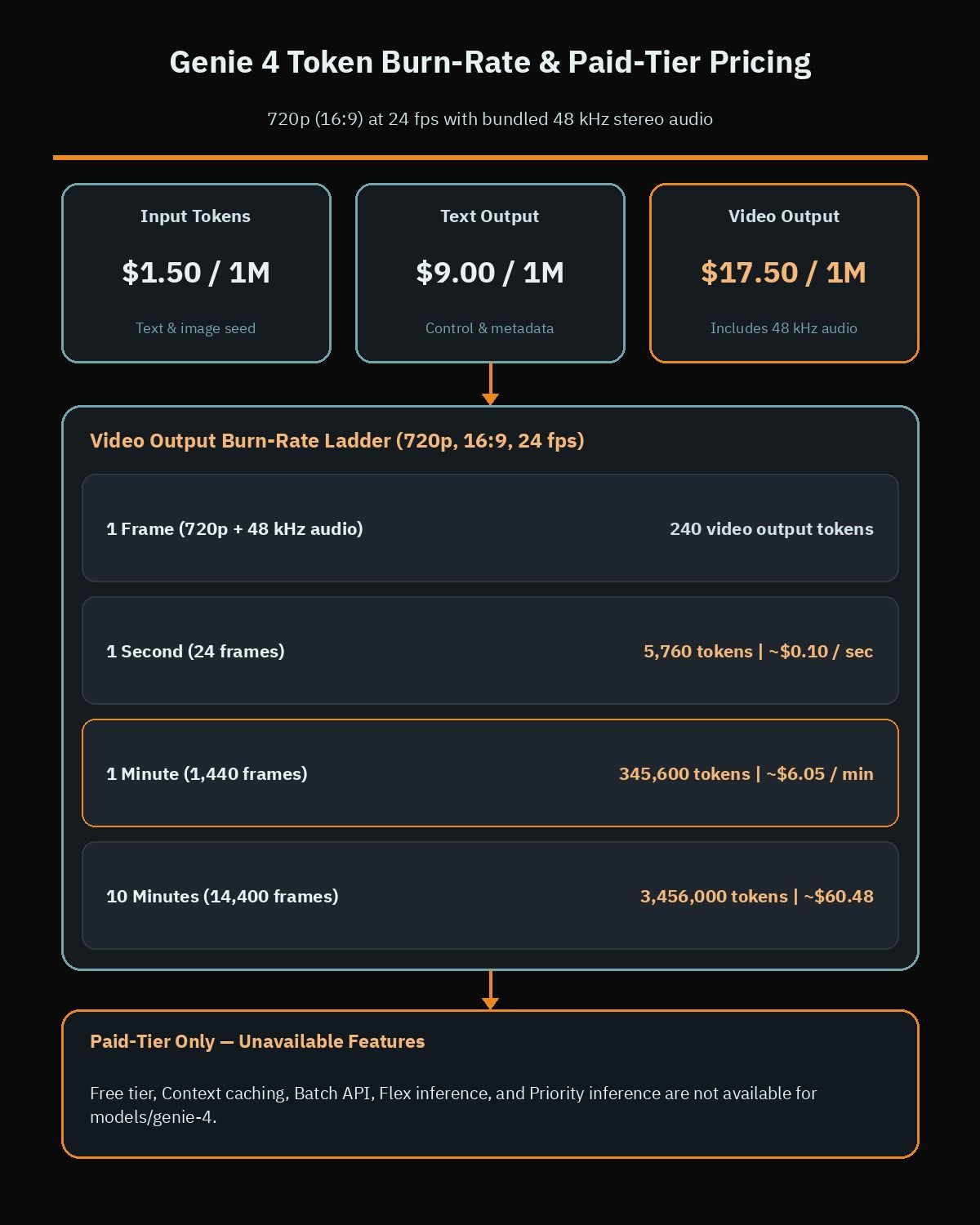
Under Google’s published Standard paid-tier pricing, input tokens for text prompts and reference images cost $1.50 per 1 million tokens, text output tokens cost $9.00 per 1 million tokens, and video output tokens (which bundle the synchronized 48 kHz stereo audio stream) cost $17.50 per 1 million tokens. Each generated 720p frame accounts for exactly 240 video output tokens. Multiplying 240 tokens by 24 frames per second yields 5,760 video output tokens every second, which translates to approximately $0.10 per second or $6.05 per minute of active runtime.
| Billing Dimension or Runtime Interval | Token Volume / Rate | Official Standard Paid-Tier Price |
|---|---|---|
Input Tokens (world_prompt text, mid-session text, reference_image) | Per 1,000,000 input tokens | $1.50 |
| Text Output Tokens | Per 1,000,000 text output tokens | $9.00 |
| Video Output Tokens (720p 16:9 video with bundled 48 kHz stereo audio) | Per 1,000,000 video output tokens | $17.50 |
| Single Generated Frame (720p at 24 fps) | 240 video output tokens | ~$0.0042 per frame |
| One Second of Active Stream (24 frames) | 5,760 video output tokens | ~$0.10 per second |
| One Minute of Active Stream (1,440 frames) | 345,600 video output tokens | ~$6.05 per minute |
| Ten-Minute Interactive Showcase Session (14,400 frames) | 3,456,000 video output tokens | ~$60.48 per 10-minute session |
Because the Free tier, Context caching, Batch API, Flex inference, and Priority inference are not supported for models/genie-4, every second of generation bills at this standard rate. If 100 curiosity clicks on an unprotected landing page each trigger a two-minute session, your API account will incur roughly $1,210 in video output token charges in an afternoon.Even worse, if your application fails to call await session.complete() when a visitor closes their browser window, orphaned server interactions can continue generating frames in the background until they hit a platform timeout.
Regional Serving Latency and MENA Network Architecture
Real-time interactive streaming is far more sensitive to physical distance and round-trip time (RTT) than standard REST API calls. In the official documentation, Google discloses that models/genie-4 is currently served from data centers located in the United States, Western Europe, and Japan. Users located in North America, Western and Central Europe, and East Asia typically achieve the optimal under 150 ms round-trip latency required for responsive keyboard steering.
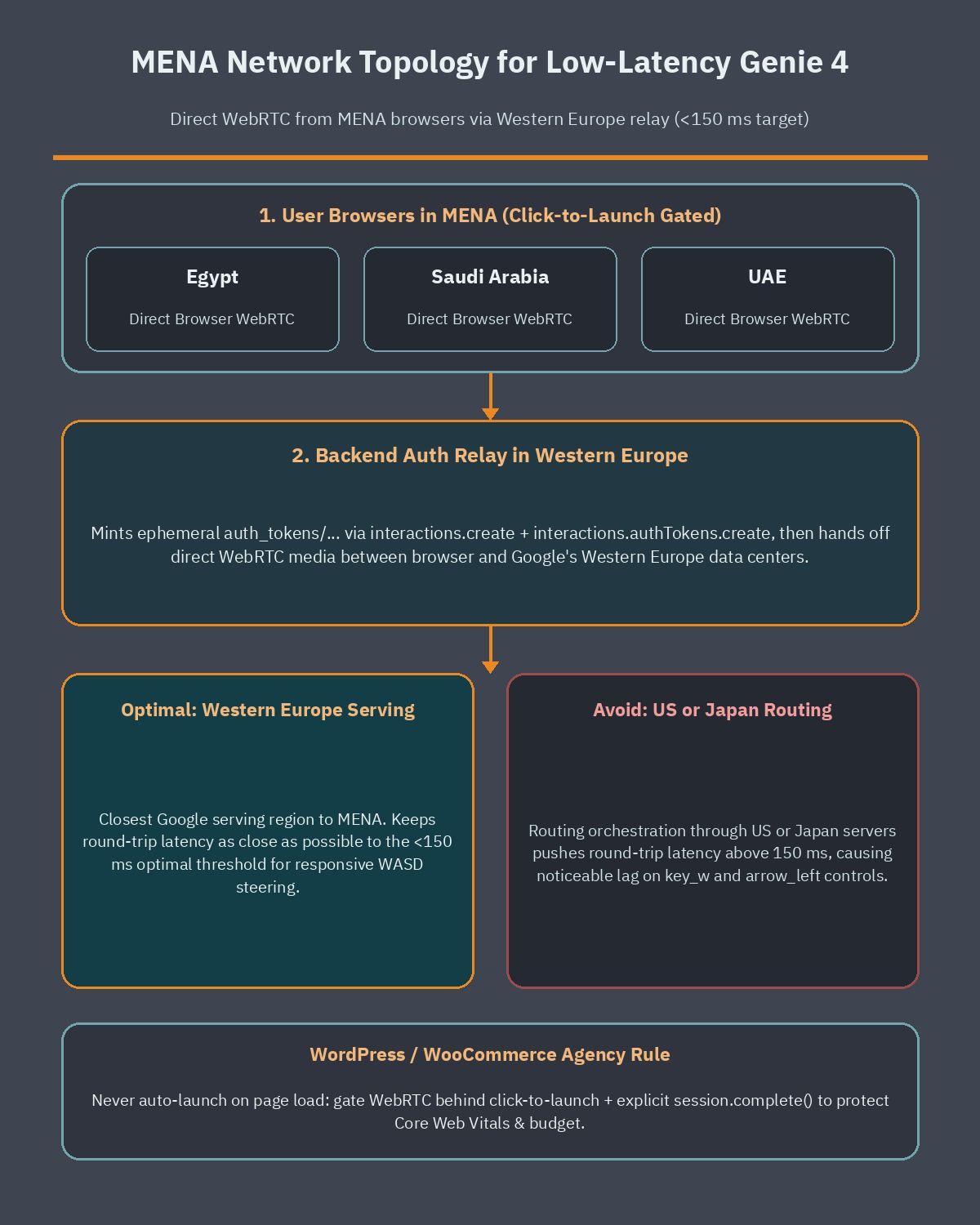
For businesses and web agencies operating across Egypt, Saudi Arabia, the United Arab Emirates, and the wider MENA region, physical network routing introduces an unavoidable latency margin. Packets traveling from Cairo, Riyadh, Jeddah, or Dubai to Western European peering points (such as Marseille, Frankfurt, or Amsterdam) experience higher round-trip times than local European traffic, especially on congested cellular connections. When round-trip latency climbs above the 150 ms threshold, pressing key_w or arrow_left takes noticeably longer to reflect in the returned video frames, and severe network jitter can reduce the effective frame rate delivered to the browser.
- Host your backend relay in Western Europe: When deploying an authentication and session management service for MENA visitors, provision your Node.js or Python backend in a Western European cloud region rather than a US East or Asia-Pacific data center so interaction setup and server-side WebSocket pipelines stay close to Google’s nearest Genie 4 serving nodes.
- Benchmark browser WebRTC RTT before launch: Measure actual WebRTC round-trip times across major regional ISPs in Egypt, Saudi Arabia, and the UAE before designing experiences that demand rapid keyboard reflexes.
- Design slow-paced exploratory environments: Architectural walk-throughs, interior lighting previews, and exhibition booth inspections remain smooth and usable even at moderate MENA latencies, whereas fast-twitch obstacle courses feel sluggish outside the three primary serving regions.
How WordPress and WooCommerce Sites Should Integrate Genie 4 Safely
Whenever a high-profile visual API launches, business owners frequently ask their WordPress development team whether they can drop a live interactive stream straight onto their homepage hero banner or product catalog. With models/genie-4, embedding an auto-playing WebRTC world on a public page is a critical mistake for two reasons: it destroys your API budget at $6.05 per minute per concurrent visitor, and it harms front-end performance by loading heavy WebRTC negotiation scripts and live video decoding during initial page load.
Preserving Core Web Vitals, particularly Largest Contentful Paint (LCP) and Interaction to Next Paint (INP), is essential when you want to speed up WordPress Arabic sites and bilingual enterprise portals. Instead of initializing @google/genai on page load, smart WordPress and WooCommerce architectures isolate Genie 4 behind three defensive layers: a lightweight static poster facade, an authenticated click-to-launch gate with server-enforced session duration caps, or an offline server-side capture workflow.
1. Static AVIF or WebP Facades With Click-to-Launch Gates
On public WordPress pages, render a compressed 16:9 WebP or AVIF poster image (or a short looping MP4 preview under 500 KB) inside your Gutenberg block template. Only load the @google/genai WebRTC client module dynamically when a verified user clicks an explicit button to launch the interactive 3D world preview.For high-ticket businesses such as off-plan real estate developers in Cairo or Dubai, luxury hospitality brands, or custom furniture showrooms, place that launch button behind a qualified lead form or logged-in customer portal.
2. Server-Enforced Duration Caps and Heartbeat Teardown
When a qualified user launches an interactive session on your site, your WordPress REST endpoint or Node.js microservice should mint the ephemeral token via interactions.authTokens.create(interaction.id) and simultaneously schedule a strict server-side timer (for example, 60 or 90 seconds). Attach a browser pagehide and visibilitychange listener that pings your teardown endpoint, and run a backend heartbeat check that calls await session.complete() automatically if the client disconnects or reaches the maximum session length. If you need custom checkout gating or per-customer usage quotas integrated with product previews, hire a WooCommerce developer to wire token metering directly into user roles and session transients.
3. Server-Side WebSocket Capture for Public Product Pages
Many merchandising and design teams want the creative flexibility of Genie 4 without exposing a live $6.05/min billing faucet to anonymous website visitors. Using the Python google-genai SDK over transport: "websocket", your creative team can seed a world from a product stage image, steer through a 30-second walk-through in an internal dashboard, capture the incoming base64 JPEG frames and 48 kHz PCM audio chunks, and encode them into a standard optimized video file. You spend roughly $3.00 once during content production and serve the resulting video file to tens of thousands of WordPress visitors through your CDN at near-zero marginal cost.
Who Should Use Genie 4 in the Gemini API, What It Costs, and What to Do This Week
Not every digital business needs a live, keyboard-steerable world model running at 24 frames per second. Teams building interactive architectural pre-visualizations, game design sandboxes, film blocking prototypes, spatial layout simulators, or VIP showroom configurators are the primary beneficiaries of models/genie-4 right now. By contrast, businesses that simply need static hero illustrations, standard e-commerce catalog imagery, or fixed social media video clips should stick to static image models or offline clip generation tools rather than paying real-time streaming rates.
Keep the verified financial math front and center whenever you scope a client proposal: Genie 4 requires a paid-tier Gemini API key and bills $1.50 per 1 million input tokens, $9.00 per 1 million text output tokens, and $17.50 per 1 million video output tokens (with 48 kHz stereo audio included). At 240 video output tokens per frame and 24 fps (5,760 tokens per second), every active stream costs roughly $0.10 per second or $6.05 per minute. Because closing a browser tab or exiting a local code block only detaches the network transport without halting server generation, every production integration must enforce an explicit await session.complete() call backed by server-side timeout timers to prevent costly session leaks.
- Test prompts in Google AI Studio first: Open the live playground at
aistudio.google.com/live?model=genie-4with a16:9reference image and test how your target environment responds to WASD steering, 180-degree camera turns, and mid-session text changes before writing custom application code. - Benchmark Western Europe WebRTC latency from your target market: Run a small prototype using
@google/genaiwith a backend relay hosted in Western Europe and measure round-trip steering responsiveness from networks in Egypt, Saudi Arabia, and the UAE. - Build ephemeral token and session.complete() guardrails before any UI work: Never expose your
GEMINI_API_KEYin frontend code, compress WebRTC seed JPEGs under48 KBto fit the64 KBSCTP data channel limit, and implement server-enforced duration caps that guaranteesession.complete()executes on every session.
If your company is evaluating how to integrate Gemini API models, interactive product previews, or high-performance custom plugins into a WordPress or WooCommerce platform without risking runaway API bills or slow page loads, book a free consultation so we can review your architecture and map out a cost-controlled implementation plan.
Frequently asked questions
How much does it cost to stream an interactive world with Genie 4 in the Gemini API?
Genie 4 requires a paid-tier Gemini API key and charges $1.50 per million input tokens, $9.00 per million text output tokens, and $17.50 per million video output tokens with 48 kHz stereo audio included. Because a 720p stream at 24 frames per second emits 240 video tokens per frame, or 5,760 tokens every second, an active session costs roughly $0.10 per second, which equals about $6.05 per minute.
Should developers connect to Genie 4 over WebRTC or WebSocket?
Use WebRTC for interactive browser applications where visitors steer a world in real time with keyboard controls. WebRTC sends native RTP video and Opus audio tracks directly to an HTML video element with adaptive jitter buffering, although its SCTP data channel limits seed images to under 48 KB. Use WebSocket for Python or Node.js backend scripts that capture frames, run automated tests, or send larger JSON setup payloads.
Does closing a browser tab stop Genie 4 generation and API billing?
No, closing a browser tab or exiting a local code block only detaches the WebRTC or WebSocket transport connection without immediately terminating the server interaction. To stop frame generation and prevent unintended token charges at $6.05 per minute, your application must explicitly call the session complete method when a user finishes, when a timer expires, or when a server watchdog detects a disconnected client.
How does regional serving latency affect Genie 4 sessions for MENA websites?
Google serves Genie 4 from data centers in the United States, Western Europe, and Japan, delivering optimal round-trip latency under 150 milliseconds in North America, Western and Central Europe, and East Asia. Visitors connecting from Egypt, Saudi Arabia, the UAE, and nearby MENA markets experience higher network latency, which can delay keyboard steering and reduce frame rate unless teams test WebRTC performance and route backend relays through Western Europe.
Does Genie 4 save a permanent 3D mesh of the generated environment?
No, Genie 4 does not construct or store a persistent 3D mesh in memory. Instead, the model maintains a rolling visual horizon as it generates 720p video frames at 24 frames per second. If a user rotates the camera 180 degrees away from a landmark and turns back several seconds later, background structures and environmental details may rearrange rather than remain fixed in place.
References
- Google Blog: Genie 4 is now available in Google AI Studio and the Gemini API
- Google AI for Developers: Genie 4 in the Gemini Interactions API (v1beta) Documentation
- Google AI for Developers: Gemini API Official Pricing for Genie 4
- Google AI Studio: Live Interactive Playground for Genie 4 (models/genie-4)
- Google DeepMind: SynthID Watermarking for AI-Generated Video and Audio