هذا المقال متوفر باللغة العربية — اقرأ بالعربية
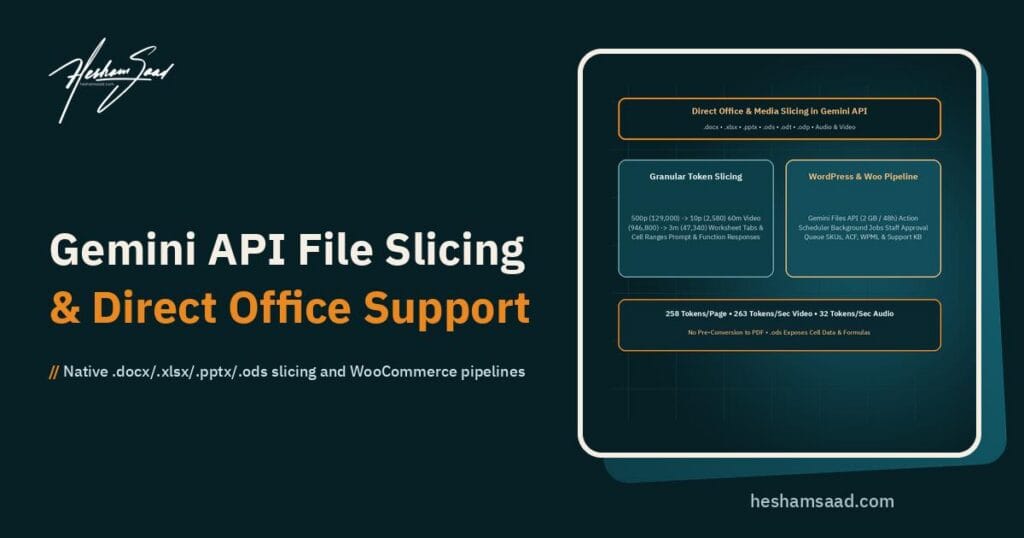
Google DeepMind updated the Gemini API on November 18, 2026 with direct multimodal processing for Microsoft Office and OpenDocument files, paired with granular Gemini API file slicing inside both user prompts and function responses. Instead of maintaining fragile conversion scripts or paying to send an entire 400-page manual or multi-tab workbook in every request, engineering teams can pass native office files and isolate only the exact pages, spreadsheet tabs, cell ranges, time intervals, or content layers needed.
For businesses across Egypt, Saudi Arabia, and the Gulf running WordPress sites and WooCommerce stores, the update removes a major layer of backend glue code. Daily operations rely on supplier Excel price lists, bilingual Word product catalogs, PowerPoint vendor decks, and recorded training videos that previously required custom CSV exports, PDF converters, or video clipping scripts before an AI model could read them.
What changed in the November 18, 2026 Gemini API update
According to the official Google AI Studio changelog for November 18, 2026, the Multimodal file processing and slicing release introduces two linked capabilities across the developer platform. First, the API accepts Microsoft Office and OpenDocument formats for Word, PowerPoint, and Excel directly alongside PDF, image, audio, and video inputs. Second, developers can slice documents, spreadsheets, videos, and audio both inside initial user prompts and inside function responses returned by agentic tools.
Slicing inside function responses matters just as much as prompt-level slicing. Multi-step agents rarely inspect an entire archive up front; the model invokes a lookup tool and receives a file reference in the next turn. With tool-level slicing via inline bytes or a Files API URI, a tool can return only the requested tab, page interval, or video clip instead of flooding the context window.
Note that the November 18, 2026 changelog summary announces the new capabilities without publishing separate per-format billing discounts or exact SDK parameter tables in the changelog note itself. Token charges follow the standard per-million-token rates for your chosen model on the official Google AI Studio pricing page, so teams should confirm active rates and run staging token checks before budgeting production volume.
Direct Microsoft Office and OpenDocument handling without pre-conversion
Building document pipelines for WordPress traditionally meant running headless LibreOffice, debugging broken Arabic table margins during PDF export, or writing PHP parsers for legacy office binaries. Native API ingestion removes most of that conversion overhead while processing each file format according to its structure.
Word, PowerPoint, and OpenDocument presentations
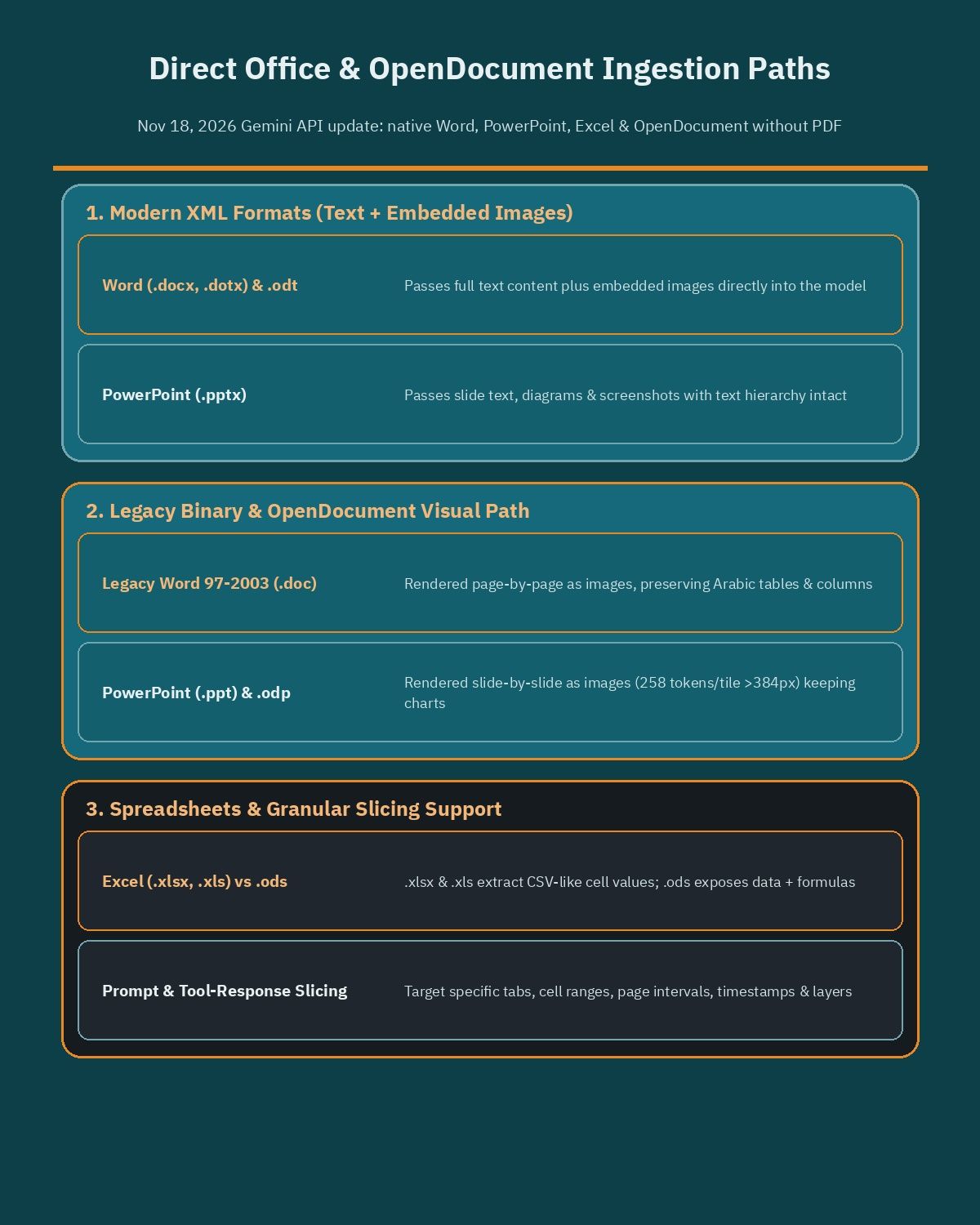
Modern XML-based document formats, including Word (.docx, .dotx), OpenDocument Text (.odt), and PowerPoint (.pptx), pass their full text content along with embedded images directly into the model. Product diagrams, screenshots, and text hierarchy remain intact without an intermediate PDF export step.
Legacy binary formats and OpenDocument presentations take a visual rendering path. Word 97-2003 (.doc), PowerPoint 97-2003 (.ppt), and OpenDocument Presentation (.odp) files are rendered page-by-page or slide-by-slide as images, preserving charts, multi-column layouts, and bilingual callouts that break when stripped into plain text.
Excel and OpenDocument spreadsheets
Spreadsheet ingestion supports Microsoft Excel (.xlsx, .xls) and OpenDocument Spreadsheet (.ods) files directly. Under Gemini’s baseline document-processing rules, .xlsx and .xls files expose cell values in a CSV-like format without cell styling, whereas .ods files expose both cell data and underlying formulas.
Previously, standard workbook processing read only the first worksheet tab, forcing developers to reorder tabs programmatically whenever pricing sat on sheet three or four. Pairing direct spreadsheet support with tab and cell range slicing lets pipelines read the exact sheet and block of rows required.
How Gemini API file slicing works across prompts and function responses
Passing whole files into an API becomes costly when every request tokenizes 200 pages of boilerplate or a 60-minute video just to check one section. Gemini API file slicing lets developers constrain the exact subset and layer of a file the model reads.
The November 18, 2026 update exposes four slicing dimensions across user prompts and function responses:
- Page ranges in documents and presentations: Target specific page numbers or slide intervals rather than processing an entire manual or catalog.
- Worksheet tabs and cell ranges in spreadsheets: Isolate a named tab or cell range inside a multi-sheet workbook, skipping unused archive sheets.
- Time intervals in audio and video: Clip exact start and end timestamps so the model inspects only the relevant demonstration or support segment.
- Specific content layers: Select page images, extracted text, spreadsheet formulas, or video transcripts depending on whether visual layout or raw data matters.
Combining layer selection with tool calls enables lean agentic loops. Paired with fast execution models such as Gemini 4 Hydrogen, an agent can read a lightweight sheet list or video outline first, then call a function that returns only the matching cell range or timestamp slice. Developers should consult the official Gemini API files and document-processing documentation for exact SDK field names across client libraries.
| File Category | Supported Formats | Granular Slicing Targets | Verified Limits and Token Baselines |
|---|---|---|---|
| Word and PDF documents | .docx, .doc, .dotx, .odt, .pdf | Page ranges; extracted text or page images | PDFs up to 1,000 pages or 50 MB; baseline 258 tokens per page (adjustable with media resolution) |
| Presentations | .pptx, .ppt, .odp | Slide or page ranges; page images or extracted text | .pptx passes text and embedded images; .ppt and .odp render slides as images; image tiles at 258 tokens |
| Spreadsheets | .xlsx, .xls, .ods | Worksheet tabs; cell ranges; values or formulas | .xlsx and .xls extract cell values; .ods exposes data and formulas; supports up to millions of cells |
| Video | MP4 and standard video formats | Time intervals; video transcripts or visual stream | Standard static video at 263 tokens per second; inline under 100 MB and 1 min; Files API up to 2 GB per file |
| Audio | MP3, WAV, AAC, FLAC, OGG, Opus | Time intervals; audio stream or transcript layer | 32 tokens per second (1,920 tokens per minute); multi-channel combined; up to 9.5 hours per prompt |
Token economics, benefits, and operational limits to watch
Google’s published multimodal token baselines make the savings easy to calculate. Visual document pages consume a baseline of 258 tokens per page (adjustable with media resolution settings such as low), images larger than 384 pixels split into 768 by 768 pixel tiles at 258 tokens per tile, audio consumes 32 tokens per second (1,920 tokens per minute), and standard static video consumes 263 tokens per second.
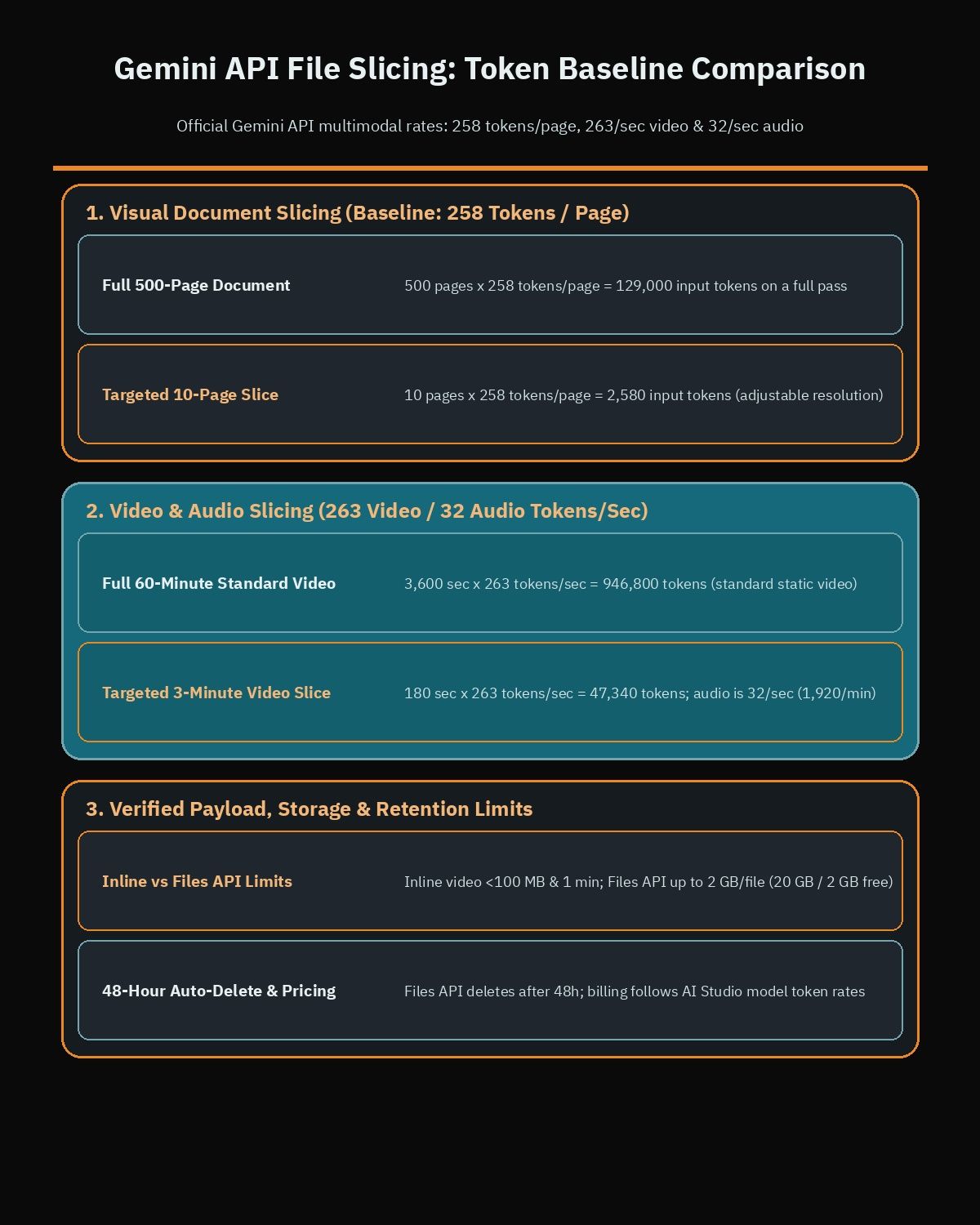
Look at two concrete scenarios. Processing 500 visual document pages consumes 129,000 input tokens on a full pass, whereas slicing 10 relevant pages drops the count to 2,580 tokens. Likewise, a 60-minute standard video totals 946,800 tokens in full, while a 3-minute slice consumes 47,340 tokens, cutting latency and keeping prompts comfortably inside context limits.
Before deploying these capabilities in production, weigh the operational strengths and limits:
- Lower server maintenance: Eliminating LibreOffice, PDF renderers, and custom spreadsheet splitters removes heavy dependencies from WordPress hosting servers.
- 48-hour Files API expiration: The Gemini Files API allows up to 2 GB per file and 20 GB total project storage (2 GB on the free tier), but deletes files automatically after 48 hours, so workflows must re-upload from local or cloud storage when needed.
- Messy regional spreadsheets: Merged headers, right-to-left Arabic columns, and mixed currency cells still require strict JSON schema checks before writing catalog updates.
- Inline vs. Files API limits: Inline base64 video payloads stay restricted to under 100 MB and 1 minute, while catalogs and recordings over 100 MB or 10 minutes belong in the Files API or registered Google Cloud Storage buckets.
How Gemini compares with OpenAI and Anthropic on Office files and slicing
Engineering teams evaluating document pipelines often compare Gemini against OpenAI and Anthropic. While all three handle PDFs well, their APIs differ sharply on Office spreadsheets, legacy formats, and media slicing.
OpenAI accepts .pdf, .docx, .pptx, .xlsx, .csv, and .tsv through its Responses API and Files API. PDFs process text and page images, Word documents extract text, and Excel files use a spreadsheet augmentation flow that parses rows (typically up to the first 1,000 rows per sheet) with header metadata. Even alongside newer models covered in our review of GPT-6.2 Astra Sol, OpenAI’s documented file pipeline does not pair native OpenDocument support (.odt, .ods, .odp) with unified prompt and function-response slicing across page ranges, worksheet tabs, audio, and video.
Anthropic’s Claude Messages API offers strong native PDF comprehension with page visuals and citations alongside plain text and code inputs. Direct .xlsx and .docx processing in Claude generally relies on workspace environments or pairing requests with code execution tools rather than native API slicing across Office, OpenDocument, and media intervals inside tool responses.
Practical WordPress and WooCommerce workflows for MENA businesses
Most companies across Egypt, Saudi Arabia, and the UAE run WooCommerce stores, B2B distributor portals, and bilingual WordPress sites rather than standalone AI labs. Direct Office support and file slicing address three everyday operational bottlenecks.
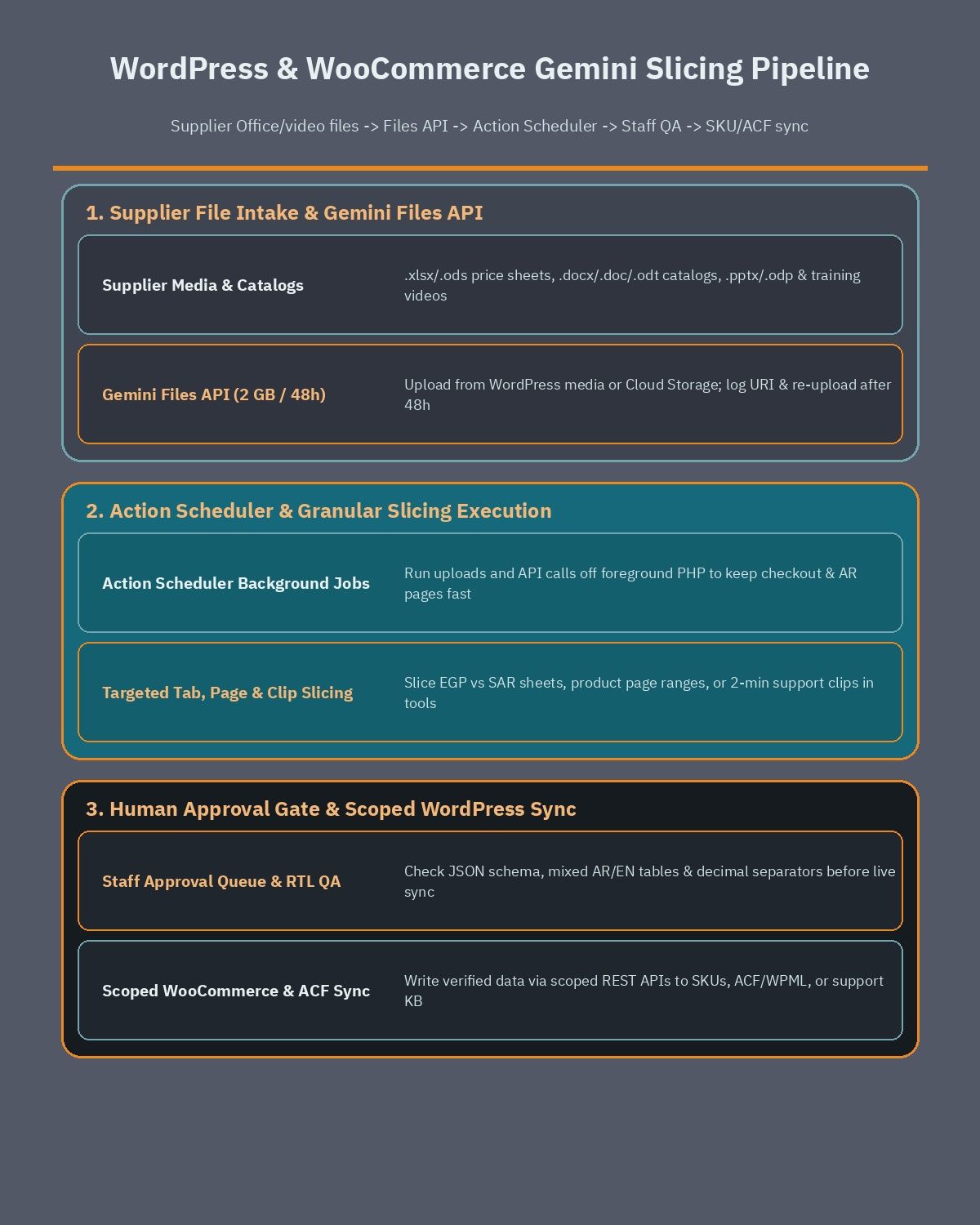
Updating WooCommerce SKUs from supplier Excel workbooks
Regional distributors frequently receive multi-tab Excel workbooks where sheet one holds notes, sheet two lists Egypt EGP pricing, sheet three holds Saudi SAR tiers, and sheet four tracks discontinued SKUs. Sending the entire file wastes tokens and introduces cross-market pricing errors.
With tab and cell range slicing, a server job uploads the workbook once via the Files API, slices only the target regional tab and SKU rows, and extracts structured JSON for WooCommerce SKU, price, and stock fields. Never let an AI write directly to live product tables: teams automating catalog syncs should hire a WooCommerce developer to isolate writes behind scoped REST API endpoints and a human approval queue.
Extracting bilingual Arabic and English specs from Word catalogs
Manufacturers often share product brochures as .docx, legacy .doc, or .odt files containing nested spec tables, dimension diagrams, and mixed Arabic and English descriptions. Slicing exact page ranges processes one product line at a time, while selecting the page-image layer preserves visual diagrams and right-to-left Arabic columns.
In a custom WordPress development setup, extracted specs map cleanly into Advanced Custom Fields (ACF) or WPML translation fields. Running uploads and Gemini API calls inside Action Scheduler background queues rather than foreground PHP requests is critical to speed up WordPress Arabic sites and keep storefront checkout fast during catalog imports.
Indexing training videos and manuals into support workflows
Service companies and marketplaces accumulate hours of Arabic and English onboarding videos alongside PowerPoint or .odp decks. Instead of paying 263 tokens per second for an entire 60-minute recording on every ticket, a support agent can check chapter metadata first and use function-response slicing to inspect only a 2-minute clip or three matching slides.
Implementation checklist for WordPress and AI engineering teams
Before wiring direct Office ingestion and file slicing into a live store or portal, run through six practical checks:
- Inventory real supplier formats: Confirm whether vendors send .xlsx, .ods, .docx, legacy .doc, .pptx, or .odp files, and separate workflows needing formulas (.ods) from visual layout rendering (.doc, .ppt, .odp).
- Enforce explicit slicing bounds: Require every prompt or tool call to pass tab names, cell coordinates, page ranges, or video timestamps instead of defaulting to full-file payloads.
- Track the 48-hour Files API window: Keep source files in secured WordPress storage or Google Cloud Storage, log URI expiration times, and automate re-uploads after 48 hours.
- Queue jobs and stage writes: Process Gemini requests in asynchronous background workers and hold WooCommerce price or inventory changes for staff approval.
- Validate Arabic RTL tables on staging: Verify mixed Arabic and English columns, decimal separators, and SKU codes before enabling live syncs.
- Monitor token usage per batch: Log input and output tokens against Google AI Studio pricing tiers so scaling catalog volume stays predictable.
Designing slicing boundaries and approval queues up front keeps API spending controlled and protects live store data. If your business wants to automate WooCommerce supplier imports, bilingual WordPress catalog extraction, or AI support workflows safely, book a free consultation to review your file formats, hosting setup, and budget.
Frequently asked questions
Which Microsoft Office and OpenDocument files work directly in the Gemini API?
The Gemini API accepts Word (.docx, .doc, .dotx), PowerPoint (.pptx, .ppt), Excel (.xlsx, .xls), and OpenDocument (.odt, .odp, .ods) files directly without pre-converting them to PDF. Modern .docx, .dotx, .odt, and .pptx files pass text and embedded images, while .doc, .ppt, and .odp render as page or slide images.
How does Gemini API file slicing reduce token costs on large files?
File slicing restricts processing to the exact page ranges, worksheet tabs, cell ranges, video or audio time intervals, or content layers your request needs. Since baseline PDF pages cost 258 tokens each and standard static video costs 263 tokens per second, sending only 10 pages or a short clip cuts token bills sharply.
Can the Gemini API read specific Excel tabs and spreadsheet formulas?
With the November 18, 2026 slicing update, prompts and function responses can target specific worksheet tabs, cell ranges, and content layers such as extracted data or formulas. In baseline document handling, .xlsx and .xls files expose cell values like CSV, while OpenDocument .ods files expose both cell values and underlying formulas.
How long does the Gemini Files API keep uploaded Office catalogs and videos?
The Gemini Files API stores uploaded files for 48 hours before automatically deleting them, with limits of 2 GB per file and 20 GB total project storage or 2 GB on the free tier. WordPress sites should keep master supplier files in local media or cloud storage and re-upload when needed.
Is it safe to update WooCommerce product prices directly from sliced supplier sheets?
No AI model should overwrite live WooCommerce prices or inventory without validation. A safer WordPress workflow runs file uploads and Gemini API slicing in asynchronous background queues, validates SKU and Arabic or English fields through scoped REST endpoints, and holds pricing changes in a staff approval queue before publishing.
References
- Google AI Studio: Gemini API Release Notes and Changelog (November 18, 2026)
- Google AI for Developers: Gemini Files API Documentation
- Google AI for Developers: Document Processing with the Gemini API
- Google AI for Developers: Gemini API Pricing
- Google AI for Developers: Gemini API Overview and Multimodal Guides