هذا المقال متوفر باللغة العربية — اقرأ بالعربية
When a patient in Cairo, Riyadh or Dubai wakes up with tooth pain or needs a specialist for a parent, scrolling through old Instagram posts is the last thing they want to do. They want to confirm which doctor treats their concern, check branch hours, open a map and request an appointment without playing phone tag. A well-structured clinic website WordPress build puts those answers in one calm place your reception team can easily manage.
Many private doctors, dental clinics and small medical centers rely on Facebook, Instagram and word of mouth because they picture websites as slow portals nobody updates. In practice, a clear WordPress doctor website works like an organized front desk that answers routine location and schedule questions after hours and routes appointment requests cleanly. Getting that result comes down to sensible page structure, the right booking setup, clean Arabic and English pages and practical privacy habits.
Core pages every clinic website WordPress build needs
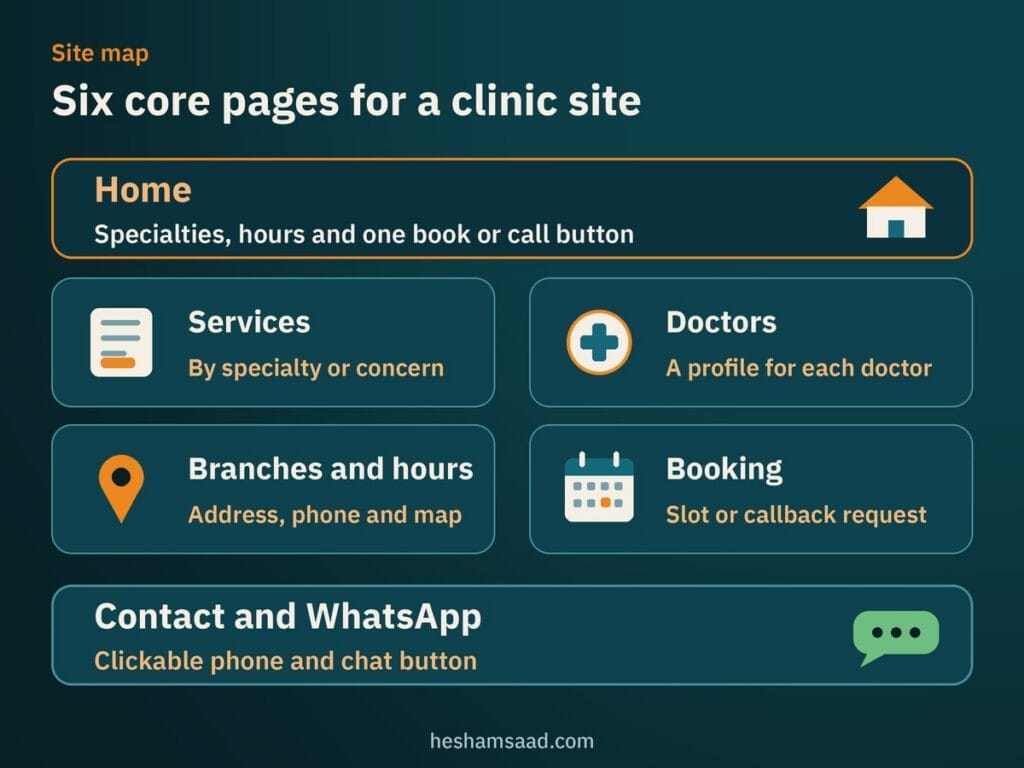
Patients visiting a health website are often anxious or browsing on a phone in traffic, so clarity beats visual tricks every time. Much like planning a local restaurant website on WordPress, a local medical practice earns trust when practical details take one tap to find. Start with six core pages before worrying about decorative extras.
- Home: State what specialties your practice covers, which city or district you serve, your opening hours and one obvious button to book or call.
- Services: Group treatments by specialty or patient concern so visitors understand what you offer without reading dense academic jargon.
- Doctors: Show each practitioner’s full name, specialty, qualifications, spoken languages, branch days and a clear, approachable portrait.
- Branches and hours: Give every physical branch its street address, floor or parking notes, phone numbers, working hours and map link.
- Booking: Provide one straightforward way to choose an appointment slot or request a callback without forcing visitors to create an account.
- Contact and WhatsApp: Keep clickable phone numbers and a direct WhatsApp chat button visible for quick reception questions.
Leave out auto-playing videos, pop-up banners and vague slogans. Whether you run a solo practice or a multi-chair dental clinic website WordPress project, every element on screen should either reassure the patient or help them reach a consultation chair.
Choosing how patients book their appointments
Not every reception desk works the same way, so copying another clinic’s booking calendar can create double work for your coordinators. Your clinic appointment booking WordPress setup has to match how your team confirms doctor shifts and handles walk-ins. Most practices in Egypt and the Gulf fit one of three practical setups.
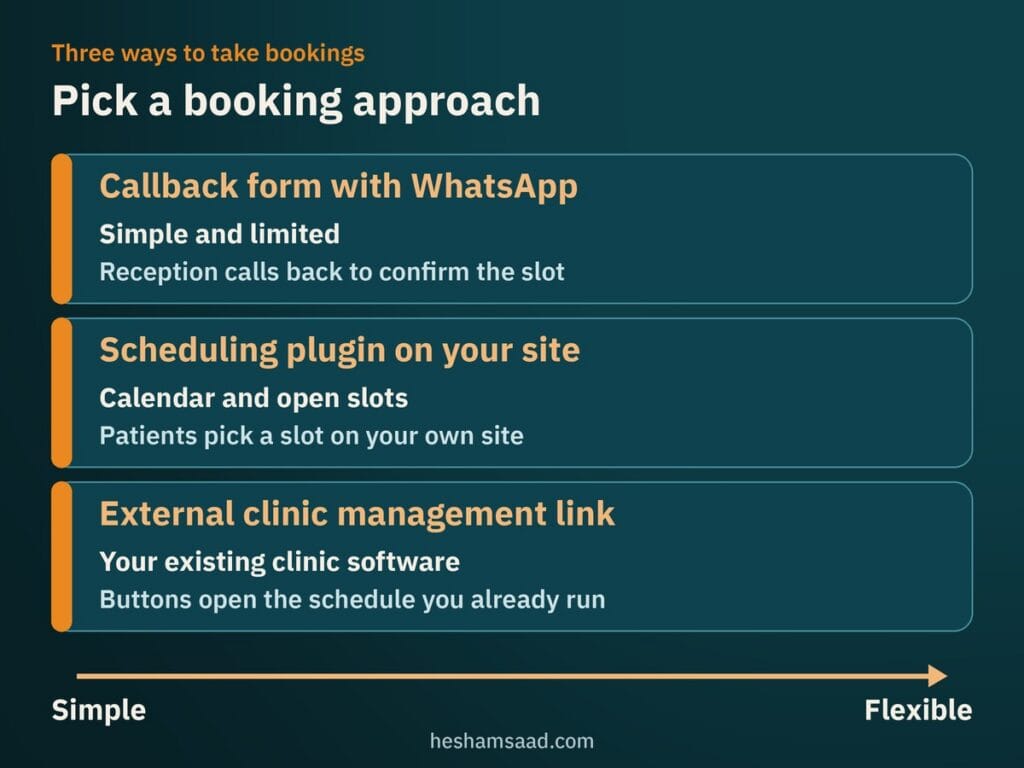
A callback form paired with WhatsApp
If doctors adjust hospital rounds or surgery hours weekly, a live online calendar goes out of sync unless someone updates it constantly. A short request form asking only for the patient’s name, phone number, preferred doctor and preferred day avoids wrong bookings. Reception calls back to confirm the exact slot, while WhatsApp handles quick scheduling questions during working hours.
Scheduling plugins inside your site
When doctors keep fixed shifts and want patients to select open slots directly, Amelia and Bookly are two established plugins on WordPress.org. The free Amelia Lite version provides a mobile-first booking calendar, services, staff profiles, email notifications and automatic prevention of double booking, with forms built for Gutenberg blocks, Elementor or Divi. Keep in mind that certain integrations, unlimited employees, custom notifications, reminders and multilingual support are not included in Amelia Lite.
Bookly also offers a free scheduling plugin on WordPress.org where patients choose a category, service and staff member from a calendar and get email or SMS confirmations and reminders. Check which reminders are in the free version before launch, because online payments, unlimited staff members, unlimited services and extra add-ons require the paid Bookly Pro add-on. We compare calendars, deposits and Arabic configuration in our guide to building a WordPress booking website.
An external clinic management link
Some polyclinics and dental centers already run clinic management software at reception that includes its own online booking screen. Rather than maintaining two separate calendars and risking double bookings, keep your doctor and treatment pages on WordPress and connect your booking buttons directly to that existing schedule.
Structuring doctor profiles and treatment pages for search
Many clinics squeeze ten treatments onto one bulleted page and put every doctor on a single grid with two-line bios. That leaves very little for a patient searching Google for a specific service in their neighborhood or looking up a specialist by name. Giving each core treatment and each permanent doctor an individual page helps both search engines and hesitant patients understand what your clinic offers.
Write every service page in plain language that answers practical pre-visit questions: who the consultation suits, what happens during the visit, how to prepare and which doctors handle that care. Link each treatment directly to those doctor profiles and the branch where they see patients. Good medical website design keeps these pages calm and readable, ending with one clear booking call to action.
Behind the scenes, structured data helps Google interpret your practice details accurately. Google Search Central advises using the most specific LocalBusiness subtype possible, requiring your business name and address while recommending telephone, openingHoursSpecification, geographic coordinates and URL. Schema.org provides MedicalClinic, Dentist and Physician types under LocalBusiness, and although Google does not guarantee rich results, you should validate your pages with Google’s Rich Results Test.
Connecting Google Maps, branch listings and WhatsApp
Your website and your Google Business Profile work as a pair whenever nearby patients search on Google Maps. Google Business Profile documentation notes that local results are mainly based on relevance, distance and prominence, where prominence also reflects web links and reviews alongside algorithm details Google keeps confidential. Nobody can promise local rankings, yet matching your exact clinic name, address, phone numbers and hours across both places builds consistency, as explained in our WordPress local SEO setup guide.
Read Google’s business representation guidelines carefully if your practice operates multiple branches or hosts several doctors. Maintain one precise real-world address profile per physical location, and note that while individual practitioners such as doctors may qualify for separate pages under specific Google rules, you should read those guidelines first so clinic and doctor listings do not conflict. Add written landmark and parking notes beside the map on every branch page.
Because patients across MENA message clinics daily on WhatsApp, add a click-to-chat button using WhatsApp’s official https://wa.me/ link format with your country code and digits only, plus an optional ?text= query for a starter message. Keep any pre-filled message restricted to asking about open slots or branch directions. Add a short note beside the button reminding patients never to send symptoms, lab reports or health details on WhatsApp.
Running Arabic and English pages without layout bugs
In Egypt, Saudi Arabia and the Gulf, patients switch between Arabic and English depending on whether they are checking street directions, doctor credentials or insurance paperwork. An Arabic RTL clinic website should not rely on unreviewed automatic translation widgets, because medical specialty titles and branch instructions easily turn awkward when translated word by word. Human-edited copy in both languages immediately signals care and credibility.
The free Polylang plugin on WordPress.org lets you manage linked Arabic and English versions of pages, posts, media, categories, tags and custom post types, with built-in support for RTL scripts. You can set the language by URL code, subdomain or separate domain per language and add a language switcher via blocks, a menu item or a widget, while further features are offered in Polylang Pro. Each doctor and treatment page then gets a clean URL in each language.
Switching from left-to-right to right-to-left flips spacing, phone numbers, directional icons and calendar grids, so test every page on an actual phone before launch. Note too that while Amelia Lite lists Arabic among its available translations and mentions RTL support on admin pages in its changelog, you should test its front-end booking form in Arabic yourself. Our walkthrough on fixing WordPress RTL layout issues covers the typography and alignment checks that keep Arabic pages clean.
Handling patient forms, privacy and site security
Even a simple callback request form collects personal contact details that patients expect your practice to treat discreetly. Data protection and health privacy rules differ by country, so check directly with the official data protection authority and health regulator in your country and review your obligations with a qualified lawyer. From a website standpoint, the safest rule is keeping sensitive medical information off your web forms altogether.
Restrict website forms to minimal scheduling fields: full name, phone number, preferred doctor or branch and preferred day. Never ask visitors to describe symptoms, medical history or test results in web forms, standard email notifications or WhatsApp messages. Place a clear consent line on every form explaining how your reception team uses those contact details to arrange the visit.
Follow core WordPress.org security guidance as well: serve both your public website and administration screens over HTTPS, and keep WordPress core, plugins and themes updated strictly from official WordPress.org releases, building on the automatic updates included since version 3.7. Choose trusted hosting, keep regular backups and give receptionists limited booking accounts rather than full administrator roles, following our checklist for running a WordPress security audit.
Mobile speed, clinic photography and advertising cautions
Real photos of your reception desk, consultation rooms and doctors build far stronger patient confidence than generic stock models in lab coats. Uploading huge uncompressed camera files, however, stalls mobile pages when patients open your site on cellular data. On web.dev, Google defines Core Web Vitals around Largest Contentful Paint (LCP), Interaction to Next Paint (INP) and Cumulative Layout Shift (CLS), setting a good LCP target of 2.5 seconds or less across three-quarters of page visits.
Resize and compress clinic portraits before uploading so the largest visible top image renders quickly, and apply browser-level image lazy loading to gallery or doctor photos further down the page, as documented on web.dev. We break down practical sizing and format steps in our guide to optimizing WordPress images for speed.
Be just as careful with promotional claims, clinical photos and review sections. Advertising and medical claims rules differ per country and per health authority, so check local regulations before publishing clinical claims, before-and-after photos or patient testimonials. Likewise, Google Maps user-generated content policy states that reviews and ratings must reflect a genuine, unbiased experience with the business, so never post or buy fake reviews.
What drives project cost and when to hire a developer
Project scope and launch timing depend on how your clinic operates rather than a fixed page count. A single-doctor office with one branch and a callback form takes far less setup than a multi-branch medical center needing bilingual Polylang templates, per-doctor booking calendars, RTL checks and structured data across dozens of services. How soon you go live also depends on content readiness, including approved doctor bios, real clinic photos, Arabic and English service copy, booking setup tests and internal sign-off.
While a solo practitioner can assemble a basic starter page, investing in custom WordPress development pays off when you want clean bilingual layouts, fast mobile pages and booking forms your receptionists can trust daily. A developer builds structured templates for doctors and branches, restricts staff permissions properly and hands over a tidy editing workflow.
As your concrete next step, write down a short list of your branches, active doctors, main specialties and whether reception prefers a callback form, a WordPress booking plugin or an external scheduling link. Bring that one-page outline when you book a free consultation, and we will map out a practical WordPress plan built around your clinic and your patients.
Frequently asked questions
Does a clinic need its own website if it has Instagram?
Yes, a dedicated website gives patients structured information that social feeds bury quickly. When someone needs a doctor urgently, they want clear treatment pages, practitioner qualifications, branch hours, map directions and a direct booking path in one calm place. Instagram still helps people discover your clinic, while your website turns hesitant visitors into confirmed appointments and pairs cleanly with your Google Business Profile.
Can WordPress take appointment bookings?
Yes, WordPress handles clinic bookings in three practical ways depending on how your reception desk works. You can use a simple callback request form with WhatsApp, install a scheduling plugin from WordPress.org such as Amelia Lite or Bookly for open time slots, or link buttons to external clinic software. Check free plugin limits first because online payments, some reminders and unlimited staff can require paid upgrades.
How do I show an Arabic and English clinic site?
You can run a clean Arabic and English WordPress site using the free Polylang plugin from WordPress.org. Polylang supports right-to-left scripts, connects translated versions of your doctor and service pages under separate URLs, and adds a language switcher to your menu or header. Always use human-written Arabic and English copy and test forms, phone numbers and booking screens on mobile in right-to-left view.
Is it safe to collect patient details in a form?
It is safe to collect basic scheduling contact details when you keep forms minimal and secure, while avoiding medical information altogether. Ask only for a name, phone number, preferred doctor or branch and preferred day, with a clear consent line, HTTPS across the whole site, regular updates, backups and restricted staff accounts. Check your country data protection authority, health regulator and a local lawyer for legal requirements.
How long before I can go live?
Launch timing depends mainly on how ready your clinic content is and how complex your booking workflow needs to be. A single-branch clinic using a callback request form finishes much sooner than a multi-branch practice needing bilingual pages, per-doctor calendars and right-to-left form testing. Having approved doctor bios, real clinic photos, Arabic and English service descriptions and internal sign-off ready keeps your launch moving smoothly.
References
- Amelia Booking for Appointments and Events Calendar on WordPress.org
- Bookly Responsive Appointment Booking and Scheduling Tool on WordPress.org
- Polylang Multilingual Plugin on WordPress.org
- Google Search Central: Local Business Structured Data
- Schema.org: MedicalClinic Type
- Schema.org: Dentist Type
- Schema.org: Physician Type
- Google Business Profile Help: Tips to Improve Your Local Ranking on Google
- Google Business Profile Help: Guidelines for Representing Your Business on Google
- Google Maps User-Generated Content Policy: Fake and Misleading Content
- WhatsApp Help Center: How to Use Click to Chat
- web.dev: Web Vitals
- web.dev: Optimize Largest Contentful Paint
- web.dev: Browser-Level Image Lazy Loading for the Web
- WordPress Developer Resources: Hardening WordPress
- WordPress.org Documentation: HTTPS for WordPress