هذا المقال متوفر باللغة العربية — اقرأ بالعربية
Planning a catering company website WordPress build gives your kitchen a structured way to present event packages, collect quote requests by date and headcount, and take booking deposits without losing details inside long chat threads. When a wedding family in Cairo, an event coordinator in Riyadh, or an office manager in Dubai searches for a caterer, forwarding static PDF brochures over messaging apps leaves gaps around staffing, setup equipment, and allergen handling. Your website does its job when it answers those operational questions clearly and sends qualified inquiries straight to your coordinator.
Effective catering website design differs from a dine-in bistro page or a standard online store because every booking depends on kitchen production capacity for a specific calendar date, venue access, and service style. Before you hire a developer or agency to build the site, mapping out how your menus, quote forms, payment links, and recurring corporate inquiries connect will keep the project grounded in how your kitchen actually runs.
What a catering company website WordPress setup needs to win online quotes
When someone plans a wedding buffet, an executive conference lunch, or a private home dinner, they are not ordering a single dish for immediate courier delivery. They want to know whether your kitchen handles their type of gathering, whether your team supplies chafing dishes and servers or drops off labeled trays, and whether their preferred date is open. If your website only shows a photo gallery and a generic contact form with a blank message box, visitors write vague inquiries that force your sales coordinator to spend phone calls chasing basic facts.
A purpose-built WordPress site turns that back-and-forth into an organized booking workflow tailored to your kitchen. Structured menu pages group your food and service inclusions by event category, and a guided quote request form collects the date, guest count, city or venue, and package selection upfront. From there, clear WhatsApp follow ups keep the host informed while your team checks kitchen capacity and prepares a formal proposal.
Beyond event inquiries, the same site can collect partial booking deposits through local payment gateways, capture recurring meal requests from offices, and showcase real photographs and client feedback from past events. Adding natural Arabic and English pages alongside accurate local business details ensures both local families and corporate procurement teams across Egypt, Saudi Arabia, and the Gulf can evaluate your catering company with confidence.
Menu and package pages built around each event type
Putting every dish your kitchen prepares onto one long page overwhelms corporate buyers and wedding hosts who have completely different priorities. Give each core line of business its own dedicated page, covering weddings, corporate events, office lunches, and private parties. While building a restaurant website on WordPress focuses on individual dish pricing and immediate table or takeaway orders, a catering menu page organizes food around complete group packages and on-site execution.
Inside each event page, present clear package cards defined strictly around what your company delivers. Each package should state the package name, the dish selections or menu categories included, and the service format such as open buffet, plated courses, live cooking stations, or individual boxed meals. State explicitly whether service staff, buffet tables, warmers, and cutlery are included as part of the package so the host knows what arrives at the venue.
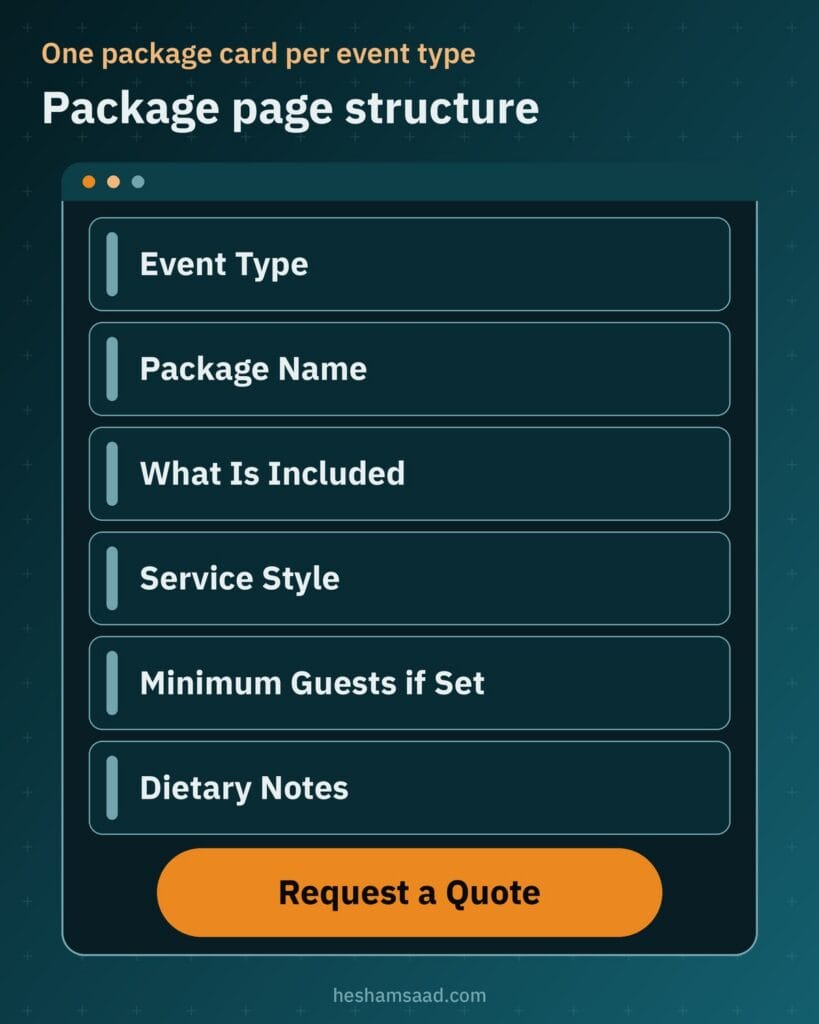
Handle pricing and guest thresholds honestly according to your commercial rules. Publish per-person or per-package rates only if your kitchen maintains fixed prices that hold steady; otherwise, mark the package clearly as price on request so custom staffing or venue travel can be calculated properly. Similarly, display a minimum guest requirement only on packages where your kitchen actually enforces a headcount floor.
| Event type | What the client wants to know | What the page shows |
|---|---|---|
| Weddings | Whether your kitchen manages formal reception service, live stations, and pre-booking tastings | Reception menu tiers, staffing and buffet setup inclusions, tasting details, and a quote button |
| Corporate events | Whether presentation, timing, and coffee breaks suit conferences, seminars, or executive launches | Buffet and break packages, equipment setup notes, allergen labels, and rates or price on request |
| Office meals | How packaged team lunches or shared trays arrive neatly labeled and ready for workplace dining | Boxed meal and tray menus, dietary tags, packaging details, and a link to recurring office plans |
| Private parties | Whether menus fit home gatherings, engagements, or family dinners with optional serving help | Drop-off tray selections, optional servers and warmers, minimum headcount if set, and date inquiry |
Every menu and package card also needs clear dietary notes and allergen information written in plain language, covering vegetarian choices, nut-free trays, gluten-sensitive options, or dairy notes as your kitchen prepares them. End each package block with a direct button to request a quote that carries the selected event type and package name straight into your inquiry form, sparing the visitor from retyping what they just read.
Celebration cakes and dessert tables often need their own order path. A bakery website on WordPress can collect cake size, flavor and a delivery date on the product page, and send multi-tier wedding cakes or large dessert tables to a quote form when the kitchen has to review the design first.
Event quote requests organized by guest count and date
Once a prospective host finds a suitable menu tier, your online catering quote form needs to gather every detail required to price and schedule the job accurately. Unlike setting up a WordPress booking website where an appointment slot confirms automatically on the spot, catering requires a human capacity check before any date is promised. Your kitchen might handle multiple small office drop-offs on the same afternoon while blocking out full production capacity when a large wedding reception is booked.
Design the form fields around real kitchen and logistics decisions rather than open text boxes. Ask for the event type, preferred date, estimated guest count, city or venue location, preferred service style such as buffet, boxed meals, plated dining, or live stations, and the chosen package. Include a dedicated field for dietary requirements, an optional budget field for hosts who want menu guidance within a target spend, and contact fields for name, phone number, email, and an explicit WhatsApp consent checkbox.
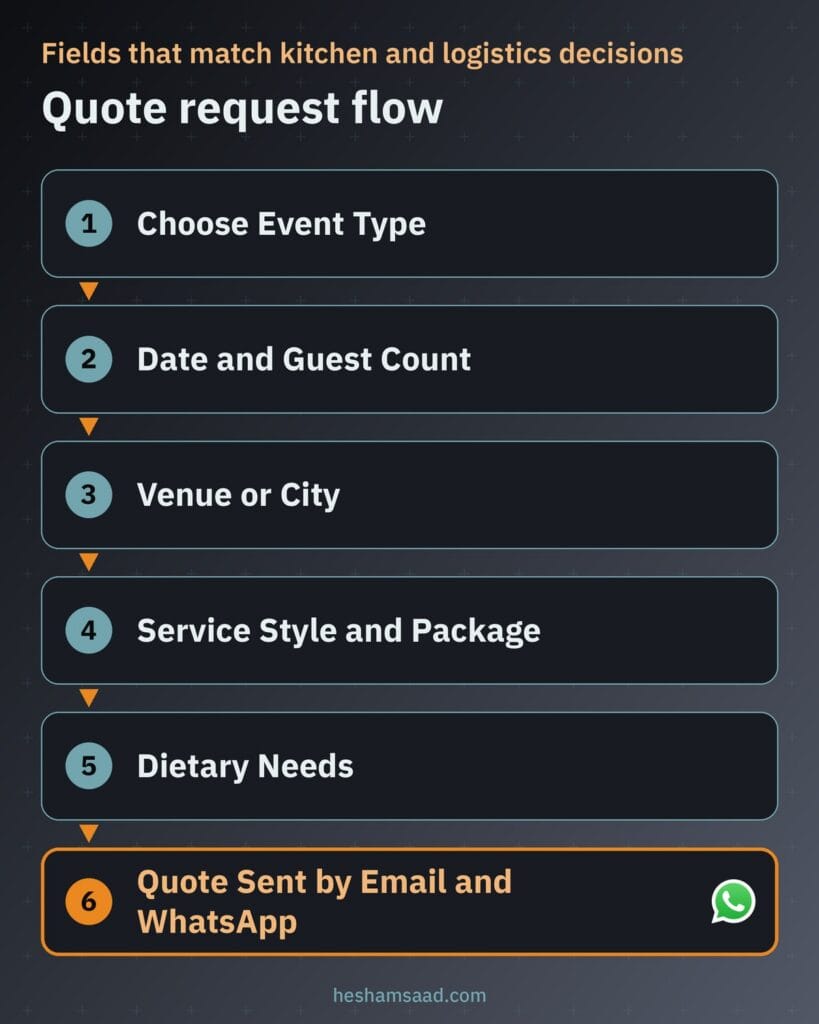
If your team coordinates closely with external decorators, hall managers, or corporate producers, the logistics mirror several workflows covered in our guide to planning an event website on WordPress, where structured intake forms prevent miscommunication around venue access and setup windows. Keeping the budget field optional ensures corporate coordinators with fixed allowances can share them while private hosts who simply want your standard package quote do not feel pressured to guess.
As soon as the visitor submits the form, WordPress should send an automatic confirmation email summarizing the submitted date, guest count, and package while making clear that the booking is pending a kitchen capacity check. Internally, your coordinator receives a clean brief ready for review, verifies kitchen load and staffing availability on that date, and prepares an accurate written quote.
WhatsApp follow ups from first inquiry to event day
Across Egypt, Saudi Arabia, and the Gulf, corporate coordinators and family hosts expect quick answers on WhatsApp once they shortlist a caterer. On your menu and package pages, add a direct click to chat button for visitors who have a quick pre-inquiry question before filling out the full quote form. Under WhatsApp documentation, a wa.me link using your phone number in full international format opens a conversation directly without forcing the visitor to save your number first, and adding the ?text= URL parameter pre-fills the opening message with the package page they are viewing.
How you manage outbound WhatsApp follow ups after a quote form arrives depends on the size of your sales team. A small kitchen coordinator can review each submitted inquiry in WordPress and reply manually from the company phone, keeping every detail personal. If your company runs a larger sales desk and wants automated status messages triggered from your system, you need the official WhatsApp Business Platform, which allows businesses to message customers at scale through an API connected directly or via a solution provider.
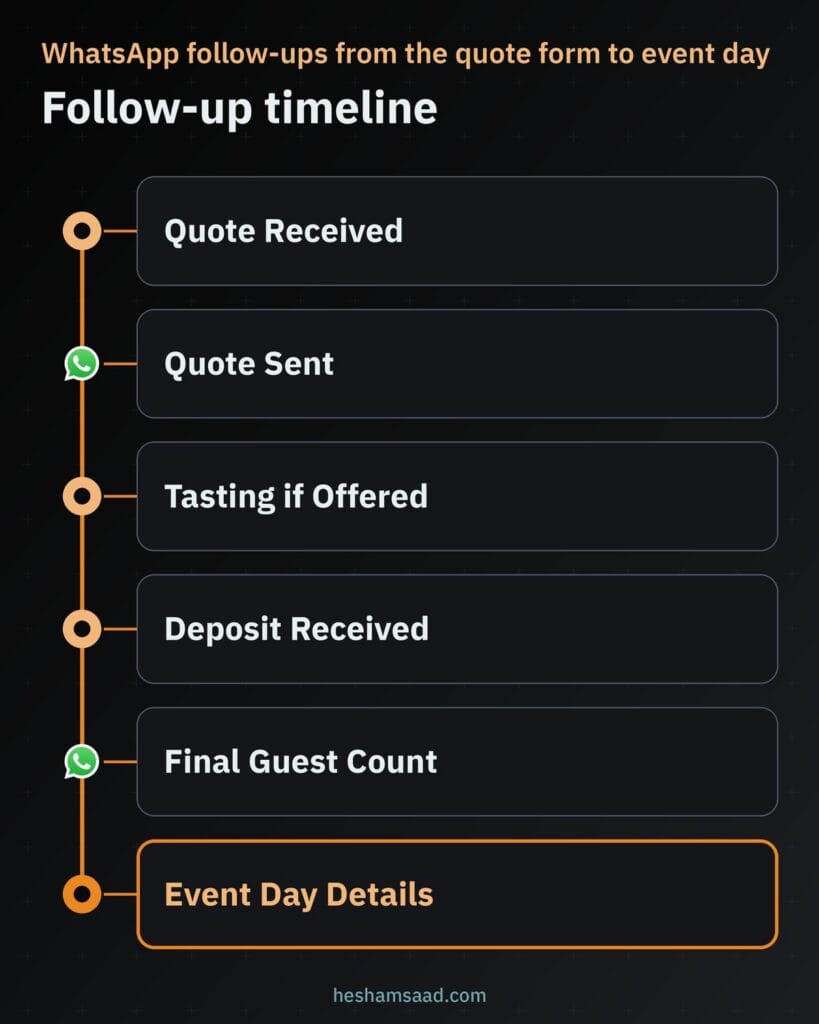
Whether your coordinator sends messages manually or through an approved API workflow, message only customers who checked the WhatsApp consent box on your quote form. Respecting consent protects your business number and keeps communication welcome rather than intrusive.
Map your follow up messages around clear operational milestones rather than vague check-ins. Useful touchpoints cover confirming that the quote request was received, sharing the formal quote document, scheduling a menu tasting if your kitchen offers tastings for qualifying events, confirming that the booking deposit arrived, sending a final guest count reminder ahead of kitchen prep, and sharing event day arrival and coordinator contact details.
Booking deposits and local payment gateways
Verbal confirmations leave your kitchen exposed to last-minute date changes after you have already turned down other inquiries or planned ingredient orders. Once your team approves date capacity and agrees on a proposal with the client, collecting a booking deposit holds the date firmly on your production calendar, while the remaining balance is settled before or after the event according to your company policy. Alongside online checkout links, keep offline bank transfers or in-person payments available for corporate finance departments or hosts who prefer traditional settlement.
If you also run your own event hall, our guide to a wedding venue website on WordPress covers date availability, wedding packages and online booking deposits from the venue owner side.
Holding event dates with WooCommerce Deposits
Even though a catering company does not use a public add-to-cart storefront for custom events, your coordinator can generate private or package-linked orders through WooCommerce once a quote is approved. Pairing WooCommerce with the official paid WooCommerce Deposits extension lets clients pay a deposit upfront or follow a structured payment plan consisting of an initial deposit plus a later balance or set schedule.
Pay close attention to how Woo defines this tool when writing your checkout terms. Official documentation states that WooCommerce Deposits is built for partial payments toward a purchase rather than a refundable security deposit. Publish a clear written cancellation, date-change, and refund policy on your site and link to it before payment so every client understands how booking deposits and final headcount adjustments are treated.
Connecting local gateways in Egypt and Saudi Arabia
To accept online deposits smoothly, connect WooCommerce to a local payment gateway that matches where your company is registered. Paymob offers an official Checkout for WooCommerce plugin on WordPress.org and operates in Egypt, the UAE, Oman, Saudi Arabia, and Pakistan. Depending on your country, Paymob lists debit and credit cards, mobile wallets, bank instalments, kiosk payments, and buy-now-pay-later services in Egypt, alongside bank cards, digital wallets, and buy-now-pay-later options in Saudi Arabia.
If your catering business operates in Saudi Arabia, Moyasar also provides an official WooCommerce plugin on WordPress.org with an Arabic interface, supporting local and international bank cards as well as mobile wallet payments. Which specific payment methods appear on your checkout page always depends on your merchant account approval and underwriting with each gateway, as detailed in our guide to comparing WooCommerce payment gateways in Egypt and Saudi Arabia.
Corporate meal plans for recurring office deliveries
One-off wedding and conference inquiries follow a completely different buying process from companies looking to feed employees every week. Adding a dedicated corporate meal plans page turns your site into a practical corporate catering website for workplace managers, human resources teams, and operations leads looking for reliable staff lunches or shift meals.
Do not send recurring office buyers through your single-date wedding quote form, where fields like venue setup and live stations get in the way. Build a separate recurring meal inquiry form on the corporate page that asks for the company name, the number of employees eating, preferred delivery days, menu rotation preferences, workplace city or district, dietary requirements, and point-of-contact details. Those answers tell your kitchen immediately whether the inquiry fits your daily production route and delivery schedule.
Kitchens that plate corporate meals also need scheduled treatments; a pest control website WordPress build shows how inspection quotes and recurring commercial contracts should be collected before the event date.
Keep the commercial workflow realistic by letting the website qualify the lead rather than forcing complex contract billing onto WordPress. Once your team reviews the employee headcount and rotation schedule, handle sample meal drops, service level agreements, purchase orders, and recurring corporate invoicing offline through your regular accounting process.
Real event photos and client reviews that earn trust
Hosts booking food for an important family wedding or a board-level corporate seminar look closely at how chafing dishes, serving stations, table risers, and boxed meals actually look outside the kitchen. Use only authentic photographs captured at your own catered events and kitchen prep lines, always with the client’s permission when a private venue or corporate branding is visible. Never pass off stock food photographs as your own catering work, because experienced coordinators spot generic buffet photos quickly and lose confidence in what will arrive on event day.
Pair your real event photography with genuine written reviews published with client permission, noting the type of event your team served so prospective buyers see relevant proof. Honest feedback about punctual setup, warm food replenishment, or clean boxed-lunch labeling reassures human readers far better than vague marketing claims.
When your developer adds structured data to the site, keep expectations aligned with Google’s official review snippet guidelines. Google states that if a business controls the reviews about itself on its own site, its LocalBusiness pages are ineligible for star review rich results in search because those reviews are treated as self-serving, and offering benefits in exchange for reviews without clear disclosure also violates guidelines. Display real client reviews on your pages to build trust with visitors, without expecting review stars next to your site in Google search results.
Publishing your menus and pages in Arabic and English
Serving clients across Egypt, Saudi Arabia, and the Gulf means writing for both Arabic-first family hosts and English-speaking corporate or hospitality coordinators. Every menu page, package card, allergen note, and quote form label should be written naturally in both Arabic and English, with dish names presented properly in each language rather than left to clumsy automatic translation that mangles culinary terms.
On WordPress, Polylang is a free multilingual plugin on WordPress.org that lets you translate pages, posts, media, categories, tags, and custom post types such as catering packages while organizing languages cleanly by URL directory code, subdomain, or domain. Polylang also supports right-to-left scripts out of the box, while WPML serves as a paid alternative if your developer prefers its translation workflow.
Two technical details matter on every bilingual build so visitors and search engines read your pages properly. First, Arabic pages must apply the HTML dir="rtl" attribute as documented by MDN so package tables, bullet lists, and quote form inputs flow cleanly from right to left. Second, follow Google’s localized versions guidelines by adding hreflang annotations between each Arabic and English URL pair so Google recognizes them as localized equivalents of the same content.
Local search visibility for your catering kitchen
When an office administrator or engaged couple searches for event catering in your city, your Google Business Profile works alongside your website to confirm that your kitchen is an established local operation. Unlike a dine-in restaurant promoting walk-in tables across multiple storefronts, a catering company relies on accurate service-area and commercial kitchen representation.
Follow official Google Business Profile guidelines closely: represent your business accurately as it operates in the real world, enter a precise address or defined service area, maintain only one profile per physical location, and pick the fewest categories that describe your core catering service. Keep your business name and phone number identical across your website header, contact page, and profile listing so prospective clients and search engines see consistent contact records.
On the WordPress side, have your developer implement Google’s LocalBusiness structured data using the most specific business subtype available, along with accurate business hours and department contacts if you separate wedding inquiries from corporate accounts. Valid structured data helps Google understand your company details clearly, though Google explicitly notes that structured data never guarantees any rich result in search.
What shapes the cost of building your catering website
Every catering company runs a different mix of menus, inquiry steps, and payment rules, so development quotes vary according to the exact scope you ask an agency or freelancer to build. Understanding what adds engineering and content work helps you request comparable proposals and focus your budget on features your coordinator will use every day.
- Number of menus and packages: Structuring multiple event categories, custom package fields, allergen tags, and seasonal menus takes more template setup and content entry than a single overview page.
- Quote form logic: Conditional fields that filter packages by event type, pass chosen packages from menu pages, and route notifications to separate coordinators add form configuration work.
- Deposits and payment gateways: Configuring WooCommerce, WooCommerce Deposits, and live merchant integration with Paymob or Moyasar adds checkout testing and compliance checks.
- Corporate meal plan flow: Building a dedicated corporate landing page and separate recurring office meal form expands the site beyond single-date event inquiries.
- WhatsApp workflow: Placing manual click to chat links is straightforward, whereas connecting automated milestone notifications through the WhatsApp Business Platform and a provider requires API integration.
- Languages, photography, design, hosting, and maintenance: Writing and formatting full Arabic and English content with right-to-left styling, preparing real event photography, crafting custom catering website design, choosing reliable hosting for image-rich menus, and keeping WordPress plugins updated all shape your total investment.
If your kitchen wants to launch cleanly without building every integration at once, you can start with bilingual package pages, a date-checked quote form, a corporate meal request page, and manual WhatsApp follow ups, then add online deposit links or API messaging once your digital inquiry workflow settles in.
Plan your catering website structure before you build
Before approaching a developer, write down a one-page operational brief for your kitchen. List the exact event types you serve, note which packages carry published rates versus price on request, list the mandatory fields your coordinator needs to check capacity on a requested date, and write down your deposit, cancellation, and refund rules.
If you want a WordPress site built around your menus, quote workflow, and local payment setup in Egypt, Saudi Arabia, or the Gulf, explore our custom WordPress development service to see how we structure business builds. When your menu outline is ready, book a free consultation so we can review your catering requirements and map out the right build for your company.
Frequently asked questions
How does a quote request by guest count and date work?
The visitor selects an event type, enters the event date, estimated guest count, and city or venue, and picks a service style and menu package along with dietary needs. After they enter contact details and optional WhatsApp consent, the site sends an email confirmation summarizing the request. Your team then checks kitchen and staffing capacity for that calendar date before sending a confirmed quote.
Can clients pay a deposit online in Egypt or Saudi Arabia?
Yes, you can collect partial booking payments online using WooCommerce with the official WooCommerce Deposits extension once your team approves an event quote. You can connect Paymob in Egypt or Saudi Arabia, or Moyasar in Saudi Arabia, depending on your business account approval with each gateway. Keep a clear cancellation and refund policy on the site and still allow offline bank transfers when needed.
Can the site handle corporate meal plans for offices?
Yes, your WordPress site can include a dedicated corporate meal plan page built specifically for offices ordering recurring meals. Instead of a single-date wedding or party form, office managers fill out a form asking for their company name, the number of employees eating, preferred delivery days, and menu rotation preferences. Your team then handles commercial contracts and recurring corporate invoicing directly offline.
Should my catering site be in Arabic and English?
Yes, publishing both Arabic and English pages helps you serve local families alongside international corporate coordinators across Egypt, Saudi Arabia, and the Gulf. Plugins such as Polylang or WPML let you pair translated menu pages, apply right-to-left layout on Arabic URLs, and output hreflang tags for Google. Write natural dish and package names in both languages rather than relying on raw machine translation.
References
- WhatsApp Help Center: How to use click to chat
- WhatsApp Business Platform
- WooCommerce: WooCommerce Deposits Extension
- WordPress.org Plugin Directory: Paymob Checkout for WooCommerce
- WordPress.org Plugin Directory: Moyasar
- Google Search Central: Review Snippet Structured Data Guidelines
- WordPress.org Plugin Directory: Polylang
- MDN Web Docs: HTML dir Global Attribute
- Google Search Central: Localized Versions of Your Pages (hreflang)
- Google Business Profile Help: Guidelines for Representing Your Business on Google
- Google Search Central: Local Business Structured Data