هذا المقال متوفر باللغة العربية — اقرأ بالعربية
Building an architecture firm website WordPress platform that wins commercial, institutional, and private residential commissions requires far more than a full-screen slideshow of exterior renders. When real estate developers, hospitality operators, or private landowners across the MENA region evaluate your studio, they look for clear evidence of how your practice solves spatial, environmental, and programmatic challenges. They also expect a direct, structured way to submit a project brief or request a proposal without chasing generic email addresses.
Many studio principals start with an off-the-shelf visual theme and soon discover that adding new projects, filtering work by typology, or publishing Arabic project pages turns into a manual chore. Without a proper content structure underneath the design, every new project page looks slightly different, high-resolution architectural photography slows down mobile browsing, and prospective clients abandon generic contact forms that cannot accept site plans or brief documents.
This guide is written for architecture firm owners and managing principals who are planning a new website or preparing a brief for a WordPress developer. It covers how to structure a scalable project portfolio, how to configure an RFP or quote request workflow, how bilingual Right-to-Left layouts work in practice, and what technical factors shape the build budget.
Structuring an architecture firm website WordPress portfolio with custom post types
The foundation of an architectural portfolio on WordPress is separating your built and unbuilt design work from standard blog posts and static pages. When a studio builds each project as a regular page, there is no automated way to generate filtered sector archives, link related projects by typology, or restructure the portfolio layout later without rebuilding every project entry by hand.
In WordPress, a developer solves this by registering a dedicated custom post type for projects using the core register_post_type function hooked to the init action. According to WordPress developer documentation, the post type key cannot exceed 20 characters, making a singular key such as project the clean standard. Configuring this post type properly gives your studio a dedicated menu inside the WordPress dashboard where staff architects or marketing coordinators can publish and update projects consistently.
- Block editor and REST API access: Setting
'show_in_rest' => trueis mandatory so the custom post type opens inside the Gutenberg block editor and becomes available to dynamic query blocks across the site. - Public archive routing: Registering the post type with
'public' => true,'has_archive' => true, and a custom rewrite rule such as'rewrite' => ['slug' => 'projects']creates a clean, predictable URL structure for the main portfolio index. - Supported editor features: Passing
'title','editor','thumbnail','excerpt', and'custom-fields'inside the'supports'array enables featured hero images, summary descriptions for archive cards, and structured metadata fields for project location, completion stage, or floor area.
By isolating project data inside its own post type, your practice can redesign its visual templates in the future while keeping every project narrative, gallery, and metadata field intact.
Organizing architectural work with custom taxonomies and Query Loop filtering
Once your portfolio grows beyond a handful of commissions, prospective clients need a fast way to filter your work relevant to their own brief. A hospitality developer wants to review hotels and resorts immediately, while a municipal or commercial client wants to inspect office towers, master plans, or cultural buildings without scrolling through private villas.
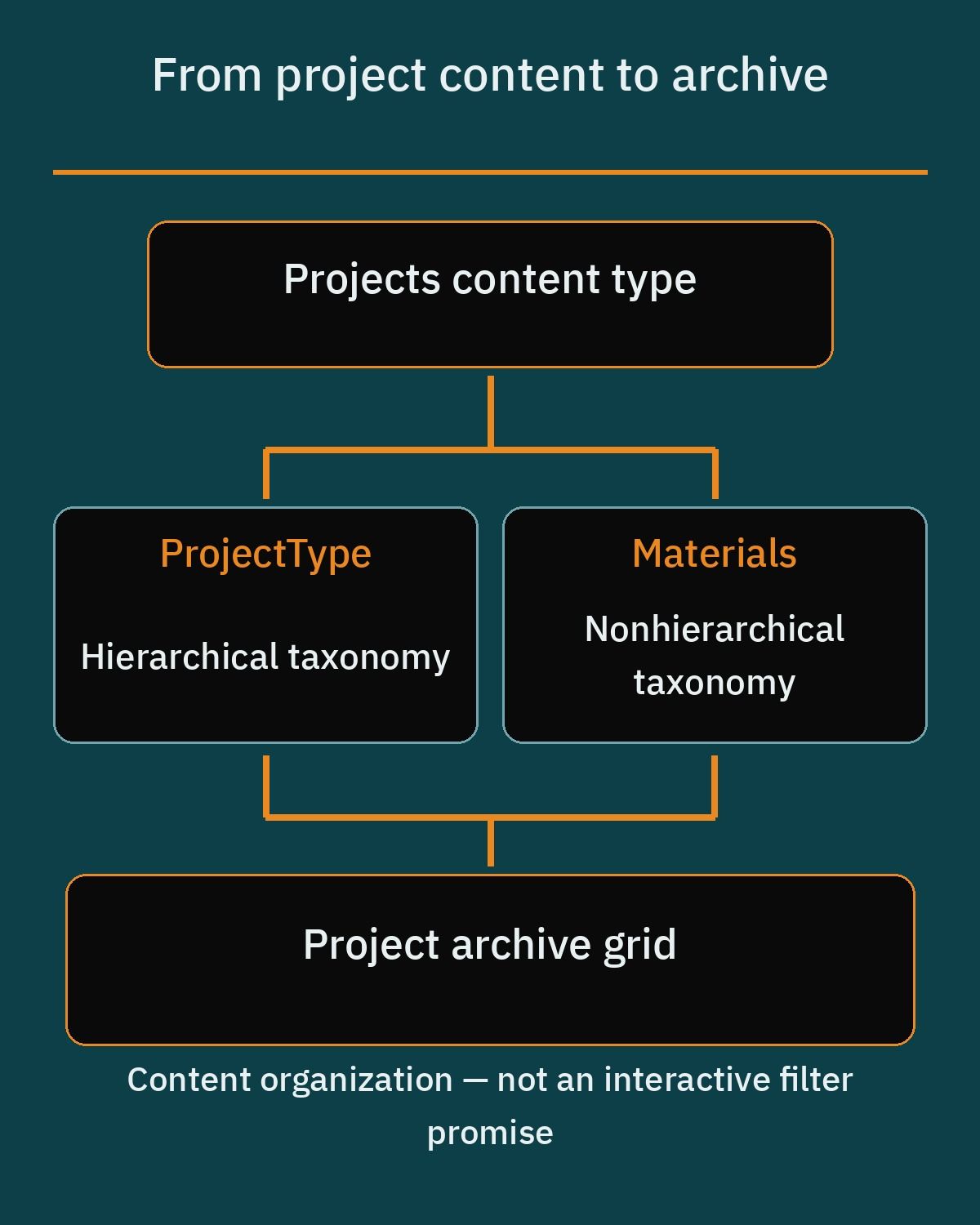
WordPress handles this categorization through custom taxonomies registered with the register_taxonomy function hooked to the init action and linked to the project object type. Each taxonomy name must be 32 characters or fewer and use only lowercase alphanumeric characters and underscores. Just like the custom post type, setting 'show_in_rest' => true is required so taxonomy panels appear in the Gutenberg sidebar and can be used as filters in the core Query Loop block.
- Hierarchical taxonomies for core categories: Setting
'hierarchical' => truecreates category-style groupings such as Project Type or Sector, allowing parent and child terms like Commercial, Hospitality, or Residential. - Non-hierarchical taxonomies for attributes: Setting
'hierarchical' => falsecreates tag-style terms suited for cross-cutting attributes such as Materials, Structural Systems, or Sustainability Features. - Visual archive composition with the Query Loop block: The core Query Loop block acts as a visual wrapper for
WP_Query, fetchingprojectentries filtered by custom taxonomy terms, tags, author, or keyword that the editor selects in the block settings. - Modular project cards: Inside the Query Loop block, your developer nests inner blocks including Post Title, Featured Image, Post Excerpt, Post Date, Post Terms, and Pagination to compose uniform portfolio grids.
This architecture also lets you embed curated project grids on service pages. For example, your master planning service page can use a Query Loop block filtered specifically to the master planning taxonomy term so visitors immediately see relevant work alongside your methodology.
Keep one distinction clear when you brief your developer. In the core Query Loop block, the filter is a fixed taxonomy term chosen by the editor, and visitors browse your work through linked taxonomy archive pages such as a hospitality or master planning archive. An interactive filter bar that visitors click to narrow the grid on the page is not part of the core block alone; it needs a plugin or custom code.
Building individual project pages with case narratives and core gallery blocks
A common mistake on architecture websites is publishing ten photos of a building with a two-line caption. Serious clients want to read the firm’s own case narrative explaining the site context, environmental constraints, spatial program, circulation strategy, and material choices. When writing these narratives and crediting consultants or partners, your firm should always follow its own professional and local rules regarding project attribution and practice representation.
If your practice also handles interior architecture or turnkey fit-outs alongside core shell-and-core design, your project pages may need to balance spatial mood boards with technical drawings; you can compare how interior-focused studios structure those visual stories in our guide to building an interior design website on WordPress. For architectural work, pairing written sections with core Gutenberg media blocks keeps the layout structured without relying on bloated third-party gallery sliders.
The WordPress core Gallery block is built using nested core/image blocks, which gives your team independent settings on every single drawing or photograph for alt text, captions, custom links, aspect ratios, borders, and border radii. You can arrange project photography in responsive grid layouts ranging from 1 to 8 columns and enable the “Crop images to fit” toggle so mixed-dimension exterior shots and interior perspectives align into clean rows. Both the Gallery block and the standalone Image block include a native expand-on-click lightbox (introduced in WordPress 6.4 for the Image block), allowing visitors to inspect high-resolution plans, sections, and elevations full-screen without extra plugins.
For hero renders or featured architectural diagrams between text sections, the core Image block provides aspect ratio presets such as 16:9, 4:3, and 1:1, custom width and height dimensions, object-fit scaling options (cover and contain), and styling tools including duotone filter presets, borders, and border-radius controls directly in the block sidebar.
Optimizing high-resolution portfolio renders and architectural photography
Architecture portfolios are uniquely media-heavy. A single project page often combines wide-angle exterior photography, twilight renders, axonometric diagrams, and detailed section drawings. Uploading uncompressed files directly from rendering software or a photographer’s delivery folder will stall page rendering, especially for clients reviewing your portfolio on mobile connections on-site or during travel.
Before uploading portfolio assets, your studio should establish a consistent resizing and compression workflow; we cover the full preparation process in our guide to WordPress image optimization. Once images are uploaded, modern WordPress core includes several built-in performance mechanisms that your developer and hosting environment should support.
- Native WebP support (WordPress 5.8): WordPress supports uploading, resizing, and serving lossy and lossless WebP images natively in the Media Library, generating smaller file sizes than comparable JPEGs and PNGs when the server’s PHP environment has the GD or Imagick extension compiled with WebP support.
- Native AVIF support (WordPress 6.5): WordPress 6.5 added full core support for the
.avifformat, handling uploads, editing, cropping, and responsive thumbnail generation just like JPEG and PNG while supporting wide color gamuts and HDR at smaller file sizes than JPEGs, provided the host runs LibGD or ImageMagick 7.0.10-58+ compiled with AVIF support. - Automatic native lazy loading (WordPress 5.5): Core automatically injects
loading="lazy"onto<img>tags output viathe_content(),wp_get_attachment_image(), andget_avatar(), provided explicitwidthandheightdimensions are present on the image markup to prevent Cumulative Layout Shift. - Fetch priority and LCP optimization (WordPress 6.3): WordPress automatically adds
fetchpriority="high"to the primary above-the-fold image most likely to be the Largest Contentful Paint element (limited to at most one image per page) and deliberately omitsloading="lazy"on that image to avoid artificial rendering delays.
When reviewing hosting options with your developer, verify that the server’s PHP image processing library is compiled with both WebP and AVIF support so WordPress can generate modern responsive image sub-sizes automatically whenever your team uploads new project photography.
Designing an RFP and project inquiry form for architectural commissions
When a commercial developer or private client is ready to shortlist architects, a basic contact form asking only for a name, email, and message forces days of back-and-forth emails just to establish whether the project fits your studio. A structured RFP or project inquiry form qualifies leads upfront by collecting the project type, site location, current project stage, required scope of services, and uploaded documents such as design briefs, site surveys, or preliminary plans.
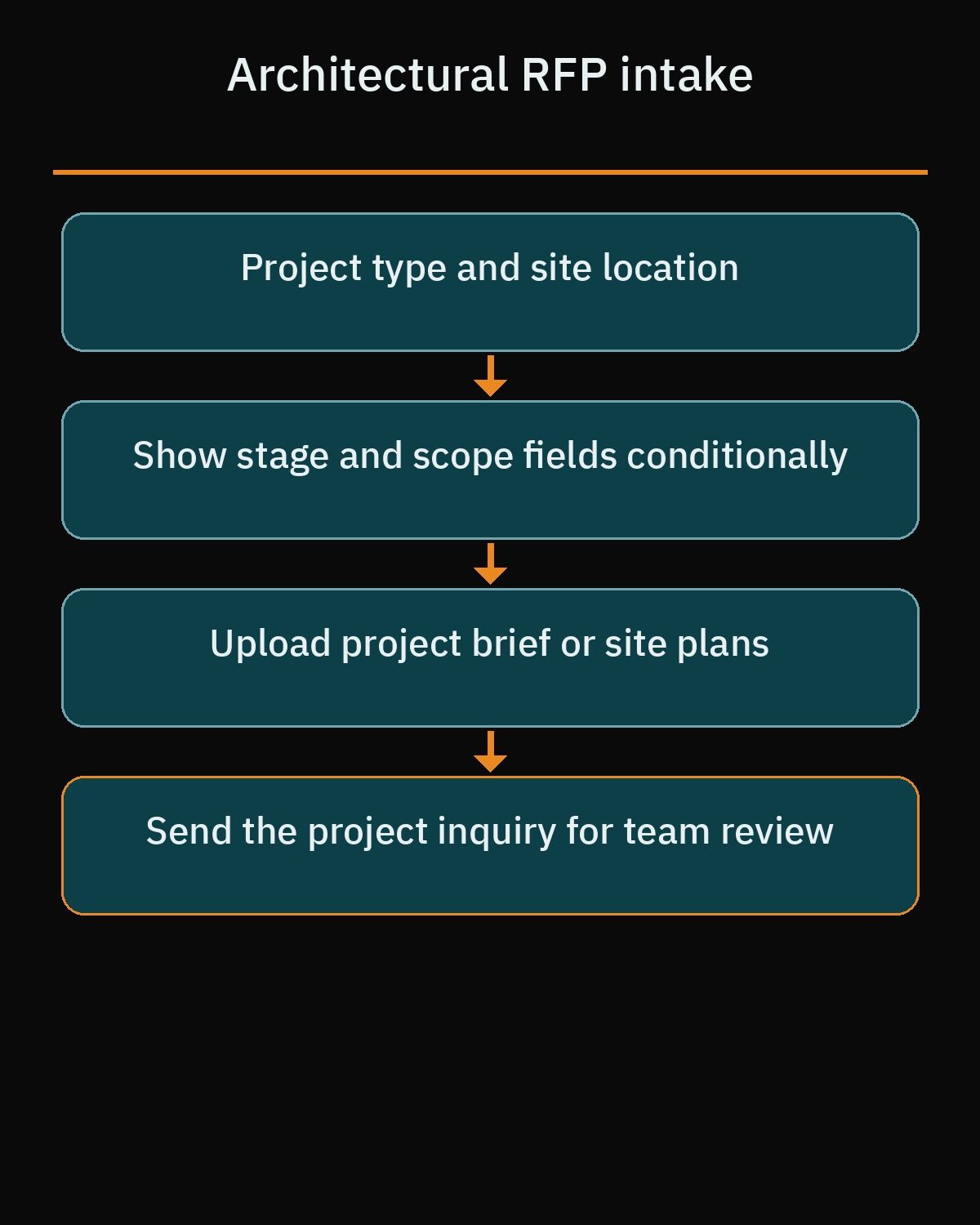
Firms that also manage site execution or tender packages often need similar document intake workflows, which we also examine in our guide to building a construction company website on WordPress. Because an architectural RFP form asks for detailed project information and file attachments, breaking the form into logical steps and showing fields conditionally based on project type keeps the form approachable for the client.
When choosing a WordPress form plugin for an architectural RFP workflow, firm owners should understand what is included in free repository versions versus what requires a commercial license across the three main options:
- Fluent Forms: Basic field show and hide conditional logic is available in both the free and paid versions. However, the paid version adds conditional logic for notifications and confirmations, the file upload field, and multi-step forms via the “Form Step” field (requiring Fluent Forms Pro).
- WPForms Lite: The free version handles simple contact forms, while the paid version adds the file upload field, “Smart Conditional Logic”, and multi-step forms via the “Page Break” field (all requiring the WPForms Basic license or higher).
- Gravity Forms: Gravity Forms does not provide a free or lite version on WordPress.org and is strictly a commercial plugin. File upload fields, conditional logic, and multi-step forms via the “Page Break” field are included in core across all license tiers.
In short, because every serious architectural RFP or quote request form requires file uploads for briefs and site plans, your studio should plan on licensing a paid form plugin as part of its core website stack.
Setting up bilingual Arabic and English architecture portfolios with RTL support
Operating an architecture practice in the MENA region usually means presenting work to both international partners in English and local private clients, developers, and public entities in Arabic. A professional bilingual architecture site cannot rely on automated browser translation; both the architectural terminology in your project narratives and the visual alignment of your portfolio grids must feel native in each language.
From a technical standpoint, switching to Arabic requires switching the page direction to Right-to-Left so navigation bars, typography hierarchies, form labels, and split-screen project narratives mirror properly. WordPress developers typically implement bilingual architecture portfolios using either WPML or Polylang.
- WPML RTL and URL routing: WPML automatically detects Arabic as a Right-to-Left script and switches the HTML text direction attribute (
dir="rtl"), activating the theme’srtl.cssstylesheets. It supports language directories (such as/en/and/ar/), subdomains, or separate domains. - WPML custom post type and string translation: WPML translates custom post types such as Projects and custom taxonomies, linking the English and Arabic versions while keeping permalinks and slugs synchronized or localized. It also supports Gutenberg block-level translation and interface string translation for form placeholders, UI buttons, and footers via the WPML String Translation module.
- Polylang RTL and URL routing: Polylang includes built-in recognition of the Arabic locale (
ar) and toggles WordPress core’sis_rtl()function totrue, prompting themes and blocks to load RTL styles. It configures directory-based URLs (such as/en/projects/and/ar/projects/), subdomains, or distinct domains, and provides native Gutenberg blocks, widgets, and navigation menu integration for language switching. - Polylang free custom post type support: Multilingual support for custom post types and custom taxonomies is available in the free version of Polylang, configured in the admin dashboard under Languages, Settings, and Custom post types and Taxonomies.
Whichever plugin your developer selects, make sure your theme’s RTL stylesheet is tested thoroughly against your project gallery grids, taxonomy archive pages and links, any interactive filter added by plugin or custom code, and multi-step RFP forms so Arabic visitors get the exact same visual polish as English visitors.
Describing your practice with Schema.org LocalBusiness structured data
Structured data using Schema.org vocabulary provides a standardized semantic description of your architecture studio, its physical office locations, and the services it offers. Rather than viewing schema markup as a way to obtain special visual features in search engines, studio principals should treat it as clean machine-readable metadata that clarifies who the firm is and where it practices.
One detail many developers miss is that the ProfessionalService type is deprecated by Schema.org due to ambiguity and overlap with the top-level Service type; it is maintained strictly for backwards compatibility, and Schema.org advises against using it for new implementations. Furthermore, Schema.org contains no dedicated standalone subtype for an architect or architecture firm.
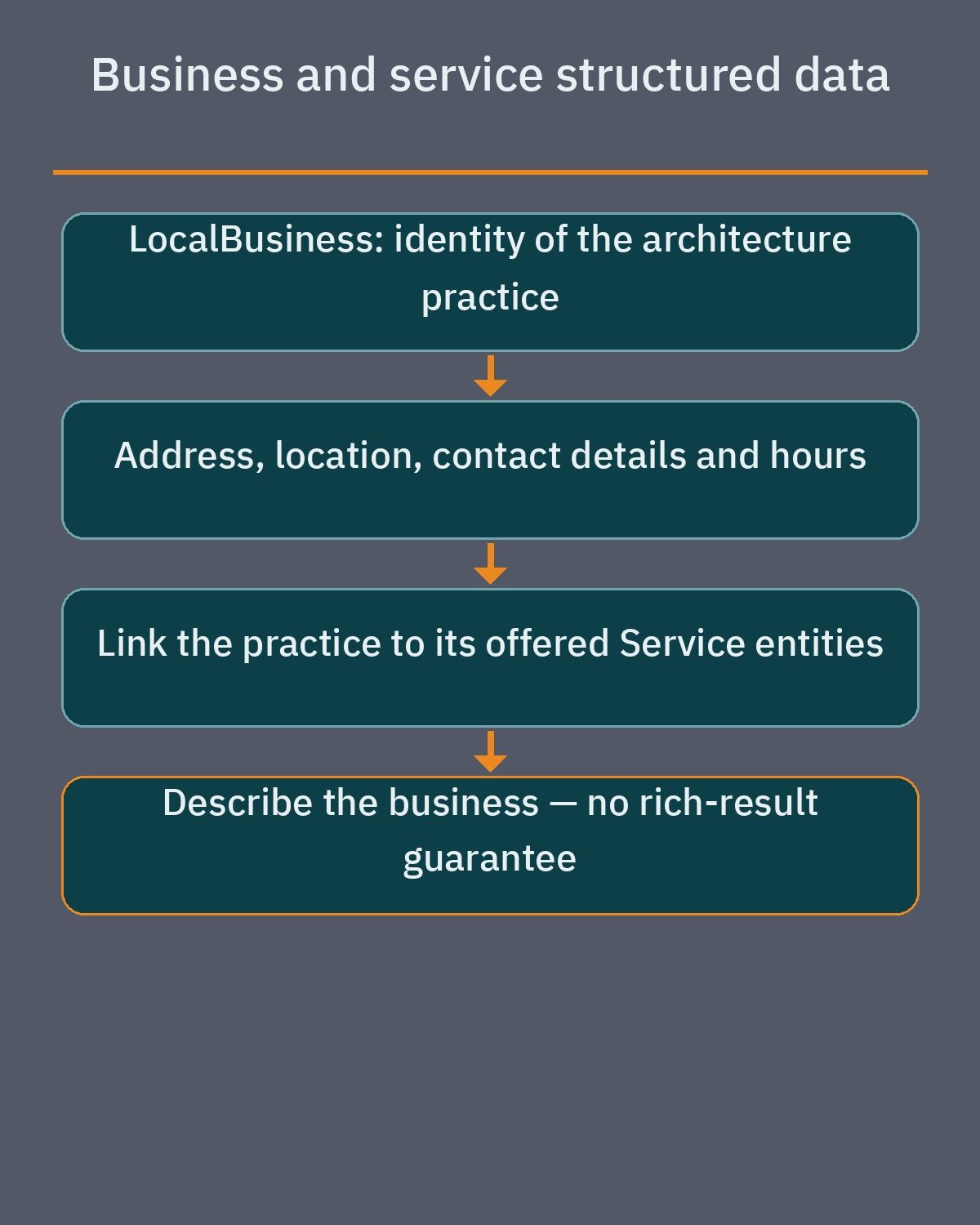
Instead, the official Schema.org recommendation is to use LocalBusiness directly or combine it with the HomeAndConstructionBusiness subtype, which models architectural planning, structural design, and construction services. A proper LocalBusiness description includes core physical location properties such as name, address (using PostalAddress), geo (using GeoCoordinates with latitude and longitude), telephone, url, and openingHoursSpecification. Specific architectural capabilities such as Schematic Design or Site Planning should then be defined as distinct Service entities linked to the LocalBusiness via hasOfferCatalog or makesOffer.
Factors that shape the website build budget for an architecture firm
When architecture firm principals request proposals from web agencies or independent WordPress developers, quotes can vary widely depending on what happens beneath the surface layout. Understanding the real technical and editorial drivers allows you to scope the build sensibly and compare developer proposals on an equal footing.
- Portfolio data architecture and archive structure: A site that uses a custom project post type, hierarchical and non-hierarchical taxonomies, custom metadata fields, and dynamic Query Loop templates takes more engineering time upfront than static pages, but saves substantial effort over the life of the site.
- Bilingual and Right-to-Left parity: Designing, testing, and refining mirrored Arabic RTL layouts for architectural grids, typography, and multi-step forms requires dedicated front-end styling and content entry across both language trees.
- RFP form logic and plugin licensing: Building a multi-step inquiry form with conditional field branching and brief or CAD plan file uploads involves both commercial form plugin licensing and careful validation setup.
- Media curation and optimization workflow: Preparing raw architectural renders, elevation drawings, and photography into clean aspect ratios and verifying server support for WebP and AVIF generation directly affects how much production time the launch requires.
- Case narrative writing and compliance review: Writing original project narratives in English and Arabic and reviewing project credits to ensure everything aligns with the firm’s own professional and local rules requires dedicated internal time from the studio’s leadership.
Separating your must-have launch requirements from phase-two additions helps you focus your initial investment on the core portfolio structure, fast image delivery, and a reliable RFP intake workflow.
Planning your build and hiring the right WordPress developer
Before you hand a brief to a WordPress developer, assemble your internal materials so the build starts with real architectural content rather than placeholder text. Select your strongest completed and in-progress projects, organize high-resolution photography and drawings into labeled folders, and draft a concise case narrative for each commission explaining the brief, site constraints, and design outcome.
At the same time, agree internally on the exact taxonomies visitors will use to browse your portfolio, such as project typologies and key materials, and write down the exact qualification questions and document upload fields your principals want on the RFP request form. Having these decisions settled before development begins keeps the project on schedule and prevents costly mid-project restructuring.
If you want a website built around clean custom post types, fast architectural galleries, bilingual Arabic and English RTL support, and a tailored RFP workflow, explore our WordPress development services or book a free consultation to review your studio’s portfolio requirements and plan your build.
Frequently asked questions
What factors influence the budget for an architecture firm website on WordPress?
The build budget depends on the technical scope rather than a fixed template fee. Key factors include setting up a custom project post type with custom taxonomies, building a multi-step RFP form with file uploads, configuring bilingual Arabic and English RTL layouts, and preparing optimized project photography and written case narratives. Commercial licenses for form or multilingual plugins also factor into the project requirements.
How should an architecture firm organize its project portfolio in WordPress?
An architecture practice should register a dedicated project custom post type and pair it with custom taxonomies for hierarchical categories like project type and tag-style terms like materials. Enabling REST API support allows the team to design individual project pages with core Gallery and Image blocks while using the Query Loop block to display portfolio grids for taxonomy terms chosen by the editor across the site.
Do I need a paid WordPress form plugin to accept RFP briefs and CAD plans?
Yes, accepting uploaded project briefs or site plans requires a paid form plugin or license. Fluent Forms includes basic field conditional logic in its free version, but the paid version adds file uploads and multi-step forms. In WPForms Lite, the paid version adds file uploads, conditional logic, and multi-step page breaks, while Gravity Forms is a commercial plugin that includes all three features in core.
How can a MENA architecture firm run a bilingual Arabic and English portfolio?
A firm can use either Polylang or WPML to connect English and Arabic project pages and taxonomies under separate language directories, subdomains, or domains. Both plugins recognize Arabic as a Right-to-Left language and trigger RTL stylesheet rules automatically. Polylang supports custom post types and taxonomies in its free version, while WPML provides block-level translation and an interface string translation module for form labels and navigation.
How does WordPress keep high-resolution architectural renders from slowing down pages?
WordPress core supports modern WebP and AVIF image formats, which generate smaller file sizes than standard JPEG and PNG files when the hosting server runs compatible GD or ImageMagick libraries. In addition, WordPress automatically applies native lazy loading to images with explicit width and height dimensions and assigns high fetch priority to the main above-the-fold image while skipping lazy loading on that element.
References
- WordPress.org Gallery Block Documentation
- WordPress Developer Block Reference: Gallery
- WordPress.org Image Block Documentation
- WordPress Developer Block Reference: Image
- WordPress.org Query Loop Block Documentation
- WordPress Developer Reference: register_post_type
- WordPress Developer Reference: register_taxonomy
- Fluent Forms File Upload Documentation
- Fluent Forms Conditional Logic Documentation
- Fluent Forms Multi-Step Documentation
- WPForms File Upload Guide
- WPForms Smart Conditional Logic Guide
- WPForms Multi-Page Form Guide
- Gravity Forms File Upload Documentation
- Gravity Forms Conditional Logic Documentation
- Gravity Forms Page Break Documentation
- WPML Getting Started Guide
- Polylang Plugin Repository
- Polylang Documentation
- Schema.org ProfessionalService
- Schema.org LocalBusiness
- Schema.org HomeAndConstructionBusiness
- Make WordPress Core: Lazy-loading images in 5.5
- Make WordPress Core: Image performance enhancements in WordPress 6.3
- Make WordPress Core: WordPress 6.5 adds AVIF support
- Make WordPress Core: WordPress 5.8 adds WebP support