هذا المقال متوفر باللغة العربية — اقرأ بالعربية
Building an event planning website WordPress platform gives your wedding, corporate, or conference company a clear system to turn visitors into qualified inquiries. Social media clips spark initial attention, yet clients planning a major celebration or business summit in Egypt or the Gulf need structured proof before requesting a proposal. They look for complete event albums, transparent service scopes, verified venue partnerships, and a direct way to check date availability.
When your event company website answers those questions upfront, your coordinators spend far less time chasing missing guest counts or unavailable dates on the phone. Below is a practical blueprint covering page structure, fast photo galleries, stepped inquiry forms, WhatsApp routing, Arabic right-to-left support, and online deposits before you hire a developer.
What an event planning website WordPress needs to turn visitors into inquiries
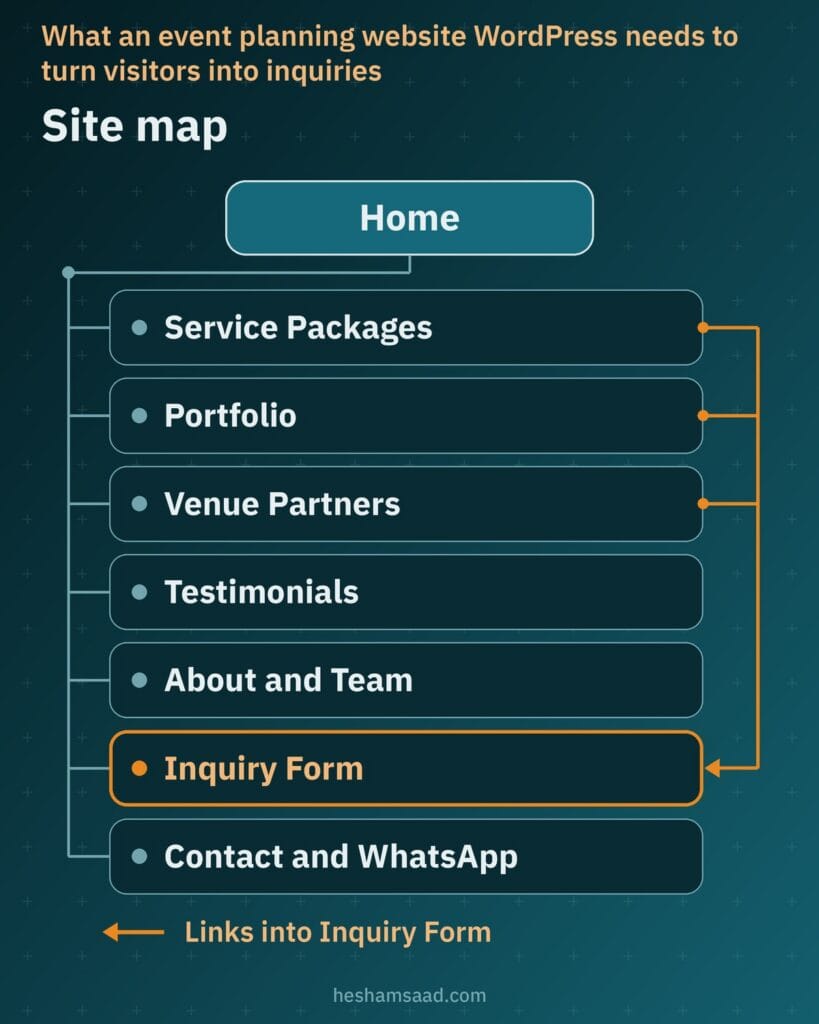
Whether a family is comparing wedding planners or an executive team is sourcing a conference producer, visitors evaluate your visual taste and operational discipline at the same time. Core pages and sections should guide prospective hosts straight from visual proof to a concrete date request:
- Home: states the occasions your company produces, highlights signature real events, and places a clear inquiry button near the top.
- Service packages: defines what full planning, styling, vendor management, and day-of coordination cover and exclude.
- Portfolio: presents real weddings, conferences, or private celebrations in fast, captioned albums.
- Venue partners: lists hotels, halls, and outdoor venues where your company holds real working agreements.
- Testimonials: displays authentic client feedback published with written permission.
- Inquiry and booking: gathers event dates, guest counts, venue status, and requested services in guided steps.
- About and team: introduces the planners, producers, and floor coordinators who run your events.
- Contact with WhatsApp: pairs office contact details and the main form with mobile click-to-chat access.
Connect every proof page directly to your inquiry flow instead of stranding visitors at the footer. Someone viewing a Cairo ballroom reception or a Riyadh conference setup should see a clear prompt to request availability for a similar occasion.
If your company handles both private celebrations and corporate conferences, give each audience a distinct entry path from the home page into the portfolio. Someone browsing a wedding planner website cares about floral styling, ceremony timing, and guest hospitality, whereas a conference organizer focuses on stage production, delegate registration, and audio-visual management.
Keeping a photo-heavy event portfolio fast on mobile
Stage lighting, floral installations, exhibition booths, and reception tables sell your craft visually, so image clarity matters. Publish only photographs from real events your company produced, with photographer permission and credit where agreed, plus written client consent before showing recognizable wedding couples or private guests.
Uncompressed camera files slow mobile loading and hurt Google’s Core Web Vitals, particularly Largest Contentful Paint (LCP) for loading speed, alongside Interaction to Next Paint (INP) for responsiveness and Cumulative Layout Shift (CLS) for visual stability. Since WordPress 5.8, you can upload WebP images natively when your hosting supports WebP; according to the WordPress core team, WebP images are around 30% smaller than comparable JPEG or PNG files.
Resize and compress photos before upload, and keep explicit width and height attributes on every image. WordPress outputs responsive srcset and sizes attributes automatically and, by default since WordPress 5.5, adds loading=”lazy” to img tags that include width and height attributes so below-the-fold album photos load only as visitors scroll near them, preventing CLS layout shifts.
Build one page per event category or per real past event with short captions explaining the brief and setup. Avoid sliders that download every image at once, never set videos to autoplay, and paginate or split large galleries into separate albums to limit images per page. For another example of pairing image galleries with service pages, see our guide to building a beauty salon website on WordPress.
Structuring service packages without confusing prospective clients
Vague tier labels force prospective hosts to message your team just to learn whether you handle decor, suppliers, or floor management alone. Dedicated package pages clarify how full planning, coordination, decor styling, vendor management, and day-of coordination differ, while stating clearly what stays outside each scope.
| Package section | What it answers for the client | Example content |
|---|---|---|
| Included scope | Which tasks your planners and crew manage directly | Full planning, concept styling, vendor management, timeline control, or day-of coordination |
| Exclusions | Which expenses remain separate from your fee | Venue rental charges, catering invoices, official permits, or external travel costs |
| Event formats | Whether the tier fits the client’s occasion | Weddings, corporate galas, conferences, product launches, or private family celebrations |
| Pricing display | How budgeting works before submitting an inquiry | Published fixed package rate if offered, real starting rate, or custom quote request |
| Next action | How to check availability for that package | Button opening the inquiry form with the chosen service tier selected |
Display fixed package prices only when your company genuinely sells standardized packages at fixed rates, and publish a starting rate only if that baseline applies to real contracts you deliver. Otherwise, use a clear request-a-quote prompt and never publish invented numbers just to fill a pricing table.
If you run recurring workshops rather than one-off events, see our training center website WordPress guide.
Designing an inquiry and booking form around dates and guest counts
A plain contact box leaves out critical event parameters and slows down your sales response. In a well-structured event booking WordPress setup, a stepped inquiry form collects the exact details your coordinators need to check feasibility without crowding a mobile screen.
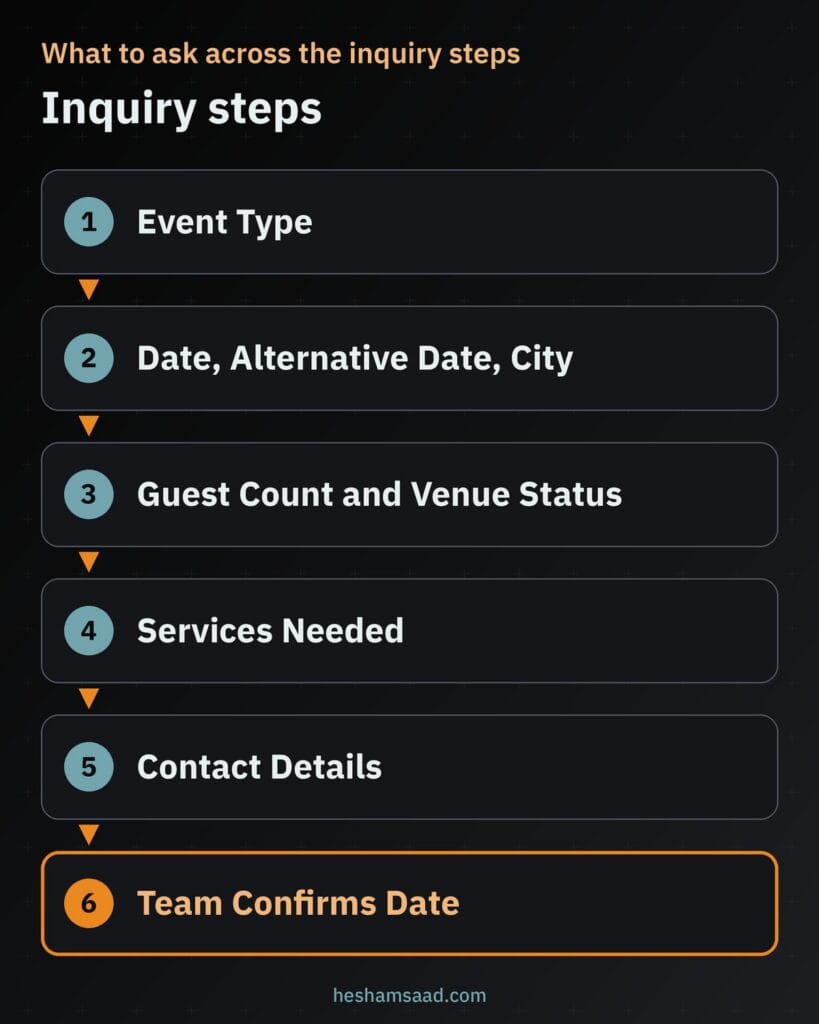
What to ask across the inquiry steps
Group your questions in the same sequence your planners follow during a first phone consultation. Each step asks only for details the host can answer right away without hunting through paperwork:
- Event type: wedding, corporate event, conference, or private party so the inquiry reaches the right planner.
- Event date and location: target date, an alternative date in case venues are full, and the host city.
- Guest count and venue status: expected attendance and whether a venue is already booked or still needed.
- Services and optional budget: planning or coordination services needed, plus a budget range only if your team wants it.
- Contact details: name, phone, email, and preferred contact method via phone, WhatsApp, or email.
Use the form confirmation message to state clearly what happens next as your coordinator reviews the brief. Unlike self-service appointment slots, covered in our guide on building a WordPress booking website, an event booking is confirmed by your team rather than by the form because dates depend on venue and vendor availability.
Asking for an alternative date upfront gives your planner an immediate fallback option to check if peak-season venues or production crews are already committed on the primary date. That single extra field turns potential dead ends into constructive proposals.
Building multi-page forms with WPForms
In WPForms, the Page Break field divides a long questionnaire into separate pages, each carrying its own title, a custom Next button label, and an optional Previous button while keeping entered data intact as visitors move between pages. You can display a Progress Indicator styled as a Progress Bar, Circles, a Connector, or None, and use conditional logic to skip pages that do not apply to the chosen event type.
Showcasing venue partners with real agreements
Clients organizing a Cairo hotel wedding, a North Coast celebration, or a Gulf business conference look closely at whether your crew knows local venue operations. A venue partners section highlights spaces where your company understands load-in access, staging rules, and banquet coordination.
List only venues where you hold a real working agreement and written permission to display the venue name, logo, and photographs. When creating individual venue pages, publish only verified facts from each property, including its real location, supported event types, and guest capacity as stated by the venue itself.
Connecting each partner venue profile back to your inquiry form also helps undecided hosts. Visitors who like a specific hall or garden can click straight through to check whether both that venue and your planning team are open on their target date.
Publishing real client testimonials without risking search penalties
Entrusting a wedding reception or an annual conference to an agency requires high confidence, making real client feedback persuasive proof. Publish only genuine testimonials from real past clients with their written permission, using a first name or initials when a client prefers privacy. Never invent quotes or edit feedback in a way that changes its meaning, and link visitors to your real Google Business Profile reviews when available.
Keep structured data rules in mind when coding testimonial sections. Google’s general structured data guidelines prohibit marking up content that is invisible to readers or misleading content such as fake reviews, and Google’s review snippet documentation states that LocalBusiness and Organization review rich results apply only to sites capturing reviews about other businesses, under the self-serving reviews guideline. Display testimonials clearly for human readers without adding review star markup for your own business.
Connecting WhatsApp click to chat alongside your inquiry form
Mobile visitors across Egypt and the Gulf appreciate a quick way to message your team on WhatsApp while reviewing packages. Using https://wa.me/ followed by your full business phone number in international format, without zeroes, brackets, or dashes, opens a chat on phone or WhatsApp Web without the visitor saving your number first, while ?text= adds a URL-encoded pre-filled message naming the event type.
Display the official Chat on WhatsApp button as is so it follows brand guidelines, keep it visible on mobile screens, and connect it to a business number your team actively answers. Keep WhatsApp beside your structured inquiry form rather than replacing it, so complete date, venue, and guest specifications still arrive in an organized brief.
Taking event deposits online through local payment gateways
Once your team verifies venue and supplier schedules and confirms availability, taking the booking deposit online locks in the date without bank transfer friction. Never collect open checkout payments before your coordinator approves the date, since event capacity depends on live crew and venue checks.
After confirming availability, send a payment link or run checkout through WooCommerce connected to regional processors, such as the options covered in our guide to WooCommerce payment gateways in Egypt and Saudi Arabia. For a related look at direct reservation policies and online payment setups, see our guide on building a hotel website on WordPress.
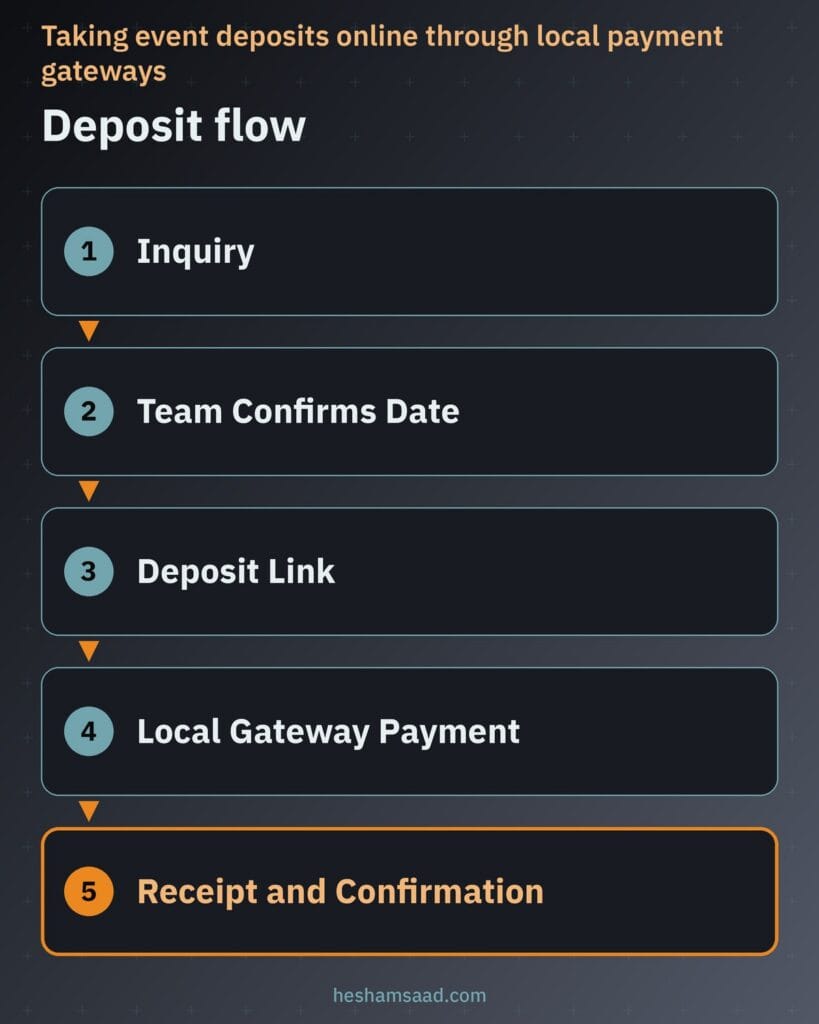
Present your company’s written deposit and cancellation policy clearly before payment, and issue an official invoice or receipt right upon completion. Because the local payment gateway processes the transaction externally, sensitive card data is never stored on your WordPress site.
Building a proper Arabic RTL experience alongside English
Serving families and corporate teams in Cairo, Riyadh, Jeddah, or Dubai calls for an authentic bilingual site rather than machine-translated pages. WordPress supports translation and right-to-left languages natively, provided your theme includes proper RTL styling and sets the HTML dir=”rtl” attribute so menus, split columns, gallery navigation, and progress indicators mirror cleanly on desktop and mobile screens.
Write the Arabic pages from scratch in natural, persuasive Arabic set in legible Arabic fonts so package scopes and deposit rules read with full clarity. Localize every interactive element too, including WPForms field labels, date fields, validation notices, confirmation messages, and the pre-filled WhatsApp text on Arabic pages.
What drives the cost of an event planner website
Budgeting for an event, wedding, or conference website depends on the media volume, bilingual scope, and payment workflows your business needs. Compare developer proposals against concrete technical cost drivers rather than arbitrary flat estimates:
- Pages and languages: total number of service pages and whether you launch in both English and Arabic RTL.
- Portfolio size and image preparation: resizing, compressing, converting to WebP, and captioning real past event albums.
- Form complexity and integrations: multi-page conditional inquiry forms and connecting leads to your team calendar or CRM.
- Deposit payments and gateway setup: configuring WooCommerce or payment links with local gateways, policy acceptance, and receipts.
- Venue partner pages: building verified, permission-backed profile pages for partner hotels and halls.
- Custom design versus theme: adapting a clean RTL-ready WordPress theme versus creating a custom visual design.
- Content writing and photography: producing original bilingual service copy and curating professional event photography.
- Hosting, maintenance, and security: provisioning WebP-capable hosting, backups, updates, and ongoing protection.
Prioritizing core package pages, a fast curated portfolio, and a structured inquiry form keeps your initial launch focused on generating qualified leads. You can then add individual venue profiles or deeper CRM connections in a planned second phase.
When to bring in a WordPress developer for your next step
Combining fast WebP galleries that pass Core Web Vitals, conditional multi-page forms, mirrored Arabic RTL templates, and gated deposit checkouts demands careful WordPress engineering. Relying on a heavy template with unoptimized wedding albums and broken bilingual forms quietly turns serious inquiries away.
Start by securing client and photographer permissions for your strongest real events, listing what each planning package includes and excludes, and writing down the intake questions your coordinators ask first. When your notes are ready, explore our WordPress development services to see how we build fast bilingual websites, or book a free consultation to plan your event website structure and deposit flow.
Frequently asked questions
How do I keep a photo heavy portfolio fast?
Resize and compress your event photos before uploading them, and save them in WebP format when your hosting supports it. Always include image width and height attributes so WordPress can apply native lazy loading below the fold and prevent layout shifts. Split large weddings or conferences into separate album pages instead of loading dozens of photos in one slider or setting videos to autoplay.
What should an event inquiry form ask?
Ask for the event type, preferred date, an alternative date, and the event city first. Next, collect the expected guest count, whether a venue is already booked, the planning services needed, and an optional budget range if your team uses one. Finish with contact details and the preferred reply channel, then explain that your team will check availability to confirm the date.
Can I show testimonials on my event website?
Yes, as long as every testimonial comes from a real past client who gave written permission to publish it. You can use a first name or initials if a private host prefers discretion, and link visitors to your real Google Business Profile reviews. Do not invent quotes or add review star schema markup to testimonials about your own business on your own site.
Can clients pay a deposit online?
Yes, once your team checks venue and supplier schedules and confirms that the requested date is available. You can send a payment link or use WooCommerce with a local payment gateway so card details are processed externally and never stored on your website. Include your written deposit and cancellation policy at checkout and send an automated receipt right after payment.
Do I need an Arabic version of my event website?
If your company serves clients in Egypt or the Gulf, a human written Arabic version helps local families and corporate decision makers review packages with confidence. Use a WordPress theme with proper right to left styling and the HTML right to left direction attribute so layouts and galleries mirror cleanly. Translate every form label, date field, confirmation message, and WhatsApp chat prompt into natural Arabic.
References
- Lazy-loading images in 5.5, Make WordPress Core
- WordPress 5.8 adds WebP support, Make WordPress Core
- Web Vitals, web.dev
- How to Create Multi-Page Forms in WPForms, WPForms Documentation
- General structured data guidelines, Google Search Central
- Review snippet structured data, Google Search Central
- How to use click to chat, WhatsApp Help Center
- Internationalization, WordPress Developer Resources
- HTML dir global attribute, MDN Web Docs