
هذا المقال متوفر باللغة العربية — اقرأ بالعربية
Launching a car dealership website WordPress project gives a showroom owner full control over how new and used vehicles are presented, filtered, and turned into sales inquiries. Buyers across the MENA region rarely visit a showroom floor without checking available stock, comparing odometer mileage, and verifying specifications on their phones first. If your pages load slowly or lack clear search filters, high-intent shoppers move on to competing dealers.
A showroom selling new and pre-owned vehicles has very different technical requirements from a fleet booking platform like a WordPress car rental website or a service-bay site like an auto repair shop website on WordPress. Instead of hourly calendars or repair tickets, your dealership platform must organize shifting stock, support multi-parameter filtering, collect financing inquiries safely, and send leads to WhatsApp.
Planning a car dealership website WordPress architecture for your showroom
Every reliable showroom site starts with a clean separation between visual design and structured vehicle data. Rather than publishing cars as standard blog posts or static layouts, WordPress stores each vehicle as a dedicated custom post type with standardized taxonomies and specification fields. This structure keeps your archive grids consistent and easy to filter.
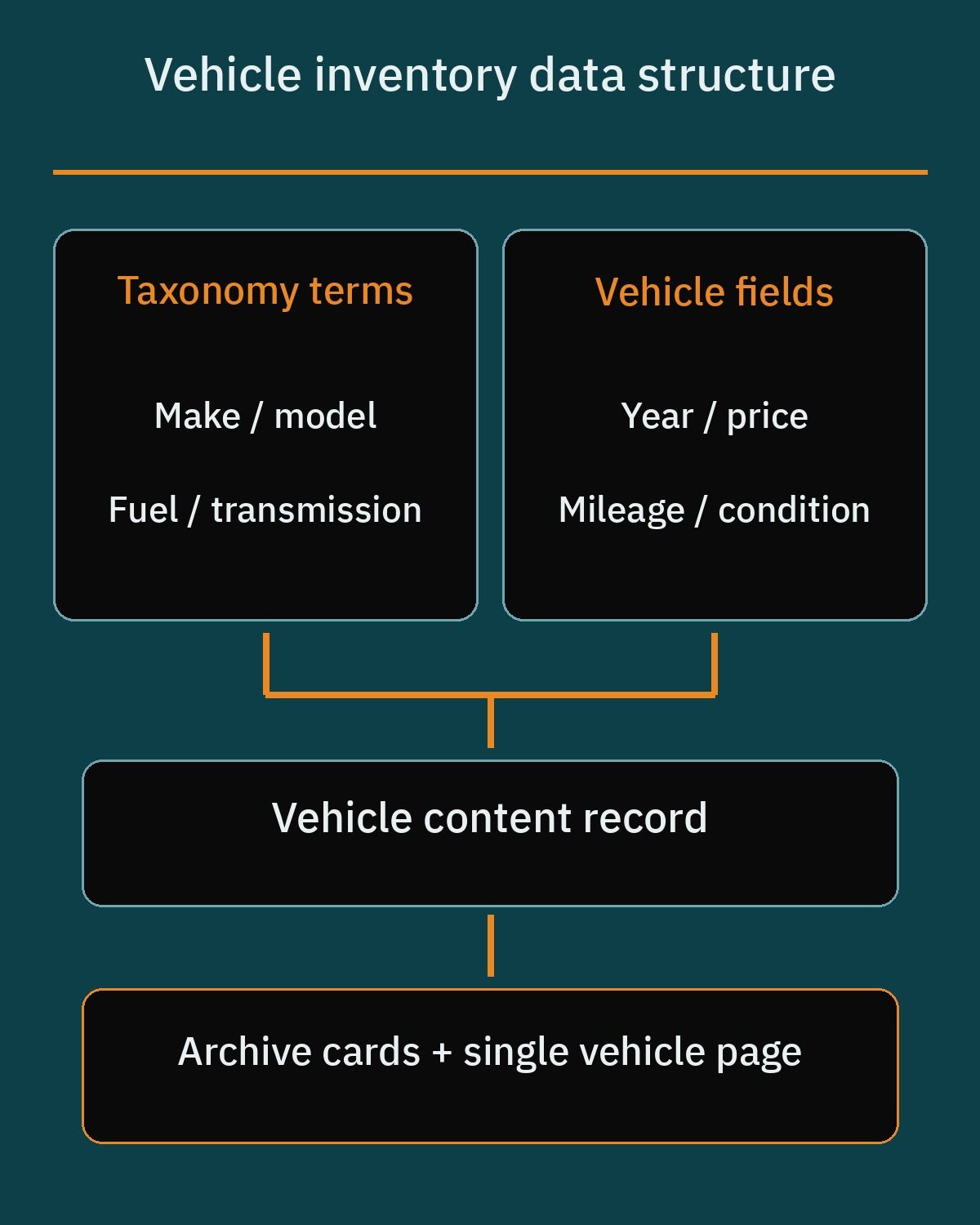
Whether your showroom sells brand-new models, certified pre-owned stock, or trade-in cars, each listing needs a core set of attributes that buyers compare side by side:
- Make and model organized as linked categories so choosing a brand narrows the available models.
- Condition and registration year to distinguish brand-new showroom arrivals from used vehicles.
- Asking price and odometer mileage stored as numeric fields so buyers can sort or filter by ranges.
- Fuel type and transmission specifications covering petrol, diesel, hybrid, electric, automatic, and manual options.
- Vehicle Identification Number (VIN) or stock code so sales staff can identify the exact car during a call.
Preparing this specification sheet and your photography guidelines before development starts keeps the launch on schedule. It also helps your staff publish new arrivals and remove sold cars without breaking layouts.
Comparing WordPress vehicle inventory plugins and avoiding abandoned tools
Instead of coding an inventory system from scratch, most showrooms build on an established WordPress dealership plugin and customize its templates. Picking an actively maintained plugin is important because your entire vehicle catalog depends on its custom post type structure.
Motors: Car Dealership & Classified Listings by StylemixThemes is a specialized option on WordPress.org. The free core covers inventory listings, grid and list archive layouts, vehicle specification fields for make, model, year, price, mileage, and condition, basic categories and dependent category filters, front-end listing submission forms, and user profiles with dashboards. For larger operations, the paid edition adds pre-built Elementor and Gutenberg listing templates, location-based radius search with Google Maps, an interactive loan calculator, sliding image galleries, custom field sorting, and multi-user dealership management.
Auto Listings: Car Listings & Car Dealership Plugin is another strong choice for a clean inventory foundation. Its free plugin provides custom post type vehicle inventory management, automated spec population, multi-parameter search filters, built-in inquiry and lead forms, vehicle photo galleries, Google Maps integration, and an Elementor search widget. As your showroom grows, the paid edition adds front-end paid submissions, multi-dealer marketplace features, custom tabs, and third-party data lookups such as the UK DVLA API.
When reviewing older recommendations or auditing an existing site, avoid discontinued tools. Car Demon was closed and removed from the official WordPress.org plugin repository due to security issues and lack of maintenance. Using unmaintained plugins risks security vulnerabilities and compatibility failures during routine updates.
Designing search filters so buyers find the right car fast
Once your showroom carries more than twenty or thirty vehicles, a basic archive page with pagination is no longer enough. Buyers arrive with clear criteria, whether they want a family SUV under a specific budget or a low-mileage sedan from recent years. Your search bar must let them combine make, model, year, price, mileage, fuel type, and transmission quickly.
Basic filters included in free inventory plugins work well for smaller catalogs, using standard dropdowns, checkboxes, and radio buttons that submit a query and reload the page. However, full page refreshes feel slow on mobile connections when shoppers toggle several filters in a row.
To speed up browsing, developers pair the vehicle custom post type with a dedicated filtering plugin. Search & Filter on WordPress.org filters custom post types and taxonomies using standard dropdown, checkbox, and radio controls in its free version. For a faster showroom experience, the paid edition adds true dynamic faceted search where facets auto-update based on selections and hide zero-result values, live AJAX reloading without page refreshes, price and mileage range sliders, an asynchronous database indexer for large inventories, and compatibility with Advanced Custom Fields (ACF) and WPML.
Structuring make, model, price, and mileage facets for mobile shoppers
For dealerships managing large inventories or multiple showroom branches, FacetWP is a dedicated premium faceting solution. It connects directly to WordPress custom post types, custom taxonomies, and custom fields built with ACF or Meta Box, utilizing an independent database index table for fast AJAX-based filtering.
FacetWP offers facet interface components for Gutenberg and Elementor layouts, including checkboxes, dropdowns, dual-handle range sliders for price and mileage, and proximity or geolocation maps. Matching the control type to each attribute makes mobile filtering much smoother:
- Dependent dropdowns for make and model so selecting a brand immediately limits the model list to matching vehicles in stock.
- Dual-handle range sliders for price, year, and odometer mileage so buyers set minimum and maximum limits without typing numbers.
- Checkboxes for fuel type, body style, and transmission so shoppers can compare automatic petrol and hybrid cars together.
Because dynamic facets automatically hide combinations with zero matching cars, buyers never hit empty search pages. That keeps visitors browsing your available stock instead of leaving your site.
Building a safe financing inquiry and pre-qualification form
Many showroom customers in the MENA region purchase new and late-model used cars through bank auto loans or Islamic murabaha financing partners. Adding a dedicated financing inquiry section on vehicle pages helps convert visitors who prefer monthly instalments into qualified showroom leads.
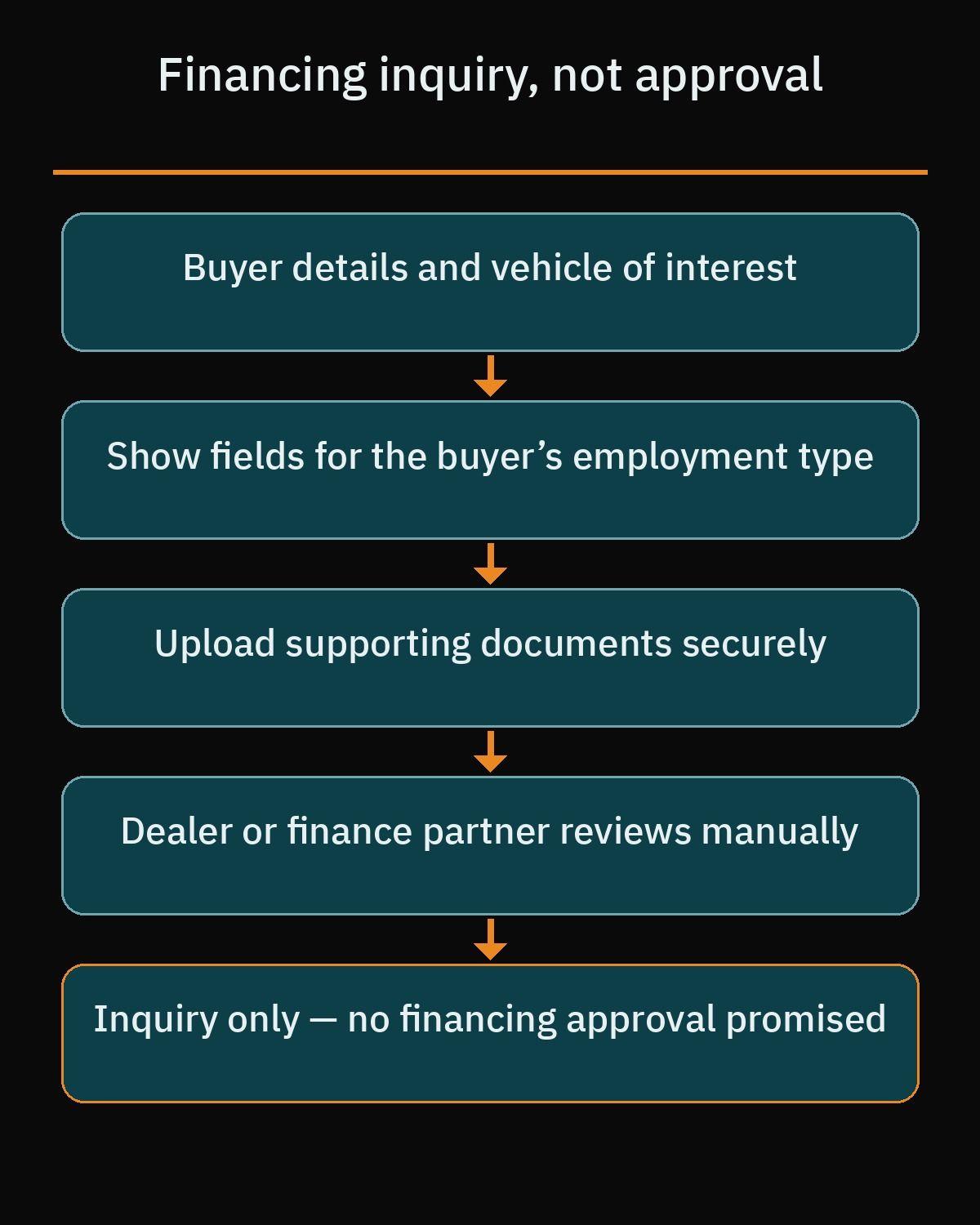
Every showroom owner must handle this feature with strict legal and operational clarity. A financing form on your website only collects an inquiry or pre-qualification request for the dealer or its finance partner to review manually. It is not a loan approval. Your website copy, calculators, and messages must never promise loan approval, interest rates, or binding monthly instalment amounts. Always confirm the exact form wording and disclaimers with your finance partner before publishing.
A well-structured inquiry form collects the core details your finance coordinator needs before calling the buyer:
- The selected vehicle listing, asking price, and preferred down payment amount.
- Employment type, such as government sector, private sector, or business owner, along with monthly income level.
- Optional file uploads for initial review, including national ID, salary certificates, and bank statements.
- A clear consent statement confirming the submission is only a pre-qualification inquiry for manual review and not a loan approval.
Comparing WordPress form builders for showroom financing inquiries
You do not need custom banking software to collect financing inquiries on WordPress. Established form builder plugins let your developer create structured pre-qualification forms that adapt to each buyer’s answers.
Fluent Forms is well suited for dealership financing inquiries. Its free version includes built-in smart conditional logic out of the box to show or hide questions based on income level, employment type, or down payment amount, plus standard file upload fields for national ID, salary certificates, and bank statements. For showrooms wanting a guided layout, the paid edition adds multi-step form flows and mathematical calculation fields for real-time monthly payment estimates that you can label clearly as non-binding estimates.
WPForms Lite is another widely used drag-and-drop form builder with pre-built contact templates for general vehicle inquiries. However, if you use WPForms for financing inquiries, note that multi-page forms, file uploads, conditional logic, and calculations are not included in the free plugin; the paid edition adds those features.
Turning showroom visitors into WhatsApp leads
In markets across Egypt, Saudi Arabia, the UAE, and the wider region, car buyers prefer messaging on WhatsApp over waiting for email replies. Placing a direct WhatsApp button on every vehicle page captures shoppers who want to ask about condition, trade-in options, or showroom hours immediately.
You do not need heavy chat plugins to set this up. WhatsApp supports a standard Click to Chat link format using https://wa.me/<number>, where <number> is your complete phone number in international format, omitting any leading zeroes, plus signs, brackets, or dashes, such as https://wa.me/97150XXXXXXX or https://wa.me/2010XXXXXXXX. Using the pre-filled message format https://wa.me/<number>?text=<urlencodedtext>, your developer can format links like https://wa.me/97150XXXXXXX?text=I’m%20inquiring%20about%20the%20vehicle%20listing so your sales team sees a clear inquiry message right away.
Combining these website links with the official WhatsApp Business app gives your showroom team practical tools to manage incoming leads:
- Catalog Showcase creates a mobile storefront inside WhatsApp where dealerships showcase vehicle inventory with photos, prices, descriptions, website links, and SKU or VIN numbers.
- Quick Replies let staff use keyboard shortcuts triggered with /, such as /financing or /hours, to send standard answers and media files right away.
- Automated Messaging provides automated away messages and greetings to capture showroom leads outside working hours.
Handling high-resolution vehicle photo galleries without slowing pages
Car buyers inspect exterior angles, interior trim, dashboard controls, and odometer photos before visiting your showroom. Because a single listing often holds twenty or more high-resolution images and archive pages display dozens of vehicle cards, unoptimized galleries can slow down mobile browsing.
WordPress core handles critical image delivery tasks automatically when your theme outputs clean markup. Since WordPress 5.5, core automatically injects the browser-native loading=”lazy” attribute into img tags that specify both width and height attributes, deferring off-screen gallery photos and preventing layout shift.
Refinements across WordPress 5.9 through 6.3 improved Largest Contentful Paint (LCP) performance so WordPress automatically excludes the first content image from lazy loading and applies fetchpriority=”high” to candidate LCP images, such as your archive top banner or primary car photo. Furthermore, WordPress 6.7 automatically prepends auto to the sizes attribute (sizes=”auto, …”) for lazy-loaded images, enabling browsers to calculate exact slot widths before loading image sources. Your developer should configure consistent thumbnail dimensions in your dealership templates so these core features work properly.
Setting up automotive schema, local search, and staff workflows
Attracting nearby buyers searching for specific car models or showrooms in your city requires structured data and a solid WordPress local SEO foundation. Schema.org provides dedicated automotive types that help search engines understand your business and inventory:
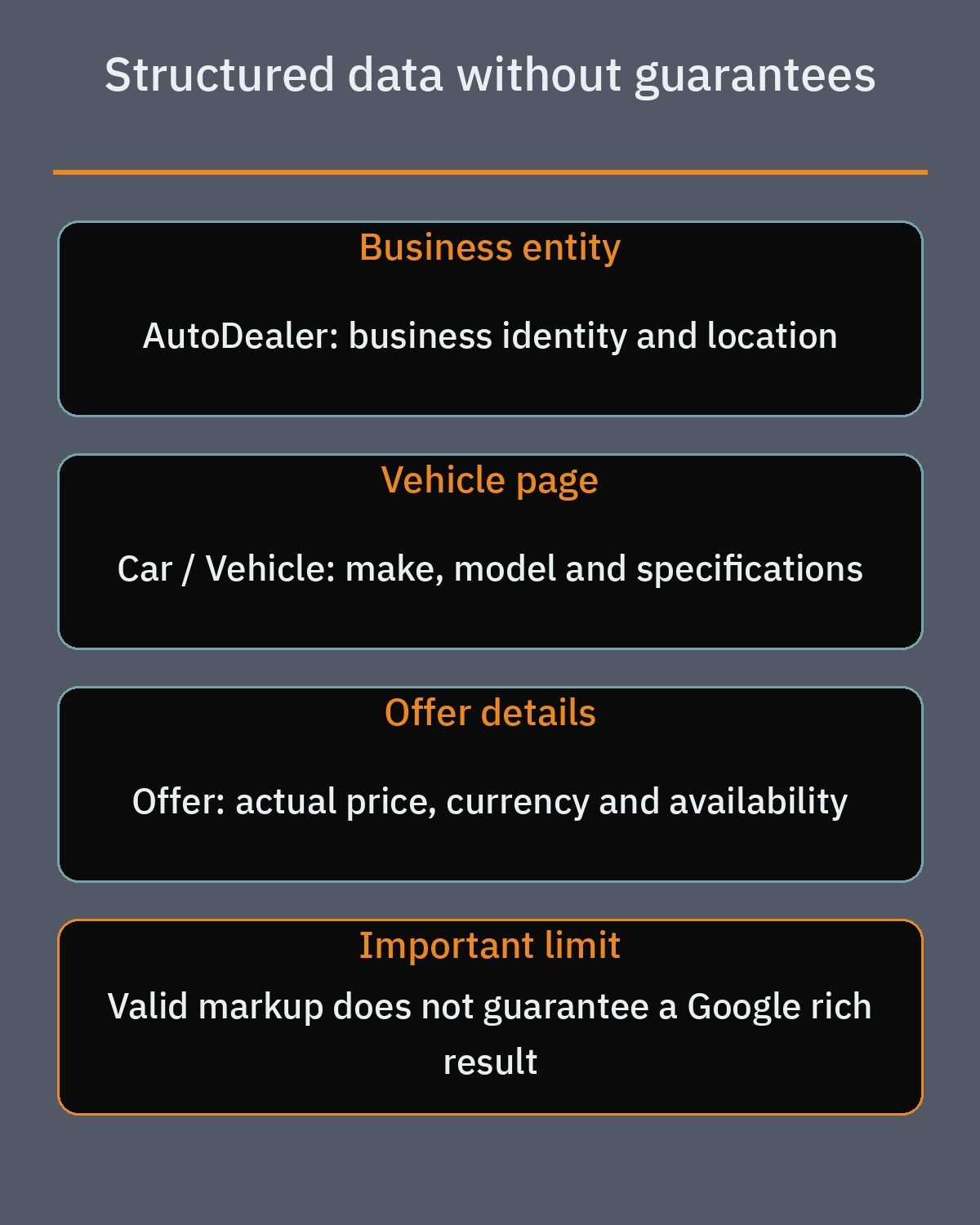
- AutoDealer is a specific subtype of LocalBusiness and AutomotiveBusiness for the dealership organization itself, covering physical showroom address, opening hours, phone number, and geo-coordinates.
- Vehicle is a top-level subtype of Product for vehicles, supporting properties such as vehicleIdentificationNumber (VIN), mileageFromOdometer, vehicleModelDate, fuelType, driveWheelConfiguration, and bodyType.
- Car is a specific subtype of Vehicle for passenger automobiles, paired with offers (Offer type with price, priceCurrency, and availability).
Treat this markup as a clear semantic description of your showroom and your cars, not as a promise of special search features. Search engines decide how to display any page, so pair AutoDealer, Car, Product and Offer markup with accurate listing pages and an active Google Business Profile.
Finally, pair your website with a clear showroom workflow so staff photograph new arrivals consistently, fill in every specification field, and remove sold vehicles promptly. When you are ready to build a fast, bilingual showroom website tailored to your inventory and sales team, review our WordPress development services or book a free consultation to discuss your project.
Frequently asked questions
What affects the timeline and scope of a WordPress showroom website?
The project scope depends on whether your dealership uses standard inventory templates or needs custom faceted search, bilingual layouts, and tailored financing inquiry forms. Configuring a core listing plugin with basic filters is much faster than building custom taxonomy structures, conditional pre-qualification forms, and staff dashboards for multiple showroom branches. Preparing your vehicle specification sheet and photo guidelines before development starts keeps the launch on schedule.
Which WordPress plugins manage new and used car inventory reliably?
Motors and Auto Listings are active WordPress plugins built specifically for managing vehicle custom post types, specification fields, photo galleries, and archive layouts. Both offer free core versions that handle single showroom inventories along with paid editions that add advanced templates, map tools, or multi-dealer capabilities. You should avoid a discontinued plugin like Car Demon, which was closed on WordPress.org and is no longer maintained.
How do search filters handle make, model, price, and mileage without slowing the site?
Dedicated filtering tools like the paid edition of Search and Filter and FacetWP use custom database index tables and live AJAX reloading to update car listings without refreshing the full page. When a buyer selects a make, dynamic faceted search updates the available models and hides zero-result options automatically. Dual-handle range sliders also let shoppers narrow vehicles by price and odometer mileage smoothly on mobile screens.
Does a website financing form approve car loans automatically?
No, a dealership financing form only collects an inquiry or pre-qualification request for your sales team or finance partner to review manually. It never grants a loan approval or guarantees interest rates or monthly instalment amounts. Using a plugin like Fluent Forms lets you apply conditional logic based on employment type or down payment and collect supporting documents while keeping legal disclaimers clear as confirmed with your finance partner.
How should a car showroom connect vehicle listings to WhatsApp?
The most reliable method is placing a direct Click to Chat link on each vehicle page using the standard wa.me URL format with your full international phone number and no plus signs or leading zeroes. You can append a URL-encoded text parameter so the buyer sends a pre-filled inquiry message identifying the listing. Your sales staff can then manage leads in the WhatsApp Business app using quick replies, away messages, and a mobile catalog.
References
- Motors: Car Dealership & Classified Listings on WordPress.org
- Auto Listings: Car Listings & Car Dealership Plugin on WordPress.org
- Search & Filter Plugin on WordPress.org
- Search & Filter Pro Official Documentation
- FacetWP Advanced Filtering for WordPress
- Schema.org AutoDealer Type
- Schema.org Vehicle Type
- Schema.org Car Type
- WhatsApp Help Center: How to Use Click to Chat
- WhatsApp Business App Official Features
- Fluent Forms on WordPress.org
- WPForms Lite on WordPress.org
- Make WordPress Core: Lazy-loading Images in 5.5
- Make WordPress Core: Improving LCP in WordPress 6.3
- Make WordPress Core: Auto Sizes for Lazy-loaded Images in WordPress 6.7