هذا المقال متوفر باللغة العربية — اقرأ بالعربية
Running a busy patisserie or sweets shop means balancing morning tray bakes, walk-in counter traffic and afternoon celebration deliveries. When you plan a bakery website WordPress project for your business in Egypt or the Gulf, the goal is not simply putting a PDF price list online. Your store needs to capture exact cake details, enforce kitchen preparation times and route deliveries to the right city neighborhoods without tying up your staff on the phone all day.
If every request comes in through social media messages, your staff end up spending a lot of time asking for missing cake sizes, inscriptions and location pins. A dedicated cake shop online ordering website turns those scattered chats into structured orders that arrive in your kitchen with payment status, pickup or delivery windows and customer notes attached. Below is everything you should ask your developer to set up before launch.
What a bakery website WordPress build should do
Selling baked goods online works differently from selling clothes or electronics because almost everything has a shelf life, a decoration window and a transport limit. While a restaurant website on WordPress focuses on immediate hot meals cooked within minutes of checkout, a bakery or patisserie blends ready-to-ship boxes with made-to-order cakes that require notice. Your site has to handle both types of purchases in one clean workflow.
To manage bakery online orders reliably, your store must separate items that can leave the branch today from items that need one or two days of preparation. A shopper buying a box of baklava or fresh croissants expects a quick checkout and a nearby delivery slot. Another customer ordering a tiered birthday cake needs to pick a sponge flavor, type a name to pipe in chocolate, upload a photo of a design and choose a date later in the week.
When your developer configures WooCommerce around how your ovens and decorators actually work, your website stops overpromising to customers. Clear rules for variations, custom fields, time slots and city zones prevent double-booked decorators and keep fragile cream cakes from being scheduled for distant neighborhoods your drivers cannot serve in summer heat.
A menu customers can browse and order from
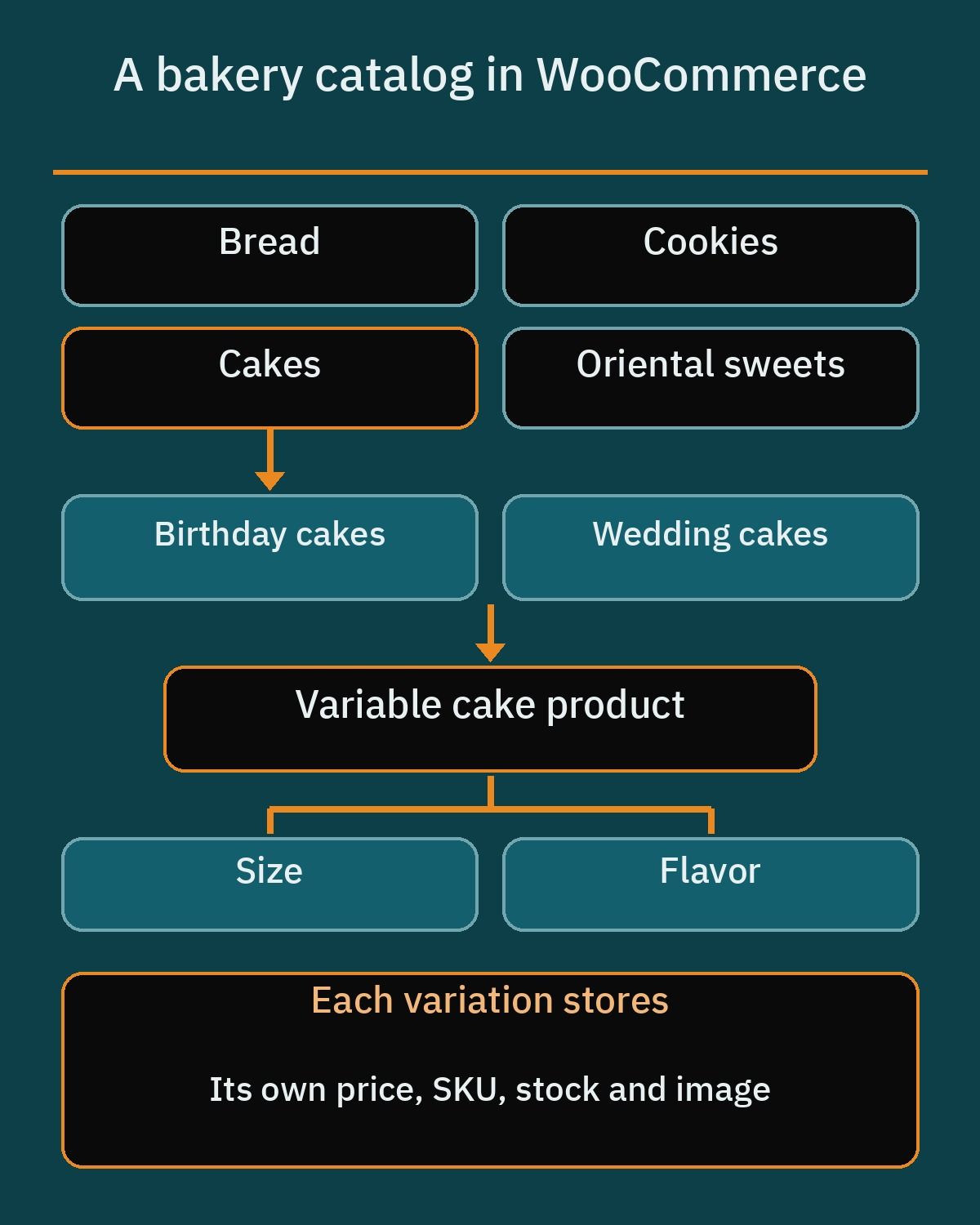
Shoppers visiting a bakery site usually know the occasion they are buying for before they know the exact item name. WooCommerce product categories are hierarchical, which lets your developer organize top-level sections such as Cakes, Oriental sweets, Bread and Cookies, and then nest subcategories like Birthday cakes and Wedding cakes underneath. Each category supports its own name, slug, description, thumbnail image and display type, so a main section can display subcategories, individual products or both on the same page.
Once a customer clicks into a cake or sweet tray, avoid creating separate store listings for every single weight or diameter. Instead, use WooCommerce variable products with attributes such as Size (measured by cake diameter or number of servings) and Flavor. Each variation carries its own price, SKU, stock status and photo, so switching from a small chocolate fudge cake to a large pistachio raspberry cake updates the product price and picture right away.
Visual clarity matters when buyers cannot see the pastry case in person. The built-in WooCommerce product gallery supports image zoom, a fullscreen lightbox and a photo slider so customers can inspect frosting textures and box assortments closely. If your developer builds with a classic theme, they enable these gallery features through theme support code, while block themes control them directly inside the Product Gallery block settings.
Custom cake orders without the back and forth
Standard variations work well when a customer only picks a size and base flavor, but celebration cakes usually need extra personalization. Rather than creating hundreds of variations for every possible filling, topper and inscription, your developer can use Product Add-Ons for WooCommerce, an official paid extension by Woo. It places extra input fields right above the Add to Cart button on individual products or across global product categories.
With Product Add-Ons for WooCommerce, you can tailor the exact questions a customer answers before adding a cake to their cart:
- Short text or long text fields for the message written on the cake board or icing, plus special preparation notes for the kitchen.
- File upload fields where the buyer attaches a reference photo of a cake style, color palette or party theme.
- Multiple-choice options displayed as a dropdown, radio buttons or clickable images for sponge flavors and inner fillings.
- Checkboxes and quantity fields for extras like birthday candles, macarons, chocolate plaques or greeting cards, each with an optional flat or percentage fee.
- A Date Picker, heading dividers and even customer-defined price fields if you sell open-value gift vouchers.
Not every cake should be paid for immediately at checkout. Multi-tier wedding cakes, sculpted novelty cakes and large corporate dessert tables often require a design check and custom pricing, much like the inquiry workflow on a catering company website on WordPress. For those items, set up a dedicated quote request page instead of a direct cart button.
When choosing a free plugin for that custom cake inquiry page, check which fields come included before installing. Contact Form 7 is free and includes both date fields and file upload fields out of the box, making it practical for collecting event dates and reference photos. Fluent Forms includes Time and Date fields, dropdowns, checkboxes and text areas in its free version, while Image Upload and File Upload require its Pro edition, and WPForms Lite offers drag-and-drop building, templates and email notifications without date or file upload fields in the free tier.
Pickup and delivery time slots
A bakery order without a date and time window is an operational headache. Fresh cream cakes cannot sit in a delivery van all afternoon, and customers picking up a birthday order want to know their box will be ready when they arrive at the branch. Unlike a WordPress booking website built for one-on-one consultations or salon appointments, a bakery store ties scheduling directly to physical products in the WooCommerce checkout.
Order Delivery Date for WooCommerce by Tyche Softwares is a solid starting point on WordPress.org, and its plugin page lists bakeries preparing cakes and custom orders among its common use cases. The lite version adds a delivery date picker at checkout with optional time slots, lets you choose which weekdays you deliver, and allows you to block out public holidays or kitchen maintenance days. You can also set a minimum preparation lead time and cap the maximum number of deliveries per day so decorators are never overwhelmed, with full support for both classic and block Cart and Checkout plus High-Performance Order Storage (HPOS).
Another plugin on WordPress.org is Delivery and Pickup Date Time for WooCommerce by CodeRockz, which lets shoppers pick either a delivery or pickup date and time during checkout in its free version, with a Pro version available for advanced scheduling rules. Whichever plugin your developer selects, make sure the chosen date and time slot print clearly on the WooCommerce order screen and kitchen notification emails.
Many customers prefer collecting custom cakes themselves from the nearest branch to save on courier fees. WooCommerce includes Local Pickup as a core shipping method without extra plugins. When your site uses the WooCommerce block Checkout, your developer can register multiple pickup locations, each with its own branch name, street address and pickup instructions, so buyers simply pick their preferred branch at checkout.
Delivery zones inside your city
Delivering fragile pastries across Cairo, Giza, Alexandria, Riyadh, Jeddah or Dubai requires tighter geographic rules than shipping dry goods by national courier. In WooCommerce, shipping zones are configured under the WooCommerce Settings menu in the Shipping tab and matched from top to bottom. Each zone can be defined by country or state and narrowed by specific postcodes using exact matches, numeric ranges or wildcards, with its own flat rate, free shipping threshold or local pickup method.
The catch for MENA bakeries is that shoppers in Egypt and much of the Gulf rarely know or type their postal code when ordering food online. If your checkout depends on postcode matching to calculate delivery fees for Maadi, New Cairo, Nasr City or Al Olaya, customers will either see an error or pick the wrong rate. Instead, ask your developer to map city neighborhoods as state or region selections or add a delivery area selector, following the setup covered in our guide to WooCommerce shipping zones for Egypt and the Gulf.
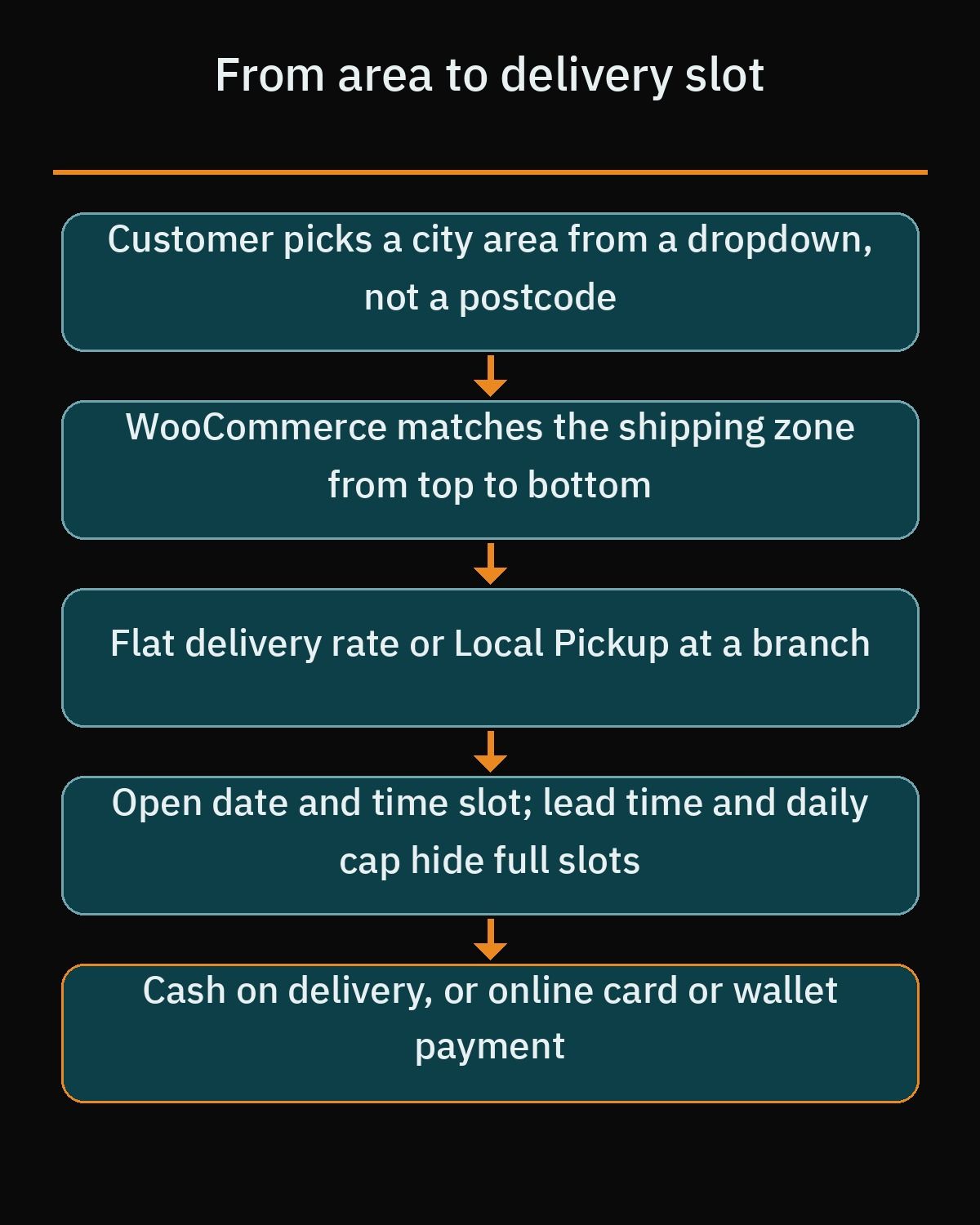
Payment options should match local expectations and the type of product being ordered. Cash on delivery is built directly into core WooCommerce and works well for everyday bread and ready sweet boxes, though you may prefer to take online payment upfront before writing a custom name on a cake. For stores in Egypt, Paymob for WooCommerce is the official plugin connecting cards and mobile wallets enabled on your Paymob merchant account, while in Saudi Arabia mada and credit cards come through a licensed payment gateway, depending on your merchant agreement.
Pre-orders for Ramadan, Eid and weddings
Seasonal peaks are among the busiest weeks of the year for most patisseries, whether you are selling kunafa creations during Ramadan, kahk and petit four boxes for Eid al-Fitr or summer wedding cakes. If you wait until the week of the holiday to open sales, your phone lines and kitchen schedule will jam at the same time. Accepting structured pre-orders lets you buy ingredients in accurate quantities and organize baking shifts days in advance.
For stores that launch special seasonal menus before the items are in the display case, WooCommerce Pre-Orders is an official paid extension by Woo designed for upcoming releases. It allows customers to order a simple or variable product before it is available, displays an optional release date and time, and gives you custom button text and a dedicated pre-order status in the dashboard. Depending on your payment gateway support, you can charge the customer upfront or upon release, add an optional pre-order fee and email all pre-order buyers at once when their boxes are ready.
If you do not need release-date billing, a simpler setup often works just as well for holiday baking. Your developer can publish an occasion product such as an Eid cookie box, enable the checkout delivery date picker with a daily order cap so no single day exceeds oven capacity, or use the core WooCommerce stock status called On backorder for items baked in scheduled batches.
WhatsApp next to checkout, not instead of it
In Egypt and the Gulf, many customers like to send a quick voice note or photo on WhatsApp before committing to a large celebration cake. Fighting that habit costs you sales, but moving every single pastry order into WhatsApp chat leaves your staff manually copying addresses, chasing bank transfers and forgetting which time slot was promised. The smart balance is keeping WhatsApp right next to your WooCommerce checkout as an assistant rather than a replacement.
On custom cake and event tray pages, your developer can place a click-to-chat button alongside the normal Add to Cart button. Using the official WhatsApp link format (wa.me followed by your full international phone number without any plus sign, leading zeros, brackets or dashes, plus a URL-encoded text parameter), the button opens a chat with the exact cake name and page link already filled into the message box. Your team immediately knows which product the customer is asking about.
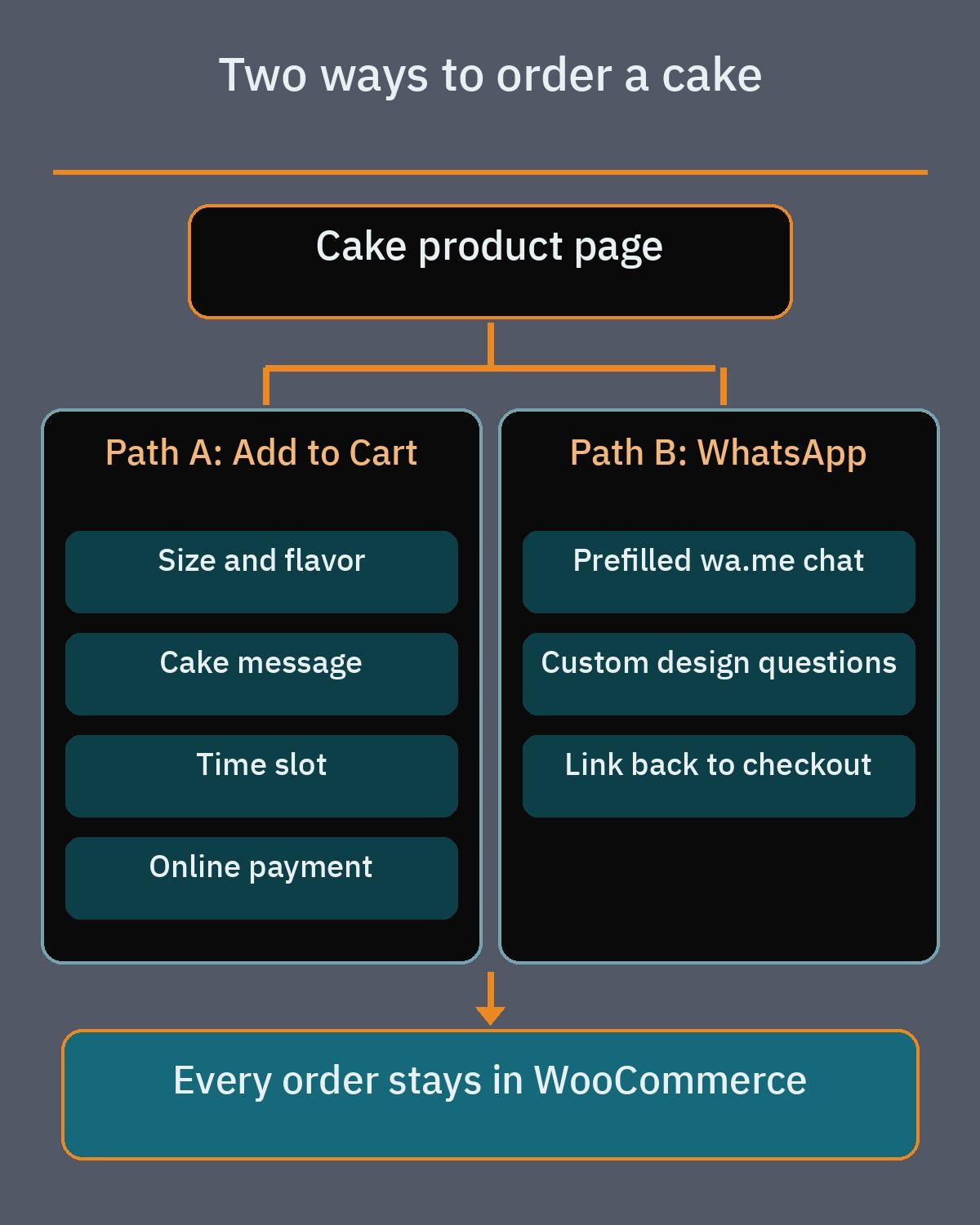
Pair that website button with the WhatsApp Business app so your number shows a business profile with your address and opening hours. Inside the app, you can maintain a basic catalog of popular items with photos, prices and descriptions, set up quick replies for frequent questions about portion sizes and use away messages when the bakery closes at night. Once a custom design is agreed in chat, send the customer back to the website checkout or a payment link so the order, delivery date and kitchen notes stay inside WooCommerce.
Photos that load fast
People buy sweets with their eyes first, and generic stock photos cannot show what your bakery actually makes. Plan a dedicated photo shoot using natural daylight near a window rather than harsh yellow kitchen bulbs, and keep the camera angle consistent across every item in the same category so your shop grid looks clean. Always include a slice or cross-section shot showing the sponge and filling layers, add a visual size reference so buyers understand how big a cake is, and upload a matching photo for every flavor or size variation.
High-resolution food photography can easily slow down mobile pages if your staff upload raw camera files straight to the media library. Have your developer configure an image optimization plugin on WordPress.org such as Smush, which handles image compression, lazy loading and WebP conversion, or Imagify, which compresses uploads and converts them to modern WebP and AVIF formats. Fast-loading gallery images keep mobile shoppers browsing your boxes without burning through their data connection.
Local search and your Google Business Profile
Nearby customers often find a cake shop or patisserie through Google Search and Maps before they ever open your website. Connecting your domain to an accurate Google Business Profile helps those nearby searchers move straight from local discovery to your online menu. Start by editing your profile to ensure your website URL, street address, phone number and regular opening hours match what appears in your website footer.
Because bakeries often stay open later during Ramadan, Eid and national holidays, update your Special hours inside Google Business Profile for holidays and special events instead of overwriting your regular weekly schedule. Upload fresh photos and short videos of your storefront, pastry counter and signature cakes to the profile, and use the built-in Menu editor for food and drink businesses to list menu sections and items with descriptions and prices, plus a direct link to your website menu (keep in mind that menu edits on Google can take 24 to 48 hours to appear publicly).
On the WordPress side, ask your developer to include structured data using the Schema.org Bakery type, which is a specific subtype of FoodEstablishment and LocalBusiness. Defining properties such as openingHoursSpecification, hasMenu, address and telephone helps search engines understand your branch details clearly, even though no developer can promise specific rankings or rich results in search.
Arabic pages and order details
Whether your bakery operates in Cairo, Alexandria, Riyadh, Doha or Kuwait City, many of your customers and kitchen staff prefer using Arabic. WordPress automatically switches its layout direction to right-to-left (RTL) when the site language is set to Arabic, and WooCommerce is translation-ready through community language packs. However, your WordPress theme and every checkout plugin must include clean RTL stylesheets so product grids, cart drawers and buttons align properly on mobile screens.
Ask your developer to test every interactive field in Arabic before launch, including calendar date pickers, delivery time slot dropdowns and custom cake add-on options. Pay special attention to the short text field where customers type an Arabic birthday or congratulations message for the cake. Make sure the order confirmation email and any printed kitchen ticket preserve UTF-8 encoding with Arabic letters properly connected from right to left, rather than printing disconnected backward characters that confuse the decorator.
Budget and choosing a developer
When you ask agencies or freelancers for a quote on a bakery store, the cost depends on your operational complexity rather than a fixed template rate. A simple catalog of twenty ready-made sweet boxes takes far less time to build than a store with hundreds of variable cakes, multi-option Product Add-Ons, custom quote forms and branch-specific pickup rules. Before comparing proposals, review our checklist on how to hire a WooCommerce developer so you know how to evaluate past e-commerce work.
The main factors that drive your project budget and timeline include:
- Total number of products, size and flavor variations, and whether you need data entry help organizing categories and descriptions.
- Custom cake personalization fields, file upload rules and separate inquiry forms for wedding or event orders.
- Delivery date and time slot logic, preparation lead times, daily order caps and city neighborhood shipping zones.
- Local payment gateway integration (such as Paymob in Egypt or a licensed mada gateway in Saudi Arabia) and annual subscription renewals for paid WooCommerce extensions.
- Bilingual Arabic and English content setup, original food photography and whether you want a tailored custom design or a styled WooCommerce theme.
If you want a store that captures every cake detail accurately and fits the way your kitchen actually bakes and delivers, explore our WordPress development services to see how we build e-commerce sites for MENA businesses. You can also book a free consultation to walk through your menu, custom cake workflow and delivery zones before you start building.
Frequently asked questions
How should a bakery website collect custom cake requests and reference photos?
Use Product Add-Ons for WooCommerce on standard celebration cakes that have fixed pricing rules. Customers can pick a flavor, enter the cake inscription, upload a reference image and select a date right on the product page. For multi-tier wedding cakes or complex designs that need a custom quote first, place a separate request form built with Contact Form 7 so your pastry team can review the photo and confirm availability before payment.
How can I stop customers from ordering a custom cake for immediate delivery?
Install a scheduling plugin such as Order Delivery Date for WooCommerce and set a minimum preparation time so same-day slots do not appear when a cake needs advance notice. You can also cap the number of orders allowed per day, define available delivery weekdays and block out public holidays. Customers only see open pickup or delivery windows at checkout, which protects your kitchen from taking more orders than your ovens and decorators can finish.
How do city delivery zones work when customers in Egypt or the Gulf do not use postcodes?
WooCommerce matches shipping zones from top to bottom and supports state or region rules alongside postcodes. Because shoppers in Cairo, Alexandria, Riyadh or Dubai rarely enter postal codes at checkout, your developer should configure a neighborhood or district dropdown instead of relying on postcode fields. Each zone then applies its own flat delivery rate, free shipping rules or local branch pickup option so delicate cakes only travel as far as your drivers can safely reach.
Should my bakery take all online orders through WhatsApp or use WooCommerce checkout?
Keep standard WooCommerce checkout for everyday pastries, boxes and fixed-option cakes so payments, delivery slots and order details are recorded automatically. Use a WhatsApp click-to-chat button with a prefilled product name as a helper on custom cake pages where buyers want to discuss design ideas before paying. Relying on chat alone for every order creates manual work during busy weekends and makes it easy to miss a cake message or delivery time.
What affects the cost of building a bakery website on WordPress?
The budget depends on the size of your product catalog, how many size and flavor variations you sell and whether you need custom cake add-ons or quote forms. Delivery zone rules, time-slot capacity limits, local payment gateway integration and annual licenses for paid WooCommerce extensions also shape the scope. Adding both Arabic and English pages, shooting original product photography and designing a custom theme require more development time than launching a single-language store with ready photos.
References
- WooCommerce Documentation: Managing Product Categories, Tags and Attributes
- WooCommerce Documentation: Variable Product
- WooCommerce Documentation: Adding Product Images and Galleries
- WooCommerce: Product Add-Ons Extension
- WooCommerce Documentation: Product Add-Ons
- WordPress.org Plugins: Contact Form 7
- WordPress.org Plugins: Fluent Forms
- WordPress.org Plugins: WPForms Lite
- WordPress.org Plugins: Order Delivery Date for WooCommerce
- WordPress.org Plugins: Delivery and Pickup Date Time for WooCommerce
- WooCommerce Documentation: WooCommerce Blocks Local Pickup
- WooCommerce Documentation: Setting up Shipping Zones
- WordPress.org Plugins: Paymob for WooCommerce
- WooCommerce: WooCommerce Pre-Orders Extension
- WooCommerce Documentation: Managing Products
- WhatsApp Help Center: How to Use Click to Chat
- WhatsApp Business: Official Overview
- WhatsApp Help Center: About Catalog
- WordPress.org Plugins: Smush Image Optimization
- WordPress.org Plugins: Imagify Image Optimization
- Google Business Profile Help: Edit Your Business Profile on Google
- Google Business Profile Help: Set Special Hours
- Google Business Profile Help: Manage Photos or Videos for Your Business Profile
- Google Business Profile Help: Use the Menu Editor
- Schema.org: Bakery Type Specification
- WooCommerce Documentation: Translating WooCommerce (Localization)