هذا المقال متوفر باللغة العربية — اقرأ بالعربية
A WordPress SEO audit is a structured review of your site that answers one practical question: what is stopping Google from finding, understanding and ranking the pages that bring you customers? If your enquiries from search have slowed down, you are about to redesign, or you are comparing proposals from developers and agencies, an audit gives you a clear list of problems before you spend money fixing the wrong things.
This guide is written for business owners in Egypt, Saudi Arabia and the Gulf who want to understand what a proper audit covers, what a useful report looks like, what drives the cost, and how to hire someone to do it without falling for empty promises. You do not need to be technical to follow it.
What a WordPress SEO audit is, and what it is not
An audit is a diagnosis, not a treatment. A good auditor crawls your site, reads your Google Search Console data, tests your key pages on mobile, reviews your WordPress setup, and then writes down what is wrong, why it matters and how much work each fix needs.
An audit is not:
- A one-click “SEO score”. Automated tools are useful for spotting patterns, but a score out of 100 does not tell you which problem is costing you leads.
- A ranking guarantee. Google’s own guidance on hiring an SEO says an audit should give you realistic estimates of improvement and an estimate of the work involved, and that if someone guarantees first place in search results, you should find someone else.
- A content plan by itself. It may point out weak or missing pages, but writing and publishing them is separate work.
When your business actually needs an audit
Not every site needs a deep audit every month. These are the moments when one usually pays for itself:
- Traffic or leads from Google dropped and nobody can explain why.
- Before a redesign or a platform move, so you know which pages and URLs must be protected. Our guides on a WordPress website redesign and a Wix to WordPress migration explain why this step matters.
- Before hiring an SEO agency, so you can judge their proposal against a neutral baseline. See how to choose a WordPress SEO agency.
- When you take over a site from a previous developer and do not know what was installed or changed. A WordPress website takeover is a natural time to check SEO too.
- When you add an Arabic or English version and want both languages to show to the right people.
What a WordPress SEO audit should check
The exact list depends on the site, but a serious audit of a WordPress business site covers the areas below. If a proposal skips most of them, ask why.
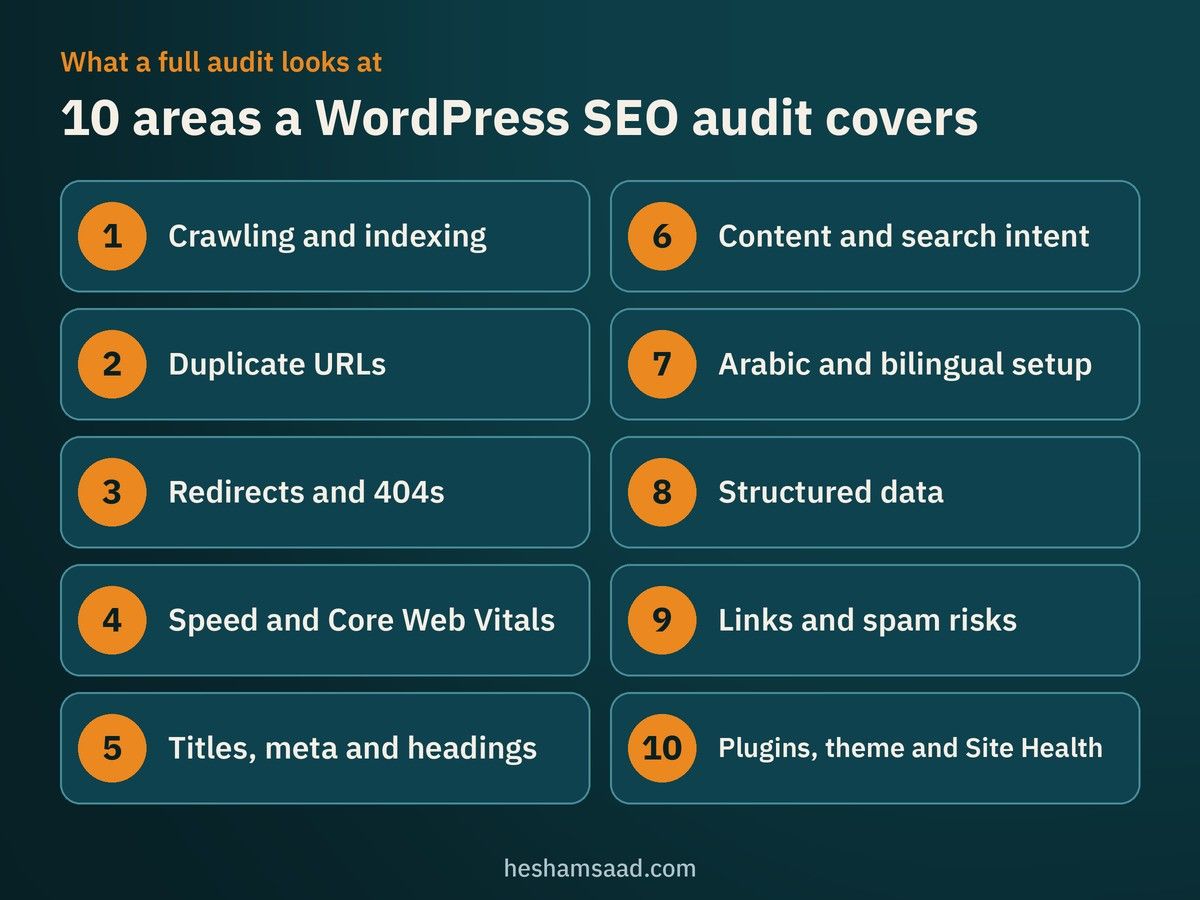
1. Can Google crawl and index your important pages?
This comes first because nothing else matters if your pages are not in Google’s index. The auditor should check:
- The “Discourage search engines” setting. In Settings, then Reading, WordPress has a checkbox that asks search engines not to index the site. According to the WordPress documentation, since version 5.3 it adds a noindex, nofollow robots meta tag to every page. It is often left on after a site moves from staging to live.
- Stray noindex tags on service pages, set by an SEO plugin or a page builder.
- robots.txt. Google explains that robots.txt controls crawling and is not a mechanism for keeping a page out of Google. Pages you want hidden need noindex or a password, and pages you want ranked must not be blocked.
- XML sitemaps. Since WordPress 5.5, core can publish a sitemap index at /wp-sitemap.xml, and most SEO plugins replace it with their own. The audit should confirm that one clean sitemap is submitted in Search Console and that it lists the pages you care about.
- The Page indexing report in Search Console, where statuses such as “Crawled, currently not indexed” or “Excluded by noindex tag” show which URLs Google left out and why. If you have not connected it yet, follow our guide to Google Search Console for WordPress.
2. Duplicate and low-value URLs that WordPress creates
WordPress generates many URLs automatically: tag and category archives, author archives, date archives, attachment pages for images, and paginated pages. Add the http and https versions, with and without www, and one service can end up reachable at several addresses.
The audit should check that every important page has a clear canonical URL, that the other versions redirect to it, and that thin archive pages are either useful or kept out of the index. Google’s documentation on canonical URLs explains how rel=”canonical” and redirects help it pick the version you prefer.
3. Redirects and broken links
Old URLs from a previous design, deleted products and renamed services often leave behind 404 errors or long redirect chains. The auditor should list:
- Pages that return 404 but still receive visits or links.
- Redirect chains (A to B to C) that should point straight to the final page.
- Temporary redirects used where a permanent one is meant.
Google’s site move guidance notes that 301 and other permanent redirects do not cause a loss in PageRank, so fixing these properly is low risk and often quick.
4. Speed and Core Web Vitals on real phones
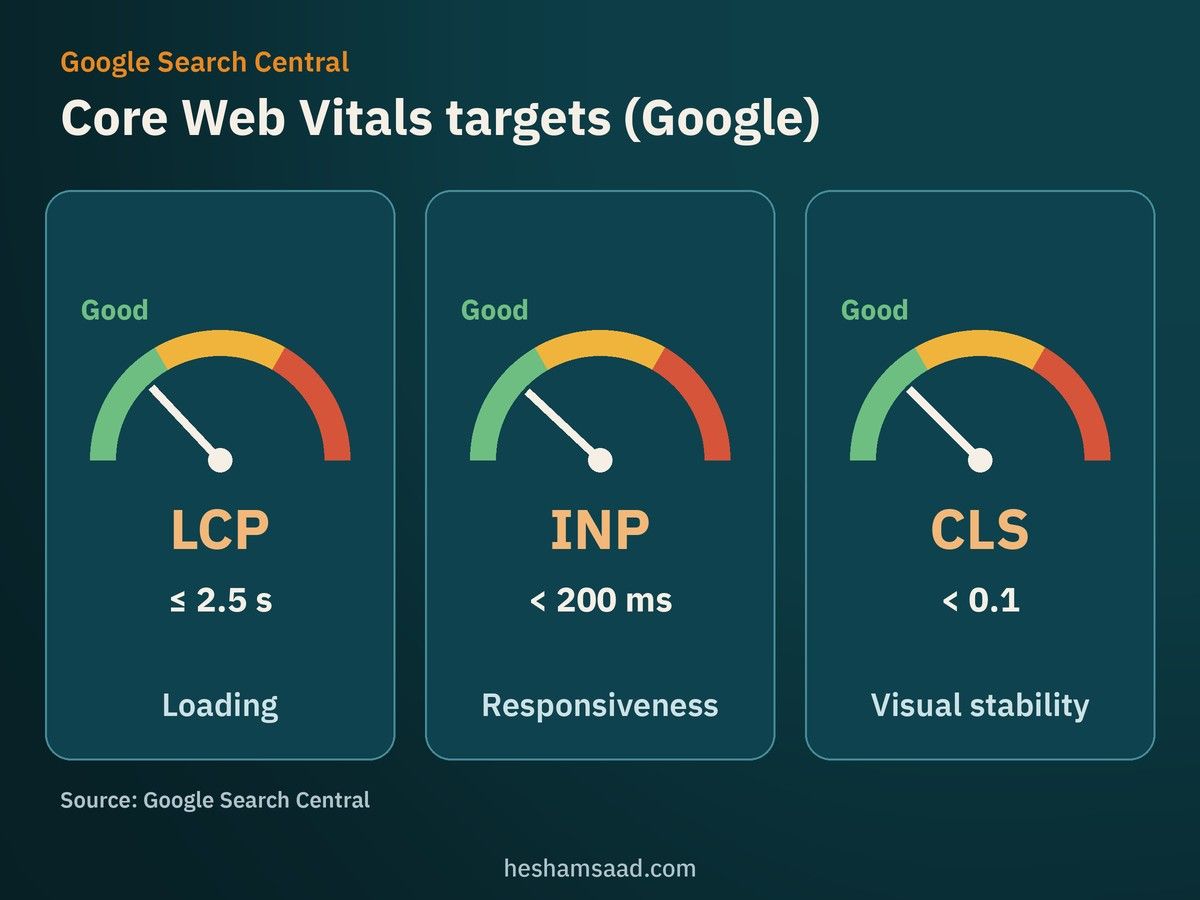
Google uses the mobile version of a site’s content for indexing and ranking, which it calls mobile-first indexing. Most visitors in the region also browse on phones, often on mobile data. Google’s Core Web Vitals guidance gives three targets for a good experience:
- Largest Contentful Paint (LCP): within 2.5 seconds.
- Interaction to Next Paint (INP): under 200 milliseconds.
- Cumulative Layout Shift (CLS): under 0.1.
On WordPress, slow results usually trace back to heavy page builders, too many plugins loading scripts on every page, large images and cheap hosting. The audit should name the specific causes on your key templates, not just paste a score. Arabic sites have their own issues with fonts, which we cover in how to speed up Arabic WordPress sites.
5. Titles, meta descriptions and headings
Google recommends that every page has a descriptive, concise title element and warns against vague titles such as “Home”. It also says it will sometimes use your meta description for the snippet when it describes the page better than the on-page text. The auditor should flag:
- Missing, duplicated or very long titles.
- Service pages whose titles do not mention the service or the city you serve.
- Pages with no H1, or several H1s from the theme.
- Meta descriptions copied across many pages.
6. Content quality and search intent
This is the part automated tools handle worst. Google’s guidance on helpful content asks you to consider “Who, How, and Why” for your content: who created it, how it was produced and why it exists. A human auditor should check whether your service pages explain what you offer, for whom, where you work and how the process runs, or whether they are three lines of generic text.
They should also look for pages competing for the same search, such as two blog posts and a service page all targeting “web design in Riyadh”, which confuses both visitors and Google.
7. Arabic and bilingual setup
Many MENA business sites run in Arabic and English with WPML or Polylang. Google’s documentation on localized versions says each language version must list itself and all other language versions in its hreflang annotations, and it recommends an x-default fallback for language selector pages. The audit should confirm that:
- Each page links to its real translation, not to the home page of the other language.
- Arabic pages are written in natural Arabic, not raw machine translation.
- Menus, titles and meta descriptions are translated, not left in English.
Our guide to bilingual WordPress SEO goes deeper into this.
8. Structured data
Schema markup helps Google understand your business, products, articles and FAQs. The auditor should test key pages in Google’s Rich Results Test and fix errors. Keep expectations realistic: Google states that it does not guarantee structured data will show up in results, even when the markup is correct.
9. Links and spam risks
An audit should review who links to you and whether anything looks manipulative. Google’s spam policies list buying or selling links for ranking purposes as link spam, and violations can lead to lower rankings or a manual action. The auditor should check the Manual actions report in Search Console and tell you plainly if a past provider bought links.
10. Plugins, theme and WordPress health
Finally, the WordPress layer itself. Common findings include two SEO plugins active at once and printing duplicate tags, a theme that hard-codes titles, outdated plugins, and PHP versions flagged in Tools, then Site Health. These are developer fixes, so the report should mark them clearly.
Technical SEO audit checklist for WordPress
Use this table to compare what different providers promise, or to run a first pass yourself.
| Area | What to check | Free tool | Who usually fixes it |
|---|---|---|---|
| Indexing | Reading setting, noindex tags, Page indexing report | Search Console, page source | Developer |
| Sitemaps | One clean sitemap submitted, key pages listed | Search Console | Developer or SEO |
| Duplicates | Canonical URLs, http/https and www versions, archives | URL Inspection | Developer |
| Redirects | 404s with visits, chains, temporary redirects | Search Console, a crawler | Developer |
| Speed | LCP, INP and CLS on mobile for key templates | PageSpeed Insights | Developer |
| On-page | Titles, meta descriptions, H1s | SEO plugin, a crawler | Content or SEO |
| Content | Thin service pages, overlapping topics | Search Console Performance report | Business owner and writer |
| Bilingual | hreflang pairs, translated menus and meta | Page source, URL Inspection | Developer and translator |
| Structured data | Errors on key pages | Rich Results Test | Developer |
| Links | Manual actions, paid link history | Search Console | SEO |
What a useful audit report looks like
The report is what you are paying for, so judge it before you judge the auditor’s confidence. A useful report:
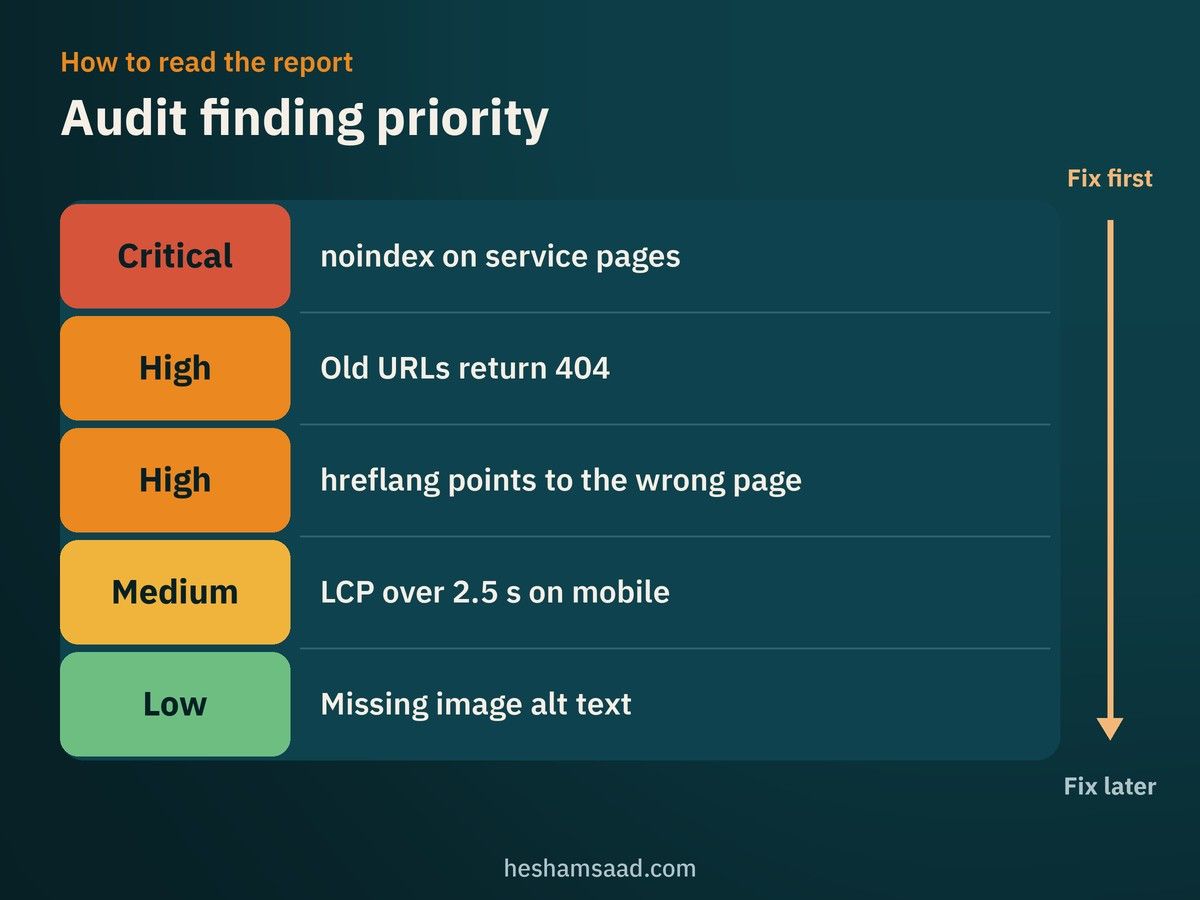
- Is prioritized. The few issues that block indexing or leads come first, cosmetic ones last.
- Shows evidence. Each finding lists example URLs and screenshots, so your developer can reproduce it.
- Estimates effort. Google itself expects an audit to include an estimate of the work involved.
- Names an owner. Developer, writer, translator or you.
- Uses plain language. You should understand why each item matters for your business.
| Priority | Example finding | Why it matters |
|---|---|---|
| Critical | Service pages carry a noindex tag | They cannot appear in Google at all |
| High | Old service URLs return 404 after a redesign | Lost visits and links from the old pages |
| High | Arabic pages point hreflang to the English home page | The wrong language may show to searchers |
| Medium | LCP above 2.5 seconds on mobile service pages | Slower experience for most visitors |
| Low | Some image alt text is missing | Worth fixing, but not urgent |
What affects the cost of a WordPress SEO audit
Prices vary widely between freelancers and agencies, so instead of quoting numbers, here is what drives the quote you receive:
- Site size. A ten-page company site and a WooCommerce store with thousands of product URLs are very different jobs.
- Languages. A bilingual site doubles much of the content review and adds hreflang checks.
- Depth. An automated crawl with a short summary costs far less than a manual review of content, templates and Search Console history.
- Access and history. If Search Console was never set up, the auditor has less data and may need time to collect it.
- Whether fixes are included. Some providers quote the audit alone; others bundle the first round of technical fixes.
When you compare offers, compare the scope and a sample report, not only the price. Our article on hiring a WordPress designer covers how to compare proposals in the same way.
A 30-minute self check before you hire anyone
You can catch the most serious problems yourself with free tools:
- Open Settings, then Reading, and confirm “Discourage search engines from indexing this site” is unchecked.
- In Search Console, open the Page indexing report and look at which important pages are not indexed.
- Check the Performance report for the queries and pages that brought clicks over the last few months, and note any sharp drops.
- Run your home page and your main service page through PageSpeed Insights on mobile.
- Search for your business name and main service in Google and check whether the right page and the right language appear.
- Test one service page in the Rich Results Test if you use schema.
If any of these look wrong, you already have a short brief to send to a professional.
How to hire someone for a WordPress SEO audit
Ask these questions before you agree to anything:
- Can I see a sample report from a past audit, with client details removed?
- Which parts are automated and which are reviewed by a person?
- Will you check both the Arabic and English versions?
- Will the report estimate effort and say who should fix each item?
- What access do you need?
On access, follow Google’s advice: at the audit stage, give read access to Search Console and do not grant write access yet. For WordPress, a temporary account with limited rights or a staging copy is usually enough for review.
Walk away if you hear:
- A guaranteed first position on Google.
- Claims that a tool is “approved” by Google. Google says it does not evaluate or endorse third-party SEO tools, and those tools do not have access to its internal ranking data.
- Offers to buy links or packages of hundreds of backlinks.
- A refusal to explain what they will change on your site.
After the audit: turning findings into work
An audit only helps if the fixes happen in a sensible order. Start with the critical and high items, test changes on a WordPress staging site where possible, and change one area at a time so you can see what moved. Write the date of each change down, then watch the Search Console reports over the following weeks, since Google needs time to recrawl pages.
If local searches matter to you, combine the fixes with the steps in our WordPress local SEO guide.
Frequently asked questions
How often should a WordPress site be audited?
A full audit makes sense before big changes such as a redesign or migration, and whenever search traffic drops without a clear reason. In between, a monthly look at Search Console catches most new problems early.
Will an audit improve my rankings by itself?
No. The audit tells you what to fix. Rankings can only respond after the fixes are made and Google recrawls the pages, and even then nobody can promise a position.
Do I need a special audit for Google AI Overviews?
Google says there are no additional requirements or special optimizations needed to appear in AI Overviews or AI Mode, and that normal SEO best practices still apply. A standard audit already covers what matters. We discuss this more in Arabic sites and Google AI Overviews.
Can my web developer do the audit?
Often yes, especially for the technical parts. The content and search intent review benefits from someone who knows SEO and your market. If the same person who built the site audits it, ask them to be strict about their own work.
Your next step
If you want a clear picture of what is holding your site back in search, our WordPress development team can review your setup, explain the findings in plain language and fix the technical issues. You can also book a free consultation to talk through your site before you decide anything.
References
- Do you need an SEO?, Google Search Central
- Settings Reading screen, WordPress documentation
- Introduction to robots.txt, Google Search Central
- New XML sitemaps functionality in WordPress 5.5, Make WordPress Core
- Page indexing report, Search Console Help
- How to specify a canonical URL, Google Search Central
- Site moves with URL changes, Google Search Central
- Mobile-first indexing best practices, Google Search Central
- Core Web Vitals and Google Search results, Google Search Central
- Title links in Google Search, Google Search Central
- Meta descriptions and snippets, Google Search Central
- Creating helpful, reliable, people-first content, Google Search Central
- Localized versions of your pages, Google Search Central
- Structured data general guidelines, Google Search Central
- Rich Results Test, Google
- Spam policies for Google web search, Google Search Central
- AI features and your website, Google Search Central
- PageSpeed Insights, Google
- Site Health screen, WordPress documentation