هذا المقال متوفر باللغة العربية — اقرأ بالعربية
When a buyer searches your catalog for an apartment in New Cairo, a villa in Riyadh or an off-plan launch in Dubai, clunky filters and generic contact forms push that inquiry elsewhere. Building a real estate developer website WordPress platform around structured listings, fast search filters and direct agent routing turns property browsing into qualified sales conversations.
Whether your company operates a residential brokerage, leases commercial spaces or markets new compounds as a developer, your website needs clean inventory workflows that your coordinators can update without friction. Below is how each part works together before you brief a developer.
What a real estate developer website WordPress project needs for qualified leads
A serious property listing website does far more than display interiors alongside a switchboard number. Buyers arrive with specific requirements around city, neighborhood, unit type, bedroom count, delivery status and sale versus rent terms. If visitors cannot narrow your catalog on a phone screen and reach the specialist assigned to that district, high-intent traffic leaves without inquiring.
Effective real estate agency website design connects nine practical elements: structured unit pages, multi-field filters, dedicated off-plan launches, viewing booking, routed WhatsApp and form leads, genuine Arabic and English versions, neighborhood maps, fast photo delivery and strict protection for buyer records. WordPress gives your agency full ownership of those workflows without locking your listings inside an external portal.
When every listing stores structured fields and agent assignments from the start, your marketing team controls landing pages for ad campaigns while your sales manager sees exactly which units bring inquiries.
Property listings with filters for city, type, price range and bedrooms
WordPress lets a developer register custom post types, giving your catalog a dedicated property post type completely separate from blog articles. Alongside it, custom taxonomies group units cleanly by city, area, property type and sale or rent status. Attributes that buyers search across numeric thresholds, specifically price range and bedrooms, work better as structured fields on each listing so visitors can filter between minimum and maximum values.
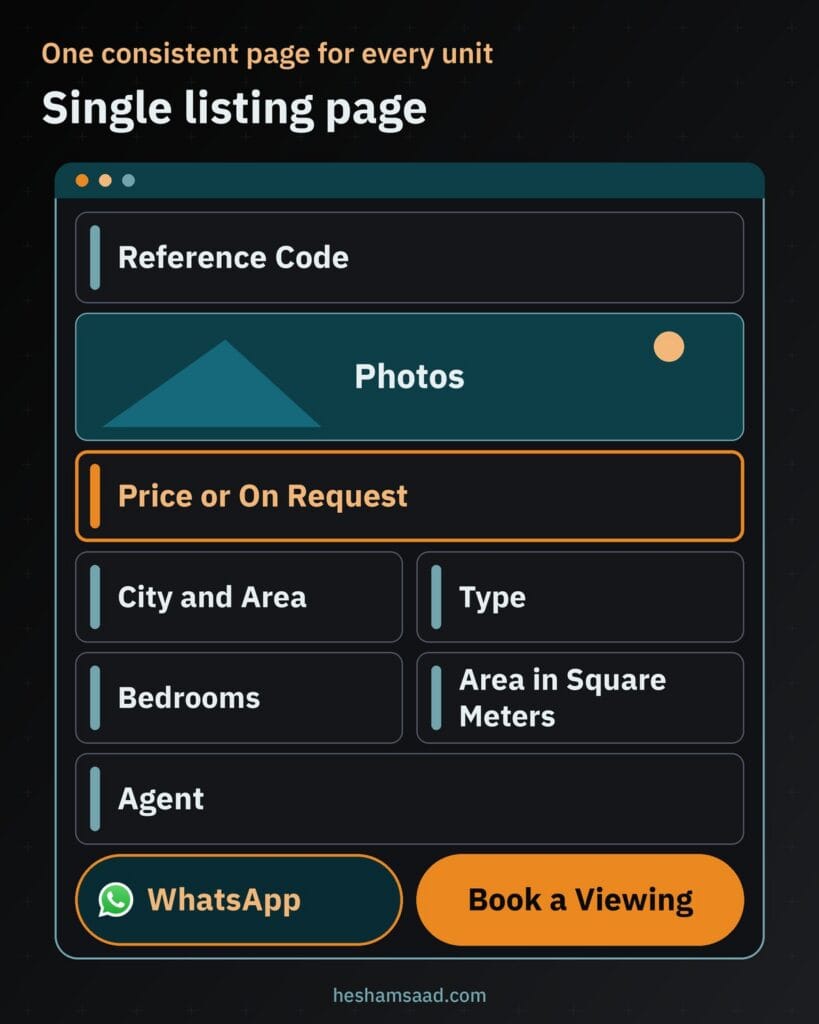
Give every unit its own page with a consistent layout: reference code, city, area, compound or building, type such as apartment, villa, townhouse, office or shop, sale or rent tag, bedrooms, bathrooms, area in square meters, finishing status and delivery readiness. Publish the asking price only when your seller approves public pricing; otherwise display a price-on-request state alongside photos, floor plans, the responsible agent, a viewing request button and a WhatsApp button with the reference pre-filled.
Make sure your search filters keep clean, shareable URLs whenever criteria change. When a client asks for villas for sale in a specific district, your advisor can send that exact filtered catalog URL in a single message.
| Filter | How it is stored | What the buyer sees |
|---|---|---|
| City and area | Custom taxonomy | Location selector grouping districts under each city |
| Property type | Custom taxonomy | Choices for apartment, villa, townhouse, office or shop |
| Sale or rent | Custom taxonomy | Toggle separating purchase inventory from rental listings |
| Price range | Structured listing field | Minimum and maximum budget inputs for priced units |
| Bedrooms | Structured listing field | Bedroom count selector filtered by minimum or range |
Dedicated project pages for off-plan launches
Marketing an entire compound or tower inside a single-unit template confuses investors because a launch spans multiple unit categories, floor plans and phases. Registering a separate project custom post type in WordPress lets you publish a dedicated off-plan project page for each development while keeping individual resale and rental homes in their own catalog.
Build each project page around verified launch details: the developer name, location, unit types, master plan, floor plans and a register-interest form. Present the payment plan and delivery date strictly as officially announced by the developer, without speculative estimates. Place the downloadable brochure behind a short name-and-phone form so your sales desk sees who is researching each launch.
Label every architectural visualisation clearly as a render in the project gallery so buyers distinguish concept imagery from completed photography. If your company constructs the developments it markets, our guide to a construction company website on WordPress covers how builders present engineering credentials and project milestones alongside sales campaigns.
Viewing appointment booking for ready units and sales offices
Back-and-forth calls slow down deals when a qualified buyer wants to inspect a property or meet an advisor. Adding structured booking requests lets visitors pick a preferred slot while reviewing floor plans, using confirmation rules built for real estate rather than unmoderated calendar locks. See our guide to a WordPress booking website for how custom scheduling workflows operate.
On-site viewings for ready properties
For ready apartments, villas, offices and shops, the visitor selects the unit, picks a preferred day and time, and submits a name and phone number. Because occupied units and gated compounds require access coordination, the slot remains provisional until the assigned agent confirms and sends a viewing reminder.
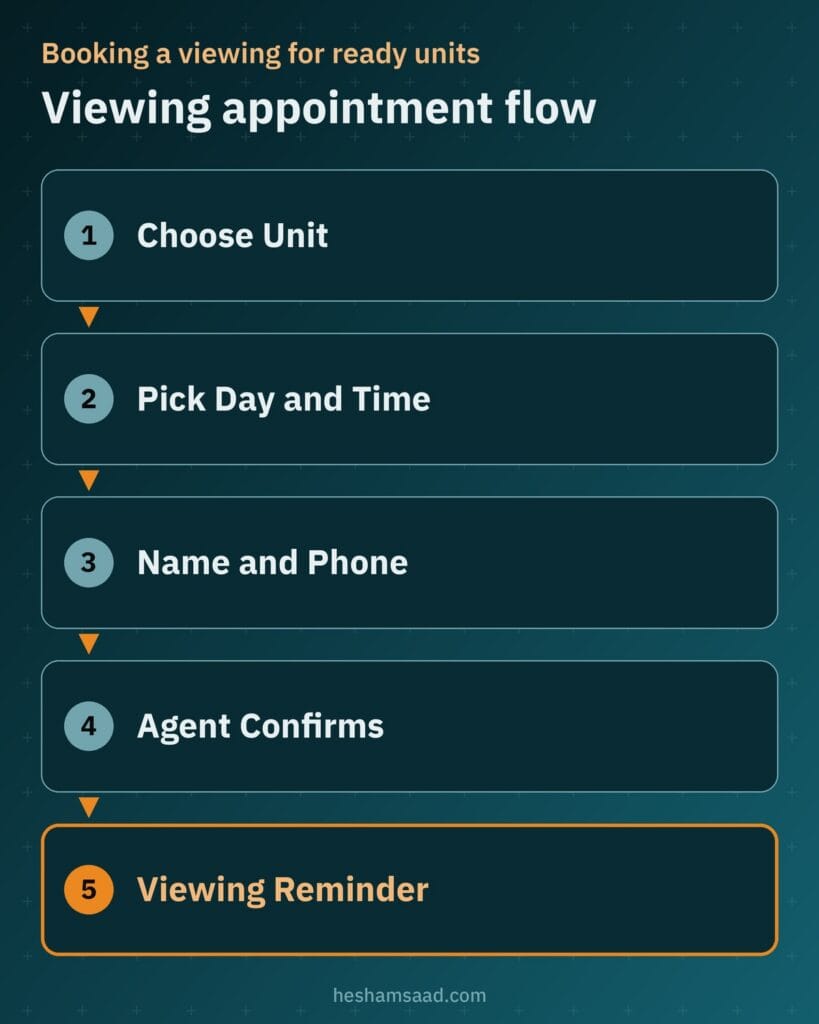
Agent confirmation prevents overlapping travel between neighborhoods while giving the buyer a clear next step instead of an open-ended contact form.
Sales office visits for off-plan launches
When a launch is still under construction, an on-site unit walkthrough is impractical. Off-plan pages switch the prompt to a sales office visit so your advisor can walk the buyer through architectural models, live availability sheets and official payment schedules.
Routing WhatsApp chats and lead forms to the right agent
Buyers across Egypt, Saudi Arabia and the UAE reach for direct messaging as soon as a property catches their eye. WhatsApp click-to-chat uses the wa.me link format with a phone number in full international format so visitors open a chat without saving the contact first. Using the text URL parameter lets WordPress pre-fill the listing reference code automatically in the opening message.
Assign an agent or neighborhood team on every property and project record so leads never pile up in one general inbox. Form submissions carry the unit or project reference and source page URL directly to that advisor by email and optionally into your CRM, while the on-page WhatsApp button links straight to the assigned agent’s number.
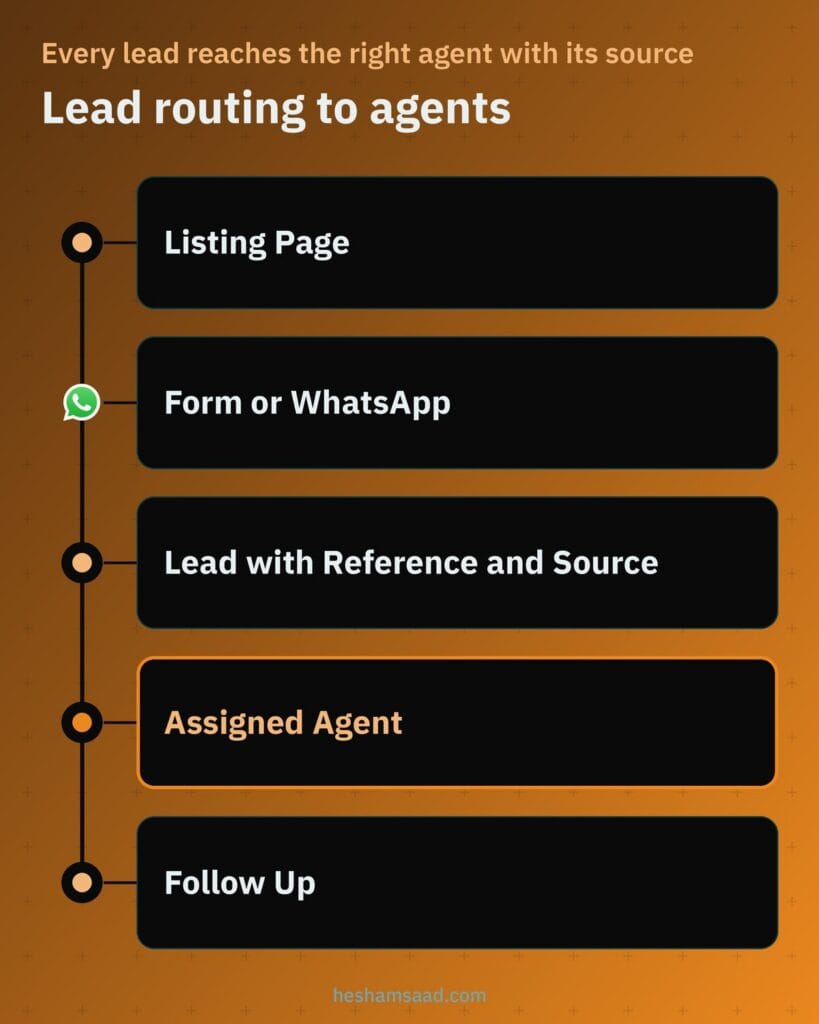
For larger brokerages that manage customer conversations at scale through an official API connected via a solution provider, the WhatsApp Business Platform supports centralized messaging workflows. Whichever setup you choose, appoint one coordinator to monitor unanswered leads so inquiries stay covered while agents are out conducting viewings.
Publishing property listings in both Arabic and English
Reaching domestic families alongside expatriates and regional investors requires full parity between your Arabic and English catalogs. Polylang is a free multilingual WordPress plugin that translates posts, pages, media, categories, tags, custom post types and custom taxonomies, supporting right-to-left layouts and language URLs via directory code, subdomain or separate domain. WPML serves as a paid alternative if your team prefers its translation workflow.
Linking each property and project entry across separate Arabic and English URLs allows WordPress to output hreflang annotations in the page header. Google uses hreflang signals to recognize both pages as localized variations of the same listing and serve the matching language in search results.
Write genuine human Arabic descriptions rather than relying on automatic translation, and spell neighborhoods and compounds the way Arabic speakers naturally search for them. Check right-to-left alignment across filter menus and keep numerals consistent across specifications and form inputs.
Interactive maps, area pages and structured data
Neighborhood context drives property shortlists, from commuter roads to nearby schools and commercial hubs. With the Google Maps Embed API, a developer embeds an interactive map iframe using a place name, address or Place ID, and Google states the Maps Embed API is free to use with unlimited usage. If a seller prefers privacy on a resale home, display an approximate district pin on the listing page and share exact coordinates once a viewing is confirmed.
Area pages also attract organic search traffic when created solely for districts where your agency holds live inventory. Pair practical notes on local amenities and road links with a live grid of available units in that neighborhood, never empty pages for areas you do not serve. Buyers comparing shell-and-core properties against finished homes in those areas also weigh renovation needs, and firms with a fit-out arm can check our guide to an interior design website on WordPress.
Clean Schema.org markup further clarifies page meaning for search crawlers. Schema.org provides RealEstateListing as a WebPage subtype describing real estate offers and RealEstateAgent as a LocalBusiness subtype for a brokerage office or agent, helping search engines interpret your pages without promising any special rich result in Google.
Keeping photo-heavy pages fast on mobile and desktop
Uncompressed interiors, master plan graphics and floor plans quickly slow down mobile browsing if uploaded raw. Since WordPress 5.5, images with width and height attributes receive loading=”lazy” by default, and WordPress adds srcset and sizes attributes so mobile screens download appropriately sized files rather than full desktop originals.
Browser-level image lazy loading uses the native loading attribute to defer offscreen images without extra scripts, while above-the-fold visuals should not be lazy loaded. Keep the main listing hero photo excluded from lazy loading for fast initial rendering, let lower gallery images load on scroll and cap thumbnail counts on search result cards.
Follow Google image guidelines by serving responsive srcset images with a standard src fallback, writing descriptive filenames and alt text for rooms and facades, and placing photos beside relevant copy. Resize and compress photos into modern lightweight image formats before upload, and embed walkthrough videos from external video hosting rather than storing raw video files in WordPress.
Protecting buyer contact details and inquiry records
Property inquiry, viewing and brochure forms collect personal names, mobile numbers and budget ranges that clients trust your agency to safeguard. Official WordPress hardening guidance emphasizes keeping WordPress core, themes and plugins updated because older versions are not maintained with security updates, and downloading extensions exclusively from official sources.
Serve every page over HTTPS, restrict administrator privileges, enforce strong passwords with two-factor authentication for team accounts and protect forms against automated spam. Add a clear privacy consent line to every inquiry form, run regular off-site backups and delete old lead entries from WordPress in line with your company retention policy.
If you already operate an active WordPress property site, walk through our WordPress security audit checklist to tighten access controls and form storage before scaling ad spend.
What shapes the scope and cost of the build
Two property websites can look alike visually while requiring very different custom development underneath. Defining your operational requirements across these areas shapes the build scope and cost:
- Listing volume and how coordinators enter inventory, whether manually in WordPress or through automated feed or CRM imports.
- Search filter combinations, range queries, sale-versus-rent toggles and shareable filter URL behavior.
- Count and layout complexity of dedicated off-plan project pages, floor plan tabs and gated brochure downloads.
- Viewing appointment rules differentiating ready-unit visits from off-plan sales center bookings.
- Agent lead routing by area or launch, WhatsApp handoff logic and external CRM connections.
- Bilingual Arabic and English setup, custom visual design, Google Maps integration, image optimization, hosting capacity and ongoing maintenance.
Separating must-have launch workflows from future upgrades helps your developer scope a clean initial build around how your sales desk actually operates.
Planning your launch and next step
Before starting design, document the unit categories you sell or lease, the exact search filters buyers request on calls, your active off-plan launches and which agent or team handles each neighborhood. Decide upfront who prepares your English and Arabic property descriptions and who monitors unanswered inquiries. If you are still choosing between a ready theme, a listing plugin and a custom build, our earlier guide on choosing the build approach for a WordPress real estate website compares those options in detail.
Once you have those notes ready, book a free consultation to map out your catalog architecture, lead routing and bilingual setup, or visit our WordPress website development page to see how we build custom property platforms for brokers and developers.
Frequently asked questions
Can buyers filter listings by city, type, price range and bedrooms?
Yes, WordPress supports combined property filters when listings use custom structures instead of standard blog posts. A developer registers custom taxonomies for city, area and property type while storing price and bedroom counts as listing fields for range queries. Clean URLs let agents share filtered results directly.
Do off-plan projects need their own pages?
Yes, off-plan launches belong on a dedicated project post type separate from individual resale or rental units. Unlike a single unit page, a project page combines the developer name, master plan, unit layouts, official delivery date and published payment plan. Labelled renders and brochure forms qualify buyers.
How do WhatsApp and form leads reach the right agent?
Each listing or project stores its assigned agent or area team so inquiries route automatically instead of entering one shared inbox. Forms send the reference code and source page by email or into your CRM. The WhatsApp button opens a chat with the reference already pre-filled.
Should my property listings be in Arabic and English?
Publishing listings in Arabic and English helps you reach local buyers and international investors across Egypt, Saudi Arabia and the UAE. Polylang or WPML links each unit across separate URLs with right-to-left layout and hreflang tags for Google. Natural Arabic copy with local area names builds buyer trust.
Will many property photos slow my site down?
Large photo galleries stay fast when images are resized and compressed before upload. WordPress serves responsive image sizes through srcset attributes and applies browser-level lazy loading to photos below the fold. Excluding the main photo from lazy loading, capping card thumbnails and hosting videos externally protects mobile speed.
References
- Custom Post Types, WordPress Plugin Handbook
- Custom Taxonomies, WordPress Plugin Handbook
- How to Use Click to Chat, WhatsApp Help Center
- WhatsApp Business Platform
- Polylang Plugin Directory Page, WordPress.org
- Tell Google About Localized Versions of Your Page, Google Search Central
- Get Started with the Maps Embed API, Google Maps Platform
- RealEstateListing Type Definition, Schema.org
- RealEstateAgent Type Definition, Schema.org
- Lazy-Loading Images in WordPress 5.5, Make WordPress Core
- Browser-Level Image Lazy Loading for the Web, web.dev
- Google Images SEO Best Practices, Google Search Central
- Hardening WordPress, WordPress Advanced Administration Handbook