هذا المقال متوفر باللغة العربية — اقرأ بالعربية
Building an auto repair shop website WordPress setup gives your workshop a structured way to turn phone inquiries into confirmed bay appointments. Whether you operate a mechanical facility in Riyadh, a specialized service center in Cairo, or an expanding garage in Dubai, vehicle owners check your website before handing over their keys. They want to confirm you work on their car make, see which branch handles their repair, and reserve a drop-off slot without waiting on hold.
A plain brochure page with a stock mechanic image and a basic contact form leaves your reception desk answering repetitive questions all morning. A focused car service center website organizes your repair menu, ties appointment slots to real bay capacity, and supports clear WhatsApp communication while the vehicle is on the lift.
What your auto repair shop website WordPress project needs for online bookings
When a dashboard warning light comes on or cabin cooling drops, a car owner compares local workshops by looking for clear answers and proof of capability. If your site only states that you fix all vehicles, a visitor cannot tell whether you carry diagnostic tools for their model or have an available bay at their nearest branch.
Before hiring a developer or agency, map out the core parts your website needs so vehicle owners move directly from reading about a repair to booking a bay slot:
- Individual service pages for key jobs including oil and filter changes, computer diagnostics, AC service, and bodywork and paint.
- An online booking form that captures vehicle make, model, and year, then offers time slots matched to each branch schedule.
- A clear process for WhatsApp status updates from reception check-in and quote approval through to pickup.
- Individual branch pages with embedded maps, accurate working hours, and real photos of your facility.
- Credible trust signals built around genuine customer feedback and plain-language warranty terms.
- Human-written Arabic and English pages backed by local search structured data for each physical location.
Dedicated service pages for oil changes, diagnostics, AC, and bodywork
Cramming mechanical work, electrical troubleshooting, air conditioning service, and paint repair onto a single summary page forces car owners to call reception just to ask what is included. Giving each core service its own page lets you address specific owner questions right beside the booking button.
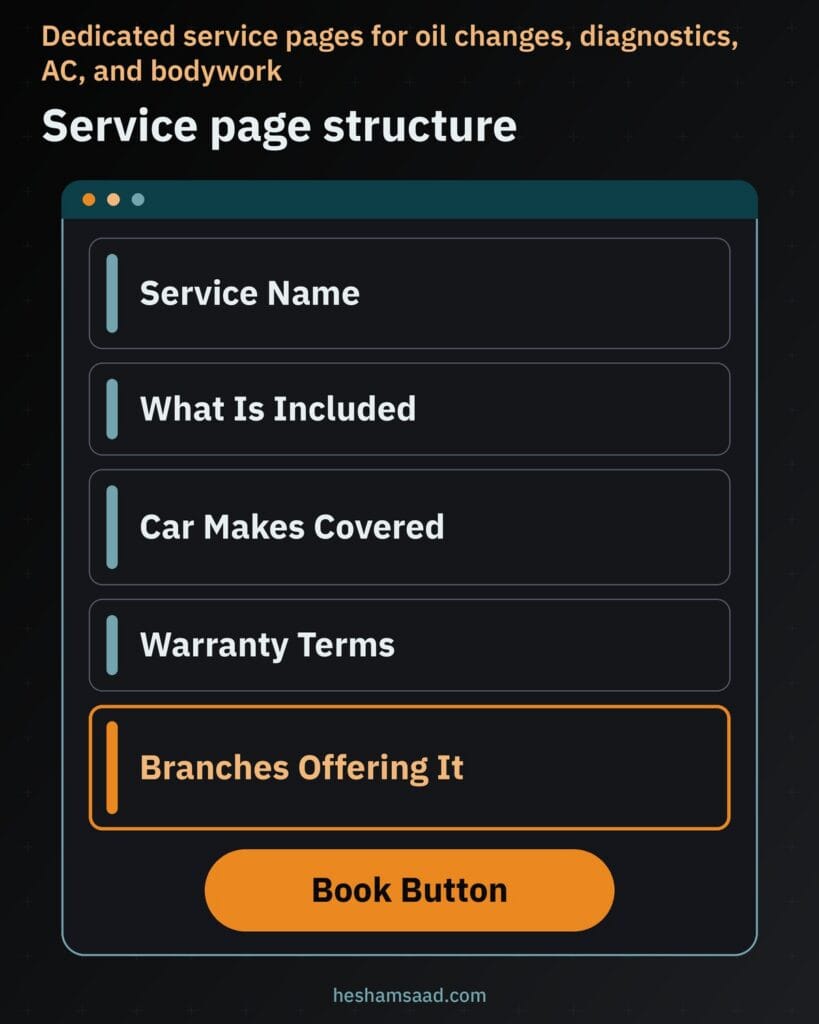
Build every service page around the exact details your service advisor explains at the counter. List what checks or parts the job covers, which car makes your technicians service, and anything the driver should bring such as past maintenance records or a wheel lock key. State an expected turnaround window only if your shop commits to one, write warranty terms exactly as you honor them, show prices only if you publish fixed rates, and end with a direct booking button.
| Service | What the car owner wants to know | What the page shows |
|---|---|---|
| Oil and filter change | Which oil grades are stocked and whether basic inspection checks are included | Included fluid and filter items, inspection checklist, supported vehicle makes, and a book button |
| Computer diagnostics | Whether your scanners read their vehicle modules and how repair quotes work | Systems tested, how fault findings are shared, quote approval rule before repairs, and branches offering it |
| AC service and recharge | Whether technicians test for leaks before refilling refrigerant | Leak check steps, cabin filter inspection, supported refrigerant types, written warranty terms, and branch availability |
| Bodywork and paint | How damage estimates are prepared and how color matching is handled | In-person inspection process, spray booth preparation steps, paintwork warranty terms, and branches with body bays |
Dedicated pages also save counter effort every day. When a driver asks over WhatsApp or the phone what an AC check or diagnostic appointment covers, your receptionist can send the direct service page link where everything is laid out clearly.
Booking a bay slot by car make, model, and year
Setting up car maintenance booking online demands more logic than a basic appointment calendar because different repairs require specific lifts, diagnostic scanners, and technician skills. When planning a WordPress booking website for your workshop, ask your developer to connect form choices to vehicle details and actual bay capacity.
Walk the vehicle owner through a clean sequence starting with car make, model, and production year, an optional plate number field, and current mileage. Next, let them pick the service category, preferred branch, and an open day and arrival slot. Structuring vehicle selection on WordPress shares similar filtering logic with building a car rental website on WordPress, though here the form matches customer cars to workshop bays rather than booking out a fleet vehicle.
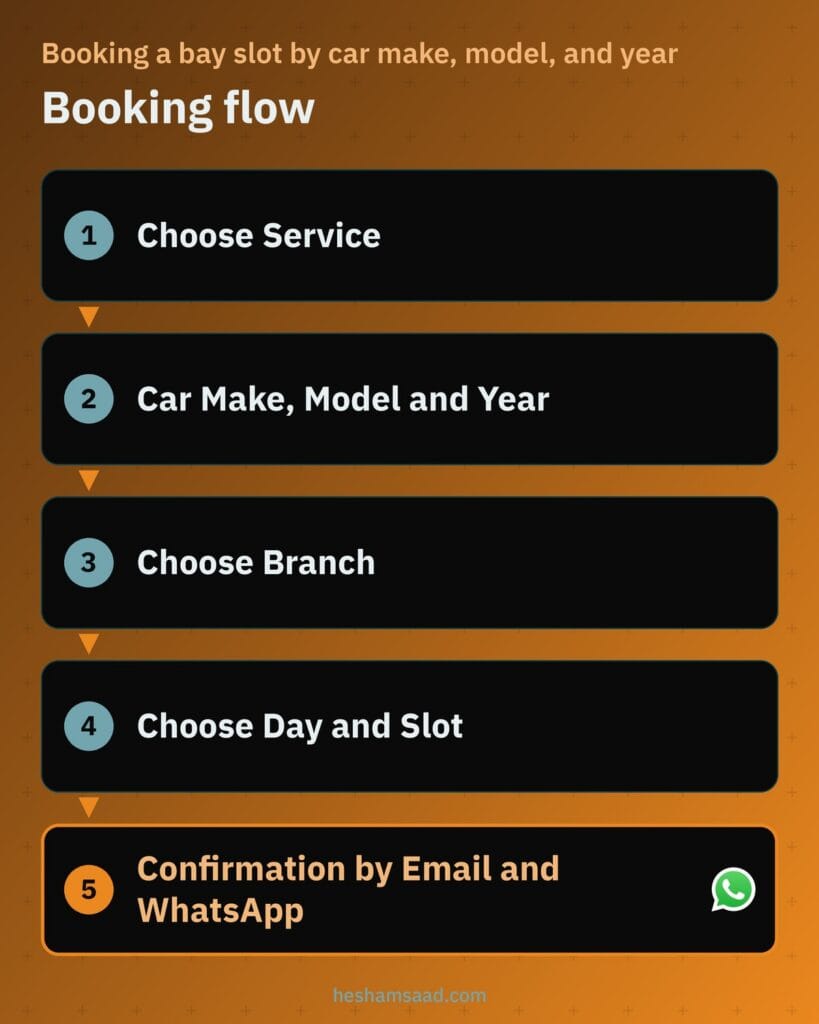
Behind the form, capacity rules keep your shop floor realistic. Your developer can cap bookings per branch and per bay type so quick fluid changes do not block heavy mechanical lifts, while hiding bodywork or specialized diagnostics when a customer selects a branch that does not offer them.
Once submitted, the site should send an immediate confirmation via email and WhatsApp listing the branch location, chosen date and slot, vehicle make and model, and requested service. That gives your parts and reception staff clear preparation details before the car arrives.
Sending WhatsApp updates as the car moves through the workshop
After a driver drops off their keys, silence triggers anxious follow-up calls to your front desk. Breaking the workshop visit into clear stages keeps owners informed without tying up phone lines: car received, under inspection, waiting for customer approval of the quote, in progress, and ready for pickup.
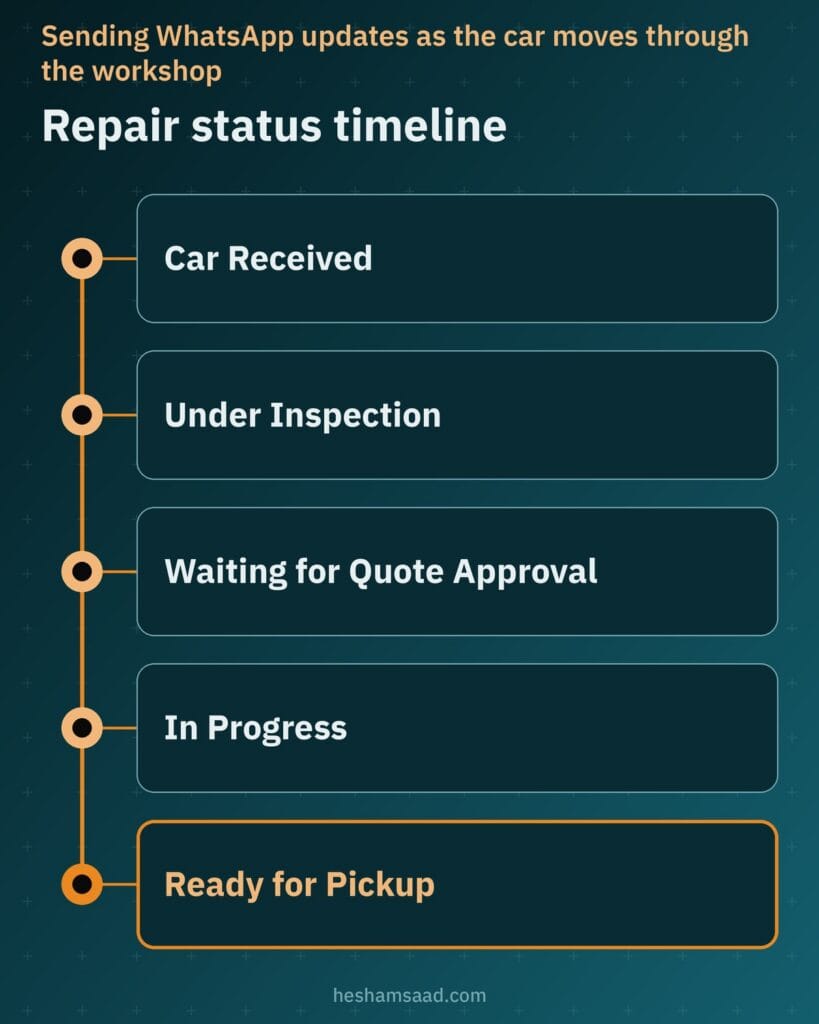
Collect clear permission before messaging any customer on WhatsApp. Add an opt-in checkbox to your online booking form and workshop intake card so you only send status updates to vehicle owners who agreed to receive them.
Manual updates with click to chat links
If you run a single-branch workshop with manageable daily intake, your advisor can send updates manually from the WordPress dashboard. A developer can generate WhatsApp click to chat links using wa.me followed by the customer phone number in full international format, which opens a chat without saving the number first and uses the ?text= parameter to pre-fill the status message or quote approval note.
Automated notifications through an API
If your service center runs high daily bay volume across multiple service advisors, manual clicking creates bottlenecks at the counter. Sending automated status alerts requires the official WhatsApp Business Platform, which enables businesses to message customers at scale through an API connected via a provider when a job stage updates.
Branch pages with maps, hours, and bay capabilities
Stacking multiple workshop addresses into a cramped website footer causes avoidable confusion, particularly in industrial districts where neighboring service gates look similar. Give every physical branch its own dedicated URL so drivers searching in New Cairo, Jeddah, or Sharjah land straight on the location nearest to them.
Each branch page should display the street address, opening hours, direct phone and WhatsApp links, and the exact repair categories handled at that facility. Add real photos of your exterior signage, customer reception, and work bays so first-time visitors spot your entrance right away from the street.
Place an interactive map on each branch page through the Google Maps Embed API, which loads a Google Maps view inside an iframe using a place name, address, or Place ID. Google states that the Maps Embed API is free to use with unlimited usage, and every address, phone number, and schedule on the page should match your Google Business Profile details.
Customer reviews, clear warranties, and real workshop photos
Leaving a vehicle at an unfamiliar garage requires confidence in both workmanship and billing honesty. Publishing real customer reviews on your website with permission helps prospective clients see how your team communicates fault findings, respects quote approvals, and delivers cars on schedule.
Be careful if an agency promises that putting testimonials on your pages will generate star ratings beneath your workshop links in Google search. Under Google review snippet guidelines, if a business controls the reviews about itself on its own site, its LocalBusiness pages are ineligible for the star review feature because those count as self-serving reviews, and offering benefits for reviews without clear disclosure also violates the guidelines.
Show genuine reviews for human visitors rather than chasing search stars, and pair them with a clear warranty policy page explaining what labor and parts your shop covers. Use authentic photographs of your bays and technicians instead of stock photos, and display trade licenses or authorizations only if real and shown accurately as on the official document.
Publishing your workshop site in Arabic and English
Across Egypt, Saudi Arabia, and the Gulf, your car service center website serves Arabic-speaking drivers alongside English-speaking residents and corporate fleet coordinators. Relying on raw machine translation turns technical repair terms like control arm bushings, transmission service, or panel blending into confusing wording that hurts workshop credibility.
On WordPress, Polylang is a free multilingual plugin that translates posts, pages, media, categories, tags, and custom post types, supports right-to-left scripts, and sets each language via URL code, subdomain, or domain. WPML is a paid alternative if your developer prefers its translation management tools for custom booking templates.
Make sure your developer sets the HTML dir attribute to rtl on Arabic pages so headings, tables, and form inputs align properly from right to left, and adds hreflang tags so Google understands your Arabic and English pages are localized variations of the same content. Write vehicle make lists, form labels, validation alerts, and confirmation messages naturally in both languages.
Local search visibility for each workshop location
Car owners searching for brake pads, engine diagnostics, or AC repair nearby want a verifiable local workshop. Align your setup with Google Business Profile guidelines: represent your business accurately as it exists in the real world, provide a precise address, keep only one profile per physical location, and select the fewest categories describing your core auto repair operation.
On every branch page, a developer can implement Schema.org AutoRepair structured data, which is a subtype of AutomotiveBusiness and LocalBusiness, containing the real name, address, phone number, and opening hours of that location. Google Local Business structured data guidelines advise using the most specific subtype available and let you specify hours and departments, while noting that Google does not guarantee any rich result.
Keep your workshop name, address, and phone numbers identical across your website and external listings. When targeting surrounding neighborhoods, apply solid WordPress local SEO fundamentals and create service-plus-area pages only where you have real physical coverage rather than duplicate doorway pages.
Keeping customer phone and plate records safe
Every appointment request submitted on your site stores personal customer information, including names, mobile numbers, vehicle models, and optional license plate numbers. Leaving plugins outdated or sharing a single administrator login across front-desk computers puts customer privacy and your workshop reputation at risk.
Assign restricted dashboard roles so reception staff manage bookings without full site access, keep WordPress core and plugins updated on a tested schedule, and avoid leaving spreadsheet exports on shared desktops. Running a periodic WordPress security audit checks your form storage, user permissions, and backups before issues arise.
What shapes the budget for a custom workshop website
When reviewing quotes for garage website design on WordPress, operational workflow drives development effort much more than visual colors or fonts. A thorough proposal reflects the functional pieces your workshop requires:
- The count of individual service pages and physical workshop branches needing separate layouts, maps, and schedules.
- The complexity of booking rules, including car make and model lists, bay capacity limits, and branch-level service filtering.
- Whether your reception team sends manual WhatsApp click to chat messages or integrates automated updates via the WhatsApp Business Platform API.
- Single-language publishing versus a full bilingual Arabic and English build with original copywriting and real workshop photography.
- Optional connections to internal shop management software, managed hosting setup, and ongoing technical maintenance.
Planning the next step for your workshop website
Before speaking with a developer, prepare a short document listing the core services you want customers to book online, which branches handle mechanical, AC, or body repairs, how bay capacity limits daily intake, and the exact warranty terms your shop stands behind.
If you want a clear implementation plan for your workshop in Egypt, Saudi Arabia, or the Gulf, book a free consultation to discuss your branches and booking workflow, or explore our WordPress development services to see how we build custom business websites.
Frequently asked questions
Can customers book a service slot by their car make and model?
Yes, a developer can build a WordPress booking form where drivers select their car make, model, and year before choosing a service and time slot. Linking the vehicle selection to your branch schedule lets you limit slots by bay capacity and hide services that a specific workshop location does not handle. The customer then receives booking confirmation by email and WhatsApp.
How do I send WhatsApp updates on the car status?
A single workshop can send manual updates using WhatsApp click to chat links that open a conversation with a prepared message for your service advisor. Larger service centers that want automated alerts when a repair stage changes need the official WhatsApp Business Platform connected through a provider. Always collect customer consent during booking before messaging them.
Should each branch have its own page?
Yes, every physical workshop location should have its own dedicated page on your website. Each page should show the exact street address, an embedded Google Maps view, working hours, direct phone and WhatsApp contact details, real facility photos, and the specific repair services available there. Matching these details with your Google Business Profile listing helps local drivers find the right branch.
Can I show reviews and get star ratings on Google?
You can display genuine customer reviews on your website with permission to build trust with car owners comparing workshops. However, Google review snippet guidelines treat reviews that a business controls on its own site as self-serving, so LocalBusiness pages are ineligible for star rich results in search. Focus on real feedback, clear warranty terms, and authentic workshop photos instead.
Should my workshop site be in Arabic and English?
Yes, offering both Arabic and English serves local drivers and expat car owners across Egypt, Saudi Arabia, and the Gulf. Use a multilingual plugin such as Polylang or WPML so each language gets separate URLs, proper right-to-left layout for Arabic, and hreflang tags for Google. Translate service descriptions, booking form fields, car makes, and confirmation messages naturally.
References
- Schema.org: AutoRepair
- Google Search Central: Local Business Structured Data
- Google Search Central: Review Snippet Structured Data
- Google Business Profile Help: Guidelines for Representing Your Business on Google
- Google Maps Platform: Maps Embed API Overview
- WhatsApp Help Center: How to Use Click to Chat
- WhatsApp Business Platform
- Google Search Central: Localized Versions of Your Pages
- WordPress.org Plugin Directory: Polylang
- MDN Web Docs: HTML dir Global Attribute