هذا المقال متوفر باللغة العربية — اقرأ بالعربية
Planning a cleaning company website WordPress project for your operation in Egypt, Saudi Arabia or the UAE comes down to one practical goal: turning a local search into a confirmed visit or a qualified quote request. When a villa owner in New Cairo, an apartment resident in Riyadh or an office manager in Dubai searches on a phone, your pages need to confirm within seconds that your crews serve their district and handle their exact job.
A well-planned cleaning services website removes the phone tag that slows down your dispatch desk. Instead of listing every chore on a single brochure page with a generic contact number, your site sorts visitors by job complexity: predictable home visits move straight into a scheduled arrival window, while post-renovation work or commercial workspaces flow into a structured WhatsApp quote request.
What your cleaning company website WordPress build needs so visitors book
Running residential and commercial crews means coordinating travel routes, compound gate passes, cleaning supplies and team headcount on every shift. If your website leaves service scope vague or accepts addresses far outside your operating zone, your coordinator spends the morning apologizing and canceling requests instead of filling your crew calendar.
Before you hire a developer or agency to build the site, make sure the project blueprint connects seven practical components around how your teams work in the field:
- Separate service pages for regular home upkeep, office cleaning and deep cleaning so clients never confuse routine tidying with heavy degreasing or post-construction work.
- A booking form built around real served districts, property size and arrival windows rather than rigid clock minutes traffic could break.
- Direct WhatsApp quote links carrying pre-filled service and area details for large villas, commercial contracts or stained upholstery.
- Local area pages matching the cities and districts defined inside your Google Business Profile.
- Real, permission-backed before and after photos alongside genuine customer reviews that build household trust.
- Payment options combining online gateways or booking deposits with pay-on-completion methods at the door.
- Fast mobile performance powered by compressed WebP images and clean WordPress code so gallery pages load smoothly over cellular data.
Service pages for home, office and deep cleaning
Effective home cleaning website design starts by giving each core service its own dedicated URL and clear task boundaries. Squeezing regular apartment housekeeping, corporate office maintenance and move-in deep cleaning onto one page invites disputes once your crew arrives at the property. A client booking standard room tidying should see right on the page that inside-oven scrubbing, chandelier detailing or paint residue removal belongs under deep cleaning instead.
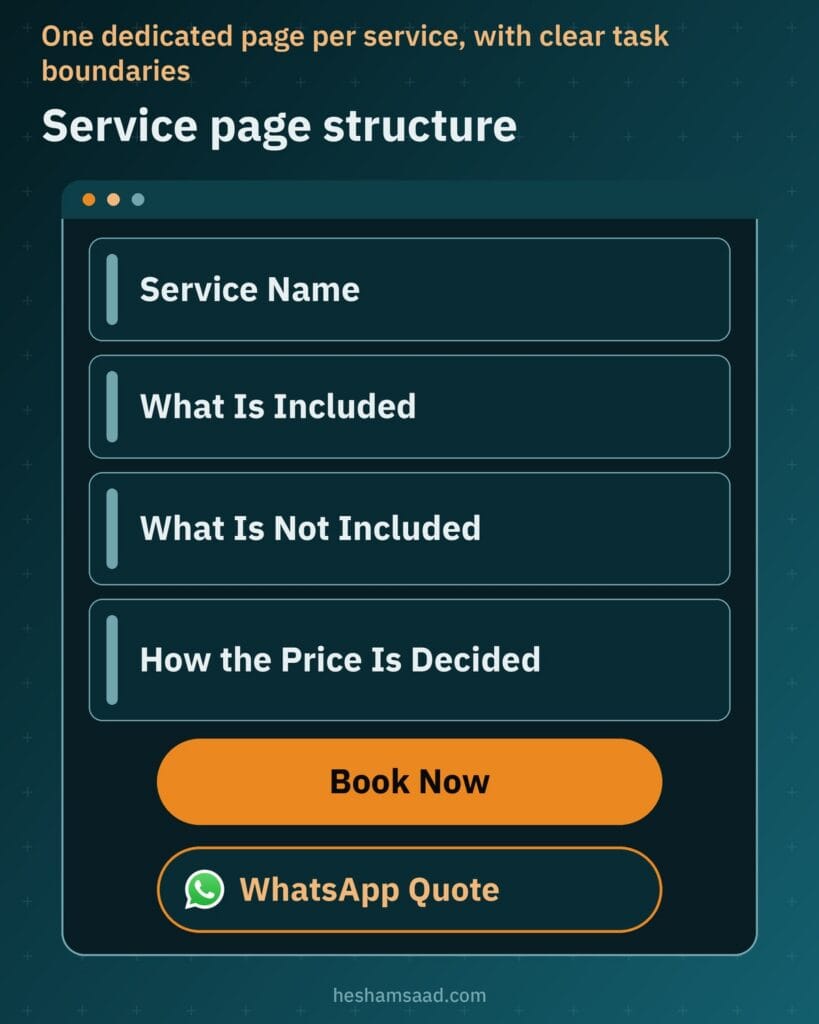
Treat each service page as an honest pre-visit checklist. Spell out what is included, what is excluded, and what the customer prepares beforehand, such as putting away fragile items, securing pets, confirming water and electricity access or issuing compound entry passes. Mention crew supervision or specialized equipment only when your company genuinely provides them on that service. Explain how your team decides the price based on area size, room count and surface condition without publishing numbers unless you maintain fixed public rates, then place clear buttons to book online or request a WhatsApp quote.
| Service page | Who it is for | What the page should explain |
|---|---|---|
| Home cleaning | Apartment and villa residents seeking recurring or single visits | Rooms and surfaces covered, excluded chores, whether the crew brings supplies, customer prep steps, and how property size shapes pricing |
| Office cleaning | Companies, clinics, retail shops and workspaces needing scheduled upkeep | Workstation, restroom and shared hallway tasks, evening or daytime scheduling, crew supervision, and quote steps for commercial contracts |
| Deep cleaning | Move-in, move-out, post-renovation and seasonal heavy cleaning clients | Intensive kitchen, bathroom, appliance and grout work, differences from standard home cleaning, crew equipment, and when a photo quote is needed |
If your company also runs specialty add-ons such as sofa shampooing, carpet extraction or curtain steaming, either build dedicated pages for services people search standalone or present them as clear optional extras inside your residential and deep cleaning pages.
A booking form built around dates, arrival windows and served areas
When a resident wants a routine apartment or villa visit with predictable scope, online booking for cleaning lets them reserve a request immediately without waiting for your phone line to open. Instead of a basic contact form that only captures a name and vague message, a structured WordPress booking system gathers every operational detail your dispatcher needs to assign the right team on the first review.
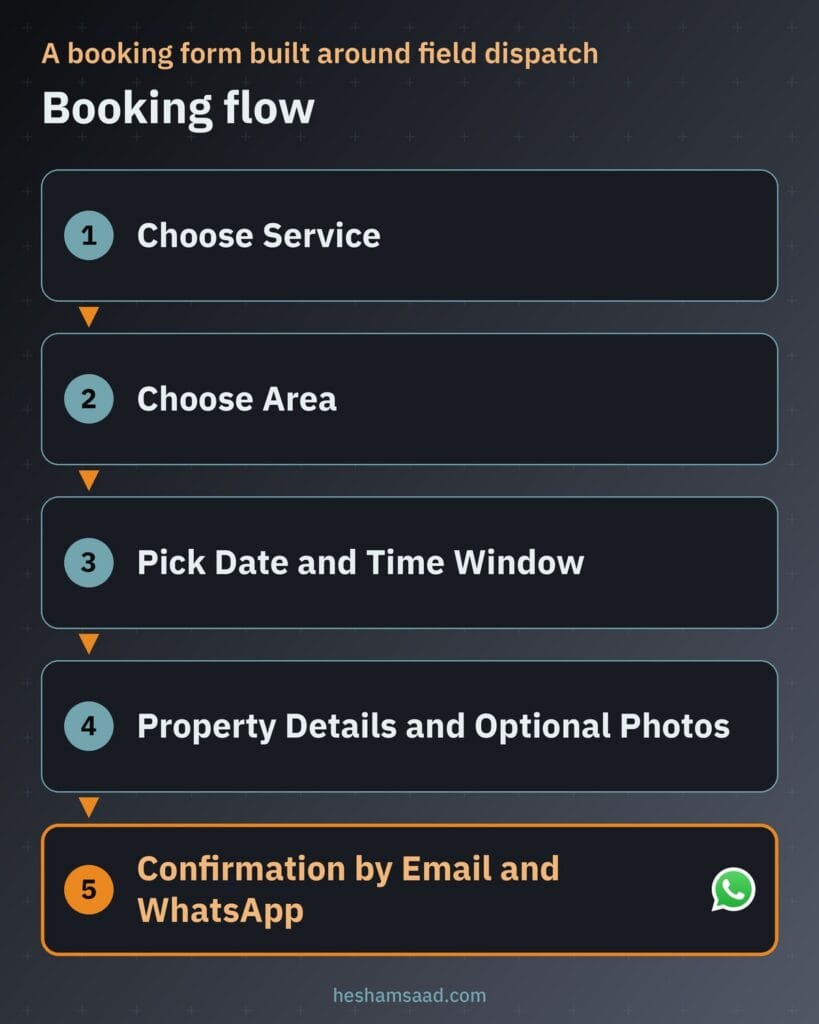
Design the form around field dispatch realities rather than generic calendar slots. Ask the customer to select the service, choose their district or city from a closed list of areas your vans actually cover, and specify property type and approximate size. Let them pick a preferred date and a morning or afternoon arrival window instead of an exact minute promise that road traffic between appointments can ruin, then collect a phone number, gate or pet notes, and optional photos of problem areas.
Right after submission, trigger an automated summary by email and WhatsApp showing the selected service, area and requested window. State clearly in that message whether the slot is locked in immediately or awaiting a quick dispatcher check so the homeowner knows exactly what happens next.
WhatsApp quote requests when a fixed booking does not fit
Direct booking works smoothly when two apartments of similar size require comparable crew effort, yet heavy or custom jobs do not fit a blind checkout form. A multi-floor villa coated in gypsum dust after renovation, a medical clinic needing nightly sanitization or stained living room upholstery requires scoping before you commit cleaner headcount, machinery and chemicals.
On pages covering variable work, pair or replace the booking button with a fast WhatsApp quote action. According to official WhatsApp documentation, a click-to-chat link using wa.me followed by your phone number in full international format opens a chat thread right away without making the visitor save your number first, and adding the ?text= parameter inserts a pre-filled message.
Have your developer populate that pre-filled text dynamically with the service name and district from the page the visitor is viewing. When the message arrives at your desk already naming deep cleaning and the client neighborhood, your coordinator can ask for two or three room photos or a quick walkthrough clip on WhatsApp and reply with an accurate quote.
Service area pages that match how Google ranks local businesses
Homeowners and office managers include their neighborhood or city name when searching because they want a company whose vans already operate nearby. According to Google Business Profile documentation, local search results are based mainly on relevance, distance and prominence: complete and detailed business information helps Google match your profile to relevant queries, while prominence also reflects web links to your business along with review volume and positive ratings. A focused WordPress local SEO strategy aligns your website pages with those signals.
Because your teams visit clients at their properties, Google Business Profile allows service-area businesses to set coverage by city, postal code or region, up to 20 service areas, keeping the total area within about 2 hours of driving time from where the business is based. Match that real footprint on WordPress by creating a served areas hub page linking to dedicated service area pages, following the same zone and quote architecture discussed in our guide to building a logistics company website on WordPress.
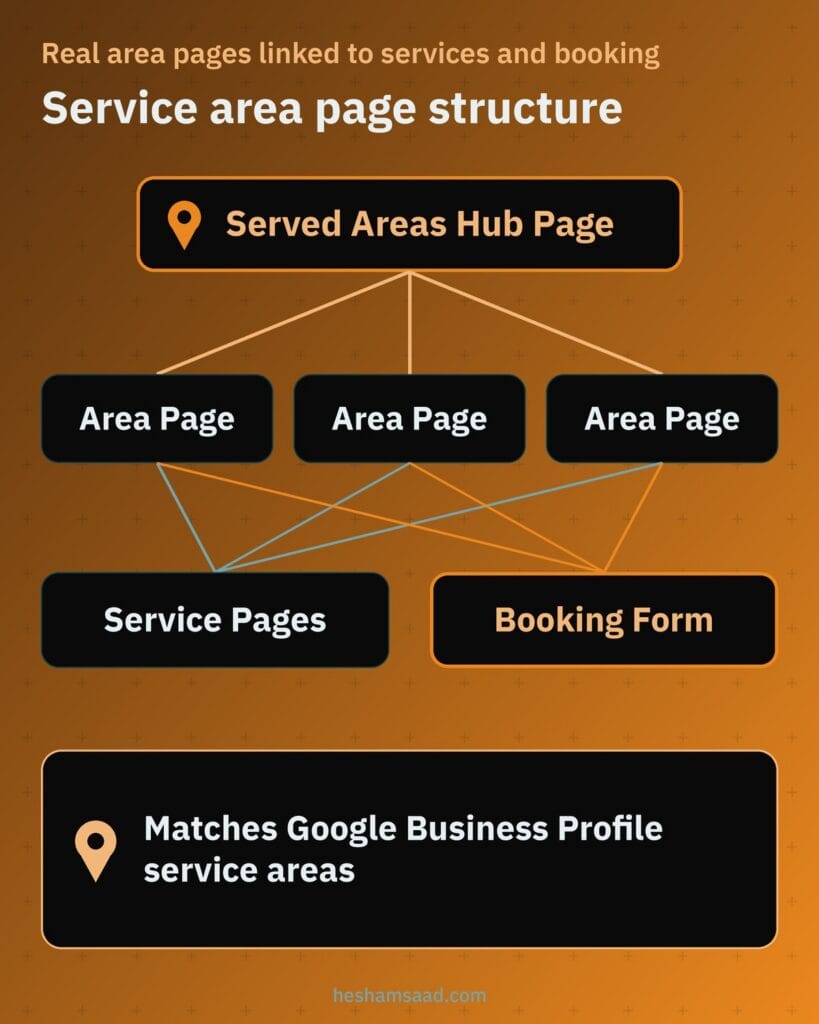
Avoid cloning a single page across twenty URLs with only the district name swapped in the title. Write genuinely local information on every area page: name the surrounding neighborhoods or compounds your crews cover there, mention realistic arrival windows if you route vans to specific zones on scheduled days, describe real jobs completed in that district when available, and link visitors straight to your service pages and booking form.
Before and after photos and customer reviews that build trust
Inviting a cleaning crew into a private home or workplace takes real confidence. Polished stock images of models holding spray bottles look artificial to local homeowners, whereas authentic job photos and verified client reviews prove your quality standards before the first visit.
Before and after job photos without privacy risks
Use photographs only from real jobs your own teams completed, and secure clear permission from the customer before shooting or publishing anything. Protect client privacy by framing tight, matching-angle shots of kitchen hoods, tile grout, balcony tracks or sofa cushions under consistent light while keeping faces, family photos, personal items, exterior street markers and office screens completely out of frame. Save approved pairs as compressed WebP images so visual proof stays crisp and lightweight.
Customer reviews and Google star rating rules
Showcase real customer feedback on your website with permission and link directly to your Google Business Profile reviews so visitors can check public ratings and post new feedback after their appointment. Keep technical promises honest too: under Google Search Central review snippet guidelines, LocalBusiness review rich results apply only to sites that capture reviews about other local businesses rather than self-serving reviews on your own domain, so a developer should never promise star ratings beneath your own pages in Google Search.
Online payment on booking versus paying on completion
Your checkout setup balances customer comfort against crew utilization. First-time residential clients value inspecting the finished rooms before paying, while reserving a full crew and equipment van for a deep clean exposes your schedule to lost revenue if someone cancels at the last hour. Running WooCommerce behind your booking process lets you support both payment styles cleanly.
When you want full prepayment or a partial booking deposit on intensive jobs, the Paymob Checkout plugin connects WooCommerce stores to local and global payment methods, and Tap documents a direct WooCommerce integration for online checkout. You can review regional gateway considerations in our breakdown of WooCommerce payment gateways in Egypt and Saudi Arabia. When customers pay in cash or by portable card terminal after inspection, WooCommerce includes a built-in Cash on Delivery payment method so every confirmed visit still logs inside one order dashboard.
Pair your checkout options with a plain cancellation and rescheduling policy right above the submit button. Spell out the notice required to move a booking without forfeiting a deposit and state what applies if a crew arrives at an inaccessible address.
Mobile speed and Core Web Vitals for photo-heavy pages
Prospective clients compare cleaning companies from smartphones, including over mobile connections inside residential compounds or office towers. Google evaluates real user page experience at the 75th percentile across mobile and desktop traffic using three Core Web Vitals: Largest Contentful Paint (LCP) of 2.5 seconds or less for loading, Interaction to Next Paint (INP) of 200 milliseconds or less for form responsiveness, and Cumulative Layout Shift (CLS) of 0.1 or less so buttons stay steady while assets load.
WordPress includes built-in capabilities that help photo-rich service pages hit those thresholds without bloated add-ons. Since WordPress 5.8, you can upload and display compressed WebP images directly in the media library, and since WordPress 5.5, WordPress adds the loading=”lazy” attribute to images by default so below-the-fold before and after galleries wait to download until the visitor scrolls down.
Combine WebP compression and native lazy loading with explicit image dimensions, a lightweight theme, a minimal set of well-maintained plugins and dependable hosting close to your regional audience so every booking dropdown and WhatsApp button responds right away.
What drives the cost of building your cleaning website
Two cleaning sites can look comparable on a home screen while requiring very different custom work behind the scenes. When you evaluate proposals from a WordPress developer or agency, the investment depends on your operational scope:
- The number of distinct service pages and local area pages requiring original writing rather than copied text.
- Booking form rules, including district filtering, arrival windows, property size inputs and crew capacity logic.
- Online payment and partial deposit integration through WooCommerce alongside pay-on-completion options.
- Automated email and WhatsApp confirmation workflows for both your dispatch coordinator and your clients.
- Bilingual Arabic and English publishing, including right-to-left layout care and hreflang annotations that tell Google Search the Arabic and English URLs are localized versions of each page.
- Custom interface design, preparing real job photography, server hosting setup and ongoing WordPress maintenance.
Separating launch essentials from phase-two additions helps your developer scope an accurate build around how your dispatch team works right now rather than charging for unused complexity.
Your next step before hiring a WordPress developer
Start by writing down a concise operational checklist for your company: list every residential and commercial service you deliver, mark which jobs fit direct online booking versus a photo-guided WhatsApp quote, write out the real cities or districts your crews cover within driving range, and gather customer-approved before and after photos.
Once you have those details ready, review our custom WordPress development services to see how we build fast, conversion-ready sites for MENA service businesses, or book a free consultation to walk through your cleaning company workflow and plan your website structure together.
Frequently asked questions
Should customers book online or ask for a quote on WhatsApp?
Offer both options on your website because different jobs need different workflows. Standard apartment or villa visits with predictable scope fit an online booking form where the client picks a date window and district. Post-renovation cleanups, large villas and commercial offices need a WhatsApp quote request with room photos first.
Do I need a separate page for every area I serve?
Create an individual page only for districts or cities your crews genuinely cover and where you can write helpful local details. Google Business Profile lets a service-area business list up to 20 areas within about 2 hours of driving time. Real local pages beat thin copies that only swap city names.
Can I post before and after photos of customer homes?
Yes, provided every image comes from a real job completed by your crew and you get explicit permission from the customer first. Shoot tight angles of kitchens, tiles, windows or sofas in matching light without showing faces, family portraits or documents, then upload approved pairs as compressed WebP files.
Should customers pay when they book or after the cleaning?
Supporting both methods in WooCommerce protects your schedule while reassuring first-time clients. WooCommerce Cash on Delivery lets customers book online and pay in cash or by card at the door upon completion. For deep cleaning or peak days, online payment or a deposit via Paymob or Tap reduces no-shows.
What decides the cost of a cleaning company website?
Scope and operational features decide the budget rather than a flat template price. Major cost drivers include the number of original service and area pages, district and crew scheduling logic, and WooCommerce payment or deposit setup. Bilingual Arabic and English pages with hreflang, photography, WhatsApp alerts, hosting and maintenance also contribute.
References
- Google Business Profile Help: How to improve your local ranking on Google
- Google Business Profile Help: Manage service areas for service-area and hybrid businesses
- Google Search Central: Review snippet structured data
- WhatsApp Help Center: How to use click to chat
- WordPress.org Plugin Directory: Paymob for WooCommerce
- Tap Developer Documentation: WooCommerce integration
- WooCommerce Documentation: Cash on Delivery
- web.dev: Web Vitals
- Make WordPress Core: Lazy-loading images in 5.5
- Make WordPress Core: WordPress 5.8 adds WebP support
- Google Search Central: Tell Google about localized versions of your page