
هذا المقال متوفر باللغة العربية — اقرأ بالعربية
Planning a logistics company website WordPress project starts with how commercial shippers evaluate your firm before they send a cargo inquiry. When an import manager in Cairo, a manufacturer in Alexandria, or a procurement lead in Jeddah or Dubai visits your site, they have real freight to move and specific operational checks to complete. They look to confirm that your team handles their shipping mode and trade corridor, holds verifiable legal credentials, and offers a direct way to request a rate.
A brochure-style shipping company website built around stock vessel photos and a plain message box fails those checks. Your site wins B2B inquiries when every page reflects the actual freight services, corridors, tracking tools, and branch operations your company runs.
What a logistics company website WordPress build needs to win B2B leads
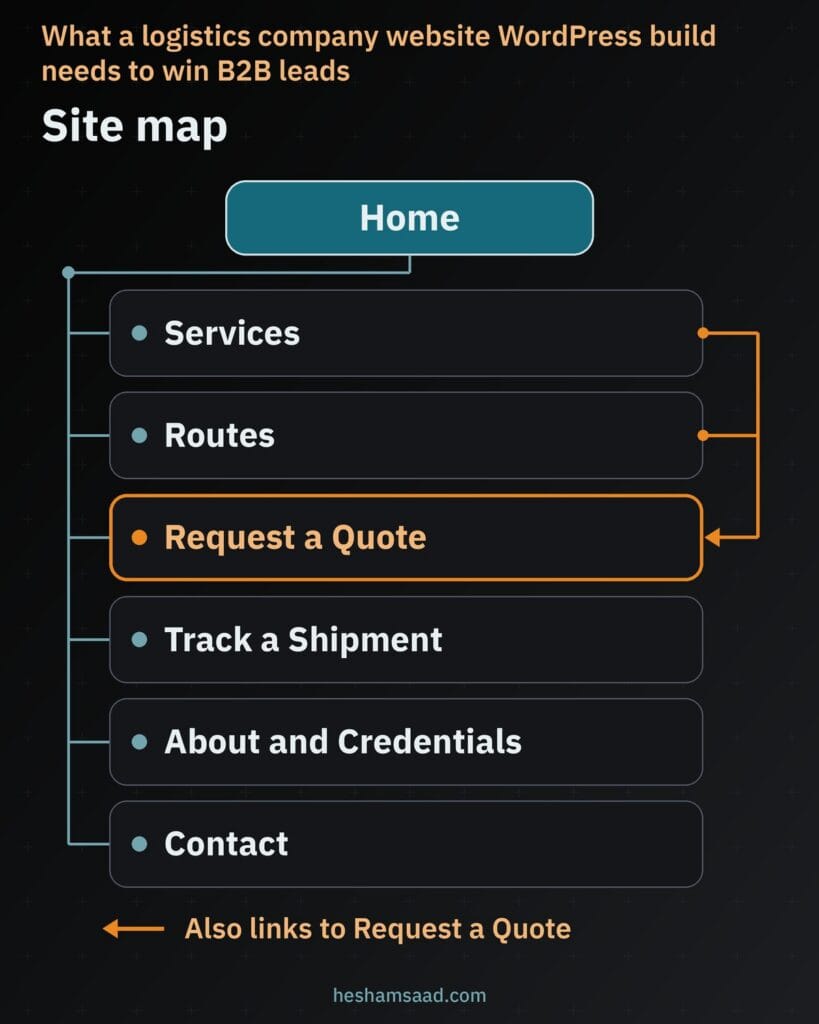
Whether your company operates as a freight forwarder, a shipping line agent, a cross-border trucking fleet, or a 3PL warehouse operator in Egypt or the Gulf, commercial visitors expect a clear path from capability check to rate request. Organizing your site map around real operational functions keeps procurement teams moving toward your sales desk:
- Home page: States your freight modes, core regions served, and direct paths to request a rate or track cargo.
- Service pages: Gives each real operational service its own dedicated page rather than crowding every mode onto one overview.
- Route pages: Covers specific port pairs, air corridors, or land border crossings your company actively serves.
- Quote request page: Hosts a multi-step freight quote request form built around commercial cargo specs.
- Tracking page: Provides a dedicated shipment tracking page connected safely to your carrier or internal system.
- About and credentials page: Publishes your legal name, commercial registration, branch and warehouse addresses, licenses, and named contacts.
- Industry, contact, and FAQ pages: Adds sector pages only for industries where you run specialized handling, paired with direct branch contacts and pre-booking answers.
Linking these pages intentionally turns research visits into qualified leads. A buyer reviewing an air cargo or Gulf trucking page should see relevant credentials and a direct path into your quote form without hunting through menus.
Restraint during planning matters just as much as layout. Leaving out modes, sectors, or corridors your firm does not operate keeps your pricing desk focused on commercial shipments rather than misdirected consumer parcel calls.
Service pages built around real freight operations
Combining sea freight, air freight, land freight, customs clearance, warehousing, and last-mile delivery onto one short bulleted page forces corporate shippers to guess at your real capacity. An exporter booking refrigerated containers needs different operational answers than an importer arranging port clearance and dry storage. Giving each service you genuinely offer its own URL lets buyers confirm fit right away.
Publish standalone pages strictly for services your company runs in house or under contract, and omit anything outside your scope. Structure each page so a logistics coordinator can verify how your team handles cargo before reaching out:
| Page section | What it answers for the shipper | Example content on the page |
|---|---|---|
| Service scope | Whether your firm handles this mode and cargo type | Full container load, consolidated sea cargo, dry units, or temperature-controlled equipment |
| Operational workflow | Who manages pickup, export filing, transit, and handover | Warehouse loading, port terminal handling, customs coordination, and consignee delivery |
| Required documents | What paperwork the shipper prepares before booking | Commercial invoice, packing list, certificate of origin, and bill of lading instructions |
| Handling limits | Which cargo needs special approval or falls outside scope | Out-of-gauge machinery dimensions, hazardous goods rules, or unit weight thresholds |
| Direct quote action | How the buyer submits specs for this mode | Button opening the freight quote request form for this service |
Listing required shipping documents and cargo limits upfront saves back-and-forth emails for both sides. When shippers reach your pricing team knowing what paperwork and cargo details are needed, rate preparation moves faster.
Route and trade lane pages without thin doorway content
Commercial buyers searching for a freight partner frequently search by origin and destination pairs rather than broad logistics terms. Dedicated route or lane pages capture that demand when your company actively moves cargo on those corridors, such as sea lanes into Sokhna or Jebel Ali, air cargo into Cairo or Doha, or cross-border trucking across the Gulf.
Avoid generating thin doorway pages by duplicating a single template and swapping port or city names across dozens of URLs. Search engines and experienced supply chain managers spot boilerplate pages quickly, and claiming lanes where you lack active operations damages credibility across your whole site.
Build pages strictly for real routes using substantive corridor details: the specific ports, airports, or border posts handled, general transit and scheduling considerations without unverified promises, required shipper paperwork, and the branch or trade desk handling that lane. Grounding commercial pages in verifiable scope mirrors the B2B structure in our construction company website on WordPress guide, where concrete project and capability pages lead straight into quote requests.
Factories that ship to distributors face the same buyer questions, which we cover in our guide to a manufacturing company website WordPress build.
Designing a multi-step freight quote request form
A generic contact box forces your sales reps to chase missing cargo specs over email before quoting, while a single tall page packed with fields intimidates visitors on mobile screens. Breaking your freight quote request form into short steps collects complete pricing inputs cleanly. Ask strictly for what your pricing desk needs to calculate a rate.
Grouping cargo details across form steps
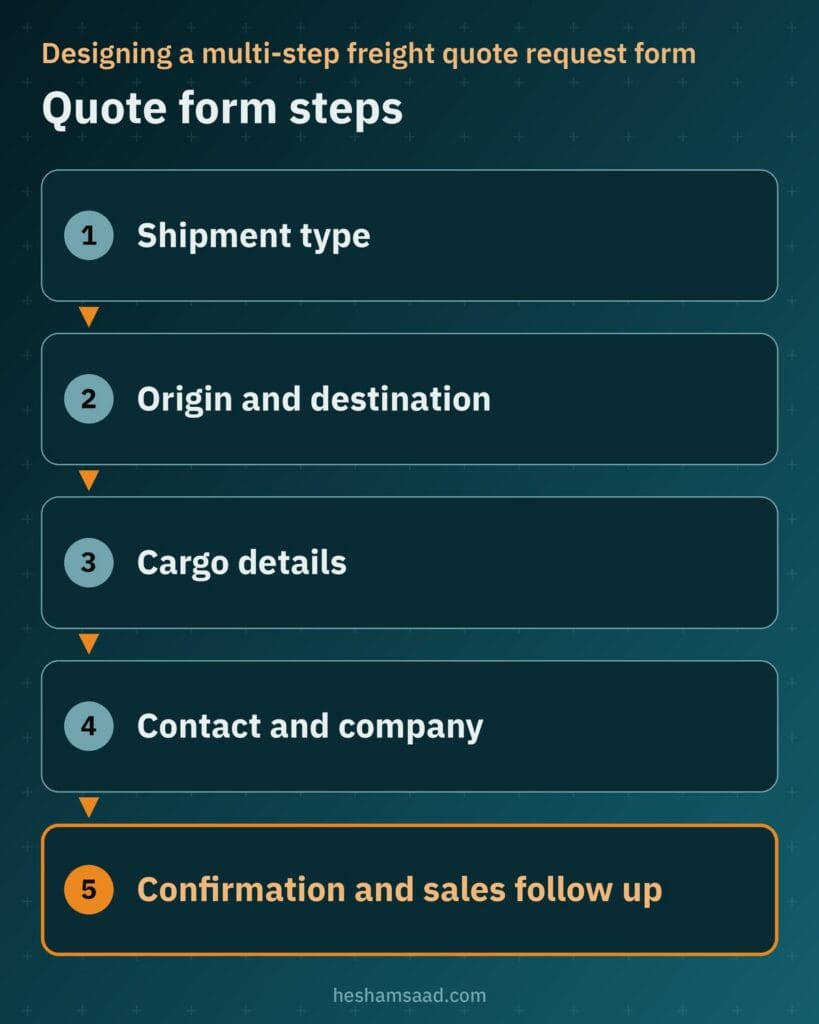
Arranging fields in the sequence a pricing coordinator reviews a shipment file keeps the form straightforward for commercial buyers. Four focused steps cover an initial rate request:
- Shipment type and service: Mode selection such as sea freight, air freight, overland trucking, customs clearance, or warehousing.
- Origin and destination: Pickup city or port, delivery city or port, and preferred incoterm if already known.
- Cargo details: Commodity description, gross weight, volume or package dimensions, package count, cargo ready date, plus an optional packing list upload only if your team wants files attached.
- Contact and company details: Company name, contact person, work email, phone number, and handling notes.
Multi-page controls, routing, and honest confirmation
In WordPress, WPForms lets you build multi-page forms by dragging a Page Break field into the form builder to divide fields across as many pages as needed. Each page supports a Page Title, a custom Next button label, and an optional Previous button, plus a Progress Indicator styled as Progress Bar, Circles, or Connector (or None) showing progress text such as Step 1 of 3. Data typed on earlier steps stays in place while the visitor moves between pages before submitting, and conditional logic can skip empty pages that do not apply to the selected service. Multi-step quote forms work just as well for cover requests, as our insurance company website WordPress guide explains.
Send each submission directly to your sales inbox or CRM with a reference code so inquiries never stall in individual mailboxes. Enable anti-spam protection on the form, and show an honest confirmation message explaining what happens next, mentioning a reply window only when your sales team commits to meeting it.
Setting up a shipment tracking page safely
Existing clients return to your shipping company website to check departure, arrival, and clearance milestones, so placing a clear shipment tracking page in your main navigation saves routine status calls to your operations desk. How that page works depends on what your carrier portals or internal transport management system (TMS) allow. Never copy tracking rows manually or scrape third-party portals.
Check browser framing rules with your provider before planning an on-page embed. As documented by MDN, a server can send the X-Frame-Options HTTP header or the Content Security Policy frame-ancestors directive to stop browsers from rendering its pages inside an iframe on external sites. Because browsers enforce those rules automatically, your WordPress page can embed a tracking portal only when the provider permits framing.
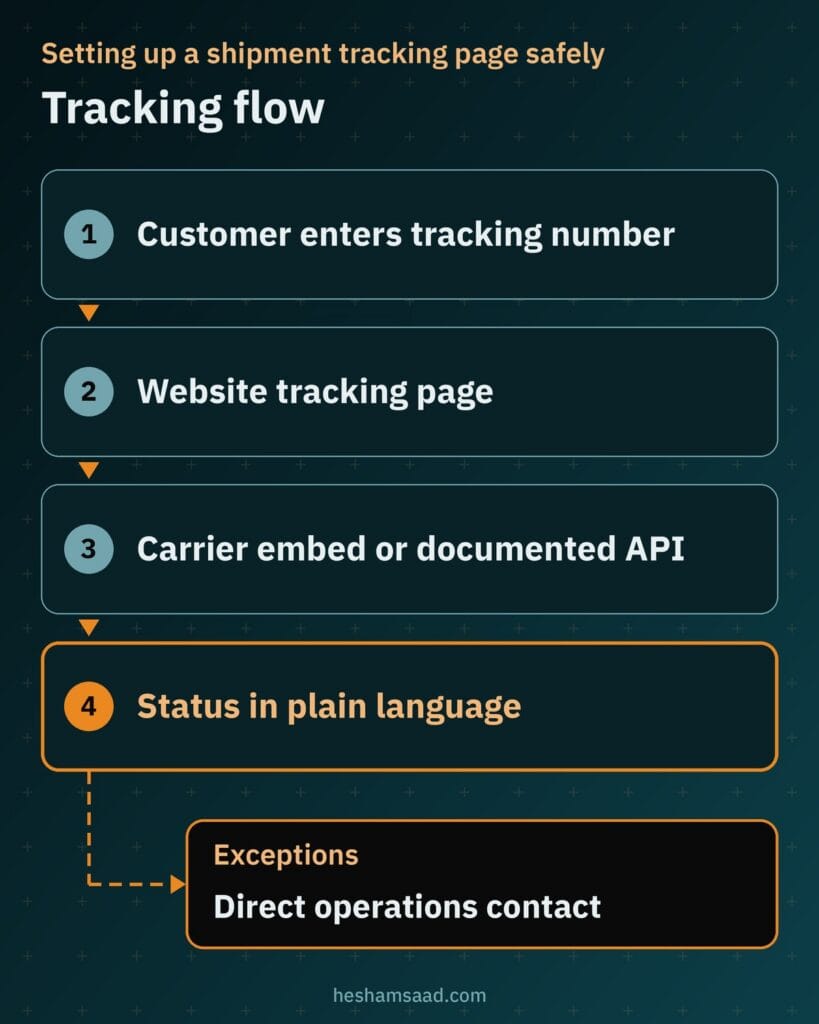
Ask your carrier or TMS vendor for their official tracking widget, direct tracking link format, or documented API. When embedding is blocked, link cleanly out to the provider’s tracking page with the shipment number or have a developer connect to their documented API. Keep private customer records gated behind provider authentication, explain milestone statuses in plain language, and list a direct contact for customs holds or delivery exceptions.
Trust signals that commercial shippers verify before booking
Handing commercial cargo to a new forwarder involves real financial and operational risk. Before an importer or exporter in Egypt or the Gulf approves your firm as a vendor, they check your site to confirm your company is legally registered and runs real facilities:
- Legal identity and tax ID: Publish your legal company name, commercial registration details, and VAT or tax ID, which Google notes in its Organization structured data documentation is an important trust signal because users can check public registries.
- Physical addresses: List full street addresses for your headquarters, port branches, and warehouses rather than city names alone.
- Real licenses and memberships: Name only the customs brokerage licenses, transport permits, and trade memberships your company holds, with zero invented certifications.
- Named contacts and real photos: Show named commercial or operations contacts alongside real photos of your warehouse or fleet instead of stock vessel imagery.
- Permitted client proof: Display client logos only with permission, and publish case studies only when every detail is true.
Procurement teams spot exaggerated global claims and borrowed port photography right away during supplier screening. Accurate registration details, real facility photos, and named trade desk contacts earn far stronger confidence from B2B shippers.
Place your legal company name and registration details consistently in the site footer as well as on your About and Contact pages. Matching details across your website and commercial rate sheets reassure new shippers before booking.
Keeping quote forms and tracking connections reliable
Broken multi-step forms, failed email routing, or compromised plugins silently cut off incoming rate requests and cause corporate security filters to block your domain. Because shippers submit commercial cargo details and optional packing lists through your site, operational uptime and security go together.
WordPress official hardening guidance emphasizes keeping WordPress core, themes, and plugins such as WPForms updated so patched vulnerabilities cannot be exploited. Pair timely updates with limited admin access, strict upload file checks, periodic form delivery tests, and a thorough WordPress security audit to keep quote and tracking workflows dependable.
B2B search visibility for freight and logistics firms
Corporate shippers search by pairing a freight service with a city, port, or trade corridor, using English on international trade desks and Arabic across regional buying teams. Publishing well-written English and Arabic pages on WordPress helps manufacturers, traders, and overseas partners find your company in both languages.
Structured data and branch office visibility
Adding Organization structured data on your home page or about page clarifies your official company details for search engines. Google lists no required properties for Organization markup, while recommended fields include name, url, logo, legalName, address (supporting multiple addresses across cities or countries), contactPoint, telephone, email, sameAs, taxID, and vatID. Select the specific subtype fitting your firm, test your markup in the Rich Results Test, and note that Google does not guarantee rich results.
For physical offices with real public addresses, include LocalBusiness structured data using the specific applicable subtype with required name and address properties. Combine that markup with a verified Google Business Profile for each real office as explained in our WordPress local SEO guide.
Search fundamentals and page performance
Apply the fundamentals in Google’s SEO Starter Guide across every page: descriptive URLs, unique content written for people, descriptive title links and meta descriptions, and clear anchor text explaining each linked page. Keep layouts lightweight so pages stay responsive across Core Web Vitals, namely Largest Contentful Paint (LCP), Interaction to Next Paint (INP) on interactive forms, and Cumulative Layout Shift (CLS).
What drives the cost of a logistics website project
Scoping a shipping company website depends on your operational pages, languages, and integrations rather than fixed template tiers. Clarifying these cost drivers upfront helps you compare agency proposals accurately, much like vehicle classes and booking workflows shape scope in our car rental website on WordPress guide:
- Service and route pages: Count of dedicated freight mode pages, real corridor pages, and specialized industry pages.
- Languages: Designing and structuring both English and right-to-left Arabic pages and forms.
- Quote form and CRM setup: Multi-step conditional logic, optional file upload handling, and routing into your sales inbox or CRM.
- Tracking integration type: Outbound link formatting, permitted provider widget embed, or custom integration with a documented carrier or TMS API.
- Content and photography: Writing bilingual operational copy and photographing your real offices, warehouses, and fleet.
- Hosting, maintenance, and security: Server resources, backups, updates, and ongoing monitoring.
Confirming early which assets your internal team will provide, such as corridor notes and facility photos, keeps project scope well defined. Your developer can then focus on bilingual UX, form logic, and reliable integrations.
When a developer helps and how to start
Pre-made themes struggle once a logistics firm needs matched Arabic and English layouts, conditional multi-step quote forms connected to a CRM, safe carrier or TMS API tracking, and multi-branch structured data. Bringing in a specialist avoids fragile plugin workarounds, slow mobile pages, and broken embeds before commercial buyers test your site.
Start by preparing a short internal checklist: list the freight services and active routes your company serves right now, write down the exact cargo fields your pricing desk requires to quote, and ask your TMS or carrier vendor which tracking embed or API options they support. With that list ready, book a free consultation to review your requirements, or explore my WordPress development services to build a fast, credible B2B website for your firm.
Frequently asked questions
Do I need a separate page for each shipping service?
Yes, create one dedicated page for every service your company actually operates, such as sea freight, air freight, overland trucking, customs clearance, or warehousing. Separating each mode lets commercial buyers review your exact scope, required shipping documents, and handling limits without digging through a single general overview. Leave out services you do not handle in house or under contract.
What should a freight quote request form ask?
Ask only for the shipment facts your pricing desk needs to calculate an accurate rate. Group the fields into short steps covering service mode, origin and destination, cargo commodity with weight and dimensions, package count, preferred incoterm, target ready date, and company contact details. You can also allow an optional packing list upload and route each submission directly to your sales inbox or CRM.
Can my website show tracking from my carrier or system?
Your website can embed a tracking tool inside a page only when your carrier or transport management system permits framing in browsers. Providers can block iframe embedding through browser security headers, so ask your vendor for an official widget, direct tracking link format, or documented API. Always keep private account data behind provider authentication and explain milestone statuses in plain language alongside an exceptions contact.
What trust signals do B2B shippers look for?
Commercial shippers verify your full legal company name, commercial registration details, tax or VAT identification number, and physical office or warehouse addresses before handing over cargo. Publishing genuine trade licenses, named department contacts, real photos of your warehouse or fleet, and approved client logos builds credibility during vendor screening. Never display invented certifications or stock photos of vessels.
How does a logistics company website rank for B2B searches?
Your site ranks by publishing thorough English and Arabic pages for every real freight service and trade lane your team operates, backed by descriptive URLs and page titles. Adding Organization structured data with your legal details and maintaining a verified Google Business Profile for each physical branch helps buyers and search engines confirm your footprint. Fast loading pages and clear internal links also support visibility.
References
- How to Create Multi-Page Forms in WPForms (WPForms Documentation)
- X-Frame-Options HTTP Header (MDN Web Docs)
- Content-Security-Policy: frame-ancestors Directive (MDN Web Docs)
- Hardening WordPress (WordPress Developer Resources)
- Organization Structured Data (Google Search Central)
- Local Business Structured Data (Google Search Central)
- Search Engine Optimization (SEO) Starter Guide (Google Search Central)
- Web Vitals: LCP, INP, and CLS (web.dev)