هذا المقال متوفر باللغة العربية — اقرأ بالعربية
When you plan a training center website WordPress project in Egypt, Saudi Arabia, or the Gulf, your goal is turning course inquiries into confirmed registrations and paid seats. If a prospective learner or corporate coordinator cannot find your syllabus, upcoming start dates, branch location, and payment options on one clear page, your admissions desk spends hours repeating basic details by phone. Replacing scattered spreadsheets with online registration lets trainees reserve their round right away.
A practical training institute website connects your course catalog, cohort schedules, local checkout, and bilingual pages into one manageable system. Before hiring a developer, map out how your courses, rounds, and payments work day to day.
What a training center website WordPress build needs for online registration
A training center does not sell products off a shelf like a standard online store, and it does not stop at general brochure pages either. Each program runs in scheduled intakes, serves a defined career or skill level, and requires clear attendance details before someone commits their time and budget. Your website has to answer practical questions about outcomes, timing, instructors, and payment in the order a prospective learner asks them.
To move visitors from browsing to confirmed seats, your build needs seven connected parts working together. You need a filterable course catalog, per-round schedules, an online registration and payment checkout, credible instructor profiles, honest certificate handling, opt-in email and WhatsApp reminders, and full Arabic and English pages. Leaving out any one of these pieces pushes your admissions team back into manual follow-ups.
Mapping these parts early also protects your budget from mismatched software. A center teaching classroom workshops or live virtual cohorts needs fast round selection and reliable regional payments rather than heavy student portals, whereas an institute selling recorded tracks needs lesson tracking and quiz tools.
Structuring your course catalog around schedules and rounds
Every course in your catalog needs its own dedicated page built with consistent fields. Include the course title, who it is for, learning outcomes, module outline, duration set by your center, and delivery format across classroom, live online, or recorded sessions. Alongside those essentials, display the branch, instructor, next start dates, open seats if your center tracks capacity, the fee if you publish fees publicly, and a clear register button.
As your catalog grows, visitors need clean filters on your main courses archive. Filtering by category, delivery format, and start date helps individual learners and corporate coordinators find relevant intakes without opening dozens of tabs.
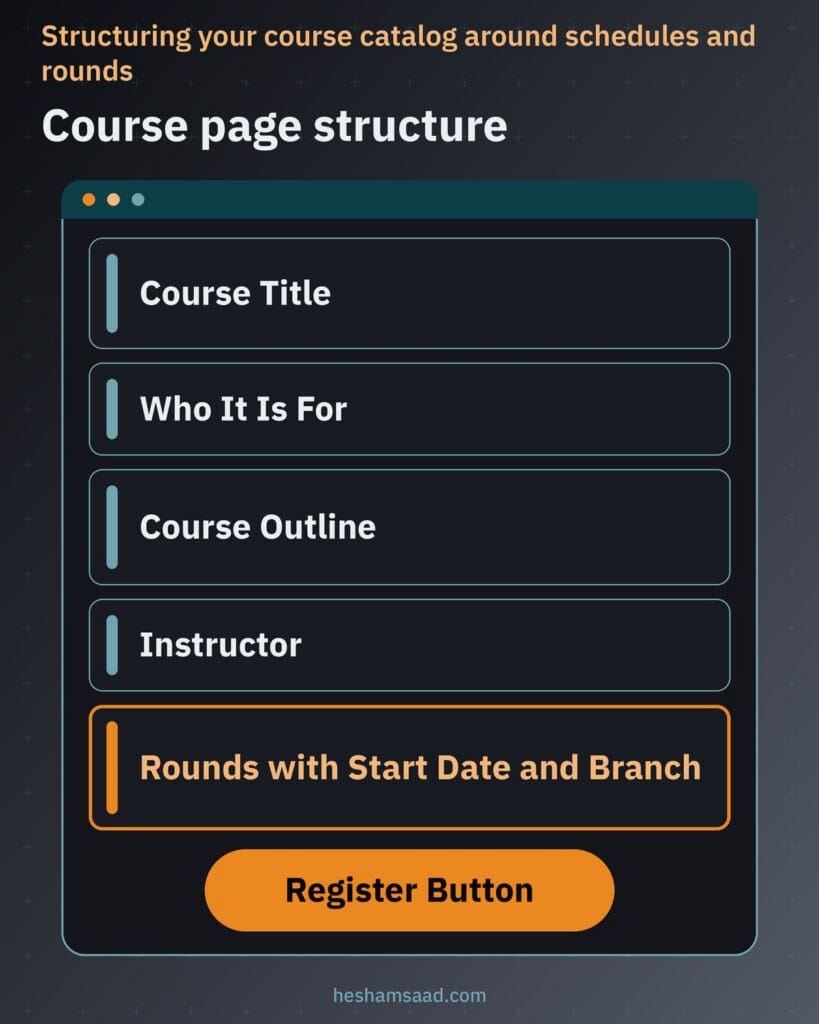
Treat rounds, or cohorts, as repeatable schedules listed on one permanent course page. Each course can show several upcoming rounds with a start date, weekly days and hours, and branch, letting trainees enroll in a specific cohort. When an intake finishes or fills up, archive or hide that past round instead of deleting the page.
| Course page element | What it answers for the trainee | Example content |
|---|---|---|
| Who it is for | Whether the trainee fits the entry level | Junior accountants working with spreadsheets |
| Outcomes and outline | What practical skills the course builds | Financial statements, cash flow budgets, and closing checklists |
| Format and branch | Where and how sessions run | Classroom training at the Cairo branch or live online |
| Rounds schedule | Which intake dates fit their calendar | Autumn evening cohort or winter weekend intake |
| Register button | How to reserve a seat in a round | Select round and proceed to online or branch payment |
Keeping all cohorts inside one reusable template saves your admissions staff repetitive editing. Closing a full round or adding a new intake takes one quick update in WordPress.
Handling online course registration and local payments
Once a visitor chooses a program, your course registration website should move them from round selection to seat confirmation smoothly. The trainee picks an open cohort on the course page, completes a concise registration form, and goes straight to WooCommerce checkout. Removing unneeded physical shipping fields keeps mobile checkout fast and clear.
Connecting WooCommerce to regional gateways lets trainees pay using familiar methods. Paymob provides an official Paymob Checkout plugin for WooCommerce supporting local and global payment methods with refunds started from the Paymob dashboard, while Tap documents a WooCommerce integration in its developer guides. You can review regional gateway options in our guide to local payment gateways in Egypt and Saudi Arabia.
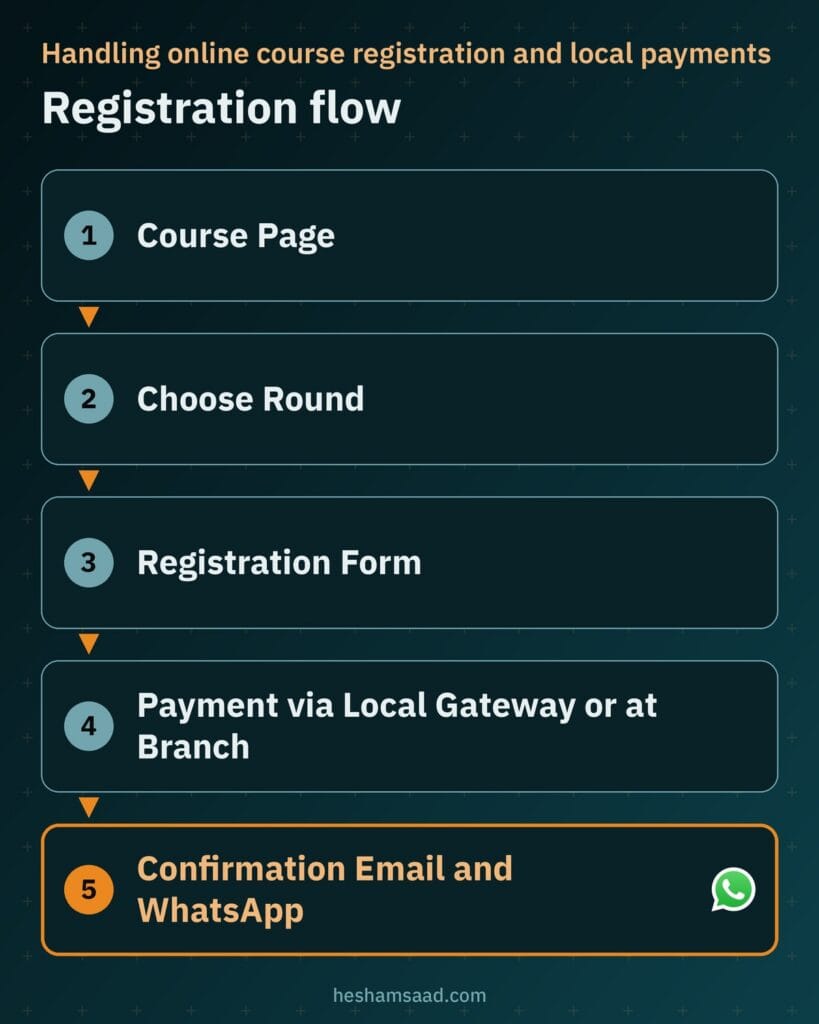
If you want Fawry at checkout, ask Fawry or your developer which WooCommerce integration is officially supported before finalizing scope. Pairing online gateways with a pay-at-the-branch option also accommodates trainees or corporate sponsors who settle fees in person.
After checkout, display an immediate confirmation screen naming the course, round, start date, and payment status. Follow up automatically with a confirmation email and WhatsApp message where agreed so trainees know their next step.
Choosing between a simple booking flow and a full LMS
Before requesting an LMS WordPress setup, look closely at where teaching actually happens. Your site architecture changes depending on whether instructors teach live cohorts or trainees study self-paced material inside the website.
When a simple registration flow fits your courses
When classes run in physical rooms or on live video calls and you only need registration and payment, a straightforward catalog and checkout flow is enough. Trainees pick a round on the course page, fill out the form, pay via WooCommerce or choose branch payment, and get confirmation. Compare how online booking for courses differs from one-to-one appointments in our guide to a WordPress booking website.
Avoiding an unnecessary LMS spares your staff from maintaining empty dashboards. If your institute also takes custom corporate training requests or partial seat reservations, see our related guide on handling inquiries and deposits on WordPress.
When a full LMS makes sense for your institute
An LMS makes sense when learners watch recorded lessons on your site, take quizzes, follow drip schedules, and track completion progress. Tutor LMS offers a free plugin and a Pro version with a course builder, lessons, quizzes, student and instructor dashboards, content drip, multi-instructor support, an instructor registration form, automated email notifications, and native eCommerce plus WooCommerce monetization.
LifterLMS provides a free core plugin with paid add-ons for sections, lessons, quizzes, drip content, prerequisites, certificates, achievement badges, multi-instructor courses, a student dashboard, email notifications, built-in payment options, a WooCommerce integration add-on, and a course cohorts add-on, while LearnDash is a paid LMS with courses, quizzes, and completion certificates. Weigh those tools against the extra lesson setup and ongoing maintenance an LMS demands.
Issuing verifiable course certificates without overclaiming
Certificates carry real weight for career switchers and corporate sponsors, so how your website generates and verifies them matters. Inside an LMS setup, LearnDash lets you build a certificate and associate it with a course or quiz so trainees earn it upon finishing the course or passing a quiz, and LifterLMS awards completion certificates alongside achievement badges.
Verification stops unauthorized edits and reassures employers checking a candidate’s credentials. Tutor LMS lists a certificate builder and certificate verification using a unique certificate ID and an optional QR code among its Pro features or add-ons, and a custom catalog site can also provide a lookup page where a certificate ID confirms completed training.
Protect your institute’s credibility by issuing certificates strictly for courses a trainee actually completed. Never claim local or international accreditation your center does not hold, and when you do hold formal accreditations, display the body’s name and scope word for word as written on your official documentation.
Building credible instructor pages
Trainees comparing two institutes for the same subject look closely at who is teaching the cohort before they pay. Giving every trainer a dedicated profile page turns an anonymous course listing into a concrete commitment led by a named practitioner.
Keep instructor pages factual and easy to scan. Publish a clear professional biography, list only genuine academic or industry qualifications the trainer actually holds, use a real portrait only with the instructor’s permission, and link directly to the active courses and upcoming rounds they teach at your center.
Connecting instructor profiles to course templates makes schedule updates effortless when trainers rotate between cohorts. On LMS sites where co-trainers share a program, both Tutor LMS and LifterLMS support multi-instructor courses, and Tutor LMS includes an instructor registration form if external specialists apply to teach with your institute.
Setting up email and WhatsApp reminders for trainees
Clear communication between registration day and the first session prevents late arrivals, missed online links, and repetitive front-desk calls. A practical sequence starts with an instant registration confirmation email and payment receipt, followed by a scheduled reminder before the round begins.
WordPress sends site emails through its wp_mail function, so your developer should configure reliable sending through SMTP or a dedicated email service rather than relying on unconfigured server mail. Proper mail authentication keeps checkout receipts, cohort reminders, and completion notices out of spam folders.
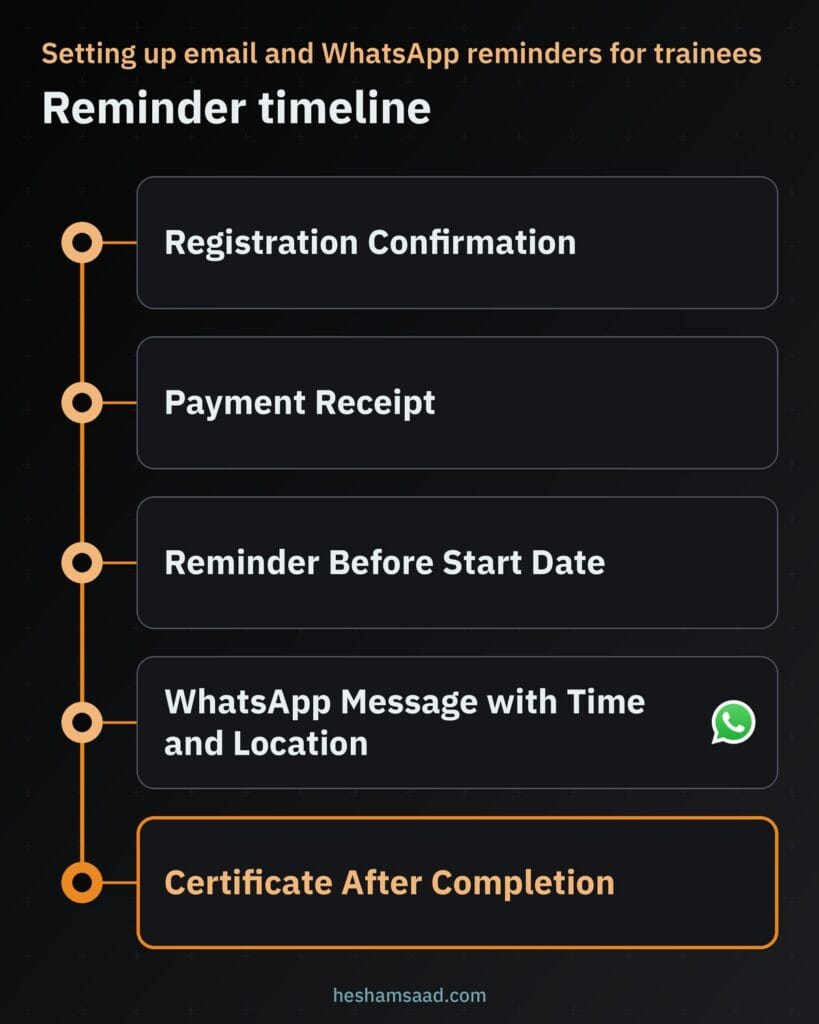
For quick pre-enrollment questions, a WhatsApp click-to-chat link using wa.me followed by your phone number in full international format opens a chat without saving your number first, and adding a text query parameter pre-fills the course name. Sending automated WhatsApp reminders with session times and branch locations requires connecting the official WhatsApp Business Platform or an approved provider.
Only send email or WhatsApp reminders to trainees who explicitly agreed to receive them during registration. Prepare both Arabic and English reminder templates so each learner receives date, time, and branch instructions in the language they used to enroll.
Running a genuinely bilingual Arabic and English site
Across Egypt, Saudi Arabia, and the Gulf, prospective learners search for technical certificates or software courses in English while preferring clear Arabic explanations for schedules, policies, and branch directions. Publishing genuine, human-written Arabic pages alongside English pages serves individual trainees and corporate decision-makers equally well.
A solid bilingual WordPress setup gives Arabic and English pages separate URLs and outputs hreflang annotations so Google recognizes that both pages are localized versions of each other. Arabic pages must also apply proper right-to-left layout using the HTML dir=”rtl” attribute and WordPress internationalization standards so course tables, round selectors, and menus align naturally.
Do not stop translation at the course description while leaving forms and emails in English. Tutor LMS lists RTL readiness, multilingual plugin support, and Arabic among its translations, and LifterLMS also includes Arabic among its translations, while your developer translates registration labels, checkout steps, and confirmation emails end to end.
Course page SEO that relies on structure, not rich result promises
On September 9, 2025, Google removed course info structured data documentation from Google Search Central because course info rich results are no longer shown in Google Search results. If a vendor promises special Google course carousels or schema snippets to win your project, treat that claim as outdated.
Real search performance for a training center comes from clean page architecture and thorough course descriptions. Give each course one permanent page with a unique SEO title, a clear meta description, natural headings that match what learners search for, and all upcoming cohorts listed on that single URL rather than creating duplicate pages for every new round.
Strengthen those course pages with internal links from category hubs and practical blog posts that answer career or skill questions related to your programs. When trainees attend classes at physical branches, combine strong course pages with the branch optimization steps covered in our guide to local SEO for WordPress websites.
What drives the cost of a training center website
The effort required to build a training center website depends on how your operations work behind the scenes rather than how decorative the homepage looks. Scoping these technical decisions upfront explains why a classroom registration site differs in effort from a multi-branch bilingual academy with recorded courses.
- Course catalog scale: how many courses, categories, and search filters need to be structured and populated.
- Rounds and seat rules: whether each course runs multiple concurrent cohorts across branches with automatic seat cutoffs.
- Payment gateway setup: integrating WooCommerce with Paymob, Tap, a confirmed Fawry option, and manual branch payment tracking.
- Booking flow versus LMS: whether you only collect registrations or also build recorded lessons, quizzes, drip schedules, and certificate ID verification.
- Languages and reminders: creating separate Arabic and English URLs, RTL layouts, reliable SMTP email delivery, and opt-in WhatsApp integrations.
- Design, content, and maintenance: crafting a custom layout, writing original bilingual course copy, and managing hosting, backups, and plugin updates.
Separating day-one essentials from future upgrades lets you launch with reliable course registration and payment first. You can always add recorded video portals or automated messaging integrations once enrollment demand justifies maintaining them.
How to prepare your brief and take the next step
Before requesting quotes, write a one-page brief covering your active course list, how programs are grouped into categories, and whether sessions run in classrooms, live online, or as recorded self-paced lessons. Note how your team manages rounds and seat limits, and decide whether course fees appear publicly on each page.
Next, confirm which regional payment gateways your commercial registration supports, whether you want a pay-at-the-branch option, and whether your center needs Arabic and English from launch. Gather real instructor biographies, approved trainer photos, and exact accreditation documents early so content never stalls development.
If you want an experienced technical partner to plan and build your catalog, checkout, and bilingual architecture cleanly, explore our WordPress development services to see how projects run. You can also book a free consultation to walk through your courses, payment gateways, and registration workflow before writing a single line of code.
Frequently asked questions
Do I need an LMS for my training center website?
You only need an LMS if trainees watch recorded video lessons, complete quizzes, or track lesson progress directly on your website. When your courses take place in a classroom or on live video calls, a simpler registration flow with course schedules and WooCommerce checkout handles enrollments without the extra setup and maintenance of plugins like Tutor LMS, LifterLMS, or LearnDash.
Can trainees pay for courses online in Egypt or Saudi Arabia?
Yes, trainees can pay online during registration when your site connects WooCommerce to a supported regional payment gateway. Paymob provides a WooCommerce checkout plugin for local and global payment methods, and Tap documents a WooCommerce integration for online payments. For Fawry, your developer should confirm which WooCommerce integration is officially supported, and you can still offer payment at your branch.
Can my website issue course certificates?
Yes, a WordPress LMS can generate digital certificates once a trainee finishes a course or passes a required quiz. LearnDash and LifterLMS both award completion certificates, while Tutor LMS offers a certificate builder and certificate ID verification with an optional QR code in its Pro features. Issue certificates only for completed training and state only real accreditations your institute holds.
How do I send reminders before a course starts?
Your website can send registration confirmations and pre-course email reminders automatically when your developer configures reliable delivery for WordPress mail through SMTP or an email service. For WhatsApp, you can place click-to-chat links for manual inquiries or connect the official WhatsApp Business Platform through a provider for automated reminders. Always collect clear trainee consent before sending messages in Arabic or English.
Should my training center site be in Arabic and English?
A bilingual Arabic and English website helps your center serve both Arabic-preferring trainees and corporate or international learners searching for English course titles. Each language needs its own URLs, proper right-to-left layout for Arabic pages, translated forms and confirmation emails, and hreflang annotations so Google connects both versions in search results. Write natural Arabic copy instead of relying on automatic translation.
References
- Tutor LMS plugin page on WordPress.org
- LifterLMS plugin page on WordPress.org
- LearnDash Certificates documentation
- Paymob for WooCommerce plugin page on WordPress.org
- Tap WooCommerce integration documentation
- Google Search Central documentation updates
- Google Search Central guide to localized versions of pages
- WhatsApp Help Center guide to click to chat
- WordPress Developer Reference for wp_mail
- WordPress Internationalization developer guide
- MDN Web Docs reference for the HTML dir attribute