هذا المقال متوفر باللغة العربية — اقرأ بالعربية
When a driver, homeowner, or company finance director compares cover in Egypt or the Gulf, your website is where they decide whether your firm looks credible enough to contact. Planning an insurance company website WordPress build gives your underwriting or brokerage team a structured way to explain policies clearly, capture qualified quote inquiries, and display regulatory credentials in plain sight. Every page should turn cautious visitors into real advisor conversations.
Focused insurance agency website design separates public policy education from authenticated client servicing so neither audience hits dead ends. Prospective policyholders need clear cover explanations and a short path to request a callback, while active clients need emergency numbers and direct entry to your claims system.
What your insurance company website WordPress build needs to bring in leads
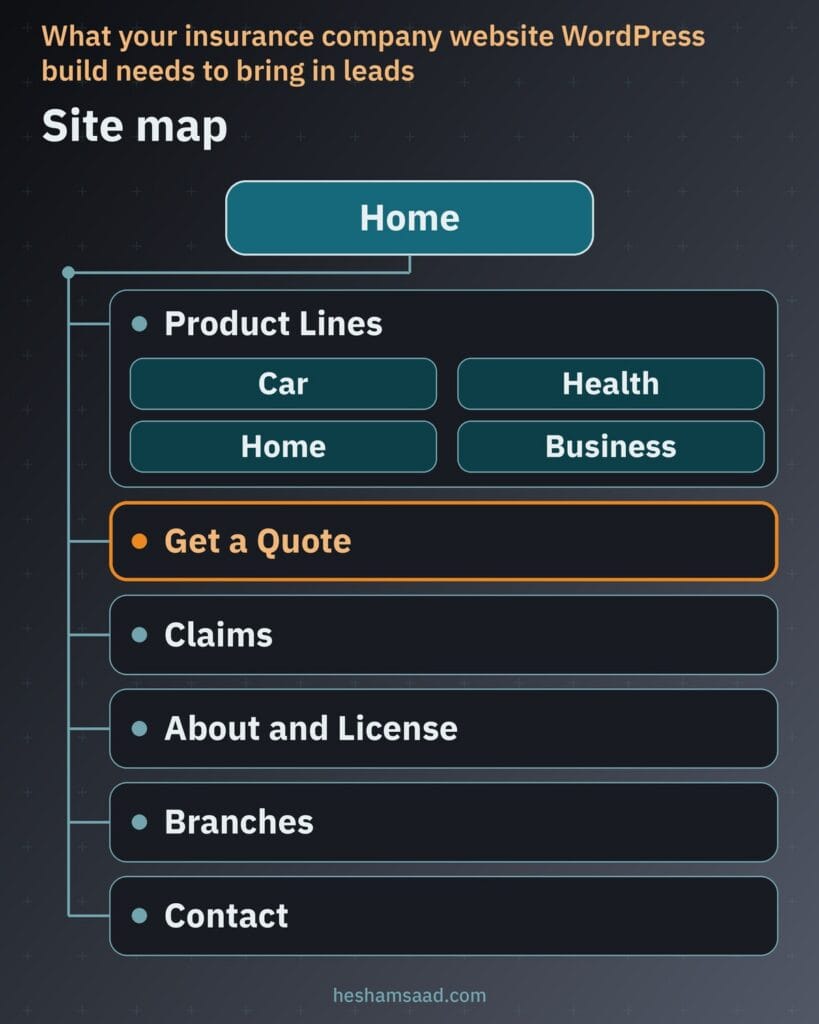
Whether you run a direct carrier, a retail agency, or an insurance broker website, lead generation depends on giving every visitor intent its own dedicated destination. Organizing your site map around buyer and policyholder tasks keeps menus straightforward across desktop and mobile screens.
- Home page: states who you insure, highlights active policy lines, shows license credentials, and routes visitors straight to quote requests or claim reporting.
- Product pages per line: dedicated pages for car, health, home, and business insurance, limited strictly to lines your company actually sells.
- Quote request page: a guided multi-step form that gathers essential risk facts so a licensed advisor can prepare an accurate proposal.
- Claims page: step-by-step notification rules, document checklists, real emergency contact numbers, and a link to your authenticated claims portal.
- About and license page: your registered legal name, supervisory authority details, named contacts, and permitted carrier partners for brokers.
- Branches, Contact, and FAQ pages: verified office addresses with hours, department contact channels, and plain-word answers to buyer questions.
Separating these core pages keeps your home page free of cluttered disclaimers and unrelated form fields. Each destination handles one clear job in earning buyer confidence and directing leads to the right desk.
Following the Google SEO Starter Guide, pair this structure with descriptive URLs, clear navigation link text, and distinct page titles. Clean hierarchy helps both search engines and policy buyers see how your lines and client services fit together.
Dedicated product pages for every insurance line you sell
Putting motor, medical, residential, and commercial cover onto a single overview page forces buyers to scroll past irrelevant terms and weakens your search visibility for individual policy queries. Publish one dedicated page per line your company genuinely underwrites or places, and leave out lines you do not offer so your advisors focus solely on qualified leads.
Every product page should state clearly who the policy protects, explain available cover types in everyday language, list the documents required for underwriting, show how to get a quote, and outline how claims work. Link to a formal policy wording document only if your company officially publishes one, and never invent coverage limits, premiums, or unapproved policy benefits.
| Insurance line | What the page answers | Content to include |
|---|---|---|
| Car | Which vehicles and drivers qualify and how own-damage or third-party liability cover works | Eligible vehicle uses, cover types in plain words, ownership and driver documents, quote link, and accident claim steps |
| Health | Whether plans cover individuals, families, or corporate staff and how hospital access works | Who the plan covers, inpatient and outpatient cover options, required member details, quote path, and medical claim steps |
| Home | How buildings, personal contents, and owner or tenant risks are covered against physical loss | Eligible property types, building and contents cover options, basic property facts needed, quote path, and loss reporting steps |
| Business | Which commercial activities qualify and how premises, stock, staff, or liability risks are insured | Eligible industries, property and liability cover categories, basic company documents needed, advisor quote route, and commercial claim contacts |
Per the Google SEO Starter Guide, give each line page unique, useful copy written for people alongside an accurate title link and meta description. Distinct pages let a company buyer land directly on commercial cover while a motorist lands straight on car insurance.
Structuring a multi-step quote form that buyers complete
Presenting an exhaustive questionnaire on one screen drives mobile visitors away before your sales desk ever hears from them. A focused insurance quote form splits the request into brief, logical steps and asks only what an advisor needs to prepare an initial indication.
In WordPress, WPForms lets you create multi-page forms by dragging a Page Break field into the form to split it into as many pages as needed. Each page supports a Page Title, a custom Next button label, and an optional Previous button, plus a Progress Indicator styled as a Progress Bar, Circles, Connector, or None showing progress text such as Step 1 of 3. Entered answers stay in place as the visitor moves between pages before submitting, and empty pages can be skipped with conditional logic.
- Select the product line: ask the visitor to choose car, health, home, or business cover first so unrelated pages are skipped.
- Add basic line details: ask make, model, year, and use for car; covered people count and ages for health; property type and city for home; or activity and staff count for business.
- Share contact details: request full name, phone number, email address, and preferred callback window.
- Give data consent: require an explicit checkbox for quoting data use linked to your privacy policy, backed by form spam protection.
Never request national ID numbers, medical records, or card details in an initial website quote form. Deliver completed submissions straight to your sales inbox or CRM with a reference code so your team tracks every inquiry cleanly.
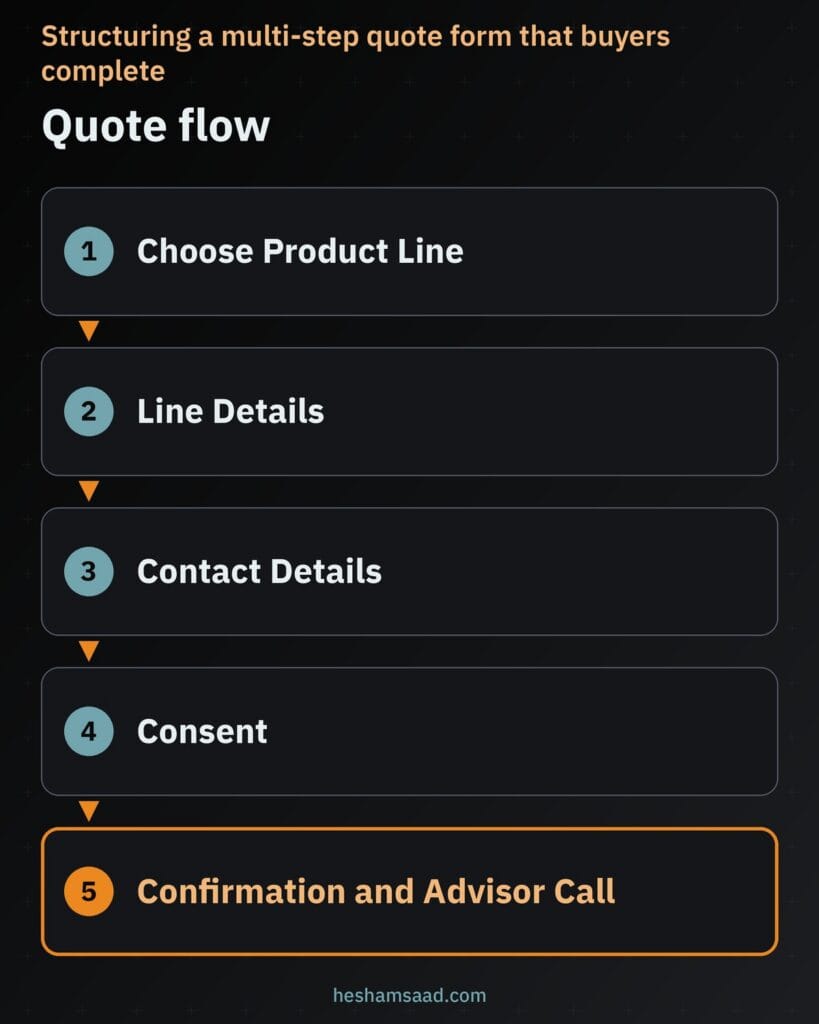
Display an honest confirmation message after submission explaining that a licensed advisor will review the details and call during the requested time window. Setting accurate expectations builds stronger trust than promising an instant quote when manual underwriting applies.
B2B firms with long sales cycles, such as factories, need a similar quote flow; see our manufacturing company website WordPress guide.
Claims guidance and secure portal tracking
Policyholders visit your claims page right after a collision, medical emergency, or property loss when clear guidance matters immediately. Placing a visible Claims link in your top navigation reassures both existing clients and prospective buyers checking how you support policyholders.
What belongs on your public claims page
Publish plain step-by-step instructions per policy line explaining how to report an incident, which documents to prepare, and how a claim reference is issued once the file opens. Display your company’s real emergency assistance and claims desk phone numbers near the top so mobile visitors can call without scrolling.
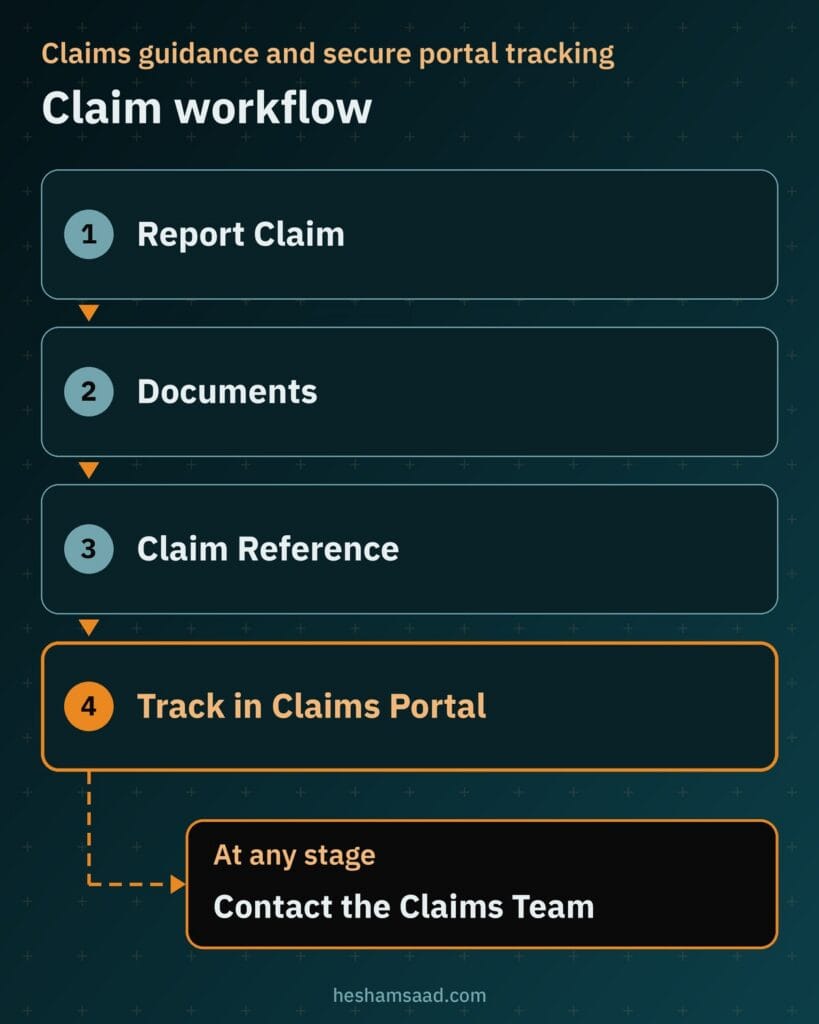
Organize document checklists by line so a driver sees accident report requirements while an HR manager sees group medical reimbursement rules. Clear public checklists reduce incomplete submissions and repeated phone follow-ups for your claims staff.
Keeping claim tracking inside your authenticated portal
Never publish claim status updates, medical approvals, or settlement records on public WordPress pages or unauthenticated lookup forms. Claim tracking must run exclusively inside your company’s own claims system or client portal behind its dedicated login.
Your WordPress claims page can link directly to that external portal or embed the login view only when your claims platform supports secure framing. That boundary keeps sensitive claim files off your marketing database while giving clients one clear starting point.
Regulatory trust signals that verify your license
Buyers across Egypt and the Gulf check whether an insurance site belongs to an authorized company or an unlicensed lead broker before submitting contact details. Much like planning a law firm website on WordPress in another regulated field, concrete licensing proof earns confidence where generic stock imagery cannot.
Show your company’s full legal name on the About page and in the site footer alongside your official registration details, replacing placeholders like [License number] and [Regulator name] with your real license number and the supervisory authority that licensed you. Add verifiable street addresses for every real branch plus named leadership or department contacts so corporate and individual buyers see accountable people.
If you operate an insurance brokerage, state clearly that you act as an intermediary and display partner insurer names or logos only with written permission from each carrier. Skip invented ratings, fabricated awards, or unverified client counts, and add Google Organization structured data on your home or About page with recommended properties such as name, legalName, url, logo, address, telephone, contactPoint, taxID, and vatID, keeping in mind that Google does not guarantee rich results.
Protecting personal data and hardening your site
Even without national IDs or medical files in initial quote forms, your site collects full names, phone numbers, ages, property locations, and company staffing details. Safeguarding that intake calls for the same discipline we describe when building an accounting firm website on WordPress that handles private client records.
Serve every page over HTTPS so personal details submitted through quote and callback forms travel encrypted in transit. Collect only the minimum fields required to prepare an initial quote, record explicit consent linked to your privacy policy, and follow WordPress hardening practices by limiting admin roles and restricting access to stored form entries.
WordPress core includes a built-in privacy policy page setting and Tools screens to export or erase a person’s personal data on request, and plugins can register their stored data with these tools. Those core features help manage individual privacy requests, although they do not on their own make your site compliant with local insurance or data laws. Keep WordPress core, themes, and plugins updated, maintain regular backups, and run a periodic WordPress security audit to review permissions and server rules.
Mobile speed and Core Web Vitals for policy buyers
Drivers checking roadside claim steps from a highway shoulder and parents comparing family medical plans at home browse on mobile phones over cellular connections. Because Google uses mobile-first indexing, Google indexes and ranks your site based on its mobile version, so mobile pages must carry the exact same policy descriptions, license disclosures, and structured data as desktop screens.
Evaluate speed and usability around Core Web Vitals: Largest Contentful Paint (LCP) for loading performance, Interaction to Next Paint (INP) for responsiveness when tapping multi-step form controls, and Cumulative Layout Shift (CLS) for visual stability so buttons never jump while loading. Keep pages light by compressing images, avoiding heavy visual sliders, installing only essential plugins, and testing every form step and click-to-call emergency number on real smartphones.
Native Arabic RTL pages that read naturally
Serving policyholders across Egypt and Gulf markets requires native Arabic pages written from scratch rather than literal translations of English insurance copy. Policy concepts such as deductibles, hospital networks, exclusions, and third-party liability need clear, natural Arabic phrasing so buyers understand coverage boundaries before speaking with your sales team.
Following W3C internationalization guidance, set dir=”rtl” directly on the html element for Arabic pages so HTML markup controls right-to-left direction rather than relying on CSS rules alone. Pair proper markup direction with a mirrored layout, legible Arabic web fonts, and thorough RTL testing across every WPForms step so progress indicators, dropdowns, phone fields, and validation notices align cleanly.
Local SEO for physical insurance branches
Motorists scheduling pre-insurance vehicle inspections and corporate managers dropping off signed policy documents search for offices in their own city or district. Applying structured WordPress local SEO helps each real branch appear in local search results without relying on spammy location tactics.
Create one dedicated page per physical, staffed branch listing its real street address, opening hours, local phone lines, landmark directions, and on-site policy or claims services, backed by a verified Google Business Profile per branch. Add Google LocalBusiness structured data using the specific InsuranceAgency schema.org sub-type where accurate with required name and address properties, and never publish doorway pages made by swapping city names where your firm holds no real office.
What drives project cost and build timeline
Budgeting and scheduling an insurance website build depend on your operational scope and system connections rather than page aesthetics alone. Defining these requirements before requesting vendor proposals prevents mid-project rework once compliance and underwriting leaders review the staging site.
- Count of active insurance lines and staffed physical branches needing dedicated content, maps, and structured data.
- Bilingual content writing scope when producing native Arabic and English policy guides, legal disclosures, and FAQs.
- Quote form conditional logic per insurance line plus lead routing integration into your sales inbox or CRM.
- Claims portal integration approach, whether a direct external login link, a secure embedded frame, or a custom API connection.
- Hosting setup, HTTPS configuration, role-based access controls, security hardening, backups, and ongoing maintenance after launch.
Aligning internally on which integrations belong in phase one gives every vendor the exact same brief to estimate against. Your sales, claims, and compliance heads can also prepare approved policy descriptions and license wording in parallel while templates are built.
When to bring in a WordPress developer and your next step
Generic pre-made themes look appealing in demo screenshots, yet they break down when you wire conditional multi-line quote forms, mirror Arabic RTL layouts cleanly, lock down access to personal data, and connect a claims portal without hurting mobile Core Web Vitals. Partnering on custom WordPress development services gives your company clean block templates, accurate organization and branch schema, and forms matched to what your advisors actually need.
Your marketing team also gets structured editing fields so updating branch hours, phone numbers, or approved policy brochures never disturbs page layouts or bilingual navigation. Technical maintenance, backups, and security updates stay predictable long after launch day.
Before kicking off design, list the exact insurance lines you sell, confirm your real [License number] and [Regulator name] wording with compliance, and decide where quote inquiries and claim logins will point. Once you have that brief ready, book a free consultation to review your requirements and map out your WordPress build.
Frequently asked questions
Do I need a separate page for each insurance line?
Yes, create one dedicated page for every insurance line your company actually sells, such as car, health, home, or business cover. Separate pages let buyers read plain-language cover options, required documents, quote steps, and claim instructions without scrolling past unrelated policies. Leave out any line you do not underwrite or broker so your advisors receive relevant inquiries.
What should an insurance quote form ask?
Ask only the basic details needed for an advisor to prepare an initial quote, split across short steps. Start with the policy line, collect core risk facts like vehicle model and year or covered member ages, then gather contact details, preferred callback time, and privacy consent. Never ask for national ID numbers, medical records, or card details in this first form.
Can clients track their claims on my website?
Clients should track claims only through the dedicated claims system or policyholder portal run by your company, protected by its own secure login. Never display claim progress, medical approvals, or settlement details on public WordPress pages. Your public claims page should list filing steps, required documents, and emergency phone numbers, then link to or securely embed that portal.
How do I show my license on the website?
Display your registered legal company name, your real license number, and the name of the insurance regulator that licensed your business in the site footer and on the About page. Pair those credentials with real branch street addresses and named contacts. If you operate as a broker, state your intermediary role and show partner insurers only with their permission.
How do I protect personal data sent through my site?
Serve your entire WordPress site over HTTPS so form submissions travel encrypted in transit, and collect only the minimum details needed to quote. Capture explicit consent linked to your privacy policy, restrict admin access to stored form entries, and keep WordPress core, themes, and plugins updated. Configure the built-in WordPress privacy tools to handle personal data export or erasure requests.
References
- WPForms Documentation: How to Create Multi-Page Forms in WPForms
- WordPress Plugin Developer Handbook: Privacy
- WordPress Documentation: Tools Export Personal Data Screen
- WordPress Documentation: Tools Erase Personal Data Screen
- WordPress Advanced Administration Handbook: HTTPS for WordPress
- WordPress Advanced Administration Handbook: Hardening WordPress
- W3C Internationalization: Structural Markup and Right-to-Left Text in HTML
- Google Search Central: Mobile-First Indexing Best Practices
- web.dev: Web Vitals
- Google Search Central: Local Business Structured Data
- Google Search Central: Organization Structured Data
- Google Search Central: SEO Starter Guide