هذا المقال متوفر باللغة العربية — اقرأ بالعربية
People looking for a gym, fitness studio or training club in Cairo, Riyadh, Jeddah or Dubai usually spot a clip on Instagram, get a referral from a friend, or tap a nearby pin on Google Maps. Before they pack a bag or drive over, they look for a clear gym website WordPress build where they can review membership tiers, check class times and see whether the branch suits their routine. When all they find is a crowded social feed with buried story highlights, many put off visiting or message reception asking the same basic questions all day.
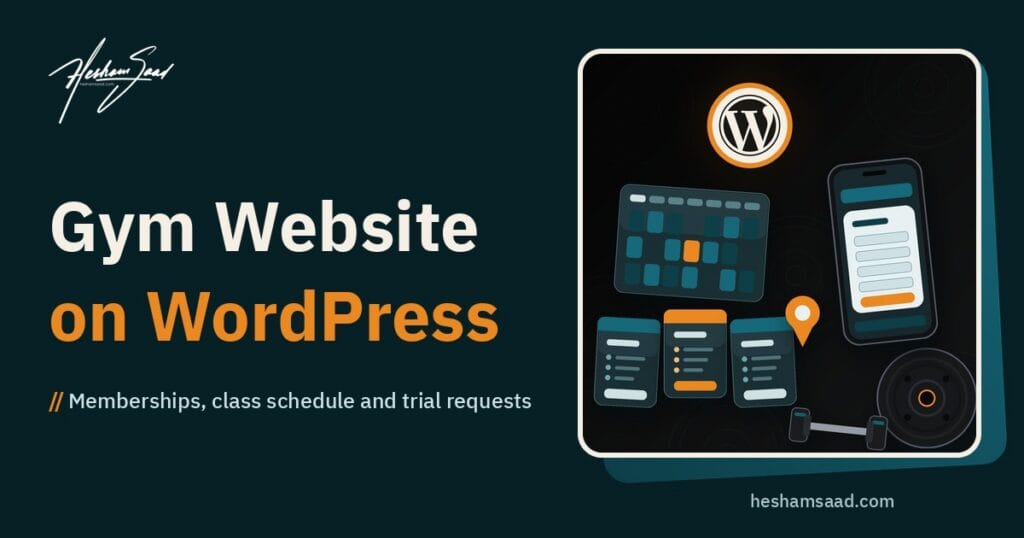
A practical gym membership website answers those everyday questions on a phone screen and gives prospective members an easy way to send a trial or visit request. Below is how to structure your pages, plan cards, mobile class schedules, payment options, local branch profiles and bilingual Arabic and English content without creating extra admin work for your staff.
Core pages a gym website WordPress setup needs
Sound gym website design starts with a focused menu built around what local prospects check before their first visit. Your Home page should state clearly what kind of gym or studio you run, name the neighborhoods you serve, and point visitors straight to Memberships and Plans, the Class Schedule and a Free Trial or Visit Request page. Keep Contact details and an FAQ page easy to reach so people can check parking, locker access, towel rules or membership freeze policies without calling the front desk.
Three supporting pages help visitors picture themselves training at your club. Your Trainers page should introduce only real coaches currently on your team, published with their consent and real background rather than stock portraits or invented certifications. Facilities works best with real photographs of your gym floor, studios and equipment, while Branches must list only open, operating locations with accurate hours and directions.
Across Egypt, Saudi Arabia and the Gulf, some clubs run women-only branches or sessions, separate training areas or dedicated women-only hours. Publish women-only sessions or separate hours only if your gym genuinely offers them, and state the exact branch and schedule clearly so visitors arrive at the right entrance and time.
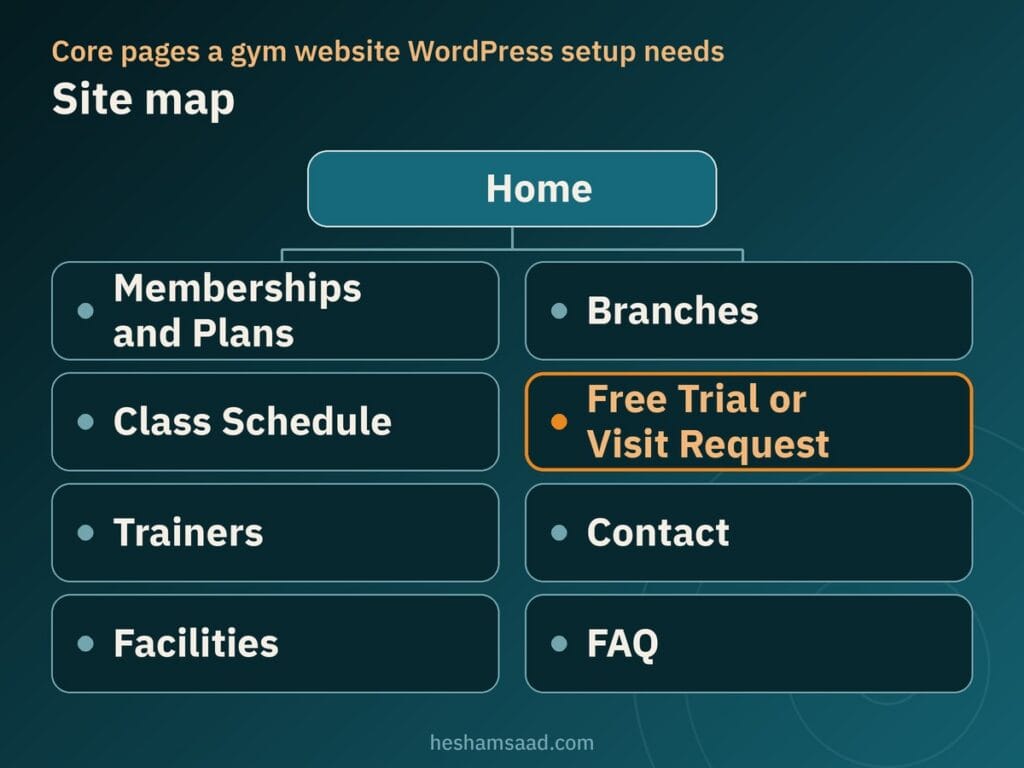
Keeping your navigation trimmed to these core pages stops mobile visitors from getting lost in empty subpages or promotional clutter. Someone tapping over from Instagram or Google Maps can check your facilities, scan class times and send a trial request without hunting through menus.
Presenting membership plans clearly
Effective fitness website design shows only the real membership plans your front desk actually sells. On every plan card, state what that tier includes exactly as your gym defines it: full-day or off-peak access hours, open floor training, group classes, single-branch or multi-branch entry, and any starter orientation or trainer sessions tied to that tier. Plain wording on the page prevents awkward misunderstandings at reception when a member arrives for a studio session or visits a second branch.
Club owners often hesitate over publishing rates openly. Display a price on your site only when it is your real rate and someone on your team will update the page immediately whenever plans or promotions change. If rates vary by branch or shift frequently and staff cannot keep the website current, leave numbers off the cards and invite visitors to request a trial visit or ask reception for current membership options.
| Plan detail | What to show on the card | What to leave off |
|---|---|---|
| Access scope | Entry hours, eligible branches, and open gym floor access | Vague tier names that hide off-peak or branch limits |
| Classes and trainer sessions | Included group studios and any starter coaching defined by the gym | Implying private training is included when billed separately |
| Price policy | Current real price kept updated, or a prompt to request plan details | Expired seasonal offers or unstated registration rules |
| Joining step | One clear button to join online or request a club visit | Multiple competing buttons inside the same plan card |
End every plan card with one clear way to join so mobile visitors never hesitate over what to tap next. Whether your club takes online sign-ups or starts every member with an in-person tour, keeping one consistent action across the page makes comparing plans straightforward.
A class schedule that works on mobile screens
For group training gyms, Pilates rooms, cycling studios and boxing clubs, the timetable is often the single most visited page on a fitness studio website. Members check session times on their phones before leaving home or work, and a wide multi-day desktop grid shrinks into unreadable columns on a narrow screen. Choosing between a simple daily timetable and a booking system depends on whether classes are open walk-ins or capped by room and equipment capacity.
Simple daily tables or lists
When your timetable rarely changes and members can walk in without reserving equipment, a clean schedule organized per day works reliably. WordPress provides a core Table block intended for tabulated data rather than page design, with controls to insert or delete rows and columns, add header and footer sections, pick default or stripes styles, and keep fixed width table cells enabled by default as of version 6.6. Because wide tables with many columns are cramped on a phone, stick to a few columns such as time, class and trainer, or publish one short class list per day under day tabs.
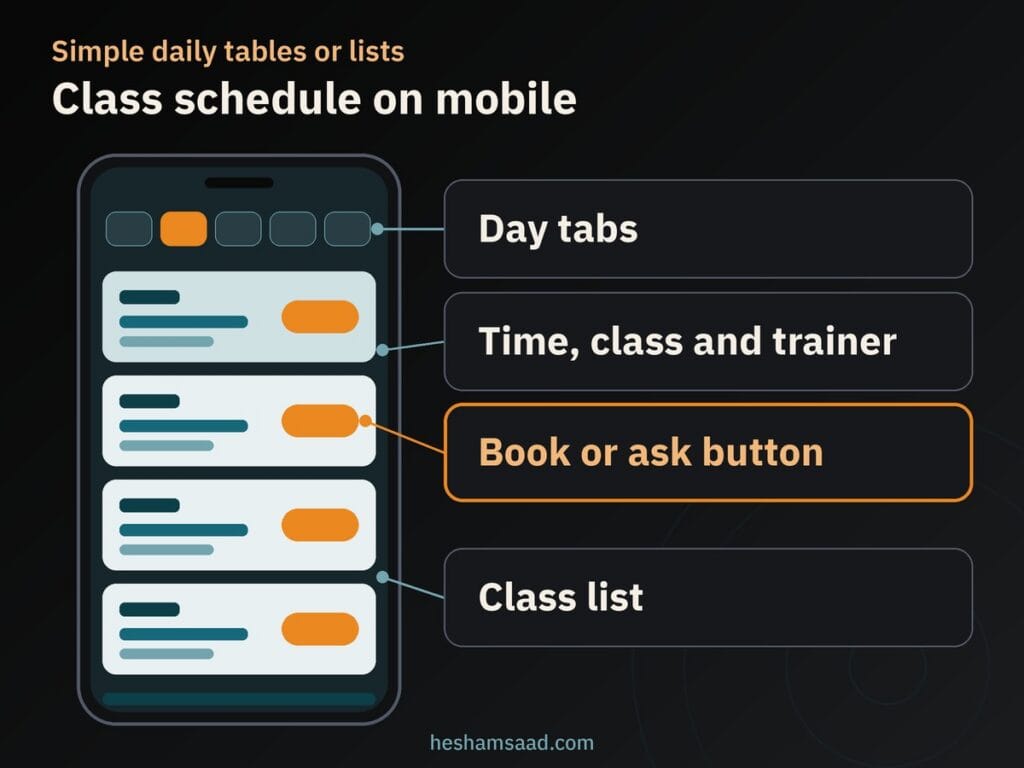
Placing a book or ask button at the end of each class row lets interested visitors act directly from the timetable. Reception or a manager can edit a coach swap or holiday change inside the regular WordPress editor without touching reservation settings.
Live class booking with spot limits
When reformer beds, bikes or studio spots are strictly limited, a booking plugin lets members reserve slots online and closes registration once a class fills up. That setup works well only when staff keep the schedule, coach assignments and spot capacities accurate every single day. Our guide to building a WordPress booking website explains how slot reservation tools work and what your team has to maintain behind the scenes.
If you run a spa or salon next to the gym, see our beauty salon website WordPress guide for service menus and booking.
Trial request forms, class booking and WhatsApp
Most prospects in local neighborhoods want to inspect the equipment, see how busy the floor gets in the evening, or try one session before committing to a membership. Giving visitors a low-friction way to request that first visit turns casual browsers into scheduled walk-ins your front desk can welcome properly.
Each inquiry channel fits a slightly different visitor habit. Most clubs get steady inquiries when they understand what each option handles best:
- A short trial or visit request form: collects just a name, phone or WhatsApp number, preferred branch, preferred visit time, and fitness goal or class interest so your team can reply and confirm.
- Online class slot booking: suits studios offering scheduled introductory sessions where a visitor picks an exact date and hour.
- WhatsApp click to chat: uses the official https://wa.me/ link format followed by your full phone number with country code in digits only, plus an optional ?text= parameter for a short pre-filled message naming the branch and class.
You can combine these cleanly by making the trial request form your primary page action and keeping WhatsApp click to chat as a secondary button for quick questions. Keep both the form and any pre-filled WhatsApp text brief: never ask prospects to share health conditions, medical history, ID numbers, contracts or private documents in a first inquiry or chat prompt.
Taking membership payments online or at the desk
If your club sells straightforward passes or plans with clear terms, a one-off online payment through a payment gateway lets ready buyers join anytime. Letting people pay at the front desk after a tour or trial session is also a completely valid policy, especially when members sign club agreements on site. Many gyms offer online checkout for standard memberships while keeping front-desk payment open for everyone else.
Take extra care before promising automatic recurring renewals on your plans page. Whether a plan renews automatically depends on both the specific WordPress plugin managing memberships and whether your payment gateway supports recurring charges in your market. Always check the official documentation of both the plugin and the gateway first, and read our comparison of payment gateways in Egypt and Saudi Arabia when reviewing regional checkout options.
Before opening online payments to the public, run a live payment and process a complete refund from start to finish. Testing confirms that confirmation emails arrive, reception can verify paid sign-ups right away, and refunds settle cleanly without guesswork.
Branch pages, local search and Google Business Profile
Members rarely drive across town to work out when a good gym sits near home or work, so local search clarity matters for every district you serve. Build a dedicated page for every real, open branch with its street address, nearby landmarks, opening hours, parking notes and branch schedule. When a branch has a real public address where members train, a developer can add ExerciseGym structured data from Schema.org (following Google Search Central advice to pick the most specific LocalBusiness sub-type possible), supplying the required name and address alongside telephone, opening hours, geo coordinates and URL, then checking it in the Rich Results Test without expecting guaranteed rich results.
Pair your branch pages with Google Business Profile guidelines: represent your gym as shown on real-world signage, keep addresses precise, and maintain only one profile per business unless you operate genuinely separate locations with separate staff and service areas. Read Google’s official guidelines and service-area documentation carefully before opening more than one profile, particularly if you also visit clients for mobile training as a hybrid or service-area business. Our guide to WordPress local SEO explains how branch pages and map listings work together.
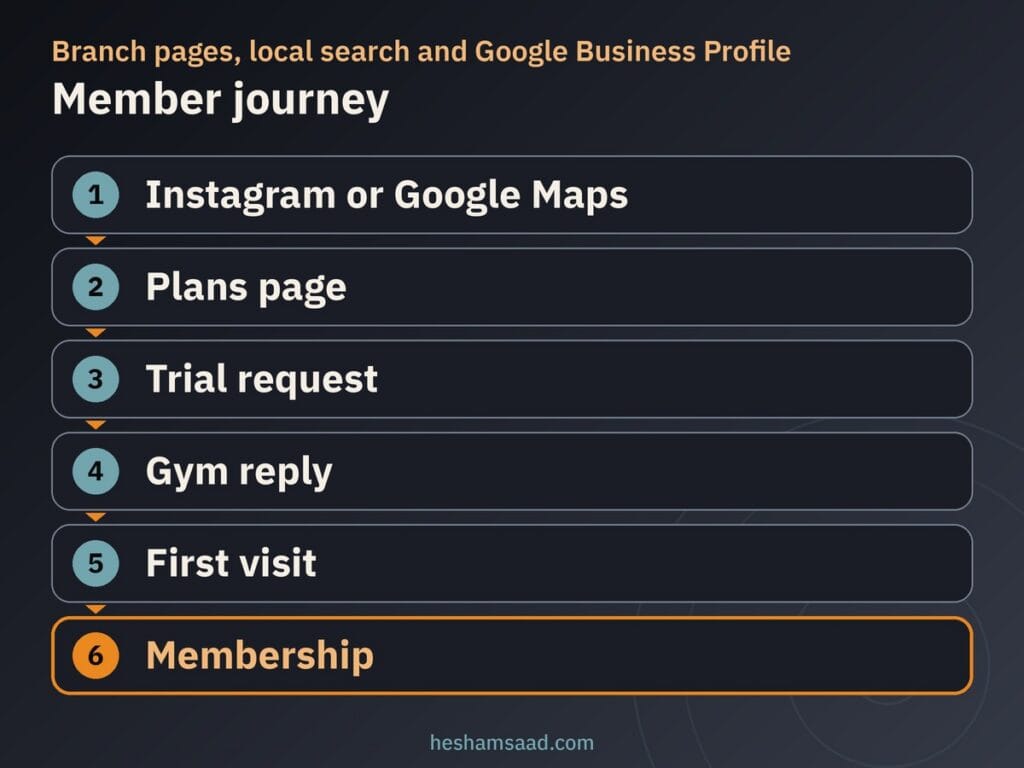
When branch pages and map listings match, a local visitor moves naturally from Instagram or Google Maps to your plans page, sends a trial request, gets a fast gym reply, comes in for a first visit and signs up for a membership. Be skeptical of anyone promising guaranteed map rankings: Google keeps algorithm details confidential and explains that local results rely mainly on relevance, distance and prominence, which also reflects links and reviews. Under Google Maps user-generated content policy, reviews and ratings must reflect a genuine experience with the business, so ask actual members for honest reviews and never stage fake ones.
Keeping photo and video sections fast on phones
Real photos of your gym floor, group studios and equipment build trust far faster than stock fitness photography, yet oversized image files stall mobile connections. Because images are often the largest contributor to page size, Google image SEO best practices advise using standard HTML img elements (Google does not index CSS images) in supported formats such as WebP, AVIF or JPEG, applying responsive image techniques, and checking speed with PageSpeed Insights. Aim to keep Largest Contentful Paint at 2.5 seconds or less for at least 75% of page visits.
From WordPress 5.5 onward, WordPress lazy-loads images by default by adding native loading=”lazy” to img tags that have width and height attributes, back-fills dimensions on attachment images to reduce layout shifting, and outputs srcset and sizes attributes for responsive screens. However, both web.dev and Google Search Central warn against lazy-loading content likely to be immediately visible in the viewport on load, especially your LCP hero image. Keep the top hero photo eager, let lower facility galleries lazy-load, and verify pages with the URL Inspection Tool in Search Console.
Use short, descriptive filenames instead of generic camera filenames, write useful alt text near relevant copy without keyword stuffing, and pick a high-resolution gym photo rather than a site logo as your preferred social image. Skip heavy autoplaying background video on mobile headers; a sharp still photo with an optional tap-to-play club tour keeps phones responsive.
Protecting member data on your site
Keep data collection minimal across your website so prospective members feel comfortable getting in touch. Ask only for basic contact details, branch preference and class interest on your trial forms. Do not collect health information, injury histories, body measurements or ID images through website forms unless your gym truly needs them online and a developer sets up strict access rules and secure handling first.
Serve the entire site over HTTPS so inquiry forms and payment sessions stay encrypted in transit. Follow official WordPress hardening guidance by keeping WordPress core, plugins and themes updated strictly from official wordpress.org releases and limiting admin accounts to active managers. You can review the practical checks in our WordPress security audit guide to keep member inquiries protected.
Arabic and English pages with clean RTL layouts
Across Egypt, Saudi Arabia and the Gulf, a bilingual gym website serves both Arabic-first local members and English-speaking residents or coaches. Polylang, a free multilingual plugin on WordPress.org, translates posts, pages, media, categories, tags and custom post types, supports right-to-left (RTL) scripts, sets languages by URL code, subdomain or separate domain, and provides language switcher blocks, widgets or menu items, with additional features in Polylang Pro.
Once both languages are in place, test your class schedule tables, membership plan cards and trial request forms in Arabic on an actual mobile phone to check column order, button alignment and phone fields. When mirrored tables or form labels shift out of place in Arabic, read our guide on how to fix WordPress RTL issues to see what a developer adjusts in the styling.
What drives the cost of building the site
Proposals for gym websites vary widely because two sites with similar home pages can involve very different technical work underneath. What shapes the scope most is how interactive your branches, schedules and sign-ups need to be:
- Number of branches and pages: a single studio needs fewer location pages, schedules and structured data setups than a multi-branch club.
- Plans and schedule approach: static plan cards and a daily Table block take less setup than live class booking with spot limits.
- Online payments and renewals: connecting a payment gateway, testing refunds and verifying recurring renewal support add setup and testing work.
- Trainer pages and bilingual versions: preparing coach profiles, organizing Arabic and English pages, and testing RTL layouts expand review effort.
- Photo and video preparation plus maintenance: compressing real gym media and handling ongoing WordPress updates keep the site fast and reliable after launch.
Choosing features your reception staff can realistically keep updated stops you from paying for complex booking tools that go stale after launch. Starting with a clean, maintainable setup leaves room to add online reservations or checkout later if demand grows.
When a WordPress developer helps you launch right
Pre-made demos often look tidy on a desktop monitor and break once you load real Arabic and English timetables, multi-branch addresses and mobile photo galleries. Bringing in a developer helps you put together readable mobile schedules, ExerciseGym structured data for physical branches, fast facility photography and tested inquiry forms that behave properly in RTL. Multi-location service businesses share many of these structural decisions; if you want to see how a related setup handles branches, specialist profiles and booking inquiries, read our guide to building a clinic website on WordPress.
As your concrete next step, write down your open branches, your real membership plans, whether classes need spot reservations or a daily schedule, and whether members will pay online or at reception. When you are ready to turn that list into a fast bilingual site, explore my WordPress development services or book a free consultation to plan the right structure for your gym.
Frequently asked questions
Do I need a booking system for classes?
You only need a booking plugin when classes have limited spots or equipment and members must reserve in advance. If your timetable rarely changes and members can walk into group sessions freely, a simple daily schedule built with the core WordPress Table block or a clean daily list is easier to read on mobile phones and much faster for staff to update.
Should I show membership prices on the site?
Show membership prices only when they are your real current rates and your team will update the page immediately whenever plans or promotions change. Outdated fees on a website create frustration at the reception desk. If your rates vary by branch or season and staff cannot maintain them consistently, describe what each plan includes and invite visitors to request a trial visit instead.
Can members pay online?
Yes, members can make a one-off online payment for a membership plan through a supported regional payment gateway, or you can let them pay at the front desk. Automatic recurring renewals depend on both your membership plugin and whether your payment gateway supports recurring billing, so check the official documentation for both before promising automatic renewals, and test a payment and refund before launch.
How do I rank for my area and each branch?
Nobody can guarantee search rankings because Google keeps its algorithm details confidential and local results rely mainly on relevance, distance and prominence. Give every real public branch its own page with accurate hours and address details, ask a developer to add ExerciseGym structured data, keep your Google Business Profile complete under official guidelines, and ask actual members for genuine reviews.
How do I run an Arabic and English site?
You can connect Arabic and English pages on one WordPress installation using Polylang, a free multilingual plugin that translates pages, posts and media, supports right-to-left scripts, and adds a language switcher to your menu. After translating your content, test your class schedule tables, membership plan cards and trial request forms in Arabic on a mobile phone so aligned columns and fields stay readable.
References
- WordPress Documentation: Table block
- Schema.org: ExerciseGym
- Google Search Central: Local business structured data
- Google Business Profile Help: Guidelines for representing your business on Google
- Google Business Profile Help: Manage service areas for service-area and hybrid businesses
- Google Business Profile Help: Tips to improve your local ranking on Google
- Google Maps User Generated Content Policy: Prohibited and restricted content
- WhatsApp Help Center: How to use click to chat
- WordPress.org Plugins: Polylang
- Make WordPress Core: Lazy-loading images in 5.5
- web.dev: Optimize Largest Contentful Paint
- web.dev: Browser-level image lazy-loading for the web
- Google Search Central: Fix lazy-loaded content
- Google Search Central: Google image SEO best practices
- WordPress Advanced Administration Handbook: Hardening WordPress
- WordPress Documentation: HTTPS for WordPress