هذا المقال متوفر باللغة العربية — اقرأ بالعربية
If you run a beauty salon, a hair salon or a nail and beauty studio, your site has a short list of jobs. It shows what you offer, shows work you are proud of, and makes it easy to ask for an appointment from a phone. This guide explains how I plan a beauty salon website WordPress project for owners in Egypt, Saudi Arabia and the Gulf, page by page, so you know what to ask for before you hire anyone.
You will not find prices or promises here. You will find the decisions that change how the site works: which pages to build, how to present your price list, which booking approach fits your team, how to show your gallery without slowing the site down, and how each branch gets found on Google Maps.
The core pages of a beauty salon website WordPress project
Good salon website design starts with the page list, not the colors. A clear list keeps the menu short, keeps the budget honest and stops the site from filling up with pages nobody opens. I start with this set and remove anything your salon does not really have:
- Home: who you are, where you are, and one clear button to book or ask a question.
- Services, grouped by category such as hair, nails, skin and makeup, covering only what you actually offer.
- Price list, either inside each service or as its own page.
- Gallery of real work done in your salon.
- Team, showing real staff members who have agreed to appear.
- Booking or appointment request.
- Branches, with one page for each real location.
- Contact, with phone, WhatsApp and opening hours.
- FAQ, answering the questions your reception team keeps answering by phone.
If your salon has a women-only area or ladies-only hours, say so plainly on the home page, the branch page and the booking page. State it as a fact, with the days and the entrance details, and leave it there. If you do not have them, leave the topic out completely.
Every page should lead to booking or WhatsApp, so a visitor who has seen enough never has to hunt for the next step. This is the site map I sketch before any design work starts:
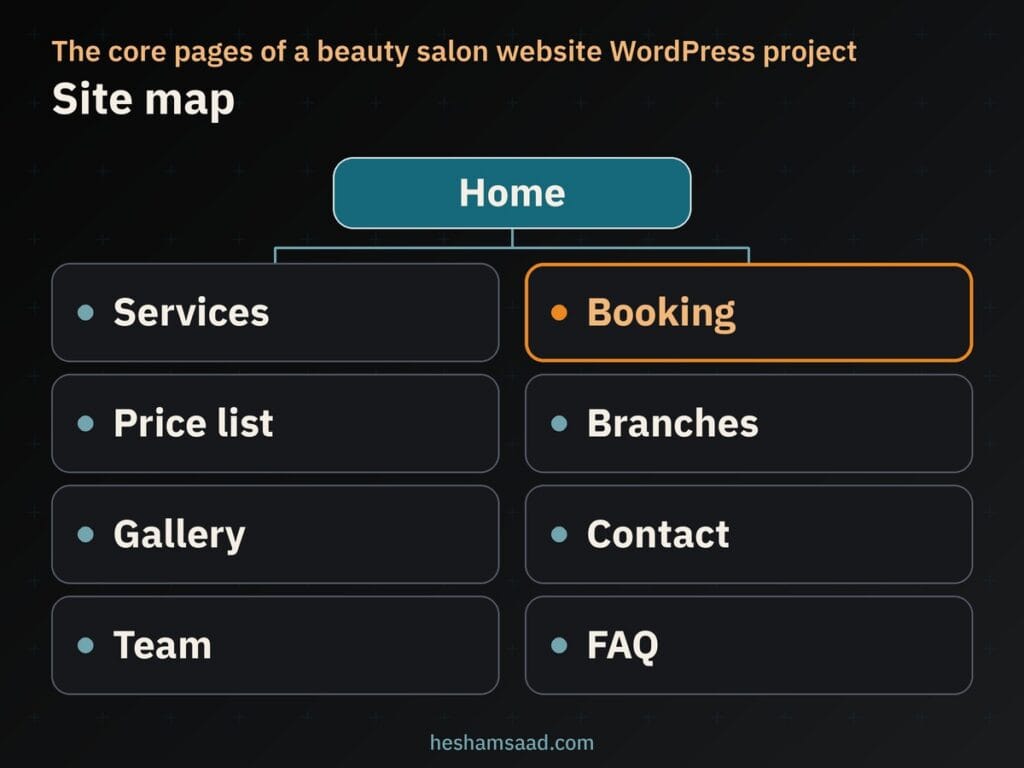
The team page is optional. If your staff change often or prefer not to be shown, a strong gallery and clear service pages can do the same job without the upkeep.
A services and price list that reads well on a phone
Treat your salon price list page as real content, not decoration. A scanned photo of your printed menu forces visitors to zoom on a phone, and it cannot be searched, translated or updated quickly. Real text in a list or a simple table avoids all three problems.
List only the services you offer today. A price belongs on the page only if it is the real current price and someone on your team is responsible for keeping it updated. Use “starting from” wording only if your salon genuinely prices that way. When the final price depends on the client, describe the service and invite a booking or a WhatsApp question instead of guessing.
Here is what I show for each service, and when:
| Field | Show it when | Why it helps |
|---|---|---|
| Service name | Always | Lets a visitor find the service quickly |
| Short description | Always | Explains what is included in plain words |
| Approximate duration | Only if your salon defines it | Helps the client plan the visit |
| Price | Only if real, current and kept updated | Gives a clear answer without a phone call |
| Starting from wording | Only if your salon really prices that way | Sets an honest expectation |
| Booking or WhatsApp link | Always | Turns reading into a request |
The core WordPress Table block handles this well. Its documentation says tables are best used for tabulated data rather than page design, and a price list is exactly that. Turn on the Header section, try the Stripes style if rows blur together, and check the result on a narrow phone screen, because a table with many columns gets cramped fast.
Group the price list the same way as your services. On a hair salon website, for example, cuts, color and treatments can each get their own small table. Matching the grouping on both pages means a client who reads about a service finds its price without searching.
Booking online, by request or on WhatsApp
This decision affects your daily routine more than any design choice does. A beauty salon booking website can work in three ways, and the right one depends on how your reception team actually works.
A booking plugin with live time slots
A booking plugin lets clients pick a service, a staff member and a time slot themselves. It is convenient, but it depends on your team: calendars, days off and service durations must stay accurate, or clients will book slots that do not exist. I explain how these plugins work in my guide to building a WordPress booking website.
A short appointment request form
If you prefer to confirm every visit by hand, a short form is enough: name, phone or WhatsApp number, branch, service, and preferred day and time. Your team replies and confirms. It asks less of your staff and keeps the schedule in your hands, but the client waits longer for an answer.
WhatsApp click to chat
Click to chat uses a wa.me link with your full number in international format, digits only, plus an optional pre-filled message. Keep that message short, for example the branch and the service the visitor was viewing. It suits quick questions, but a chat is harder to track than a form if nobody owns the inbox.
You can combine these options. One setup I like puts the booking plugin or request form on service pages and a WhatsApp button on every page for quick questions. With a booking plugin, the flow looks like this:
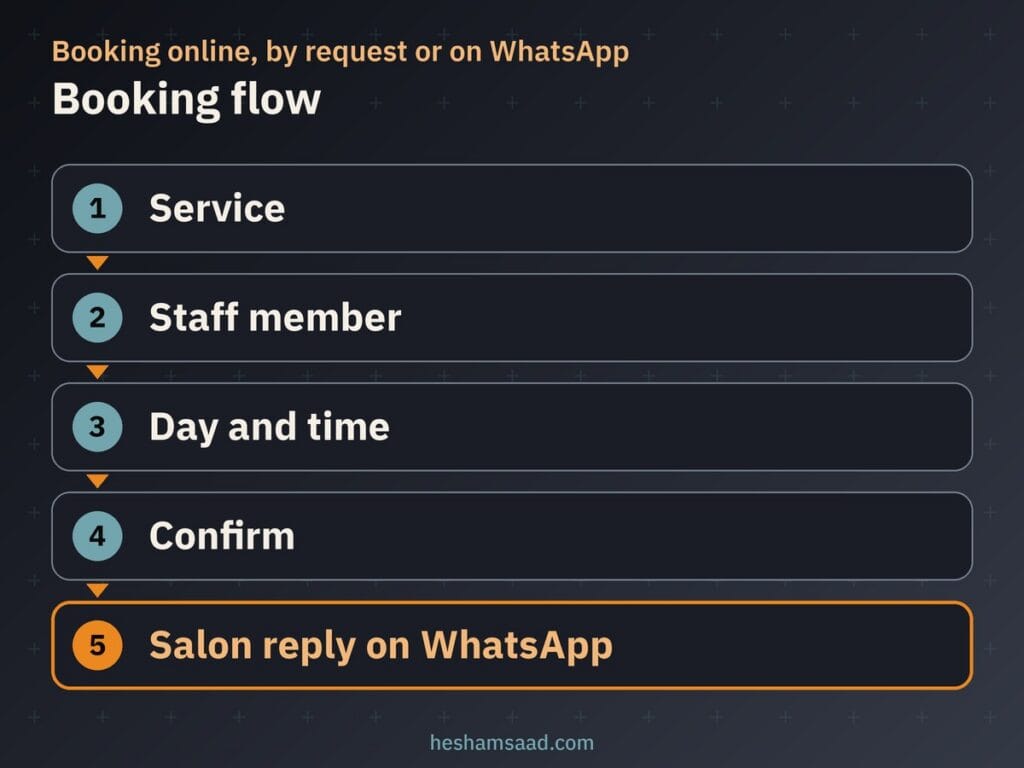
Whatever you choose, keep the first form and the pre-filled WhatsApp text free of health, allergy or skin condition questions. That information is sensitive, and if a treatment really needs it, your staff can ask in person before starting. The same goes for ID numbers or private documents: a first message has no reason to include them.
Deposits and paying online
If no-shows on long appointments cost you time, an online deposit can look attractive. Whether you can take one depends on two things: the booking plugin and the payment gateway. Read the official documentation of both to see what they support for deposits, refunds and your country before you promise anything on the site.
Paying at the salon is still a valid choice. You confirm appointments by WhatsApp or phone and collect payment on the day, which keeps the site simpler and avoids refund questions altogether.
If you do take payments online, test before launch. Book a real service, pay a real deposit, then issue a refund and check that the confirmation messages and your records show the correct status. Write your refund rule in plain words next to the booking button so nobody is surprised later.
A gallery of real work that loads fast
Your gallery is your proof, so it has to be real: your own work, your own chairs, your own space. Stock photos presented as your work mislead visitors, and the difference becomes obvious the moment they walk in.
Consent comes first. Photograph clients only with their permission, and never publish a face without clear consent. When a face is not needed, close-ups of hands, nails, finished hair from behind or details of a style show the work just as well.
Speed comes next. Google’s image guidance notes that images are often the largest contributor to page size, and a gallery is almost all images. Resize photos to the size they display at, compress them, and use formats such as WebP or AVIF, both supported by Google Search. Since WordPress 5.5, images with width and height attributes get loading=”lazy” by default, so photos further down the page load only as the visitor scrolls near them.
There is one exception. web.dev warns against lazy-loading images that are likely to be visible when the page loads, especially the LCP image. Keep the first large photo of the gallery or home page eager and let the rest lazy-load. I cover the full process in my guide to WordPress image optimization.
Name files the way a person would describe them, such as balayage-long-hair.jpg rather than IMG00023.JPG, and write alt text that says what the photo shows. Google treats alt text as the most important image metadata, and it also helps visitors who use screen readers. Describe the work and skip the keyword stuffing.
Branch pages, Google Maps and local search
If you have more than one branch, give each its own page: exact address, phone, WhatsApp, opening hours, a map, and any services or hours that differ at that location. One contact page listing every branch makes it harder for a visitor to find the one near them.
Your Google Business Profile matters as much as the site. Google’s guidelines ask you to represent the business as it appears in the real world, on your signage and stationery, with an accurate and precise address. They allow only one profile per business, so never create a second profile for the same salon. For several branches, follow the guidelines for each real location instead of guessing.
Reviews must come from real visits. Google Maps policy says reviews should reflect a genuine experience with the business, so do not buy them, write them yourself or trade them with friends. Ask clients after their appointment and reply politely to what they write.
Google says local results depend mainly on relevance, distance and prominence, and it keeps the details of its algorithm confidential. Nobody can honestly promise you the top spot in Maps. What you can control is complete, consistent information on your profile and your branch pages, which I cover in my guide to WordPress local SEO.
For branches with a real public address, a developer can add structured data using the schema.org BeautySalon type, which follows Google’s advice to use the most specific LocalBusiness sub-type. Name and address are required, while telephone, opening hours, geo coordinates and URL are recommended. Google does not guarantee rich results, so validate the markup with the Rich Results Test and treat it as support, not a ranking trick.
This is the client journey I plan each branch page around:
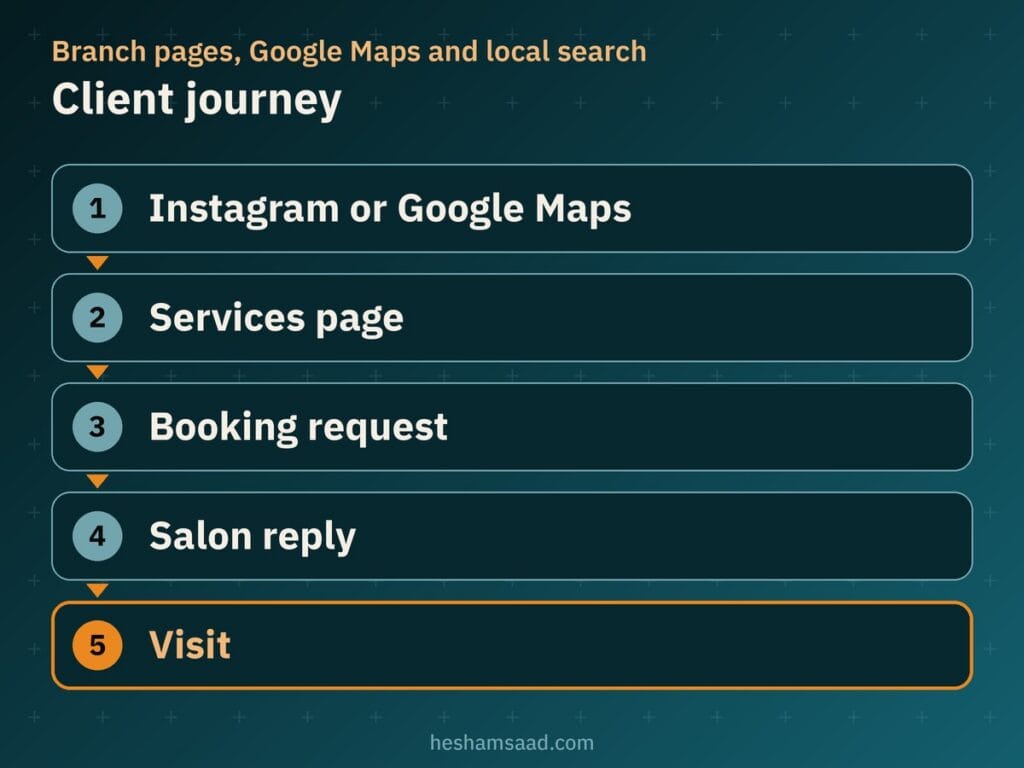
You control every step of it. Your Instagram bio and Maps profile should point to the right page, the services page should answer the obvious questions, and someone on your team should own the reply to every booking request.
Arabic and English pages that work in RTL
A bilingual salon website needs more than translated text. Arabic reads right to left, so menus, icons and buttons must mirror correctly, and phone numbers and times must stay readable inside Arabic sentences.
On WordPress, I use Polylang for this. It is a free plugin that translates posts, pages, media, categories, tags and custom post types, and its plugin page states that RTL scripts are supported. The language can be set through a code in the URL, a subdomain or a separate domain for each language, and you add a language switcher as a block, a widget or a menu item. More features are available in Polylang Pro.
Write the Arabic pages for Arabic readers rather than translating line by line. Service names deserve extra care: use the words your own clients say at reception, in both languages. Then open the Arabic pages on a phone and test the parts with the most risk:
- The price table: column order, alignment and fit on a small screen.
- The booking form: labels, error messages, date and time fields, and the confirmation message.
- The WhatsApp button: its position and the Arabic pre-filled text.
- The language switcher: it should open the matching page, not just the home page.
Keeping client data safe and small
A salon site collects names, phone numbers and appointment details. Treat that as client data, even if it feels minor. The simplest protection is to collect as little as possible: if a field does not help you confirm an appointment, remove it. This is practical advice, not legal advice, so check the rules that apply in your country.
Run the whole site on HTTPS so forms travel over an encrypted connection, and keep WordPress core, the theme and plugins updated. The WordPress hardening guide also recommends installing WordPress only from official releases on wordpress.org. Remove plugins you no longer use, and give staff accounts only the access they need.
Decide who reads booking requests and WhatsApp messages, and where they are stored. A form that sends to an inbox nobody checks is a data risk and a lost appointment at the same time.
What shapes the cost of a salon site
I will not quote figures here, because the same request can mean very different amounts of work. These are the factors that move the scope up or down:
- Number of branches, since each needs its own page and details.
- Number of services and pages, including how many categories the price list has.
- Booking approach: a short request form is lighter than a booking plugin with staff calendars.
- Online deposits, which add payment setup and testing.
- Gallery size, and whether photos arrive ready or need selecting, resizing and naming.
- Arabic and English versions, each written and tested properly.
- Maintenance after launch, from updates to price list changes.
When you ask for quotes, send every developer the same brief: branches, service categories, booking approach, deposits or not, gallery size, languages, and who will update prices. Then you can compare the offers fairly.
When a developer is worth it
You can put together a basic salon page on your own. A developer earns their place when the site has several branches, a booking plugin tied to staff calendars, online deposits, a large gallery that must stay fast, or Arabic and English versions that both have to work on a phone. Those parts affect each other, and a mistake in one shows up in another.
If your business sits closer to treatments and appointments with specialists, my guide to a clinic website on WordPress uses a similar structure built around appointment requests, doctors and branches.
Your next step: write down your branches, your service categories, whether your prices are fixed, and how your team confirms appointments today. Bring that list to a free consultation and I will tell you which booking approach fits your salon and what the build involves. If you already know what you need, see how I handle WordPress development projects from planning to launch.
Frequently asked questions
Do I need online booking for my salon?
Not always. A booking plugin fits when you want clients to pick a service, staff member and time slot themselves, but your team must keep calendars and service durations accurate. If you prefer to confirm each visit by hand, a short appointment request form plus a WhatsApp button can work well, and you can combine all three on the same site.
Should I show prices on the site?
Show a price only when it is the real current price and someone at the salon will keep it updated. Use starting from wording only if your salon really prices that way. When a price depends on the client, list the service with a short description and invite a booking or a WhatsApp question instead of guessing.
Can clients pay a deposit online?
Yes, it is possible, but it depends on the booking plugin and the payment gateway you choose, so read the official documentation of both before promising it on the site. Paying at the salon is still a valid choice. If you do take deposits online, test a real payment and a refund before launch.
How do I show up in local search for each branch?
Give each real branch its own page with its exact address, phone number, opening hours and map. Keep your Google Business Profile accurate, never create duplicates, and ask clients for genuine reviews only. A developer can add BeautySalon structured data for branches with a real public address, but nobody can promise a ranking or a rich result.
How do I run an Arabic and English site?
Polylang is a free plugin that lets you translate pages, posts, media and categories, supports right to left scripts, and sets the language through a code in the URL, a subdomain or a separate domain. Before launch, open the Arabic pages on a phone and test the price table, the booking form and the WhatsApp button.
References
- WordPress documentation: Table block
- Schema.org: BeautySalon
- Google Search Central: Local business structured data
- Google Business Profile: Guidelines for representing your business on Google
- Google Business Profile Help: Tips to improve your local ranking on Google
- Google Maps: User generated content policy
- WhatsApp Help Center: How to use click to chat
- Polylang on WordPress.org
- Make WordPress Core: Lazy-loading images in 5.5
- web.dev: Browser-level image lazy loading for the web
- Google Search Central: Google image SEO best practices
- WordPress Developer Resources: Hardening WordPress
- WordPress documentation: HTTPS for WordPress