
هذا المقال متوفر باللغة العربية — اقرأ بالعربية
Launching a baby store website WooCommerce platform in Egypt, Saudi Arabia, or the wider Gulf requires much more than uploading stroller photos to a generic retail template. Expectant parents and extended family members shop for infant products under tight timelines, strict safety expectations, and rapidly shifting developmental stages. A single customer journey often combines lightweight organic cotton bodysuits and silicone feeding bottles with an engineered modular travel system and a solid wood convertible crib that requires scheduled home assembly.
When a store treats all of those items the same way in the catalog and cart, shoppers quickly hit friction. Parents struggle to tell whether an infant car seat adapter fits their chosen stroller chassis, relatives accidentally buy duplicate baby shower gifts, and flat courier shipping rules either overcharge for small pacifiers or under-calculate freight on heavy nursery wardrobes. Store owners end up resolving preventable sizing, compatibility, and delivery disputes manually over phone calls and messaging apps.
What a baby store website WooCommerce build must handle
Baby and nursery commerce across MENA spans four distinct business models that frequently overlap as a brand grows. Independent baby boutiques curate premium organic apparel, swaddles, and wooden toys; maternity and nursing retailers focus on sizing transitions from pregnancy through postpartum recovery; nursery furniture showrooms sell complete room sets with custom finishes and home installation; and regional children gear distributors manage multi-brand catalogs covering strollers, ISOFIX car seats, high chairs, and digital safety monitors.
Each of these merchants serves two distinct buyer personas on the exact same storefront. The primary buyer is an expectant or new parent researching technical safety specifications, fabric breathability for warm regional climates, folded stroller trunk dimensions, and long-term durability across multiple children. The secondary buyer is a grandparent, aunt, uncle, or family friend shopping from a shared baby shower list or looking for a reputable hospital welcome gift with a printed greeting card and direct delivery to the parents’ home.
Investing in custom WordPress development allows a nursery brand to bring these workflows together inside a unified operational structure. Instead of patching together conflicting third-party scripts, your store architecture can guide both technical parental research and effortless family gifting from the first category click through final doorstep fulfillment.
- Dual-axis catalog discovery: Shoppers need to browse by functional department (travel systems, car seats, nursery furniture, feeding and nursing, baby care essentials, and infant apparel) while filtering simultaneously by store-configurable developmental milestones.
- Collaborative family gifting: Expectant parents expect shareable wishlists with QR codes and real-time purchased item locking so extended family members can buy exact requested variations or contribute digital gift cards toward major gear.
- Component-level inventory synchronization: Travel system bundles that combine a stroller frame, a carrycot bassinet, a car seat, and weather accessories must deduct stock from each underlying SKU automatically whenever a bundle or standalone part sells.
- Split fulfillment and technician scheduling: Checkout must distinguish between small courier parcels and bulky dimensional-weight nursery furniture that requires two-person room-of-choice delivery or showroom collection.
Structuring multi-stage age and milestone catalog navigation
An infant grows through distinct physical and developmental milestones during the first three years of life, making age-based navigation the backbone of an effective baby store catalog. If a parent searching for a newborn bassinet or slow-flow bottle nipple has to scroll past toddler booster seats and training cups, mobile bounce rates climb rapidly. At the same time, organizing your primary menu strictly by age creates confusion when shoppers want to compare convertible products that span multiple years, such as all-stage car seats or cribs that convert into toddler beds.
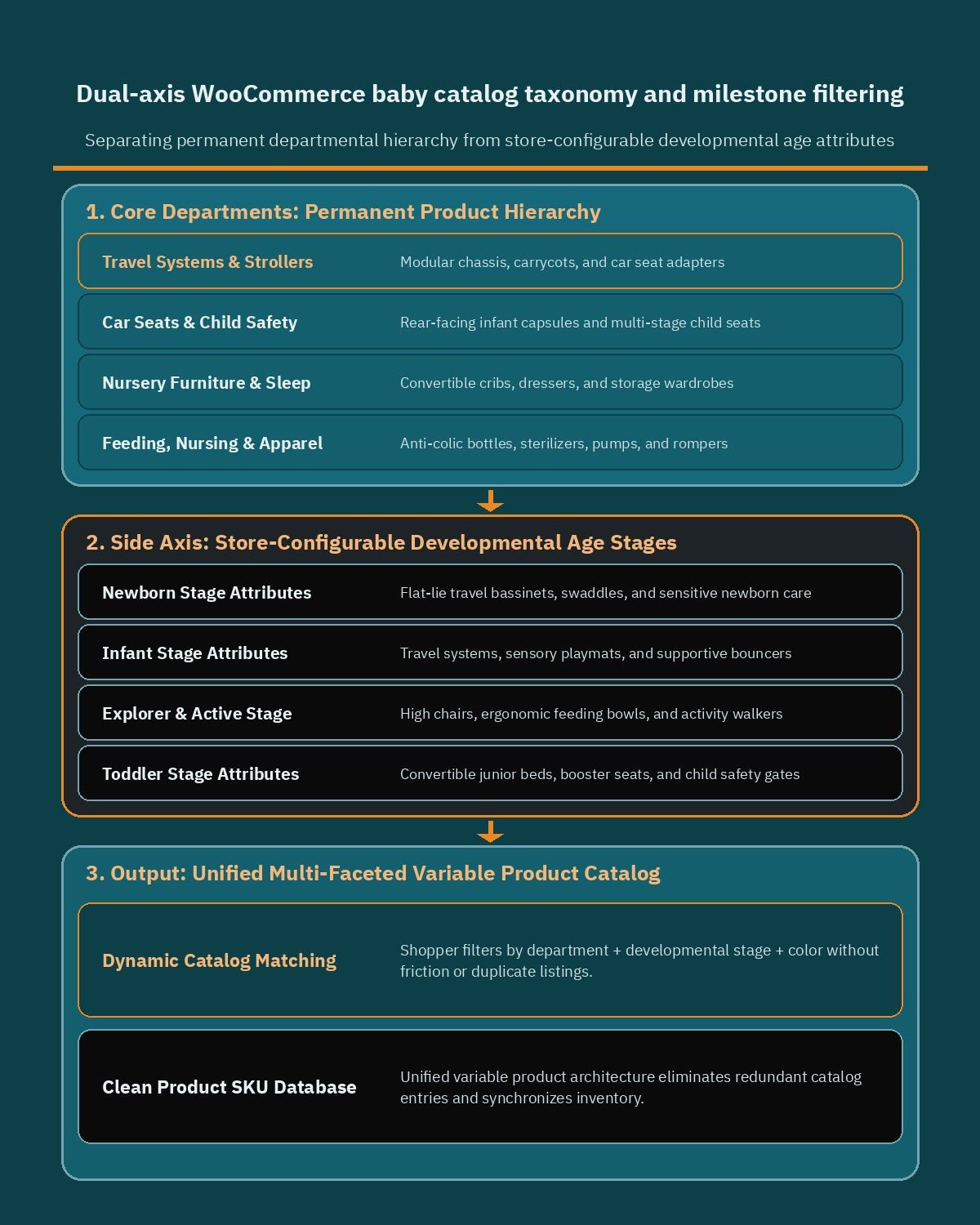
The cleanest solution in WooCommerce separates permanent departmental hierarchy from cross-cutting developmental and technical attributes using WooCommerce product taxonomies, categories, and custom attributes configured under Products > Categories and Products > Attributes. Your primary hierarchical categories represent stable retail departments, while global attributes capture store-configurable age milestones, weight brackets, safety certifications, and material compositions.
When you structure age brackets as global attributes rather than isolated category silos, a single convertible high chair or multi-stage car seat can belong to one logical department while appearing in filtered views across every developmental stage it supports. Merchants can define age windows as store-configurable options tailored to their inventory assortment, such as Newborn (0 to 3 months), Infant (3 to 6 months), Explorer (6 to 12 months), First Steps (12 to 24 months), and Toddler (24 months and up).
Mapping sub-departments and technical filtering attributes
Every sub-department in a baby catalog requires specific filtering attributes so parents can verify fit, safety, and everyday practicality before adding items to their cart. Setting up structured attribute terms ensures your layered navigation sidebar and mobile filter drawer display only relevant criteria for the active department.
- Travel systems and strollers: Filter by chassis fold style (one-hand cabin-friendly compact fold vs full-size terrain chassis), stroller seat orientation (parent-facing and world-facing), twin or tandem compatibility, and frame weight class.
- Infant and convertible car seats: Filter by store-configurable child height and weight ranges, installation method (ISOFIX base included, ISOFIX compatible, or vehicle belt routing), rotation capability (such as 360-degree swivel bases), and compatible stroller adapter standards.
- Nursery furniture and sleep: Filter by mattress footprint dimensions, wood species and non-toxic finish type, adjustable base heights, and conversion kit availability for transitioning from a baby crib to a junior bed.
- Feeding, nursing, and sterilization: Filter by bottle nipple flow rate (slow, medium, fast, or variable flow), bottle material (borosilicate glass, PPSU, or medical-grade silicone), breast pump power type, and sterilizer capacity.
- Safety monitors and baby care essentials: Filter by monitor transmission type (local non-Wi-Fi radio link vs dual-mode smartphone app viewing), Bath tub support stage, and hypoallergenic skincare formulation attributes.
- Organic infant clothing and maternity wear: Filter by month-based garment sizing, TOG thermal warmth ratings for sleep sacks, organic cotton weave, and nursing-access closures.
For apparel and sleepwear lines, configuring WooCommerce Variable Products allows parents to select age-stage size variations and colorways on a single product page while tracking stock per SKU. Many of the cataloging principles used in specialized apparel and clothing store WooCommerce setups apply directly here, especially visual color swatches, clear garment length and weight size charts in centimeters and kilograms, and automatic hiding of out-of-stock month sizes.
Building a baby shower gift registry and group gifting workflow
In Egypt, Saudi Arabia, and across the Gulf, welcoming a newborn is a major family celebration where relatives and close friends coordinate gifts ranging from hospital reception baskets to complete nursery room setups. Without an organized digital registry on your storefront, expectant parents resort to sharing screenshots over messaging apps, which inevitably leads to three relatives buying the exact same sterilizer while nobody orders the crib mattress or car seat base.
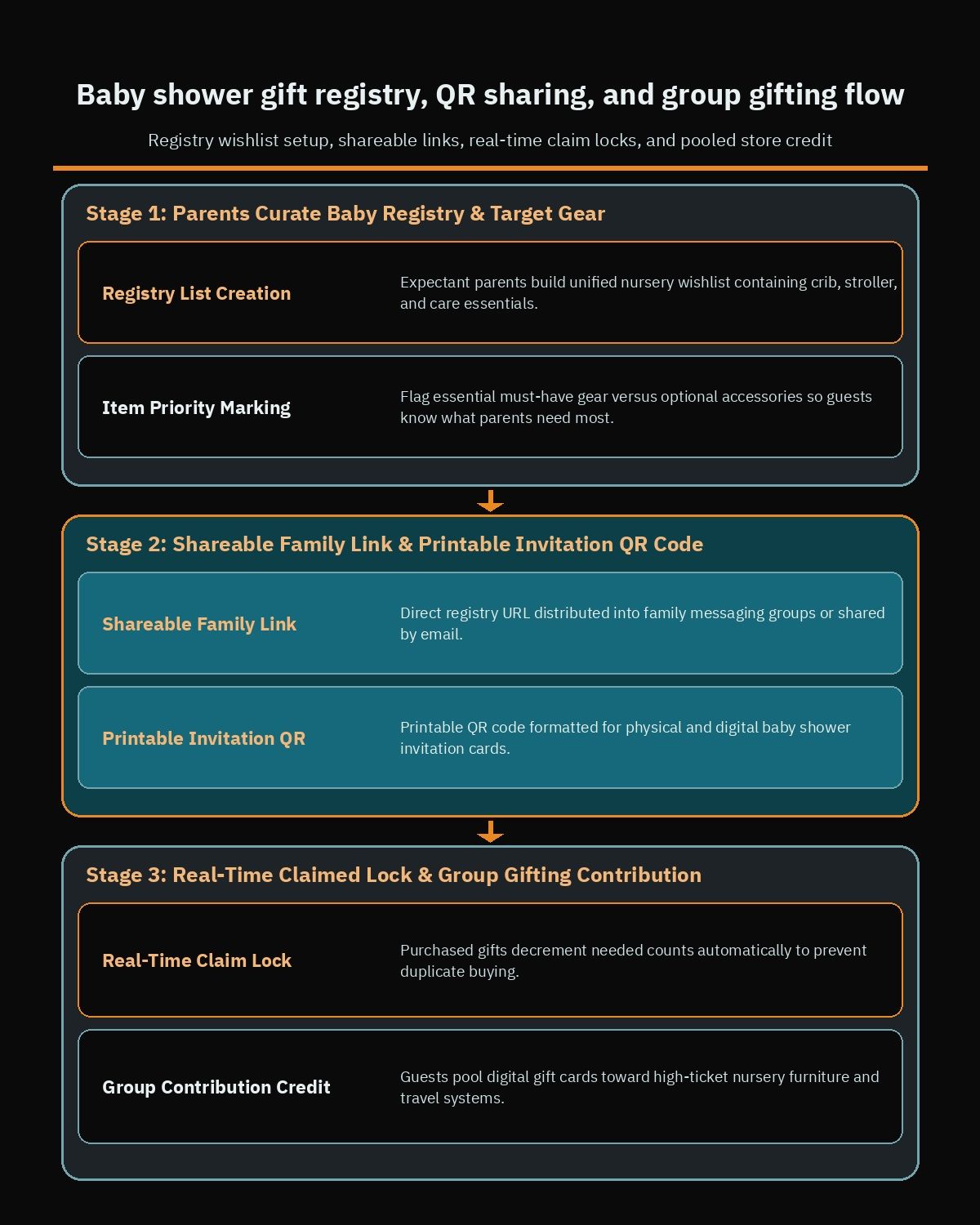
Implementing a structured gift registry workflow with WooCommerce Wishlists transforms scattered family shopping into a predictable, high-conversion acquisition channel for your store. Expectant parents can register an account months before their expected due date, browse your departments, and add specific product variations (including exact colorway, month size, and bundle options) to a dedicated public or link-shared baby registry.
Once the registry list is saved, the store generates a clean shareable link that parents can send directly into family messaging groups or encode into a printable QR code for physical and digital baby shower invitations. When a relative opens that registry URL on their smartphone, they see the exact items the parents selected, organized by priority and availability status, without needing to guess sizes or nursery color palettes.
Preventing duplicate gifts and enabling group contributions
A reliable baby registry must handle real-time inventory and purchase state changes so two guests shopping on the same evening never buy duplicate gear. Pairing your registry lists with WooCommerce Gift Cards also gives guests a flexible way to contribute toward high-ticket nursery furniture or travel systems when they prefer not to purchase an entire stroller or wardrobe alone.
- Desired quantity versus claimed count tracking: Parents specify how many units of each item they need (for example, one baby monitor but four organic muslin swaddle packs), and the registry decrements the remaining needed count automatically as guests complete checkout.
- Privacy-preserving shipping address routing: Registry guests can select the option to ship their gift directly to the expectant parents’ pre-saved delivery address without exposing sensitive street or building details on the public registry screen.
- Digital gift cards for group funding: Guests can purchase digital gift cards in store-configurable denominations sent straight to the parents’ email address, allowing multiple colleagues or relatives to pool store credit that the parents redeem at checkout toward a flagship stroller or crib set.
- Hospital welcome gifting and scheduled dispatch: Just as specialized online flower and gift shop WooCommerce builds coordinate timed deliveries and personalized recipient notes, a baby boutique can let gift buyers attach a custom greeting message and request a preferred delivery date window.
Configuring modular travel system bundles and nursery assembly add-ons
First-time parents are often overwhelmed by component compatibility when shopping for travel gear and nursery furniture. A flagship stroller might require a specific carrycot bassinet for the first six months, a dedicated pair of bayonet adapters to click an infant car seat onto the frame, an ISOFIX base for the family vehicle, and climate accessories like a UPF sun parasol, mosquito net, or rain shield. If shoppers have to hunt for each part across separate catalog pages, many abandon the purchase out of fear of ordering mismatched hardware.
Using WooCommerce Product Bundles lets you turn complex multi-part gear into guided, step-by-step configurators on a single product template. Instead of creating rigid pre-boxed SKUs that lock up warehouse inventory, you group existing simple or variable products into a dynamic bundle where every component remains linked to its master inventory record.
When a parent chooses a graphite stroller frame, a sand-colored bassinet fabric pack, and a matching infant car seat inside the bundle builder, WooCommerce verifies stock across all three underlying SKUs and deducts one unit from each upon checkout. If the sand bassinet sells out via standalone orders, the bundle configurator updates immediately so you never oversell a travel system you cannot fulfill completely.
Adding nursery assembly, extended warranties, and gift wrap
Alongside physical product bundles, baby stores frequently offer value-added services and personalization options that increase average order value while solving real practical headaches for expectant families. Integrating WooCommerce Product Add-Ons allows you to display structured checkboxes, radio buttons, drop-downs, and text inputs directly above the Add to Cart button on eligible products.
- In-home technician nursery assembly: On cribs, changing dressers, and nursery wardrobes, parents can check an optional add-on to book professional home assembly so heavily pregnant parents do not have to assemble heavy timber panels themselves.
- Store-configurable extended warranty tiers: On electronic baby monitors, breast pumps, and strollers, merchants can offer optional store-configurable warranty protection plans or accidental damage coverage with clear terms displayed before checkout.
- Custom embroidery and keepsake engraving: On organic cotton baby blankets, hooded bath towels, and wooden keepsake boxes, shoppers can type the baby’s name in Arabic or English and select thread colors for bespoke personalization.
- Gift wrapping and printed greeting cards: Gift buyers can select premium gift boxing or ribbon wrapping and type a personal congratulatory message that prints directly on the packing slip for the warehouse packing station.
Merchants can configure bundle pricing rules and add-on fees as store-configurable options, such as offering a promotional package discount when a parent bundles a crib, breathable mattress, and fitted sheet set together, or charging a flat service fee per furniture piece requiring technician assembly.
Managing parcel courier delivery alongside bulky nursery furniture freight
Fulfillment logistics can quietly erode margins on a baby store when shipping rules fail to distinguish between small everyday items and oversized nursery gear. A pack of pacifiers or three cotton rompers fits into a standard courier flyer bag, whereas a full-size travel system box or a solid beechwood crib triggers dimensional-weight surcharges or requires a two-person furniture delivery van with elevator and floor-access coordination.
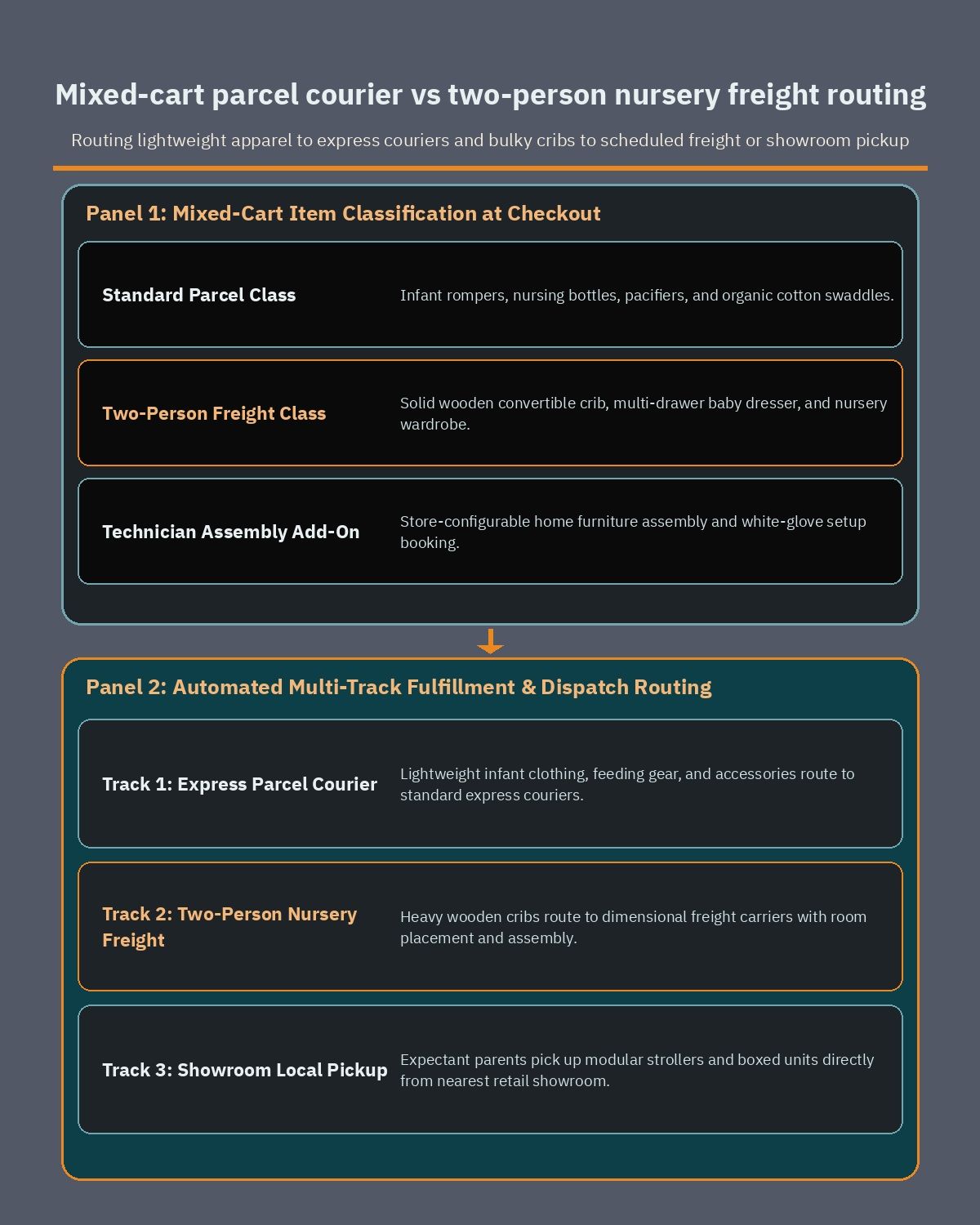
Many of the heavy-freight lessons from furniture store WooCommerce architecture apply directly when a baby retailer sells complete nursery room collections. To keep checkout transparent and protect your delivery margins, you need a structured shipping configuration under WooCommerce > Settings > Shipping that combines WooCommerce Shipping Zones, Product Shipping Classes, and WooCommerce Local Pickup.
First, define geographic regions accurately by configuring WooCommerce shipping zones across Egypt and the Gulf so urban metro hubs (such as Cairo, Alexandria, Riyadh, Jeddah, Dammam, or Dubai) are separated from remote governorates and outlying provinces where heavy furniture vans may operate on scheduled weekly routes or carry higher freight tariffs.
Assigning shipping classes for mixed-cart orders
Once your regional zones are established, create distinct shipping classes under WooCommerce > Settings > Shipping > Shipping classes and assign every catalog item to the class that matches its physical handling profile.
- Standard Parcel Class: Assigned to infant clothing, feeding bottles, pacifiers, skincare, compact toys, and baby monitors that travel through standard domestic express couriers.
- Oversized Gear Class (Dimensional Weight): Assigned to boxed travel systems, twin strollers, convertible car seats with ISOFIX bases, and playpens whose carton volume exceeds standard courier weight brackets.
- White-Glove Nursery Freight Class: Assigned to baby cribs, changing dressers, two-door wardrobes, and nursery rocking gliders that require two-person handling, scheduled delivery windows, and optional in-room assembly.
For orders containing only Standard Parcel or Oversized Gear items, integrating WooCommerce courier plugins in Egypt and Saudi Arabia automates air waybill generation, cash-on-delivery reconciliation where supported, and SMS or WhatsApp tracking notifications. When a customer mixes a lightweight cotton romper and a heavy wooden crib in the same cart, class-based shipping rules ensure the heavy freight fee is applied accurately while letting your operations team dispatch the clothing parcel immediately or consolidate delivery with the scheduled furniture van.
Enabling Local Pickup alongside delivery zones also serves expectant parents and gift buyers who want to collect an urgent hospital bag item, car seat, or baby shower gift directly from your retail showroom or warehouse counter without waiting for a courier run.
Integrating MENA payment gateways and installment checkouts for baby gear
Preparing for a baby involves concentrated household spending over a short period, especially for first-time parents furnishing an entire nursery and buying an infant car seat, stroller, monitor, and hospital bag essentials at the same time. Offering trusted local payment methods alongside flexible split-installment checkouts removes financial friction and helps parents choose higher-grade safety gear without delaying their order.
Rather than relying on a single card processor, a well-planned MENA baby store checkout combines localized card and mobile wallet gateways with regional buy-now-pay-later plugins and native store gift card redemption. Because payment regulations, supported settlement currencies, and merchant onboarding rules evolve over time, you should always verify current supported countries, currencies, and merchant terms directly on each provider’s official plugin page before finalizing your checkout architecture.
- Card and digital wallet processing with Paymob: The official Paymob for WooCommerce plugin enables merchants to accept credit and debit cards, mobile wallets, and local payment options through an integrated checkout flow; check the official Paymob plugin documentation to verify current supported countries, currencies, and payment methods for your business entity.
- Saudi payment processing with Moyasar: For merchants operating in Saudi Arabia, the Moyasar plugin supports Mada debit cards, Visa, Mastercard, American Express, Apple Pay, and STC Pay directly inside WooCommerce; review Moyasar’s official plugin page to confirm current eligibility and settlement terms.
- Installment checkout with Tamara: Integrating Tamara Checkout lets shoppers split higher-value nursery furniture and travel system purchases into scheduled payments while displaying transparent installment messaging on product and cart pages; consult Tamara’s official plugin page for current supported markets, currencies, and order value limits.
- Installment checkout with Tabby: Adding Tabby Checkout gives parents and gift buyers another popular split-payment option on product pages and at checkout; always check Tabby’s current supported countries, currencies, and merchant terms on its official plugin page before planning your checkout setup.
For Gulf stores serving customers who rely on national debit networks such as KNET or regional Apple Pay wallets, make sure express wallet buttons appear clearly on mobile cart and checkout screens. In addition, ensure your checkout flow allows parents to apply partial balances from WooCommerce Gift Cards (received during their baby shower) and pay any remaining balance smoothly using their preferred card or installment gateway.
Designing a mobile-first checkout experience for expectant parents and gift buyers
New and expectant parents do a large portion of their product research and shopping on smartphones, often late at night or one-handed while caring for an infant. Family members clicking a baby shower registry link from a WhatsApp group or scanning a QR code on an invitation are also almost exclusively on mobile devices. If your mobile product pages suffer from layout shifts, slow attribute selectors, or a cluttered multi-page checkout form, conversion rates drop sharply.
A mobile-first baby store interface prioritizes thumb-friendly tap targets, sticky summary bars for bundle builders, and clean collapsible specification accordions that display folded dimensions, fabric care instructions, and safety compliance details without overwhelming the screen. When a shopper filters a category by age stage or car seat installation type, results should update rapidly with clear active filter pills that can be cleared with a single tap.
Expected due-date delivery holding and multi-address gifting
Beyond standard mobile usability, baby and nursery checkouts benefit from two practical delivery workflows that match how families actually plan for a birth.
- Preferred delivery window and warehouse dispatch holding: Parents often purchase a crib set and travel system during the second trimester to lock in stock and spread out payments, but they may want physical delivery and technician assembly held until closer to their expected due date or after nursery painting finishes. Adding a store-configurable preferred delivery date selector or dispatch hold note at checkout lets your warehouse team schedule fulfillment around the family’s timeline.
- Friction-free gift buyer address separation: When an aunt or colleague orders from a baby registry, checkout should clearly distinguish the gift buyer’s billing contact details (where the payment receipt and order confirmation are sent) from the expectant parents’ shipping destination, while automatically suppressing printed prices on the packing slip inside the parcel.
What drives development scope and how to brief your WooCommerce team
When budgeting and planning a custom baby and nursery eCommerce store, the engineering effort depends primarily on catalog complexity, operational integrations, and custom gifting or bundling workflows rather than decorative theme graphics. A boutique launching with fifty organic cotton sleepwear SKUs and a single domestic courier requires a very different technical build from a multi-branch showroom chain synchronizing thousands of serialized car seats, multi-box furniture sets, and regional retail POS terminals.
Understanding the main architectural drivers helps you prioritize features for your initial launch phase and prepare an actionable technical brief when hiring a dedicated WooCommerce developer.
- Catalog structure and variation depth: The number of core departments, global filter attributes (age stages, weight classes, safety standards), and variable product matrices (apparel sizes, stroller frame and fabric combinations) shapes data modeling and import automation.
- Bundle configurators and add-on logic: Building dynamic travel system and nursery room bundles that synchronize component SKU inventory, alongside product add-ons for home assembly, warranty tiers, and custom embroidery, requires careful template and cart validation engineering.
- Baby shower registry and group gifting features: Customizing public registry landing pages, printable QR invitation codes, real-time claimed item counters, privacy-masked shipping routing, and digital gift card redemption workflows adds tailored frontend and checkout logic.
- Split shipping, courier APIs, and ERP or POS sync: Connecting automated parcel courier plugins alongside dimensional-weight furniture rules, showroom local pickup, and two-way inventory synchronization with your warehouse ERP or retail showroom POS system directly influences integration testing scope.
- Bilingual localization and multi-gateway checkout: Delivering a natural Arabic (RTL) and English (LTR) shopping experience across every filter drawer, registry share link, and installment gateway checkout requires thorough cross-device quality assurance.
Before you start development, compile a sample spreadsheet of twenty representative products spanning infant apparel, feeding bottles, modular travel systems, and nursery furniture, along with your target shipping zones, courier partners, and payment gateways. If you want an experienced technical review of your catalog structure, registry workflow, and fulfillment logic, book a free consultation to map out a tailored WooCommerce architecture for your baby and nursery brand.
Frequently asked questions
How can expectant parents share a baby shower gift registry without receiving duplicate items?
Using WooCommerce Wishlists alongside WooCommerce Gift Cards allows expectant parents to build a dedicated baby registry and share it with relatives through a direct link or printed QR code. When a family member purchases an item from the shared list, the registry updates its claimed status immediately so other guests select remaining essentials. Relatives can also purchase digital store credit to help fund larger nursery furniture sets or travel systems.
What is the best way to sell customizable stroller travel systems and nursery assembly services in WooCommerce?
WooCommerce Product Bundles lets you group a primary stroller chassis with compatible bassinets, infant car seat adapters, and weather shields while deducting stock from each individual component SKU automatically. You can pair that setup with WooCommerce Product Add-Ons to offer store-configurable service options on the product page. Parents can then request home technician nursery assembly, select extended warranty coverage, or enter a custom baby shower greeting card message before checkout.
How does a baby store handle small courier parcels and heavy nursery furniture in the same cart?
You can combine WooCommerce Shipping Zones with Product Shipping Classes to assign different fulfillment rules to lightweight infant apparel and oversized wooden cribs or wardrobes. Standard items route to everyday parcel couriers, while heavy furniture triggers dimensional-weight freight calculations or scheduled two-person home delivery rates. Enabling WooCommerce Local Pickup also gives nearby families the option to collect bulky travel gear or furniture directly from your showroom or regional warehouse.
Which payment gateways and installment options work best for a MENA baby store on WooCommerce?
MENA baby stores commonly integrate Paymob for WooCommerce and Moyasar to process local cards and digital wallets alongside Tamara Checkout and Tabby Checkout for split installment payments. Installment options help expectant parents manage high-ticket purchases like complete nursery rooms and modular travel systems without delaying essential preparation. Merchants should always verify current supported countries, currencies, and merchant eligibility terms directly on each provider official plugin page before configuring checkout.
References
- WooCommerce: Managing Product Categories, Tags and Attributes
- WooCommerce: Variable Product Documentation
- WooCommerce Wishlists Official Documentation
- WooCommerce Gift Cards Official Documentation
- WooCommerce Product Bundles Official Documentation
- WooCommerce Product Add-Ons Official Documentation
- WooCommerce: Setting Up Shipping Zones
- WooCommerce: Product Shipping Classes
- WooCommerce: Local Pickup Shipping Method
- WordPress Plugin Directory: Paymob for WooCommerce
- WordPress Plugin Directory: Moyasar Payment Gateway
- WordPress Plugin Directory: Tamara Checkout
- WordPress Plugin Directory: Tabby Checkout