هذا المقال متوفر باللغة العربية — اقرأ بالعربية
Building a profitable flower shop website WooCommerce store in Egypt, Saudi Arabia, or the UAE requires a completely different checkout and fulfillment workflow than a standard retail store. When a customer orders shoes or electronics, they ship the item to their own home and wait a few days for a parcel courier. When someone buys a luxury rose arrangement in Riyadh, Dubai, or Cairo, they are sending a time-sensitive, perishable gift to another person, often within a specific two-hour window that same afternoon.
Out-of-the-box e-commerce templates break down under real florist studio operations. Without afternoon cutoff rules, customers place same-day bouquet orders late at night and expect morning delivery. Without distinct sender and recipient workflows, automated confirmation emails or printed invoices accidentally spoil the surprise or reveal the price to the person receiving the flowers. And if your checkout forces the buyer to know a full postal code instead of providing a recipient WhatsApp number for a courier location pin, most mobile shoppers will abandon the order and message a competitor on Instagram instead.
This guide walks through the exact architecture needed to launch or upgrade a floral and gift arrangement store on WordPress and WooCommerce, covering time-slot scheduling, recipient privacy, greeting card customization, multi-SKU gift bundles, cold-chain local shipping rules, and regional mobile payments.
Core architecture of a flower shop website WooCommerce store
A floral boutique sits at the intersection of made-to-order preparation, gifting personalization, and temperature-controlled local logistics. Before installing plugins or picking a theme, store owners should map how each customer action on the frontend translates into a florist workbench ticket and a driver dispatch route in the backend.
While WooCommerce core handles product catalogs, tax rules, shipping zones, and linked cross-sells natively for free, specialized floral workflows rely on tested extensions from the Official WooCommerce Marketplace. When evaluating WooCommerce vs Shopify for a luxury floral brand, the ability to customize the checkout flow, control sender versus recipient fields, and integrate regional couriers without per-order platform surcharges makes WooCommerce a strong fit for MENA florists.
| Floral Store Requirement | WooCommerce Core or Official Extension | License Type | Operational Role in a Florist Studio |
|---|---|---|---|
| Delivery dates, time slots, and holiday caps | Order Delivery for WooCommerce | Paid annual extension | Displays calendar dates and time windows at checkout, enforces same-day cutoff hours, and caps orders per slot. |
| Greeting cards, ribbon colors, and QR tags | Product Add-Ons | Paid annual extension | Adds character-limited textareas, radio buttons, file uploads, and option fees directly on the bouquet product page. |
| Curated hampers with separate SKU inventory | Product Bundles | Paid annual extension | Groups flowers with vases, chocolates, or balloons while deducting stock from each individual component SKU. |
| Cart-page impulse add-ons | WooCommerce Core Linked Products | Free in WooCommerce Core | Suggests complementary add-ons as upsells on the product page or cross-sells inside the shopping cart. |
| Recipient phone validation and anonymous toggle | Checkout Field Editor (or custom Checkout Block fields) | Paid annual extension / Custom code | Relabels shipping fields for the gift recipient, adds an anonymous sender checkbox, and captures WhatsApp numbers. |
| District rates for chilled vans | WooCommerce Core Shipping Zones | Free in WooCommerce Core | Matches neighborhoods or regions top-down to apply zone-specific flat rates and minimum order amounts. |
| Regional cards, wallets, and installments | Paymob for WooCommerce and native gateways | Free plugin (gateway fees apply) | Processes Apple Pay, Mada, KNET, local cards, and Tamara or Tabby installment checkouts on mobile. |
Selecting the right combination of core features and extensions prevents plugin bloat and keeps your checkout reliable during high-traffic gifting seasons.
Delivery date and time slot scheduling for fresh bouquets
Timing is the single biggest promise a florist makes. A birthday bouquet that arrives a day late, or an anniversary arrangement delivered to an office after the recipient has gone home for the weekend, turns into an immediate refund request. Standard e-commerce shipping estimates (such as three to five business days) have no place on a floral site.
The official Order Delivery for WooCommerce paid annual extension integrates directly into both the WooCommerce Checkout Block and classic shortcode checkouts, letting buyers select an exact delivery date and time window before paying. This setup is very similar to the preparation and pickup scheduling required on a WordPress bakery website, where fresh items must be assembled shortly before dispatch.
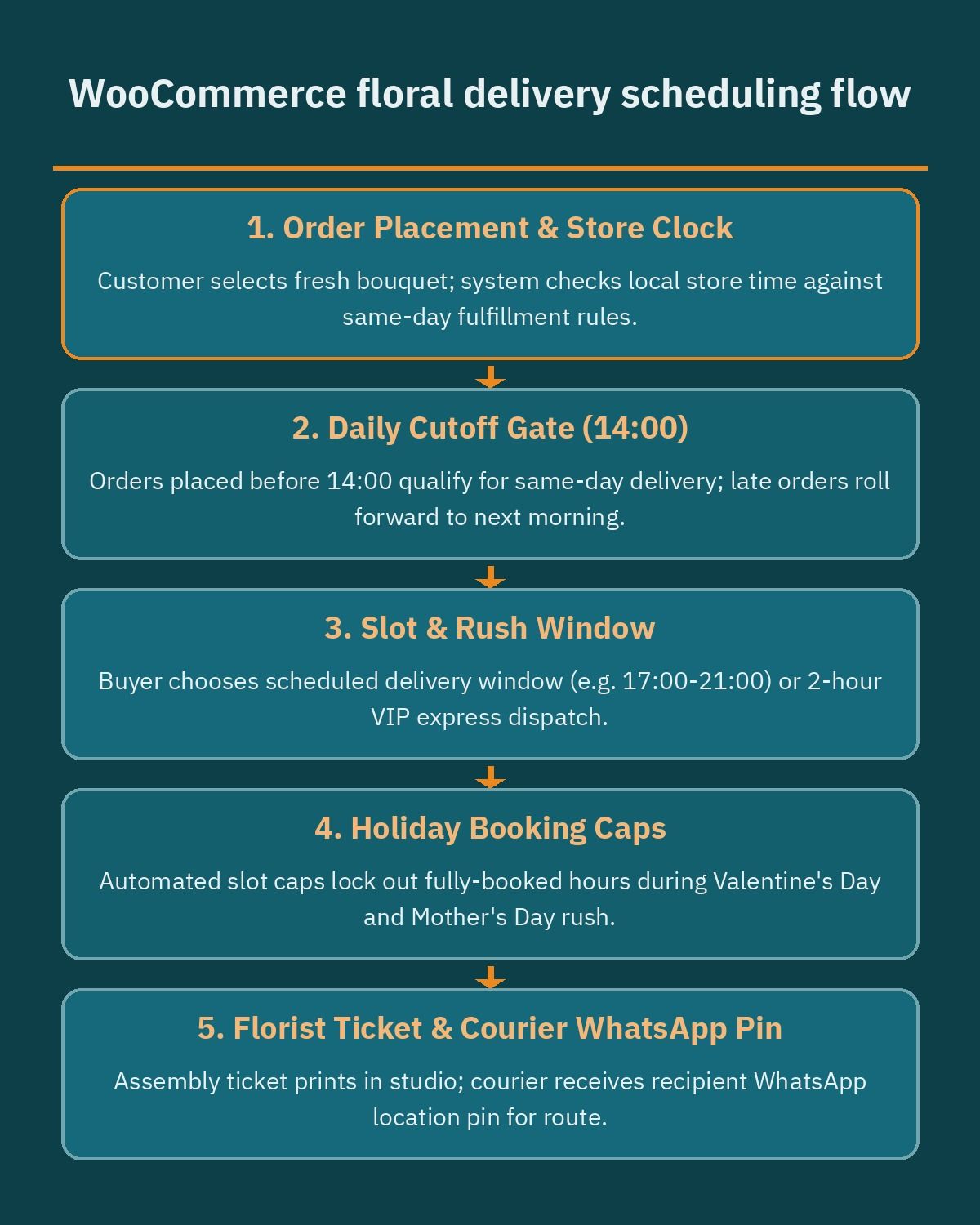
To prevent operational bottlenecks between your florists and your drivers, your scheduling configuration should cover four scenarios:
- Same-day delivery windows and daily cutoff times: Divide the delivery day into practical windows such as a morning slot (10:00 AM to 2:00 PM), an afternoon slot (2:00 PM to 6:00 PM), and an evening slot (6:00 PM to 10:00 PM). Set a hard cutoff time for each window and for same-day service overall. Once the clock passes your afternoon cutoff, the calendar automatically disables today’s date and defaults to the next available morning slot.
- Two-hour express dispatch for ready-to-go arrangements: Many last-minute buyers need a bouquet delivered immediately. By assigning specific fast-assembly bouquets to an express shipping method or dedicated time frame with a higher delivery fee, you can offer two-hour dispatch in central zones without promising express turnaround on complex, custom floral installations.
- Maximum order caps per time frame: Your floral studio only has a finite number of floral designers and chilled vans. Order Delivery for WooCommerce allows you to set a maximum number of orders per day or per individual time frame. When the evening slot hits its capacity limit, that window locks automatically for new shoppers while leaving earlier or next-day slots open.
- Seasonal pre-orders for Mother’s Day and Valentine’s Day: During major floral holidays across the Middle East, order volume spikes sharply. You can open pre-order dates weeks in advance, block out miniature two-hour windows on peak dates in favor of broader all-day delivery windows, and increase minimum preparation lead times on intricate catalog arrangements so your studio floor stays organized.
Separating sender billing from recipient delivery details
In standard e-commerce, the customer buying the item is almost always the person receiving the package. In a flower shop, the buyer (the sender) and the recipient are two different people in two different locations. If your WooCommerce checkout treats the order like a regular self-purchase, several awkward mistakes happen: the courier calls the sender instead of the recipient for directions, the recipient receives an automated email showing the exact price paid, or a printed invoice lands inside the gift bag.
Distinct sender and recipient fields with anonymous gifting
Your checkout should default to collecting separate billing (sender) and shipping (recipient) details rather than hiding the shipping address behind a small toggle. Using the Checkout Field Editor paid annual extension on classic checkouts, or registered additional fields on the WooCommerce Checkout Block, you can relabel the sections clearly as “Your Details (Sender)” and “Recipient Delivery Details.”
All automated WooCommerce order receipts, payment confirmations, and status updates must route exclusively to the sender’s billing email address. On the workshop side, custom packing slip templates should strip out all prices, subtotals, and payment method names, printing only the recipient’s name, delivery window, address, greeting card text, and bouquet care instructions.
You should also include an explicit “Send this gift anonymously” checkbox at checkout. When selected, the sender’s name and phone number remain stored safely inside the WooCommerce admin order screen (so your customer support team can reach the buyer if there is a payment or stock issue), but the printed gift card and driver manifest hide the sender’s identity completely. If a recipient calls the shop asking who sent the bouquet, your staff can see the anonymous flag in the order dashboard and respect the buyer’s privacy.
Recipient phone validation for WhatsApp location pins
Across Cairo, Riyadh, Jeddah, and Dubai, residential addresses often lack standardized street numbers or postal codes that couriers can navigate blind. Local delivery drivers rely heavily on sending a quick WhatsApp message to the recipient to request a live GPS location pin and confirm someone is home to accept perishable flowers.
Because WooCommerce’s default shipping form does not always emphasize a separate shipping phone field, florists should require a validated recipient mobile number inside the delivery section. Add a clear checkout option asking the sender how the courier should handle the delivery:
- Contact recipient via WhatsApp for location pin: The driver messages the recipient ahead of dispatch to confirm the exact building pin and delivery time without mentioning that the package is flowers, preserving the surprise as a general delivery.
- Do not contact recipient (surprise delivery): If the sender already has the exact building, apartment, and gate details (or provides a Google Maps link directly in a custom checkout field), the driver navigates straight to the door and only calls the sender if entry is blocked.
Gift customizer: greeting cards, QR video tags, and luxury wrapping
A floral arrangement feels personal because of the presentation and the message attached to it. Instead of forcing customers to type their card message into the generic WooCommerce “Order notes” box at the very end of checkout (where it gets mixed up with gate codes and driver directions), personalization belongs right on the single bouquet page.
The official Product Add-Ons paid annual extension lets you configure global add-on groups (applied across an entire product category) or per-product add-ons directly inside the product data panel. Using checkboxes, radio buttons, dropdowns, custom text inputs, and file uploads, you can build a step-by-step gift customizer before the customer clicks Add to Cart:
- Personalized greeting card messages: Use a character-limited textarea field so the buyer’s message fits neatly onto your physical printed stationery without overflowing. You can also include quick-select occasion prompts (Birthday, Congratulations, Get Well Soon, Anniversary) to help buyers who are unsure what to write.
- Audio and video QR code greeting tags: Modern luxury florists in the Gulf and Egypt increasingly offer multimedia gift tags. By adding an optional URL input or secure media upload field via Product Add-Ons, a sender can record a personal voice note or video greeting. Your studio software converts that link into a printed QR code inside the greeting card so the recipient can scan it with their phone camera when opening the bouquet.
- Luxury ribbon, wrapping paper, and vase upgrades: Offer visual or radio-button selections allowing the buyer to upgrade from kraft paper to double-faced satin ribbon, velvet hatboxes, or imported ceramic and glass vases, automatically adding the flat fee to the bouquet price.
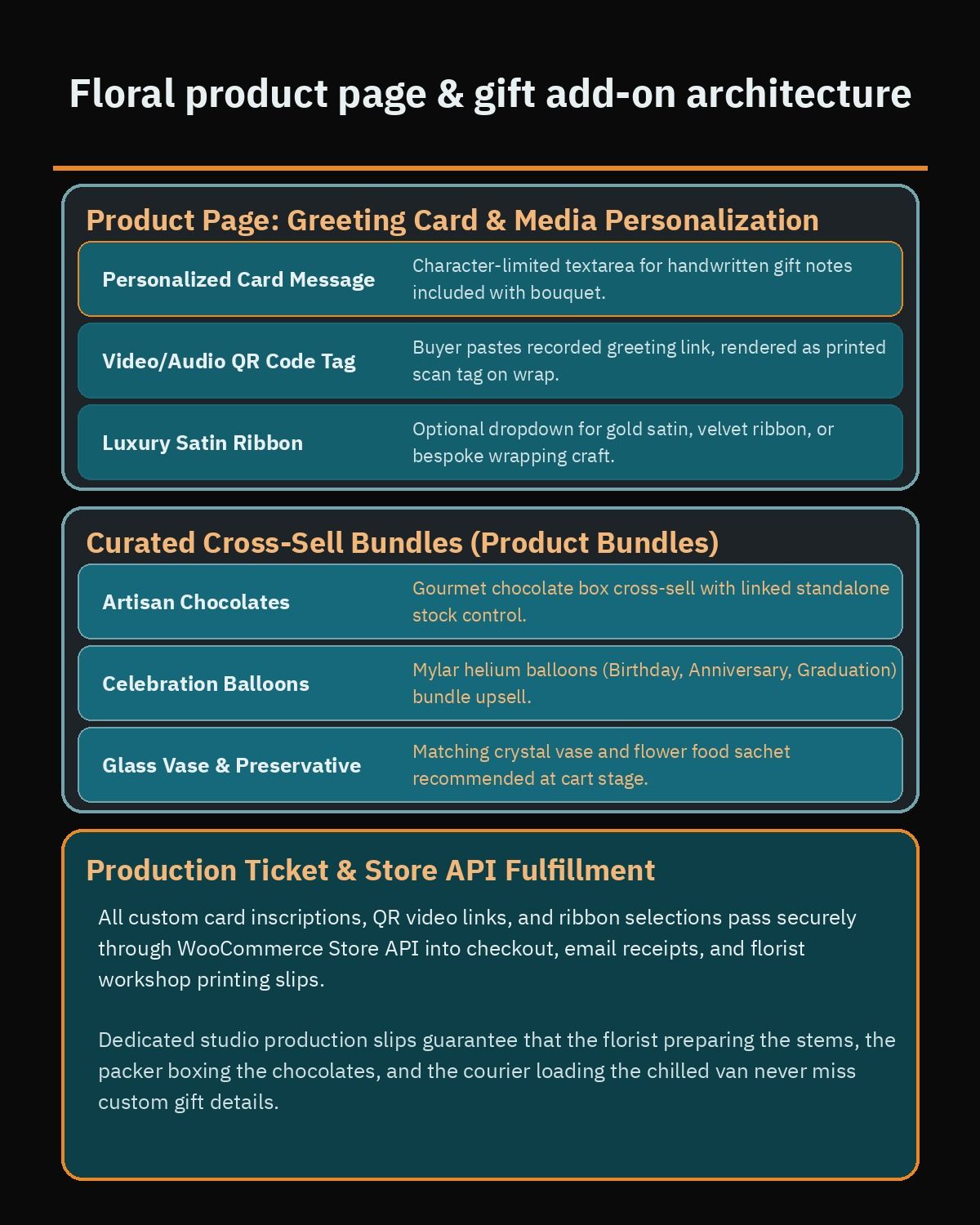
All selected add-on data travels through the WooCommerce Store API and REST API into the cart, checkout, order confirmation emails, and studio production slips, ensuring your florists never miss a custom ribbon request or card inscription.
Product add-ons and bundle cross-sells for chocolates, cakes, and balloons
Bouquets rarely travel alone during major celebrations. Shoppers frequently want to pair fresh flowers with a box of Belgian or local artisan chocolates, a mini celebration cake, helium balloons, a scented candle, or a plush teddy bear. Presenting these extras at the right moment increases average order value while saving the customer a trip to a second store.
However, many florists make the mistake of building every gift extra as a simple checkbox inside Product Add-Ons. While Product Add-Ons works well for wrapping paper or greeting cards that do not need strict unit-by-unit stock tracking, it does not maintain independent SKU inventory for physical gift items. If you only have twelve boxes of a specific luxury chocolate assortment in your chiller, selling them through untracked checkboxes risks overselling an out-of-stock item.
Instead, structure your gift catalog across three distinct WooCommerce mechanisms, much like the multi-SKU inventory logic used on a WooCommerce supermarket website:
- Product Bundles for curated gift hampers and “Complete the Gift” packages: Using the official Product Bundles paid annual extension, you can group existing simple or variable products into a unified gift package or optional build-your-own box on the product page. When a shopper adds a floral arrangement plus a specific chocolate box and helium balloon bundle to their cart, WooCommerce tracks parent and child line items and deducts stock directly from each individual SKU.
- Core Linked Products Upsells on the bouquet page: Under the Linked Products tab in WooCommerce core, assign higher-tier arrangements (such as upgrading from a 25-stem bouquet to a 50-stem or 100-stem luxury dome arrangement) as Upsells so shoppers see premium alternatives before adding to cart.
- Core Linked Products Cross-sells on the Cart page: Assign fast-moving impulse gifts like mini cakes, greeting cards, teddy bears, and glass vases as Cross-sells under Linked Products. When the customer views their cart or slide-out mini-cart, they can add these complementary items with a single tap right before entering checkout.
Perishable floral care and cold-chain local shipping rules
Cut flowers are highly sensitive to heat and transit delays. In Cairo’s summer traffic or the intense afternoon heat of Riyadh, Dammam, and Dubai, transporting delicate hydrangeas, tulips, or garden roses on a standard motorbike or an unrefrigerated parcel van will wilt the petals before they reach the recipient’s door. A floral e-commerce store must enforce cold-chain local shipping rules directly inside its checkout logic.
In WooCommerce core, you configure delivery areas under WooCommerce > Settings > Shipping > Shipping zones. Because WooCommerce evaluates shipping zones from the top of your list downward and applies the first zone that matches the recipient’s address, your zones must be ordered from the most specific inner-city neighborhoods down to broader metropolitan and outer suburban regions. For a detailed walkthrough of regional zone structures, see our guide on WooCommerce shipping zones in Egypt and the Gulf.
For a flower shop operating chilled vans, structure your shipping zones and methods around three rules:
- District and neighborhood fee tiers: Group nearby districts around your floral studio (for example, Zamalek, Maadi, and New Cairo in Egypt; Olaya and Al Malqa in Riyadh; or Downtown Dubai and Jumeirah) into primary zones with standard chilled delivery rates. Place outer residential compounds and satellite cities (such as 6th of October, Sheikh Zayed, North Coast seasonal branches, or outer Sharjah and Ajman routes) into separate zones with higher delivery fees that reflect the longer round-trip time of a refrigerated van.
- Minimum cart value per zone: Dispatching a temperature-controlled van forty kilometers across town for a single small bouquet destroys your profit margin. By pairing your shipping zones with minimum order rules or conditional free-shipping thresholds, you can require a higher minimum cart subtotal for distant districts while keeping inner-city minimums accessible.
- Store pickup vs chilled courier dispatch: If you use the WooCommerce Checkout Block, you can enable global Local Pickup so customers who want to collect a bouquet from your boutique in person can toggle to pickup without entering a delivery address. When dispatching via third-party fleets or dedicated drivers, review our breakdown of WooCommerce courier plugins in Egypt and Saudi Arabia to understand which fleets support scheduled same-day local dispatch versus standard multi-day parcel shipping (which should only ever be enabled for non-perishable preserved roses or dried floral decor).
Regional payment gateways and frictionless mobile checkout
Floral gifting is overwhelmingly mobile-first. Most customers discover a boutique through Instagram reels, Snapchat ads, or Google Maps, tap through on their phone, pick an arrangement, write a quick card message, and want to pay in seconds. Note also that cash on delivery (COD) works poorly for gift orders: you obviously cannot ask the gift recipient to pay the driver for their own surprise flowers at the door! That means your online payment success rate determines your store’s conversion rate.
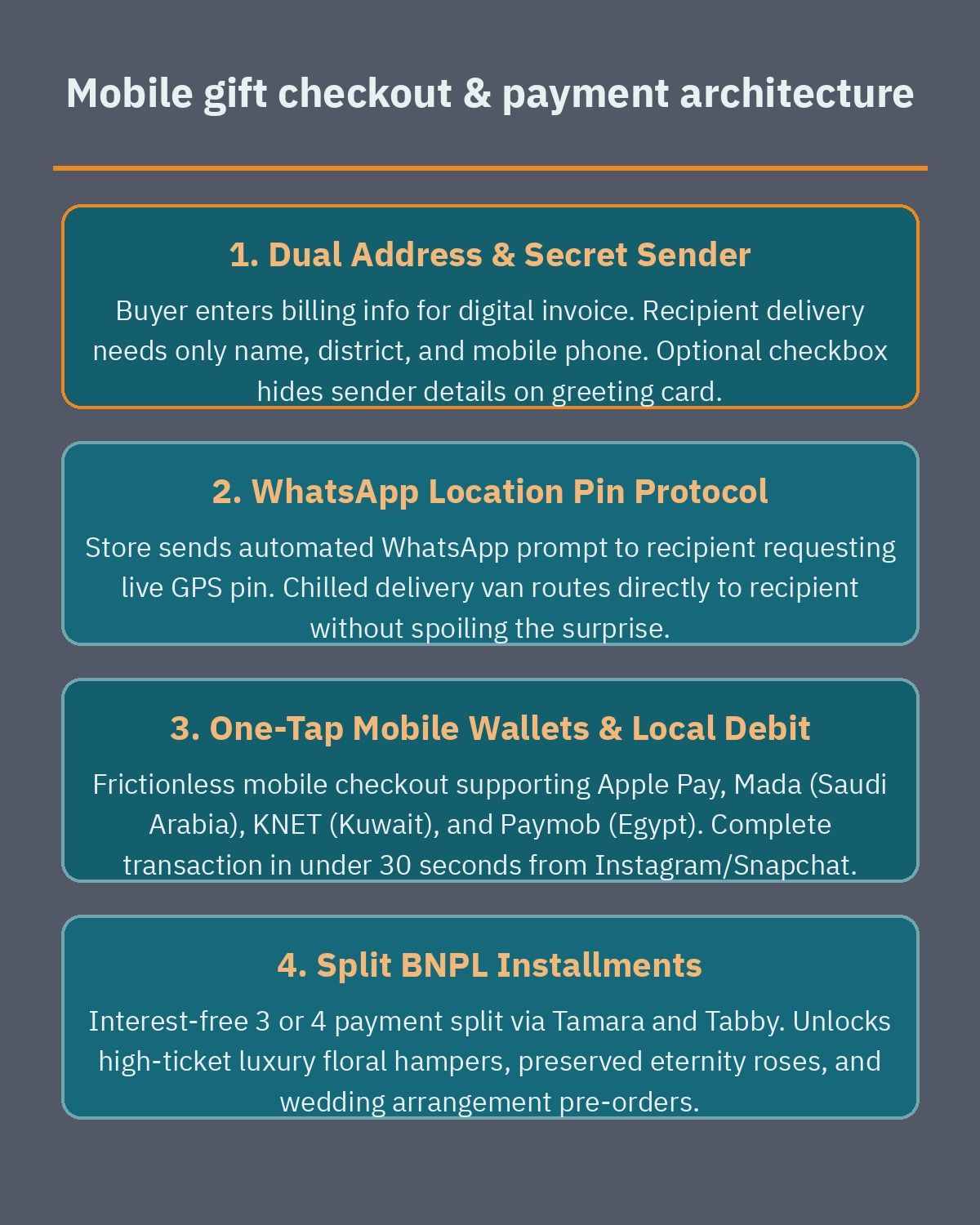
To maximize completed gift orders across MENA, your WooCommerce checkout should offer the exact local payment methods buyers trust on their smartphones:
- Apple Pay and Google Pay: Essential for iOS and Android users ordering on the go. One-tap biometric wallet authentication removes the friction of typing a 16-digit card number while commuting or sitting in a meeting.
- Mada, KNET, and local debit networks: In Saudi Arabia, Mada is mandatory for domestic debit card acceptance, while KNET is the standard in Kuwait. In Egypt, integrating the official Paymob for WooCommerce plugin lets you accept local bank cards, mobile wallets, and digital payments inside a unified checkout interface.
- Tamara and Tabby installment options: Luxury floral arrangements, large wedding or engagement stand displays, preserved eternal rose boxes, and multi-item chocolate hampers carry high average order values. Offering Buy Now, Pay Later (BNPL) split payments through Tamara and Tabby directly on the product page and at checkout helps shoppers upgrade to larger bouquets and add-on bundles without hesitation; check Tabby’s current supported countries and currency on its official plugin page before planning your integration.
Alongside payment gateways, page speed and checkout layout play a major role in mobile conversions. High-resolution floral photography, video previews of bouquets, and interactive gift customizers can bloat page weight if left unoptimized. Applying proper image compression, object caching, and font optimization (covered in our guide to speeding up Arabic WordPress sites) keeps both your Arabic RTL and English LTR product pages responsive on mobile data connections.
What drives development cost for a WooCommerce flower shop
When floral boutique owners budget for a professional e-commerce build, the investment depends on how deeply the website automates studio preparation, gift customization, and multi-zone delivery dispatch. Rather than paying a recurring percentage of your gross revenue to a closed floral marketplace aggregator, owning your WooCommerce platform keeps your customer list and repeat holiday reminders in-house.
The main factors that determine the development scope and budget of a floral WooCommerce project include:
- Custom gift card and QR media generation: A basic store collects plain text for a greeting card, whereas an advanced luxury boutique may require live on-screen card typography previews, automated PDF card layout generation styled to match physical stationery printers, and automated QR code rendering for customer audio or video uploads.
- Multi-branch and multi-city fulfillment logic: A single-studio florist in one city only needs one set of shipping zones and slot capacities. A floral brand operating separate branches in Riyadh and Jeddah, or Cairo and Alexandria, requires branch-specific inventory routing, distinct holiday cutoff calendars per city, and localized courier assignments.
- Bilingual RTL/LTR design and seasonal campaign templates: Floral brands rely heavily on visual presentation and seasonal landing pages for Mother’s Day, Valentine’s Day, Eid, graduations, and corporate events. Designing custom bilingual Gutenberg block patterns that look equally polished in Arabic and English takes dedicated frontend engineering.
- POS, floral recipe, and ERP synchronization: If your physical flower shop uses an in-store point-of-sale or inventory system to track fresh stem arrivals, vases, and imported chocolates, building a two-way webhook integration ensures walk-in sales and online orders never clash during peak holiday rushes.
If you are planning to launch a new floral boutique online or want to replace a generic e-commerce setup with a tailored gifting and scheduling workflow, explore our WordPress development services or book a free consultation to review your catalog structure, delivery zones, and checkout requirements before the next gifting season.
Frequently asked questions
How do I set up same-day flower delivery cutoffs and time slots in WooCommerce?
You can manage same-day delivery cutoffs and time windows using the Order Delivery for WooCommerce paid annual extension. Inside the settings, you define daily preparation rules, afternoon cutoff hours for same-day dispatch, and specific morning or evening delivery windows. You can also set a maximum number of orders per time slot so your florists and chilled vans are never overbooked during peak holidays like Mother’s Day or Valentine’s Day.
How can a flower shop separate buyer billing details from the recipient delivery address?
WooCommerce separates billing and shipping sections at checkout so the sender enters their own payment details while supplying the recipient’s address and mobile number. Using the Checkout Field Editor paid annual extension or custom block fields, you can relabel shipping inputs for recipients, validate a phone number for WhatsApp location pins, and add an anonymous gifting checkbox that omits the sender’s name from the card.
What is the difference between Product Add-Ons and Product Bundles for floral gifts?
The Product Add-Ons paid annual extension attaches custom input fields and simple paid options directly to a bouquet page, such as a character-limited greeting card message, a wrapping ribbon color, or a QR code video link. The Product Bundles paid annual extension groups separate catalog items that have their own SKU stock levels, letting customers combine a flower arrangement with artisan chocolates, helium balloons, or a glass vase.
How do florists configure district delivery fees for chilled vans in WooCommerce?
In WooCommerce core shipping settings, you create individual shipping zones ordered from the most specific neighborhood down to broader city regions. Because fresh arrangements require temperature-controlled vans rather than standard parcel couriers, you can assign distinct flat rates and minimum order thresholds to each zone. Nearby central districts can carry a standard local courier fee, while distant suburban districts require a higher delivery fee or a minimum cart subtotal.
Which payment methods work best for mobile flower shoppers in Egypt and the Gulf?
Gift buyers shopping on smartphones expect fast one-tap digital wallets, local debit networks, and installment options. Integrating regional gateways like Paymob alongside native payment integrations lets your checkout accept Apple Pay, Mada, KNET, local cards, and split-payment services such as Tamara and Tabby. Pairing these mobile payment methods with a single-page or streamlined block checkout prevents cart abandonment when a customer is ordering a last-minute bouquet from their phone.
References
- Order Delivery for WooCommerce Documentation
- WooCommerce Product Add-Ons Documentation
- WooCommerce Product Bundles Documentation
- WooCommerce Checkout Field Editor Documentation
- Setting Up Shipping Zones in WooCommerce
- WooCommerce Related Products, Upsells, and Cross-Sells
- WooCommerce Checkout Block Reference
- Paymob for WooCommerce on WordPress.org