هذا المقال متوفر باللغة العربية — اقرأ بالعربية
If you run a travel, tour, or Umrah agency in Egypt, Saudi Arabia, the UAE, or elsewhere in MENA, planning a travel agency website WordPress build starts with how your sales desk turns enquiries into confirmed bookings. A brochure site with destination photos but no departure dates, hotel details, or deposit rules pushes prospective travellers into long chat threads before your team even knows their travel dates or group size.
Whether you are launching an Umrah travel agency website, selling domestic excursions, or quoting tailored family holidays abroad, your site has two practical jobs. Fixed departures with set rates should move cleanly toward online payment, while custom itineraries and variable pilgrimage packages should send structured enquiries straight to a named coordinator.
What a travel agency website WordPress build needs before taking leads
Before discussing colour palettes or homepage banners, map out the core pages your sales workflow requires so visitors never hit a dead end. Every menu link should guide a traveller from browsing destinations to checking trip inclusions and either reserving seats or submitting an enquiry.
- Home page: Clear positioning for the trips you operate, featured seasonal departures, and search filters by destination, budget, duration, activities, or trip types.
- Package listing page: A filterable catalogue where guests narrow trips without opening dozens of separate browser tabs.
- Package pages: Day-by-day itineraries, inclusions and exclusions, hotel options, departure dates, pricing categories, and booking or enquiry actions.
- Destinations section: Archive pages grouping trips by country, city, or region so visitors interested in one area see every matching package.
- Umrah section (if offered): A dedicated hub separating pilgrimage packages from leisure holidays so pilgrims inspect Makkah and Madinah stay details directly.
- About and license page: Your agency background, physical office address, and official tourism or Umrah license details if your company holds one.
- Contact and WhatsApp page: Office hours, phone numbers, web form, and direct WhatsApp links for pre-booking questions.
- FAQ page: Clear policies covering deposits, room options, child rates, visa support, and cancellations.
Structured archives keep your menus tidy as your team adds seasonal departures across the year. WP Travel Engine includes destination, activity, and trip type pages in its core plugin alongside trip search and filter controls.
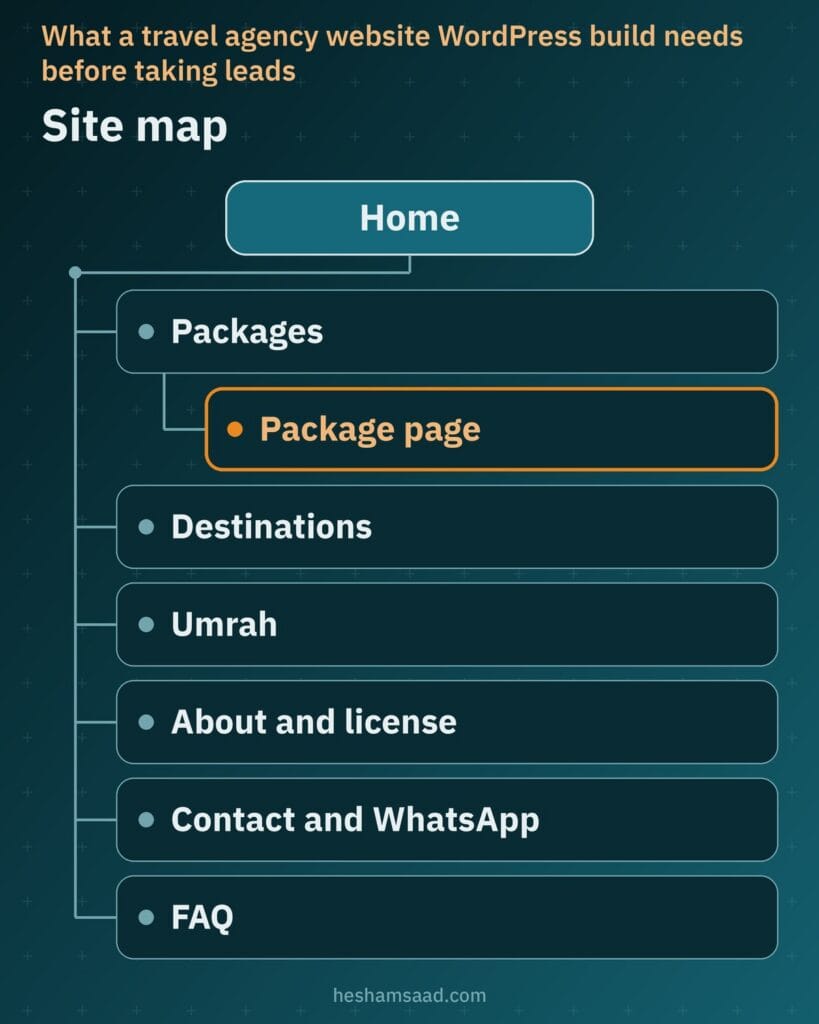
Showing your physical office address and official license details (if your agency holds one) also builds trust before a guest sends a deposit. Once this page map is agreed on paper, your developer can configure navigation menus and bilingual URLs without mid-project rework.
Package and tour pages that answer questions upfront
When a traveller opens a trip page and cannot tell which meals, airport transfers, or hotel categories are included, your team repeats basic facts all day on the phone. A clear tour booking website puts every operational detail on the package page in a predictable layout so visitors qualify themselves first.
Core tour details and WP Travel Engine options
WP Travel Engine is a free WordPress tour booking plugin with paid add-ons that gives unlimited trip packages dedicated fields for day-by-day itineraries, cost included and excluded lists, regular and sale prices, duration, trip facts, FAQs, a photo and video gallery, a map, and JSON-LD travel schema markup. Core settings also handle adult and child pricing categories, minimum and maximum participants, and group-size price adjustments.
For extra booking logic, WP Travel Engine offers paid add-ons including Trip Fixed Starting Dates for scheduled departure dates, Conditional Price for peak seasonal dates, Accommodation for shared, standard, or deluxe rooms, Pickup Points, Extra Services, and Itinerary Downloader for a PDF brochure. Always publish clear cancellation and refund terms directly on the trip page so guests know where they stand before paying.
Presenting Umrah packages accurately
If your agency organises pilgrimage trips, an Umrah package page needs verified specifics rather than vague promises. List the named hotels in Makkah and Madinah, an agency-written description of walking distance or shuttle transport, intercity transfers, room occupancy options, and visa handling if your agency offers it.
Publish only the inclusions and stay details your agency confirms in writing for that departure, plus your official license details if held, without inventing licensing rules or authority claims. Accurate pages protect both your guests and your sales coordinators when hotel allocations tighten before busy seasons.
Choosing between an enquiry form and online booking
Not every itinerary belongs in an instant online cart. Review your catalogue and separate trips with fixed seat inventory and firm rates from packages that depend on live flight quotes, custom hotel nights, or visa timing. For a broader overview across industries, see our guide to building a WordPress booking website.
| Trip type | Best route | Why |
|---|---|---|
| Tailored trip | Enquiry form | Itinerary, hotels, and flights depend on the guest’s dates and preferences. |
| Umrah package | Enquiry form or hybrid | Quote varies with room tier, hotel distance, flights, and visa timing. |
| Fixed departure | Online booking | Departure date, seat count, itinerary, and per-person price are set upfront. |
| Day tour | Online booking | Fixed schedule, clear pickup point, and set adult and child rates. |
| Group trip | Enquiry form | Private transport, rooming lists, and custom payment terms need agent review. |
A hybrid setup is possible on one website: accept instant bookings on fixed departures and day tours while routing tailored trips, group quotes, and variable Umrah packages through an enquiry form. WP Travel Engine includes a trip-page inquiry form, booking email notifications, saved booking and inquiry details, discount coupons, and Trip Booking and Trip Enquiry Gutenberg blocks.
Using those Gutenberg blocks, your developer can match each package template to how your sales desk sells that specific category. Visitors always see one clear next action rather than competing buttons on the same page.
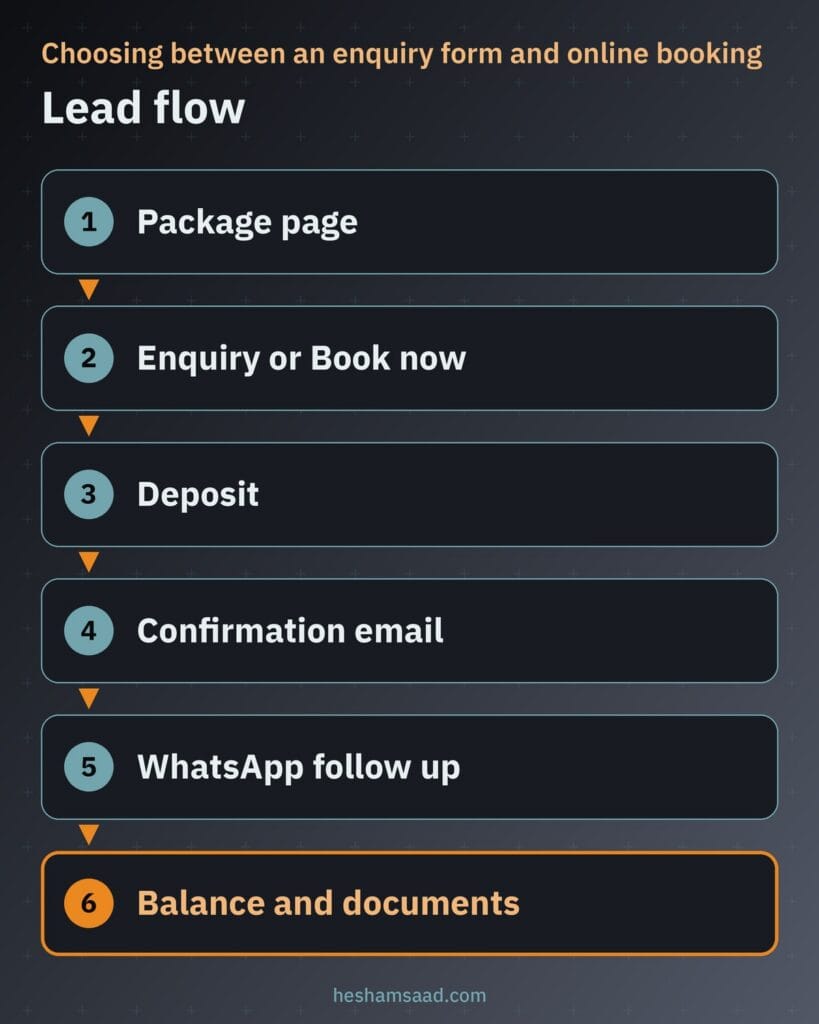
Map out the post-submission handoff before launch as well. An instant confirmation email acknowledges the request right away while your coordinator follows up on WhatsApp regarding rooming details, balance due dates, and travel documents.
Taking online deposits through local payment gateways
If your agency’s booking terms allow split payments, taking an online deposit lets travellers lock in seats while paying the remaining balance closer to departure. WP Travel Engine offers a paid Partial Payment add-on for percentage or fixed-amount deposits, while its core plugin supports PayPal Standard, Check, Book Now Pay Later, and Direct Bank Transfer.
Local Egyptian or Saudi gateways connect through WooCommerce rather than WP Travel Engine alone, using WP Travel Engine’s paid WooCommerce Payments add-on. One regional option is Paymob for WooCommerce, a PCI-compliant checkout plugin with 3D Secure that supports global and local payment methods and lets you initiate refunds from the Paymob dashboard. Compare regional options in our guide to WooCommerce payment gateways in Egypt and Saudi Arabia.
Because this setup chains WP Travel Engine add-ons, WooCommerce, and Paymob for WooCommerce together, confirm the exact combination with both vendors before building. Run a live test deposit and refund from start to finish before launch, and place your deposit and cancellation terms right next to the booking button.
Handling multiple currencies for regional and international guests
An agency in Cairo, Riyadh, or Dubai may serve local residents alongside Gulf visitors and diaspora families booking trips from abroad. WP Travel Engine lets you choose your base selling currency in core and offers a paid Currency Converter add-on that converts displayed tour prices into local currency by detecting the guest’s location.
Displayed estimates on package pages are separate from the currency settled by your acquiring bank. On the checkout side, Paymob for WooCommerce lists multiple currency support for accepting payments in various currencies where enabled on your merchant account.
Always charge in the currency your payment gateway actually settles and treat converted tour-page figures as informational estimates. State the exact charged currency clearly at checkout before payment so guests know how their card will be billed.
Capturing WhatsApp leads without losing track of enquiries
When prospective guests compare itineraries on your site, a quick WhatsApp question about quad rooms, child rates, or pickup points can be their first contact with your office. WhatsApp’s official click-to-chat format (https://wa.me/ followed by your full number in international format) opens a chat on mobile phones and WhatsApp Web without saving the number first, and pairs with the official Chat on WhatsApp button.
A generic site-wide chat icon sends an empty greeting that forces staff to ask which package and dates the visitor saw. Adding WhatsApp’s ?text= URL parameter on each trip template pre-fills the message with the package name so your coordinator has immediate context.
Route incoming WhatsApp enquiries to a named team member on duty and log every chat in your lead tracker or CRM alongside web form submissions. Keep chat focused on availability questions, and never ask travellers to send passport or ID copies over public chat links on your site.
Keeping gallery-heavy package pages fast on mobile
Destination galleries help sell trips, yet uncompressed camera files stall mobile connections before prices even render. Compress authentic photos of the real hotels and excursions you run, choose efficient image formats, and place standard HTML image tags near relevant itinerary text in formats Google Search supports such as WebP, AVIF, or JPEG. Use descriptive filenames like luxor-nile-cruise-deck.webp instead of IMG00023.JPG, write informative alt text without keyword stuffing, and set a high-resolution trip photo rather than your site logo for social previews.
Google’s Core Web Vitals measure loading and visual stability through Largest Contentful Paint (LCP), Interaction to Next Paint (INP), and Cumulative Layout Shift (CLS), setting 2.5 seconds or less as the target for good LCP. Because the top banner photo sits inside the first viewport, web.dev cautions against lazy-loading in-viewport LCP hero images.
Since WordPress 5.5, WordPress core adds native lazy loading by default to images that carry width and height attributes, back-fills dimensions on attachment images to reduce layout shifts, and outputs responsive srcset and sizes attributes. Load the main hero photo eagerly while deferring lower gallery images, and check finished pages in PageSpeed Insights.
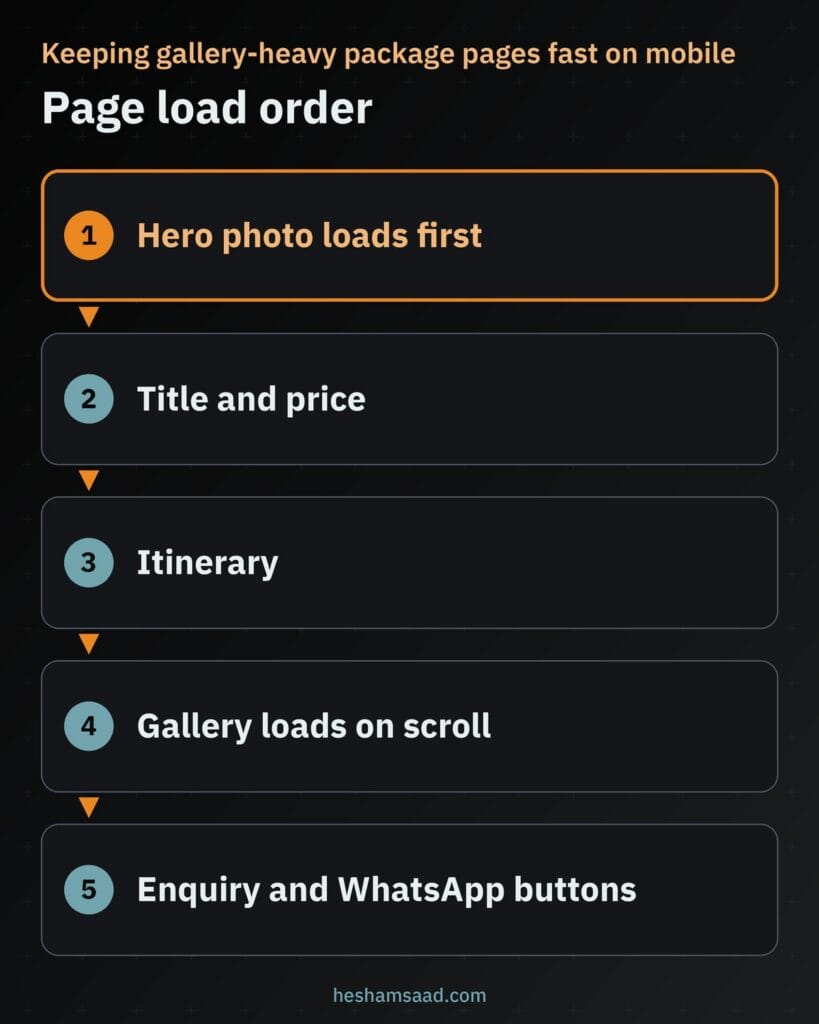
Skip heavy autoplay video headers on package pages; place any walkthrough video lower down where visitors tap play on demand. Keeping the top viewport light puts your trip title, price, and enquiry buttons in view immediately.
Building in Arabic and English with local search visibility
Selling across MENA and overseas markets calls for proper bilingual architecture rather than automatic translation overlays. WP Travel Engine works with both WPML and Polylang. Polylang translates posts, pages, media, categories, tags, and custom post types, supports right-to-left (RTL) scripts, sets languages by URL code, subdomain, or domain, and provides language switcher blocks, widgets, and menu items, with extra features in Polylang Pro.
Beyond translating itinerary prose, your developer must test departure date pickers, participant counters, price tables, and enquiry forms in Arabic RTL view on mobile screens. Careful RTL testing prevents misaligned dates and broken checkout summaries.
Pair bilingual URLs with clear city and branch contact pages so nearby travellers find your office in either language; see our guide to WordPress local SEO for details. If you manage a single property or serviced apartments rather than multi-destination tours, read our sibling guide to building a hotel website on WordPress.
What drives the cost of your project
An enquiry-led Umrah site with a small seasonal catalogue requires far less checkout engineering than a multi-currency booking portal with split deposits. Understanding what shapes travel website cost helps you compare developer proposals fairly before signing.
- Packages and departures: Structuring destination archives, room options, and recurring departure schedules across your catalogue.
- Enquiry versus online booking: Form routing alone compared with cart rules, seat limits, and automated booking emails.
- Plugin and paid add-ons: Licensing and configuring paid WP Travel Engine add-ons for fixed dates, deposits, seasonal pricing, accommodations, pickup points, or PDFs.
- Payment gateway setup and deposits: Connecting WooCommerce, Paymob for WooCommerce, deposit rules, and live payment and refund tests.
- Currencies: Setting your selling currency, location-based currency display add-ons, and clear checkout billing notices.
- Arabic and English setup: Configuring WPML or Polylang, linking translated trip taxonomies, and testing RTL forms and dates.
- WhatsApp and CRM routing: Building dynamic pre-filled per-package chat links and logging leads into your tracker or CRM.
- Photo and content preparation: Formatting day-by-day itineraries, compressing real trip photos, and writing clear inclusion and refund terms.
- Ongoing maintenance: Safely updating WordPress, booking add-ons, WooCommerce, and gateway plugins ahead of peak travel seasons.
Sharing a shortlist of trip types, merchant gateway accounts, and bilingual requirements lets a developer price your actual workflow accurately. You can also launch complex packages on enquiry forms first and phase in online deposits once your gateway account is live.
When bringing in a WordPress developer pays off
Installing a free tour plugin takes minutes, yet the fragile parts sit where plugins meet. Connecting WP Travel Engine with WooCommerce and a local gateway, testing partial deposits and refunds, hitting Core Web Vitals on gallery pages, and fixing mobile RTL forms all require staging tests.
An experienced developer helps you avoid redundant add-ons, builds tour and Umrah templates around how your coordinators close leads, and sets up safe pre-season updates. Your staff gets a clean dashboard where adding departure dates or updating hotel tiers stays straightforward.
Next, write down your core trip categories, mark which packages take online deposits versus enquiries, check your merchant gateway eligibility, and gather real photos and confirmed inclusions for three flagship trips. When that list is ready, book a free consultation to review your booking architecture, or explore our travel agency website WordPress service to build a fast, bilingual site for your agency.
Frequently asked questions
Should my agency take enquiries or online bookings?
Choose based on whether trip rates and seats are fixed upfront. Online booking suits day tours and fixed departures with set adult and child prices. Enquiry forms suit tailored private trips, group quotes, and Umrah packages where flights, hotels, and visas vary, and one WordPress site can combine both.
What should an Umrah package page show?
An Umrah package page should list only the exact inclusions your agency confirms for that departure. Show the named Makkah and Madinah hotels with your agency description of walking distance or shuttle transport, intercity transfers, room occupancy options, and visa handling if offered. Include your official license details if held.
Can travellers pay a deposit with local payment methods?
Yes, if your agency booking terms allow split payments and your plugin stack supports your gateway. WP Travel Engine offers paid Partial Payment and WooCommerce Payments add-ons to route checkouts through WooCommerce gateways like Paymob for WooCommerce. Confirm compatibility with both vendors first, test payments and refunds, and show cancellation terms.
Can I show package prices in more than one currency?
Yes, you can show estimated converted prices while settling payments in your gateway currency. WP Travel Engine sets a base selling currency in core and offers a paid Currency Converter add-on for location-based price display, while Paymob for WooCommerce supports multiple payment currencies. State the exact charged currency clearly at checkout.
How do I stop WhatsApp leads from getting lost?
Use per-package click-to-chat links with a pre-filled message and assign clear follow-up ownership. Adding the WhatsApp text parameter on each trip page sends the package name automatically so your coordinator sees which itinerary the guest viewed. Route chats to a named agent, log leads, and never request passport copies on chat.
References
- WP Travel Engine plugin page on WordPress.org
- Paymob for WooCommerce plugin page on WordPress.org
- Polylang multilingual plugin page on WordPress.org
- WhatsApp Help Center: How to use click to chat
- web.dev: Web Vitals overview
- web.dev: Optimize Largest Contentful Paint
- web.dev: Browser-level image lazy loading
- web.dev: Choose the right image format
- Make WordPress Core: Lazy-loading images in 5.5
- Google Search Central: Google image SEO best practices