
هذا المقال متوفر باللغة العربية — اقرأ بالعربية
Building an optical store website WooCommerce shoppers can rely on requires much more than uploading frame photos and setting a retail price. Eyewear sits at the intersection of fashion retail and regulated medical customization, where a single eyeglasses order combines a physical frame SKU with bespoke prescription lenses ground to a fraction of a diopter. When an optical chain or boutique in Cairo, Riyadh, or Dubai launches online with a basic catalog template, customers quickly get stuck trying to figure out how to submit their eye measurements or choose the right lens thickness.
A well-engineered optical store guides the buyer from frame discovery through prescription entry without overwhelming them with clinical jargon. At the same time, the backend must give your in-house opticians clean, validated optical parameters, attached doctor prescriptions, and separate line items for lab fulfillment and medical insurance invoicing. By planning your WordPress development around how opticians actually dispense eyewear, you turn complex clinical orders into a clear self-service checkout flow.
What an optical store website WooCommerce build must handle
Standard e-commerce stores sell finished goods that sit on a warehouse shelf ready to ship. An optical retailer manages four distinct product models inside one storefront, and each model follows its own inventory, pricing, and fulfillment logic. Understanding these differences early prevents your team from forcing every item into the same product template.
- Prescription eyeglasses: The customer selects a frame in a specific color and millimetre size, then builds a custom lens package based on their vision needs, prescription strength, lens index, and surface coatings.
- Designer and polarized sunglasses: Shoppers either buy them off the shelf with plano non-prescription sun lenses or request custom-tinted and polarized prescription lenses fitted into the sunglass frame.
- Contact lenses and care solutions: Buyers choose independent Left Eye (OS) and Right Eye (OD) diopter powers, base curves, diameters, and box quantities, often setting up recurring replenishment deliveries.
- Frame-only and home try-on orders: Some customers purchase frames alone to fit at their local clinic, while others reserve a sample box of frames against a refundable deposit to test the fit at home before ordering prescription lenses.
While a clothing store website on WooCommerce handles size and color variations through standard attribute matrices, optical stores cannot create pre-built variations for every possible combination of Sphere, Cylinder, Axis, and Pupillary Distance. Doing so would generate tens of thousands of variations per frame and bring the database to a crawl. Instead, your architecture must keep the physical frame as the base inventory item and attach lens configuration and prescription parameters dynamically during the ordering process.
Building a step-by-step prescription lens configurator
In a physical optical showroom, a qualified optician asks the customer how they use their glasses before recommending a lens package and coating. Online, your store needs to replicate that consultation through a guided, multi-step lens configurator that launches as soon as the shopper clicks “Select Lenses” on a frame page. Presenting all lens choices on a single crowded screen causes confusion and cart abandonment, whereas a staged wizard keeps each decision simple.
You can architect this workflow using WooCommerce Composite Products when lens packages are managed as separate catalog components with their own SKUs and lab costs, or Product Add-Ons when lens upgrades and coatings act as custom fee modifiers on the frame product. Many custom optical builds combine both approaches with conditional front-end logic so that each step filters the choices shown in the next screen.
Step 1: Vision usage and lens category
The first step of the configurator asks the shopper what kind of vision correction they need in plain, everyday language alongside clear icons and short explanations. Structuring the choices by usage helps first-time eyewear buyers pick the correct optical design before entering any numbers.
- Single vision lenses: Designed for one field of view, either distance vision (driving and everyday wear) or near vision (reading and close-up work).
- Progressive and bifocal lenses: Multifocal lenses that correct distance, intermediate, and reading vision in one lens without visible dividing lines, or traditional bifocals with a distinct reading segment.
- Blue-light digital filter lenses: Available with or without a prescription power to reduce glare and eye strain during long hours in front of computers, tablets, and phones.
- Photochromic and light-adaptive lenses: Lenses such as Transitions that remain clear indoors and darken automatically when exposed to ultraviolet sunlight outdoors, which is especially popular across sunny Gulf and Egyptian cities.
- Non-prescription fashion lenses: Clear plano lenses with anti-reflective coating for shoppers buying the frame purely as a style accessory, or frame-only purchases without lab work.
Step 2: Lens index, thickness, and protective coatings
Once the customer selects their usage type and enters or uploads their prescription, the configurator guides them through lens material index and surface treatments. A higher refractive index bends light more efficiently, allowing the optical lab to cut a thinner, lighter lens for stronger prescriptions. Without conditional guidance, a buyer with a high minus or plus prescription might select a basic 1.50 standard index lens just to save money, resulting in thick, heavy lenses that protrude from a thin metal or rimless frame and trigger an unhappy return request.
- 1.50 Standard Index: Suitable for light prescriptions and full-rim acetate frames where edge thickness is concealed.
- 1.59 Polycarbonate or Trivex: Impact-resistant materials recommended for children’s eyewear, sports frames, and drill-mount rimless styles.
- 1.60 Mid-Index Thin Lenses: A balanced option for moderate prescriptions and semi-rimless nylon cord frames.
- 1.67 High-Index Super Thin: Engineered for stronger spherical or astigmatism prescriptions to reduce lens weight and cosmetic eye magnification.
- 1.74 Ultra-Thin Index: The thinnest optical plastic option for high-power prescriptions, keeping lenses slim and comfortable on the bridge of the nose.
After selecting the refractive index, the shopper chooses their surface coatings, including anti-reflective (AR) treatments for night driving, scratch-resistant hard coats, UV400 protection, and hydrophobic water-repellent layers. Your configurator should bundle compatible coatings into clear tiers or toggle switches so the customer sees the exact live subtotal update before moving to checkout.
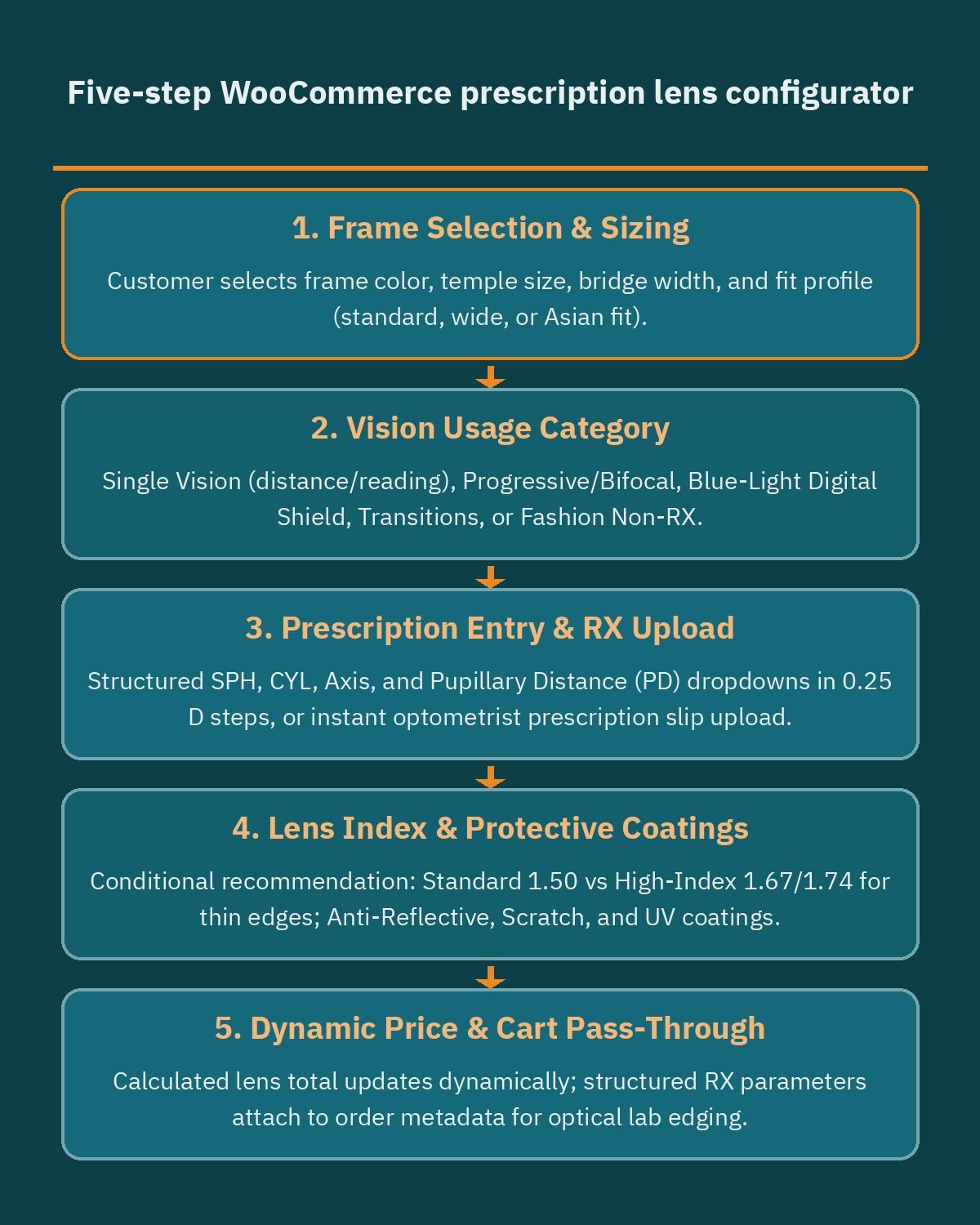
Linking frame construction attributes to your lens configurator rules adds another layer of clinical protection. If a frame is tagged as rimless or half-rim in the product database, the configurator can automatically hide brittle 1.50 standard plastic lenses and highlight high-tensile 1.59 or 1.60 materials that will not crack when grooved or drilled in the optical lab.
Capturing SPH, CYL, Axis, PD, and doctor prescriptions accurately
Collecting clinical prescription data is the highest-risk step in online eyewear retail. If you give customers open text boxes to type their numbers, you will inevitably receive missing plus or minus signs, decimal points in the wrong place, or left and right eye values swapped. Just as an auto parts website on WooCommerce uses strict year, make, and model selectors to prevent buyers from ordering incompatible mechanical parts, an optical store must enforce structured parameter inputs and range validation before accepting an order.
Design the prescription entry grid to mirror the layout of a standard ophthalmology or optometry slip, with separate rows for the Right Eye (OD, oculus dexter) and Left Eye (OS, oculus sinister). Every numeric parameter should use a controlled dropdown incremented in standard 0.25 diopter steps (or 1-degree steps for Axis) rather than free-form keyboard input.
- Sphere (SPH): Measures nearsightedness (minus values, such as -2.50) or farsightedness (plus values, such as +1.75), with 0.00 or Plano clearly labeled for eyes that only require astigmatism correction.Force the user to pick an explicit plus or minus value so no non-zero number is submitted without a sign.
- Cylinder (CYL): Measures astigmatism power in 0.25 diopter steps. Because some clinics write prescriptions in minus cylinder notation and others use plus cylinder notation, include plus and minus values clearly in the selector.
- Axis: A whole number between 1 and 180 degrees indicating the angle of astigmatism correction. Build conditional validation so the Axis dropdown stays disabled when Cylinder is 0.00, and becomes strictly required the moment a non-zero Cylinder value is selected.
- Near Addition (ADD): Appears only when the shopper chooses progressive, bifocal, or intermediate office lenses, capturing the extra magnifying power (typically +0.75 to +3.50) needed for reading.
- Pupillary Distance (PD): Measures the distance in millimetres between the centers of the pupils so the optical center of each lens aligns directly with the wearer’s eyes. Provide a toggle between a single binocular PD dropdown (for example, 54 mm to 74 mm) and dual monocular PD dropdowns (separate Right PD and Left PD, such as 31.5 mm and 32.0 mm), which is essential for high-index and progressive lenses.
Even with well-validated dropdowns, many customers feel safer letting a licensed professional read their paper chart. Using the file upload field in Product Add-Ons, let shoppers attach a smartphone photo or PDF scan of their signed prescription directly on the product page, or select an option to send the prescription after checkout via email or WhatsApp linked to their order ID. On the backend, orders containing prescription lenses should automatically land in a custom “Pending Optician Verification” status until your staff compares the uploaded slip against the entered SPH, CYL, Axis, and PD values before releasing the job ticket to the edging lab.
Frame sizing, millimetre measurements, and home try-on deposits
Fit anxiety is the primary reason eyewear shoppers hesitate to buy frames online. Unlike apparel that stretches or drapes, an eyeglasses frame that is three millimetres too narrow pinches the temples, while a bridge that is too wide causes the glasses to slide down the nose all day. Setting up variable products in WooCommerce lets you manage multiple frame colorways (such as Tortoiseshell, Matte Black, or Gold Titanium) alongside distinct eye-size variations under one clean product URL.
Every product page should include a visual diagram of the three standard millimetre numbers stamped inside the temple arm of any pair of glasses (for example, 52-18-140), along with two additional measurements that matter for comfort and optical performance:
- Lens width (46 mm to 60 mm): The horizontal diameter of one lens at its widest point.
- Bridge width (14 mm to 24 mm): The gap between the two lenses that rests across the nose, paired with an attribute noting whether the frame uses fixed acetate nose pads or adjustable metal nose pads for low-bridge or high-bridge fit.
- Temple length (135 mm to 150 mm): The length of the side arm from the front hinge over the ear.
- Total frame width: The end-to-end horizontal measurement across the front of the frame, allowing customers to measure a pair of glasses they already own and love with a simple ruler.
- Lens height (B measurement): The vertical height of the lens in millimetres, which your configurator can check automatically to confirm the frame is tall enough to accommodate a progressive lens corridor (typically requiring a minimum vertical height set by your optical lab).
Storing frame shape (round, aviator, rectangular, cat-eye, browline), material (acetate, titanium, stainless steel, TR90), total width classification (narrow, medium, wide), and bridge type as global WooCommerce attributes also strengthens your WooCommerce SEO architecture. Shoppers searching Google for specific combinations such as lightweight titanium frames or wide-fit polarized sunglasses land directly on indexable, fast-loading category and attribute archive pages.
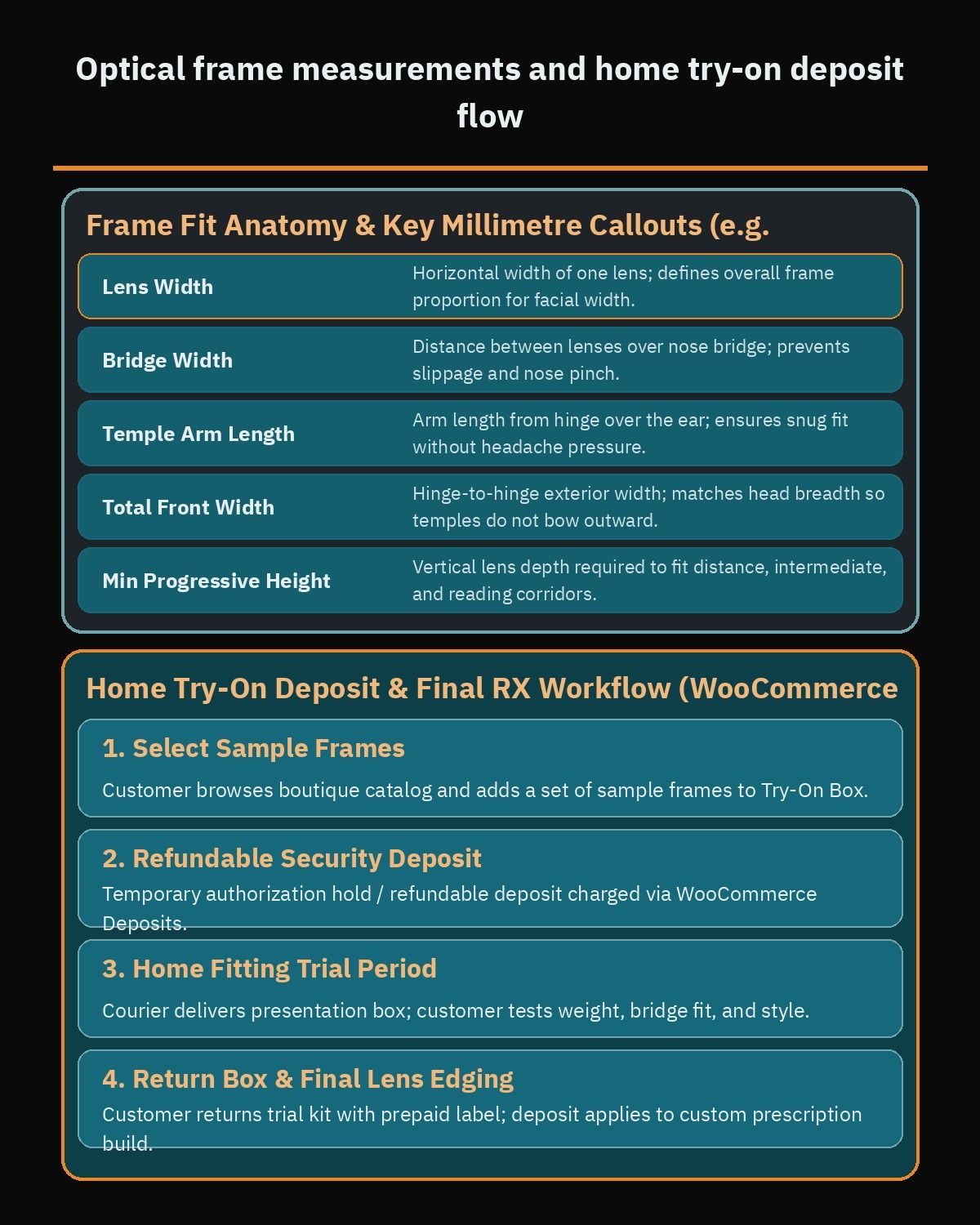
To eliminate fit uncertainty completely for premium frames, many optical brands in Egypt, Saudi Arabia, and the Gulf offer a home try-on sample box or in-branch reservation service. Similar to how a jewelry store website on WooCommerce handles high-value reservations and bespoke viewing deposits, you can configure WooCommerce Deposits so a customer selects a set of sample frames fitted with non-prescription demo lenses and pays a refundable security deposit at checkout. Once the customer tests the frames at home with family, returns the sample box via pre-paid courier, and chooses their favorite pair, the deposit is credited directly toward their final prescription eyewear order.
Contact lenses, pack variations, and auto-refill subscriptions
Contact lenses bring high repeat-purchase frequency to an optical e-commerce store, but they cannot use the same product page layout as eyeglasses frames. Contact lens wearers rarely need a multi-step coating wizard; instead, they want a fast, single-screen matrix where they can select their exact medical box parameters for each eye and reorder in under a minute.
Because most people have slightly different prescriptions in their right and left eyes, a contact lens product template must display two parallel rows (OD and OS) with independent selectors and a checkbox to order for one eye only when needed. Depending on whether the product is a spherical, toric (astigmatism), or multifocal contact lens, the template displays the relevant verified medical parameters:
- Power / Sphere (PWR / SPH): Restricted to the exact diopter steps manufactured by that specific brand and lens line.
- Base Curve (BC) and Diameter (DIA): Measuring the curvature and width of the soft lens in millimetres so it sits properly on the cornea (many daily lenses offer one or two fixed BC/DIA options, which should be pre-selected or locked to valid combinations).
- Cylinder and Axis (for Toric lenses) or ADD Power (for Multifocal lenses): Shown dynamically only on toric or multifocal contact lens product pages.
- Pack size and quantity: Allowing buyers to switch between 5-pack or 10-pack trial boxes, 30-pack daily boxes, 90-pack value boxes, or 6-pack monthly lenses while seeing the per-box price update immediately.
When a customer selects a 30-pack for their right eye (-2.00) and a 30-pack for their left eye (-2.50), the single “Add to Cart” button adds both SKU variations to the cart simultaneously with the eye labels clearly tagged in the line-item metadata. That level of product-type customization is a key reason optical chains evaluating WooCommerce vs Shopify often prefer WooCommerce, where custom PHP cart handlers and prescription metadata rules run natively without third-party app workarounds or per-order transaction surcharges.
Once your contact lens product template is in place, integrating WooCommerce Subscriptions turns one-time contact lens buyers into predictable recurring revenue. Shoppers can toggle between a one-time purchase and an auto-refill subscription on configurable billing intervals (such as monthly or quarterly cycles) to match their lens wear schedule. From the “My Account” portal, subscribers can skip a delivery when traveling, update their OD/OS diopter values after an annual eye exam, or add multi-purpose contact lens solution bottles to their next scheduled shipment.
Itemized medical tax invoices for optical health insurance claims
Across Saudi Arabia, the UAE, Egypt, and the wider Gulf, corporate and private health insurance plans frequently include an annual optical benefit covering prescription corrective lenses and a portion of the frame cost. When online optical stores fail to support insurance reimbursement paperwork, insured shoppers abandon their carts and walk into a brick-and-mortar clinic instead.
Direct real-time insurance portal integration requires hospital-grade accreditation that many independent boutiques do not have on day one, or even need. Most online eyewear buyers are happy to pay at checkout by card or installment plan and upload the invoice to their insurer’s mobile app for cash reimbursement, provided your store issues a compliant, itemized medical tax invoice rather than a generic e-commerce receipt.
If an online store bundles the frame and prescription lenses into a single line item labeled “Eyeglasses Complete Package,” insurance claims adjudicators often reject the claim because they cannot verify how much was spent on medical corrective lenses versus the fashion frame. Using PDF Invoices & Packing Slips for WooCommerce with a custom optical invoice template solves this problem cleanly by printing a downloadable PDF invoice inside the customer account and order confirmation email that includes:
- Patient and policyholder identification: A dedicated checkout field allowing the buyer to enter the exact patient full name and national ID or insurance membership number as it appears on their medical card, even if a parent or spouse is paying for the order.
- Separate itemized price lines: One distinct line item showing the optical frame brand, model code, and price, followed by separate line items for the Right Eye (OD) and Left Eye (OS) corrective medical lenses, refractive index, and anti-reflective treatment fees.
- Printed optical parameters: A structured clinical table on the PDF showing the dispensed SPH, CYL, Axis, ADD, and PD values alongside the dispensing optician’s license or store commercial registration details.
- Tax and VAT breakdown: Separate tax rates per line item where local law treats medical corrective lenses differently from standard retail frames or non-prescription sunglasses.
Because medical device taxation, e-invoicing QR code mandates (such as ZATCA in Saudi Arabia or ETA in Egypt), and health insurance documentation rules vary by jurisdiction and change over time, always review your invoice layout and tax classifications with a qualified local tax and healthcare compliance advisor before going live.
Regional payments, BNPL installments, insured courier shipping, and custom-lens returns
A complete pair of designer frames fitted with ultra-thin 1.74 high-index progressive or photochromic lenses represents a significant household purchase. How you configure payment options, fragile-item shipping, and post-purchase return rules determines both your checkout conversion rate and your protection against costly lab write-offs.
Checkout gateways and split-payment installments in MENA
Cash on delivery (COD) carries heavy operational risk for prescription eyewear: if a customer refuses delivery at the door after your optical lab has already edged a custom pair of lenses to their exact PD and astigmatism axis, those cut lenses cannot be resold to anyone else. Most optical stores either disable COD for custom-cut prescription orders or require an upfront digital deposit covering the lens lab cost, while encouraging full prepaid checkout through trusted regional gateways.
- Local cards and mobile wallets: In Egypt, integrating Paymob for WooCommerce supports Visa, Mastercard, Meeza cards, and local mobile wallets inside a native checkout flow. For Saudi Arabia, Moyasar enables Mada debit cards, credit cards, STC Pay, and one-tap Apple Pay so mobile shoppers can complete checkout in seconds.
- Buy Now, Pay Later (BNPL) installments: Splitting an order into interest-free payments makes it much easier for customers to upgrade from standard lenses to thinner high-index materials or anti-reflective coatings. Integrating Tamara Checkout and Tabby Checkout displays split-payment messaging directly beneath the frame and lens configurator total. Always check Tabby’s current supported countries and currency on its official plugin page before planning your integration, and verify Tamara’s active regional requirements in the same way.
Insured optical shipping and custom-lens return rules
Eyewear requires careful physical handling and realistic lead-time communication. While stock sunglasses and sealed contact lens boxes can ship the same day, prescription glasses need extra business days for lens surfacing, coating, edging, and quality inspection at the optical bench. Configure WooCommerce shipping zones under WooCommerce > Settings > Shipping to separate fast local courier dispatch from custom lab fulfillment timelines, and always ship finished eyewear in crush-proof hard cases with insured courier delivery and signature verification upon receipt.
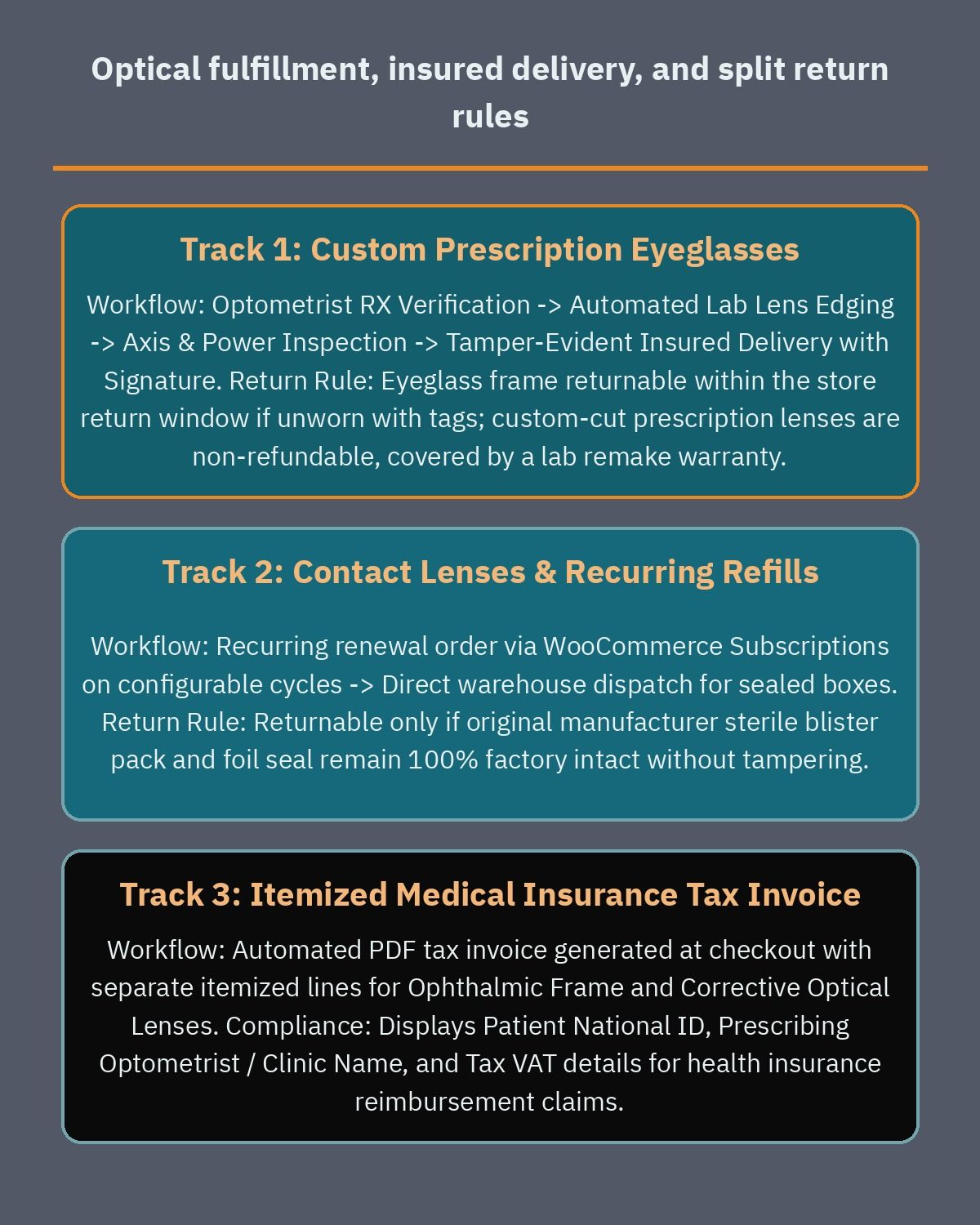
Your return and warranty workflow also needs clear technical separation between stock items and custom-manufactured medical lenses. By combining Returns and Warranty Requests for WooCommerce with core WooCommerce refunds, your customer service team can enforce fair, transparent policies at the individual line-item level:
- Stock sunglasses and unworn frames: Eligible for standard return or exchange within your return window, provided original tags, protective cases, and cleaning cloths are intact.
- Contact lens boxes: Returnable only if the outer manufacturer foil seal is completely unopened and unmarked, allowing customers whose prescription changed to exchange sealed boxes safely.
- Custom-cut prescription lenses: Because lenses edged to a specific frame contour and individual PD are bespoke medical components, you can issue a partial refund for the returned frame while deducting or converting the custom lens fee into store credit, or offer a one-time lab remake warranty if the customer’s eye doctor adjusts their prescription shortly after delivery.
What drives development cost and how to brief your WooCommerce team
When optical retailers ask what it takes to build a custom eyewear store on WooCommerce, the engineering scope depends far more on workflow depth than on the number of frames in the catalog. A store selling 3,000 frames that all share one clean lens configurator is much simpler to build than a 200-frame store with six disconnected ERPs and unstandardized lab pricing matrices.
- Depth of the lens configurator tree: The number of conditional rules connecting vision usage, prescription strength ranges, frame mount restrictions (full-rim vs rimless), lens indices, and tint or photochromic upgrades.
- Optical lab and multi-branch POS integration: Whether your team exports validated prescription job tickets manually as structured PDFs/CSVs or requires automated two-way API synchronization with an optical ERP, retail branch inventory system, and lens surfacing lab.
- Bilingual RTL interface and medical terminology: Designing the lens configurator, PD measurement guides, and prescription tables so they work intuitively in both English and right-to-left Arabic while keeping international clinical abbreviations (OD, OS, SPH, CYL, Axis, PD) properly aligned in left-to-right numeric tables.
- Home try-on and subscription automation: Adding deposit holding workflows for sample frame boxes and automated recurring billing for contact lens replenishment schedules.
Before you hire a WooCommerce developer, gather four documents from your head optician and operations lead: your complete lens package and index pricing sheet, the min/max diopter ranges your lab can fulfill per lens index, a sample of the itemized tax invoice your walk-in customers currently use for health insurance claims, and your written return rules for frames versus custom-cut lenses. Having those rules documented upfront saves weeks of revisions during development.
If you are planning a new eyewear e-commerce launch or upgrading an existing optical catalog in Egypt, Saudi Arabia, or the Gulf, book a free consultation so we can review your lens packages, prescription workflows, and regional payment requirements and map out a clear build plan for your store.
Frequently asked questions
How does a WooCommerce prescription lens configurator work for eyewear shoppers?
A prescription lens configurator breaks eyewear ordering into guided steps after the customer selects a frame. Using WooCommerce Composite Products or Product Add-Ons, the store asks for usage type such as single vision, progressive, blue-light filter, or photochromic lenses, then presents compatible lens indices and anti-reflective coatings. This step-by-step path keeps shoppers from picking thick lens materials that do not suit strong prescriptions.
How can an optical store prevent mistakes when customers enter SPH, CYL, Axis, and PD values?
Use structured dropdown menus incremented in quarter-diopter steps for Sphere and Cylinder values instead of open text boxes. Set validation rules that require an Axis number between 1 and 180 whenever a customer enters a Cylinder value for astigmatism, and allow both single and dual Pupillary Distance entries. Always include a file upload field so your optician can check the paper prescription before cutting lenses.
Can customers order different contact lens powers for each eye on a recurring subscription?
Yes, you can configure contact lens product pages with independent right-eye and left-eye selectors for power, base curve, diameter, and box size. Pairing that setup with WooCommerce Subscriptions lets buyers schedule automatic replenishment orders for daily or monthly disposable lenses without re-entering their optical parameters each cycle. Customers can pause, reschedule, or update their prescription details from their account dashboard whenever their vision changes.
What information must an online optical invoice include for health insurance reimbursement?
Regional health insurance providers typically require an itemized medical tax invoice rather than a combined retail receipt. Using PDF Invoices and Packing Slips for WooCommerce, your store can generate downloadable PDF documents that list the patient name, optical parameters, frame price, corrective lens cost, and applicable tax on separate lines. Always verify exact invoicing rules with a local tax and healthcare advisor.
How do optical stores handle returns when frames are returnable but custom prescription lenses are not?
Splitting the frame and the custom-cut lenses into separate order line items allows your support team to apply distinct return policies to each component. Using Returns and Warranty Requests for WooCommerce alongside core line-item refunds, you can accept an unworn frame back into inventory while retaining the fee for custom-ground prescription lenses. When a lab manufacturing defect occurs, the same workflow tracks a warranty remake at no extra charge.
References
- WooCommerce: Variable Product Documentation
- WooCommerce: Composite Products Documentation
- WooCommerce: Product Add-Ons Documentation
- WooCommerce: Subscriptions Documentation
- WooCommerce: Deposits Documentation
- WordPress.org: PDF Invoices & Packing Slips for WooCommerce
- WooCommerce: Returns and Warranty Requests
- WooCommerce: Refunds Documentation
- WooCommerce: Setting Up Shipping Zones
- WordPress.org: Paymob for WooCommerce
- WordPress.org: Moyasar Payment Gateway
- WordPress.org: Tamara Checkout for WooCommerce
- WordPress.org: Tabby Checkout for WooCommerce