هذا المقال متوفر باللغة العربية — اقرأ بالعربية
Mistral Vibe Desktop changes how engineering teams move between local codebases and remote agent execution by placing both workflows inside a single native application for macOS and Windows. Instead of splitting tasks across a terminal CLI for local files and a browser tab for cloud containers, developers open a repository session in one desktop workspace and manage everything from launch to pull request review.
For business owners across Egypt and the GCC who commission custom websites, this split matters more than interface polish. Agency teams building bilingual storefronts or bespoke portals must balance fast delivery with strict code safety, because mixing experimental AI edits with active client branches creates avoidable conflicts.
Understanding how local sessions, Git worktrees, and temporary cloud containers operate inside this release helps both engineering leads and buyers evaluate whether an agency uses AI tooling with discipline. Here is what changed, where the boundaries sit, and how the architecture applies to production WordPress and WooCommerce builds.
What changed with Mistral Vibe Desktop
Previously, teams using Mistral’s coding tools chose between two interfaces depending on where the code lived. The Vibe CLI handled local repository operations from a command line, while Vibe Code Web handled cloud sessions in a browser.
The desktop app merges both paths into one native client for macOS and Windows, with Linux support marked as coming soon in Mistral’s official overview. Every session represents a conversation opened against a repository, whether that repository sits on a developer’s laptop or runs inside a remote cloud container.
Local sessions inside the app share the Vibe CLI’s core agent engine and session logs, yet the desktop client does not embed or run the CLI binary itself. No separate CLI installation is required, though Mistral notes that tools, implementations, and prompts can differ between the desktop and terminal interfaces.
End-to-end workflow in a single application
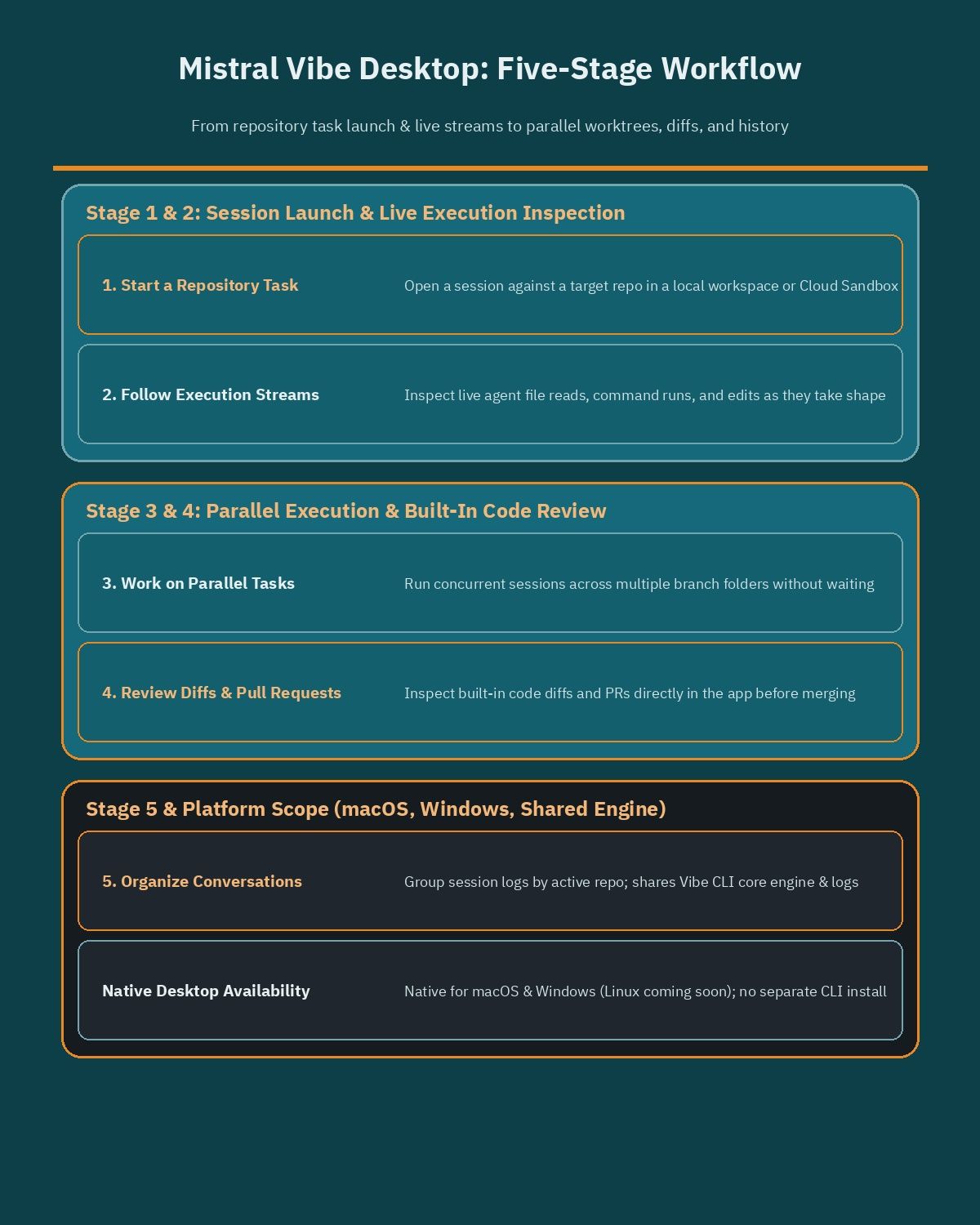
Rather than acting as a passive chat window that pastes code snippets for manual copying, the application structures software delivery around five connected stages inside one window:
- Start a task by opening a session against a target repository in either a local workspace or a cloud sandbox.
- Follow and inspect live agent execution streams as files are read, commands run, and edits take shape.
- Work on parallel tasks across multiple sessions or branch folders without waiting for a single thread to finish.
- Review built-in code diffs and pull requests directly inside the app before accepting changes into main branches.
- Organize conversations across active repositories so teams can revisit previous session logs cleanly.
Keeping diff inspection and pull request review inside the same workspace reduces context switching between an editor, a terminal, and a GitHub browser tab. For agency leads overseeing several client repositories at once, having organized conversation threads tied to built-in diffs makes code review faster to audit.
Local sessions versus Cloud Sandboxes
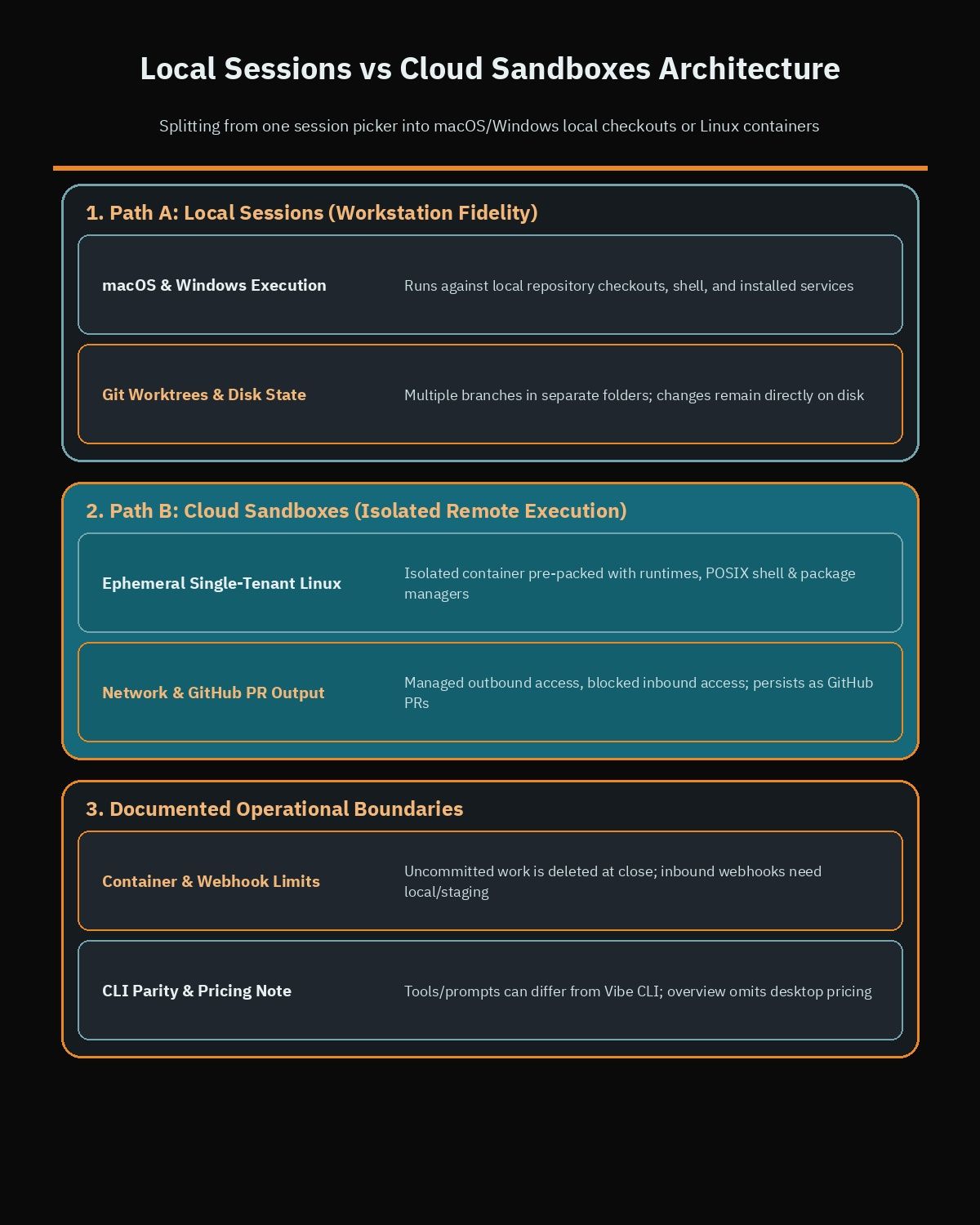
The defining design choice in the desktop app is offering two distinct runtime environments under one roof. Choosing between a local session and a cloud sandbox changes where commands execute, which dependencies the agent can reach, and how finished code persists after the conversation ends.
| Dimension | Local sessions | Cloud Sandboxes |
|---|---|---|
| Execution environment | Runs directly on the developer’s macOS or Windows machine | Runs in an isolated, ephemeral single-tenant Linux container |
| Tooling and dependencies | Uses existing local files, shell, services, checkout, and installed packages | Pre-packed with common language runtimes, POSIX shell, package managers, and CLI utilities |
| Git and repository access | Operates directly on the local repository checkout and Git worktrees | Configured with Git and GitHub app credentials for the connected repository |
| Network boundaries | Follows the developer machine’s local and network permissions | Outbound internet managed by Mistral for docs, packages, and public APIs; inbound public access blocked |
| Persistence after session | Changes remain directly in local files and branches on disk | Container is temporary and deleted at session end; persistent code is committed as a GitHub pull request |
When local sessions are the right fit
Local sessions run directly against files, shell tools, and background services on the developer’s machine. They are the practical option whenever a developer already holds a local checkout or needs the agent to test changes against local dependencies.
Web platforms often depend on local databases, custom PHP extensions, or environment configurations already wired on the workstation. Running locally lets the agent inspect those files and test against the active stack.
How Cloud Sandboxes isolate remote tasks
Cloud Sandboxes move execution off the laptop into an isolated, ephemeral single-tenant Linux container. Each container comes pre-packed with common language runtimes, a POSIX shell, standard CLI utilities, package managers, and Git configured with GitHub app credentials.
Network rules stay tight inside the container: inbound public internet access is blocked, while outbound access is managed by Mistral to fetch documentation, pull dependencies, or call public APIs. Because sandboxes are temporary and deleted when a session ends, persistent changes are committed and opened as GitHub pull requests on the connected repository.
Parallel local development with Git worktrees
Running multiple AI coding tasks inside a single local folder creates an immediate collision problem. If one task edits a template or configuration file while a second task runs tests or switches branches in the same directory, both sessions corrupt each other’s working tree.
Mistral addresses this bottleneck by supporting Git worktrees natively within local workflows. A Git worktree checks out multiple branches of the same repository into separate directories on disk at the same time, while sharing the underlying Git history. Because each worktree folder holds an independent working state, parallel Vibe agent tasks can edit files, install packages, and run checks concurrently without overwriting one another.
For engineering teams adopting parallel local sessions, a few operational habits keep worktree workflows predictable:
- Assign one distinct feature or fix branch per worktree folder so two agents never touch the same branch simultaneously.
- Keep task scopes separated by module or responsibility before launching concurrent sessions.
- Inspect built-in code diffs inside each session before merging worktree branches back into the main integration branch.
- Remove completed worktrees regularly so unused branch folders do not accumulate stale build artifacts on disk.
Practical WordPress and WooCommerce workflows for MENA agencies
General coding assistants often struggle with WordPress projects because WordPress spans PHP templates, JavaScript block builds, CSS stylesheets, database state, and third-party plugin hooks. Separating local worktree execution from isolated cloud containers maps cleanly to how professional WordPress development teams in Egypt and the GCC deliver client sites.
Business owners commissioning a store or corporate platform rarely see how code moves from a developer’s laptop to production, yet that workflow determines how fast bugs get fixed and how safely updates ship. When an agency pairs local environment fidelity with cloud isolation, each class of task runs where it carries the lowest risk.
Parallel local tasks for WooCommerce hooks and RTL blocks
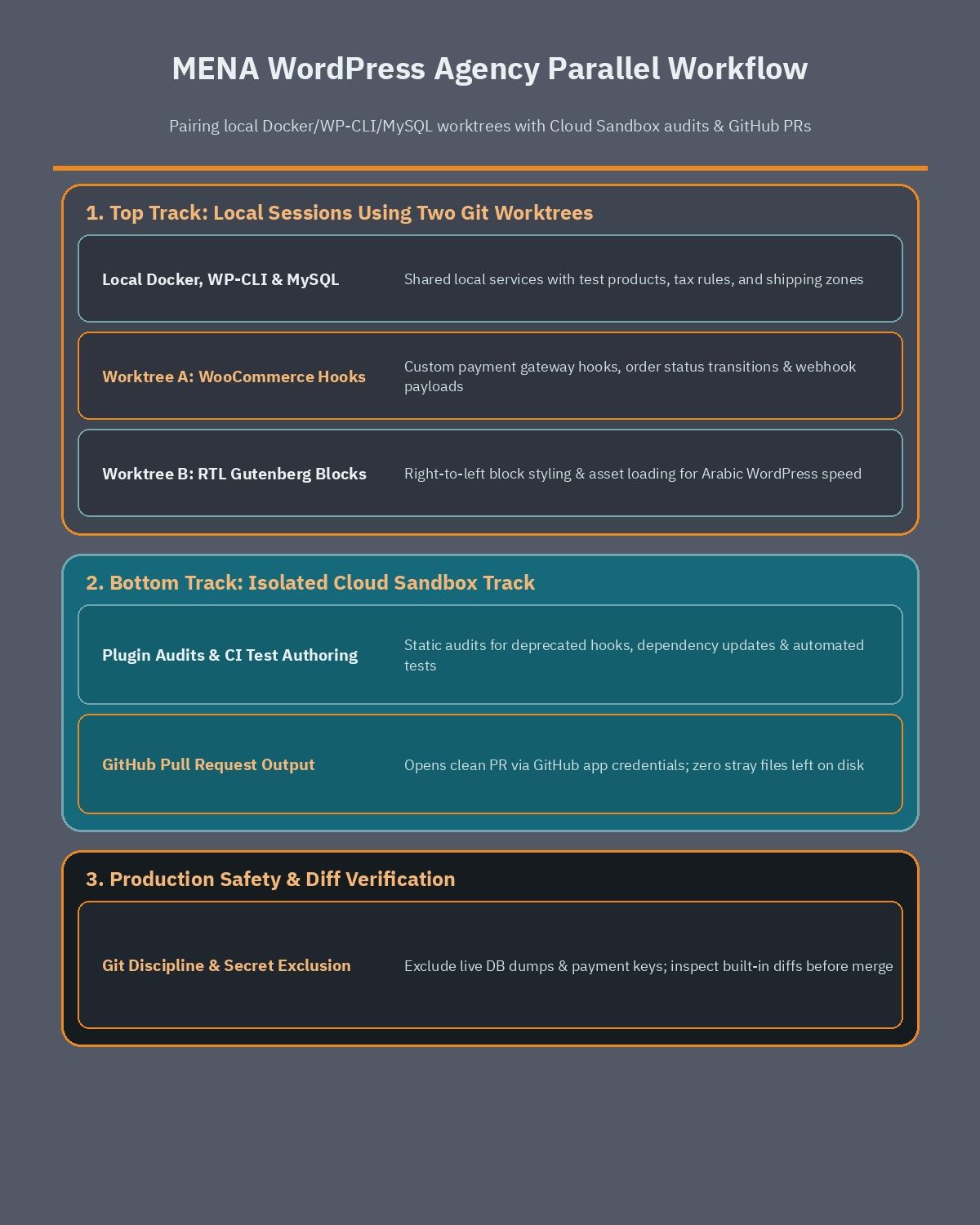
Most production WooCommerce builds run locally inside Docker containers alongside WP-CLI and a local MySQL database containing test products, tax rules, and shipping zones. Those local services are exactly why local sessions matter for teams you engage when you hire a WooCommerce developer for regional commerce builds.
Using Git worktrees inside local desktop sessions, a developer can split two urgent client deliverables side by side without stepping on shared files:
- Worktree one runs a local session focused on custom WooCommerce payment gateway hooks, validating order status transitions and webhook payloads against the local MySQL database and WP-CLI scripts.
- Worktree two runs a parallel local session focused on Right-to-Left Gutenberg block styling and asset loading rules tailored for Arabic WordPress performance across mobile viewports.
Because each worktree lives in its own folder on its own branch, neither session blocks the other during testing. Once both tasks complete, the engineer opens the built-in diff viewer in the desktop app, checks every hook and stylesheet change, and merges each branch only after local verification passes.
Cloud Sandboxes for plugin audits and GitHub pull requests
Not every WordPress engineering task requires a live MySQL database or a full Docker stack. Static code audits, dependency updates, CI pipeline setup, and automated test authoring work cleanly against an isolated repository snapshot.
Cloud Sandboxes suit those workflows because they run inside a clean, temporary Linux container separated from local workstations and client database dumps. A lead developer can launch a cloud session against a connected GitHub repository to audit a plugin for deprecated hooks or draft test coverage, then review a clean GitHub pull request before merging. When the session ends, the container disappears with zero stray files left on developer laptops.
Strengths, limits, and comparison with other workflows
Every coding environment carries trade-offs, and evaluating Mistral Vibe Desktop realistically means looking at both what it solves and what stays out of scope today. Comparing the tool against pure terminal agents or browser-only sandboxes highlights where the unified client helps and where teams still need manual discipline.
Key operational strengths from the current architecture include:
- Single desktop interface covering both local repository work and remote cloud sandboxes on macOS and Windows.
- No separate Vibe CLI installation required to run local desktop sessions, while preserving shared engine behavior and session logs.
- Native support for Git worktrees, making concurrent branch tasks practical without manual folder juggling.
- Built-in diff and pull request review views alongside organized conversation history.
- Single-tenant cloud container isolation with blocked inbound traffic and automatic PR handoff through GitHub app credentials.
At the same time, technical teams and buyers should account for clear platform limits documented by Mistral:
- Linux desktop availability is not live yet and remains marked as coming soon, which limits native parity for agencies standardized on Linux developer workstations.
- Because Desktop does not embed the CLI binary directly, tools, implementations, and prompts can behave differently between the desktop client and the terminal CLI.
- Cloud Sandboxes are temporary and deleted when a session finishes, so any work not committed and pushed to a GitHub pull request is lost when the session closes.
- Blocked inbound public internet access protects cloud containers, which means workflows that require external webhooks to reach the running container directly must run locally or use dedicated staging servers instead.
Compared to terminal-only agents, the desktop client lowers friction for engineers who prefer visual diff inspection and parallel session tracking over managing multiple terminal windows. Compared to browser-only cloud sandboxes, adding local sessions and Git worktree support avoids forcing database-heavy stacks like WordPress and WooCommerce into generic remote containers.
Mistral’s desktop overview focuses on technical architecture and session modes rather than publishing separate desktop tier pricing on that page. Agencies already benchmarking coding assistants across model families such as GPT-6.2 Astra Sol and Gemini 4 Hydrogen should review current Mistral account terms and usage limits in official Mistral documentation before standardizing across a full team.
What business owners should verify before adoption
If you are a founder, marketing director, or operations lead hiring an agency to build or maintain your WordPress platform, you do not need to manage your developer’s desktop app directly. However, asking the right governance questions ensures AI coding tools speed up delivery without putting your live store or customer data at risk.
Before greenlighting an agency workflow built around desktop and cloud coding agents, check these practical safeguards:
- Confirm that your website codebase lives in a proper Git repository with branch protection and pull request reviews rather than direct FTP edits on a live server.
- Verify that production database backups, payment keys, and live customer records remain excluded from both local test dumps and cloud sandbox repositories.
- Ask how developers review generated diffs before merging branches, especially around checkout hooks, security permissions, and user authentication.
- Ensure every parallel task maps to a clear issue or feature branch so your team can roll back an individual change cleanly if needed.
Well-structured engineering habits determine whether desktop AI tools produce reliable software or fragile shortcuts. If you are planning a custom WordPress build, migrating a bilingual WooCommerce catalog, or tightening your agency’s technical delivery process, book a free WordPress consultation to map out a clean repository and deployment architecture for your business.
Frequently asked questions
Do developers need to install Vibe CLI before using Mistral Vibe Desktop?
No separate Vibe CLI installation is required to run local sessions inside Mistral Vibe Desktop. The desktop app shares the CLI’s core agent engine and session logs, but it does not embed or execute the CLI binary directly. Keep in mind that specific tools, implementations, and prompts can still differ between the desktop and terminal interfaces.
Which operating systems support Mistral Vibe Desktop right now?
Mistral Vibe Desktop is available as a native application for macOS and Windows. According to Mistral’s official documentation, Linux desktop support is coming soon rather than available today. Teams on macOS and Windows can run both local repository sessions and remote cloud sessions from the same desktop workspace.
When should a WordPress team choose a local session over a Cloud Sandbox?
Choose a local session when your developers already have a repository checkout and need to test against local services such as Docker, WP-CLI, and MySQL. Use a Cloud Sandbox for isolated tasks like plugin code audits, CI setup, or test authoring that can run inside a clean Linux container and output a GitHub pull request.
How do Git worktrees help when running parallel coding tasks?
Git worktrees let you check out multiple branches of the same repository into separate local folders at the same time. Because each folder keeps its own working files, parallel agent sessions can build separate features side by side without overwriting active edits. Developers can then inspect each built-in diff before merging branches.
What happens to code inside a Cloud Sandbox after a session ends?
Cloud Sandboxes run inside temporary, single-tenant Linux containers that are deleted when the session closes. Persistent code changes are saved by committing them and opening a GitHub pull request directly on the connected repository using pre-configured GitHub app credentials. Any uncommitted edits left in the container disappear once the session ends.