هذا المقال متوفر باللغة العربية — اقرأ بالعربية
The GPT-Live-1.1 OpenAI API release on November 19, 2026 targets two operational bottlenecks that have slowed down production voice agents: multilingual speech accuracy during live conversations and the ongoing cost of idle WebRTC connections. Available under the model ID gpt-live-1.1 (with default snapshot gpt-live-1.1) exclusively on the v1/live/sessions endpoint, this update refines full-duplex spoken interaction while simplifying how engineering teams hand off complex reasoning and database lookups to backend services.
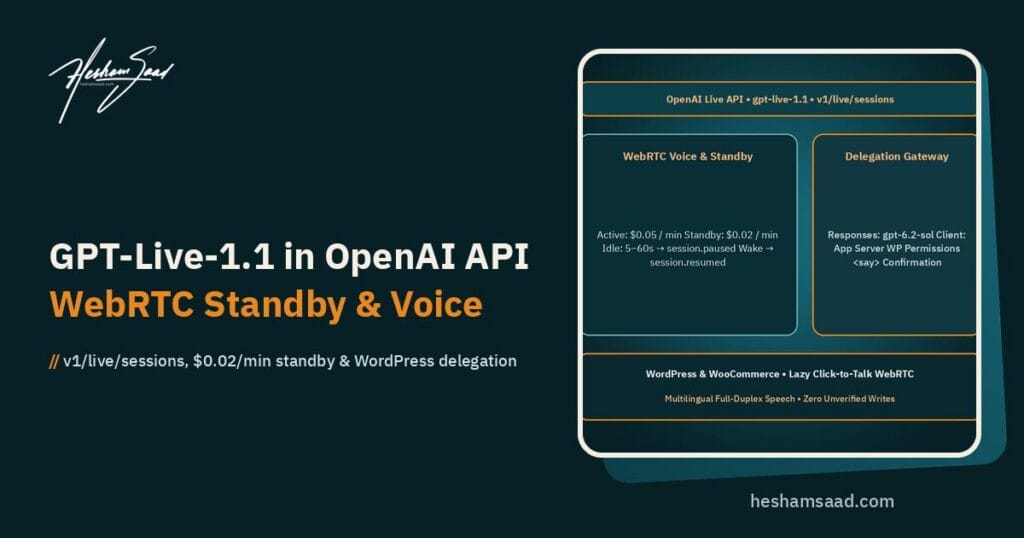
Alongside the new model snapshot, OpenAI introduced configurable WebRTC standby support for both gpt-live-1 and gpt-live-1.1, trimming paused session duration charges from $0.05 per minute down to $0.02 per minute. For companies in Egypt, Saudi Arabia, the UAE, and across the wider MENA region running WordPress service portals, WooCommerce stores, or SIP contact centers, these two changes directly impact how you budget and build bilingual voice interfaces.
What Changed in the GPT-Live-1.1 OpenAI API Release
Like its predecessor, gpt-live-1.1 is a full-duplex voice model built to listen while it speaks. Instead of waiting for a rigid half-duplex turn boundary before processing input, the model monitors incoming audio continuously, handles natural conversational overlap, and yields the floor when a customer interrupts or corrects a detail mid-sentence.
Where gpt-live-1.1 pulls ahead of gpt-live-1 is in the quality of its acoustic and linguistic front end, paired with a much cleaner instruction format for backend tool delegation. According to OpenAI’s November 19, 2026 API changelog and model documentation, the upgrade centers on four verified capabilities:
- More accurate speech transcription: Higher transcription fidelity reduces misheard order numbers, phone digits, and domain-specific terms before they ever reach a downstream tool or backend model.
- Better multilingual pronunciation: Spoken output handles non-English vocabulary and code-switched phrases more naturally, avoiding awkward phonetic rendering when a session shifts between Arabic and English.
- Stronger accent and voice consistency across languages: When a caller switches languages mid-conversation,
gpt-live-1.1preserves a steadier vocal identity and accent profile rather than sounding like a different speaker on each language switch. - Plain-language delegation prompting: Developers no longer need to embed
gpt-live-1‘s special<|SpawnThinking|>token syntax to trigger backend handoffs, using readableDelegate to the backend when:andDo not delegate when:criteria instead.
For MENA businesses, the combined improvement in transcription accuracy and cross-language voice consistency solves a daily complaint in regional customer support. A shopper calling a Cairo electronics store or a patient booking a dental consultation in Dubai rarely speaks in pure formal Arabic or pure English; they mix Arabic questions with English brand names, SKU codes, neighborhood landmarks, and dosage terms. Keeping the voice session consistent across those shifts prevents both transcription failures and jarring voice shifts.
Endpoint Scope, Modalities, and Session Architecture
Before planning a migration or a new plugin integration, engineering teams must note a strict routing boundary: gpt-live-1.1 is supported only on the v1/live/sessions endpoint. You cannot call gpt-live-1.1 through v1/chat/completions, v1/responses, v1/realtime, v1/audio/speech, or v1/audio/transcriptions.
That isolation is intentional. The v1/live/sessions surface manages persistent, stateful, full-duplex conversation loops where low-latency audio streaming and asynchronous backend delegation run concurrently. Attempting to drop the model ID into a standard REST text completion payload or an older Realtime API socket will return an unsupported endpoint error.
| Technical Dimension | gpt-live-1 | gpt-live-1.1 |
|---|---|---|
| Supported API Endpoint | v1/live/sessions only | v1/live/sessions only |
| Input and Output Modalities | Audio and text input; audio and text output | Audio and text input; audio and text output |
| Supported API Features | streaming, function_calling | streaming, function_calling |
| Delegation Prompt Syntax | Special <|SpawnThinking|> token syntax | Plain-language Delegate to the backend when: / Do not delegate when: rules |
| Multilingual Speech & Transcription | Baseline live transcription and voice handling | More accurate transcription, better multilingual pronunciation, stronger cross-language accent and voice consistency |
| Concurrent-Session Rate Limits | Dedicated gpt-live-1 concurrency pool across inference regions | Separate concurrent-session rate limits from gpt-live-1, applied across inference regions |
| WebRTC Active & Standby Pricing | $0.05/min active; $0.02/min WebRTC standby (added Nov 19, 2026) | $0.05/min active; $0.02/min WebRTC standby |
Because gpt-live-1.1 maintains separate concurrent-session rate limits from gpt-live-1 applied across inference regions, teams can stage a controlled blue-green rollout. You can keep existing production traffic on gpt-live-1 while testing gpt-live-1.1 in parallel without one model exhausting the other’s concurrency quota.
Transport Options: WebRTC, WebSockets, and SIP Telephony
The v1/live/sessions architecture supports three transport protocols depending on where the audio originates. Selecting the right transport early prevents costly rewrites when you move from a browser prototype to a multi-channel support desk:
- WebRTC (Recommended for client and server audio): OpenAI recommends WebRTC for browser widgets, mobile applications, and server audio pipelines because it handles network jitter, packet loss, and media track negotiation natively. WebRTC is also required if you want to use configurable standby mode.
- WebSockets: Useful for custom server-to-server relays or specialized middleware where raw audio frames and control events are proxied through an existing backend socket architecture.
- Telephony and SIP: Following OpenAI’s launch of outbound SIP calling via
v1/live/sessionson November 2, 2026, voice agents can connect directly to telephone networks and PBX systems for inbound and outbound phone support.
In a typical MENA commercial setup, a single backend delegation service can serve two voice entry points at once: a WebRTC browser assistant embedded on high-intent WooCommerce checkout or clinic booking pages, and a SIP trunk handling phone calls from customers who prefer dialing a local landline.
Startup Session Parameters and Voice Selection
When your application initializes a session on v1/live/sessions, the startup payload establishes the model, system behavior, voice profile, and delegation topology. Key configuration fields include:
model: Set to"gpt-live-1.1".instructions: System prompt guiding the voice model, supporting up to16,384tokens at startup and extendable mid-session viasession.instructions.append.input: An array of prior text messages to seed conversation history before audio begins (defaults to[]).audio.output.voice: Defaults tomarin. You can also pick from built-in natural and generated voices includingquartz,ripple,vesper,willow,stone,gleam,meridian,bossa,tempo,beacon,delta,cinder,nuri,juni,flitz,brise,sillage,nira,harema,shida, andnoeul, or configure custom voices.delegation.type: Chooses between"client"(the default) and"responses"at session startup.store: Defaults tofalse. Settingstore: truepersists the session state so you can use session forking for testing, debugging, or branching conversations.
Having input accept prior text messages at startup is especially helpful on WordPress sites where a visitor starts in a text chat drawer and clicks a button to escalate to live voice. Passing the recent text exchange into input lets gpt-live-1.1 continue the conversation without asking the customer to repeat their name or order number.
Plain-Language Prompting and Mid-Session Context Controls
Prompting a full-duplex voice agent differs fundamentally from prompting a text chatbot. Because the model listens and speaks at the same time while coordinating with a separate backend brain, an unstructured paragraph of instructions leads to awkward interruptions, premature tool calls, or dead air while a database query runs.
With gpt-live-1.1, OpenAI formalizes live prompting around three explicit policy headings inside your instructions block (up to 16,384 tokens) and replaces the brittle <|SpawnThinking|> token syntax with plain-language delegation criteria.
The Three Core Policy Headings
Every production prompt for gpt-live-1.1 should organize conversational rules under three distinct headings so the voice model knows how to react in real time:
Backchannel policy: Defines when and how the model produces brief listening acknowledgments (such as “mm-hmm” or “got it”) while the user is speaking a multi-sentence explanation, confirming the line is live without stealing the turn.Interruption policy: Instructs the model how to stop speaking immediately when the caller cuts in, drop stale explanation branches, and address the caller’s latest correction or question.Delegation policy: Explicitly lists three sub-elements in plain language:Backend tools(what capabilities exist behind the scenes),Delegate to the backend when(clear triggers such as looking up an order status, calculating shipping duties, or modifying a booking), andDo not delegate when(triggers the voice model should answer immediately itself, such as greetings, clarifying an unclear digit, or repeating store hours already in context).
Dropping <|SpawnThinking|> in favor of explicit Delegate to the backend when and Do not delegate when blocks makes prompt reviews far safer for product managers and agency QA teams. You can read the prompt and immediately see which requests stay in the low-latency voice loop and which requests trigger a backend handoff.
Runtime Events for Silent Context, Spoken Commentary, and Exact Disclosures
During an active call, your application frequently needs to feed new state into the voice model or force an exact legal phrase without restarting the session. The v1/live/sessions event protocol provides three specialized append controls for this purpose:
session.thinking.append: Injects silent, summarized context into the conversation state. For example, when a logged-in WooCommerce customer opens a voice session, your backend can push their membership tier, preferred language, and most recent order ID viasession.thinking.appendso the model has background awareness without reading it aloud unsolicited.session.commentary.append: Sends spoken progress updates while a longer backend task is executing. If an ERP stock check or courier API takes four seconds to respond, sending a brief progress cue viasession.commentary.appendkeeps the caller informed instead of leaving uncomfortable silence on the line.session.instructions.appendwith verbatim<say>tags: Appends instructions mid-session and supports strict verbatim script delivery. Using the exact directiveRead the following exactly, without an introduction or explanation: <say>...</say>forces the model to speak mandatory call-recording disclosures, return policy terms, or payment confirmation wording word for word.
Combining session.commentary.append for wait states with <say>...</say> for compliance notices solves two of the biggest enterprise objections to generative voice agents: unpredictable pauses during API lookups and paraphrased legal terms.
Dual Delegation Architecture: Responses Mode vs. Client Mode
A core architectural principle of OpenAI’s Live API is separating the fast front-end conversational voice model (gpt-live-1.1) from heavier backend reasoning, database queries, and business logic. Because spoken dialogue fails whenever latency spikes, gpt-live-1.1 stays focused on real-time audio comprehension, natural turn-taking, and immediate spoken responses, while delegating complex work asynchronously.
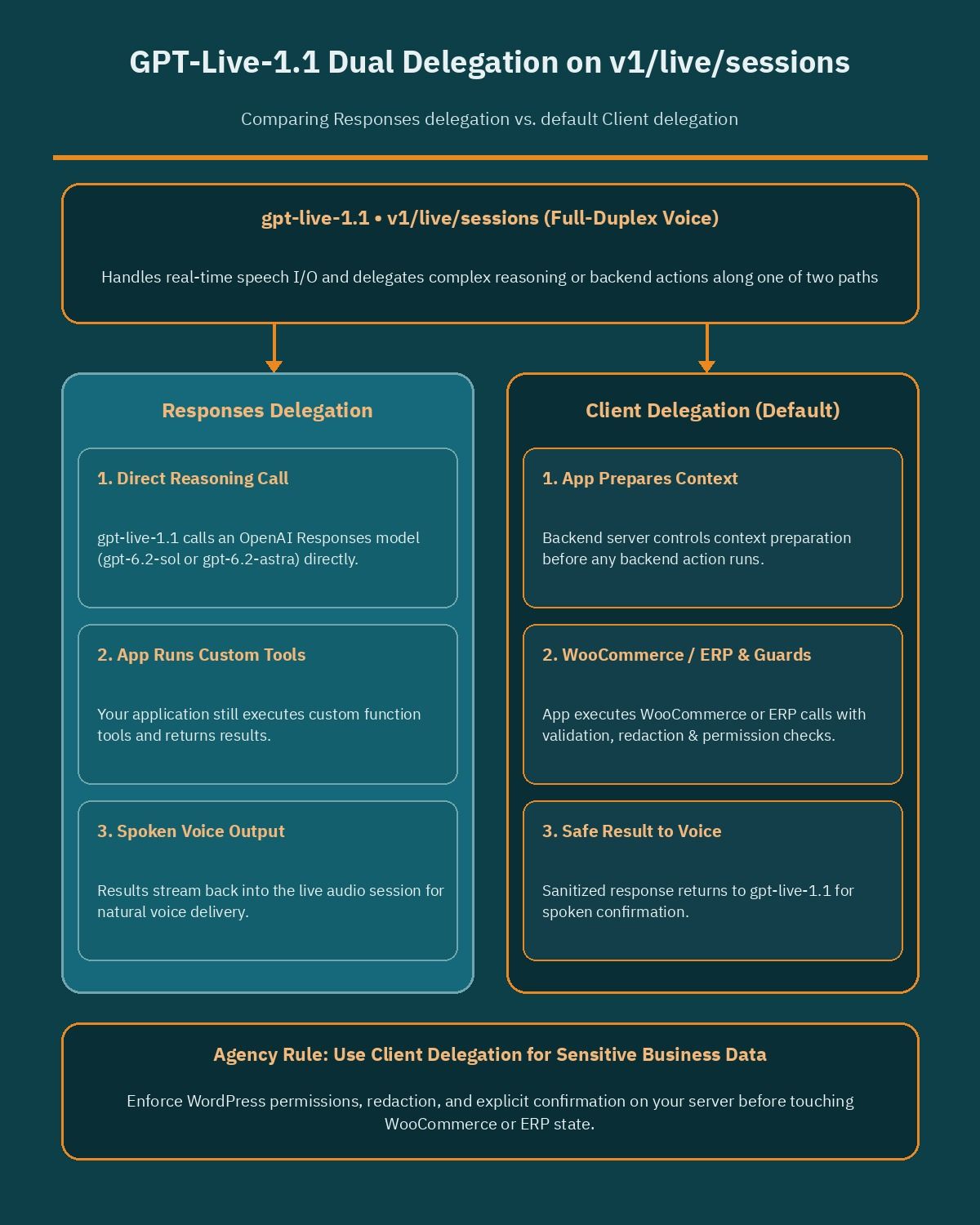
At session startup, you choose how that handoff works by setting delegation.type to either "responses" or "client" (the default).
Understanding the boundary between these two modes is essential before connecting a live voice agent to customer data or store inventory.
How Responses Delegation Works
When you configure delegation.type: "responses" at session startup, GPT-Live manages the backend request directly to an OpenAI Responses model and returns the resulting output to the spoken conversation. Meanwhile, your application still executes any custom function tools invoked during that reasoning loop.
For teams already building on OpenAI’s latest reasoning snapshots, as covered in our technical breakdown of GPT-6.2 Astra and GPT-6.2 Sol, Responses delegation lets gpt-live-1.1 hand off multi-step synthesis or policy troubleshooting to gpt-6.2-sol or gpt-6.2-astra without your team writing custom orchestration middleware for the model-to-model hop.
How Client Delegation Works (Default)
When you leave delegation.type at its default value of "client", GPT-Live emits a delegation request to your application whenever the conversation hits a Delegate to the backend when rule. Your own backend server takes full control of the handoff lifecycle:
- Your application prepares and sanitizes the exact context required for the task.
- Your backend invokes whichever downstream service fits the job: an OpenAI model, an internal RAG pipeline, a multi-step fulfillment workflow, a clinic scheduling API, or a WooCommerce REST endpoint.
- Your application validates, redacts, or filters the raw outputs (stripping internal margin figures, staff notes, or unverified customer PII) before sending the approved result back to
gpt-live-1.1to speak.
Regardless of whether you pick responses or client delegation, OpenAI’s delegation guide emphasizes a strict security rule: your application, not the voice model, remains responsible for permission checks, required user confirmations, business records, and task state. Never rely on a voice prompt alone to prevent an unauthorized refund, address change, or appointment cancellation.
Configurable WebRTC Standby Mode and Official Pricing Breakdown
Live voice sessions on a website or service dashboard rarely consist of nonstop talking. A customer looking through a furniture catalog, reading a medical intake screen, or hunting for an invoice PDF in another browser tab may stay silent for 20 to 90 seconds between questions. Previously, keeping a WebRTC session warm during those quiet stretches meant paying full active inference rates or tearing down the connection and forcing a slow reconnect.
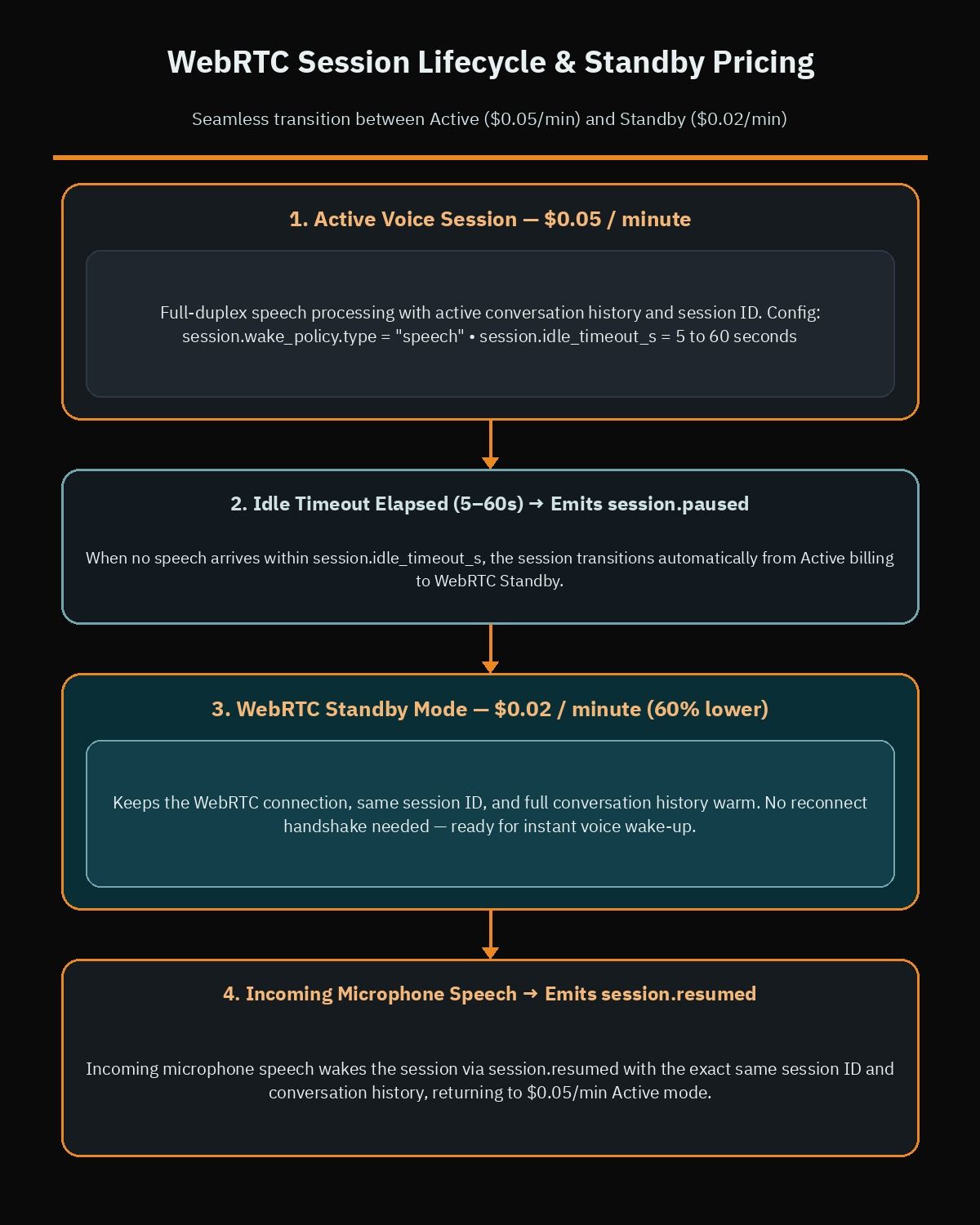
On November 19, 2026, OpenAI solved this trade-off by launching configurable WebRTC standby mode for both gpt-live-1 and gpt-live-1.1. While a WebRTC session is in standby, inference pauses and the session duration rate drops by 60 percent:
- Active live session duration:
$0.05per minute ($3.00per hour). - Standby live session duration (WebRTC only):
$0.02per minute ($1.20per hour, a 60 percent lower rate while inference is paused). - Separate backend billing: Any backend model calls (such as Responses models invoked during delegation) and tool usage are billed separately according to their own standard pricing.
Understanding the exact state transitions and edge cases of WebRTC standby prevents unexpected billing or clipped first syllables when a user resumes speaking.
Configuring Wake Policy, Idle Timeout, and VAD Thresholds
Standby mode operates exclusively on WebRTC connections and is controlled through three session configuration parameters:
session.wake_policy.type: Set this to"speech"so the session waits for detected speech before starting or resuming active inference.session.idle_timeout_s: Set this to a whole number from5to60seconds. When no input or output transcript activity occurs for that duration, the session automatically transitions into standby and emits asession.pausedevent.session.wake_policy.vad_threshold: Optionally tune the voice activity detection sensitivity from0to1(default0.5) to match your users’ typical background noise profile.
For wake-on-speech to function, your client application must keep the WebRTC microphone media track active while the session is paused. As soon as the caller speaks above the configured VAD threshold, inference resumes automatically, the server emits a session.resumed event, and the conversation continues on the exact same WebRTC connection and session ID with full conversation history intact.
Two Operational Caveats Developers Must Handle
OpenAI’s live conversation documentation highlights two behaviors that front-end developers must account for when building WebRTC voice widgets:
- Muting the microphone does not trigger standby by itself: If a user clicks a mute button in your UI, the session remains in the active billing state (
$0.05per minute) untilsession.idle_timeout_sexpires without an input or output transcript. If your UI includes a “Hold” or “Pause Call” button, combine a shortidle_timeout_s(for example,5to10seconds) with clear visual indicators listening for thesession.pausedevent. - First response latency after waking from standby: When a session wakes from standby on a very short utterance (such as a single word like “Hello?”), the first response may take slightly longer while active inference spins back up. Prompting your interface or agent to handle brief wake phrases gracefully avoids users repeating themselves twice.
Even with standby priced at $0.02 per minute, you should still enforce an application-level maximum idle ceiling. If a visitor leaves a browser tab open and walks away for twenty minutes, paying $0.02 per minute indefinitely adds unnecessary cost; terminate the WebRTC session entirely after two to three minutes in standby and let the visitor resume via a one-click reconnect seeded with stored input history.
Architecting GPT-Live-1.1 for MENA WordPress and WooCommerce Sites
Across Egypt, Saudi Arabia, Kuwait, Qatar, and the UAE, e-commerce stores and service businesses rely heavily on conversational commerce. Shoppers and B2B buyers routinely ask to confirm stock availability, warranty coverage, delivery windows, or clinic appointment slots before committing to a checkout or booking form. Adding a bilingual voice assistant powered by gpt-live-1.1 can capture high-intent customers who prefer speaking over typing on a mobile screen, provided the WordPress integration is architected cleanly.
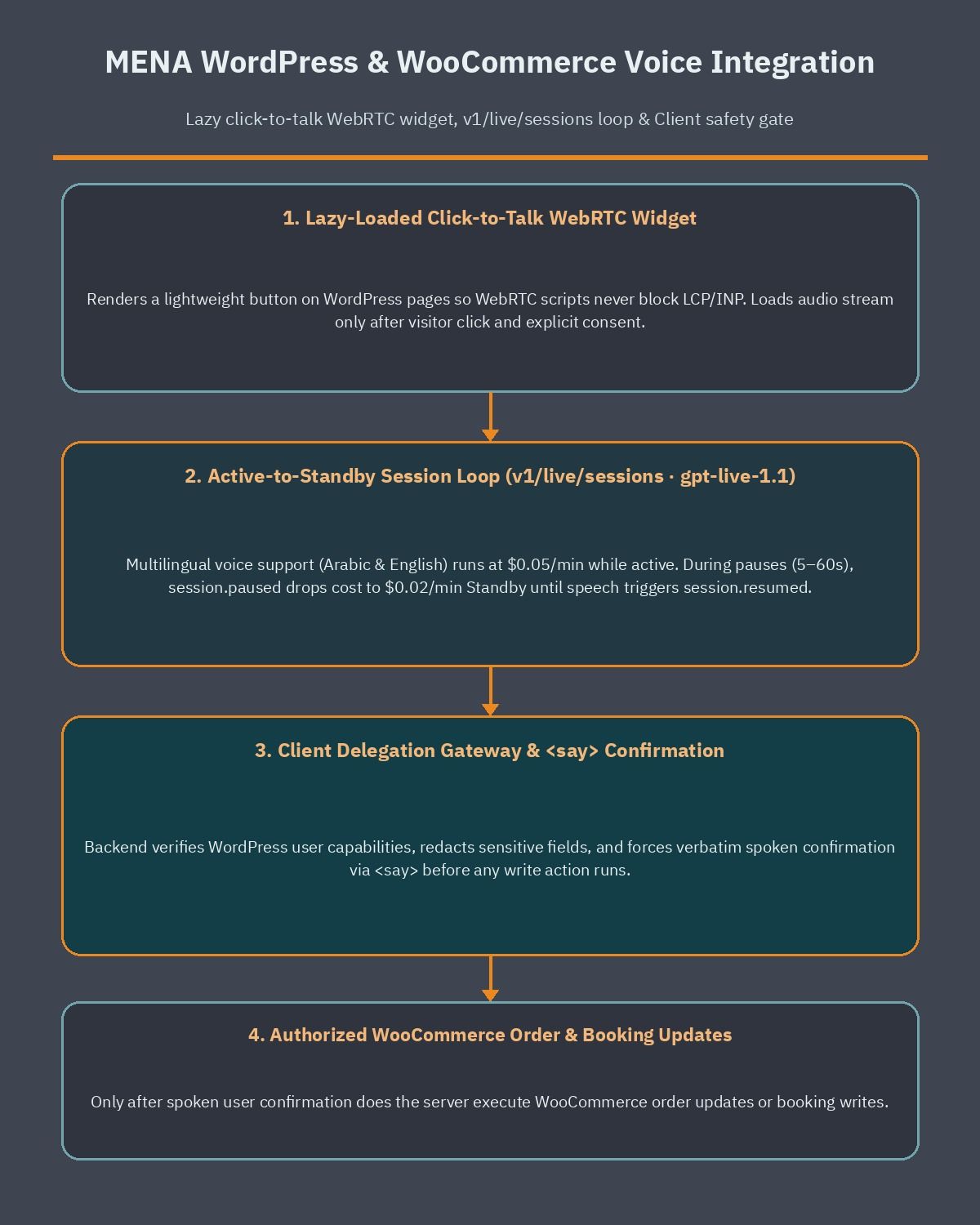
When our agency scopes custom voice and AI integrations through our WordPress development service, we separate the architecture into three isolated layers: a lazy-loaded browser WebRTC UI, a secure token and delegation proxy, and authenticated WordPress or WooCommerce data handlers.
Structuring your build around those three layers prevents credential exposure, protects Core Web Vitals, and stops unauthorized database writes.
Handling Bilingual Arabic-English Code-Switching
Regional callers naturally blend Arabic sentence structure with English commercial nouns. An automotive parts buyer in Riyadh or an apparel customer in Alexandria might open the call in Arabic, read out an alphanumeric SKU in English, switch back to Arabic to ask about cash-on-delivery fees, and spell a compound or street name using English terms.
With gpt-live-1.1, you can reinforce its improved multilingual pronunciation and cross-language voice consistency by structuring your instructions and Delegation policy around regional patterns:
- Mirror the caller’s primary language while preserving English identifiers: Instruct the model to respond in natural Arabic when addressed in Arabic, while keeping model numbers, SKU codes, and brand names in their exact catalog form.
- Normalize numbers before delegating: Under
Delegate to the backend when, require the voice model to repeat back phone numbers, order IDs, or booking dates and receive a quick verbal confirmation before firing a write delegation request. - Use
session.thinking.appendfor localized catalog terms: Push the current product title in both Arabic and English alongside its SKU into silent thinking context as soon as a user clicks the voice button on a product page.
Enforcing WooCommerce Permissions Through Client Delegation
For online stores that decide to hire a WooCommerce developer to connect voice support with live order data, delegation.type: "client" should always be your default choice. Giving a voice session direct, unfiltered write access to store endpoints creates serious security and margin risks.
Instead, your custom WordPress REST endpoint or Node/Python middleware handles every delegated request with strict server-side guardrails:
- Read-only catalog lookups: Public queries (checking whether a size is in stock or comparing two product specifications) execute against cached WooCommerce product data and return concise JSON summaries to
gpt-live-1.1. - Authenticated order tracking: Before querying personal order details, your backend verifies the WordPress user nonce or matches the order ID against a verified phone OTP, redacting full billing addresses and payment metadata before returning the delivery status to the voice session.
- Explicit confirmation for state changes: If a caller asks to update a delivery slot, cancel an unshipped item, or book a service appointment, your application tracks the task state in your database, uses
session.instructions.appendwithRead the following exactly, without an introduction or explanation: <say>...</say>to read the exact modification terms, and executes the write only after your backend records the caller’s confirmation.
Protecting WordPress Core Web Vitals and Arabic Site Speed
A frequent mistake with third-party AI voice and chat plugins is loading heavy WebRTC bundles, audio worklets, and session initialization requests on every page view. On mobile connections, initializing media scripts before the visitor interacts with the page degrades Interaction to Next Paint (INP) and delays Largest Contentful Paint (LCP).
To apply the same performance discipline we outline in our guide to speed up WordPress Arabic sites, build your voice launcher as a lightweight, zero-dependency HTML/CSS button on initial load. Fetch the WebRTC client bundle, request microphone permission, and open the v1/live/sessions connection only after the visitor explicitly taps “Talk to Support.” Once connected, configure session.wake_policy.type: "speech" and session.idle_timeout_s: 15 so pauses while the shopper scrolls through product variations drop automatically to the $0.02 per minute standby rate.
Who Should Use GPT-Live-1.1, What It Costs, and What to Do This Week
Not every customer interaction requires a full-duplex live audio stream. Before allocating engineering hours or API budget, match gpt-live-1.1 against your actual customer support and sales workflow.
Who Should Adopt GPT-Live-1.1 Now vs. Wait
- Adopt
gpt-live-1.1now if: You operate a bilingual Arabic-English support desk, medical or real estate booking line, outbound/inbound SIP phone workflow, or high-ticket WooCommerce store where callers interrupt, switch languages mid-sentence, and need sub-second spoken turn-taking while backend tools look up live records. - Upgrade immediately from
gpt-live-1if: You already run workloads onv1/live/sessionsand want cleaner plain-language delegation prompts, better multilingual pronunciation, and 60 percent savings on paused WebRTC session minutes. - Stick with text chat or asynchronous voice notes if: Your customers primarily send asynchronous WhatsApp text messages, upload document photos, or browse low-margin catalog items where even
$0.02to$0.05per minute of live session duration exceeds your support cost per order.
Real-World Cost Modeling with Active and Standby Minutes
When budgeting for gpt-live-1.1, separate your cost calculation into two parts: live session duration on v1/live/sessions and downstream delegation costs. Live session duration is billed at $0.05 per minute ($3.00 per hour) while active and $0.02 per minute ($1.20 per hour) while in WebRTC standby, with backend model tokens and tool invocations billed separately.
Consider a typical 5-minute WebRTC customer support call on a WooCommerce store where the shopper speaks and listens for 3 minutes and spends 2 minutes silently browsing product sizes or checking an SMS code while standby is active. At the flat active rate without standby, 5 minutes costs $0.25 in session duration. With WebRTC standby triggering during the 2 silent minutes (3 minutes at $0.05 plus 2 minutes at $0.02), the session duration cost drops to $0.19 per call, before adding the small token cost of any delegated backend lookups.
Five Concrete Steps to Execute This Week
- Audit your endpoint and concurrency config: Confirm your voice service connects specifically to
v1/live/sessionswithmodel: "gpt-live-1.1", and monitor its dedicated concurrent-session rate limits separately from any legacygpt-live-1traffic. - Rewrite prompts into the three policy blocks: Replace any legacy
<|SpawnThinking|>tokens with structuredBackchannel policy,Interruption policy, andDelegation policy(Backend tools,Delegate to the backend when,Do not delegate when) sections inside the16,384-token instruction limit. - Enable WebRTC standby and hard disconnect timers: Set
session.wake_policy.type: "speech"and testsession.idle_timeout_svalues between10and20seconds (within the5to60second range), while adding an application timer that closes abandoned standby sessions after two to three minutes. - Lock down Client delegation permissions: Keep
delegation.type: "client"for WordPress and WooCommerce integrations, enforce server-side authentication and data redaction, and usesession.instructions.appendwith<say>...</say>for verbatim confirmation prompts before any database write. - Benchmark bilingual audio and page speed: Test code-switched Arabic and English prompts across your top 20 customer questions using built-in voices (beginning with default
marin), and verify that your WebRTC script loads only after an explicit user click.
If you want an experienced engineering review before connecting live voice agents or SIP lines to your store or booking platform, book a free consultation and we will map out a secure, cost-controlled architecture tailored to your WordPress stack.
Frequently asked questions
Which OpenAI API endpoint supports gpt-live-1.1 and can I call it from Chat Completions or the Realtime API?
You can only run gpt-live-1.1 on the v1/live/sessions endpoint. OpenAI does not support this model on v1/chat/completions, v1/responses, v1/realtime, v1/audio/speech, or v1/audio/transcriptions. It supports audio and text inputs alongside audio and text outputs, plus streaming and function calling over WebRTC, WebSockets, or SIP telephony. Keep keep-alive and concurrency budgets separate too, because gpt-live-1.1 enforces its own concurrent session rate limits across inference regions independently from gpt-live-1.
How does WebRTC standby pricing work for gpt-live-1.1 and how do I enable it?
Active live sessions cost $0.05 per minute, or $3.00 per hour, while WebRTC standby reduces the session duration rate by 60 percent to $0.02 per minute, or $1.20 per hour. To enable standby on a WebRTC connection, set session.wake_policy.type to speech and configure session.idle_timeout_s to a whole number between 5 and 60 seconds. Keep the microphone track active so incoming speech automatically resumes inference with the same session ID and conversation history.
When should a WordPress or WooCommerce site use client delegation instead of Responses delegation?
Choose client delegation, which is the default mode at session startup, whenever your voice assistant needs to query WooCommerce orders, check user roles, redact sensitive data, or coordinate multi-step ERP and CRM workflows. Choose Responses delegation when you want GPT-Live to directly invoke an OpenAI Responses model such as gpt-6.2-sol or gpt-6.2-astra while your application executes custom function tools. In both modes, your application remains responsible for permission checks, user confirmations, and business records.
How does plain-language delegation prompting in gpt-live-1.1 differ from gpt-live-1?
In gpt-live-1, developers had to rely on special SpawnThinking token syntax inside prompts to trigger backend thinking and tool handoffs. With gpt-live-1.1, you write plain-language rules under a structured Delegation policy heading that lists your Backend tools, explicit Delegate to the backend when criteria, and explicit Do not delegate when criteria. Combine that policy with a Backchannel policy and an Interruption policy inside the 16,384-token instructions limit for predictable full-duplex voice behavior.
Why does gpt-live-1.1 help Arabic and English customer support on MENA WordPress sites?
Callers across Egypt and the Gulf frequently mix Arabic conversation with English brand names, product SKUs, shipping addresses, and clinic booking terms in the same sentence. Because gpt-live-1.1 improves speech transcription accuracy, multilingual pronunciation, and voice consistency across languages, the voice session captures mixed-language requests more reliably. At the same time, lazy-loading the WebRTC voice widget only after a visitor clicks the call button protects WordPress Core Web Vitals and initial page load speed.
References
- OpenAI API Documentation Changelog (November 19, 2026 and November 2, 2026 Releases)
- OpenAI API Model Reference: gpt-live-1.1 Capabilities, Endpoints, and Pricing
- OpenAI Developer Guide: Live API Overview and Transport Options (WebRTC, WebSockets, SIP)
- OpenAI Developer Guide: Managing Live Conversations and Configurable WebRTC Standby Mode
- OpenAI Developer Guide: Live Prompting Policies, Plain-Language Delegation, and Runtime Appends
- OpenAI Developer Guide: Live Delegation Architecture (Responses Delegation vs. Client Delegation)