هذا المقال متوفر باللغة العربية — اقرأ بالعربية
Microsoft AI launched MAI Code 2 and MAI Code 2 Flash inside GitHub Copilot on November 17, 2026, shifting its in-house coding lineup from lightweight assistance into full agentic software engineering. Instead of shipping a single general model for every prompt, Microsoft now pairs a heavy reasoning model with a fast, cost-efficient companion inside the same Copilot model picker.
For engineering managers, founders, and WordPress development teams across MENA, the real impact lies in how you separate daily tasks. Routing multi-file architecture work and routine block fixes to different tiers affects your usage-based Copilot spend, review speed, and repository governance.
What changed with MAI Code 2 and MAI Code 2 Flash
According to the official GitHub Changelog release on November 17, 2026, MAI Code 2 and MAI Code 2 Flash are the next generation of Microsoft AI coding models in GitHub Copilot. Both models are engineered for agentic coding workflows, allowing developers to run multi-step tasks rather than relying only on inline completions.
Earlier MAI-Code releases centered on lightweight coding help. With this update, Microsoft AI expands into complex, agentic software engineering while retaining a lightweight tier for high-frequency work. GitHub also notes that the main announcement covers vision support, coding performance improvements, and efficiency gains across the release.
- Focused responses: MAI Code 2 aims to move developers from request to result with practical code changes and less unnecessary back and forth.
- Clear workload split: Placing both models side by side lets developers match prompt complexity to model weight instead of overspending on simple edits.
- Shared agentic design: Both models support agentic workflows, keeping teams inside one model family from quick inspection through multi-file execution.
Under usage-based billing, that clear split matters from day one. Giving developers a fast default for small edits preserves capacity for harder debugging sessions.
Comparing capabilities and positioning across both models
Picking the right model starts with scope, file count, and how deeply a change touches surrounding modules. Each release covers a distinct layer of the engineering queue.
Complex engineering tasks for the flagship model
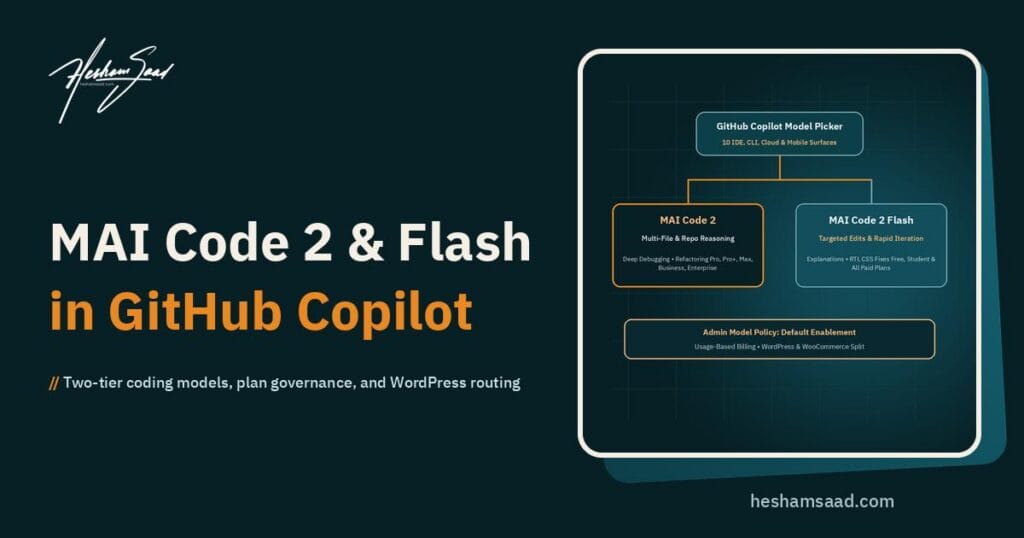
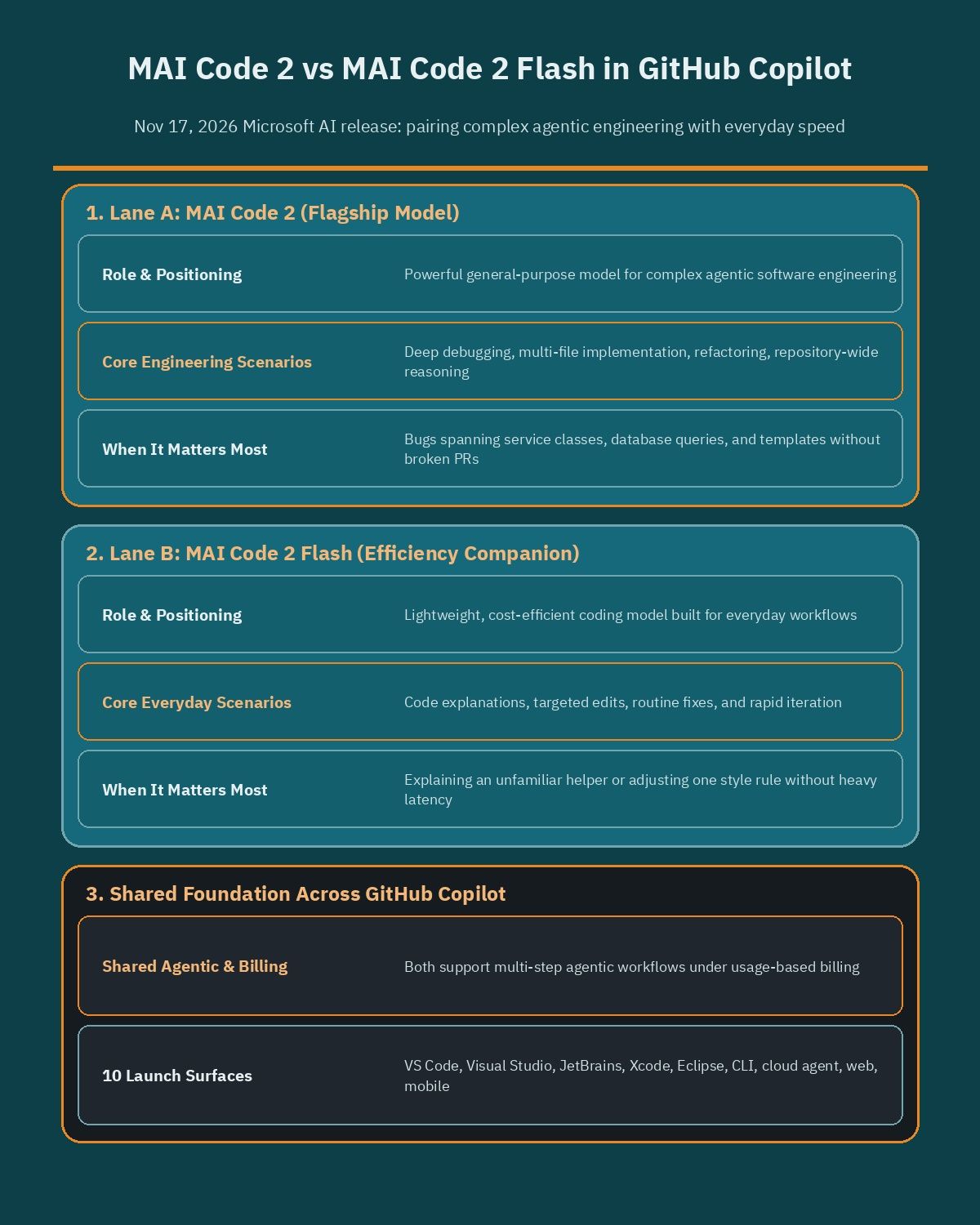
MAI Code 2 serves as Microsoft AI’s powerful, general-purpose coding model. GitHub highlights four primary scenarios for it: deep debugging, multi-file implementation, refactoring, and repository-wide reasoning.
Those are the exact jobs where narrow context creates broken pull requests. When a bug spans a service class, a database query, and a template file, the model needs repository-wide awareness to deliver practical edits without endless follow-up prompts.
Everyday iteration tasks for the Flash model
MAI Code 2 Flash is a lightweight, cost-efficient coding model built for everyday development workflows. GitHub recommends Flash for code explanations, targeted edits, routine fixes, and rapid iteration.
When a developer only needs to understand an unfamiliar helper function or adjust a single style rule, waiting on a heavier reasoning pass slows momentum. Flash keeps sprint QA, small fixes, and live troubleshooting moving quickly.
| Attribute | MAI Code 2 | MAI Code 2 Flash |
|---|---|---|
| Positioning | Powerful general-purpose model for complex agentic engineering | Lightweight, cost-efficient model for everyday workflows |
| Best-fit tasks | Deep debugging, multi-file implementation, refactoring, repository-wide reasoning | Code explanations, targeted edits, routine fixes, rapid iteration |
| Agentic workflow support | Supported | Supported |
| Eligible Copilot plans | Copilot Pro, Pro+, Max, Business, Enterprise | Copilot Free, Student, Pro, Pro+, Max, Business, Enterprise |
| Annual plan access | Available to eligible annual subscribers | Available to eligible annual subscribers |
| Billing structure | Usage-based billing | Usage-based billing |
| Admin controls | Managed via Copilot model policy settings | Managed via Copilot model policy settings |
Plan availability and usage-based billing rules
GitHub ties access to subscription tier while billing both models under usage-based billing. Knowing which plan includes which model avoids friction when onboarding contractors, junior staff, and senior engineers.
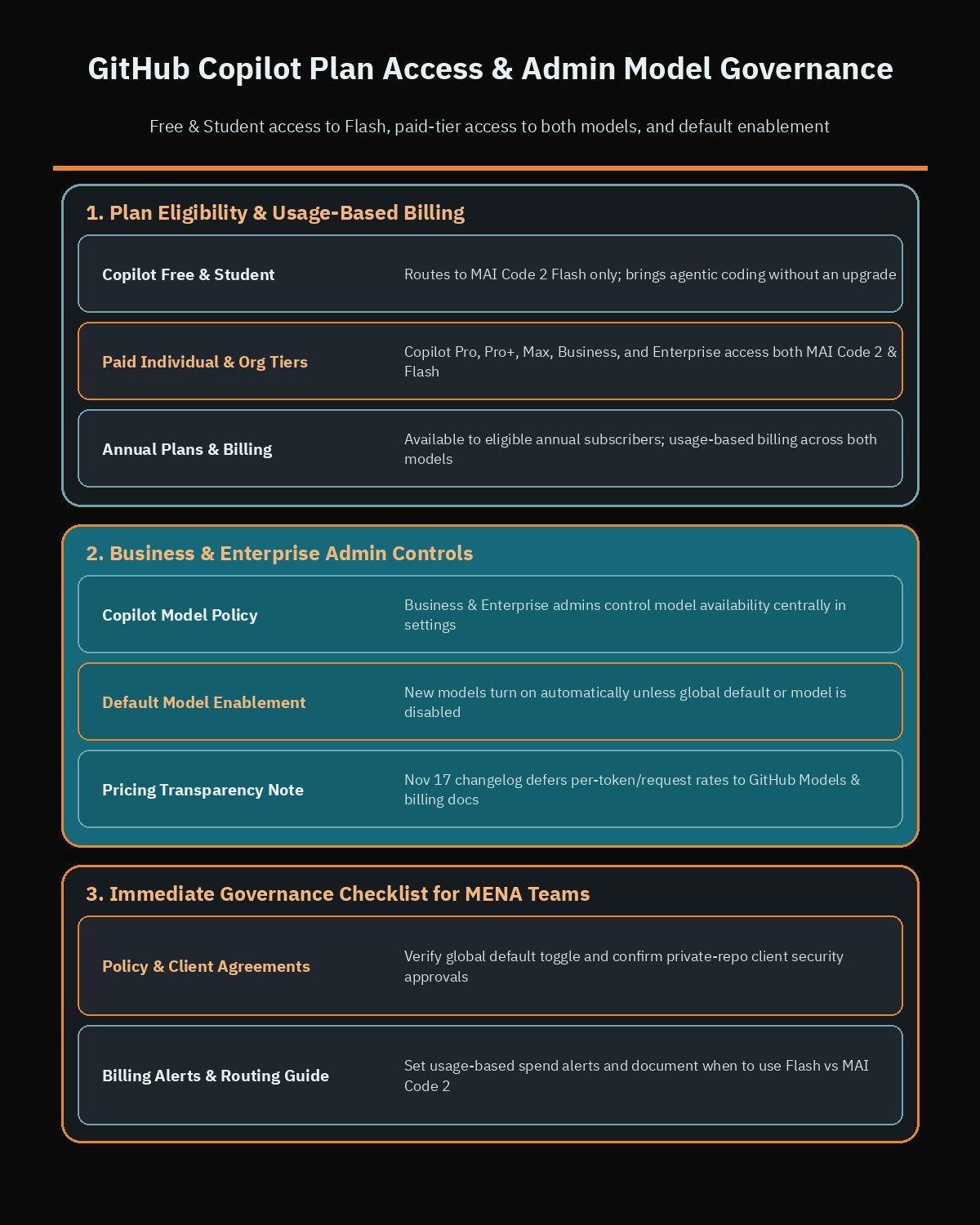
- Paid tiers only for the flagship model: MAI Code 2 is available on Copilot Pro, Pro+, Max, Business, and Enterprise plans.
- Broad access for the Flash model: MAI Code 2 Flash is available on Copilot Free, Student, Pro, Pro+, Max, Business, and Enterprise plans.
- Annual subscriptions included: Both models are available to eligible GitHub Copilot subscribers on annual plans.
Adding MAI Code 2 Flash to Copilot Free and Student gives solo builders and students access to agentic coding without an upfront upgrade. Meanwhile, reserving the heavier model for paid plans aligns multi-file engineering with commercial seats.
Neither the November 17 changelog nor the release summary lists per-token prices or fixed request multipliers for these models, instead pointing teams to GitHub’s Models and pricing documentation. Engineering leads should check their live Copilot billing dashboard before rolling out default rules across large teams.
Supported IDEs and surfaces across the developer workflow
Many model launches ship in a single editor first and reach other tools weeks later. At launch on November 17, GitHub enabled both models in the model picker across ten surfaces:
- Desktop IDEs: Visual Studio Code, Visual Studio, JetBrains, Xcode, and Eclipse.
- Terminal and cloud automation: Copilot CLI and GitHub Copilot cloud agent.
- Web, app, and mobile: github.com, the GitHub Copilot app, and GitHub Mobile on iOS and Android.
Full parity across VS Code, JetBrains, Visual Studio, Xcode, and Eclipse prevents tool fragmentation inside agencies. A PHP developer in PhpStorm gets the same model choices as a front-end engineer in VS Code or a maintainer reviewing pull requests on github.com.
Availability in Copilot CLI, the cloud agent, and GitHub Mobile also ties mobile triage to desktop execution. A tech lead in Dubai or Cairo can inspect a repository issue on GitHub Mobile with Flash, then delegate a multi-file fix to the cloud agent using the flagship model.
Admin controls and model policy for Business and Enterprise
For Copilot Business and Copilot Enterprise accounts, administrators manage access to Microsoft AI models through the model policy in Copilot settings. This keeps governance centralized instead of relying on individual developer preferences.
Under default model enablement, new models turn on automatically unless an administrator has turned off the global default or explicitly disabled the model. Organizations with default enablement active will see both models immediately.
Agencies and enterprise teams handling regulated client repositories in MENA should verify four settings right away:
- Check whether global default model enablement is enabled or paused in organization Copilot settings.
- Confirm client security agreements allow new third-party or first-party Copilot models on private repositories.
- Review usage-based billing alerts so heavy agentic runs do not spike monthly team spend unexpectedly.
- Document a simple internal rule separating routine Flash tasks from multi-file flagship tasks.
How Microsoft AI models fit inside a multi-model GitHub Copilot stack
This release landed alongside a broader wave of Copilot updates on November 17, 2026. The same changelog feed shows OpenAI’s GPT-6.2 Astra and GPT-6.2 Sol becoming available on the same day, alongside updates to Copilot Fusion and Copilot code review.
Because GitHub Copilot supports multiple model providers, teams evaluating OpenAI alongside Google options like Gemini 4 Hydrogen now have first-party Microsoft AI coding models built specifically for Copilot workflows. Based strictly on verified launch details, the trade-offs are straightforward:
- Strengths: Purpose-built coding and agentic focus, consistent availability across ten Copilot surfaces, and a clean two-tier split that aligns with usage-based billing.
- Limits: The changelog references vision support, performance improvements, and efficiency gains in the broader announcement without publishing independent benchmarks or fixed per-request rates in the notes, and Free or Student users only receive Flash.
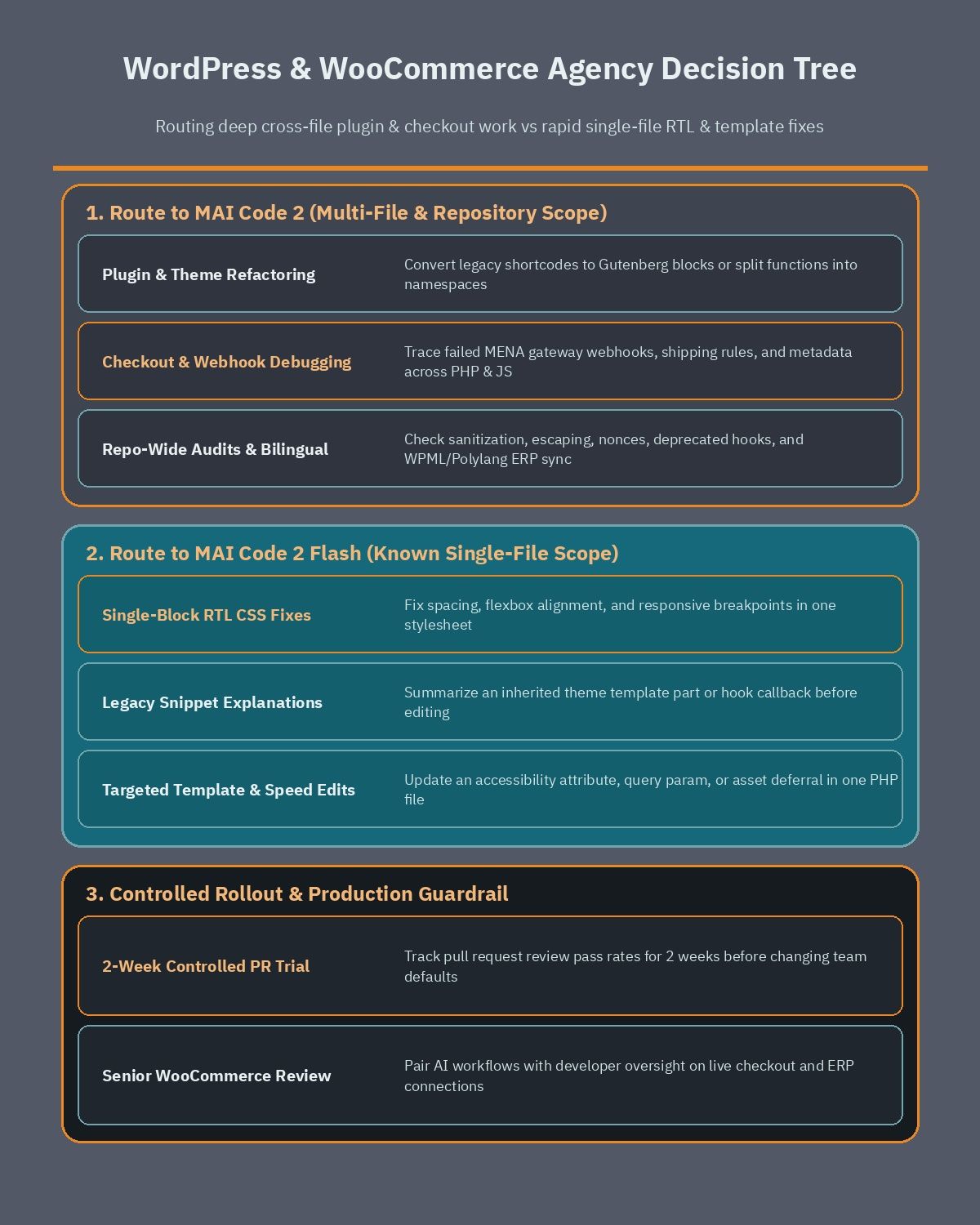
Rather than switching every team default overnight, run a controlled two-week comparison on active pull requests and track review pass rates before standardizing.
Routing WordPress and WooCommerce work in MENA teams
WordPress and WooCommerce agencies across Egypt, Saudi Arabia, and the Gulf juggle two distinct workloads every sprint. Deep plugin, hook, and checkout logic requires multi-file context, while daily styling and template tweaks demand speed.
Deep plugin and WooCommerce work for the flagship model
Route tasks to MAI Code 2 when changes cross multiple files, touch checkout state, or require auditing hooks across an entire repository:
- WooCommerce checkout and gateway debugging: Tracing failed MENA payment gateway webhooks, shipping rules, or custom order metadata across PHP hooks, REST endpoints, and checkout scripts.
- Plugin and theme refactoring: Converting legacy shortcodes into Gutenberg blocks or breaking a large functions file into modular namespaces.
- Repository-wide security audits: Checking sanitization, escaping, nonces, and deprecated WordPress hooks before a PHP or core upgrade.
- Bilingual store integrations: Coordinating WPML or Polylang filters with ERP inventory sync scripts across Arabic and English catalogs.
When store revenue depends on custom checkout flows or ERP connections, pairing disciplined AI workflows with an experienced WooCommerce developer protects against subtle data and payment bugs that automated edits can miss.
Routine block and styling fixes for the Flash model
Route tasks to MAI Code 2 Flash when the developer already knows the target file and wants fast, cost-efficient execution:
- Single-block RTL CSS adjustments: Fixing spacing, flexbox alignment, or responsive breakpoints for Arabic right-to-left templates.
- Legacy code explanations: Summarizing an inherited theme template part or hook callback before editing it.
- Minor template edits: Updating an accessibility attribute, query parameter, or markup wrapper inside one known PHP file.
- Quick front-end cleanups: Testing targeted asset deferrals or image sizing tweaks when working to speed up WordPress Arabic sites.
| WordPress or WooCommerce task | Recommended model | Why this lane fits |
|---|---|---|
| Multi-file custom plugin refactoring | MAI Code 2 | Needs repository-wide reasoning across coordinated PHP and JS files |
| WooCommerce checkout and webhook debugging | MAI Code 2 | Requires deep debugging across hooks, REST routes, and order state |
| Single-block RTL CSS alignment fix | MAI Code 2 Flash | Targeted edit in one known stylesheet with rapid visual iteration |
| Explaining an inherited theme template | MAI Code 2 Flash | Code explanation task suited to fast, cost-efficient turnaround |
| Major WordPress upgrade compatibility audit | MAI Code 2 | Benefits from repository-wide scanning and focused multi-file fixes |
Next steps for engineering leads and site owners
If your development team uses GitHub Copilot Business or Enterprise, review your model policy settings today, confirm how default model enablement is configured, and run a two-week trial routing multi-file refactoring to MAI Code 2 and routine fixes to MAI Code 2 Flash. If you are a business owner in MENA planning a custom WordPress build, WooCommerce integration, or performance overhaul and want senior engineering oversight from day one, book a free consultation to map out your technical scope.
Frequently asked questions
What is the difference between MAI Code 2 and MAI Code 2 Flash in GitHub Copilot?
MAI Code 2 is Microsoft AI’s general-purpose coding model for complex tasks such as deep debugging, multi-file implementation, refactoring, and repository-wide reasoning. MAI Code 2 Flash is a lightweight, cost-efficient model built for code explanations, targeted edits, routine fixes, and rapid iteration. Both support agentic coding workflows inside GitHub Copilot.
Which GitHub Copilot plans include MAI Code 2 and MAI Code 2 Flash?
MAI Code 2 is available on Copilot Pro, Pro+, Max, Business, and Enterprise plans. MAI Code 2 Flash is available on those same paid plans plus Copilot Free and Student tiers. GitHub also states that both models are available to eligible GitHub Copilot subscribers on annual plans under usage-based billing.
Which IDEs and apps support MAI Code 2 and MAI Code 2 Flash?
Developers can choose both models in the model picker across Visual Studio Code, Visual Studio, JetBrains, Xcode, and Eclipse. Both models are also available in Copilot CLI, GitHub Copilot cloud agent, the GitHub Copilot app, github.com, and GitHub Mobile on iOS and Android.
How do Business and Enterprise admins control access to MAI models?
Copilot Business and Enterprise administrators manage access through the model policy inside Copilot settings. Under GitHub’s default model enablement rule, new models are enabled automatically unless an administrator has turned off the global default or explicitly disabled the specific model for the organization or enterprise.
How should a WordPress or WooCommerce team split tasks between both models?
Route multi-file plugin refactoring, WooCommerce checkout hook debugging, and repository-wide compatibility audits to MAI Code 2 because those tasks require deeper cross-file reasoning. Use MAI Code 2 Flash for single-block RTL CSS adjustments, quick PHP snippet explanations, and routine template updates that benefit from fast, cost-efficient iteration.