هذا المقال متوفر باللغة العربية — اقرأ بالعربية
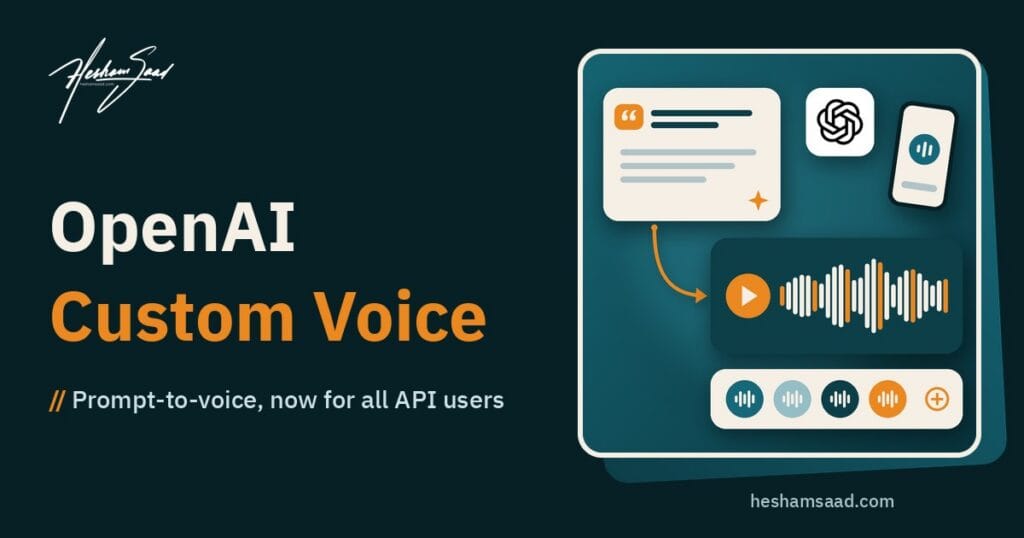
OpenAI custom voice creation is now open to every API customer. On October 16, 2026, OpenAI released prompt-to-voice for all API accounts: you write a short text description of the voice you want, the API saves it as a new voice, and you can reuse that voice in GPT-Live sessions. There is no recording, no voice actor and no consent clip involved. For a small business that wants a phone or website assistant with its own recognisable sound, that removes the most awkward step in the whole project.
This article explains what actually shipped, what it costs, where it falls short, how it compares with ElevenLabs, Google Cloud, Microsoft Azure and Amazon Polly, and what it means if your business runs on WordPress. Every fact about OpenAI comes from the official changelog, the custom voices guide, the GPT-Live session guide, the voice cost guide and the pricing page. Rival facts come only from each vendor’s own documentation or pricing page. Links are in the References section at the end.
What changed in the October 16 and October 15 updates
Two changelog entries landed one day apart, and together they make GPT-Live a more practical base for business voice agents.
October 16: prompt-to-voice for everyone
- General availability. The custom voices guide says prompt-to-voice is generally available to all API customers. You create a voice through the
/v1/audio/voicesendpoint withtypeset toprompt, or in the voice Playground. - Creation is free. OpenAI states that creating a prompt-generated voice is free. Using the voice to speak inside GPT-Live is billed at regular session rates. Listening to a voice in the Playground also runs a real GPT-Live session, so that is billed too.
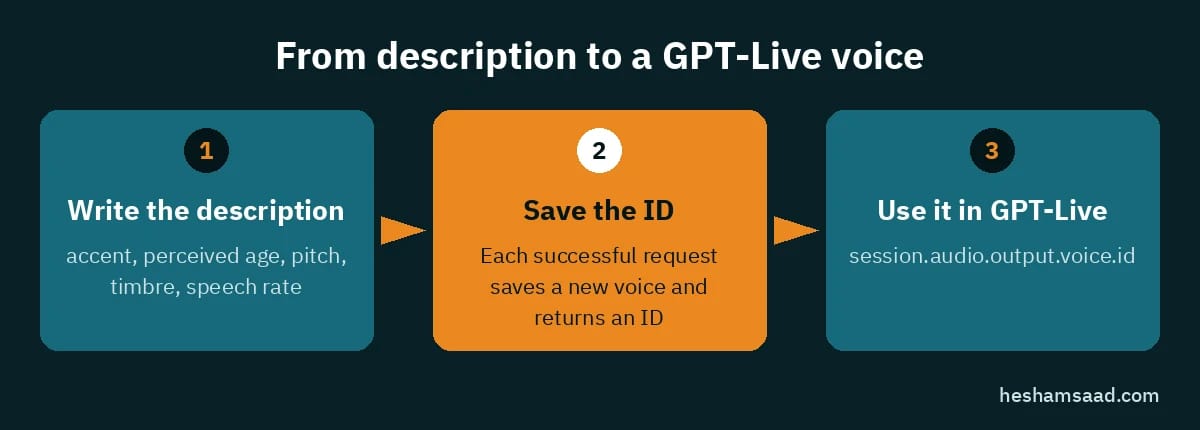
- A saved, reusable voice. Each successful request saves a new voice and returns an ID, a name, a creation time and your original description. You then set that ID as the output voice when you start a GPT-Live session.
- Nine new natural voices. The same entry added nine ready-made natural voices for GPT-Live: Nuri, Juni and Flitz (German), Brise and Sillage (French), Nira (Hindi), Harema and Shida (Japanese), and Noeul (Korean).
October 15: GPT-Live works natively with Decisions
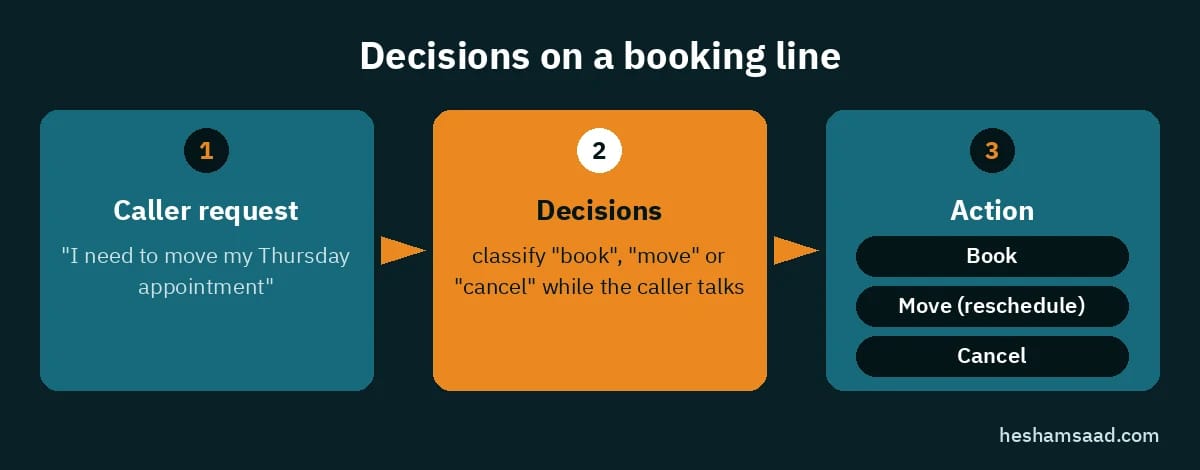
The day before, OpenAI added a native Decisions integration to GPT-Live. Decisions is the API OpenAI released in beta on October 6 with gpt-6-luna; it turns text and images into typed answers, and OpenAI describes it as 10 times faster than the Responses API. With the new integration, GPT-Live can call Decisions directly through native delegation, without a round trip through your own server first. You can also trigger decisions as input or output transcript deltas arrive, which means your app can start acting while the caller is still speaking.
In plain terms: the voice is the front desk, and Decisions is the quick clerk behind it that answers “which of these options did the caller just ask for?” A booking bot can classify “I need to move my Thursday appointment” into a reschedule action before the caller finishes the sentence.
How OpenAI custom voice works in practice
The workflow is short, and that is the point.
- Write the description. You describe vocal qualities in plain language. OpenAI’s guide lists the qualities you can mention: accent, perceived age, presentation, pitch, timbre, texture, loudness, speech rate and how distinctive the voice should be. Its own example is “A calm, reassuring adult voice for a customer support assistant” with an American English accent, mid-range pitch, warm tone and steady pace.
- Optionally add a sample script. The
script_hintfield takes up to 2,000 characters of representative speech to guide generation. If you leave it out, the service writes one from your description. Blank or very short scripts are rejected. - Save the ID. The response contains metadata only. It does not include audio or a preview, so you hear the voice by starting a session.
- Use it in GPT-Live. You set
session.audio.output.voice.idto the saved ID and, as OpenAI recommends, also paste the original voice description into the session instructions so the delivery matches. - Refine one quality at a time. Every creation request saves a new voice, so OpenAI suggests changing one quality per attempt and comparing the results on the same short passage.
Two technical details matter for planning. First, the voice is chosen when a session starts; to switch voices you start a new session. Second, session instructions can be up to 16,384 tokens, which is plenty of room for a brand voice description plus your business rules.
Pros and cons
What works in its favour
- No recording, no actor. You do not need a reference recording or a consent recording for this workflow. That avoids studio time, contracts and the legal grey area of copying a real person.
- Free to create. You can try several descriptions without paying for the creation step itself.
- Open to all API customers. The older route, custom voices from recordings, is limited to eligible customers through OpenAI’s sales team. Prompt-to-voice has no such gate.
- Simple, per-second billing. GPT-Live sessions are billed per second without rounding up to a whole minute.
- Faster reactions with Decisions. The October 15 integration lets the agent pick an action mid-sentence, which helps a phone bot feel less sluggish.
What holds it back
- GPT-Live only. Prompt-generated voices work with GPT-Live. OpenAI states they are not supported by the Text to Speech, Realtime or Chat Completions APIs. You cannot use the same brand voice to narrate a video through the TTS endpoint.
- No Arabic voice. The published GPT-Live voice list covers English, Portuguese, German, French, Hindi, Japanese and Korean. There is no Arabic voice in it, and the documentation makes no statement about Arabic.
- No preview in the response. You have to run a billed session to hear what you made.
- Not unique. OpenAI says voices are not guaranteed to be unique, and others may generate similar voices.
- Cap of 100. Each organisation can create up to 100 prompt-generated voices, and the limit also counts voices your app creates for its own customers. An agency building a voice per client will hit that ceiling.
- Zero Data Retention gap. Voice creation through
/v1/audio/voicesis not compatible with Zero Data Retention, although GPT-Live speech generations are eligible when ZDR is enabled. - Rules on use. You must use adult voices, cannot ask it to imitate a named person, public figure or fictional character, and should tell listeners the speech is AI-generated.
Comparison with rival voice services
Rivals price and package voice differently, so a straight per-minute race is not fair. The table below sticks to what each vendor publishes.
| Service | Custom voice from a text description? | Access | Published price |
|---|---|---|---|
| OpenAI GPT-Live | Yes, prompt-to-voice | All API customers | Voice creation free; gpt-live-1 $0.05 per minute, billed per second; backend models and tools extra |
| ElevenLabs | Yes, Voice Design | Self-serve plans | Agents (Speech Engine) $0.08 per minute; TTS v4 Turbo $0.04 per 1K characters, v4 $0.08 per 1K characters |
| Google Cloud Chirp 3 Instant Custom Voice | No, built from audio recordings | Allow-listed users only | $60 per 1 million characters |
| Microsoft Azure custom voice | No, built from human speech samples | Limited by eligibility, intake form | See Azure Speech pricing page |
| Amazon Polly | No text-description option on its pricing page | Self-serve | Generative $30, Neural $16, Standard $4 per 1 million characters |
ElevenLabs is the closest match. Its Voice Design tool also creates a voice from a text prompt describing accent, gender, pacing, tone and style. ElevenLabs itself calls Voice Design experimental and says Professional Voice Clones give the highest quality and consistency. It lists support for more than 90 languages on its TTS and Agents pricing. It also notes that its old Default voices expire on December 31, 2026, which matters if you built on them.
Google Cloud takes the recording route. Chirp 3 Instant Custom Voice trains a personal voice from high-quality audio recordings and needs a consent statement. Access is restricted to allow-listed users. One point in Google’s favour for this audience: its language table for Instant Custom Voice includes Arabic (ar-XA), with an Arabic consent statement.
Microsoft Azure custom voice is built from human speech samples used as fine-tuning data, and Microsoft says access is limited based on eligibility and usage criteria.
Amazon Polly is a per-character text to speech service with Standard, Neural, Long-Form and Generative voice tiers. It suits reading text aloud at a low price, but its pricing page does not describe creating a voice from a written description.
The honest summary: OpenAI and ElevenLabs are the two options here where anyone can describe a voice in words and use it the same day. OpenAI’s version is tied to its own live voice agent stack; ElevenLabs offers wider language coverage. For Arabic, OpenAI publishes no Arabic GPT-Live voice, while Google lists Arabic for its recording-based voice that is open only to allow-listed users, so Arabic projects need careful testing before you commit.
Best use cases for a GPT-Live voice agent
If you are weighing an AI voice agent for business calls, a GPT-Live voice agent with its own custom voice makes the most sense where a business answers the same kinds of calls every day and wants them to sound consistent.
- Clinic and salon booking lines. A calm, unhurried voice confirms appointments, moves them, and reads back the date. Decisions can classify “book”, “move” or “cancel” while the caller talks.
- Restaurant reservations. A brighter, friendly voice takes the party size and time, then hands off to your booking system.
- First-line customer support. Order status, opening hours, return rules. The agent handles routine questions and passes harder cases to staff.
- Multilingual front desks. Hotels or tour operators serving German, French, Hindi, Japanese or Korean speakers can now pick a ready natural voice in those languages.
- A brand voice without hiring anyone. If you want a recognisable sound but have no budget for a voice actor and no wish to clone a real person, describing the voice is the cleanest path.
OpenAI also documents telephony and SIP connections for GPT-Live, so a phone line is a realistic target, not only a website widget.
Limits and prices from official sources
- Voice creation: free.
- GPT-Live speech:
gpt-live-1is listed at $0.05 per minute. Sessions are billed per second with no rounding to a whole minute. Backend model and tool usage is charged separately. - What counts as session time: active time includes when the user speaks, the assistant speaks, both are silent, or the backend is working. Muting the microphone does not close the session.
- WebRTC start-up: creating a WebRTC session bills 15 seconds of voice duration while it initialises; that amount is credited once the session runs, so a 90-second call is not billed as 105 seconds.
- OpenAI’s own example: a 90-second call costs $0.075 for voice at $0.05 per minute; with $0.02 of backend work, the total is $0.095.
- Decisions backend:
gpt-6-luna, the model used with Decisions, is listed at $0.10 input and $0.50 output per 1 million tokens. - Voices per organisation: up to 100 prompt-generated voices; up to 20 voices from recordings for eligible customers.
- Script hint: up to 2,000 characters.
- Session instructions: up to 16,384 tokens.
- Supported APIs: GPT-Live only for prompt-generated voices.
A quick back-of-the-envelope figure: at $0.05 per minute, 1,000 calls averaging two minutes come to $100 of voice time before backend costs. Your real bill depends on call length, how much backend work each call triggers, and how quickly you close sessions.
What it means for a WordPress site or business
GPT-Live is an API, not a WordPress plugin, so nothing appears in your dashboard by itself. You need a developer to wire it into your site, usually through a small server-side component that creates sessions and talks to your booking or order data. For most WordPress businesses, the practical path looks like this:
- Start with text. If you do not yet have a website chatbot, build that first. The questions, answers and booking rules you write for it become the instructions for a voice agent later.
- Write the brand voice as a description. Treat it like a style guide: age range, pace, warmth, accent. Keep that text, because OpenAI recommends reusing it in the session instructions.
- Connect your real data. Booking plugins, WooCommerce orders or a CRM give the agent something useful to say. Decisions can map caller requests to a small, fixed set of actions your site already supports.
- Disclose the AI. OpenAI requires telling listeners the speech is AI-generated. A short line at the start of the call is enough.
- Plan for Arabic separately. If your customers speak Arabic, there is no Arabic GPT-Live voice in OpenAI’s published list, so test carefully or choose another provider for those calls.
Keep API keys on the server, never in front-end JavaScript, and watch session lengths so idle connections do not keep running. If you want help deciding whether a voice agent fits your business, or how to wire it to your WordPress site, you can book a free consultation.
FAQ
Is creating an OpenAI custom voice free?
Yes. OpenAI says creating a prompt-generated voice is free. You pay when the voice speaks in a GPT-Live session, at the normal session rate, and listening in the Playground is billed as a session too.
Can I use the custom voice with the Text to Speech API?
No. Prompt-generated voices work only with GPT-Live. They are not supported by the Text to Speech, Realtime or Chat Completions APIs.
Is there an Arabic voice?
Not in the current list. The GPT-Live voices cover English, Portuguese, German, French, Hindi, Japanese and Korean, and OpenAI has published nothing about Arabic.
Can I make it sound like a celebrity or a real person?
No. OpenAI asks you to describe vocal qualities and not to request imitation of a named person, public figure or fictional character. Children’s voices are not allowed.
How many custom voices can I create?
Up to 100 prompt-generated voices per organisation, including any your application creates for its customers.
Will my voice be unique to my brand?
Not guaranteed. OpenAI states that others may generate similar voices or output.
What does Decisions add to a voice agent?
It lets GPT-Live pick a structured action, such as “reschedule” or “cancel”, directly and quickly, even while the caller is still talking. Your app then performs the action and GPT-Live reports the result.
References
- OpenAI API changelog
- Custom voices, OpenAI API docs
- GPT-Live sessions and voice options, OpenAI API docs
- Connect voice to Decisions, OpenAI API docs
- Voice usage and cost optimization, OpenAI API docs
- OpenAI API pricing
- Voice Design, ElevenLabs docs
- Voices, ElevenLabs docs
- ElevenLabs API pricing
- Chirp 3: Instant Custom Voice, Google Cloud
- Text-to-Speech pricing, Google Cloud
- What is custom voice?, Microsoft Learn
- Amazon Polly pricing