هذا المقال متوفر باللغة العربية — اقرأ بالعربية
Building a coworking space website WordPress platform takes more than an attractive photo gallery and a contact form. When freelancers, remote workers, and growing startups evaluate a shared office in Cairo, Riyadh, or Dubai, they judge the operational quality of the physical space by how smoothly the website handles reservations and billing. If a prospective member has to message a receptionist on WhatsApp just to check if a six-person boardroom is free tomorrow at 10:00, many will simply book elsewhere.
For the space owner, manual scheduling creates daily administrative friction. Front-desk staff spend hours cross-checking spreadsheets, chasing overdue monthly bank transfers, and apologizing when two teams show up for the same meeting room. A well-structured WordPress site replaces that manual overhead with self-service desk and room scheduling, automated recurring memberships, regional payment processing, and local search visibility that brings nearby professionals through your doors.
Core architecture of a coworking space website WordPress setup
Most service businesses sell either one-off appointments or recurring retainers, rarely both at the same time. A shared workspace has to support both transaction types side by side without forcing members to maintain separate logins. Non-members and day-pass visitors need to reserve hot desks, podcast studios, or meeting rooms by the hour or by the day, while long-term residents pay monthly or annual fees for dedicated desks and private offices.
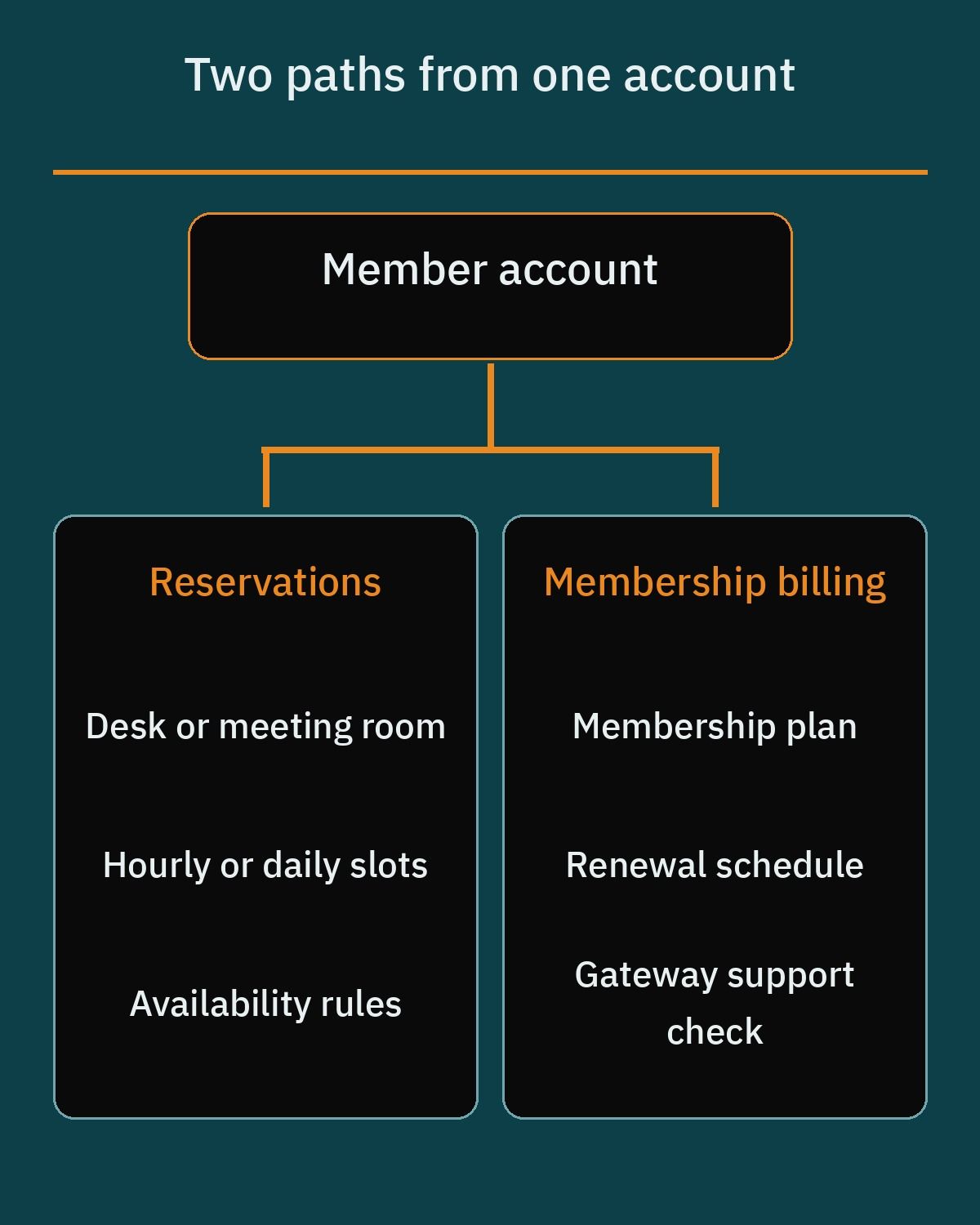
When planning your technical stack, you have two primary paths on WordPress. You can build a unified commerce system around WooCommerce by combining booking and subscription extensions, or you can pair a lightweight standalone appointment calendar with a dedicated membership plugin. Your choice depends on how closely your room inventory connects to your membership tiers.
Before installing any plugins, map out your physical floor plan and billing rules in detail:
- Short-term bookable inventory: List every meeting room, phone booth, event hall, and hot-desk zone that can be booked by the hour or day, along with opening hours and maximum capacity.
- Shared equipment and staff resources: Identify movable assets such as projectors, video conferencing carts, or recording gear that can be attached to different rooms.
- Turnaround time between bookings: Decide whether your operations team needs 15 or 30 minutes between reservations to clean tables, reset chairs, and air out meeting rooms.
- Recurring membership tiers: Define your weekly, monthly, or annual plans, including whether new members pay a one-time sign-up fee for access cards or security deposits.
Hourly and daily room reservations with WooCommerce Bookings
If your coworking space sells paid access to meeting rooms, training halls, phone booths, and day passes, WooCommerce Bookings gives you granular control over time blocks and physical inventory. If you want a deeper look at how reservation logic works across different industries, read our guide to building a WordPress booking website before finalizing your product structure. Because plugin prices change over time, always check the official WooCommerce product page for current licensing rates.
WooCommerce Bookings lets you configure bookable products using either fixed duration blocks or customer-defined durations measured in minutes, hours, days, or months. For a meeting room or podcast booth, you can allow members to pick one-hour blocks constrained to your building operating window, such as 09:00 to 18:00. For hot desks, you can offer fixed full-day blocks or multi-day passes using the same underlying engine.
Three specific features inside WooCommerce Bookings solve the most common operational headaches for workspace managers:
- Resources for rooms, desks, and equipment: Resources represent physical spaces, hardware, or personnel needed for a reservation. Each resource maintains its own quantity and independent availability rules, and can either be chosen by the customer at checkout or assigned automatically by the system.
- Shared resource pools against double-booking: Multiple bookable products can pull from the exact same resource pool. For a shared exclusive room such as Conference Room A used by both a Boardroom Hourly Pass and a Full-Day Workshop Package, you must create one global resource record with an available quantity of 1 and link it to every product that uses that space so bookings draw from the same capacity; however, each product keeps its own start times, duration, and buffer settings rather than synchronizing them across products, so you should test overlaps (such as hourly versus full-day bookings) and cross-product buffers on a staging site.
- Buffer periods for room resets: Under the product Availability tab, you can configure a non-bookable buffer period before or after scheduled slots for cleaning, maintenance, or room resets. Enabling the Adjacent Buffering toggle enforces this padding on both sides of a booking rather than in a single direction, preventing back-to-back clashes when two meetings run late.
Standalone booking plugins for desks and meeting rooms
Not every workspace owner wants to run a full WooCommerce catalog just to let visitors reserve a conference room or schedule a guided tour of the building. Several standalone booking plugins listed in the official WordPress.org directory handle time-slot scheduling cleanly, though each approaches multi-room resource management differently. Plugin prices and tier limits change periodically, so verify current details on each developer’s official pricing page.
Amelia for guided step-by-step reservations
Amelia (listed as ameliabooking on WordPress.org) provides polished front-end step-by-step booking wizards and catalog views that fit modern workspace branding without heavy custom styling. Out of the box, it manages services with customizable durations and buffer times, staff and location assignments, automated email and SMS reminders, time-zone conversion for international remote workers, and calendar sync with Google Calendar and Outlook.
However, coworking owners need to pay close attention to how Amelia handles physical rooms. Dedicated multi-resource scheduling, such as sharing meeting rooms or physical equipment across different services and staff members, is restricted to Amelia’s commercial Pro and Elite tiers rather than the free repository version.
Booking Calendar for independent asset calendars
Booking Calendar (listed as booking on WordPress.org) is one of the longest-running reservation plugins in the ecosystem and focuses on interactive front-end availability calendars. It supports both full-day and time-slot bookings, automated double-booking prevention, a customizable booking form builder, email notifications, and two-way calendar feeds using .ics URLs and Google Calendar imports.
From an operational standpoint, Booking Calendar gives your reception team a clear backend dashboard to approve, decline, or edit incoming reservations. Each bookable asset, whether a meeting room, desk, or piece of equipment, can have its own independent calendar so a reservation on Room A never blocks Room B, though advanced multi-resource capacity pooling requires its commercial versions.
Simply Schedule Appointments for fast block embeds
Simply Schedule Appointments (listed as simply-schedule-appointments on WordPress.org) is built for speed and clean integration with the WordPress Block Editor (Gutenberg) and popular page builders. Even in its core setup, it supports unlimited appointment types, custom booking windows, buffer times between slots, basic email notifications, and calendar conflict checks.
For a coworking business, Simply Schedule Appointments is an excellent fit for booking tour slots with your community manager or managing simple single-room reservations where complex shared resource pools are not required.
Recurring memberships with WooCommerce Subscriptions
Hourly meeting room bookings bring people into your building, but recurring monthly and annual memberships pay your lease and utility bills. When you pair WooCommerce Subscriptions with WooCommerce Bookings, members can manage their monthly desk plan and their hourly conference room reservations from the exact same My Account dashboard.
WooCommerce Subscriptions supports flexible recurring billing schedules on daily, weekly, monthly, or annual cycles. You can configure free trial periods (such as a complimentary test day for vetted startups), set subscription end-dates for fixed-term corporate contracts, and add one-time sign-up fees at checkout to cover refundable security deposits, locker keys, or RFID access fobs. As with all premium extensions, check the official WooCommerce Subscriptions page for up-to-date pricing.
How renewals are processed has a direct impact on your monthly cash flow and accounting workload:
- Automated recurring charges: When paired with a compatible payment gateway that supports tokenization and recurring payment hooks, the system charges the member’s saved card automatically on each billing date without requiring any action from the member.
- Manual invoice renewals: For corporate clients who pay via company transfer or cards that block recurring tokens, WooCommerce Subscriptions supports manual renewals by generating an invoice and letting the customer pay through their My Account page on each renewal date.
- Subscriber auto-renewal toggle: Store owners can enable an Auto-Renewal Toggle in the plugin settings, allowing members to switch between manual invoice payments and automated recurring billing directly from their customer dashboard.
Dedicated membership plugins: Paid Memberships Pro vs MemberPress
If your coworking space sells tiered memberships that include member-only perks, community directories, partner discount codes, or private event pages rather than complex cart checkouts, a dedicated WordPress membership plugin may be cleaner than WooCommerce Subscriptions. Paid Memberships Pro and MemberPress are two widely used options, and they follow very different licensing and distribution models.
Paid Memberships Pro follows a freemium model. Its free core plugin supports unlimited membership tiers, flexible content restriction across pages, posts, categories, and blocks, recurring payments via standard gateways such as Stripe and PayPal, member profile management, and discount codes. Upgrading to its paid Standard or Max tiers adds premium add-ons such as advanced member directories, affiliate integrations, and group accounts, which are particularly useful when one company pays for ten employee desk seats under a single corporate invoice.
Keep one important distribution detail in mind when setting up Paid Memberships Pro: in October 2024, the team removed its core listing from the WordPress.org repository to self-host plugin downloads and updates directly from its own license servers. The core software remains free to download from the official Paid Memberships Pro website, where you should also check current paid plan rates.
MemberPress operates as a commercial-only product. It does not offer a free core version on WordPress.org and does not provide a free trial, relying instead on a 14-day refund policy. Its paid tiers (Launch, Growth, and Scale) differ by feature set, number of supported sites, and transaction fees. Specifically, the entry Launch plan adds a 4.9% transaction fee on top of standard payment gateway charges, whereas the Growth and Scale plans waive that transaction fee. Always review the official MemberPress pricing page to compare current plan terms against your projected membership volume.
Choosing payment gateways for Egypt, Saudi Arabia, and the UAE
Selecting booking and subscription plugins is only half of the checkout equation. Many international WordPress tutorials assume you can simply install Stripe in five minutes, but payment gateway availability varies sharply across Egypt, Saudi Arabia, and the United Arab Emirates. Check whether the provider accepts businesses registered in your country and whether its WooCommerce integration supports the payment flow you need before planning the launch.
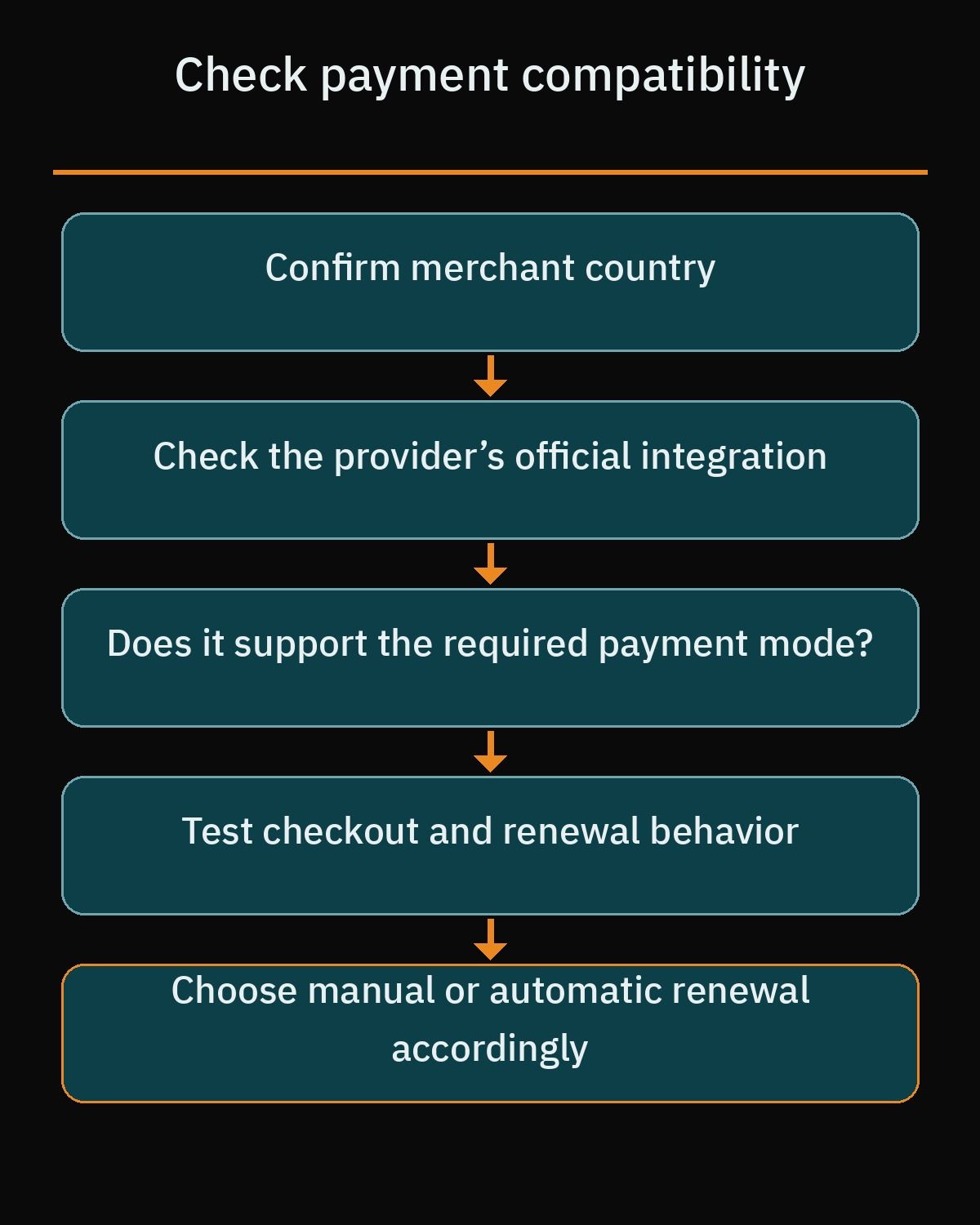
Before committing to a subscription plugin, verify both your legal entity location and how each gateway plugin is distributed and maintained for WooCommerce.
Paymob for Egypt, Saudi Arabia, and the UAE
For coworking brands operating in Egypt or expanding across multiple MENA markets, the official Paymob for WooCommerce plugin page on WordPress.org lists Egypt, the UAE, Oman, and Saudi Arabia among its markets. Its official integration is listed directly on WordPress.org under the slug paymob-for-woocommerce, making installation and updates straightforward inside the WordPress admin dashboard.
With WooCommerce Subscriptions, the Paymob for WooCommerce plugin supports recurring billing only with card payment methods that support tokenization, not all wallets or local payment methods. Beyond standard international Visa and Mastercard payments, check directly with Paymob regarding specific domestic payment methods available for your account in each market.
Tap Payments for GCC spaces in Saudi Arabia and the UAE
Tap Payments offers payment services in Saudi Arabia and the UAE; confirm merchant eligibility and the capabilities of its WooCommerce integration before choosing it. Regarding Egypt, Tap announced a Central Bank of Egypt license in 2025 and publishes an Egypt offering on its site, but its public support article on supported countries still says it does not accept new merchants from Egypt, so the guidance conflicts and an Egyptian business should confirm merchant eligibility directly with Tap.
From a technical maintenance perspective, note that Tap’s official WooCommerce integration is distributed as an installable package through Tap’s official GitHub repository (Tap-Payments/Plugin-WooCommerce-All-in-one) and developer documentation rather than maintained as an official standalone listing in the WordPress.org plugin directory. Your developer will need to install and update this package carefully during staging tests, and because automatic subscription renewals require a gateway integration that supports WooCommerce Subscriptions automatic payments, you should confirm automatic renewal support with the plugin documentation while keeping manual renewal invoices in mind as an option.
Stripe availability across the region
Stripe has deep native support across almost every WordPress booking and membership plugin via the official woocommerce-gateway-stripe plugin on WordPress.org, especially for tokenized automatic renewals. Per its global availability page, Stripe is available to businesses in the United Arab Emirates and not to direct local merchants in Egypt or Saudi Arabia.
In contrast, Stripe is not natively supported for direct domestic merchant account registration in either Saudi Arabia or Egypt. Saudi-based founders cannot onboard a local Saudi entity directly onto Stripe and typically rely on forming a US legal entity through Stripe Atlas or cross-border setups. Similarly, while Stripe supports cross-border payouts to Egyptian bank accounts via Stripe Connect and Global Payouts, Egyptian businesses cannot register a direct native Stripe merchant account.
For a deeper comparison of the gateways that work for WooCommerce stores in Egypt and Saudi Arabia, read our practical guide to WooCommerce payment gateways in Egypt and Saudi Arabia.
Local SEO and Google Business Profile rules for shared workspaces
Coworking is a hyper-local business. Most prospective members search by district or neighborhood, typing phrases like coworking space in New Cairo, shared office in Olaya Riyadh, or meeting room rental in Business Bay. Applying solid WordPress local SEO practices ensures your venue appears both in Google Maps packs and organic search results when professionals nearby need a desk.
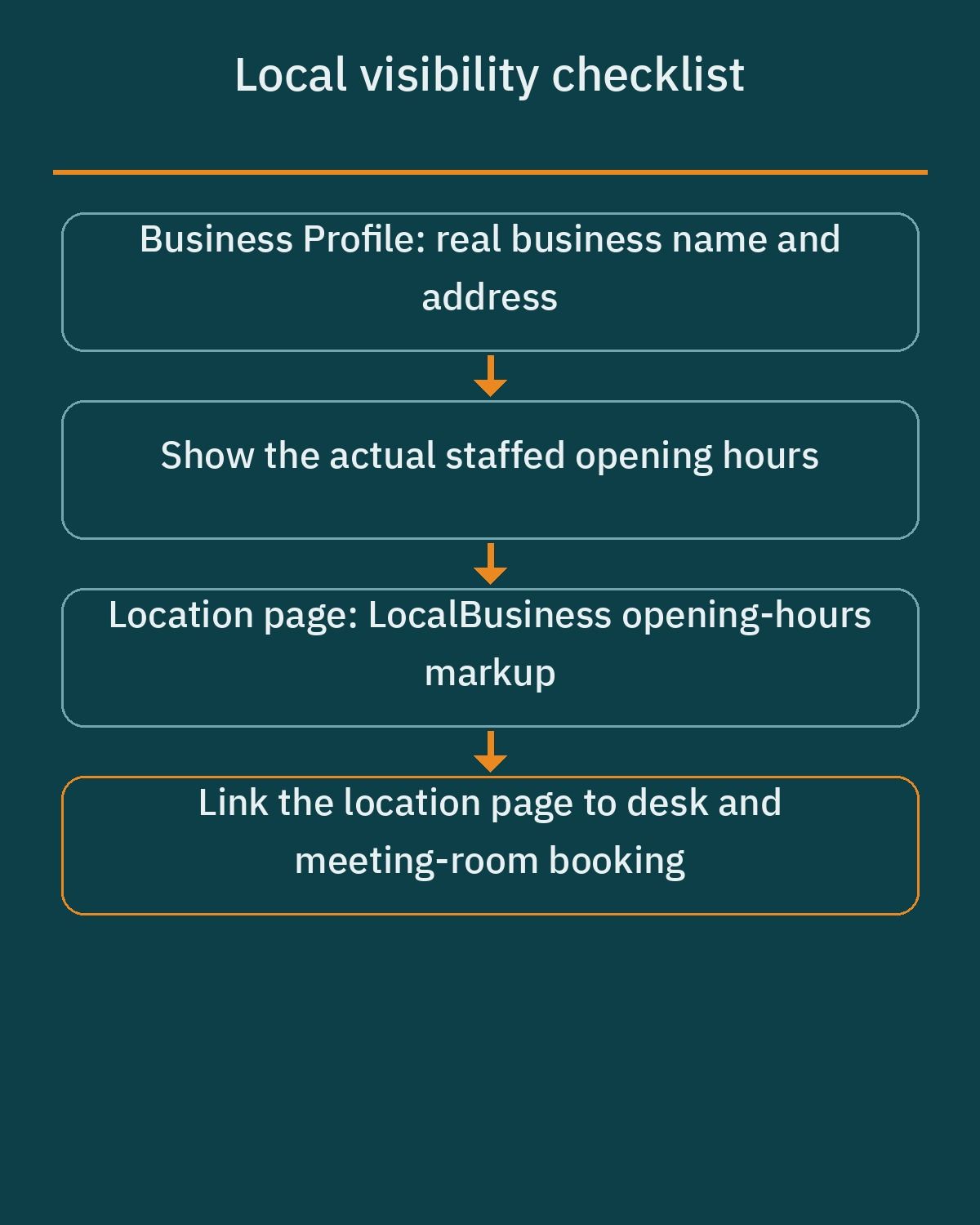
Your first priority is your Google Business Profile (GBP), where coworking operators face a unique policy challenge involving their tenants. Under official Google Business Profile guidelines, your coworking facility itself is fully eligible for a GBP listing as a physical storefront receiving customers during stated business hours. However, strict rules govern the companies renting space inside your building:
- Dedicated offices with signage and staff: Businesses renting space inside a coworking facility may use your address on Google Business Profile only if they display clear, permanent signage with their business name at the location, staff the office with their own employees during listed hours, and receive customers on-site.
- Ineligible virtual offices and hot desks: Virtual office plans, mail drops, and hot-desk members without dedicated permanent signage and on-site staff are strictly prohibited from creating GBP listings at your address.
- Protecting your facility listing: State these Google rules clearly in your membership onboarding docs so dozens of hot-desk members do not register unverified profiles at your street address and trigger spam reviews on your building.
On your WordPress website itself, reinforce your physical location data using Schema.org structured data. Create dedicated landing pages for each branch and mark them up with LocalBusiness schema (or a more specific subtype recommended by Google Search Central, such as ProfessionalService). Populate canonical properties including name, address (using PostalAddress), geo (using GeoCoordinates), telephone, and url.
To prevent search engines from misreading your operating hours, include the openingHoursSpecification property with structured OpeningHoursSpecification objects defining dayOfWeek, opens, and closes in 24-hour format, alongside specialOpeningHoursSpecification for public holidays or adjusted Ramadan schedules.
Speed, mobile usability, and operational workflows
A booking-heavy WordPress site behaves very differently from a static corporate brochure site. Availability calendars and cart sessions rely on dynamic database queries that cannot be served from static page cache without showing outdated room slots to the next visitor. At the same time, if your entire site bypasses caching, landing pages will load slowly on mobile networks and hurt your local search rankings.
A clean technical setup separates marketing pages from transactional views. Your homepage, neighborhood landing pages, and pricing comparison pages should remain fully cached for instant loading, while dynamic availability checks run only on dedicated booking views and checkout endpoints. That keeps pages snappy when a remote worker is comparing day passes on a smartphone in a noisy coffee shop.
Equally important is connecting your website to your front-desk routine. Whether you use WooCommerce Bookings, Amelia, or Booking Calendar, configure automated Google Calendar, Outlook, or .ics calendar synchronization so receptionists and community managers can view today’s room schedule and buffer periods on a tablet at the front desk without logging into the WordPress admin panel.
Planning your build and when to hire a WordPress specialist
If you run a small studio with a single meeting room and collect membership fees manually at reception, you can install a free calendar plugin such as Booking Calendar or Simply Schedule Appointments yourself in an afternoon. As soon as you combine shared room resources, turnaround buffers, automated monthly renewals, and regional payment gateways like Paymob or Tap Payments, the margin for configuration errors shrinks rapidly.
A misconfigured resource pool can let two corporate clients pay for the same training hall at the same hour, while an improper gateway webhook can cause monthly subscription renewals to fail silently. Working with an experienced specialist in custom WordPress development ensures your booking rules, member dashboard, bilingual layouts, and structured local schema are engineered to work together reliably from day one.
If you are launching a new coworking venue or upgrading an existing shared office site in the MENA region, start by listing your bookable spaces, membership tiers, and legal entity country, then book a free consultation to map out the exact plugin architecture and payment setup for your space.
Frequently asked questions
How do I stop double bookings across meeting rooms and hot desks in WordPress?
Use shared resources in WooCommerce Bookings or a separate calendar per room in a plugin like Booking Calendar. For a room sold as both an hourly pass and a full-day package, create one global resource with an available quantity of 1 and link it to both products. Each product keeps its own start times, duration and buffer, so test overlapping bookings on a staging site.
Should I use WooCommerce Subscriptions or Paid Memberships Pro for monthly coworking plans?
Choose WooCommerce Subscriptions if you already use WooCommerce Bookings for hourly rooms and want a single account dashboard and checkout for your members. It supports daily, weekly, monthly, and annual billing cycles along with sign-up fees and manual or automatic renewals. Choose Paid Memberships Pro if your primary goal is restricting member-only content, managing member profiles, or offering corporate group accounts without running a full store.
Which payment gateways work best for a coworking website in Egypt, Saudi Arabia, and the UAE?
The official Paymob for WooCommerce plugin page lists Egypt, the UAE, Oman and Saudi Arabia among its markets, and its subscription support covers tokenizable cards only. Tap serves Saudi Arabia and the UAE, and for Egypt its public guidance conflicts, so confirm eligibility with Tap. Stripe is available to UAE businesses. Confirm automatic renewal support in each gateway plugin documentation.
Can members register their own Google Business Profile using my coworking space address?
Members can only use your coworking address for a Google Business Profile if they rent a dedicated space with permanent business signage, staff it with their own employees during stated hours, and receive customers on-site. Google strictly prohibits virtual office plans, mail drops, and hot-desk members from creating profiles at a shared address. Setting clear rules in your membership agreement protects your facility listing from verification disputes.
When should a coworking owner hire a WordPress developer instead of using off-the-shelf templates?
You should hire a developer when your space needs hourly room bookings, recurring monthly memberships, and local MENA payment gateways working together under one member login. While a single calendar plugin is easy to install for basic appointment requests, combining resource pools, buffer periods, tokenized subscription renewals, and structured local schema requires careful configuration so checkout remains fast and reliable on mobile devices.
References
- WooCommerce Bookings Product Page
- WooCommerce Bookings: Daily and Hourly Blocks
- Creating a Bookable Product (Availability and Buffers)
- WooCommerce Bookings: Resources
- WooCommerce Subscriptions Product Page
- WooCommerce Subscriptions: Renewal Process
- WooCommerce Subscriptions: Pay for Renewal
- WooCommerce Subscriptions FAQ: Turning Automatic Renewals On/Off
- WooCommerce Subscriptions: Payment Gateway Guide
- Paid Memberships Pro Pricing and Features
- Paid Memberships Pro: Leaving WordPress.org Announcement
- MemberPress Plans and Pricing
- Amelia on WordPress.org
- Booking Calendar on WordPress.org
- Simply Schedule Appointments on WordPress.org
- Google Business Profile Help: Guidelines for Representing Your Business on Google
- Schema.org LocalBusiness
- Schema.org openingHoursSpecification
- Google Search Central: Local Business Structured Data Guidelines
- Paymob for WooCommerce on WordPress.org
- Paymob Official Website
- Tap Payments Official Website
- Tap Payments WooCommerce Integration (GitHub)
- WooCommerce Stripe Payment Gateway on WordPress.org
- Stripe Global Availability (Supported Countries)
- Tap Payments: Egypt Central Bank license (2025)
- Tap Payments Egypt
- Tap Payments support: supported countries
- WooCommerce Deposits documentation