
هذا المقال متوفر باللغة العربية — اقرأ بالعربية
The global rollout of ChatGPT Space Plus turns individual $20 OpenAI subscriptions from isolated chat threads into shared document and presentation workspaces. Announced in the official ChatGPT Release Notes in November 2026, this update brings the collaborative hub that previously required higher-tier plans to every adult Plus subscriber across web, desktop, iOS, and Android.
For MENA business owners, marketing leads, and digital agencies running WordPress websites, the update solves a familiar daily headache: hunting through dozens of old chat transcripts to find the latest landing page draft or client deck outline. At the same time, it introduces strict sharing boundaries and data governance questions that every business must understand before inviting staff or clients into a shared workspace.
What Changed in the ChatGPT Space Plus Global Rollout
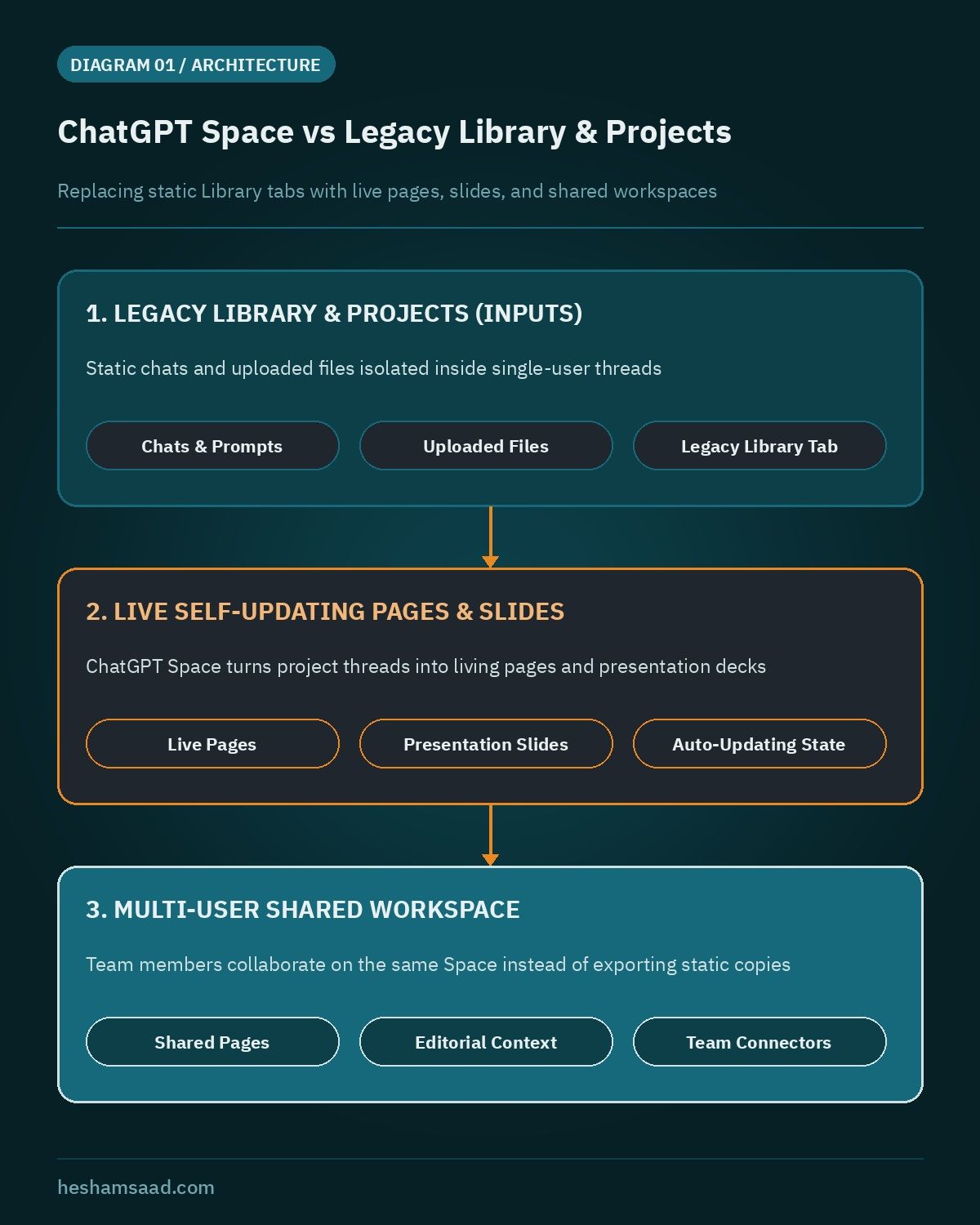
Before this release, individual subscribers stored generated images, uploaded references, and past outputs inside the static Library tab in the left sidebar. OpenAI has now retired the Library tab and replaced it with Space as the central home for persistent documents, slide presentations, uploaded files, and visual assets.
Existing ChatGPT Projects remain separate in the interface. While a Project still groups topic-specific chat threads under custom system instructions and uploaded reference files, Space shifts the focus toward living artifacts that multiple paid users can open, comment on, and edit together in real time.
Inside this updated workspace, subscribers gain four core capabilities that change how content and presentations are assembled:
- Interactive Pages and nested subpages: Users can draft long-form articles, technical specifications, and bilingual website copy inside a structured page editor, organizing related research notes into nested subpages rather than scrolling through linear chat replies.
- Collaborative ChatGPT Slides: Teams can generate, restyle, and refine presentation decks from conversational prompts or existing document outlines, adjusting slide layouts alongside colleagues in the same session.
- Self-updating content blocks: Pages and presentations can connect to external workplace apps such as Slack and Google Drive, allowing project trackers, editorial calendars, or meeting action lists to refresh automatically when source conversations change.
- In-line comment tagging and mobile editing: Collaborators with View, Comment, or Edit permissions can highlight specific paragraphs or slide bullets and tag ChatGPT directly inside a comment to rewrite, shorten, or translate a section, with full reading and editing support on iOS and Android apps.
This architecture moves routine content production closer to a traditional document suite. Rather than copying paragraphs out of a chat window into a separate document every time a prompt produces a good paragraph, an editor can maintain a single canonical draft inside Space and ask the model to update individual sections as product details evolve.
Strengths and Practical Limits for Business Teams
Every major software update looks attractive in a release note, but agency owners and marketing directors need to evaluate how it behaves under real project deadlines. Testing the workspace workflow reveals clear operational wins alongside rigid boundaries that affect client collaboration.
Where Shared Pages and Slides Save Time
The biggest immediate benefit for content and web design teams is context continuity. When a copywriter, a designer, and an account manager work inside one shared page, everyone sees the exact revision history and the specific comments directed at the assistant. Nobody wastes billable hours reconciling three conflicting versions of a homepage wireframe doc pasted from separate personal chat histories.
Self-updating pages also reduce manual status reporting. If your agency tracks client deliverable milestones across Slack channels or shared Google Drive folders, linking those sources to a master overview page keeps project checklists current without requiring an account coordinator to copy notes manually at the end of the day.
Where Closed Access and Privacy Rules Create Friction
Despite the multi-user features, OpenAI has enforced a strict wall around who can open a shared link. According to the official release documentation, viewing or editing any shared page or slide deck requires the recipient to be signed in to an eligible Plus, Pro, Business, or Enterprise account with Space enabled. Free-tier ChatGPT users cannot open shared items, and public web links do not exist.
For a MENA business working with external stakeholders, that limitation is decisive. You cannot send a Space link to a prospective client, a freelance translator, or an external board member unless you know for certain that they pay for an eligible OpenAI subscription and have passed the 18+ age verification on their account. If they are on a free account or do not use ChatGPT at all, they hit an access wall.
Data governance is the second major constraint. While Space makes it easy for two or three colleagues on $20 individual subscriptions to share a workspace folder, individual Plus accounts remain personal consumer subscriptions. Unless each employee manually disables model training in their personal privacy settings, confidential client briefs, unreleased pricing tables, and internal business documents uploaded to a personal Plus workspace may be used to train OpenAI models.
How Space Compares With Gemini Workspace, Notion, and Claude
Most companies in Egypt, Saudi Arabia, and the UAE already pay for at least one productivity suite. Before reorganizing your editorial or sales documentation around OpenAI, compare how Space stacks up against the tools your team and clients already open every morning.
- Google Workspace with Gemini: Because Google Docs and Google Slides run on standard web permissions, you can draft or edit files with AI and share a read-only or comment link with any client regardless of whether they pay for an AI add-on. If your agency relies heavily on Drive collaboration, review our guide on Gemini file editing workflows to see how native document sharing compares.
- Notion AI: Notion remains far stronger for structured databases, relational content calendars, and public or guest-accessible client portals. Space offers faster conversational slide generation and in-comment assistant tagging, but it lacks Notion’s custom database properties, filtered views, and public page publishing.
- Claude Projects and Artifacts: Anthropic excels at rendering self-contained code prototypes, interactive front-end components, and long-context technical analysis. However, Space pulls ahead for non-technical marketers who want persistent multi-user pages and editable slide decks linked directly to Slack or Google Drive updates.
The takeaway from this comparison is straightforward: Space makes ChatGPT a much stronger internal drafting studio for subscribers who already live inside OpenAI’s ecosystem, but it does not replace open client delivery platforms or your public website CMS.
Official OpenAI Pricing and Workspace Governance Rules
Choosing the right tier determines not only your monthly software bill, but also who owns your workspace data and whether an administrator can revoke access when a contractor leaves. According to the official OpenAI ChatGPT pricing page, Space is available across four distinct paid subscription tiers.
Here is how the official pricing and administrative controls break down across each eligible plan:
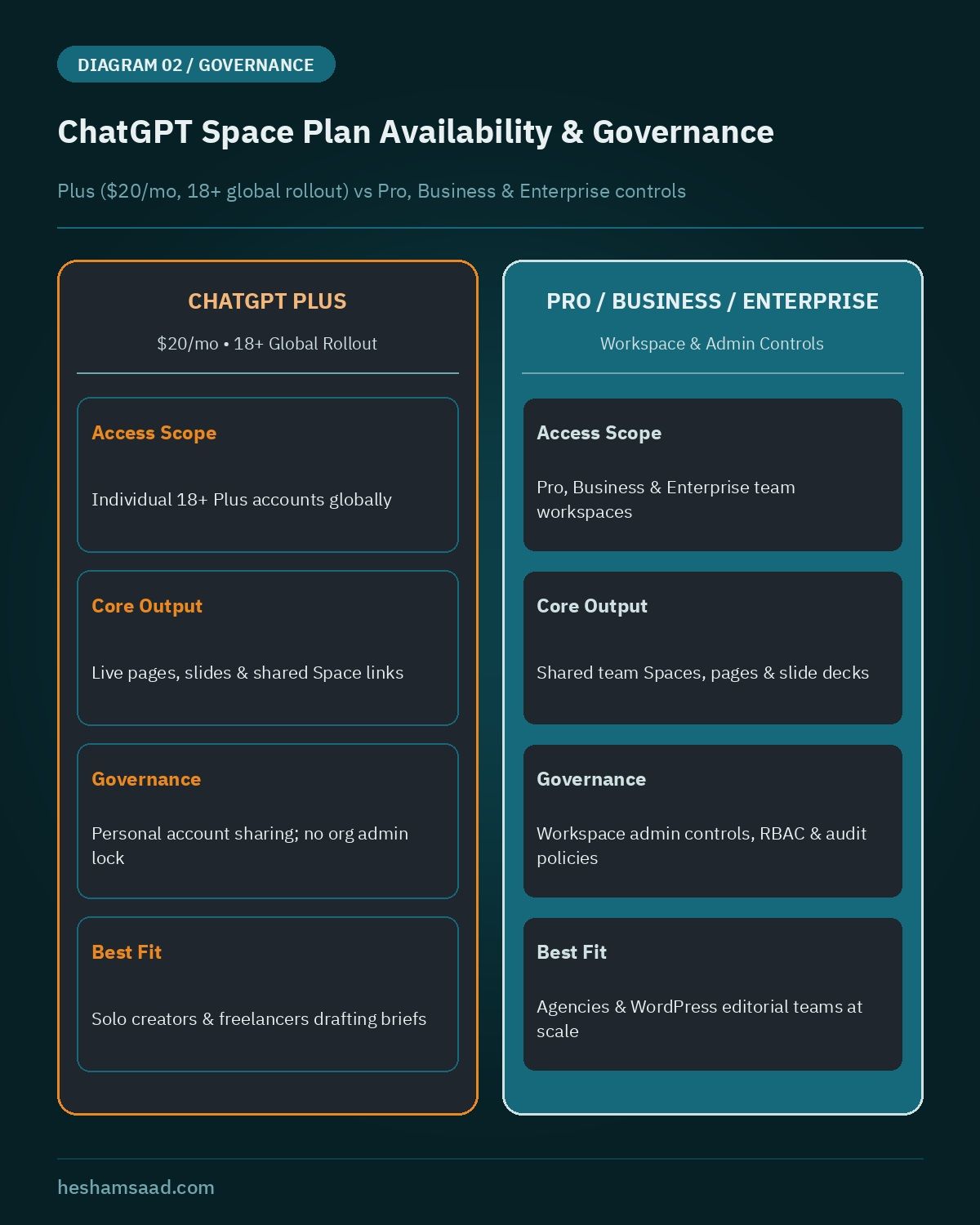
- ChatGPT Plus ($20 per month): Designed for individual subscribers ages 18 and older. It includes full access to Space pages, slides, mobile editing, and multi-user sharing with other paid users, but lacks centralized billing, domain-level access controls, or automatic training exclusion.
- ChatGPT Pro ($100, $200, or $500 per month across Pro 100, Pro 200, and Pro 500 tiers): Built for solo developers, researchers, and heavy power users who need massive reasoning allowances, Codex integration, and top-tier compute speeds alongside Space, while still operating as a single-user account.
- ChatGPT Business ($20 per user per month billed annually, or $25 billed monthly for Standard seats; $100 per user per month billed annually, or $125 billed monthly for Premium seats, with a two-seat minimum): Built for collaborative companies. Business workspaces exclude organizational data from model training by default, provide a unified admin console, support SAML single sign-on, and keep shared spaces under company ownership.
- ChatGPT Enterprise (custom annual pricing through OpenAI sales): Tailored for larger organizations requiring SCIM user provisioning, Enterprise Key Management, role-based access controls, regional data residency options, extended context windows, and formal service level agreements with zero data training.
Notice the financial parity at the entry level: a ChatGPT Business Standard seat billed annually costs the exact same $20 per month as an individual Plus subscription once you have at least two users. If your company is reimbursing two or more employees for personal Plus subscriptions so they can collaborate in Space, switching to an annual Business workspace costs no extra subscription budget while closing major compliance and intellectual property risks. For a broader look at controlling software budgets and protecting financial data in AI workflows, see our breakdown of OpenAI ChatGPT for accounting and finance teams.
Connecting Shared AI Drafts to Your WordPress Website
A common trap for growing businesses is confusing an internal drafting workspace with a publishing system. Leaving service guides, product comparisons, or sales presentations locked inside ChatGPT Space does nothing for your organic search rankings, lead generation forms, or brand authority, because search engines and prospective buyers cannot access those pages.
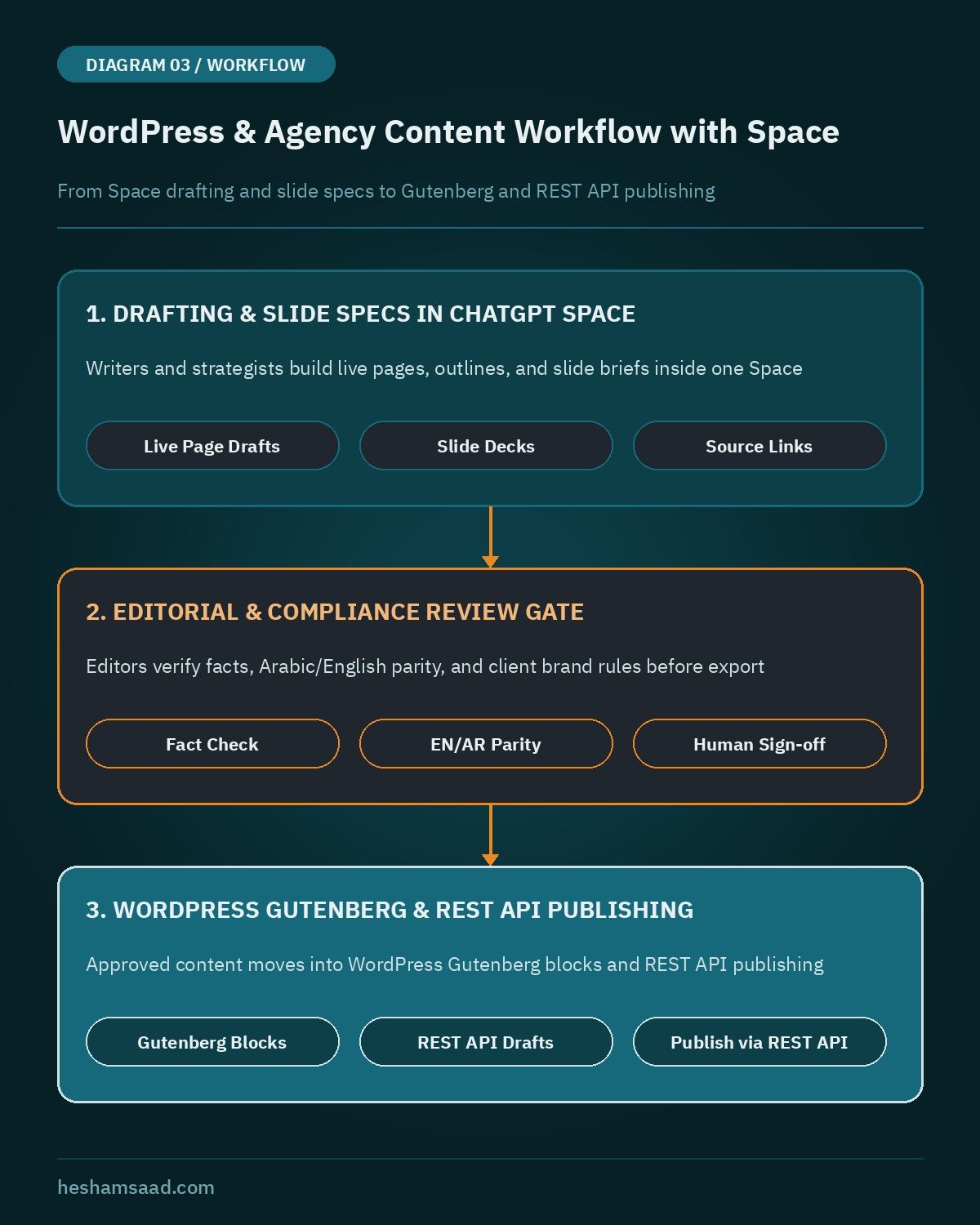
Instead, smart MENA companies use Space as the upstream assembly line for their public WordPress presence. For example, your commercial team can collaborate inside a shared Space to refine objection-handling scripts, comparison tables, and slide decks, building on the playbook we covered in OpenAI ChatGPT for sales teams. Once the messaging is approved, the public-facing versions must move into WordPress as fast, indexable landing pages and downloadable resources.
Moving content from a collaborative AI page into WordPress requires technical discipline so you do not pollute your database with messy inline markup. Follow three architectural practices to keep your site clean and fast:
- Map Space page structures directly to native Gutenberg blocks: Instruct editors and prompts inside Space to format approved drafts using clear H2 and H3 hierarchy, concise bullet lists, and dedicated FAQ sections that paste cleanly into the block editor without rogue div wrappers or inline font styles.
- Automate structured publishing through the WordPress REST API: For teams producing high volumes of bilingual product descriptions, knowledge base articles, or regional landing pages, custom middleware can take finalized content and push it into draft posts with pre-filled SEOPress metadata via the official WordPress REST API.
- Convert internal slide decks into interactive web assets: Rather than sending prospects a Space slide link they might not be able to open, turn approved slide narratives into gated or public HTML carousels, interactive ROI calculators, and conversion-focused service templates through professional WordPress development services.
When an experienced WordPress developer sets up custom block patterns, custom post types, and editorial validation rules on your site, your marketing team gets the best of both worlds. Writers can iterate rapidly with teammates inside Space, while your live WordPress site enforces brand styling, Core Web Vitals performance, bilingual RTL support, and valid structured data schema automatically.
Who Should Use It, What It Costs, and Your One-Week Action Plan
Before changing your team’s daily habits around this release, make a clear decision based on your team structure, budget, and client delivery requirements.
Who should use this release: Solo founders, independent consultants, and small internal content teams where every collaborator already holds an active 18+ paid ChatGPT subscription will gain immediate value from Space for centralizing blog drafts, campaign outlines, and internal slide decks. By contrast, agencies requiring external client sign-off from non-subscribers should keep client review documents in Google Workspace or a private WordPress staging portal, and any company with two or more collaborating staff members handling sensitive client data should use ChatGPT Business rather than personal Plus accounts.
What it costs: Access is included at no extra charge inside ChatGPT Plus at $20 per month for a single adult user. Power users needing higher compute caps can upgrade to ChatGPT Pro at $100, $200, or $500 per month across the Pro 100, Pro 200, and Pro 500 tiers. Organizations needing zero-training data privacy and centralized admin control pay $20 per user per month billed annually ($25 billed monthly) for ChatGPT Business Standard seats or $100 per user per month billed annually ($125 billed monthly) for Business Premium seats with a two-seat minimum, while large corporations negotiate custom annual ChatGPT Enterprise contracts.
What WordPress teams and business owners should do this week: Run through this seven-day checklist to adopt the workspace safely without slowing down your publishing pipeline.
- Day 1, Audit active subscriptions and privacy settings: Check which team members use personal $20 Plus accounts versus a company Business workspace, and require anyone on a personal Plus plan to disable model training in Data Controls before uploading company files.
- Day 2, Migrate reusable brand assets from the old Library: Organize your brand voice rules, approved terminology lists, and WordPress formatting guidelines into a master Space page with nested subpages for English and Arabic copy standards.
- Day 3, Test multi-user permissions and comment tagging: Invite one internal editor with Comment or Edit access to a test page and practice tagging ChatGPT in comments to refine headings, meta descriptions, and FAQ answers.
- Day 4, Connect one live workflow source carefully: Link a non-sensitive project tracker from Slack or Google Drive to a test Space page to verify how self-updating blocks behave before connecting confidential executive channels.
- Day 5, Standardize your Gutenberg handoff template: Create a repeatable page template inside Space that outputs clean H2 and H3 headings, short paragraphs, and FAQ items ready for your WordPress block editor.
- Day 6, Keep client approval portals accessible: Establish a strict rule that external clients receive staging previews on your WordPress site or open document links rather than gated Space links that fail for free accounts.
- Day 7, Evaluate your seat math and CMS integration: If two or more staff members collaborate weekly inside Space, consolidate those personal $20 subscriptions into an annual Business workspace and review where automated WordPress publishing can save editorial hours.
If you want to connect your team’s AI drafting workflow to a high-performing, bilingual WordPress website without risking broken layouts, slow page loads, or messy editorial handoffs, book a free consultation today and let us design a custom publishing architecture tailored to your business goals.
Frequently asked questions
Did ChatGPT Space completely replace the old Library tab and Projects?
ChatGPT Space replaced the static Library tab in the sidebar, becoming the new home for your interactive pages, presentation slides, uploaded files, and generated images. However, ChatGPT Projects remain separate in the sidebar so you can still keep isolated chat threads with custom instructions alongside your shared collaborative workspace documents.
Can I share a ChatGPT Space page or slide deck with a client on a free account?
No, free-tier ChatGPT users and logged-out visitors cannot open shared pages or presentations because public web links are not supported. Every collaborator must sign in to an eligible Plus, Pro, Business, or Enterprise account with Space access enabled to view, comment on, or edit a shared workspace item.
How do self-updating pages and presentations work inside ChatGPT Space?
You can connect a page or slide presentation to supported external tools and workplace apps such as Slack and Google Drive. Once connected, the document refreshes its action lists, project plans, or reference summaries automatically whenever new decisions or updated source files appear in those linked applications.
Is a personal Plus subscription safe for sharing confidential client documents in Space?
Personal Plus accounts are consumer subscriptions where content may be used for model training by default unless the account owner manually opts out in privacy settings. Companies handling sensitive client files or needing centralized seat administration and single sign-on should collaborate inside a governed ChatGPT Business or Enterprise workspace instead.
Can ChatGPT Space publish pages directly to a live WordPress website?
Space does not publish directly to a public website or generate front-end search engine optimization schema on its own. WordPress teams should use Space as an internal drafting and review studio, then transfer approved content into native Gutenberg blocks or automate draft delivery through the official WordPress REST API.


Add your first comment to this post