هذا المقال متوفر باللغة العربية — اقرأ بالعربية
OpenAI Images 2.6 is the latest image generation and editing release from OpenAI. On November 4, 2026, OpenAI published the launch post and made the update available in ChatGPT, Codex and the API. The developer-facing models are GPT-Image-2.6 Flare and GPT-Image-2.6 Sunburst, with model IDs gpt-image-2.6-flare and gpt-image-2.6-sunburst.
This article is a practical briefing, not a rewrite of the announcement. We checked the launch post, the platform model pages, the image generation guide, the API pricing page, the ChatGPT Images help article, the Images 2.6 system card and the content provenance docs. Where OpenAI has not published a detail, we say so. Speed and quality statements from OpenAI are labeled as vendor claims.
Below we cover what changed from the previous version, model IDs and endpoints, resolutions and formats, editing and inpainting, text rendering, prices and rate limits, ChatGPT plan notes, safety and C2PA, a comparison with rivals based only on their official pages, and what the release means for a WordPress site or a business in the MENA region.
OpenAI Images 2.6: what changed from the previous version
Images 2.6 sits on top of the GPT Image 2.5 line rather than replacing the whole stack overnight. OpenAI’s launch post and system card highlight these product changes:
- Faster generation (vendor claim): OpenAI says Images 2.6 generates images 50% faster than before. For Flare with quality set to low, OpenAI says generation can take as little as six seconds.
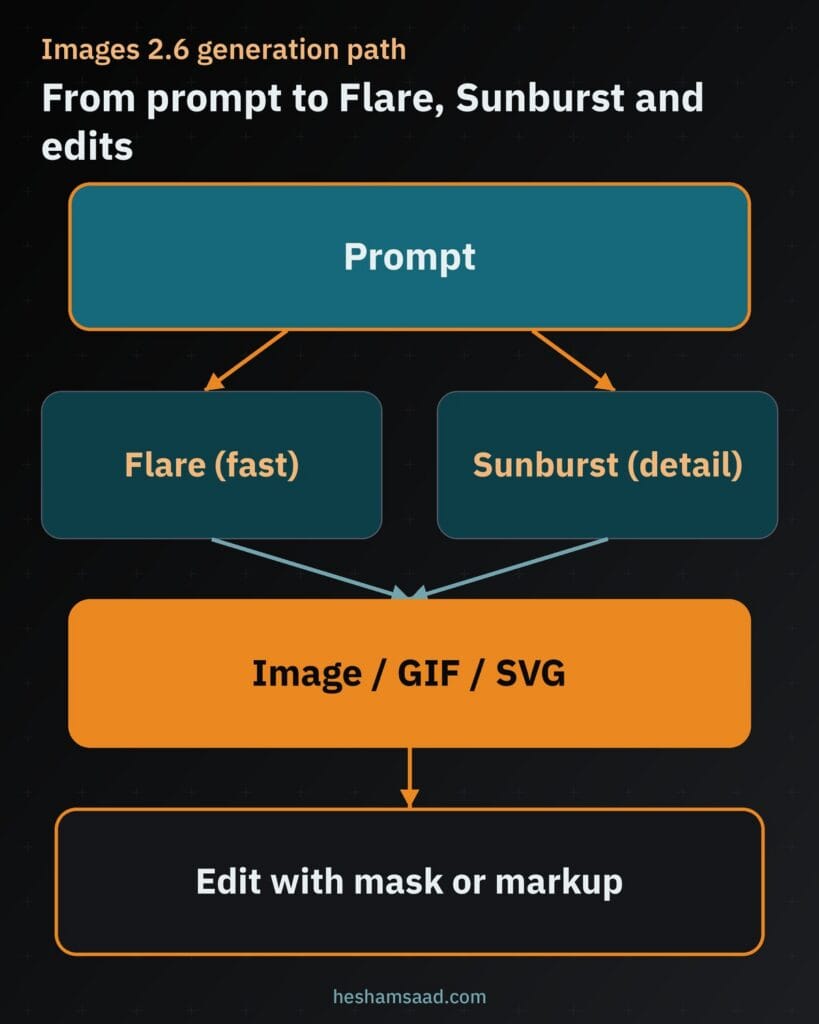
- Two API variants: Flare is positioned for fast iteration and better layout quality for posters and product imagery. Sunburst is positioned for higher-quality generation and greater consistency across edits when quality is set to medium or high.
- Animated GIFs: GIF creation is new in ChatGPT and in the API. In ChatGPT, GIF creation is rolling out; you can ask for a looping GIF or animate a still. In the API, set
output_format: "gif"on image generations. - Markup-guided edits in the API: Image markup, already available in ChatGPT, arrives in the Image API so you can annotate where a change should happen.
- SVG exports in the API: Generations can return SVG for icons and illustrations that need editable paths.
- Complexity parameter: Developers can set
complexityto low, medium or high to control how much planning the model does before rendering. OpenAI says adjusting complexity has no separate fee. The default when omitted is high. - Saved reference images in ChatGPT: Release notes say you can save a photo as a named reference and reuse it later with
@Name.
OpenAI also reports that people create 4 billion images per week across ChatGPT, Codex and the API. Treat that volume figure as a company statistic from the launch post, not as an independent measurement.
Model IDs, endpoints and API availability
According to the official model pages:
gpt-image-2.6-flare— default snapshot of the same name; image generation and editing for fast iteration.gpt-image-2.6-sunburst— default snapshot of the same name; image generation and editing for detailed visual work.
Both models accept text and image inputs and return image outputs. Supported Image API routes are POST /v1/images/generations and POST /v1/images/edits. The model pages list chat completions, responses, realtime, assistants, batch, fine-tuning and several other endpoints as not supported for these image model IDs themselves. Image generation can still be used as a tool from the Responses API with a supported mainline model, as described in the image generation guide; many code samples on that page still show GPT Image 2.5 model strings in the examples, while the 2.6 section documents the new capabilities.
OpenAI notes that some organizations may need to complete API Organization Verification in the developer console before using GPT Image models.
Resolutions, quality, formats, GIF and SVG
The image generation guide documents the following for the current GPT Image Sunburst and Flare family, including GPT Image 2.6:
- Recommended sizes:
1024x1024(square),1536x1024(landscape),1024x1536(portrait). - Custom sizes:
WIDTHxHEIGHTwith both edges multiples of 16, aspect ratio between 1:3 and 3:1, neither edge above 3840 pixels, and total pixels between 655,360 and 8,294,400. Resolutions above2560x1440are labeled experimental. - Quality: for GPT Image 2.6 and 2.5 Sunburst and Flare, options include
low,medium,high,xhigh,maxandauto. - Still formats: default
png, plusjpegandwebp, with optionaloutput_compressionfor JPEG and WebP. - Transparent backgrounds:
background: "transparent"withpngorwebp. - SVG:
output_format: "svg"on generations only, withnset to 1. No streaming, partial images, compression or prompt rewriter. Edits do not support SVG output, and SVG is not a supported raster input for edits. - GIF:
output_format: "gif"on generations.frame_countranges from 2 to 64 (default 9).frame_duration_msranges from 20 to 2000 milliseconds, rounded to 10 ms (default 200). GIF edits are not supported on the image edit endpoint. Streaming and partial images are not supported for GIF.
In ChatGPT, the help article says you can generate images in any aspect ratio with the aspect ratio picker or by stating the ratio in the prompt. GIF creation is rolling out; ChatGPT cannot edit an animated GIF you upload, though you can edit a GIF it created by describing changes.
Editing, inpainting, markup and consistency
Editing is a core part of Images 2.6. Official docs describe several paths:
- Prompt-only edits: describe the change against an existing or generated image.
- Mask-based edits (inpainting-style): upload an image and a mask that marks the area to replace. The guide says masking with GPT Image is prompt-based; the model uses the mask as guidance and may not follow its exact shape with complete precision. Mask and image must match format and size and stay under 50MB; the mask needs an alpha channel.
- Markup-guided edits: send a transparent annotation layer as
markupon the Image API edits endpoint for GPT Image 2.5 and 2.6. Do not combine markup with mask or prompt rewriter. The first image and annotation layer are each capped at 16,777,216 pixels; the annotation file has a 50MB size limit. - Reference images: use one or more images as references for a new composition.
- Multi-turn editing: available through the Responses API image generation tool, including
previous_response_idor image generation call IDs. - ChatGPT editor: select a region or describe the edit; highlights are not always precise and edits may extend beyond the selected area.
OpenAI’s launch post claims better preservation of characters, products and brand details across edits. The system card similarly says the updated models improve editing consistency and detail preservation. Treat those as vendor claims. The image generation guide still lists consistency for recurring characters or brand elements as a known limitation.
Text rendering and Arabic text in images
OpenAI states that ChatGPT Images can follow instructions to add text inside an image. The API limitations section says text rendering is significantly improved, but the model can still struggle with precise text placement and clarity. That is the official position for text in general.
OpenAI has not published a dedicated evaluation or guarantee for Arabic text rendering inside generated images in the Images 2.6 launch post, model pages, image guide, help article or system card we checked. For MENA teams that need Arabic headlines on posters, product cards or social creatives, treat Arabic glyph quality as unverified until you run your own checks. Prefer generating the visual without Arabic type and overlaying real fonts in design tools or WordPress when the text must be exact.
Prices, tokens and rate limits
API pricing for both GPT-Image-2.6 Flare and GPT-Image-2.6 Sunburst is published on the developers pricing page and the model pages as token rates, not as a single fixed price per image:
- Text input: $5 per 1M tokens; cached text input $1.25 per 1M tokens.
- Image input: $8 per 1M tokens; cached image input $2 per 1M tokens.
- Image output: $30 per 1M tokens.
The image generation guide says image output costs $30 per million billable tokens and points developers to the on-page calculator for one-image estimates. Markup-guided edits use the same token rates with no extra fee. For SVG, you pay the image model rate for the reference image plus the authoring model rate for the tokens used to produce the SVG.
Important pricing caveats from the official pages:
- Equal token rates do not mean equal cost per image; token consumption can differ by model and quality setting.
- The batch pricing table on the same pricing page lists batch rates for several GPT Image models, but when we checked it did not list separate batch rows for
gpt-image-2.6-flareorgpt-image-2.6-sunburst. Do not assume batch discounts for 2.6 until OpenAI publishes them. - Cached input notes on the pricing page refer specifically to GPT Image 2 and 2.5 with the Responses API; do not extend that wording to 2.6 without a matching note.
Rate limits are not published as fixed public numbers for these model IDs. The model pages say rate limits vary by usage tier and account, and point you to your organization’s limits in the platform settings. The general rate limits guide mentions metrics such as RPM, TPM and, for some workloads, IPM (images per minute).
In ChatGPT, image creation is subject to plan usage limits. The ChatGPT pricing page lists image generation across plans and describes higher or unlimited image creation on higher tiers; exact remaining quotas appear in the product UI rather than as a single public table for Images 2.6.
ChatGPT availability, plans and regions
The launch post says Images 2.6 is available globally today in ChatGPT and Codex across all subscription tiers on desktop, mobile and web. The Images in ChatGPT help article confirms:
- ChatGPT Images is available on all tiers.
- Images with thinking is available on Plus, Pro and Business, and is coming to Enterprise and Edu soon.
- Availability covers web, iOS and Android.
- Image generation and editing are also available in Codex.
- The official DALL·E GPT has been retired; use ChatGPT Images instead.
- Custom GPTs with Image Generation enabled can use the new generation model.
OpenAI’s phrasing is global availability. It does not publish a country exclusion list for Images 2.6 in the pages we checked. Local payment methods, age rules, teen parental controls and workspace admin settings can still affect what a given account can do. For linked teen accounts, a parent or guardian may control whether the teen can create or edit images.
Safety, moderation, C2PA and SynthID
The ChatGPT Images 2.6 system card, published November 4, 2026, describes a layered safety stack: upstream LLM policy checks, downstream multimodal monitoring of inputs and outputs, and additional safeguards for GIF creation because motion can change meaning across frames. OpenAI reports offline adversarial evaluations against GPT-Image-2.5 baselines; those percentages are evaluation results under OpenAI’s test set, not production traffic rates. The Preparedness Framework section says neither Sunburst nor Flare crossed Bio High or Cyber High thresholds in the adapted image tests, while OpenAI still applies precautionary biological-risk mitigations similar to Images 2.0 and 2.5.
On provenance, OpenAI continues C2PA Content Credentials and adds resilient watermarking with Google DeepMind’s SynthID across ChatGPT, Codex and the API. The content provenance guide and Help Center article explain that C2PA metadata can be lost through screenshots, conversion or heavy edits, while SynthID is embedded in the media and may survive some transformations. Developers can check supported files with the Content Provenance API and the public verification tool. The Images API also recommends a privacy-preserving safety_identifier for end-user apps; the older user parameter is deprecated.
API moderation for GPT Image models supports moderation: "auto" (default) or low. Blocked requests may return moderation_blocked with optional coarse category details.
Pros and cons
Pros
- Two clear API model choices for speed versus detailed editing workflows.
- Native GIF and SVG options that older GPT Image releases did not center in the same way.
- Markup and mask editing paths for more controlled changes.
- Complexity control without a separate fee, according to OpenAI.
- ChatGPT availability on all subscription tiers, with a global rollout statement.
- Documented provenance with C2PA and SynthID.
Cons
- API cost is token-based; high quality and large sizes can add up quickly.
- Batch pricing for the 2.6 model IDs was not listed on the pricing page when we checked.
- Public per-account rate limit numbers are not fixed in the docs.
- Text rendering, including Arabic, still needs human review; Arabic quality is not separately documented.
- GIF edit endpoint support is limited; uploaded animated GIFs cannot be edited in ChatGPT.
- Vendor speed and consistency claims are not independent benchmarks.
How it compares with Google, Midjourney, Flux and xAI
We only state hard facts that appear on each company’s official pages. Quality rankings below are not our tests.
- Google Gemini image (Nano Banana line): Google’s Gemini API docs describe Nano Banana models for native image generation and conversational editing, with resolutions such as 1K, 2K and 4K depending on the model, advanced text rendering claims, and grounding with Google Search on supported models. Google’s deprecations page shows older Imagen API models shut down or redirected toward Gemini image models. Vertex AI docs still discuss Gemini image and Imagen options for cloud customers. Pricing is published per model on Google’s developer pricing pages and differs from OpenAI’s per-token GPT Image table.
- Midjourney: Midjourney sells subscription plans (Basic, Standard, Pro, Mega) with Fast GPU hours and, on higher plans, unlimited Relax image generations. It is a product subscription, not an OpenAI-style public token API in the same form. Commercial terms and stealth mode rules are plan-dependent according to Midjourney’s docs.
- Black Forest Labs Flux: BFL publishes an API for FLUX image generation and editing with prompt-based requests and polling. Treat Flux as a strong dedicated image API alternative; compare pricing and feature matrices on docs.bfl.ai rather than assuming feature parity with GPT Image 2.6 GIFs or SVG.
- xAI: xAI documents image generation under its Imagine / Grok image capabilities in the xAI developer docs and news posts. Use those pages for current model names and limits rather than older Aurora-only references.
In short: OpenAI Images 2.6 competes on ChatGPT distribution, dual Flare/Sunburst API models, GIF/SVG and markup editing. Google emphasizes conversational Gemini image models and search grounding. Midjourney remains a subscription creative tool. Flux and xAI are separate API or product stacks. Pick based on workflow, not on marketing adjectives.
Best use cases
- Fast poster and social drafts with Flare at lower quality, then a Sunburst pass for the final asset.
- Product packshots and lifestyle variants with reference images and mask or markup edits.
- Short looping GIFs for ads, mascots or UI empty states where a full video pipeline is unnecessary.
- SVG icons and simple logo explorations from the API, followed by cleanup in a vector editor.
- Multi-turn brand edits in ChatGPT or the Responses API when you need to keep a character or SKU consistent.
- Transparent PNGs or WebPs for site heroes and cards.
What it means for WordPress sites and MENA businesses
For agencies and store owners in Egypt and the Gulf, Images 2.6 is less about novelty and more about production speed for the assets a WordPress site needs every week.
- Featured images and blog OG images: generate a square or landscape base, then crop in WordPress or an editor. Keep a human check for text and logos.
- WooCommerce product photos: use reference photos of the real product, then edit backgrounds or props with masks. Do not invent product claims in the image that your catalog does not support.
- Arabic creatives: because Arabic in-image text quality is not documented by OpenAI for this release, generate the scene and composite Arabic type with web-safe or licensed fonts in your design workflow.
- API in WordPress workflows: a custom plugin, WP-CLI job or middleware can call
/v1/images/generationsor/v1/images/edits, store the result in the Media Library, and attach it to a post or product. Log model ID, quality, size and token usage. Respect OpenAI usage policies and your client’s brand rules. - Provenance: if you publish AI images, keep the original file when you need C2PA or SynthID checks later; CMS recompression can strip metadata.
If you want this wired into a real content or commerce stack, our WordPress development team can help, or you can book a free consultation.
Related reading: Gemini file editing, GPT-6.1 Terra and Gemini 4 Carbon.
What OpenAI has not published yet
After checking the launch post, model pages, image guide, pricing page, help article, system card and provenance docs, these points are still unpublished or incomplete:
- A fixed public dollar-per-image table specifically for GPT Image 2.6 across every size and quality (the docs point to token rates and a calculator instead).
- Batch pricing rows for
gpt-image-2.6-flareandgpt-image-2.6-sunburston the pricing page we checked. - Account-tier numeric rate limits for these model IDs outside the organization settings UI.
- Any dedicated Arabic or right-to-left text rendering evaluation for Images 2.6.
- A firm date for Images with thinking on Enterprise and Edu beyond “coming soon”.
- Independent third-party benchmarks; the 50% faster claim and six-second Flare figure remain vendor claims.
Our take
Images 2.6 is a practical update: faster iteration according to OpenAI, clearer Flare versus Sunburst roles, and concrete new outputs in GIF and SVG. For WordPress and MENA teams, the value is in featured images, product variants and short motion loops, provided you keep humans on brand accuracy and Arabic typography. Use the official model IDs, pay attention to token costs at higher quality, and do not invent batch prices or Arabic guarantees that OpenAI has not published.
Frequently asked questions
What are the OpenAI Images 2.6 API model IDs?
The official model pages list gpt-image-2.6-flare for fast iteration and gpt-image-2.6-sunburst for detailed visual work. Both support image generation and image edit endpoints. OpenAI positions Flare for speed and layout work such as posters and product imagery, and Sunburst for higher quality and stronger edit consistency when quality is medium or high.
How much does GPT-Image-2.6 cost in the API?
Both Flare and Sunburst use the same published token rates: 5 dollars per 1M text input tokens, 1.25 dollars cached text input, 8 dollars per 1M image input tokens, 2 dollars cached image input, and 30 dollars per 1M image output tokens. Final cost depends on prompt size, quality and resolution. Use OpenAI’s calculator for one-image estimates.
Which ChatGPT plans get Images 2.6?
OpenAI says Images 2.6 is available globally in ChatGPT and Codex across all subscription tiers on desktop, mobile and web. The Images help article says ChatGPT Images is on all tiers, while Images with thinking is on Plus, Pro and Business and is coming to Enterprise and Edu soon.
Can Images 2.6 create GIFs and SVG files?
Yes in the documented paths. ChatGPT is rolling out GIF creation for looping animations. In the API, set output_format to gif on generations, with frame_count from 2 to 64. SVG output is available on generations with output_format svg. The image edit endpoint does not support GIF or SVG output.
Does OpenAI document Arabic text quality in Images 2.6?
No. OpenAI says ChatGPT Images can add text in images and that API text rendering is improved but can still struggle with precise placement and clarity. The Images 2.6 pages we checked do not publish a dedicated Arabic or right-to-left text evaluation, so verify Arabic type yourself or overlay fonts outside the model.
How do safety and C2PA work for Images 2.6?
The system card describes upstream policy checks, downstream input and output blocking, and extra GIF safeguards. Provenance uses C2PA Content Credentials plus SynthID watermarking across ChatGPT, Codex and the API. C2PA metadata can be lost through edits or conversion; SynthID may survive some changes. Check files with OpenAI’s verification tools.
References
- OpenAI: Introducing Images 2.6
- OpenAI Docs: GPT-Image-2.6 Flare
- OpenAI Docs: GPT-Image-2.6 Sunburst
- OpenAI Docs: Image generation guide
- OpenAI Docs: API pricing
- OpenAI Help: Images in ChatGPT
- OpenAI Help: ChatGPT release notes
- OpenAI: ChatGPT Images 2.6 System Card
- OpenAI Docs: Content provenance
- OpenAI Help: Provenance signals
- ChatGPT plans and pricing
- Google AI: Gemini image generation (Nano Banana)
- Google AI: Gemini API pricing
- Midjourney pricing
- Black Forest Labs docs
- xAI Docs: Image generation