---
id: 14529
title: "Recruitment Agency Website WordPress: Vacancies, CVs, Employers"
slug: "recruitment-agency-website-wordpress"
lang: "en"
url: "https://heshamsaad.com/en/recruitment-agency-website-wordpress/"
markdown_url: "https://heshamsaad.com/en/recruitment-agency-website-wordpress.md"
translations: {"ar":"https://heshamsaad.com/ar/recruitment-agency-website-wordpress/"}
description: "Plan your recruitment agency website WordPress build with separate employer and candidate paths, expiring vacancies, private CVs, and Arabic pages."
author: "Safya"
date_published: "2026-11-06T06:05:29Z"
date_modified: "2026-11-08T19:36:37Z"
categories: ["WooCommerce"]
tags: ["Bilingual Website","CV Upload Form","Job Board WordPress","Recruitment Agency Website","Recruitment Website Design"]
featured_image: "https://heshamsaad.com/wp-content/uploads/2026/11/recruitment-agency-website-wordpress-og-en-1.jpg"
word_count: 2937
reading_time_min: 15
content_sha256: "8f9c38e951df504f01921315dd0a734b1d4be7571fdc2c0c059382b2525ef8ad"
---
# Recruitment Agency Website WordPress: Vacancies, CVs, Employers
Planning a [recruitment agency website WordPress](https://heshamsaad.com/en/wordpress-development/) build starts with separating two audiences who visit your firm for completely different reasons. Corporate hiring managers arrive looking to brief your consultants on open headcount, while job seekers arrive ready to browse vacancies or submit a resume. Sending both groups to a single generic contact form buries commercial client inquiries inside daily candidate attachments.
## What a recruitment agency website WordPress build must separate
Clear recruitment website design solves that bottleneck right from your top navigation and homepage hero. Give employers a dedicated path explaining your specialist sectors, screening steps, and a staff request form routed straight to your client relations inbox. Give candidates their own career path where they browse active openings, read individual role pages, apply for a listed job, or send a general CV to your recruitment desk.
Splitting your site into two paths, two forms, and two separate email queues protects response speed on both sides of your business. Account managers spot new hiring briefs from companies in Cairo, Riyadh, or Dubai right away instead of sorting through resumes. Meanwhile, your recruiters review candidate profiles in a dedicated workflow built for screening.
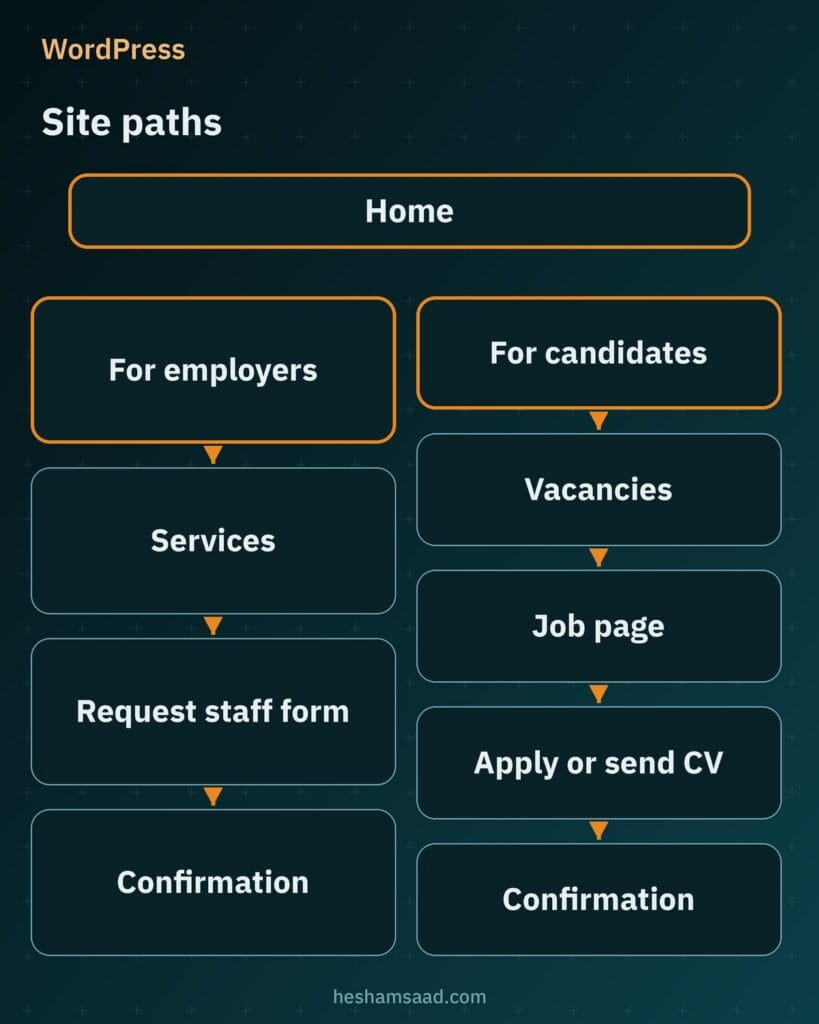Decide which team members receive employer briefs and which recruiters handle candidate submissions before your developer builds any templates. Even if a small team manages both queues at first, keeping separate addresses and confirmation messages prevents missed commercial inquiries as your agency grows.
## Job listings that expire on time
Leaving closed roles online wastes candidate effort and fills your inbox with applications for positions your client already filled. Running a structured job board WordPress setup with the free WP Job Manager plugin gives your agency shortcode based listings where every vacancy has its own page, application address, and expiry date. Recruiters or logged in users can preview a draft before going live, edit details, mark a role as filled, or delete outdated listings.
Disciplined expiry handling also matters when your developer adds Google JobPosting structured data so open roles can appear in Google job search. Google requires datePosted, description, hiringOrganization, jobLocation, and title on each single job page, plus validThrough whenever a vacancy carries a closing date. When your agency recruits on behalf of an anonymous client, Google allows staffing firms to set the hiringOrganization name to confidential while keeping the job viewable without a login wall.
| Vacancy field | Why candidates need it | Who fills it |
|---|---|---|
| Role title and summary | Explains seniority and daily responsibilities before applying | Agency recruiter from the approved client brief |
| City and location | Clarifies workplace location for commute or relocation decisions | Recruiter using confirmed employer site details |
| Contract type | Distinguishes permanent, fixed term, or project staffing roles | Recruiter based on client hiring terms |
| Core requirements | Lets qualified specialists compare their experience to real criteria | Recruiter after reviewing hiring manager notes |
| Closing date | Shows urgency and controls when the listing expires | Recruiter when publishing the vacancy |
Output JobPosting structured data only on single vacancy pages, never on search results or category archives. Once a closing date passes or a role gets filled, your website must remove the markup, reflect an expired validThrough value, or return a 404 or 410 status code, because keeping active schema on closed jobs can trigger a Google manual action. Also restrict general resume collection to genuine open recruitment so every published page reflects real hiring activity.
## Searchable vacancies across cities and sectors
A candidate browsing your site on a phone wants to narrow down relevant openings right away rather than scrolling through unrelated pages. WP Job Manager provides searchable and filterable job listings out of the box, along with RSS feeds tied to filtered searches. Your developer can configure clean filters for keyword, city, industry sector, and contract type so a finance candidate in Jeddah or an operations specialist in Alexandria finds matching roles quickly.
If your firm wants returning specialists to hear about new roles automatically, the paid Job Alerts add on lets registered users save searches and receive email alerts. Organic discovery through Google job search is also available across Egypt, Saudi Arabia, the UAE, Kuwait, Qatar, Bahrain, Oman, and Jordan. Valid structured data makes individual job pages eligible for that search experience, although Google never guarantees rich results even when every technical property is accurate.
## CV uploads, candidate privacy, and data retention
Every resume submitted through your website contains personal contact details, career history, and education records that candidates trust your agency to protect. A dangerous build mistake is wiring a CV upload form straight into the public WordPress media library. Files saved in the default WordPress uploads folder sit as static files reachable by anyone who has the direct URL unless server rules or a plugin block public access, so combine protected CV storage with general WordPress hardening and a periodic [WordPress security audit](https://heshamsaad.com/en/wordpress-security-audit/).
Before launch, ask qualified counsel to assess the data protection obligations applicable to your agency, including the basis for processing candidate data, privacy notices, hosting arrangements, retention and handling candidate requests.
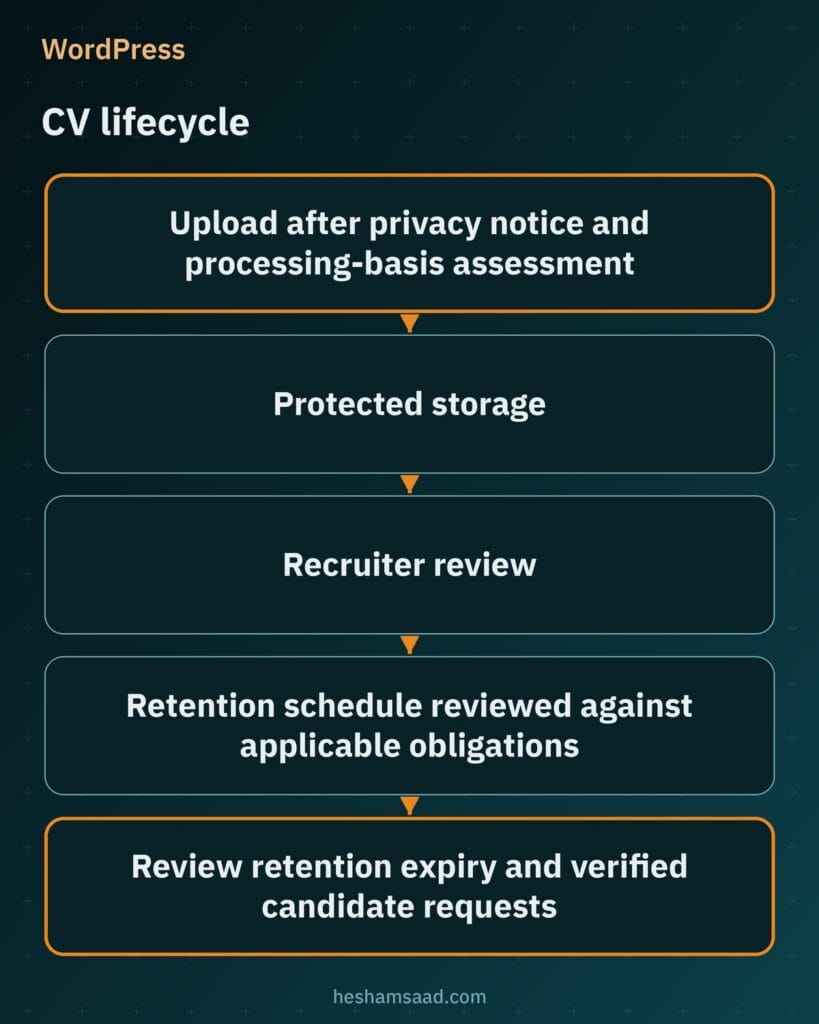Clear technical boundaries protect candidate trust and help your agency pass supplier checks with corporate HR departments. Hand this CV handling checklist to your developer during scoping:
- Restrict allowed file extensions and maximum file size on the upload field according to rules set by your agency.
- Link to a clear privacy notice using the WordPress Privacy settings screen. Ask qualified counsel to review the processing basis and whether a separate, unchecked consent checkbox is appropriate.
- Save uploaded CVs in protected storage outside public media folders and limit file access strictly to recruiter user roles.
- Document a retention schedule reviewed against applicable obligations in your privacy policy, and review records for deletion when that schedule ends.
- Ask your developer to assess support for custom candidate storage in the WordPress Export Personal Data and Erase Personal Data tools. Email confirmation alone does not establish whether a request should be fulfilled; review the requester and applicable obligations before acting.
Test file protection before opening your site to applicants by pasting a stored CV URL into a logged out browser window. If the server opens the document instead of blocking access, hold launch until your developer locks the folder down.
## Employer inquiry forms with recruiter review before publishing
WP Job Manager includes frontend forms that let guests or registered users submit and manage job listings, yet open self publishing rarely suits a consultative staffing agency. When an employer wants to hire, your consultants need to confirm commercial terms, verify headcount, and polish the role description before anything appears under your brand. Replace open job submission with a request staff form capturing company name, contact person, role title, number of hires, work location, contract type, target start date, and briefing notes.
Route those employer requests to a dedicated business development inbox separate from candidate applications, and send a prompt confirmation email so the hiring manager knows your team received the brief. Corporate mail filters can reject unauthenticated server mail, so set up authenticated delivery early and check our guide on [fixing WordPress not sending emails](https://heshamsaad.com/en/wordpress-not-sending-emails/) before live testing. After an account manager confirms the brief with the client, your recruiter drafts and previews the public vacancy inside WordPress.
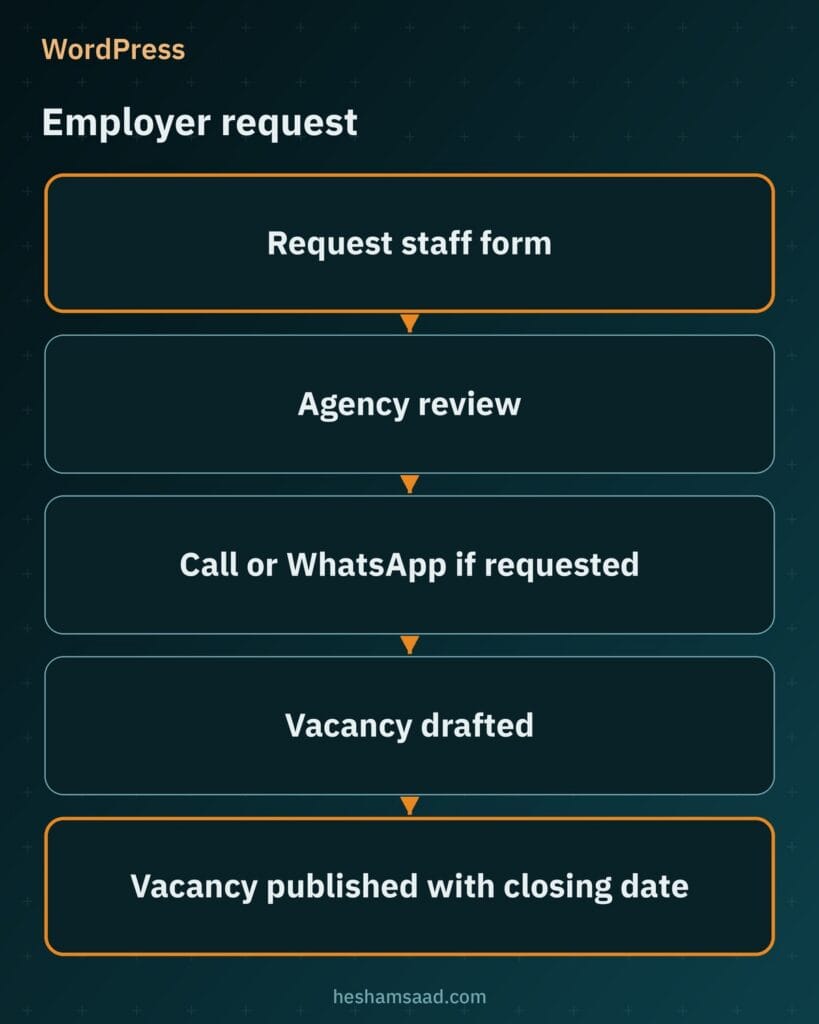Keeping human review between a client inquiry and a live job page ensures consistent role titles, realistic requirements, and valid closing dates across your board. If repeat corporate clients later ask for dashboard access to view or mark their own listings filled, you can issue registered employer logins selectively.
## Applications and Resume Manager versus direct email apply
By default, WP Job Manager ties each vacancy to an email address or website URL where candidates apply. If your firm runs a focused roster of specialist searches and tracks shortlists outside the website, pairing that core setup with a protected application form and recruiter email alerts keeps daily work simple. When your team wants structured candidate entries managed inside WordPress, two paid extensions expand your options.
### Managing role applications inside the job dashboard
The paid Applications add on lets candidates apply directly through a form on each job page rather than switching to an email client. Authorized employers or internal recruiters can then view and manage submitted applications from the job dashboard linked to that specific opening. Choose this add on when you want every applicant record attached to the exact vacancy they answered.
### Collecting general profiles with Resume Manager
The paid Resume Manager add on adds a frontend resume submission form and stores resume listings that your team manages from WordPress admin. It fits an agency that invites passive specialists to register their CVs for upcoming mandates even when no matching public vacancy is open. Whichever route you choose, apply the same protected storage and recruiter role restrictions to every uploaded document.
## Scoping connections to your internal recruitment software
If your consultants already manage hiring pipelines inside an external applicant tracking system, decide during discovery how your WordPress website will pass data to it. Never assume a ready made integration exists until a developer reviews technical documentation for your exact software plan. A direct connection is possible only when your ATS vendor offers a documented API, webhooks, or a supported import format.
Send these scoping questions to your software vendor before budgeting for custom integration code:
- Does our current subscription include access to a documented API or webhooks for reading approved vacancies and pushing candidate records?
- Can the endpoint accept uploaded CV files alongside structured form fields and candidate privacy notices and consent records where applicable?
- How are authentication keys, validation errors, and closed job updates handled when syncing between systems?
- If API access is unavailable, what structured email format or CSV column layout can our recruiters import reliably?
When a vendor restricts API access or provides incomplete documentation, skip fragile custom scripts that risk dropping applications silently. Structured email notifications or clean CSV exports from WordPress give your recruitment desk a dependable workflow with predictable upkeep.
## Arabic and English pages for regional and international hiring
Serving both local organizations and multinational employers across Egypt, Saudi Arabia, or the Gulf calls for presenting your agency clearly in Arabic and English. Polylang is a free plugin that manages multilingual WordPress posts, pages, media, categories, tags, and custom post types including vacancies, while WPML is a paid alternative, and WP Job Manager already includes Arabic interface translations. Your developer should also implement reciprocal hreflang annotations so Google serves the right localized version to each searcher.
Avoid automatic machine translation on employer service pages and active job listings, because awkward role titles weaken credibility with both HR directors and senior candidates. Have your team write native Arabic and English copy with proper right to left layout styling on Arabic pages, and publish bilingual job posts whenever a client role requires both languages. For practical details on RTL templates, URL structure, and switcher setup, read our guide to [translating a WordPress site into Arabic](https://heshamsaad.com/en/translate-wordpress-site-arabic/).
## Adding WhatsApp follow up without scattering CVs
Quick WhatsApp follow up helps consultants confirm briefing calls with employers and check interview availability with shortlisted candidates across MENA markets. Instead of adding heavy chat scripts, your developer can place clean click to chat links using the official wa.me format with your full international number and optional prefilled text. Offer click to chat on your employer contact page for urgent staffing questions, while keeping CV uploads strictly inside your protected website form so resumes do not scatter across personal phones.
Include a clear preference question on your forms asking whether the employer or candidate wants follow up on WhatsApp before your team messages them there. Stick to personal, consent based outreach from your recruiters rather than unapproved bulk messaging claims so your agency number stays trusted.
## What shapes the cost of building your recruitment site
Engineering scope for a recruitment site depends far more on vacancy workflows, document security, and software handoffs than on surface page count. A focused site with recruiter published roles and email applications requires much less custom development than a bilingual portal syncing jobs and protected CVs with external software. If your company also delivers candidate courses or corporate workshops alongside staffing, compare how catalog and booking features affect scope in our guide to [building a training center website on WordPress](https://heshamsaad.com/en/training-center-website-wordpress/).
Settle decisions on these cost drivers before requesting developer proposals so you can compare quotes on equal terms:
- Custom vacancy fields and search filter combinations across keyword, city, sector, and contract type.
- Separate employer staff request forms, candidate application forms, and dedicated inbox routing.
- Protected server storage outside public media, recruiter role permissions, and scheduled CV retention cleanup.
- Paid extension licensing and template styling for Applications, Resume Manager, or Job Alerts.
- ATS scope, comparing documented API or webhook development against structured email or CSV exports.
- Single language delivery versus native Arabic and English pages, RTL styling, and copywriting responsibilities.
- Custom visual design, managed WordPress hosting, ongoing maintenance, email authentication, and security hardening.
## Prepare your brief and plan the next step
Before speaking with a developer, put your workflow rules into a short written brief: list the fields employers must fill when requesting staff, the filters candidates need on your job board, the retention period for uploaded CVs, and whether your internal recruitment software provides API documentation. Settling those operational details upfront keeps your budget focused on clear user paths, reliable email delivery, and private file handling. A structured website gives employers and candidates an organized way to reach your firm, while actual hiring results always depend on your consultants, client terms, and market demand.
When you are ready to turn that brief into a fast, bilingual platform for your agency, explore our [WordPress development services](https://heshamsaad.com/en/wordpress-development/) to see how we build custom business sites across MENA. You can also [book a free consultation](https://heshamsaad.com/en/free-consultation/) to review your vacancy structure, CV protection setup, and technical scope before starting development.
If your agency also rents interview rooms or desks to clients, our [coworking space website WordPress](https://heshamsaad.com/en/coworking-space-website-wordpress/) guide covers meeting room booking and paid memberships.
## Frequently asked questions
Should employers and candidates use separate forms on my agency site?Yes, separating employer staffing requests from candidate job applications keeps commercial leads out of your daily CV queue. Give employers a dedicated staff request form capturing role details, headcount, location, and contract terms, and route those alerts to your client intake inbox. Candidates should follow a separate career path to apply for specific openings or submit a general resume directly to your recruitment team.
What happens to a vacancy page after the closing date?Once a role reaches its closing date or a recruiter marks it as filled in WP Job Manager, the vacancy should stop accepting applications and expire cleanly. To follow Google JobPosting rules and avoid a manual action, your site must remove the structured data markup, reflect an expired validThrough date, or return a not found or gone status for the closed page.
How should my site store uploaded CVs?Save uploaded CVs in protected storage outside public media, with access limited to authorized recruiters and tested against unauthorized direct links. Provide a clear privacy notice and review the processing basis with qualified counsel, recording consent where applicable. Follow a reviewed retention schedule, and assess verified candidate requests against applicable obligations before exporting or deleting records.
Can the website connect to the ATS we already use?Your WordPress site can connect directly only if your recruitment software vendor provides a documented API, webhooks, or a supported import format. Have your developer review the vendor documentation during scoping to confirm whether jobs, candidate fields, and CV files can sync reliably. When an API is unavailable on your plan, structured email notifications or clean CSV exports give recruiters a dependable workflow.
Should my recruitment site be in Arabic and English?If your agency serves local organizations and international employers across Egypt, Saudi Arabia, or the Gulf, offering both Arabic and English pages helps each audience read in their working language. You can manage bilingual pages and job listings with Polylang or WPML, paired with proper right to left styling and hreflang tags for Google. Write both language versions natively rather than using automatic translation.
## References
- [WP Job Manager on WordPress.org](https://wordpress.org/plugins/wp-job-manager/)
- [WP Job Manager: Applications Add On](https://wpjobmanager.com/add-ons/applications/)
- [WP Job Manager: Resume Manager Add On](https://wpjobmanager.com/add-ons/resume-manager/)
- [Google Search Central: JobPosting Structured Data](https://developers.google.com/search/docs/appearance/structured-data/job-posting)
- [WordPress Documentation: Hardening WordPress](https://wordpress.org/documentation/article/hardening-wordpress/)
- [WordPress Documentation: Privacy Settings Screen](https://wordpress.org/documentation/article/settings-privacy-screen/)
- [WordPress Documentation: Tools Export Personal Data Screen](https://wordpress.org/documentation/article/tools-export-personal-data-screen/)
- [WordPress Documentation: Tools Erase Personal Data Screen](https://wordpress.org/documentation/article/tools-erase-personal-data-screen/)
- [Polylang on WordPress.org](https://wordpress.org/plugins/polylang/)
- [Google Search Central: Localized Versions of Your Pages](https://developers.google.com/search/docs/specialty/international/localized-versions)
- [WhatsApp Help Center: How to Use Click to Chat](https://faq.whatsapp.com/5913398998672934/)