---
id: 15279
title: "Meal Prep Subscription Website WooCommerce: MENA Guide"
slug: "meal-prep-subscription-website-woocommerce"
lang: "en"
url: "https://heshamsaad.com/en/meal-prep-subscription-website-woocommerce/"
markdown_url: "https://heshamsaad.com/en/meal-prep-subscription-website-woocommerce.md"
translations: {"ar":"https://heshamsaad.com/ar/meal-prep-subscription-website-woocommerce/"}
description: "Build a meal prep subscription website WooCommerce store in MENA with macro plan selectors, 48-hour cutoff locks, pause portals, and tokenized billing."
author: "Safya"
date_published: "2026-11-22T06:00:38Z"
date_modified: "2026-11-22T06:00:38Z"
categories: ["WooCommerce"]
tags: ["Food & Beverage","MENA E-commerce","WooCommerce","WooCommerce Subscriptions","WordPress"]
featured_image: "https://heshamsaad.com/wp-content/uploads/2026/11/meal-prep-subscription-website-woocommerce-meal-prep-subscription-website-woocommerce-og-en.jpg"
word_count: 3418
reading_time_min: 17
content_sha256: "93b51135deb1896dc945e7c78b55e86e4aee06064a68c27d6e50ca9efd110b6a"
---
# Meal Prep Subscription Website WooCommerce: MENA Guide
Building a meal prep subscription website WooCommerce platform is the turning point for healthy kitchens, keto macro brands, diet centers, and corporate lunch-box operators across Saudi Arabia, Egypt, and the UAE that have outgrown manual WhatsApp coordination and fragile Excel trackers. When an operation passes 50 to 100 active subscribers, collecting weekly menu choices through Instagram direct messages and chasing bank transfers by phone creates kitchen prep errors, missed allergy exclusions, and driver routing chaos. By engineering an automated recurring storefront on WordPress, food brands turn chaotic daily order administration into a predictable production pipeline.
Most off-the-shelf food delivery templates fail because they are designed for on-demand restaurant takeout rather than multi-week nutritional programs. A subscriber paying for a 20-day or 24-day macro plan expects to select a calorie target, filter out disliked ingredients, choose between an evening home drop-off or a morning office slot, and pause deliveries during business travel without messaging support. Delivering that experience requires a deliberate data architecture that connects front-end macro selectors with automated billing cycles and kitchen dispatch sheets.
## Why standard restaurant themes break recurring meal plans
An on-demand restaurant checkout assumes the customer wants every item in the cart cooked immediately and delivered within the hour. When a healthy kitchen tries to bend a fast-food or single-event theme to sell monthly diet packages, the database stores the entire purchase as a single static order with one delivery date. That approach works when you build a [WordPress catering company website](https://heshamsaad.com/en/catering-company-website-wordpress/) for one-off corporate banquets or event buffets, where the kitchen prepares a single batch for one scheduled afternoon, but it collapses under daily recurring fulfillment.
In a recurring subscription kitchen, a single paid renewal generates 5 to 7 distinct daily fulfillment events per week, and each day carries up to five individual containers for breakfast, lunch, dinner, and snacks. If those daily selections live inside unstructured order notes or external Google Forms, your operations team still has to cross-reference payment status against menu forms every evening. Worse, when a customer asks to skip Tuesday or swap salmon for chicken on Thursday, staff must edit spreadsheets by hand while hoping the night-shift prep line uses the updated printout.
- No decoupling between billing cycles and menu rotations: Standard product pages require the buyer to pick every single meal for the next four weeks before paying at checkout, causing severe cart abandonment when week-three and week-four menus are not even finalized by the chef.
- Missing production cutoff enforcement: Without an automated timestamp lock, subscribers modify tomorrow's lunch choices at 11:00 PM after your purchasing team has already portioned raw proteins and printed thermal container labels.
- Inability to track remaining delivery credits: When a customer pauses for a four-day trip to Dubai or Riyadh, a standard order status cannot automatically push their remaining four paid meal boxes past the original expiration date while holding their billing renewal date in sync.
## How a meal prep subscription website WooCommerce architecture handles menu rotation
To run a reliable meal prep subscription website WooCommerce store, you separate the financial contract from the weekly culinary schedule. At the core sits the official [WooCommerce Subscriptions extension](https://woocommerce.com/products/woocommerce-subscriptions/), which manages the recurring billing interval, renewal order generation, and customer account status. Above that billing engine, a dedicated meal-schedule data layer maps each active subscription to a rolling calendar of daily delivery slots and macro-verified dishes.
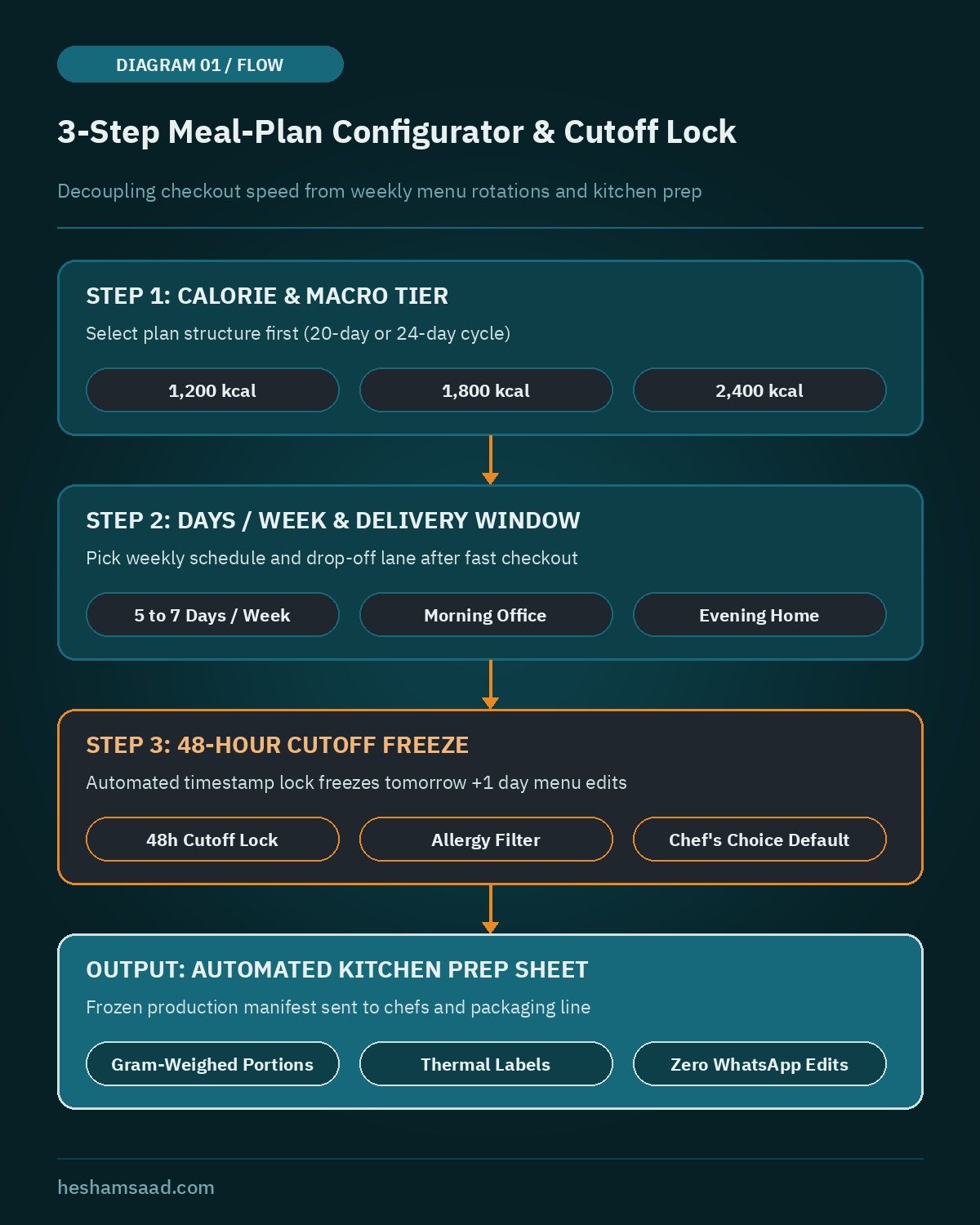
Instead of forcing a new customer to pick 80 individual dishes before completing checkout, high-converting MENA meal brands sell the plan structure first. The buyer commits to a weekly food box recurring billing WordPress plan or a 4-week cycle, checks out in under two minutes, and immediately enters the meal selection dashboard, where a default chef's choice menu is already pre-filled so the kitchen never faces a blank order if a busy client forgets to log in.
### Structuring calorie and macro tiers with variable subscriptions
In a clean product catalog, you model each program, such as Balanced Lifestyle, High-Protein Athlete, Clinical Low-Carb Keto, or Executive Lunch Box, as a Variable Subscription product rather than creating hundreds of disconnected items. Each program uses three core attributes to calculate pricing and daily container quotas: calorie target (for example, 1,200 kcal, 1,800 kcal, or 2,400 kcal), active delivery days per week (5-day workweek versus 6-day or 7-day full coverage), and meals plus snacks per day.
When a subscriber selects the 1,800 kcal, 6-day, 3-meal-plus-2-snack variation, a custom calorie macro menu selector WooCommerce layer filters the weekly dish pool to match those nutritional thresholds. Every individual recipe in your catalog stores structured custom fields for total kilocalories, grams of protein, net carbohydrates, healthy fats, and allergen taxonomy flags such as shellfish, tree nuts, dairy, or gluten. As the subscriber swaps breakfast or dinner items for the upcoming week, the interface calculates the running daily macro totals in real time so they stay aligned with their dietitian's target.
### Enforcing a 48-hour cutoff lock before kitchen prep
Operational sanity in a commercial kitchen depends on a strict cutoff timer. Whether your commissary cooks in New Cairo, Al Quoz, or northern Riyadh, procurement and marination happen 36 to 48 hours ahead of delivery. Your WooCommerce meal selector enforces a programmatic cutoff lock, typically set to 48 hours prior to the delivery window at 12:00 PM or 6:00 PM local time, that switches each daily delivery slot from editable to locked.
Before the 48-hour threshold arrives, a subscriber can freely swap dishes, change delivery notes, or skip that specific day. Once the server clock crosses the cutoff boundary, a scheduled WordPress background job freezes the daily slot record, snapshots the exact macro values and packaging count into an immutable fulfillment row, and blocks front-end edits for that date while keeping later days open. If a subscriber forgets to customize their menu before the cutoff lock triggers, the system automatically assigns the chef's pre-configured default meals that match their calorie tier and permanent allergy exclusions.
## Subscriber self-service portal and retention controls
Customer churn in the meal-prep industry rarely happens because people stop eating; it happens because inflexible plans clash with real life. When a subscriber travels for a three-day conference, attends a family wedding on Friday, or wants to move from a weight-loss plan to a maintenance tier, forcing them to negotiate with a customer service agent on WhatsApp turns a routine adjustment into a cancellation request. Building a comprehensive self-service portal inside the WooCommerce `My Account` area cuts support ticket volume while extending subscriber lifetime value.
According to the official [WooCommerce Subscriptions documentation](https://woocommerce.com/document/subscriptions/), store managers can enable native customer suspensions and variation switching while layering specialized delivery-calendar rules on top. Designing clear business rules around these controls ensures customers enjoy flexibility without leaving your kitchen holding unpaid perishable inventory.
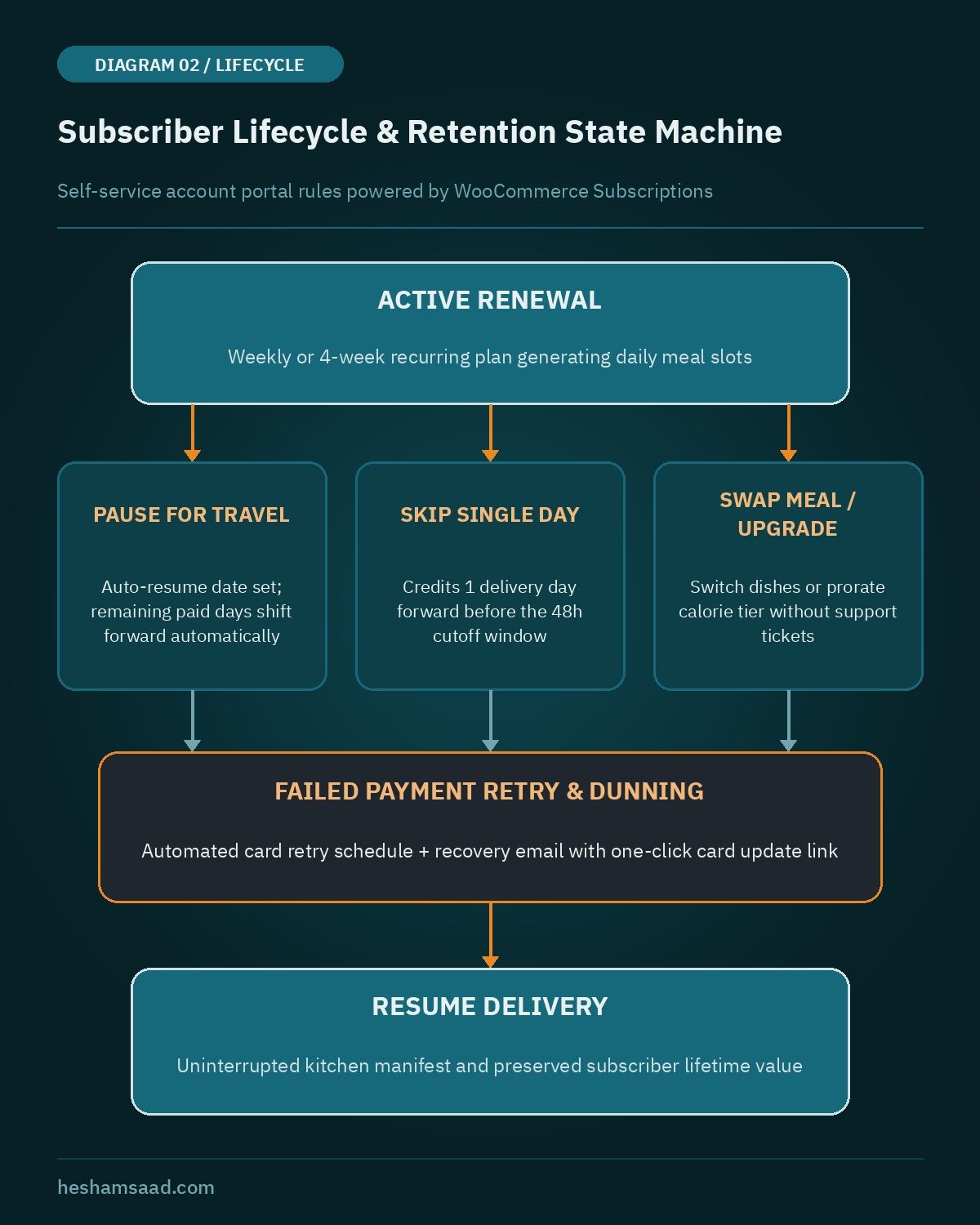
- Pause for travel with automatic resume dates: Subscribers can suspend deliveries for a defined window, such as 3 to 14 days, provided the start date falls outside the 48-hour kitchen cutoff. While core WooCommerce Subscriptions supports manual customer suspension to an `On-Hold` state, adding a scheduled resume date via Action Scheduler reactivates the meal calendar automatically when the subscriber returns and shifts their next renewal billing date forward by the exact number of paused days.
- Single-day skips and delivery credit wallet: Instead of pausing an entire week when a subscriber only needs to miss Wednesday's box, a single-day skip button cancels Wednesday's fulfillment before cutoff and either appends one extra delivery day onto the current billing cycle or logs a one-day monetary credit toward the next automatic renewal.
- Permanent ingredient dislikes and allergy filters: During onboarding or inside account settings, subscribers check off excluded ingredients such as cilantro, mushrooms, seafood, or lactose. The menu configurator hides incompatible dishes automatically and flags any default rotation item for replacement before the cutoff timer expires.
- Prorated plan switching (upgrades and downgrades): Using native WooCommerce Subscriptions switching rules, a subscriber moving from a 1,200 kcal 5-day plan to a 2,400 kcal 6-day plan pays only the prorated price-per-day difference for the remainder of the current billing period. The upgraded container count takes effect automatically on the first delivery slot after the 48-hour cutoff window.
When our engineering team scopes a custom [WordPress and WooCommerce development](https://heshamsaad.com/en/wordpress-development/) project for a subscription kitchen, we audit the brand's exact refund and hold policies first. You can cap self-service pauses at twice per monthly billing cycle or require a maximum 30-day hold limit so deferred delivery liabilities never distort monthly kitchen capacity forecasting.
## Recurring payments, kitchen dispatch, and delivery slots in MENA
A WooCommerce Subscriptions meal plan MENA storefront lives or dies by how reliably it collects recurring payments and translates paid renewals into physical boxes on refrigerated vans. Relying on cash on delivery or manual payment links at the end of every week turns your drivers and call center agents into debt collectors and drives week-two drop-off above 40 percent.
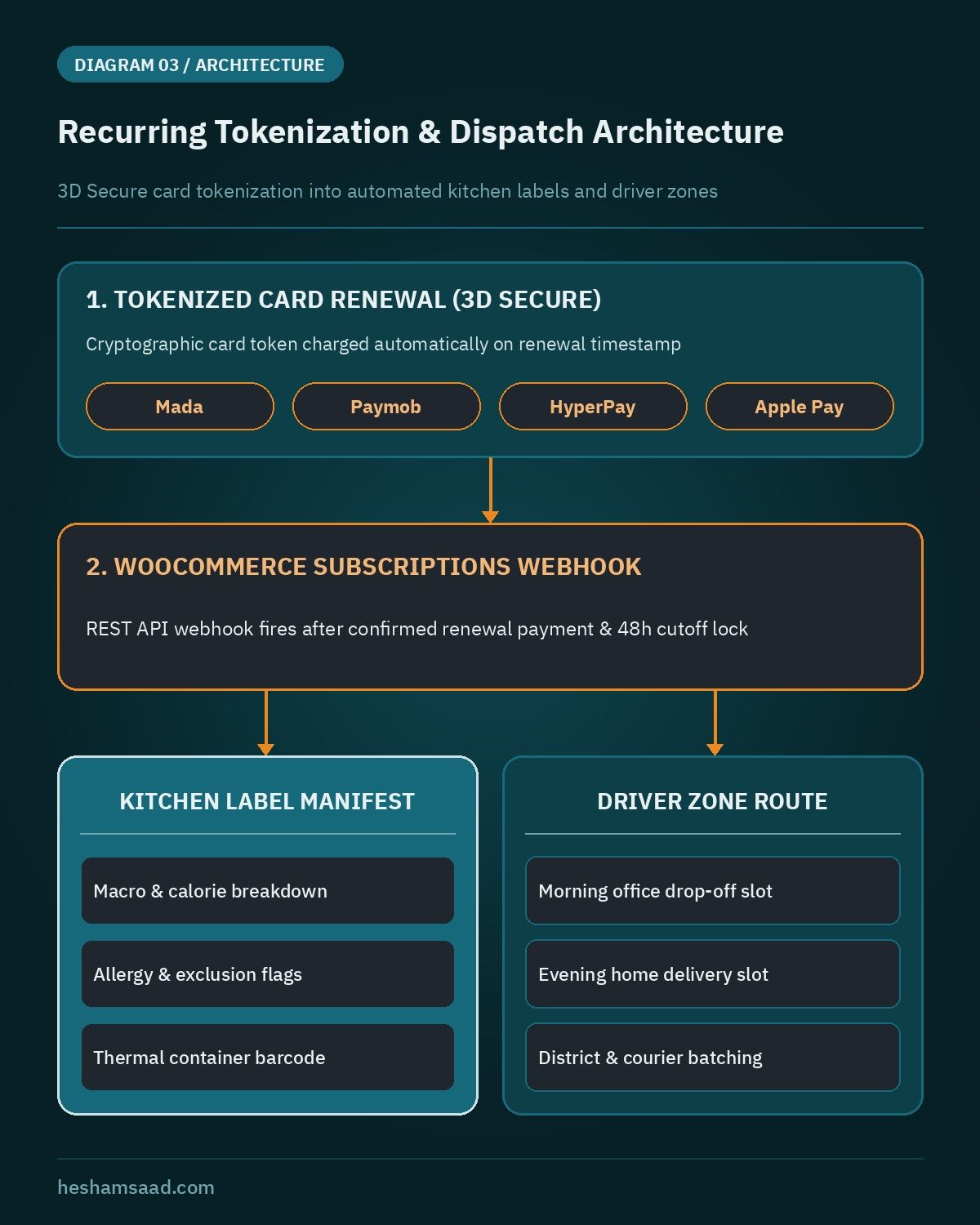
To automate weekly or monthly renewals across Saudi Arabia, Egypt, and the UAE, your checkout must implement payment gateway tokenization. During the subscriber's initial checkout, the gateway processes a 3D Secure authentication challenge and returns a cryptographic card token rather than storing raw card numbers on your server. When the weekly or monthly renewal timestamp fires, WooCommerce Subscriptions charges that saved token in the background without requiring the customer to re-enter an OTP code.
### Tokenized renewals and dunning retries for Mada, Paymob, and HyperPay
Configuring recurring payment tokenization Mada Paymob and regional gateways such as HyperPay or Tap Payments requires explicit merchant account approval for Merchant-Initiated Transactions (MIT) and recurring token vaults. In Saudi Arabia, Mada debit cards and Apple Pay tokens supported through gateways like HyperPay or Moyasar must pass the recurring flag during the initial Customer-Initiated Transaction (CIT) so the issuing bank permits subsequent automated off-session charges. In Egypt, Paymob's card tokenization engine stores a vaulted token against the WooCommerce customer profile, allowing scheduled subscription renewals to settle in Egyptian Pounds without manual link generation.
Even with tokenization active, cards hit daily spending limits or temporary insufficient balances prior to salary transfer days. Rather than immediately canceling a subscriber's meal calendar when a Thursday renewal fails, you enable the built-in WooCommerce Subscriptions failed payment retry system. When an automatic charge declines, the subscription shifts temporarily to `On-Hold`, suspends post-cutoff kitchen prep generation for unpaid future cycles, and runs a staged dunning sequence, for example, retrying the card after 12 hours, 24 hours, and 72 hours while sending localized Arabic and English recovery emails with a direct one-click card update link.
### Automating daily kitchen prep and thermal labels via the WooCommerce REST API
Once the 48-hour cutoff lock freezes a delivery day's menu selections across all active subscribers, your kitchen needs two distinct outputs: an aggregated batch-cooking prep sheet for the culinary line, and serialized thermal container labels for the assembly and packing stations. Exporting raw WooCommerce order tables into CSV files and running Excel pivot tables by hand introduces human error every single afternoon.
By connecting your custom fulfillment endpoint to the [WooCommerce REST API](https://woocommerce.github.io/woocommerce-rest-api-docs/) and registering custom endpoints through the [WordPress REST API infrastructure](https://developer.wordpress.org/rest-api/), your store outputs live JSON manifests or formatted print streams automatically when the daily cutoff cron job completes:
- Aggregated culinary batch manifest: Sums every locked dish across active subscriptions for target date `T+2`, broken down by calorie tier and protein weight (for example, 142 portions of Herb Grilled Chicken at 150g protein weight, 88 portions at 220g protein weight, and 19 dairy-free swap portions).
- Thermal container label payload: Generates one ZPL or PDF label per meal box containing the subscriber's name, dish title in Arabic and English, exact macro breakdown (kcal, protein, carbs, fat), dynamic heating instructions, consumption-by date, and a barcode that packing staff scan to verify the entire daily bag is complete.
### Splitting morning office and evening home driver dispatch routes
Meal-prep logistics in Riyadh, Jeddah, Cairo, and Dubai typically split into two fulfillment waves: an evening residential wave (for example, 6:00 PM to 11:00 PM the night before) for households with security receivers or chiller boxes, and an early morning wave (6:00 AM to 9:30 AM) for corporate offices and apartments that require same-morning handoff. Furthermore, many corporate clients require Monday-to-Wednesday deliveries at their business district office and Thursday-to-Saturday deliveries at their home address.
To prevent route confusion, each subscription stores a delivery window attribute alongside dual-address routing logic mapped to our architecture for [WooCommerce shipping zones in Egypt and the Gulf](https://heshamsaad.com/en/woocommerce-shipping-zones-egypt-gulf/). When the packing station scans the final container for a subscriber's daily cooler bag, the dispatch manifest groups bags by refrigerated van zone, time shift (Morning Shift versus Evening Shift), and pinned GPS coordinates or National Address shortcodes so drivers never waste time calling customers for location pins.
## Arabic RTL and English bilingual UX plus development budget drivers
Over 85 percent of daily meal replacements, dish swaps, and travel pauses in the MENA region happen on mobile screens while subscribers commute or scroll between workouts. If your meal configurator loads a cluttered multi-column desktop table on an iPhone screen, or if switching to Arabic breaks the alignment of gram weights and calorie counters, conversion rates plummet during the very first onboarding steps.
An effective bilingual storefront uses a mobile-first 3-step plan configurator, Goal and Calorie Tier first, Delivery Days per Week second, and Meals per Day with Instant Price Summary third, before ever showing individual dish cards. In Arabic RTL mode, nutrition badges must render clean tabular numerals for protein, carbs, fats, and kilocalories without clipping unit labels (`جم` and `سعرة`), and structured data should follow the [Schema.org Product specification](https://schema.org/Product) so search engines index your subscription tiers accurately. Because subscribers open the menu selector repeatedly every week, applying the caching and database query optimizations covered in our guide to [speed up WordPress Arabic sites](https://heshamsaad.com/en/speed-up-wordpress-arabic-sites/) keeps authenticated account pages fast even when 500 customers log in simultaneously right before the weekly cutoff deadline.
When business owners budget for a subscription kitchen platform and plan to [hire a WooCommerce developer](https://heshamsaad.com/en/hire-woocommerce-developer/), four engineering factors determine the overall build investment and timeline:
- Complexity of the macro and rotation engine: A fixed weekly box where customers choose only between three preset calorie tiers costs significantly less to build than a dynamic macro calculator where subscribers mix and match 40 daily a-la-carte items with real-time protein and carb balancing.
- Self-service credit and calendar rules: Supporting simple full-subscription pauses is faster to deploy than building a granular per-day credit ledger that permits skipping individual days, splitting weekday office and weekend home addresses, and rolling unused meal credits across renewal boundaries.
- Kitchen hardware and fleet integrations: Generating downloadable PDF prep sheets inside the WordPress admin is straightforward, whereas pushing real-time REST API webhooks into an external cloud ERP, Zebra thermal label printer queue, or third-party cold-chain fleet dispatch software adds dedicated integration testing.
- High-Performance Order Storage (HPOS) and stack maintenance: Because a store with 400 active subscribers generates thousands of renewal orders and daily slot records every month, building on WooCommerce HPOS custom database tables and following a strict [WordPress and WooCommerce stack upgrade workflow](https://heshamsaad.com/en/wordpress-woocommerce-stack-changelog-upgrade-guide/) prevents database bloat as your kitchen scales.
## 1-week meal-prep subscription launch readiness checklist
Before migrating your existing WhatsApp subscribers onto an automated WooCommerce storefront or launching a new diet kitchen brand, run your operations and technical teams through this 7-day readiness verification:
1. Days 1 to 2: Lock 2 to 3 core calorie plans and weekly cutoff rules. Finalize your baseline subscription variations (for example, 1,200, 1,800, and 2,400 kcal across 5-day and 6-day schedules), document a strict 48-hour cutoff deadline, and assign default chef selections for every tier so unedited accounts never stall the kitchen.
2. Days 3 to 4: Map kitchen prep manifests and driver delivery windows. Verify that your post-cutoff order export separates batch cooking totals from individual container label data, and confirm that every active neighborhood maps cleanly to either your morning corporate route or evening residential shift.
3. Days 5 to 6: Verify payment gateway recurring tokenization on staging. Run end-to-end test transactions using Mada, Paymob, HyperPay, or Apple Pay sandbox credentials to confirm that initial checkouts store a valid recurring token, off-session renewal charges succeed without manual OTP intervention, and failed payment retry emails trigger properly.
4. Day 7: Test one complete pause, skip, swap, and renewal cycle in Arabic and English. Using a mobile device on both RTL Arabic and LTR English storefronts, log in as a subscriber, swap two meals before the cutoff window, attempt a blocked edit inside the 48-hour freeze window, pause the plan for travel, and verify that the driver manifest and next renewal date update accurately.
If your kitchen is ready to replace manual daily spreadsheets with an automated subscription storefront tailored to your menu rotation and delivery fleet, book a [free consultation](https://heshamsaad.com/en/free-consultation/) with our team to review your plan architecture, regional payment gateway tokenization, and kitchen dispatch workflow.
## Frequently asked questions
How does a 48-hour cutoff rule protect daily kitchen preparation in WooCommerce?A 48-hour cutoff rule locks a subscriber meal selection two days before the scheduled delivery window so chefs receive a fixed production tally. If a customer makes a change after the cutoff deadline passes, the storefront saves that update for the following billing or delivery cycle rather than altering tomorrow morning kitchen prep sheets. This prevents last-minute ingredient waste and keeps purchasing predictable across weekly menu rotations.
Can subscribers pause their meal plan for travel without messaging WhatsApp support?Yes, subscribers can suspend their plan or skip individual delivery days directly from the My Account dashboard when self-service controls are configured on top of WooCommerce Subscriptions. The system checks your cutoff rules first, shifts the subscription status to on-hold or pushes the remaining delivery credit forward, and removes the customer from the active driver dispatch manifest for those dates without manual spreadsheet edits.
How do automatic weekly or monthly renewals work with Mada, Paymob, and HyperPay?During the first checkout, the payment gateway replaces the customer card details with a secure cryptographic token stored on the gateway server and referenced inside WooCommerce. When a weekly or monthly renewal date arrives, WooCommerce Subscriptions triggers a scheduled background action that charges the saved token automatically. If a bank declines the charge, the built-in retry rules place the subscription on-hold and send automated payment recovery emails.
How does the kitchen receive daily macro prep counts and container labels from WooCommerce?Instead of exporting CSV files by hand, the store uses the WooCommerce REST API and order webhooks to push locked daily orders directly to a kitchen display or thermal printer middleware. The payload groups all active dishes by recipe and calorie tier for the batch cooking team while formatting individual container labels with the subscriber name, macro breakdown, allergy exemptions, and morning or evening delivery zone.
Can a customer switch from a weight-loss calorie tier to a muscle-gain plan mid-cycle?Yes, WooCommerce Subscriptions includes native subscription switching between variations of a variable subscription product. When a customer moves from a 1,200 kcal tier to a 2,400 kcal tier inside their account portal, the system calculates the price-per-day difference to prorate the upgrade cost immediately and updates future kitchen prep quantities after the active 48-hour cutoff window clears.
## References
- [WooCommerce Subscriptions Product Overview](https://woocommerce.com/products/woocommerce-subscriptions/)
- [WooCommerce Subscriptions Official Documentation](https://woocommerce.com/document/subscriptions/)
- [WooCommerce REST API v3 Documentation](https://woocommerce.github.io/woocommerce-rest-api-docs/)
- [WordPress REST API Handbook](https://developer.wordpress.org/rest-api/)
- [Schema.org Product Structured Data Specification](https://schema.org/Product)