---
id: 14016
title: "Law Firm Website WordPress: Practice Areas, Trust and Consultations"
slug: "law-firm-website-wordpress"
lang: "en"
url: "https://heshamsaad.com/en/law-firm-website-wordpress/"
markdown_url: "https://heshamsaad.com/en/law-firm-website-wordpress.md"
translations: {"ar":"https://heshamsaad.com/ar/law-firm-website-wordpress/"}
description: "Planning a law firm website WordPress build? Structure practice areas, lawyer profiles, Arabic RTL pages, Maps and safe consultation forms."
author: "Safya"
date_published: "2026-10-26T17:10:11Z"
date_modified: "2026-10-26T17:10:11Z"
categories: ["WooCommerce"]
tags: ["Consultation Form","Law Firm Website","Lawyer Website","Legal Website","Practice Area Pages","RTL","WhatsApp"]
featured_image: "https://heshamsaad.com/wp-content/uploads/2026/10/law-firm-website-wordpress-og-en.jpg"
word_count: 2755
reading_time_min: 14
content_sha256: "40d6d1b1a18544ec5fa971ae728d9d16f7b706213a9d6f85cd61e2b1a5c82f96"
---
# Law Firm Website WordPress: Practice Areas, Trust and Consultations
When a company founder in Riyadh, a property buyer in Cairo or an executive in Dubai receives a lawyer's name from a trusted colleague, their very next move is searching that name on Google. They want to confirm which legal matters your office handles, read the background of the partner they will meet, check your street address and request a consultation privately. A well-organized law firm website WordPress build puts those answers in one calm, credible place that works quietly alongside your referrals.
Many solo practitioners and boutique firms across the region rely entirely on personal introductions, LinkedIn posts and Facebook pages because they assume a website means publishing dense legal essays every week. In reality, a clear WordPress website for lawyers acts like a discreet front desk that verifies your credentials, filters out unrelated inquiries and guides serious prospects toward an initial meeting. Getting that result comes down to focused practice-area pages, honest lawyer profiles, safe intake habits and clean Arabic and English layouts.
## Core pages every law firm website WordPress build needs
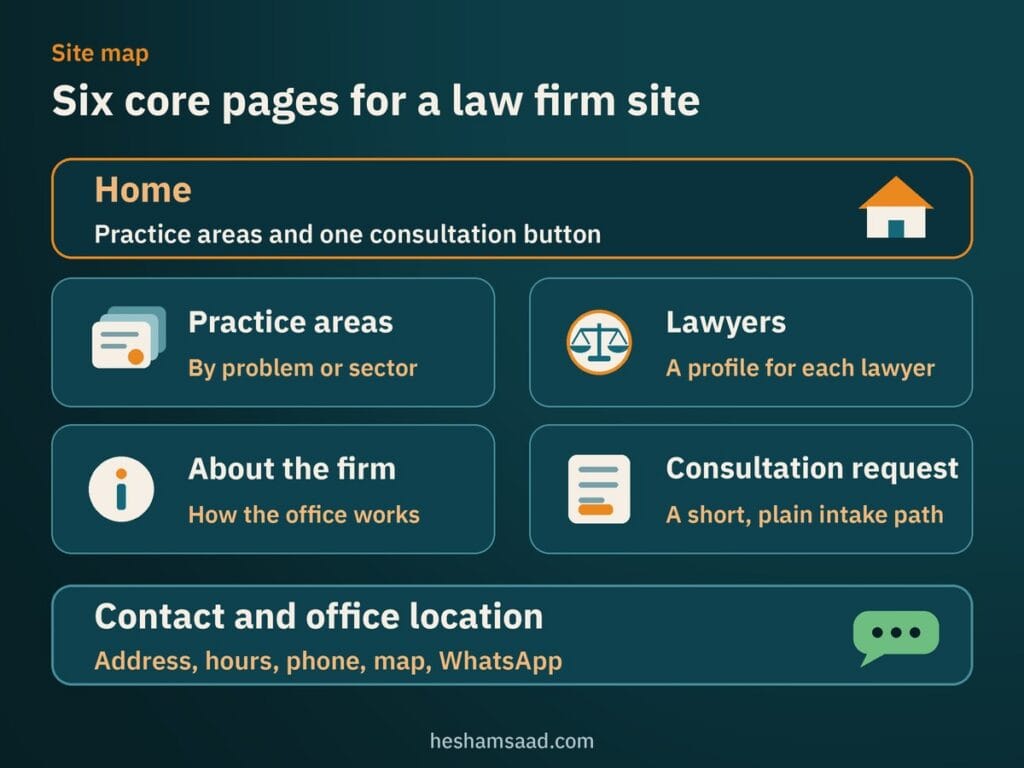
Prospective clients looking for legal counsel are often dealing with a contract deadline, a workplace dispute or a family matter on their phone between meetings. Much like [building a local clinic website on WordPress](https://heshamsaad.com/en/clinic-website-wordpress/), a local legal practice earns immediate confidence when essential office details take one tap to find. Start with six foundational sections before adding articles or firm updates.
- Home: State clearly who your firm represents, list your main practice areas, name the cities or courts you cover and show one clear button to request a consultation.
- Practice areas: Organize your legal services by client problem or commercial sector so business owners and individuals immediately recognize whether your office handles their type of matter.
- Lawyers: Present each partner, counsel and associate with their full name, professional title, education, languages spoken, real bar admissions and a composed portrait.
- About the firm: Explain how your office works with clients, how communication is handled and what visitors should expect during an initial consultation.
- Consultation request: Offer a short, plain intake path where prospective clients share basic contact details so your team can check availability and reply.
- Contact and office location: Display your full building address, floor number, parking or landmark notes, working hours, clickable phone numbers, map link and WhatsApp option.
Skip dramatic courtroom stock videos, sliding slogans and cluttered pop-up windows that slow down mobile screens. Good legal website design relies on legible typography, generous white space and straightforward navigation so a hesitant visitor feels respected rather than pressured.
Keeping this six-part structure consistent in both languages also makes your law office website simple for an office manager or junior associate to maintain. When a new lawyer joins the practice or office hours shift during Ramadan, your team knows the exact page to update without touching the design.
## Comparing consultation forms, booking plugins and WhatsApp
Legal consultations rarely work like instant retail appointments because a firm often needs to screen basic party names for conflicts of interest or match the inquiry with the right partner first. Before installing any calendar tool, decide how your secretary or managing partner actually approves new meetings. Most law offices in Egypt, Saudi Arabia and the Gulf rely on one of three setups.
### A structured consultation request form
When partners split their week between court hearings, corporate client visits and drafting deadlines, a public calendar can quickly create scheduling clashes. A short consultation request form asking only for the visitor's full name, phone number, general practice area and preferred callback window keeps your diary under control. Your coordinator reviews the request, confirms the matter fits your firm and calls back to set an in-person or video meeting.
### Appointment scheduling plugins on WordPress
Offices that set fixed consultation blocks each week and want prospects to pick an open time slot can use established plugins from WordPress.org such as Amelia or Bookly. The free Amelia Lite plugin offers a mobile-first booking calendar, services, staff profiles, email notifications and automatic double-booking prevention, with forms that work inside Gutenberg blocks, Elementor or Divi. Note that certain integrations, unlimited employees, custom notifications, reminders and multilingual support are not included in Amelia Lite.
Bookly also provides a free scheduling plugin on WordPress.org where visitors choose a category, service and staff member from a calendar and receive email or SMS confirmations. Review the free version carefully before launch, because online payments, unlimited staff, unlimited services and extra add-ons require the paid Bookly Pro add-on. We compare calendar setups, upfront fee collection and Arabic configuration in our guide to [building a WordPress booking website](https://heshamsaad.com/en/wordpress-booking-website/).
### WhatsApp click-to-chat for quick scheduling
Across MENA, business owners and individual clients alike reach for WhatsApp first to ask about office hours, location pins or consultation availability. You can add a direct chat button using WhatsApp's official https://wa.me/ link format with your full country code and digits only, plus an optional ?text= parameter for a short starter message. Keep that pre-filled prompt strictly focused on requesting an appointment slot rather than describing a legal dispute.
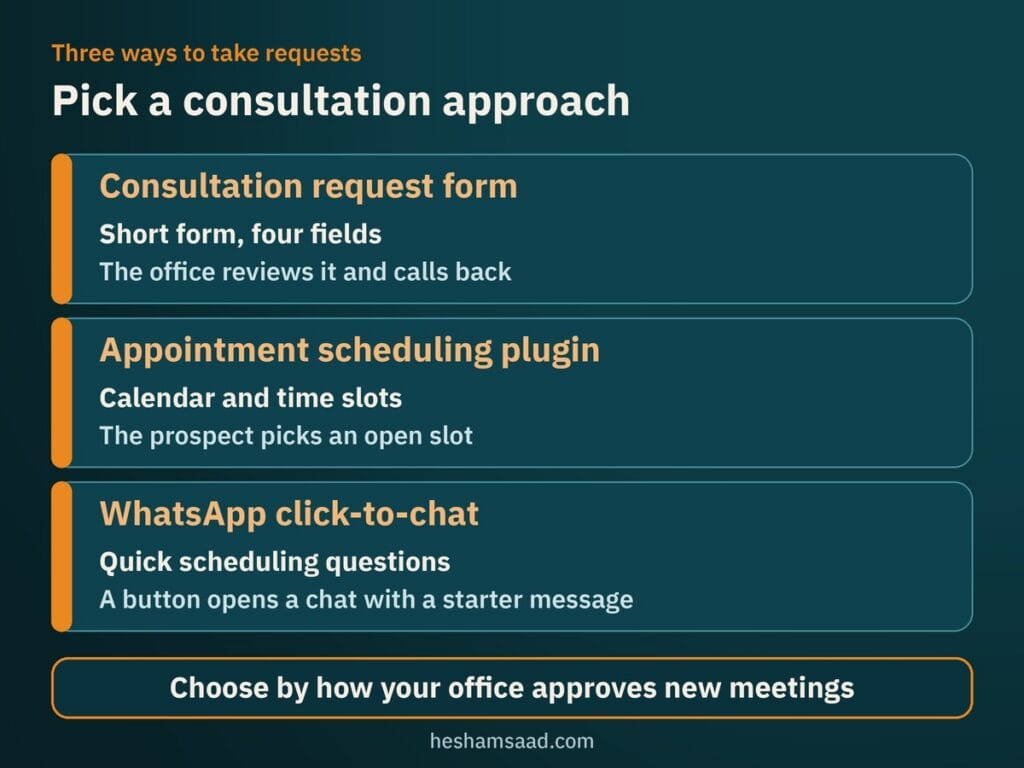Many small firms combine two of these paths cleanly by placing a primary consultation request form on practice pages and keeping a WhatsApp button for quick logistical questions. Whichever option you choose, set clear response-time expectations right beside the button so callers know when your office answers messages.
## Practice-area pages, lawyer profiles and Google Maps
A common mistake in lawyer website design is listing eight unrelated legal specialties as short bullet points on a single services page. Someone searching Google for company formation in Riyadh, commercial lease review in Dubai or labor dispute representation in Cairo wants a page dedicated specifically to that issue. Giving each core practice area its own page lets each service rank independently in search and reassures visitors that your office handles their concern regularly.
Write each practice-area page in clear, everyday language rather than copying statutory text that non-lawyers struggle to follow. Explain who the service helps, typical situations your office handles, which documents a prospective client should gather before the first meeting and which lawyers lead that work. Link every practice page directly to those lawyer profiles and end with one calm prompt to request a consultation.
Individual lawyer pages carry equal weight because clients hire specific people they feel they can trust with sensitive business or family matters. Include each lawyer's academic degrees, admitted court levels, spoken languages, published articles and genuine bar association membership only where real and verifiable. Never invent case results, fabricate client testimonials or make guaranteed-outcome claims, and always check your own bar association's advertising rules before publishing lawyer biographies or firm announcements.
Behind the visible copy, structured data helps search engines read your office details accurately. Google Search Central recommends choosing the most specific LocalBusiness subtype available, requiring your business name and address while recommending telephone, openingHoursSpecification, geographic coordinates and URL. Schema.org includes both LegalService and Attorney subtypes under LocalBusiness, and although Google never guarantees rich results, you should check your markup with Google's Rich Results Test before launch.
Your site also works hand in hand with your Google Business Profile whenever nearby prospects search on Google Maps. Google Business Profile documentation explains that local results are mainly based on relevance, distance and prominence, and nobody can promise local rankings. Keep your firm name, street address, phone numbers and hours consistent, maintain one profile per physical office and read Google's representation guidelines carefully if multiple lawyers share an address, as covered in our [WordPress local SEO guide](https://heshamsaad.com/en/wordpress-local-seo/). Remember too that Google Maps user-generated content policy requires reviews to reflect genuine experiences, so never buy or post fake reviews.
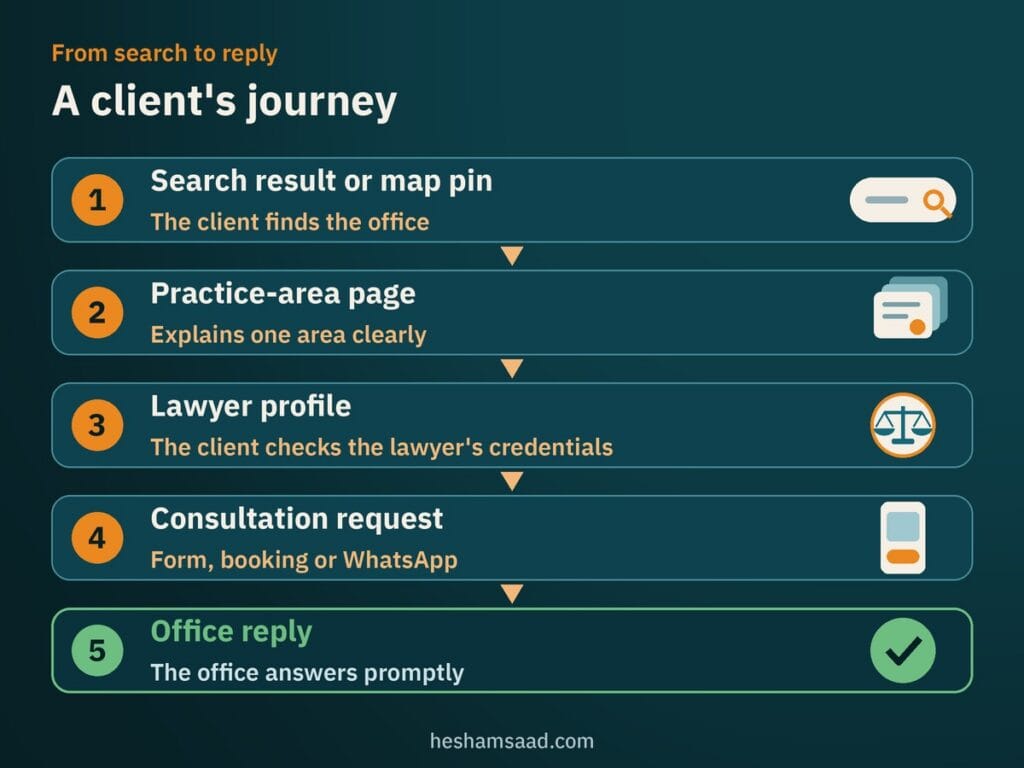When those pieces align, a prospect moves naturally from a search result or map pin to the relevant practice page, verifies the partner's credentials and submits a consultation request with confidence. Clear street landmarks, nearby metro or parking notes and prompt office replies complete that first impression offline.
## Protecting client confidentiality and WordPress security
Anyone contacting a law office expects discretion from their very first inquiry, long before an engagement letter is signed. Data protection statutes and professional secrecy obligations differ by country and jurisdiction, so check your local data protection laws and bar association rules directly with a qualified specialist. On the technical side, the safest habit is keeping confidential case material off public website channels altogether.
Limit your consultation form to basic scheduling fields: full name, phone number, email address if needed, general practice area and preferred callback time. Never ask visitors to type case narratives, opposing party names or confidential facts into web forms, standard email notifications or WhatsApp chats, and do not add document upload fields to public intake pages. Include a clear consent checkbox or notice stating how your office uses those contact details solely to respond to the inquiry.
Back up those form habits with the baseline practices outlined in WordPress.org security documentation. Serve both your public pages and WordPress administration screens over HTTPS, choose reputable hosting, maintain regular backups and apply updates for WordPress core, plugins and themes strictly from official releases, building on the automatic updates introduced in WordPress 3.7. Give secretaries or marketing assistants limited editor or booking roles rather than full administrator accounts, following our checklist for [running a WordPress security audit](https://heshamsaad.com/en/wordpress-security-audit/).
Security is not a one-time launch task that you forget once the site goes live. Outdated form plugins, expired SSL certificates or unmonitored admin logins can quietly break intake emails or expose contact submissions months later. Putting your site on a structured [WordPress care plan](https://heshamsaad.com/en/wordpress-care-plan/) keeps updates, backups and form delivery checks running on schedule while partners focus on client work.
## Running fast Arabic and English pages on mobile
Across Cairo, Riyadh, Jeddah, Doha and Dubai, commercial and individual clients switch between Arabic and English depending on whether they represent a local family business, a regional branch or a cross-border partner. Building an Arabic RTL law firm website with unreviewed automatic translation widgets is risky because legal terms, court names and corporate titles quickly lose accuracy when translated word by word. Human-written copy in both languages shows the precision clients expect from legal counsel.
The free Polylang plugin on WordPress.org lets you manage linked Arabic and English versions of pages, posts, media, categories, tags and custom post types, with built-in support for right-to-left scripts. You can set each language by URL code, subdomain or separate domain and place a language switcher using blocks, a menu item or a widget, while additional capabilities are available in Polylang Pro. That gives every practice area and lawyer profile a clean, shareable address in each language.
Moving between left-to-right English and right-to-left Arabic reverses menu order, form field alignment, directional arrows and phone number formatting, so inspect every template on an actual smartphone. If you use Amelia Lite, note that while it lists Arabic among its available translations, you should test the front-end booking screens in Arabic yourself before publishing. Our practical guide to [fixing WordPress RTL issues](https://heshamsaad.com/en/fix-wordpress-rtl-issues/) walks through the font, spacing and alignment checks that keep bilingual pages polished.
Authentic photographs of your meeting room, reception area and partners build far more trust than overused stock pictures of wooden gavels and brass scales. Uncompressed camera files, however, stall mobile pages when prospects open your link on cellular data. On web.dev, Google defines Core Web Vitals around Largest Contentful Paint (LCP), Interaction to Next Paint (INP) and Cumulative Layout Shift (CLS), setting a good LCP target of 2.5 seconds or less at the 75th percentile of page loads. Compress hero images before upload and apply browser-level image lazy loading to portraits further down the page, following the steps in our [WordPress image optimization](https://heshamsaad.com/en/wordpress-image-optimization/) guide.
## What drives project cost and when a developer helps
The effort behind a law firm project depends on operational scope rather than an arbitrary template price. A solo lawyer with one office, four practice areas and a callback request form requires far less setup than a multi-partner firm needing bilingual Polylang templates, twenty practice pages, structured attorney profiles and calendar integrations, a breakdown we explain further in our guide to [WordPress website cost drivers](https://heshamsaad.com/en/wordpress-website-cost-ai/). Launch timing likewise comes down to content readiness, including approved partner bios, real office photography, reviewed Arabic and English copy, bar rule checks and partner sign-off.
While an independent practitioner can start with a clean theme and a few well-written pages, investing in [custom WordPress development](https://heshamsaad.com/en/wordpress-development/) makes a clear difference when your firm needs refined Arabic and English typography, fast mobile loading and reusable templates for lawyers and practice areas. An experienced developer configures structured data properly, locks down staff roles, removes unnecessary plugin bloat and hands over a dashboard your assistant can update safely without breaking layouts.
As your next step, put together a one-page outline listing your core practice areas, the lawyers who need profile pages, your office addresses and whether your team prefers a consultation request form, a booking plugin or WhatsApp scheduling. Bring those notes when you [book a free consultation](https://heshamsaad.com/en/free-consultation/), and we will map out a practical, trustworthy WordPress plan built around how your law office works.
## Frequently asked questions
Does a lawyer need a website if they already use social media?Yes, a dedicated website gives prospective clients structured information that Facebook and LinkedIn feeds quickly push out of view. When someone is referred to your office, they look up your practice areas, lawyer qualifications, office address and consultation process before calling. Social media helps professionals stay visible, while your website confirms credibility and pairs directly with your Google Business Profile.
Can WordPress handle legal consultation requests?Yes, WordPress supports three practical ways to receive consultation inquiries depending on how your office schedules meetings. Most firms use a short consultation request form so an assistant can screen conflicts and call back, while fixed-hour offices can install WordPress.org plugins such as Amelia Lite or Bookly alongside WhatsApp click-to-chat. Check free plugin limits early because online payments, certain reminders and unlimited staff require paid upgrades.
How do I show an Arabic and English law firm site?You can manage linked Arabic and English pages on WordPress using the free Polylang plugin from WordPress.org. Polylang supports right-to-left scripts, assigns separate URLs by language code, subdomain or domain, and places a language switcher in your menu, header block or widget area. Write human-edited legal copy in both languages rather than relying on unreviewed machine translation, and test every form and lawyer profile on mobile.
Is it safe to collect client details in a website form?It is safe to collect basic contact details for scheduling when you keep forms minimal and block confidential case information. Ask only for a visitor name, phone number, general practice area and preferred callback time, paired with a clear consent notice and instructions never to submit case facts or documents. Run the full site over HTTPS, install official updates, maintain backups and review local data protection and bar rules.
How long before I can go live with a law firm website?Your launch timeline depends mainly on content readiness and how complex your bilingual pages and consultation setup need to be. A solo office launching with a simple consultation request form goes live much sooner than a multi-partner firm preparing Arabic and English practice pages, partner bios and booking calendars. Having approved lawyer profiles, office photography, reviewed bilingual text and bar rule checks ready prevents avoidable delays.
## References
- [Amelia Booking for Appointments and Events Calendar on WordPress.org](https://wordpress.org/plugins/ameliabooking/)
- [Bookly Responsive Appointment Booking and Scheduling Tool on WordPress.org](https://wordpress.org/plugins/bookly-responsive-appointment-booking-tool/)
- [Polylang Multilingual Plugin on WordPress.org](https://wordpress.org/plugins/polylang/)
- [Google Search Central: Local Business Structured Data](https://developers.google.com/search/docs/appearance/structured-data/local-business)
- [Schema.org: LegalService Type](https://schema.org/LegalService)
- [Schema.org: Attorney Type](https://schema.org/Attorney)
- [Google Business Profile Help: Tips to Improve Your Local Ranking on Google](https://support.google.com/business/answer/7091)
- [Google Business Profile Help: Guidelines for Representing Your Business on Google](https://support.google.com/business/answer/3038177)
- [Google Maps User-Generated Content Policy: Fake and Misleading Content](https://support.google.com/contributionpolicy/answer/7400114)
- [WhatsApp Help Center: How to Use Click to Chat](https://faq.whatsapp.com/5913398998672934)
- [web.dev: Web Vitals](https://web.dev/articles/vitals)
- [web.dev: Optimize Largest Contentful Paint](https://web.dev/articles/optimize-lcp)
- [web.dev: Browser-Level Image Lazy Loading for the Web](https://web.dev/articles/browser-level-image-lazy-loading)
- [WordPress Developer Resources: Hardening WordPress](https://developer.wordpress.org/advanced-administration/security/hardening/)
- [WordPress.org Documentation: HTTPS for WordPress](https://wordpress.org/documentation/article/https-for-wordpress/)