---
id: 14701
title: "Jewelry Store Website WooCommerce: Gold Catalog, Rates and Photos"
slug: "jewelry-store-website-woocommerce"
lang: "en"
url: "https://heshamsaad.com/en/jewelry-store-website-woocommerce/"
markdown_url: "https://heshamsaad.com/en/jewelry-store-website-woocommerce.md"
translations: {"ar":"https://heshamsaad.com/ar/jewelry-store-website-woocommerce/"}
description: "Plan your jewelry store website WooCommerce build with karat variations, daily gold rate pricing, clear product photos, WhatsApp, and local payments."
author: "Safya"
date_published: "2026-11-10T06:01:37Z"
date_modified: "2026-11-11T18:13:33Z"
categories: ["WooCommerce"]
tags: ["ecommerce","gold shop","jewelry store","product photography","WooCommerce"]
featured_image: "https://heshamsaad.com/wp-content/uploads/2026/11/097-jewelry-jewelry-og-en.jpg"
word_count: 3473
reading_time_min: 17
content_sha256: "dd12d730980d957072a78903afca15c3c4248af35e003b03bb227b4bd5a02587"
---
# Jewelry Store Website WooCommerce: Gold Catalog, Rates and Photos
Building a jewelry store website WooCommerce shoppers trust takes more planning than setting up a standard clothing or gift shop. When customers in Cairo, Riyadh, Dubai, or Kuwait browse fine gold, diamond rings, or silver sets online, they rarely treat the purchase as a casual impulse buy. They check the exact karat purity, compare the weight in grams, inspect how a clasp or stone setting looks up close, and look for direct ways to confirm availability with your showroom before paying.
## What a jewelry store website WooCommerce build needs
Most standard online stores work with fixed retail prices that stay unchanged for months. A gold or fine jewelry retailer operates differently because product values often depend on daily metal rates, purity levels, gram weights, and making charges per piece. Even shops that sell fixed-price designer collections still need structured product data so buyers can filter rings, bracelets, necklaces, and earrings by metal color and karat without confusion.
Every retail category on WordPress has its own technical priorities. Just as a [WooCommerce furniture store website](https://heshamsaad.com/en/furniture-store-website-woocommerce/) centers on room dimensions, fabric variations, and scheduled delivery rules, and a [WooCommerce pharmacy website](https://heshamsaad.com/en/pharmacy-website-woocommerce/) depends on organized health categories and clear product labeling, a jewelry catalog succeeds when technical accuracy meets visual clarity. If a shopper cannot tell whether a chain is 18K or 21K, or cannot see the gram weight clearly on mobile, they will leave the page or message a competitor.
For a shop owner in Egypt or the Gulf, planning the store properly before writing code prevents expensive rework later. You need a clear catalog structure for karats and weights, a reliable way to handle daily metal rate updates, high-detail photography that loads quickly on phones, visible trust signals, direct WhatsApp and showroom inquiry flows, and payment methods that match local banking habits.
## Catalog structure by karat, metal, and gram weight
A clean jewelry catalog starts with how you organize attributes and variations inside WooCommerce. In the WordPress admin dashboard, WooCommerce lets you create global attributes under the Products menu in the Attributes section, as well as custom per-product attributes on individual items. Global attributes are ideal for properties that apply across your entire inventory, because they power store-wide sidebar filters and keep naming consistent across hundreds of pieces.
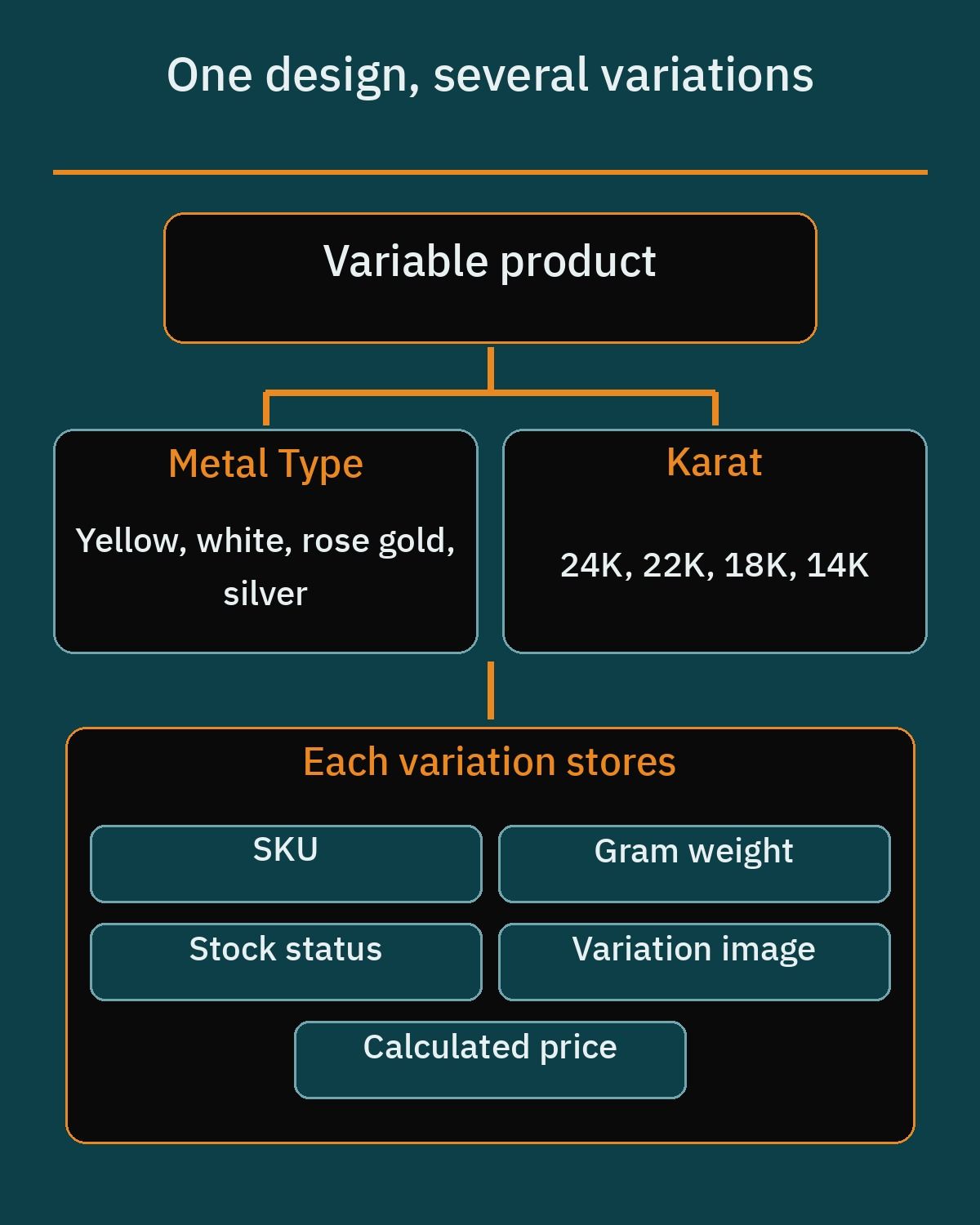When a single jewelry design is sold in more than one metal color or purity, you set it up as a variable product in WooCommerce. Attributes such as Metal Type (for example yellow gold, white gold, rose gold, or silver) and Karat (such as 24K, 22K, 18K, or 14K) can be enabled for variations. Each resulting variation functions as a distinct sellable item with its own SKU, stock quantity, price, and variation image, so selecting white gold updates both the photo and the price immediately.
Weight tracking is equally important for gold and silver shops. WooCommerce includes a dedicated Weight field under the Shipping tab for simple products and at the individual variation level for variable products. By setting your store weight unit to grams and filling in the exact weight for every variation, you provide accurate specification data for shoppers and give weight-based pricing plugins the exact number they need to calculate prices.
The same variable-product approach works in other retail niches. Our guide to a [perfume store website on WooCommerce](https://heshamsaad.com/en/perfume-store-website-woocommerce/) sets up bottle volumes such as 30 ml, 50 ml and 100 ml as variations and turns scent notes into filterable attributes.
- Global Metal Type attribute: Group items by yellow gold, white gold, rose gold, platinum, or sterling silver so customers can filter collections in one tap.
- Global Karat attribute: Define standard purities such as 24K, 22K, 21K, 18K, and 14K to keep product specifications uniform across rings, chains, and coins.
- Variation-level Weight and SKU: Record the exact gram weight and barcode SKU on each size or karat variation so showroom staff and online stock stay aligned.
- Custom per-product attributes: Use product-specific attributes for details that apply only to a single piece, such as stone cut, clasp style, or chain length in centimeters.
## Pricing products tied to the daily gold rate
For shops selling bullion bars, gold coins, or traditional weight-based jewelry, updating hundreds of product prices by hand every time the market moves is impractical. Core WooCommerce stores a static regular price and sale price on each product or variation. That default setup works well for fixed-price designer collections or watches, but gold merchants usually need prices calculated from the gram weight and current metal rate.
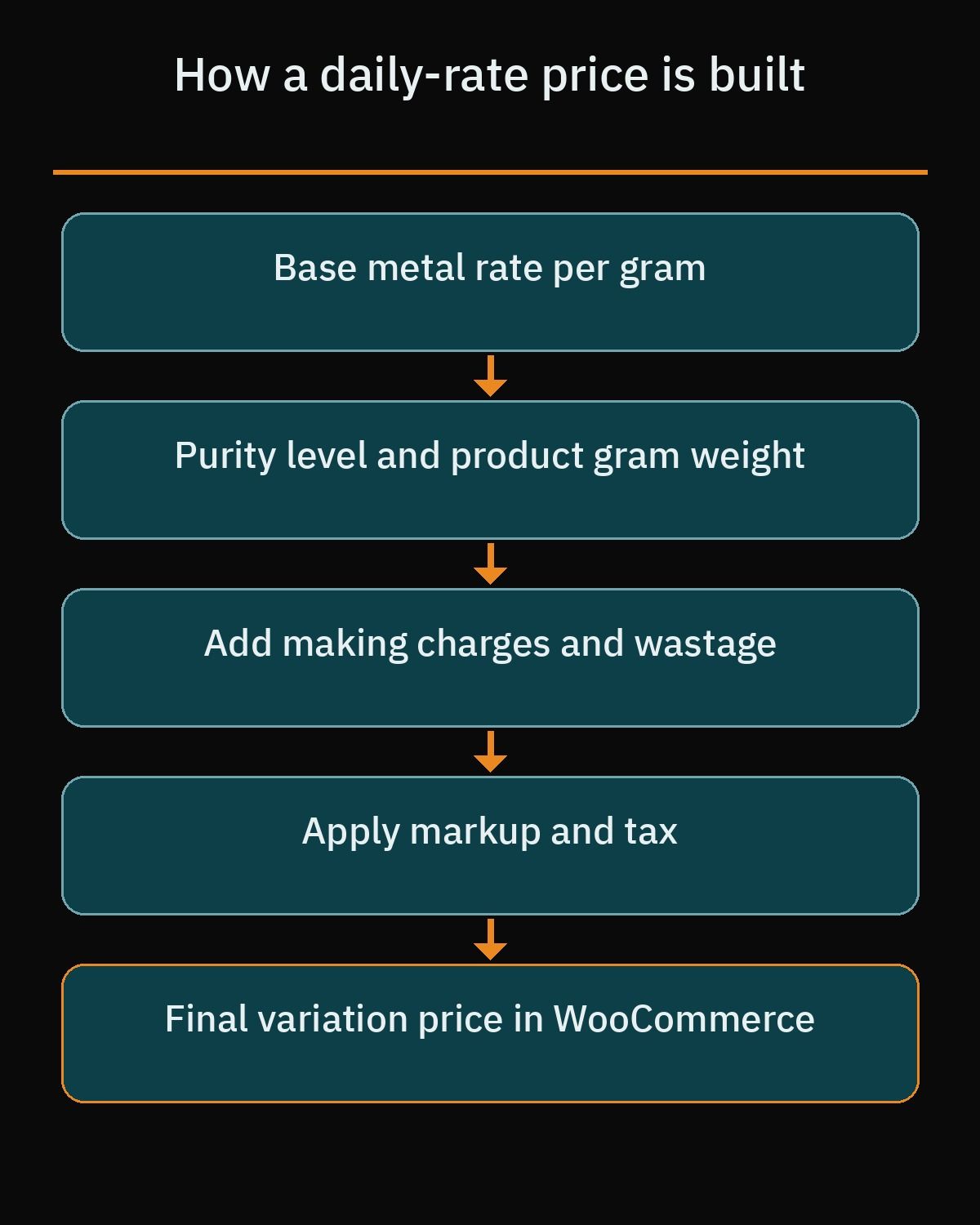Two plugins listed in the official WordPress.org directory address weight-based metal pricing for WooCommerce stores. The first is Dynamic Metal Price Calculator, which calculates WooCommerce product prices from base rates for 24K gold, silver, and other metals. Its pricing formula combines the base metal rate, purity level, product weight, making charges, wastage, markup, and tax, and it supports both variable products and custom purity levels including 24K, 22K, 18K, and 14K.
The second option on WordPress.org is Gold Price Based on Weight. In its free version, the plugin multiplies a central metal rate per gram by the product weight across simple and variable products, while its premium tier claims live API spot feeds and making charges. Before choosing either plugin, test how it handles your specific catalog size and variation count on a staging site.
- Fixed-price collections: Use native WooCommerce simple and variable product prices when selling fashion jewelry, watches, or artisanal pieces priced per design rather than per gram.
- Formula-based catalog updates: Use Dynamic Metal Price Calculator or Gold Price Based on Weight when you want to enter a base gram rate in the dashboard and recalculate weighted products automatically.
- Custom developer code: Commission custom WooCommerce code reviewed with an experienced developer if your business needs a tailored price breakdown table on the product page, connection to a regional dealer price feed, or custom rounding rules per karat.
Relying on custom code for complex pricing rules is often safer than stacking multiple conflicting pricing plugins. A developer can build a lightweight module that reads the variation weight, applies your exact making-charge formula per category, caches the calculated price for fast page loads, and logs every rate update for your accounting team.
## High-detail product photos that load fast on mobile
Online jewelry buyers rely on photography to judge craftsmanship, stone clarity, surface polish, and real-world proportions. A single thumbnail on a white background rarely convinces someone to buy a gold bracelet or diamond pendant. You need sharp macro shots from several angles, a photo showing the clasp or inner band stamp, and at least one worn or scale reference image so the customer understands the true size of the piece.
WooCommerce provides a capable product image gallery out of the box. The core gallery supports hover zoom so desktop users can inspect fine textures, a fullscreen lightbox view for distraction-free viewing, and touch slider swipe navigation for mobile shoppers. Assigning a specific variation image to each metal color ensures that when a customer switches from yellow gold to rose gold, the main gallery photo updates immediately.
Because studio jewelry photos contain high detail, uploading uncompressed files directly from a camera will slow down your mobile product pages. You can keep images crisp while reducing file sizes by using established optimization plugins on WordPress.org. Smush handles image compression, lazy loading, and WebP conversion; Imagify provides image optimization alongside WebP and AVIF generation; and ShortPixel offers compression with both WebP and AVIF output.
If your team manages hundreds of high-resolution studio shots, reviewing a complete workflow for [WordPress image optimization](https://heshamsaad.com/en/wordpress-image-optimization/) will help you balance visual sharpness with fast loading times. Cropping every product photo to a consistent aspect ratio before uploading also stops layout shifts as customers scroll through category grids on their phones.
## Trust signals buyers look for before paying
Trust is the single biggest conversion factor for an online gold or jewelry shop in the MENA region. Shoppers want reassurance that the business behind the website is established, reachable, and transparent about what is included in the price. Hiding gram weights, leaving out exchange rules, or using vague product descriptions creates hesitation right before checkout.
Every product page should present a clear specification block right below the price. Instead of burying facts inside a long paragraph, display the metal type, karat purity, approximate weight in grams, SKU number, and stone details in a clean, readable layout. If your pricing separates gold weight value from making charges, stating that clearly helps buyers compare your offer fairly against physical gold souks and mall showrooms.
- Physical showroom details: Publish your exact branch addresses, Google Maps directions, landline numbers, and daily working hours in the site footer and contact page.
- Delivery and packaging clarity: Explain how orders are packaged, which courier handles delivery, whether shipments require signature upon receipt, and how long dispatch takes.
- Exchange and resizing policies: Write plain-language policies covering ring resizing, exchange windows, and how weight differences or custom engravings are handled.
- Structured product markup: Output clean Schema.org Product and Offer data so search engines can read your catalog specifications accurately.
On the technical side, structured data using Schema.org vocabulary helps search engines interpret your catalog fields. Schema.org defines the Product type with properties such as material, weight (expressed as a QuantitativeValue), color, sku, brand, and image, alongside the Offer type for price, priceCurrency, and availability. While structured markup clarifies your product details for search crawlers, store owners should note that implementing Schema.org markup does not guarantee Google rich results in search listings.
Trust is starting to show up inside AI assistants too. With [Businesses in ChatGPT](https://heshamsaad.com/en/businesses-in-chatgpt/), a beta OpenAI launched on November 10, 2026, a jewelry shop can claim and verify its business profile and upload its product feed, so ChatGPT works from official store details.
## WhatsApp chat and showroom visit inquiries
In Egypt, Saudi Arabia, the UAE, and neighboring markets, many jewelry buyers treat the website as a digital showroom first and a checkout counter second. A customer shopping for a bridal set or an anniversary gift often wants to ask for a quick showroom video, check whether a ring size is ready for same-day pickup, or reserve a piece before driving to the store.
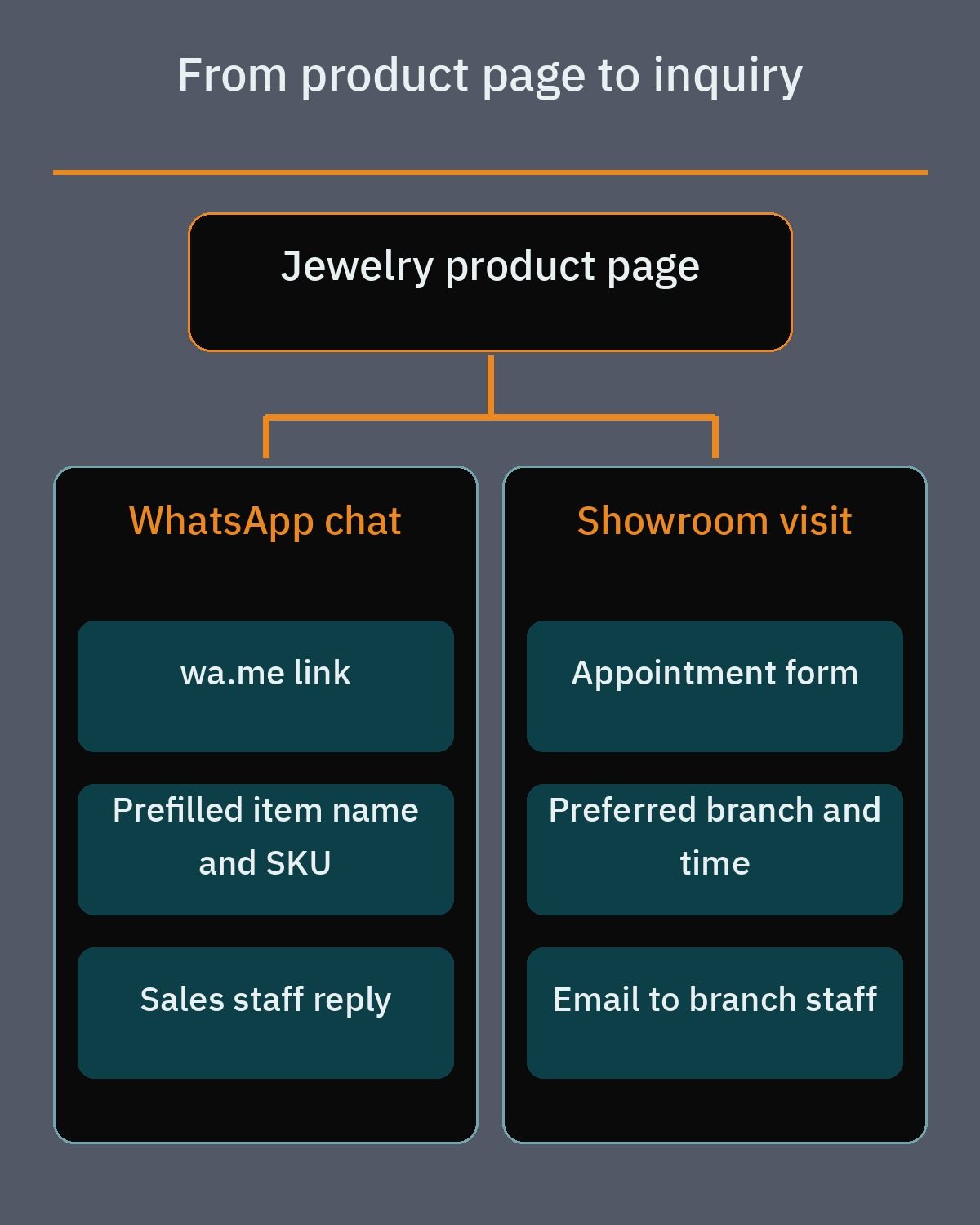You can support this habit without heavy scripts by adding a dedicated WhatsApp click-to-chat button on your WooCommerce product template. WhatsApp supports official click-to-chat links using the format https://wa.me/, where the phone number is written in full international format without plus signs, leading zeros, brackets, or hyphens. By appending the optional ?text= query parameter, your developer can automatically prefill the product title, selected karat variation, SKU, and page link into the customer message.
Connecting that click-to-chat number to the official WhatsApp Business app gives your sales staff practical tools to handle incoming chats. The WhatsApp Business app supports a verified business profile, listed opening hours, a mobile product catalog, automated greeting and away replies, and custom labels so your team can tag chats as showroom reservations, custom ring requests, or pending orders.
Alongside WhatsApp, adding a short on-site inquiry or showroom appointment form gives buyers a structured way to book a private viewing or request a custom design quote. You can build reliable forms using well-supported plugins from WordPress.org, including WPForms Lite (which provides a drag-and-drop builder, form templates, email notifications, and anti-spam tools), Fluent Forms, or Contact Form 7. A good showroom form asks for the visitor name, phone number, preferred branch, preferred date, and the SKU of the piece they want to inspect.
Occasion orders are not limited to jewelry. A [bakery website on WordPress](https://heshamsaad.com/en/bakery-website-wordpress/) can take structured cake orders for birthdays, weddings and Eid, with size, inscription and a delivery date, so those gift orders are recorded in WooCommerce instead of left in chat.
## Payment options for Egypt and Gulf jewelry shops
Choosing the right payment gateways for a WooCommerce jewelry store depends on the country where your company is legally registered and the payment methods your local buyers prefer. Because jewelry orders carry higher average cart values than everyday retail, customers look for familiar local bank card screens, digital wallets, and installment options.
If your jewelry business is registered in the United Arab Emirates, WooPayments is officially available and integrates directly into the WooCommerce dashboard. However, WooPayments is not supported for businesses registered in Egypt or Saudi Arabia, so merchants in those countries need regional or international gateway integrations.
- Paymob for WooCommerce: Available on WordPress.org for merchants in Egypt, Saudi Arabia, the UAE, Oman, and Pakistan, supporting local bank cards, mobile wallets in Egypt, debit and credit cards, Apple Pay, Google Pay and STC Pay in Saudi Arabia, Tabby and Tamara for buy now, pay later, and installment options, as listed on its official plugin page.
- Stripe for WooCommerce: The official Stripe plugin on WordPress.org connects WooCommerce to Stripe accounts in supported countries for credit card and digital wallet processing.
- Tap Payments integration: Many Gulf merchants use Tap, though there is no standalone plugin named tap-payments on WordPress.org; merchants obtain the WooCommerce plugin directly through Tap developer channels rather than the WordPress.org directory.
- Showroom reservation and pay on pickup: Using native WooCommerce offline payment methods, you can let buyers place a reservation order online and complete payment in person at your branch after inspecting the item.
Whatever combination of gateways you choose, test the entire checkout flow on mobile devices before launch. High-value transactions frequently trigger bank 3D Secure verification screens, so your checkout layout should remain clean and stable while the customer completes bank authentication on their phone.
## What drives the build budget and timeline
When jewelry shop owners ask how much a WooCommerce store costs to build, the honest answer depends on how much custom engineering and catalog preparation the project requires. Two stores with the same number of products can have very different development timelines depending on how prices are calculated and how variations are structured.
A boutique brand selling 80 fixed-price silver pieces in a single language can launch quickly using standard WooCommerce variable products and an off-the-shelf payment plugin. By contrast, a multi-branch gold retailer with 1,500 items across 18K, 21K, and 24K purities, bilingual Arabic and English layouts, daily rate formulas, and branch-specific showroom booking forms requires careful architecture and testing.
1. Catalog structure and data readiness: Setting up clean global attributes, variation weights, and SKUs goes much faster when your inventory is already organized in a spreadsheet rather than scattered across paper notebooks or unindexed folders.
2. Pricing engine complexity: Using an existing WordPress.org plugin such as Dynamic Metal Price Calculator or Gold Price Based on Weight costs far less development time than writing custom code for specialized spot feeds and making-charge tables.
3. Visual design and bilingual templates: Designing custom product templates that display specification boxes, macro galleries, and smooth right-to-left Arabic typography alongside English takes dedicated front-end work.
4. Payment and inquiry workflows: Configuring and testing Paymob, Stripe, or WooPayments alongside prefilled WhatsApp product buttons and branch inquiry routing adds practical quality assurance steps before launch.
You can keep your build budget focused on features that actually drive revenue by preparing your product data early. Before hiring a developer, gather consistent studio photos for your core collection, standardize your SKU naming system, and write down the exact formula your shop uses to calculate retail prices from gram weight and karat purity.
## When to hire a WordPress developer and your next step
Setting up a basic WooCommerce install is straightforward, but a jewelry store has very little room for pricing errors or slow, clunky product pages. If a plugin update resets a metal rate multiplier or a variation displays the wrong gram weight, it directly affects your margins and customer trust. Working with a specialist ensures that your attribute hierarchy, weight-based pricing rules, image optimization pipeline, and checkout gateways work together reliably.
If you want a store tailored to how gold and jewelry buyers actually shop in Egypt and the Gulf, explore my [WordPress development services](https://heshamsaad.com/en/wordpress-development/) to see how custom WooCommerce builds are structured from catalog planning through launch. Whether you need a clean bilingual storefront, a custom metal pricing module, or a fast mobile gallery connected to WhatsApp and local payment gateways, having a clear technical plan saves time and avoids trial-and-error plugin conflicts.
As your concrete next step, list your main product categories, the karat purities you sell, whether your prices are fixed or tied to a daily gram rate, and which payment methods your customers ask for most often. Once you have those notes ready, [book a free consultation](https://heshamsaad.com/en/free-consultation/) so we can review your catalog requirements and map out the right WooCommerce setup for your shop.
## Frequently asked questions
How can a WooCommerce jewelry store update product prices when the daily gold rate changes?You can tie product prices to a central metal rate using Dynamic Metal Price Calculator or Gold Price Based on Weight from WordPress.org. Dynamic Metal Price Calculator calculates prices from base metal rates, purity, weight, making charges, wastage, markup, and tax for simple and variable products. If your shop needs a custom price breakdown or a specific market feed, a developer can build custom code for your store.
How should I organize karat purity and gram weight for jewelry items in WooCommerce?Set up shared properties such as Metal Type and Karat under the global Attributes screen in WooCommerce so customers can filter products and select variations cleanly. On variable products, each karat or metal combination becomes its own variation with a dedicated SKU, stock count, variation photo, and price. You can record the exact gram weight inside the Shipping tab for simple items or at the individual variation level.
How do I show detailed close-up jewelry photos without slowing down mobile pages?WooCommerce includes a core product gallery with hover zoom, a fullscreen lightbox, and touch swipe sliders so mobile shoppers can inspect stone settings and metal finishes closely. To keep pages fast, compress photos and convert them to modern WebP or AVIF formats using WordPress.org plugins such as Smush, Imagify, or ShortPixel. Combining properly sized gallery images with lazy loading keeps high-resolution jewelry catalogs responsive on mobile networks.
Can shoppers ask about a specific jewelry piece on WhatsApp or book a showroom visit?Yes, you can add a WhatsApp click-to-chat button on product pages using the official wa.me link format with a prefilled message containing the item name and SKU. Pairing that link with the WhatsApp Business app gives your shop a business profile, operating hours, chat labels, and automated greeting or away replies. You can also embed a showroom appointment form using WPForms Lite, Fluent Forms, or Contact Form 7.
What affects the cost of building a jewelry website on WooCommerce?The build budget depends mainly on your catalog structure, pricing rules, design requirements, and payment integrations. A store using fixed prices or standard WordPress.org plugins takes less development time than a bilingual site needing custom gold-rate formulas, multi-attribute variations, and custom specification layouts. Preparing clean spreadsheets with SKUs, gram weights, karat purities, and organized product photography before development begins reduces manual setup work.
## References
- [WooCommerce Documentation: Managing Products](https://woocommerce.com/document/managing-products/)
- [WooCommerce Documentation: Variable Product](https://woocommerce.com/document/variable-product/)
- [WordPress.org Plugin Directory: Dynamic Metal Price Calculator](https://wordpress.org/plugins/dynamic-metal-price-calculator/)
- [WordPress.org Plugin Directory: Gold Price Based on Weight](https://wordpress.org/plugins/gold-price-based-on-weight/)
- [WooCommerce Documentation: Adding Product Images and Galleries](https://woocommerce.com/document/adding-product-images-and-galleries/)
- [WordPress.org Plugin Directory: Smush Image Optimization](https://wordpress.org/plugins/wp-smushit/)
- [WordPress.org Plugin Directory: Imagify Image Optimizer](https://wordpress.org/plugins/imagify/)
- [WordPress.org Plugin Directory: ShortPixel Image Optimizer](https://wordpress.org/plugins/shortpixel-image-optimiser/)
- [WhatsApp Help Center: How to Use Click to Chat](https://faq.whatsapp.com/5913398998672934)
- [WhatsApp Business Official Overview](https://www.whatsapp.com/business/)
- [WordPress.org Plugin Directory: WPForms Lite](https://wordpress.org/plugins/wpforms-lite/)
- [WordPress.org Plugin Directory: Fluent Forms](https://wordpress.org/plugins/fluentform/)
- [WordPress.org Plugin Directory: Contact Form 7](https://wordpress.org/plugins/contact-form-7/)
- [WooCommerce Documentation: WooPayments](https://woocommerce.com/document/payments/)
- [WordPress.org Plugin Directory: Paymob for WooCommerce](https://wordpress.org/plugins/paymob-for-woocommerce/)
- [WordPress.org Plugin Directory: WooCommerce Stripe Payment Gateway](https://wordpress.org/plugins/woocommerce-gateway-stripe/)
- [WooCommerce Documentation: Stripe](https://woocommerce.com/document/stripe/)
- [Schema.org Documentation: Product](https://schema.org/Product)
- [Schema.org Documentation: Offer](https://schema.org/Offer)