---
id: 14813
title: "Electronics Store Website WooCommerce: Specs, Stock and Installments"
slug: "electronics-store-website-woocommerce"
lang: "en"
url: "https://heshamsaad.com/en/electronics-store-website-woocommerce/"
markdown_url: "https://heshamsaad.com/en/electronics-store-website-woocommerce.md"
translations: {"ar":"https://heshamsaad.com/ar/electronics-store-website-woocommerce/"}
description: "Planning an electronics store website WooCommerce build in MENA? See how to handle specs, IMEI notes, branch stock, BNPL, feeds, and safe shipping."
author: "Safya"
date_published: "2026-11-12T06:09:38Z"
date_modified: "2026-11-13T06:16:21Z"
categories: ["WooCommerce"]
tags: ["ecommerce","electronics store","installment payments","mobile phone store","WooCommerce"]
featured_image: "https://heshamsaad.com/wp-content/uploads/2026/11/electronics-store-website-woocommerce-electronics-og-en.jpg"
word_count: 3571
reading_time_min: 18
content_sha256: "73978bd9cedb8e61b9c817cadbd7fa9eb3b1786f0ab42cc18a9fee715c6d6708"
---
# Electronics Store Website WooCommerce: Specs, Stock and Installments
Building an electronics store website WooCommerce setup for a retail business in Egypt, Saudi Arabia, or the UAE requires far more planning than launching a standard online store. When you sell smartphones, laptops, tablets, and accessories, your customers do not just browse photos and pick a size. They filter by processor family, compare battery and display specs side by side, check whether a specific branch has the unit ready for pickup today, and look for monthly installment plans at checkout.
Many store owners start by buying a multipurpose theme, uploading a spreadsheet of products, and hoping the store works out of the box. Within a few weeks, category filters break because staff entered specifications as plain text, two branches sell the same last laptop at once, and customer support cannot verify whether a returned phone actually came from their warehouse. Understanding our [WooCommerce vs Shopify comparison](https://heshamsaad.com/en/woocommerce-vs-shopify/) helps explain why an open platform gives an online electronics shop full ownership over custom workflows, provided the underlying architecture is built properly from the beginning.
## What an electronics store website WooCommerce build has to handle
An electronics retailer deals with high order values, manufacturer barcodes and warranty claims. A customer buying a laptop in Riyadh or a flagship phone in Cairo expects accurate stock availability, clear warranty duration terms, and familiar local payment options before committing to the purchase. Behind the scenes, your team needs an admin setup that prevents fulfillment mistakes and keeps hundreds or thousands of SKUs organized.
Whether you run a dedicated mobile phone store website or a multi-category showroom carrying computers, audio gear, and gaming hardware, your store has to coordinate several moving parts at the same time:
- Structured product taxonomies that separate variations you sell (storage, color) from technical specifications shoppers filter and compare (RAM, screen size, processor).
- Accessory cross-selling using extensions such as Product Bundles for WooCommerce to package a phone with a protective case and charger, or Product Add-Ons for WooCommerce to offer extra options via checkboxes and dropdowns on the product page.
- Serial number or IMEI capture on the order line item during packing, paired with a structured return and warranty workflow.
- Location-aware inventory that separates warehouse stock from retail branches and supports local store pickup.
- Regional installment gateways and shipping rules tailored to high-value parcels.
When you ask agencies or freelance developers for proposals, this operational checklist is what separates a store that scales smoothly from one that needs a costly rebuild six months after launch.
## Specs as attributes: what becomes a variation and what stays a filter
How you organize product data determines whether your catalog is easy to browse and maintain. WooCommerce gives you hierarchical product categories (for example, Phones > Android phones, Laptops, or Accessories > Chargers), a free core Brands feature to assign manufacturer brands across your catalog, and product attributes. Attributes can be created as custom per-product entries or as global attributes under Products > Attributes. Always insist on global attributes: you can reuse them across every device, let shoppers filter by them, and rename an attribute value once to update it across the entire site.
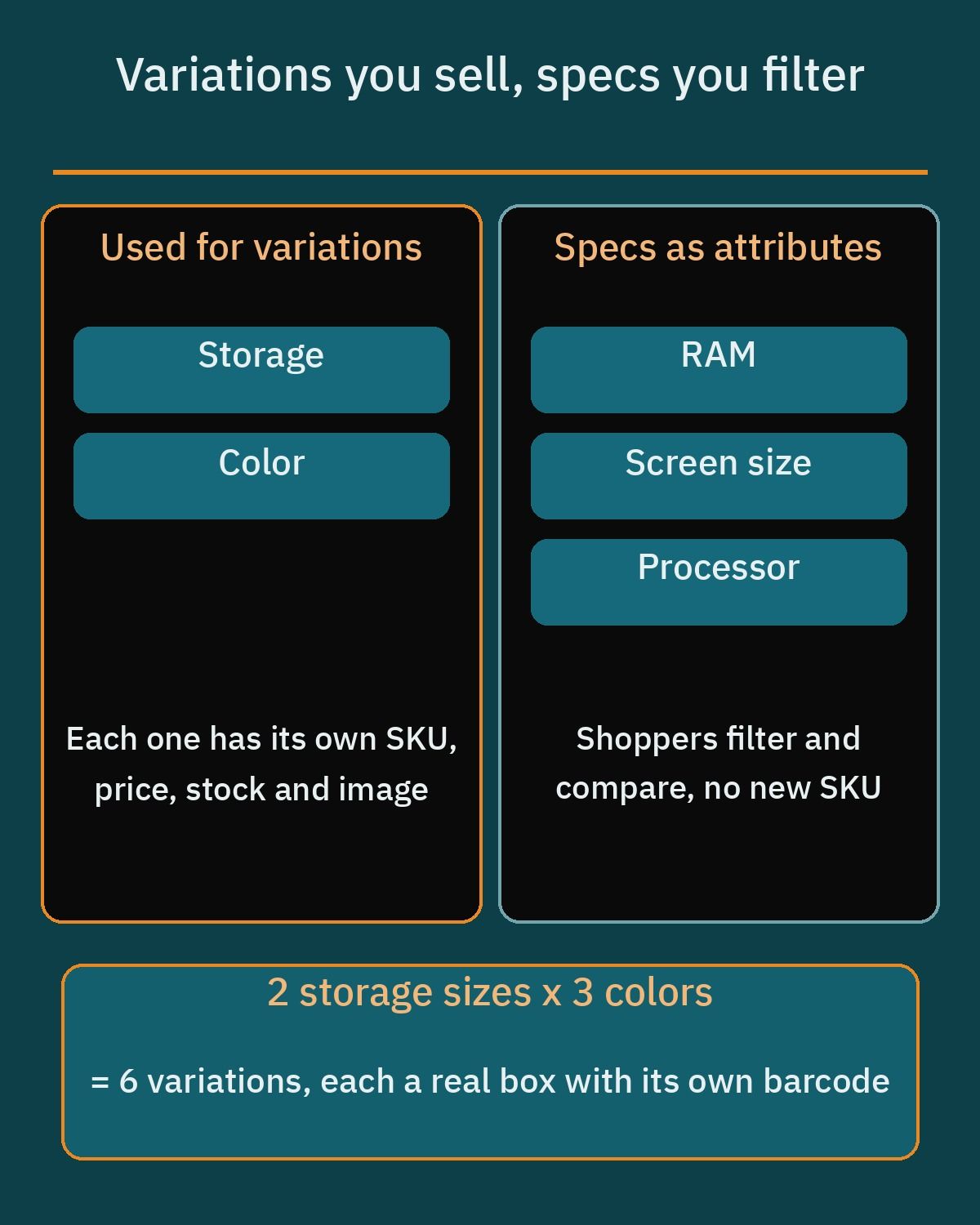The biggest mistake electronics retailers make is turning every single specification into a product variation. In a WooCommerce variable product, only attributes ticked as "Used for variations" generate purchasable combinations. Each variation gets its own product image, SKU, built-in "GTIN, UPC, EAN, or ISBN" field (accepting numbers and hyphens, which is also available on the Inventory tab for simple products), regular and sale price, stock quantity, weight, dimensions, and shipping class. You can manage stock at the individual variation level or at the parent product level.
If a smartphone comes in two storage capacities and three colors, ticking those two attributes creates six variations, each corresponding to a physical box with its own barcode and price. Attributes like screen size, processor model, battery capacity, or fixed RAM on that model should be attached to the product and marked visible on the product page, but left unticked for variations. Classic themes display these visible attributes in the Additional Information tab alongside Description and Reviews, while block themes output them through the Product Details block. Shoppers can still filter the category page by RAM or screen size without forcing your team to manage dozens of unnecessary variations per product. Apparel works the opposite way: size and color usually need their own stock count, which we walk through in our guide to a [clothing store website WooCommerce](https://heshamsaad.com/en/clothing-store-website-woocommerce/) build.
## Filters and product comparison
Once your global attributes and core Brands are assigned properly, category navigation becomes much faster for buyers who know what hardware specs they want. In modern block themes, WooCommerce provides the Product Filters block to filter a Product Collection by price, rating, attribute (such as storage or color), availability (in stock), category, brand, or tag. By default, selecting a filter updates the product list without a full page reload and displays active filters as removable chips at the top of the catalog so shoppers can adjust their criteria on mobile screens with a single tap.
Filtering narrows a hundred laptops down to four or five candidates, and product comparison helps the buyer make the final choice. The free version of YITH WooCommerce Compare on WordPress.org lets shoppers compare products side by side in a single table. Because the plugin pulls its comparison rows directly from the WooCommerce attributes configured on each product, your earlier work setting up clean global attributes pays off immediately.
A Compare button on the single product page opens a popup containing the comparison table, and an optional widget lists the products currently queued for comparison. Your developer can customize the table template to match your store design, and the plugin page lists WPML compatibility, which matters for a bilingual store.
## Warranty, serial numbers and IMEI
Selling consumer electronics without tracking unit serial numbers or IMEI codes exposes your business to fraudulent returns. Out of the box, WooCommerce core has no warranty field and no place to record the serial number or IMEI of the specific box handed to the courier. Your store build needs to address both warranty terms and unit-level identification before you ship your first order.
To handle warranty terms and post-purchase claims, the paid Returns and Warranty Requests for WooCommerce extension (developed by Woo) lets you attach warranty terms with clear durations to individual products or variations. You can include a standard manufacturer or store warranty for free, or sell paid extended warranty coverage right on the product page. When a buyer experiences a hardware issue, they log into their account to submit a return, exchange, or warranty claim, and your support team manages all RMA statuses from a single admin screen with automated email updates on status changes and the option to request product photos from the customer.
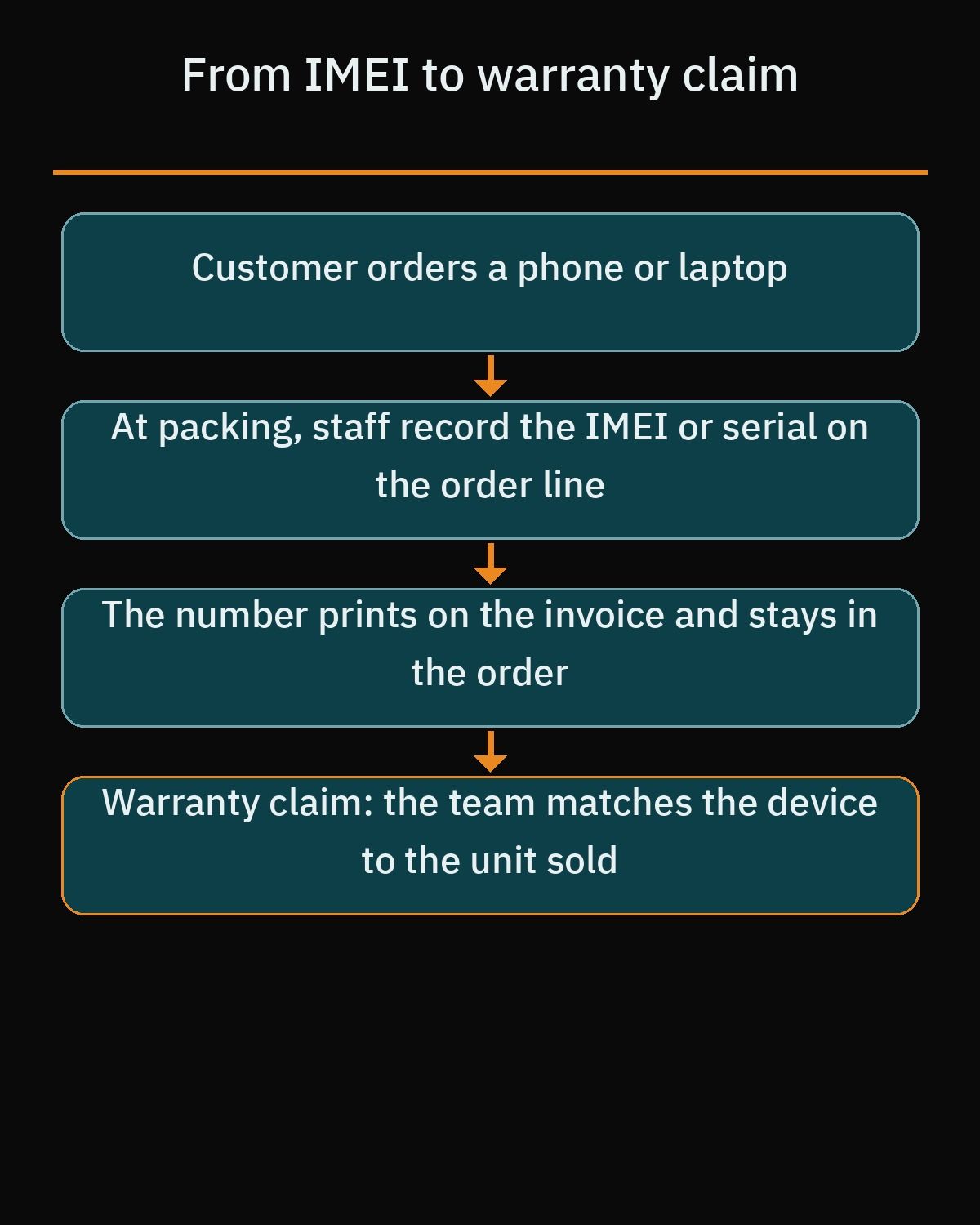
For unit tracking, ask your developer to add a custom field directly on the WooCommerce order line item. When warehouse staff pack a smartphone or laptop, they record the device's serial number or IMEI into that line item field before marking the order ready for dispatch. The system then prints that exact serial or IMEI on the customer invoice and keeps it stored permanently in the order record. If a customer opens a warranty claim months later, your team can verify in seconds that the physical device matches the unit originally sold.
## Stock per branch and store pickup
Many established electronics retailers in Cairo, Alexandria, Riyadh, Jeddah, and Dubai operate multiple retail branches alongside a central warehouse. WooCommerce core tracks only one stock quantity per product or variation, which creates a problem when a device is out of stock in your main warehouse but sitting on a shelf in two showrooms, or when a walk-in customer buys the last unit that an online shopper is checking out.
You have two main plugin paths to add multi-location stock to WooCommerce, depending on how your team updates inventory:
- Stock Locations for WooCommerce (available free on WordPress.org, with some premium features) creates a dedicated taxonomy for stock locations across both simple and variable products. It tracks stock across multiple locations inside products and orders, lets customers select a branch when purchasing, supports automatic order allocation for location stock reduction, sends email notifications when stock is allocated (plus a new order email copy to the item location), includes a shortcode to display branch availability on the product page, and supports the REST API and WPML.
- Multi Inventory Management for WooCommerce by Addify (a paid extension on WooCommerce.com) lets you maintain multiple inventories per product organized by location, retail store, warehouse, or supplier. It provides stock tracking per inventory, CSV import and export for bulk stock updates, and a central grid view to review and adjust stock levels quickly.
Alongside per-branch stock, configure WooCommerce's core Local Pickup shipping method (or the dedicated pickup locations settings if your store uses the block-based checkout). Some buyers of expensive devices would rather pay online and collect the unit in person from a nearby branch, so give them that option at checkout.
## Installments and payment options
When a customer is buying a flagship smartphone or a workstation laptop, installment and Buy Now, Pay Later (BNPL) options are often part of the buying decision. However, payment gateways and BNPL availability vary sharply between the Gulf and Egypt, so your checkout must be configured for the exact countries and currencies you serve.
### Saudi Arabia and the UAE
In the Gulf, shoppers expect split payments alongside local card schemes and mobile wallets. The official Tabby Checkout plugin on WordPress.org states that Tabby currently operates in Saudi Arabia and the UAE; it connects under WooCommerce > Settings > Tabby API using your public and secret keys, requires your store currency to match the customer's country, and offers shoppers 4 interest-free payments or up to 12 months to pay. The official Tamara Checkout plugin serves GCC users and lets buyers split purchases into 2, 3, or 4 interest-free payments or pay in full, while paying the merchant upfront and assuming credit and fraud risk. For Saudi customers paying by debit card, mada comes through a payment gateway licensed in Saudi Arabia.
### Egypt and multi-market gateways
Tabby does not operate in Egypt, so an Egyptian electronics store needs local bank installments and consumer finance providers. The official Paymob for WooCommerce plugin operates across Egypt, the UAE, Oman, Saudi Arabia, and Pakistan, and also works with WooCommerce Subscriptions. In Egypt, Paymob supports debit and credit cards, mobile wallets, Kiosk payments, bank instalments, and BNPL providers including ValU, Souhoola, Halan, Premium6, SYMPL, Aman, Forsa, and MidTakseet. In the UAE and Saudi Arabia, Paymob supports cards, Apple Pay, Google Pay, and BNPL options such as Tabby and Tamara, plus STC Pay in Saudi Arabia. The specific methods shown at checkout depend on what is activated on your Paymob merchant account.
Finally, Cash on Delivery (COD) remains a core WooCommerce gateway across the region. Use its built-in "Enable for shipping methods" setting to restrict COD to specific delivery methods or local zones, and configure "Accept for virtual orders" appropriately. If you want to add an extra handling fee for COD orders, your developer will need to add a separate extension.
## Shipping phones and laptops safely
Shipping a charger cable and shipping a high-end laptop carry very different operational risks. Start by setting up WooCommerce shipping zones by country, state or governorate, or postcode; WooCommerce always shows the customer the shipping methods from the first zone that matches their address. Next, use product shipping classes to group high-value hardware (such as phones, tablets, and laptops) separately from low-cost accessories, and configure the core Flat Rate shipping method to charge different shipping costs per class.
Before integrating a courier plugin or handing over parcels, review your courier contract carefully. Standard courier liability limits, declared-value coverage, and transit insurance options differ depending on the carrier and your commercial agreement. When negotiating with couriers for electronics delivery, verify these five operational points:
- How to declare the full invoice value of phones and laptops and opt into shipment insurance.
- Whether the courier requires a signature or a one-time password (OTP) from the recipient upon delivery.
- Whether customers may open and inspect the box at the door before paying, and how refused or opened parcels are returned to you.
- Whether the courier imposes a cash ceiling on COD collections for expensive electronics.
- Which shipping methods in WooCommerce should have COD enabled or disabled based on parcel value and destination zone.
## Product feeds for Google, Meta and ChatGPT
Electronics shoppers compare prices across search engines, social platforms, and AI assistants before clicking through to a store. Pairing a solid [WooCommerce SEO setup](https://heshamsaad.com/en/woocommerce-seo/) with automated product feeds ensures that your live stock levels, sale prices, and model identifiers stay accurate everywhere your buyers search.
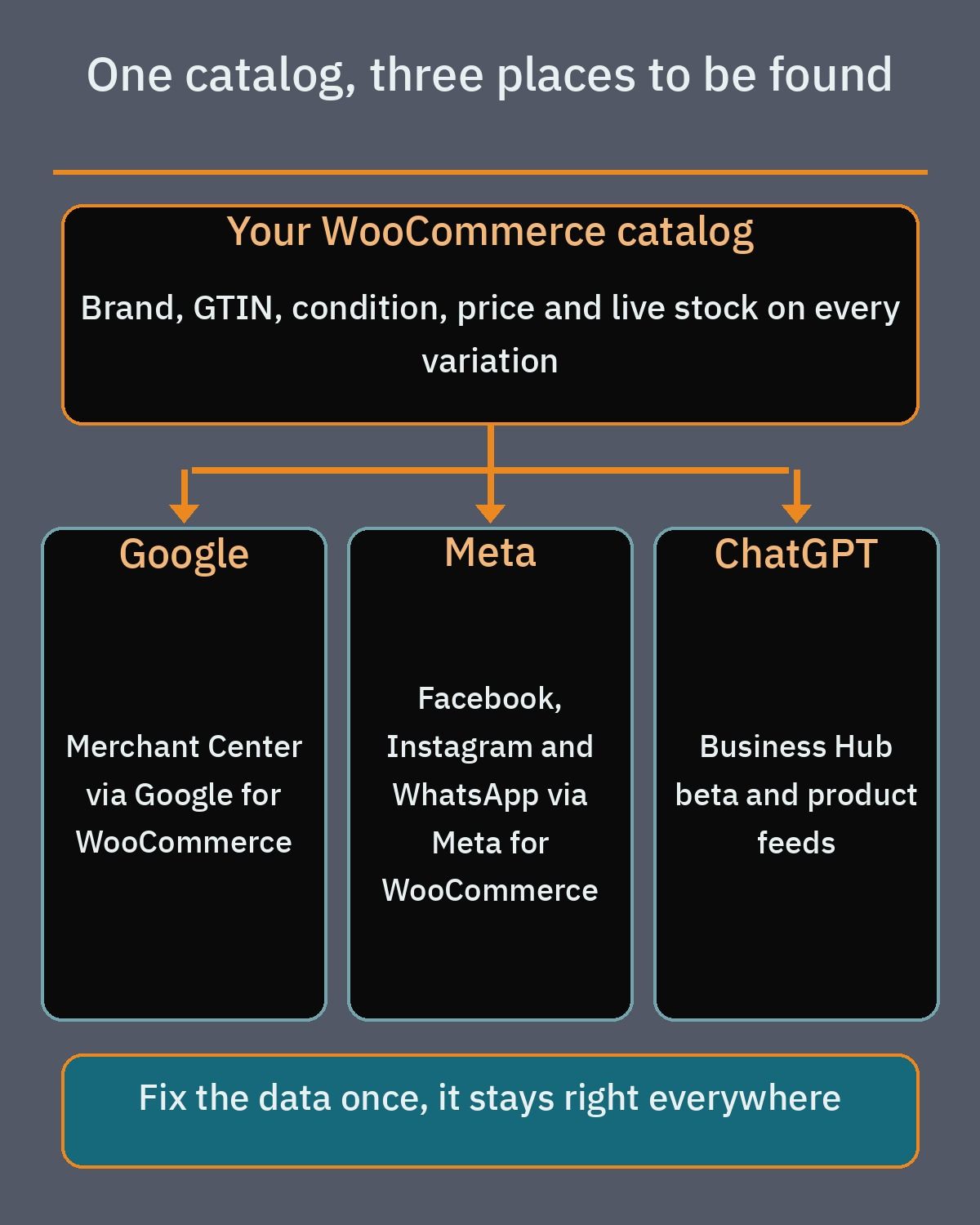For Google Shopping, the free Google for WooCommerce plugin (listed on WordPress.org) syncs your WooCommerce catalog directly to Google Merchant Center, keeps prices, promotions, and inventory updated automatically, and lets you run Google Ads Performance Max campaigns. Google Merchant Center sets data rules that matter a lot for electronics: brand is required for all new products (with only a few media exceptions), condition must be submitted accurately as new, refurbished or used, and providing a valid GTIN is recommended. Products that have a manufacturer-assigned GTIN but are submitted without one can suffer limited visibility, and you must never make up a fake GTIN, MPN, or brand.
For social commerce, the official Meta for WooCommerce plugin connects your store to Facebook, Instagram, and WhatsApp. It installs the Meta pixel, uploads your product catalog for dynamic retargeting ads, and supports WhatsApp Business order updates. Beyond search and social ads, structured catalog feeds also prepare your store for conversational shopping, as covered in our guide to [how businesses appear in ChatGPT](https://heshamsaad.com/en/businesses-in-chatgpt/) through OpenAI's Business Hub beta and product feeds.
## Speed when the catalog grows
An electronics catalog grows fast once you stock multiple brands, storage tiers, colors, and hundreds of compatible cases, cables, and adapters. If your store is built carelessly, category pages with multi-attribute filters and high-resolution product galleries will slow down, especially for mobile shoppers on cellular connections.
First, make sure High-Performance Order Storage (HPOS) is active. HPOS stores orders in dedicated custom database tables rather than mixing them into WordPress post tables; it is enabled by default on new installs from WooCommerce 8.2 onward, and existing stores can switch under WooCommerce > Settings > Advanced > Features after enabling compatibility mode sync first. Second, compress product photos and serve modern formats using an image optimization plugin such as Smush (which handles compression, lazy loading, and WebP) or Imagify (which generates WebP and AVIF files).
To keep category filtering snappy as your SKU count climbs, combine solid managed hosting with server-level object caching, configure page caching so it explicitly skips the cart, checkout, and my account pages, keep variation counts reasonable by using variations only for purchasable options, and test your busiest category pages on real mobile phones regularly.
## What drives the cost, and how to compare developers
When you request quotes for an electronics store build, you will often see wide differences in scope and pricing. Instead of comparing bottom-line figures alone, look at the specific work items that drive the cost of a serious electronics store:
- Total number of products and variations, plus who is responsible for structuring global spec attributes, entering GTIN barcodes, and cleaning supplier spreadsheets.
- Customizing category filters and the product comparison table for both desktop and mobile shoppers.
- Setting up per-branch inventory routing, store pickup options, and staff notification rules.
- Configuring the warranty and RMA claim workflow alongside the custom order line item field for serial number or IMEI capture on invoices.
- Onboarding regional payment gateways and BNPL providers (Tabby, Tamara, Paymob, and COD rules) and integrating local couriers.
- Connecting and validating Google Merchant Center and Meta catalog feeds, configuring bilingual English and Arabic content with WPML, designing a custom interface, covering annual subscriptions for paid extensions, and providing ongoing technical maintenance.
Before you [hire a WooCommerce developer](https://heshamsaad.com/en/hire-woocommerce-developer/), ask each candidate to show you how they structure variation attributes versus display specifications in the WordPress admin, how their order screen captures an IMEI at packing, and how they configure HPOS and object caching. A developer who understands electronics retail will answer those questions with a clear technical walkthrough rather than vague promises.
If you are planning a new electronics store or upgrading an existing catalog in Egypt, Saudi Arabia, or the UAE, explore our [WordPress and WooCommerce development services](https://heshamsaad.com/en/wordpress-development/) to see how we build fast, bilingual stores tailored to regional retail operations. You can also book a [free consultation](https://heshamsaad.com/en/free-consultation/) to review your catalog structure, branch inventory needs, and payment setup before you start building.
## Frequently asked questions
Which electronics specs should be variations and which should be attributes in WooCommerce?Use variations only for options that change the SKU, price, or stock level of the device, such as storage capacity and color. Leave fixed technical details like RAM, processor model, and screen size as standard global attributes that are visible on the product page without creating extra variations. This setup lets shoppers filter category pages by any specification while keeping your product edit screens and database queries fast.
How do installment payments work on a WooCommerce electronics store in Egypt, Saudi Arabia, and the UAE?Your installment setup depends on where your customers live and which currency your store uses. In Saudi Arabia and the UAE, you can connect official Tabby and Tamara plugins for interest-free split payments, or enable them alongside Apple Pay and cards through Paymob. In Egypt, Tabby does not operate, so retailers use Paymob to accept bank instalments and local buy now, pay later services such as ValU, Souhoola, Halan, and SYMPL.
Can WooCommerce track inventory across multiple retail branches and warehouses?WooCommerce core only tracks one stock number per product or variation, so multi-branch retailers need an inventory extension. A free plugin like Stock Locations for WooCommerce or the paid Multi Inventory Management extension lets you assign separate stock counts to each showroom or warehouse. Orders can then reduce stock at a specific location, and shoppers can choose a branch or pick up in store.
How do you track IMEI numbers and warranty claims for phones and laptops in WooCommerce?WooCommerce does not include serial number or warranty fields by default, so a developer adds a custom field on the order line item where staff record the IMEI or serial number during packing. That number prints on the customer invoice and stays saved inside the order record. For post-purchase claims, the Returns and Warranty Requests extension lets buyers submit return or repair requests directly from their account dashboard.
What factors affect the cost of building a custom WooCommerce electronics store?The project budget depends on the size of your catalog, how many specification attributes and variations require structured data entry, and whether you need bilingual Arabic and English content. Technical requirements such as multi-branch inventory sync, custom IMEI order fields, warranty management, installment gateway onboarding, courier integrations, and annual extension renewals also shape the scope. Ask each developer to quote these components separately so you can compare proposals fairly.
## References
- [Managing Product Categories, Tags and Attributes: WooCommerce Documentation](https://woocommerce.com/document/managing-product-taxonomies/)
- [Variable Product: WooCommerce Documentation](https://woocommerce.com/document/variable-product/)
- [WooCommerce Brands: WooCommerce Documentation](https://woocommerce.com/document/woocommerce-brands/)
- [Product Filters Block: WooCommerce Documentation](https://woocommerce.com/document/woocommerce-store-editing/customizing-shop-page-catalog/filter-products/)
- [Editing Product Data Tabs: WooCommerce Documentation](https://woocommerce.com/document/editing-product-data-tabs/)
- [YITH WooCommerce Compare: WordPress.org Plugin Directory](https://wordpress.org/plugins/yith-woocommerce-compare/)
- [Returns and Warranty Requests for WooCommerce: WooCommerce Marketplace](https://woocommerce.com/products/warranty-requests/)
- [Stock Locations for WooCommerce: WordPress.org Plugin Directory](https://wordpress.org/plugins/stock-locations-for-woocommerce/)
- [Multi Inventory Management for WooCommerce: WooCommerce Marketplace](https://woocommerce.com/products/multi-inventory-management/)
- [Local Pickup: WooCommerce Documentation](https://woocommerce.com/document/local-pickup/)
- [Tabby Checkout: WordPress.org Plugin Directory](https://wordpress.org/plugins/tabby-checkout/)
- [Tabby for Business: Official Website](https://tabby.ai/en-AE/business)
- [Tamara Checkout: WordPress.org Plugin Directory](https://wordpress.org/plugins/tamara-checkout/)
- [Paymob for WooCommerce: WordPress.org Plugin Directory](https://wordpress.org/plugins/paymob-for-woocommerce/)
- [Cash on Delivery: WooCommerce Documentation](https://woocommerce.com/document/cash-on-delivery/)
- [Setting up Shipping Zones: WooCommerce Documentation](https://woocommerce.com/document/setting-up-shipping-zones/)
- [Product Shipping Classes: WooCommerce Documentation](https://woocommerce.com/document/product-shipping-classes/)
- [Flat Rate Shipping: WooCommerce Documentation](https://woocommerce.com/document/flat-rate-shipping/)
- [Google for WooCommerce: WordPress.org Plugin Directory](https://wordpress.org/plugins/google-listings-and-ads/)
- [Product Data Specification: Google Merchant Center Help](https://support.google.com/merchants/answer/7052112)
- [Unique Product Identifiers (GTIN, MPN, Brand): Google Merchant Center Help](https://support.google.com/merchants/answer/160161)
- [Meta for WooCommerce: WordPress.org Plugin Directory](https://wordpress.org/plugins/facebook-for-woocommerce/)
- [High-Performance Order Storage (HPOS): WooCommerce Documentation](https://woocommerce.com/document/high-performance-order-storage/)
- [Smush Image Optimization: WordPress.org Plugin Directory](https://wordpress.org/plugins/wp-smushit/)
- [Imagify Image Optimization: WordPress.org Plugin Directory](https://wordpress.org/plugins/imagify/)
- [Product Bundles for WooCommerce: WooCommerce Marketplace](https://woocommerce.com/products/product-bundles/)
- [Product Add-Ons for WooCommerce: WooCommerce Marketplace](https://woocommerce.com/products/product-add-ons/)