---
id: 13660
title: "Custom WordPress Theme or Premium Theme: What Does Your Business Site Need?"
slug: "custom-wordpress-theme"
lang: "en"
url: "https://heshamsaad.com/en/custom-wordpress-theme/"
markdown_url: "https://heshamsaad.com/en/custom-wordpress-theme.md"
translations: {"ar":"https://heshamsaad.com/ar/custom-wordpress-theme/"}
description: "Custom WordPress theme or premium theme? Compare scope, RTL, speed, licences and cost drivers, plus what to ask before you hire a developer."
author: "Safya"
date_published: "2026-10-20T14:43:19Z"
date_modified: "2026-10-24T05:15:37Z"
categories: ["WordPress Themes"]
tags: ["Custom WordPress Theme","RTL","WordPress development","WordPress themes"]
featured_image: "https://heshamsaad.com/wp-content/uploads/2026/10/custom-wordpress-theme-og-en-alt.jpg"
word_count: 3706
reading_time_min: 19
content_sha256: "e0bfe837bd0b9ae8f5bcb64c6edfa23baa56c14e219c9d931716822291ee9dea"
---
# Custom WordPress Theme or Premium Theme: What Does Your Business Site Need?
A custom WordPress theme is a theme designed and built for one business: its brand, its pages, its languages and the way its team edits content. A ready-made premium theme is built to be sold to thousands of sites at once. Both can produce a good website, and both can go wrong. This guide is for business owners in Egypt, Saudi Arabia and the Gulf who are deciding what to pay for and want to understand what they are getting before a developer sends a quote.
We will cover what ready-made themes do well, where they start to cost you, what a proper custom theme project includes, the middle path many people forget, and the questions that separate a careful developer from a risky one. If you already know you want a design built around your brand, our team handles [custom WordPress theme development](https://heshamsaad.com/en/wordpress-development/) for Arabic and English business sites.
## Three real options, not two
The usual debate is "custom theme vs premium theme", but it skips the option that fits many sites best. In practice you are choosing between:
- A ready-made theme, used as it is. Free from the WordPress.org theme directory or bought from a commercial seller. You change colours, fonts, logo and content through the theme's settings or the Site Editor.
- A ready-made theme extended with a child theme or customised templates. A developer builds your own templates, patterns and styles on top of a solid parent theme without editing the parent's files.
- A custom theme. Designed for your business and built from a blank or minimal starting point, so the code contains what your site uses and little else.
WordPress's own theme handbook describes a theme as the design of a website, from colours and fonts to the entire layout. It also notes that, alongside the thousands of free and commercial themes, many people and businesses run bespoke, custom-made themes. So the real question is not which kind is better in general. It is which one fits your site, your budget and the people who will edit it after launch.
## What ready-made premium themes are good for
A good ready-made theme is a sensible choice for many sites, and we recommend one often. It makes sense when:
- You need to launch quickly and the site follows a standard structure: home, services, about, contact and a blog.
- Your brand is still forming and you would rather test the business than invest in a full design.
- The theme's demo is already close to what you want, so you mostly swap text, images and colours.
- Your budget is better spent on content, photography or ads at this stage.
- You value a vendor that ships updates and answers support tickets.
Buying a commercial theme from a reputable seller is not a legal grey area. WordPress is released under the GPLv2 (or later), and WordPress.org's position is that themes are derivative works that inherit the GPL. WordPress.org even keeps a list of commercially supported GPL themes and explains that the GPL does not require software to be free of charge, only that it must not restrict your freedoms once you receive it. When you pay for a theme, you are usually paying for support, updates and convenience.
If you run an online store, our shortlist of [WooCommerce themes for Arabic stores](https://heshamsaad.com/en/woocommerce-themes-arabic-stores/) shows how to test a ready-made theme properly before you commit.
## Where ready-made themes start to cost you
The trouble rarely shows on the demo. It appears months after launch, when you want something the theme was not designed to do. These are the limits we see most often on business sites in the region.
### 1. Code for features you never use
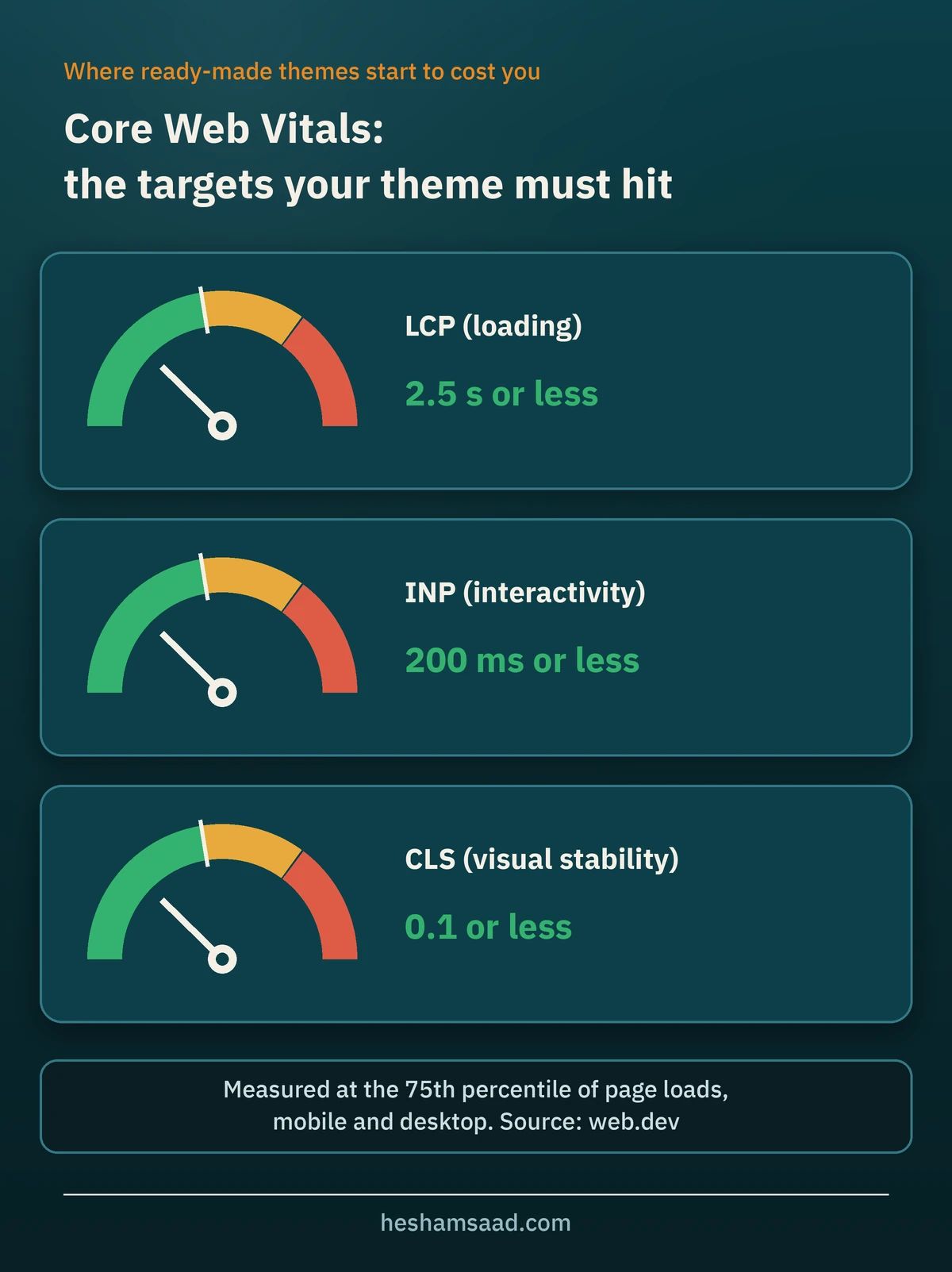
A theme sold to thousands of buyers has to cover many use cases: sliders, portfolios, mega menus, dozens of header layouts and demo importers. Some themes load only what each page needs; others load much more. Extra scripts and styles can push your pages past the Core Web Vitals targets Google publishes: Largest Contentful Paint within 2.5 seconds, Interaction to Next Paint of 200 milliseconds or less, and Cumulative Layout Shift of 0.1 or less, measured at the 75th percentile of page loads. Test the demo and your own staging pages, not the sales page.
### 2. Page builder lock-in
Many premium themes come bundled with a page builder, and their demo pages are built with that builder's own elements. Content stored this way usually depends on the builder to display correctly, so if you later change theme or drop the builder, those pages often need rebuilding. Before you buy, ask how the demo pages are built and what happens to them if the builder is removed.
### 3. Business features living inside the theme
The WordPress theme handbook is clear here: themes control presentation, and plugins control features. If a theme adds site-critical functionality, such as a portfolio section, you lose it when you change themes. WordPress.org enforces this in its own directory, where themes may not include custom post types, custom blocks, shortcodes or other functionality unrelated to design. Many commercial themes bundle such features anyway, which makes leaving them harder later.
### 4. Licences, updates and abandoned products
Many commercial themes deliver updates and support through a licence key tied to a subscription. That is fair, but someone has to keep the licence active, in an account your company controls. A theme that stops receiving updates becomes a long-term risk as WordPress, PHP and your plugins move forward. Check the changelog and update history before you buy.
### 5. RTL that works on the demo but not on your content
Plenty of themes claim RTL support. On real Arabic sites we still see arrows pointing the wrong way, sliders running backwards, menus breaking on mobile and Arabic fonts missing the weights the design needs. Our guide on [fixing WordPress RTL issues](https://heshamsaad.com/en/fix-wordpress-rtl-issues/) lists the usual problems and how to test for them.
### 6. Customising against the theme
When the design you need is far from the demo, your developer ends up writing CSS to undo the theme's styles before adding your own. The site works, but every theme update can break those overrides. At that point you are paying for custom work anyway, on top of a base that resists it.
## What a custom WordPress theme project includes
A custom WordPress theme is more than a design file turned into code. On a new site today it is usually a block theme, which the WordPress theme handbook calls the modern method of building themes. Block themes use HTML templates made of blocks, which your team can edit in the Site Editor, and a theme.json file that holds global settings and styles. A complete project should cover the following.
### Discovery and design
The work starts with your business, not with a layout. A good developer or designer asks about your audience, the pages that bring in enquiries, the content you already have, who will edit the site and which languages you need. The design phase then produces page designs for desktop and mobile, in Arabic and English if the site is bilingual, plus a small design system: colours, type sizes, spacing and the reusable sections the site will be built from.
### The theme's structure
WordPress needs only two files to recognise a block theme: style.css and templates/index.html. A real project adds much more. This table shows the standard parts of a block theme and what each one means for you:
| Part of the theme | What it controls | Why it matters to you |
|---|---|---|
| style.css | Theme name, details and optional extra CSS | Required. Identifies the theme in your dashboard. |
| templates/ | Full-page layouts such as the home page, single posts, archives and the 404 page | Each unique page type is a template to design, build and test. |
| parts/ | Reusable template parts such as the header and footer | Edit the header once and it changes everywhere. |
| patterns/ | Ready sections your team can insert: hero, services grid, testimonials, call to action | Lets non-developers build new pages that still look on-brand. |
| theme.json | Colour palette, fonts, font sizes, spacing, layout widths and which design controls editors see | Keeps the brand consistent and the editor simple. |
| styles/ | Style variations with alternative colour and type settings | Useful for a campaign look or a sub-brand. |
| functions.php | Small amounts of PHP the theme needs, such as loading assets | Should stay light. Business features belong in plugins. |
### Brand rules in theme.json
theme.json is where a custom theme earns its keep. Your developer registers your exact brand colours as a palette, your fonts as font families (with the font files bundled in the theme), and a set of font sizes that can scale smoothly between mobile and desktop. They can also switch off the controls that let editors drift away from the brand. For example, this setting removes the custom colour picker and WordPress's default palette, so editors choose only from your brand colours:
```
{
"version": 3,
"settings": {
"color": {
"custom": false,
"defaultPalette": false
}
}
}
```
The theme handbook makes the same distinction: a theme built for a client can limit users to a predetermined palette, while a theme sold publicly usually leaves every option open.
### Patterns your team can use safely
Patterns are reusable groups of blocks. WordPress automatically registers the pattern files placed in a theme's patterns folder, so your editors find them in the inserter. With the Block Locking API, a developer can stop a block from being moved or removed, or set a section to content-only editing so your team can change text and images without touching the layout. This is how a custom theme stays tidy long after the agency has handed it over.
### Arabic, RTL and typography
For sites in the region, this is often the strongest reason to go custom. A theme built with Arabic in mind from day one:
- Sets the page direction properly. The W3C advises adding dir="rtl" to the html element of a right-to-left document and using logical start and end values for margins, padding and alignment.
- Uses CSS logical properties such as margin-inline-start instead of margin-left, so one rule works in both Arabic and English. web.dev describes logical properties as giving free, automatic support for internationalisation.
- Pairs Arabic and Latin fonts that sit well together and bundles them with the theme through theme.json, instead of loading them from wherever a plugin happens to choose.
- Is tested with real Arabic content: long headings, Arabic and English words in the same line, numbers and forms.
- Flips arrows and other directional icons only where their meaning depends on direction.
- Settles details that the W3C covers in its Arabic layout requirements, such as which numeral style the site uses and how justified Arabic text is spaced.
Classic themes can also add an rtl.css file, which WordPress loads automatically when the site language is right-to-left. Either way, Arabic should be designed from the start, not patched in at the end.
### Performance and accessibility
A custom theme should load only what your pages use. WordPress can load each core block's styles only on pages where that block actually appears (developers control this with the should\_load\_separate\_core\_block\_assets filter), and a lean theme avoids shipping libraries your site doesn't need. Agree on targets in advance, such as the Core Web Vitals thresholds above, and test on an average phone over mobile data. Our guide to [speeding up Arabic WordPress sites](https://heshamsaad.com/en/speed-up-wordpress-arabic-sites/) covers fonts, images and caching in more detail.
For accessibility, a sensible baseline is what WordPress.org requires from every theme in its directory: a skip link to the main content, visible keyboard focus on menus, links and form fields, and every control reachable by keyboard. Block themes add the skip link automatically.
### Handover
The project should end with you owning everything: the theme files, ideally in a code repository your company can access, a list of templates and patterns with notes on how to use them, a short training session for your editors, and a clear plan for updates. A custom theme has no vendor shipping updates, so someone must keep it compatible as WordPress changes. Agree on who does that before launch.
## The middle path: child themes and customised block themes
Not every business needs a theme built from nothing. A child theme lets a developer change a parent theme without editing its files, so the parent can still be updated without losing your changes. In a block child theme, any template, template part or pattern can be overridden with a file of the same name, and new ones can be added. Before you settle on a theme, decide whether the site will be built in the block editor or a page builder, and our comparison of [Elementor vs Gutenberg](https://heshamsaad.com/en/elementor-vs-gutenberg/) shows what each choice means for your business site.
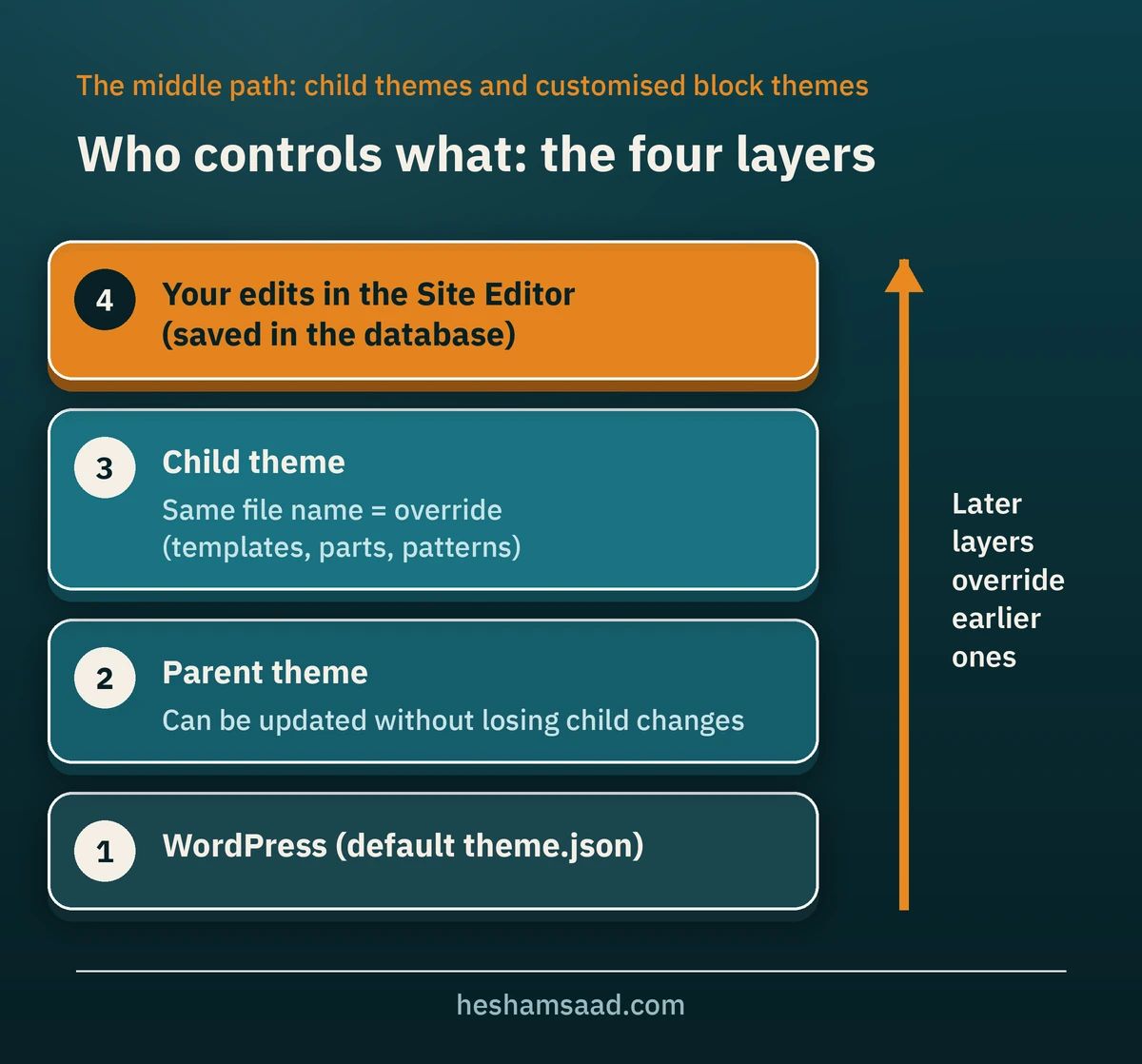The theme handbook adds an honest warning: extensive customisation inside a child theme can become a management headache, and for bigger projects it is often better to build a full theme of your own. A practical rule is that a child theme suits moderate changes to a well-built parent, while a redesign that touches most templates is a custom theme in all but name.
There is also a newer route. With a block theme, you can adjust templates and styles in the Site Editor and export the result as a theme. The free Create Block Theme plugin, published by WordPress.org, can create a blank theme, a child theme or a clone of the active theme, and save changes made in the editor back into the theme files. In experienced hands this shortens a custom build, but it does not replace design work, RTL testing or code review.
## Custom WordPress theme vs premium theme: a decision table
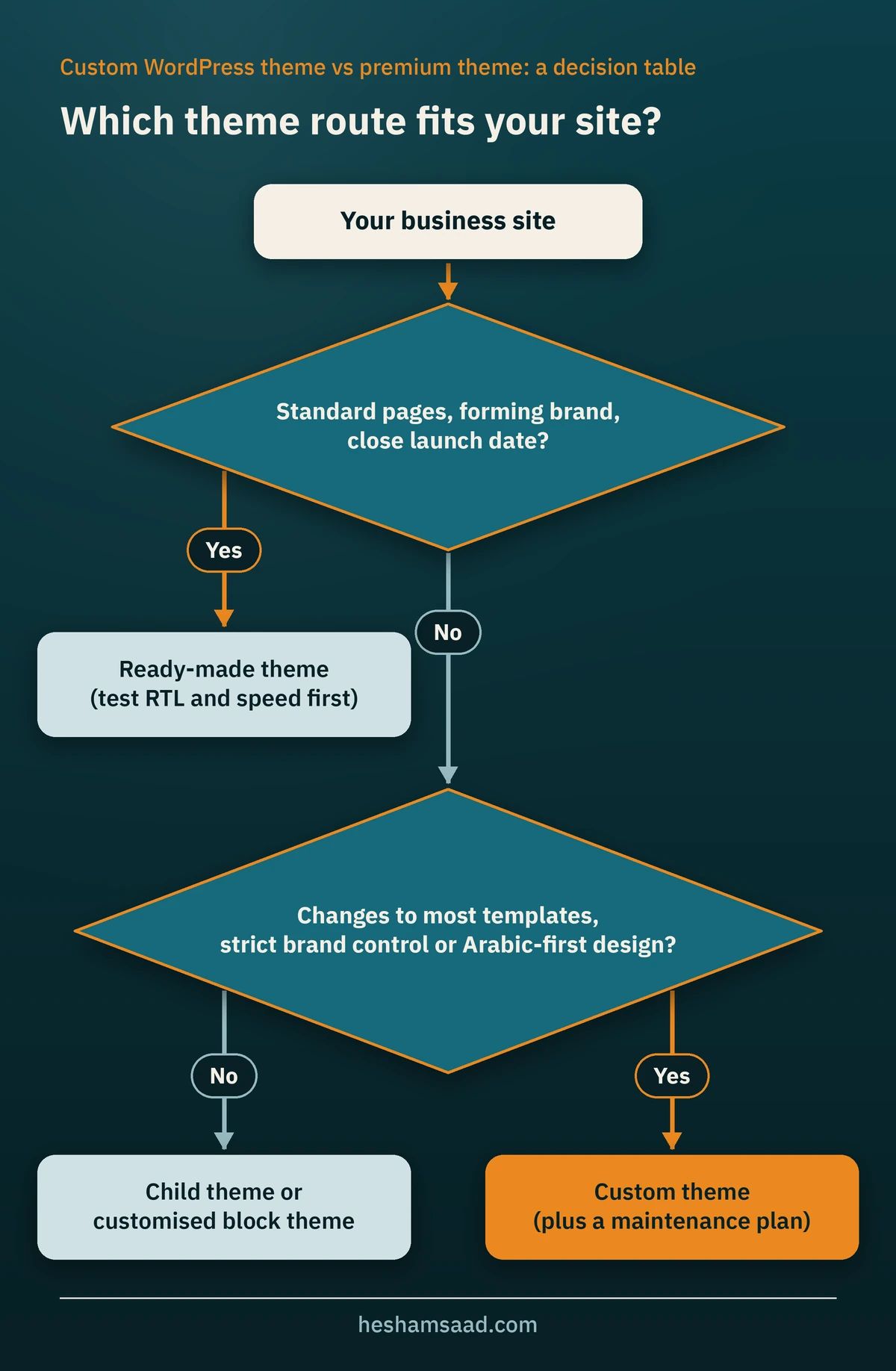
Use this table as a starting point. Most sites fit one column clearly. If yours sits between two, the middle path is usually the answer.
| Your situation | Ready-made theme | Child theme or customised block theme | Custom theme |
|---|---|---|---|
| New business, standard pages, close launch date | Good fit | Possible | Usually more than you need |
| Established brand with guidelines no demo matches | Poor fit | Possible if changes are moderate | Good fit |
| Arabic-first or fully bilingual site | Only after careful RTL testing | Good fit with a strong RTL parent | Good fit |
| Speed is a priority (ad landing pages, mostly mobile visitors) | Depends on the theme, so test it | Good fit with a lean parent | Good fit |
| Several editors who must stay on-brand | Hard to control | Good with locked patterns | Good fit |
| Current site built with a page builder you want to leave | Risk of repeating the problem | Possible | Good fit, with a planned rebuild |
| Nobody to maintain the site after launch | Good fit, the vendor ships updates | Needs light maintenance | Needs a maintenance plan |
## What drives the cost and timeline of WordPress theme development
We won't put numbers here, because two honest quotes for "a custom theme" can describe very different amounts of work. These are the factors that move the budget and the schedule the most:
- Number of unique templates. A home page, a service page and a blog post layout are three designs. Ten different landing page layouts are ten.
- Number of patterns. Each reusable section has to be designed, built, made responsive and tested in both languages.
- Languages and direction. A bilingual Arabic and English site needs every template checked in RTL and LTR, plus translated pattern text.
- Design maturity. If you already have brand guidelines and approved page designs, the build starts sooner. If design starts from zero, that is a full phase of its own.
- WooCommerce. Store templates such as product, cart and checkout add design and testing work.
- Content readiness. Missing text and photos delay launches more often than code does.
- Migration. Moving pages out of a page builder, or keeping URLs and rankings intact, takes planning. Our guide to [WordPress website redesign without losing traffic](https://heshamsaad.com/en/wordpress-website-redesign/) explains the steps.
- Performance and accessibility targets. Agreed targets mean extra testing time, and that time is well spent.
- Training and documentation. A small item, but it should be written into the quote.
A ready-made theme moves cost to later: licence renewals, workarounds and sometimes an earlier redesign. A custom theme moves it to the start. Neither is automatically cheaper over the life of the site, so compare both over the years you expect to keep it.
## Questions to ask a developer before you hire
The answers will tell you more than a portfolio. Ask:
- Will you build a block theme or a classic theme, and why is that right for my site?
- Which features will live in the theme and which in plugins? The answer you want keeps business features out of the theme.
- How will my brand colours, fonts and spacing be set in theme.json, and which design controls will my editors see?
- Which patterns will you build, and will any be locked to content-only editing?
- How do you handle Arabic: font pairing, RTL testing, mixed Arabic and English text, and logical CSS?
- Which performance targets will you commit to, and on which devices will you test?
- Does the theme meet basic accessibility: a skip link, visible focus and keyboard navigation?
- Who owns the code, and will we receive the repository and the licences for every font and image?
- Who keeps the theme compatible with future WordPress versions, and how is that priced?
For more on choosing the right person or team, read our guide on how to [hire a WordPress designer](https://heshamsaad.com/en/hire-wordpress-designer/).
## Launch and handover checklist
Before you sign off on a custom theme, make sure you have:
- The theme files and access to the code repository, in an account your company controls.
- A list of every template, template part and pattern, with a screenshot of each.
- Fonts and images whose licences allow use on your site, listed in one file.
- Brand colours, fonts and sizes set in theme.json rather than scattered through CSS.
- Arabic and English versions of every template tested on mobile and desktop.
- Core Web Vitals checked on your key pages after launch, in PageSpeed Insights or Search Console.
- A working skip link, visible focus styles and keyboard-friendly menus.
- No business-critical features stored inside the theme.
- A recorded training session your future editors can watch.
- A written maintenance plan for theme, plugin and WordPress updates.
## Frequently asked questions
### Is a custom WordPress theme worth it for a small business?
Often not at the very start. If your pages are standard and your brand is still forming, a well-tested ready-made theme or a child theme gets you a good site sooner. A custom theme becomes worth it when your brand, your Arabic content, your speed targets or your editors' needs keep pushing against what a ready-made theme can do.
### Can I edit a custom block theme myself after launch?
Yes. With a block theme you edit content, menus and, where allowed, templates and styles in the Site Editor. Your changes are saved in the database as a layer on top of the theme files. A well-built custom theme gives you patterns for new sections and keeps the controls that could break the design switched off or locked.
### Will a custom theme make my site faster?
Not automatically. A custom theme can be lean because it ships only what your site uses, but heavy images, too many plugins or slow hosting can still hold it back. Ask for performance targets in writing and test again after launch.
### Can I switch from my premium theme to a custom theme without losing SEO?
Yes, if the switch is planned. Keep your URLs, carry over all content and SEO settings, test on a staging copy, and redirect anything that has to change. A theme change alters the design, not the content itself, but pages built with a page builder may need to be rebuilt first.
If you are weighing a custom WordPress theme against a ready-made one, send us your current site or your brief. You can [see our WordPress development service](https://heshamsaad.com/en/wordpress-development/) or [book a free consultation](https://heshamsaad.com/en/free-consultation/), and we will tell you honestly which of the three options fits your business.
## References
- [What Is a Theme?, WordPress Theme Handbook](https://developer.wordpress.org/themes/getting-started/what-is-a-theme/)
- [Theme Structure, WordPress Theme Handbook](https://developer.wordpress.org/themes/core-concepts/theme-structure/)
- [Global Settings and Styles (theme.json), WordPress Theme Handbook](https://developer.wordpress.org/themes/global-settings-and-styles/)
- [Color settings, WordPress Theme Handbook](https://developer.wordpress.org/themes/global-settings-and-styles/settings/color/)
- [Typography settings, WordPress Theme Handbook](https://developer.wordpress.org/themes/global-settings-and-styles/settings/typography/)
- [Theme.json Version 3 Reference, Block Editor Handbook](https://developer.wordpress.org/block-editor/reference-guides/theme-json-reference/theme-json-living/)
- [Patterns, WordPress Theme Handbook](https://developer.wordpress.org/themes/patterns/)
- [Patterns and Block Locking, WordPress Theme Handbook](https://developer.wordpress.org/themes/patterns/patterns-and-block-locking/)
- [Child Themes, WordPress Theme Handbook](https://developer.wordpress.org/themes/advanced-topics/child-themes/)
- [Template Files (rtl.css), WordPress Theme Handbook](https://developer.wordpress.org/themes/classic-themes/basics/template-files/)
- [WordPress Code Reference: loading core block styles separately](https://developer.wordpress.org/reference/functions/wp_should_load_separate_core_block_assets/)
- [Site Editor, WordPress.org Documentation](https://wordpress.org/documentation/article/site-editor/)
- [Create Block Theme, WordPress.org plugin directory](https://wordpress.org/plugins/create-block-theme/)
- [Theme review requirements, WordPress Themes Team](https://make.wordpress.org/themes/handbook/review/required/)
- [WordPress License (GPL), WordPress.org](https://wordpress.org/about/license/)
- [Commercially supported GPL themes, WordPress.org](https://wordpress.org/themes/commercial/)
- [Structural markup and right-to-left text in HTML, W3C](https://www.w3.org/International/questions/qa-html-dir)
- [Arabic and Persian Layout Requirements, W3C](https://www.w3.org/TR/alreq/)
- [Logical properties, web.dev](https://web.dev/learn/css/logical-properties)
- [Web Vitals, web.dev](https://web.dev/articles/vitals)