---
id: 15210
title: "Choose Web Development Agency MENA: Scope, Code & Audit Guide"
slug: "choose-web-development-agency-mena"
lang: "en"
url: "https://heshamsaad.com/en/choose-web-development-agency-mena/"
markdown_url: "https://heshamsaad.com/en/choose-web-development-agency-mena.md"
translations: {"ar":"https://heshamsaad.com/ar/choose-web-development-agency-mena/"}
description: "How to choose web development agency MENA partners: compare fixed scope vs retainer models, protect GitHub and server ownership, and spot red flags."
author: "Safya"
date_published: "2026-11-20T12:01:01Z"
date_modified: "2026-11-20T12:01:01Z"
categories: ["WooCommerce"]
tags: ["MENA E-commerce","Web Development Agency","WooCommerce","WordPress"]
featured_image: "https://heshamsaad.com/wp-content/uploads/2026/11/choose-web-development-agency-mena-og-en.jpg"
word_count: 2858
reading_time_min: 14
content_sha256: "88edde278931efda9bb563c2f9e490e17bee8b6427d606fffcaf55d903dc54a7"
---
# Choose Web Development Agency MENA: Scope, Code & Audit Guide
When founders and operations directors set out to choose web development agency MENA partners for a WordPress or WooCommerce build, the biggest risks rarely appear in the design mockup. Most budget overruns and launch delays happen inside the contract, the code repository setup, and the hosting account. A polished pitch deck tells you very little about whether your business will own its source code, how change requests will be priced, or who holds the domain keys when the project ends.
Across Saudi Arabia, the UAE, and Egypt, companies commissioning bilingual Arabic and English websites face distinct operational hurdles. You need a partner who handles right-to-left interface behavior, regional checkout workflows, and mobile performance. Equally important, you need commercial terms that protect your company if you switch vendors or bring maintenance in house. If you are still selecting your store foundation, review our [WooCommerce vs Shopify](https://heshamsaad.com/en/woocommerce-vs-shopify/) comparison before issuing an agency brief.
## How to choose web development agency MENA proposals with confidence
Comparing two agency quotes side by side often feels frustrating because one lists a low lump sum while another breaks the work into discovery, engineering, and testing phases. A lower headline number usually hides missing scope items such as Arabic typography tuning, product data formatting, staging setup, or post-launch documentation. When omitted from the initial agreement, those items turn into costly change orders halfway through the build.
Every credible proposal should separate three layers of work: architectural discovery, core implementation, and post-launch support. Discovery covers the site map, multilingual structure, integration inventory, and data migration plan. Implementation covers theme or custom block engineering, plugin configuration, Arabic RTL styling, and quality assurance. Support covers security updates, off-site backups, and uptime monitoring.
Scope complexity also varies sharply by business model. A corporate site for an engineering firm, such as the structure in our [WordPress guide for construction companies](https://heshamsaad.com/en/construction-company-website-wordpress/), relies on predictable page templates and lead forms. By contrast, a [building materials WooCommerce website](https://heshamsaad.com/en/building-materials-website-woocommerce/) with bulky shipping classes, ERP inventory sync, and quote workflows requires deeper backend engineering and stricter testing criteria. Ask every agency to tie its estimate to a documented list of templates, integrations, and user roles rather than generic labels.
## Fixed scope vs retainer web development models
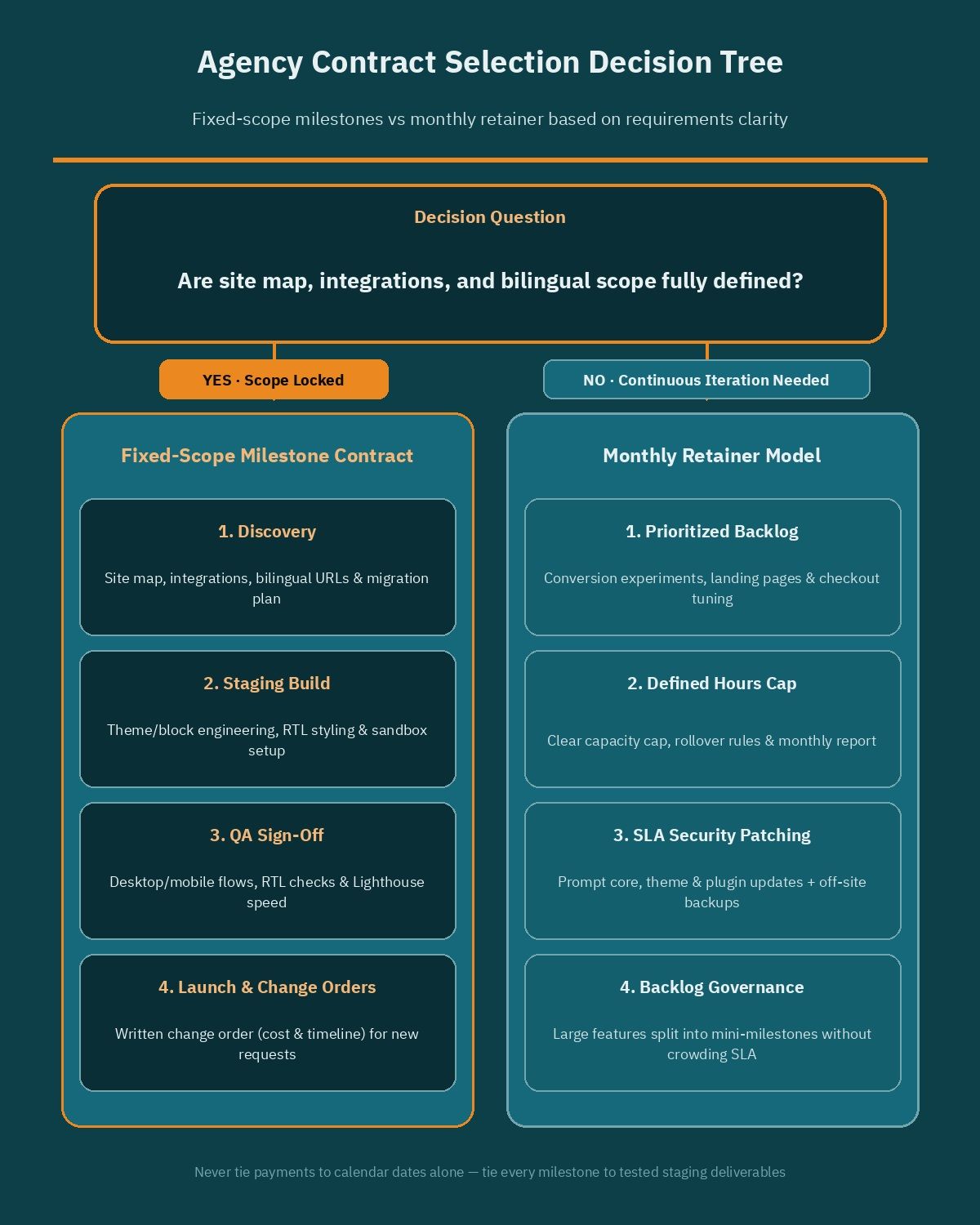
Choosing between fixed scope vs retainer web development contracts depends on how clearly your requirements are defined before coding starts. Both structures work well in the right stage and fail badly when mismatched to the project.
### When fixed-scope milestones fit a build
A fixed-scope contract fits when your site map, functional specifications, third-party integrations, and bilingual content structure are locked before development begins. You agree on a total budget and split payments across concrete deliverables, such as approved wireframes, a working staging build, QA sign-off, and final production deployment.
This model gives founders predictable budgeting and protects operations teams from open-ended hourly billing during an initial launch. However, fixed scope only stays fair when assumptions are documented upfront. If your team adds an unplanned ERP connector mid-project, a disciplined agency will pause and issue a formal change order rather than silently absorbing extra engineering hours.
### When a monthly retainer fits ongoing store growth
Once a WooCommerce store goes live, fixed-scope projects become slow for day-to-day evolution. E-commerce managers constantly need conversion experiments, landing pages, checkout refinements, speed tuning, and security updates. A monthly retainer reserves predictable engineering and QA capacity each month without writing a new statement of work for every ticket.
Retainers also suit phased builds shaped by live customer feedback. Require written scope governance in any retainer: a prioritized backlog, clear cap or rollover terms for unused hours, and monthly reporting showing shipped tickets and remaining capacity.
### How change-request pricing works in each model
In a fixed-scope agreement, any requirement outside the signed specification triggers a written change order stating the task scope, fee, and schedule impact before work starts. Never approve scope changes informally in chat threads without a written impact note. In a monthly retainer, new requests are estimated in hours and prioritized inside the active backlog, or split into a dedicated mini-milestone if they exceed monthly capacity so routine security patching is never crowded out.
| Decision factor | Fixed-scope milestone contract | Monthly retainer model |
|---|---|---|
| Best fit | Defined corporate sites and initial store launches | Ongoing WooCommerce growth, CRO, and maintenance |
| Requirements clarity | High clarity before signing | Evolving priorities shaped by live store data |
| Payment trigger | Signed acceptance of tested staging milestones | Monthly fee tied to SLA and agreed capacity |
| Change-request handling | Written change order with cost and timeline impact | Prioritized inside the monthly backlog or split across sprints |
| Main buyer risk | Vague initial specs leading to costly add-on fees | Paying for unused capacity or unclear ticket output |
## Code, GitHub, and infrastructure ownership
Asset control is where many MENA businesses get burned when a vendor relationship ends. Securing WordPress agency code ownership means every foundational account sits under your company's legal entity, paid on your corporate card, with internal leadership holding primary administrator credentials.
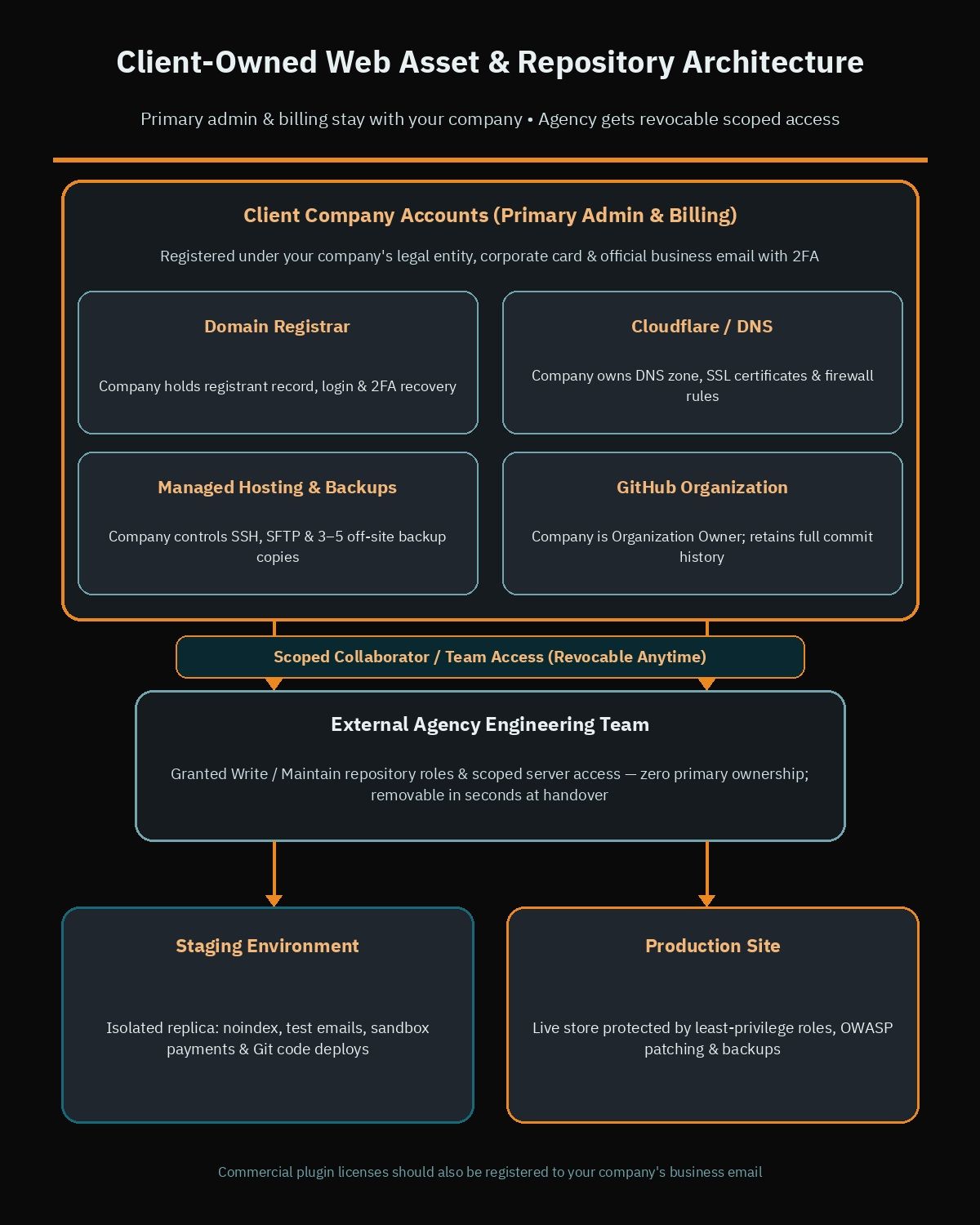Never let an agency register your domain under their corporate account, host your store on a shared reseller server you cannot log into, or store your custom code inside their private developer account. If a dispute occurs, recovering a domain or database held in someone else's name can stall operations for weeks.
Separate your infrastructure into four client-owned accounts and grant the agency scoped access to each:
- Domain registrar: Your company holds the registrant record and account login, with two-factor authentication tied to a company email address.
- Cloudflare and DNS: Your company owns the DNS zone so SSL certificates, firewall rules, and traffic routing remain under your control.
- Hosting server and backups: Your company owns the cloud or managed WordPress hosting subscription and controls SSH, SFTP, and backup storage permissions.
- Code repository: Your company creates a GitHub Organization, owns the repositories inside it, and invites agency engineers with scoped permissions.
According to GitHub's official Organizations documentation, an organization serves as a shared company account that owns repositories centrally while organization owners manage security policies, billing, and member roles. By creating teams inside your company's GitHub Organization, you grant agency engineers Write or Maintain access to the project repository while retaining exclusive Organization Owner rights. At handover, removing the agency team takes seconds and leaves the entire commit history intact in your hands.
Avoid proprietary lock-in as well. Your site should run on standard WordPress core features, native Gutenberg blocks, or commercial plugins whose licenses are registered to your business email, never an undocumented custom framework only one agency can edit.
## Milestone acceptance criteria and staging discipline
Calendar-based billing is a common trap. Scheduling a 40 percent payment on week four regardless of what actually works removes your leverage the moment a build slips. Tie every milestone invoice to written acceptance criteria verified on a staging environment.
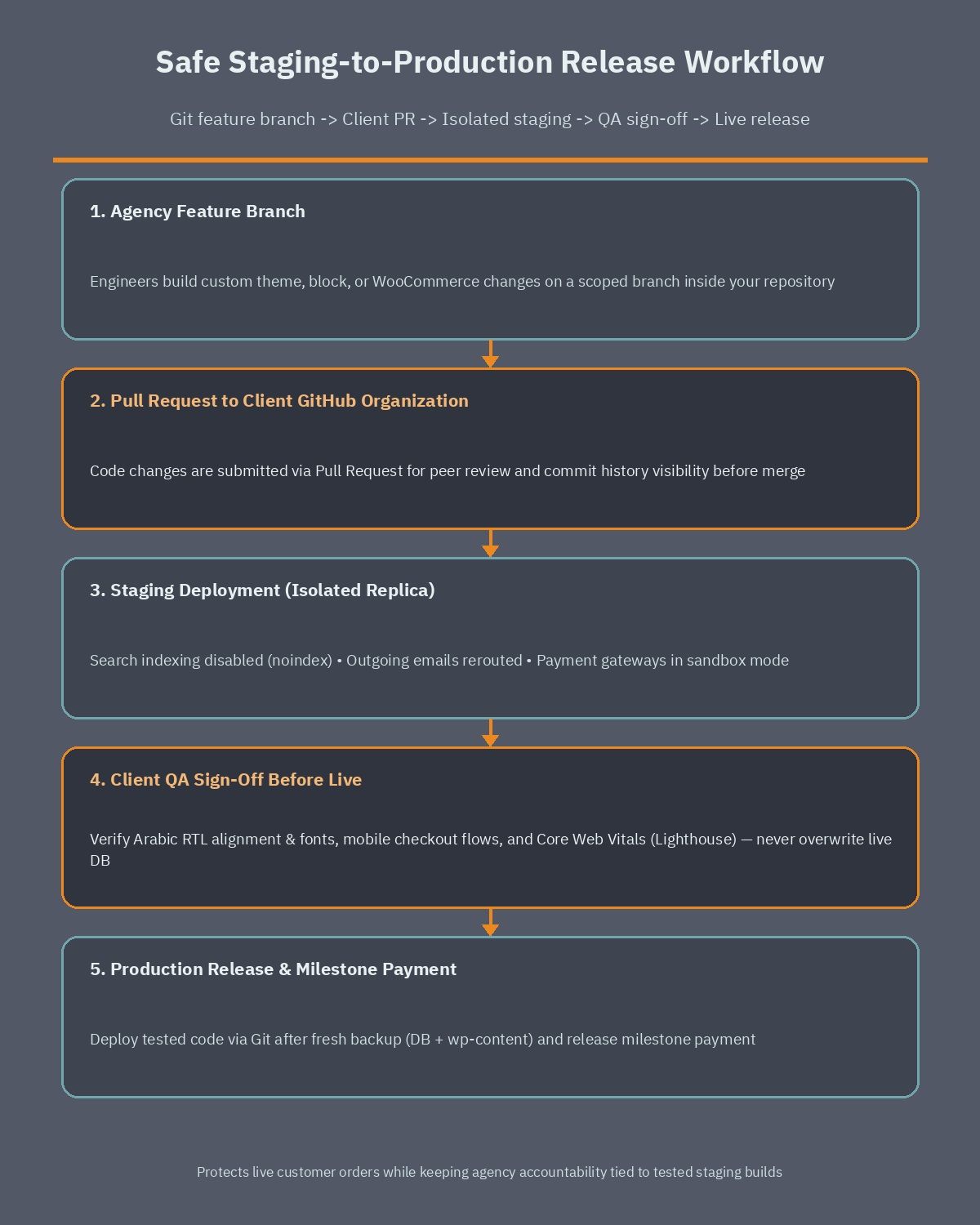WooCommerce's official documentation stresses never testing updates or code changes directly on a live, revenue-generating store. A staging site is an isolated replica of your live website where engineers deploy changes, run plugin updates, and test theme adjustments safely. Three technical safeguards belong in every staging rule: search engine indexing must be disabled so Google does not index duplicate pages, outgoing customer emails must be disabled or rerouted to test inboxes, and payment gateways must run in sandbox or test mode.
Staging discipline also protects live order data. As WooCommerce guidance warns, pushing a full staging database back onto production overwrites real customer orders or account registrations placed during the testing window. Your agency must deploy code through Git from staging to production while applying configuration changes cleanly, never blindly overwriting live database tables.
Before signing off on a launch milestone, verify the staging build against measurable QA criteria:
- End-to-end user flows: Test forms, account login, cart updates, coupon rules, shipping zones, and sandbox checkout on desktop and mobile browsers.
- Arabic RTL verification: Check navigation mirroring, slider direction, tables, validation alerts, and Arabic font rendering. Include the checks in our guide to [speeding up Arabic WordPress sites](https://heshamsaad.com/en/speed-up-wordpress-arabic-sites/) inside your acceptance sheet.
- Core Web Vitals and asset hygiene: Run mobile and desktop Lighthouse checks on key landing, category, and product templates on staging so bloated scripts or uncompressed images are fixed prior to final payment.
- Structured data and metadata: Confirm canonical tags, XML sitemaps, and schema markup such as FAQPage structured data are ready for production once indexing is enabled at launch.
## Service level agreements and uptime response terms
A website launch is the start of operational responsibility, not the finish line. Before signing any post-launch support agreement, make sure your Service Level Agreement (SLA) defines response windows, coverage hours, and escalation paths in plain writing.
Separate response time from resolution time, and divide issues into clear severity tiers. A critical outage where checkout fails or the server returns errors requires an urgent response window and immediate triage, whereas a minor spacing issue on an informational page belongs in a standard business-day queue. Confirm local weekend coverage aligned with your team's operating days across Saudi Arabia, the UAE, or Egypt, and list a named technical escalation contact.
## Backup retention, security patching, and handover documentation
Backups and security updates only protect you when their exact scope is written into the contract. Both the WordPress Advanced Administration Handbook and WooCommerce documentation emphasize that a complete backup covers two distinct layers: the database (posts, products, orders, customer records, and settings) and the wp-content directory (themes, plugins, and uploaded media). Relying on partial exports leaves a store unrecoverable.
Follow the retention rules in WordPress's official Advanced Administration documentation: match backup frequency to site activity (daily for active stores and at least weekly for low-change sites), always create a fresh backup before any core, theme, or plugin upgrade, and store three to five recent copies across independent off-site locations rather than on the same web server. Include periodic test restores on staging inside your SLA so recovery is verified before an emergency.
Security patching requires equal discipline. WordPress's security handbook notes that keeping core, themes, and plugins updated is the single most critical application-level step, and WooCommerce advises applying security releases promptly rather than waiting for a monthly update window. Align your contract with OWASP Top 10 protections covering Broken Access Control, using least-privilege admin roles and restricted server access, and Vulnerable and Outdated Components, maintaining an active dependency inventory and removing unused plugins.
Require a complete handover documentation package at launch and after major upgrades: a hosting and DNS architecture map, a register of commercial plugin licenses with renewal dates, repository README notes, and step-by-step deployment instructions.
## Website agency red flags in Saudi Arabia, Egypt, and the UAE
Recognizing common website agency red flags Saudi Egypt UAE buyers encounter helps you eliminate risky vendors early in procurement. Walk away or demand contract revisions if you see any of these patterns:
- Vague promises of unlimited pages or unlimited revisions: Reliable agencies scope effort around template types, data models, and integrations. "Unlimited" offers usually mask rigid templates and slow post-deposit delivery.
- Missing Arabic RTL and speed benchmarks: Proposals that omit Arabic font loading, mirrored navigation, bilingual URL logic, or mobile Core Web Vitals checks often ship broken layouts and sluggish checkouts.
- Withholding admin, SSH, SFTP, or repository access: Refusing to grant full WordPress administrator rights, hosting access, or GitHub ownership creates artificial vendor lock-in.
- Bundling unlicensed or nulled premium plugins: Cracked plugins or undocumented agency licenses expose your store to OWASP Vulnerable and Outdated Components risks and block official security patches.
- Calendar-only billing without staging QA: Invoices tied strictly to calendar dates remove accountability for incomplete or buggy deliverables.
- No code review or rollback workflow: If an agency cannot explain how pull requests are reviewed or how a failed release is rolled back, they lack basic engineering controls.
When your project is a focused e-commerce build or technical rescue rather than a broad brand campaign, compare agencies against a dedicated specialist. Our guide on when to [hire a WooCommerce developer](https://heshamsaad.com/en/hire-woocommerce-developer/) outlines the trade-offs clearly.
## How to audit a web development agency contract this week
Whether you are reviewing a new quote or checking an existing vendor, you can audit web development agency contract terms and technical ownership in under an hour. Run this five-point contract and repository ownership audit this week before paying your next deposit or milestone invoice:
1. Verify domain, DNS, and hosting accounts are in your company's name: Sign into your domain registrar, Cloudflare dashboard, and hosting control panel using company credentials, and confirm billing and primary recovery emails belong to your business.
2. Confirm GitHub repository admin ownership: Verify your codebase sits inside a GitHub Organization owned by your company, confirm internal leadership holds Organization Owner status, and keep agency staff in revocable collaborator teams.
3. Check staging-before-live deployment rules: Confirm the contract mandates an isolated staging environment with indexing disabled and sandbox payments active, plus written acceptance criteria tied to milestone payments.
4. Verify source-code IP assignment in the contract: Confirm the intellectual property clause assigns full rights to all custom themes, plugins, and scripts to your company upon payment, with commercial licenses registered to your business email.
5. Confirm written SLA and backup retention terms: Check for severity-based response windows, prompt security patching obligations, and automated off-site backups covering both database and wp-content files across independent locations.
If your proposal or current vendor agreement fails two or more of these five checks, pause before approving the next payment and request written amendments. When you want a technical review of an agency scope, repository setup, or WordPress build plan, [book a free consultation](https://heshamsaad.com/en/free-consultation/) with our team, or review our [WordPress development service](https://heshamsaad.com/en/wordpress-development/) to see how we structure transparent ownership, staging QA, and long-term maintenance.
## Frequently asked questions
Should I choose a fixed-scope contract or a monthly retainer for my website?Choose a fixed-scope milestone contract when your site map, integrations, and bilingual requirements are fully defined before coding begins. Choose a monthly retainer after launch when an active WooCommerce store needs ongoing experiments, checkout refinements, and security updates. In both cases, require written rules for change requests so extra features never turn into surprise invoices.
Who should own the domain, hosting account, and GitHub repository?Your company should own the domain registrar, Cloudflare DNS, hosting server, and GitHub Organization from day one using company billing and recovery emails. Grant the agency scoped collaborator or team permissions instead of giving away primary admin ownership. That structure lets you revoke vendor access cleanly at handover while keeping your full code history and infrastructure intact.
What should I test on staging before paying a launch milestone?Test complete user flows on desktop and mobile browsers, including forms, cart updates, shipping zones, and sandbox checkout, while keeping search indexing disabled and test emails isolated. Verify Arabic right-to-left alignment and font loading alongside mobile Core Web Vitals checks. Never approve a full database overwrite from staging to production if live customer orders are already coming in.
What backup and security terms should be in an agency SLA?Require automated backups covering both the WordPress database and the wp-content folder, stored across independent off-site locations with multiple recent copies and always taken before major upgrades. Your SLA should also define severity-based response windows, least-privilege access controls, and prompt security patching for core, themes, and plugins instead of waiting for monthly cycles.
What are the biggest warning signs in a web agency proposal?Watch out for vague unlimited pages promises, missing Arabic RTL and mobile speed benchmarks, calendar-based payments disconnected from staging sign-off, and refusal to share admin, SSH, or GitHub access. Bundling unlicensed or nulled plugins is another major red flag because it blocks official security patches and leaves your store exposed to known vulnerabilities.
## References
- [WordPress Developer Resources: Advanced Administration Handbook](https://developer.wordpress.org/advanced-administration/)
- [GitHub Docs: About organizations](https://docs.github.com/en/organizations/collaborating-with-groups-in-organizations/about-organizations)
- [WooCommerce Documentation: Store management, updates, backups, and staging](https://woocommerce.com/documentation/)
- [OWASP: Top Ten Web Application Security Risks](https://owasp.org/www-project-top-ten/)
- [Schema.org: FAQPage](https://schema.org/FAQPage)