---
id: 13724
title: "AI Content Writing for WordPress Sites: What Google Allows and Where a Human Still Matters"
slug: "ai-content-writing-wordpress"
lang: "en"
url: "https://heshamsaad.com/en/ai-content-writing-wordpress/"
markdown_url: "https://heshamsaad.com/en/ai-content-writing-wordpress.md"
translations: {"ar":"https://heshamsaad.com/ar/ai-content-writing-wordpress/"}
description: "AI content writing for WordPress business sites: what Google allows, which tools work in the editor, why Arabic needs a native editor and what to ask."
author: "Balqees"
date_published: "2026-10-24T21:50:08Z"
date_modified: "2026-10-24T21:50:10Z"
categories: ["AI for WordPress"]
tags: ["AI Content Writing","AI Plugins","WordPress AI","WordPress SEO"]
featured_image: "https://heshamsaad.com/wp-content/uploads/2026/10/ai-content-writing-wordpress-og-en.jpg"
word_count: 2678
reading_time_min: 13
content_sha256: "7d387290062eccb3d6a90f95cb6d919644c82a9053e337cb22f3ea34e92924bc"
---
# AI Content Writing for WordPress Sites: What Google Allows and Where a Human Still Matters
AI content writing for WordPress is now a normal part of building a business site. Most site owners we talk to in Egypt, Saudi Arabia and the Gulf have already tried pasting their service list into ChatGPT, Gemini or Claude and asking for a homepage. Some got a usable first draft. Others got polished text that could belong to any company in any country. The question is no longer whether to use AI, but which parts of your site it should write, who checks the result, and what Google expects from you.
This guide is for business owners who are planning a new site, a redesign, or a content refresh, and want to know where AI saves time and where it can hurt. It covers Google's official position, the writing tools that work inside WordPress today, the extra care Arabic content needs, and the questions to ask a designer or agency before you hand over your content. If you want a team to plan the content with the site, we handle it as part of [WordPress website development](https://heshamsaad.com/en/wordpress-development/) for Arabic and English business sites.
## Why content is the slowest part of most WordPress projects
Design and development usually run on a schedule. Content rarely does. A typical business site needs a homepage, service pages, an about page, contact details, policies, and often product descriptions or a blog. Each page needs facts that only the business owner knows: what you actually offer, who it is for, which cities you serve, how delivery or booking works.
That is where many projects stall. The design is ready, and the pages are waiting for text. AI tools can shorten this wait a lot, because they turn rough notes into structured drafts in minutes. What they cannot do is supply the facts, the experience, or the judgment about what your customers need to hear.
## What Google actually says about AI-generated content
Google has published clear guidance on this, and it is less dramatic than many people expect. In its February 2023 post on AI-generated content, Google said its ranking systems aim to reward original, high-quality content that shows experience, expertise, authoritativeness and trustworthiness (E-E-A-T), "however it is produced". Appropriate use of AI is not against its guidelines.
The line Google draws is about purpose and value, not the tool:
- Manipulating rankings is spam. Using automation, including AI, to generate content with the primary purpose of manipulating search rankings violates Google's spam policies.
- Mass pages without value are a named problem. Google's spam policy on "scaled content abuse" lists using generative AI tools to generate many pages without adding value for users as an example.
- Everything gets fact-checked, including metadata. Google's guidance on generative AI content reminds site owners that models predict likely words rather than retrieve facts, so outputs can contain errors. It asks you to review AI content before publishing, and says this applies to title elements, meta descriptions, structured data and image alt text too.
- Using AI gives no special boost. Google's FAQ puts it simply: AI content is "just content". If it is useful and original, it might do well. If not, it might not.
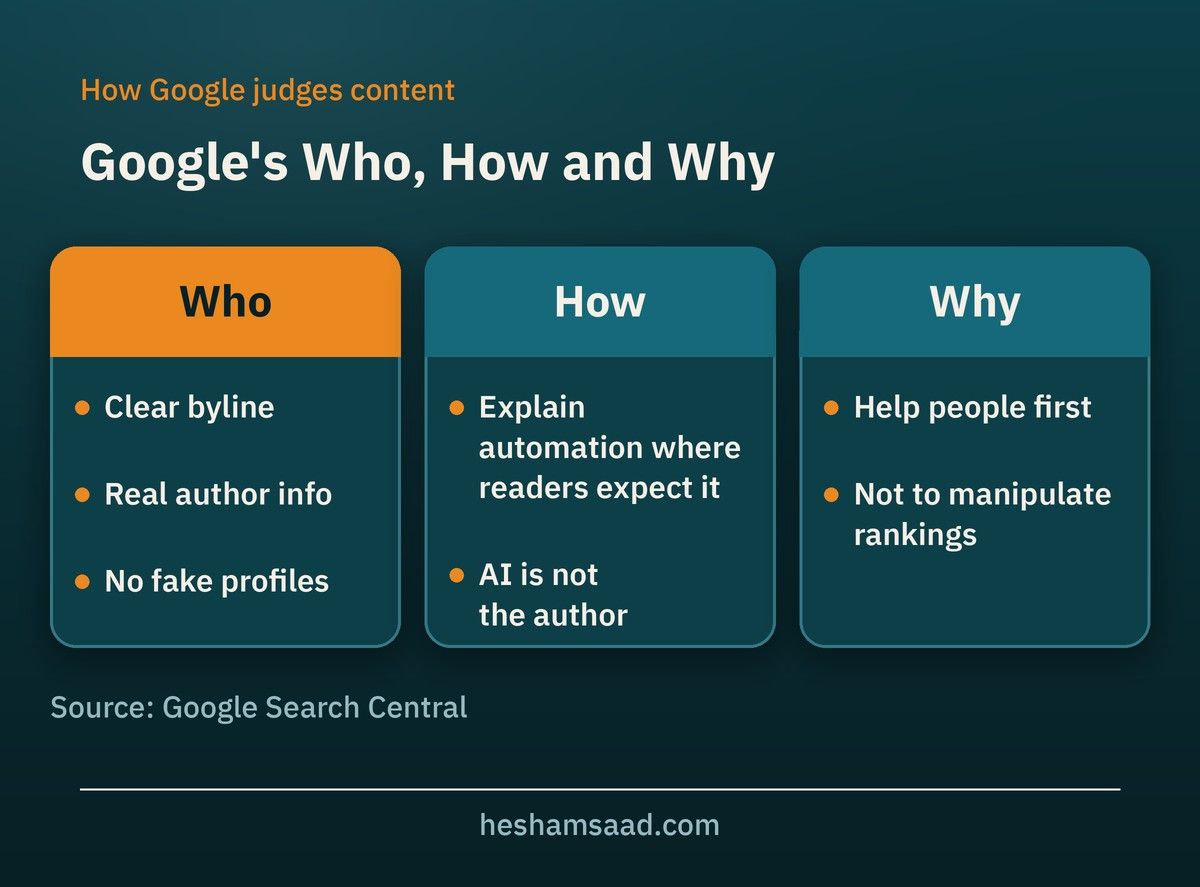
Google also suggests thinking about "Who, How and Why". Who wrote this page, and is that clear? How was it made, and would a reader reasonably expect to know if AI was involved? Why does the page exist: to help a customer, or only to catch search traffic? Google says giving AI an author byline is probably not the best way to show that AI was part of the process, and that fabricated author profiles, such as AI-generated headshots or invented credentials, are a form of deception.
## AI content writing for WordPress: what it does well and where it fails
AI is a strong assistant for some writing tasks and a weak one for others. The table below is a practical way to split the work between AI and a person.
| Task | How well AI handles it | What a person still does |
|---|---|---|
| Turning your notes into a page structure | Very well | Confirms the order matches how customers decide |
| First drafts of service pages | Well, if the brief has real facts | Adds specifics, removes generic claims |
| Rewriting, shortening or changing tone | Very well | Checks nothing important was lost |
| Titles, excerpts and meta descriptions | Well, as suggestions | Picks one, checks keyword and accuracy |
| Image alt text | Fair | Makes sure it describes the image in context |
| Facts, prices, policies and legal text | Poorly, it may invent details | Writes or verifies every line |
| Case studies and customer stories | Not at all without real input | Supplies real projects and permission to share them |
| Arabic brand voice | Inconsistent | Native editor reviews tone and phrasing |
The pattern is clear. AI is good at shaping and polishing. It is unreliable at knowing. Anything that a customer might act on, such as a price, a delivery time, a refund rule or a medical or financial claim, needs a person who knows the business to check it.
## The AI writing tools available inside WordPress
You do not have to copy and paste between a chat window and the dashboard. Several tools now work directly in the WordPress editor. Here are three you are likely to meet, described from their official pages.
### The official AI plugin from WordPress.org
The WordPress project publishes a free plugin called simply "AI". It builds on the AI Client and Connectors that arrived in WordPress 7.0, which we covered in our guide to [AI in WordPress 7.0](https://heshamsaad.com/en/ai-in-wordpress-7/). Its listed features include title, excerpt, meta description and slug suggestions, content summarization, shortening or expanding selected blocks, alt text generation, content translation, tag and category suggestions, and "Editorial Notes" that review a post block by block for accessibility, readability, grammar and SEO.
A few points matter for business owners:
- It needs an AI connector and your own API key from a provider such as OpenAI, Google or Anthropic. The plugin is free, but you pay the provider for usage.
- It works with the block editor only. Sites built on the Classic Editor will not see its features.
- The plugin describes itself as experimental and recommends testing on a staging site first. Its features are opt-in and run only when someone triggers them.
### Jetpack AI Assistant
Jetpack, from Automattic, includes an AI assistant in the editor. Its official page lists generating text, images, tables and lists from prompts, adjusting tone, spelling and grammar correction, and title and summary generation. There is a free tier with a limited number of requests, and paid plans for more. The paid plan can also connect outside assistants such as Claude or ChatGPT to the site.
### AI Engine
AI Engine by Meow Apps is a popular third-party plugin with 90,000+ active installations on WordPress.org. Besides chatbots, it has a Content Studio that turns a brief into a full draft, a Copilot in the editor to correct, rewrite, translate, shorten or lengthen text, and automatic alt text. Like the official plugin, it uses your own API keys from the AI providers you choose.
Which tool fits depends on who will write. If your team edits content in WordPress every week, an in-editor tool saves real time. If content is written once during the build, the tool matters less than the process around it. Any AI plugin also adds keys, permissions and data flows to your site, so read our guide to [WordPress AI plugin security](https://heshamsaad.com/en/wordpress-ai-plugin-security/) before installing one on a live site.
## Arabic content needs a native editor
AI models can write Arabic, but quality varies by model, topic and prompt. Even AI Engine's own FAQ notes that models support many languages but quality varies. In practice, these are the problems we see most in AI-drafted Arabic business copy:
- Translated thinking. The text is grammatically correct but follows English sentence order and idioms, so it reads like a translation even when it was written in Arabic.
- Mixed registers. Formal Modern Standard Arabic in one line, a dialect phrase in the next, and no consistent voice across pages.
- Gender and number agreement. Errors that a native reader notices immediately, especially in calls to action addressed to the visitor.
- Numbers and punctuation in RTL. Prices, phone numbers and percentages that display in the wrong order, or Latin punctuation inside Arabic sentences.
- Bilingual mismatch. The Arabic and English pages promise slightly different things, because each was generated separately.
The fix is simple but not optional: a native Arabic editor who knows your market reads every page before it goes live. If you are adding an Arabic version to an existing English site, our guide on how to [translate a WordPress site to Arabic](https://heshamsaad.com/en/translate-wordpress-site-arabic/) explains when AI translation is enough and when it is not.
## Which pages AI can draft, and which need a human first
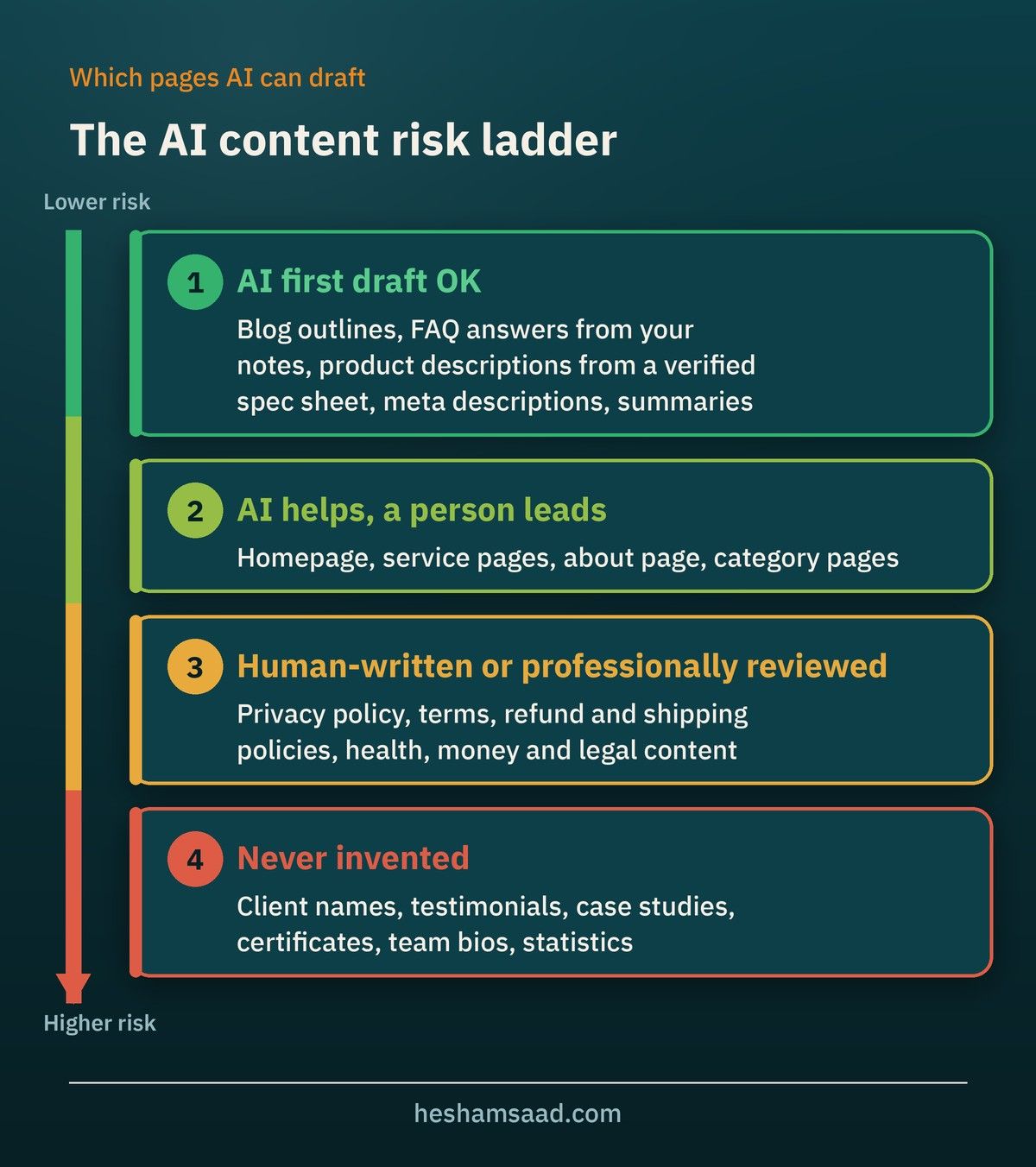
Not every page carries the same risk. Use this as a starting point when planning who writes what.
- Good candidates for an AI first draft: blog outlines, FAQ answers based on your own notes, product description variations from a verified spec sheet, meta descriptions, and summaries of long pages.
- AI can help, a person leads: homepage, service pages, about page and category pages. These carry your positioning and should sound like you.
- Human-written or professionally reviewed: privacy policy, terms, refund and shipping policies, and anything about health, money or legal matters. Google gives even more weight to reliability on these "Your Money or Your Life" topics.
- Never invented: client names, testimonials, case studies, certificates, team bios and statistics. If AI writes them without real input, they are fiction.
## A safe AI content workflow for a WordPress business site
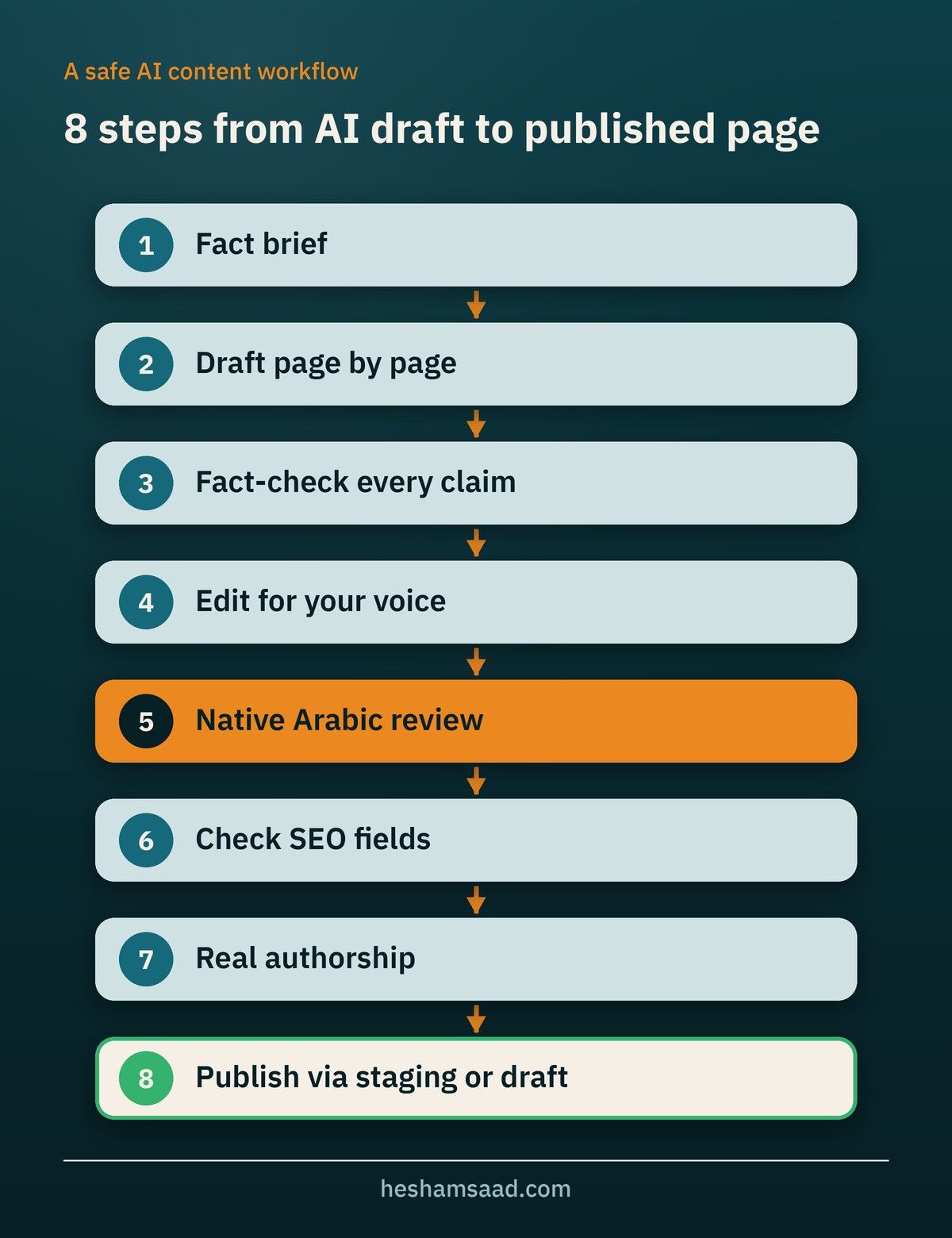
This is the process we recommend, whether you write the content yourself or a designer handles it.
1. Write a fact brief first. List your services, prices or price ranges you are willing to publish, service areas, delivery or booking rules, and what makes you different. AI works from this, not from guesses.
2. Draft page by page. Give the AI one page at a time with its purpose and audience. Long "write my whole website" prompts produce generic text.
3. Fact-check every claim. Mark each number, promise and policy, and confirm it against your brief.
4. Edit for your voice. Remove filler, repeated phrases and claims any competitor could make.
5. Native review for Arabic. A separate pass by a native editor, not a quick look.
6. Check the SEO fields. Titles, meta descriptions and alt text are content too, and Google asks you to review them when AI wrote them.
7. Add real authorship. Use a real person or the company as the author, with an about page that explains who you are.
8. Publish through staging or revisions. Review the page on a [WordPress staging site](https://heshamsaad.com/en/wordpress-staging-site/) or as a draft before it goes live.
## Extra rules for online stores
If you run a WooCommerce store and list products on Google, there is one more set of rules. Google's guidance on generative AI content notes that Google Merchant Center has its own policies for AI-generated content. AI-generated images must carry IPTC `DigitalSourceType` metadata with the value `TrainedAlgorithmicMedia`, and AI-generated product titles and descriptions must be specified separately and labeled as AI-generated.
For a store with hundreds of products, AI can help write consistent descriptions from a verified spec sheet. But generating thousands of near-identical product pages with no added value is exactly the pattern Google describes as scaled content abuse. Our guide to [WooCommerce SEO](https://heshamsaad.com/en/woocommerce-seo/) covers how to make product pages useful in search.
## Questions to ask your designer or agency about AI content
If you are hiring someone to build your site, ask how they handle content before you sign. Clear answers here prevent most surprises later.
- Will you use AI to draft any of our content? Which pages?
- Who reviews AI drafts for accuracy, and who reviews the Arabic?
- Which AI tools and providers will our content or customer data pass through?
- If you install an AI plugin, whose API key does it use, and who pays for usage?
- Will we own the final text and be able to edit it in WordPress without your tools?
- How do you write titles, meta descriptions and alt text, and who checks them?
- Will product descriptions be unique, or generated from a template?
- Will you train our team to use AI tools safely after launch?
Our guide on how to [hire a WordPress designer](https://heshamsaad.com/en/hire-wordpress-designer/) has more questions for the wider project.
## How AI changes the content part of your budget
AI mostly changes where the hours go, not whether the work is needed. Drafting and rewriting get faster. Briefing, fact-checking, Arabic editing and final review take about the same effort as before, and sometimes more, because there is more text to check.
When you compare quotes, look for a content line that names these steps. A quote that says "content included" with no review step may mean unchecked AI text. A quote that separates drafting, editing and native review is easier to judge. Our breakdown of [WordPress website cost in 2026](https://heshamsaad.com/en/wordpress-website-cost-ai/) shows where content sits among the other cost items.
## Frequently asked questions
### Will Google penalize my site for using AI content?
Not for using AI as such. Google says appropriate use of AI is not against its guidelines. The risk comes from publishing many low-value pages, unchecked errors, or content made mainly to manipulate rankings.
### Do I have to label AI-written pages?
Google suggests disclosures where a reader might reasonably ask "how was this created?". For a service page you wrote and edited with AI help, a label is usually not expected. For pages substantially generated by automation, consider explaining how they were made. Store owners using Merchant Center have specific labeling rules for AI product data and images.
### Can the official WordPress AI plugin write a full page for me?
Its current features focus on titles, excerpts, summaries, rewriting selected blocks, translation, alt text and editorial notes. A "Content Assistant" for writing and editing in the block editor is listed as coming soon.
### Is AI good enough for Arabic content?
It can produce a useful draft, but quality varies, and the common errors are the ones customers notice. Treat AI Arabic as a first draft for a native editor, not a final text.
## Get content that sounds like your business
AI can make your site faster to build, but the words on it still need to be accurate, specific and written for your customers. If you want a site where content, design and SEO are planned together in Arabic and English, see our [AI-assisted WordPress development](https://heshamsaad.com/en/wordpress-development/) service. If you want to learn to manage and update your own site, browse our [WordPress courses](https://heshamsaad.com/en/courses/). Not sure where to start? Book a [free consultation](https://heshamsaad.com/en/free-consultation/) and we will review your content plan with you.
## References
- [Google Search's guidance about AI-generated content, Google Search Central Blog](https://developers.google.com/search/blog/2023/02/google-search-and-ai-content)
- [Google Search's guidance on using generative AI content on your website, Google Search Central](https://developers.google.com/search/docs/fundamentals/using-gen-ai-content)
- [Spam policies for Google web search, Google Search Central](https://developers.google.com/search/docs/essentials/spam-policies)
- [Creating helpful, reliable, people-first content, Google Search Central](https://developers.google.com/search/docs/fundamentals/creating-helpful-content)
- [AI plugin, WordPress.org](https://wordpress.org/plugins/ai/)
- [Jetpack AI, Jetpack](https://jetpack.com/ai/)
- [AI Engine, WordPress.org](https://wordpress.org/plugins/ai-engine/)